CDH


CDH   Virtualization Smackdown


                       March 2012
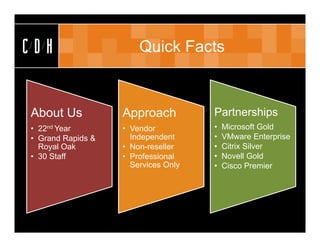
CDH                    Quick Facts


About Us           Approach          Partnerships
• 22nd Year        • Vendor          •   Microsoft Gold
• Grand Rapids &     Independent     •   VMware Enterprise
  Royal Oak        • Non-reseller    •   Citrix Silver
• 30 Staff         • Professional    •   Novell Gold
                     Services Only   •   Cisco Premier
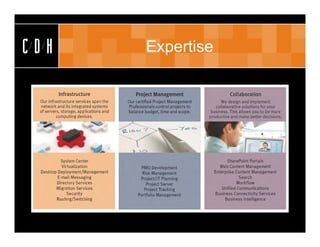
CDH   Expertise
CDH   CDH   Talks Tech
CDH        Meet Your Presenter


 Jason W. Hamilton
 Consultant
 MCTIP:EA, MCTS, VCP, CSSA
 JasonH@cdh.com
CDH                            Agenda

      • Overview
          – What is Virtualization?
      •   Benefits
      •   Considerations
      •   Capacity planning
      •   Solutions
          – Microsoft
          – VMware
      • Comparison
          – Guests, maximums, versions, features
      • Summary
CDH                       Overview

      • Virtualization
         – Decoupling OS from underlying hardware
         – Application isolation
      • History
         – IBM
         – VMware
      • Basics
         – Hypervisor
            • Type 1 & Type 2
         – Resource sharing
CDH                       Benefits

      •   Hardware savings
      •   Reduction in power and cooling
      •   High availability
      •   Disaster recovery / business continuity
      •   Operational
          – Server provisioning
          – Snapshots
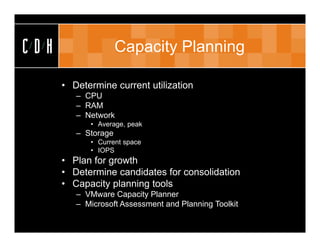
CDH                  Capacity Planning

      • Determine current utilization
         – CPU
         – RAM
         – Network
            • Average, peak
         – Storage
            • Current space
            • IOPS
      • Plan for growth
      • Determine candidates for consolidation
      • Capacity planning tools
         – VMware Capacity Planner
         – Microsoft Assessment and Planning Toolkit
CDH                      Planning

      • Planning tools
        – VMware Capacity Planner
        – Microsoft Assessment and Planning Toolkit
CDH   Solutions
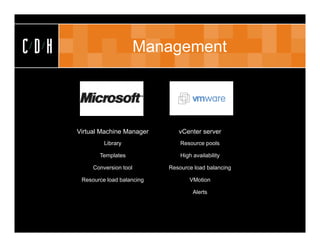
CDH                          Management


      Virtual Machine Manager       vCenter server
               Library               Resource pools

             Templates               High availability

           Conversion tool       Resource load balancing

       Resource load balancing          VMotion

                                          Alerts
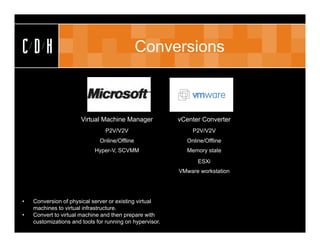
CDH                                            Conversions


                       Virtual Machine Manager            vCenter Converter
                                 P2V/V2V                      P2V/V2V
                              Online/Offline                Online/Offline
                            Hyper-V, SCVMM                  Memory state
                                                                ESXi
                                                          VMware workstation


•   Conversion of physical server or existing virtual
    machines to virtual infrastructure.
•   Convert to virtual machine and then prepare with
    customizations and tools for running on hypervisor.
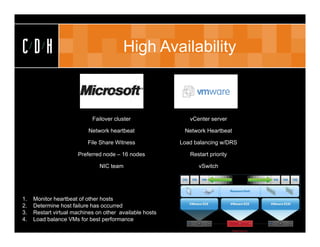
CDH                                     High Availability


                            Failover cluster                vCenter server

                          Network heartbeat               Network Heartbeat

                          File Share Witness             Load balancing w/DRS

                      Preferred node – 16 nodes             Restart priority

                               NIC team                        vSwitch


1.   Monitor heartbeat of other hosts
2.   Determine host failure has occurred
3.   Restart virtual machines on other available hosts
4.   Load balance VMs for best performance
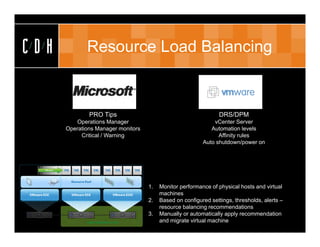
CDH          Resource Load Balancing


              PRO Tips                                           DRS/DPM
         Operations Manager                                   vCenter Server
      Operations Manager monitors                            Automation levels
           Critical / Warning                                   Affinity rules
                                                          Auto shutdown/power on


                                    1.   Monitor performance of physical hosts and virtual
                                         machines
                                    2.   Based on configured settings, thresholds, alerts –
                                         resource balancing recommendations
                                    3.   Manually or automatically apply recommendation
                                         and migrate virtual machine
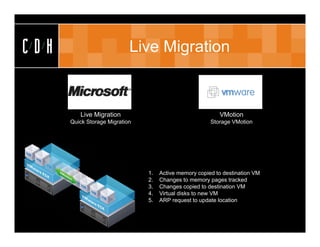
CDH                         Live Migration


         Live Migration                                    VMotion
      Quick Storage Migration                           Storage VMotion


                                1.   Active memory copied to destination VM
                                2.   Changes to memory pages tracked
                                3.   Changes copied to destination VM
                                4.   Virtual disks to new VM
                                5.   ARP request to update location
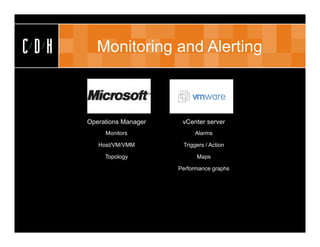
CDH      Monitoring and Alerting


      Operations Manager    vCenter server
           Monitors             Alarms

         Host/VM/VMM        Triggers / Action

           Topology              Maps

                           Performance graphs
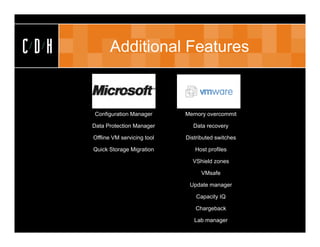
CDH         Additional Features


      Configuration Manager       Memory overcommit

      Data Protection Manager        Data recovery

      Offline VM servicing tool   Distributed switches

      Quick Storage Migration        Host profiles

                                    VShield zones

                                        VMsafe

                                   Update manager

                                      Capacity IQ

                                     Chargeback

                                     Lab manager
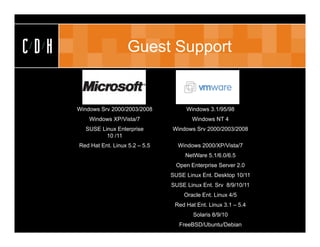
CDH                      Guest Support


      Windows Srv 2000/2003/2008          Windows 3.1/95/98
          Windows XP/Vista/7                 Windows NT 4
         SUSE Linux Enterprise       Windows Srv 2000/2003/2008
                10 /11
      Red Hat Ent. Linux 5.2 – 5.5     Windows 2000/XP/Vista/7
                                          NetWare 5.1/6.0/6.5
                                       Open Enterprise Server 2.0
                                     SUSE Linux Ent. Desktop 10/11
                                     SUSE Linux Ent. Srv 8/9/10/11
                                          Oracle Ent. Linux 4/5
                                      Red Hat Ent. Linux 3.1 – 5.4
                                             Solaris 8/9/10
                                        FreeBSD/Ubuntu/Debian
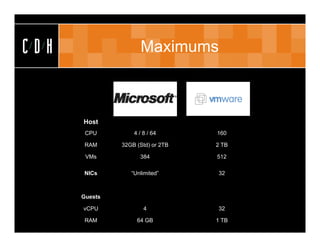
CDH                  Maximums


      Host
       CPU         4 / 8 / 64      160

       RAM     32GB (Std) or 2TB   2 TB

       VMs           384           512

      NICs        “Unlimited”      32


      Guests

      vCPU             4           32

       RAM          64 GB          1 TB
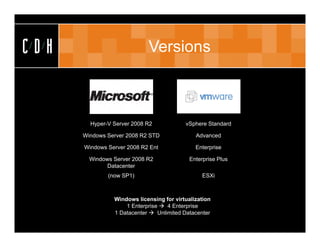
CDH                         Versions


        Hyper-V Server 2008 R2            vSphere Standard

      Windows Server 2008 R2 STD              Advanced

      Windows Server 2008 R2 Ent              Enterprise

        Windows Server 2008 R2              Enterprise Plus
              Datacenter
              (now SP1)                          ESXi


                Windows licensing for virtualization
                    1 Enterprise  4 Enterprise
                1 Datacenter  Unlimited Datacenter
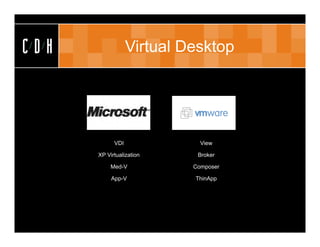
CDH               Virtual Desktop


            VDI              View

      XP Virtualization     Broker

           Med-V           Composer

           App-V           ThinApp
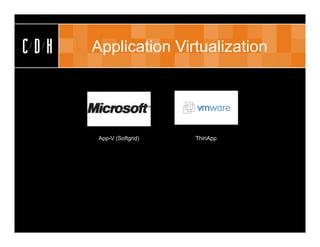
CDH   Application Virtualization


       App-V (Softgrid)   ThinApp
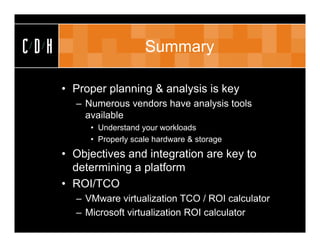
CDH                      Summary

      • Proper planning & analysis is key
        – Numerous vendors have analysis tools
          available
           • Understand your workloads
           • Properly scale hardware & storage
      • Objectives and integration are key to
        determining a platform
      • ROI/TCO
        – VMware virtualization TCO / ROI calculator
        – Microsoft virtualization ROI calculator
CDH                       Thank You

 Royal Oak                   Grand Rapids
 306 S. Washington Ave.      15 Ionia SW
 Suite 212                   Suite 270
 Royal Oak, MI 48067         Grand Rapids, MI 49503
 p: (248) 546-1800           p: (616) 776-1600


                  www.cdh.com

Virtualization Smackdown

  • 1.
    CDH CDH Virtualization Smackdown March 2012
  • 2.
    CDH Quick Facts About Us Approach Partnerships • 22nd Year • Vendor • Microsoft Gold • Grand Rapids & Independent • VMware Enterprise Royal Oak • Non-reseller • Citrix Silver • 30 Staff • Professional • Novell Gold Services Only • Cisco Premier
  • 3.
    CDH Expertise
  • 4.
    CDH CDH Talks Tech
  • 5.
    CDH Meet Your Presenter Jason W. Hamilton Consultant MCTIP:EA, MCTS, VCP, CSSA JasonH@cdh.com
  • 6.
    CDH Agenda • Overview – What is Virtualization? • Benefits • Considerations • Capacity planning • Solutions – Microsoft – VMware • Comparison – Guests, maximums, versions, features • Summary
  • 7.
    CDH Overview • Virtualization – Decoupling OS from underlying hardware – Application isolation • History – IBM – VMware • Basics – Hypervisor • Type 1 & Type 2 – Resource sharing
  • 8.
    CDH Benefits • Hardware savings • Reduction in power and cooling • High availability • Disaster recovery / business continuity • Operational – Server provisioning – Snapshots
  • 9.
    CDH Capacity Planning • Determine current utilization – CPU – RAM – Network • Average, peak – Storage • Current space • IOPS • Plan for growth • Determine candidates for consolidation • Capacity planning tools – VMware Capacity Planner – Microsoft Assessment and Planning Toolkit
  • 10.
    CDH Planning • Planning tools – VMware Capacity Planner – Microsoft Assessment and Planning Toolkit
  • 11.
    CDH Solutions
  • 12.
    CDH Management Virtual Machine Manager vCenter server Library Resource pools Templates High availability Conversion tool Resource load balancing Resource load balancing VMotion Alerts
  • 13.
    CDH Conversions Virtual Machine Manager vCenter Converter P2V/V2V P2V/V2V Online/Offline Online/Offline Hyper-V, SCVMM Memory state ESXi VMware workstation • Conversion of physical server or existing virtual machines to virtual infrastructure. • Convert to virtual machine and then prepare with customizations and tools for running on hypervisor.
  • 14.
    CDH High Availability Failover cluster vCenter server Network heartbeat Network Heartbeat File Share Witness Load balancing w/DRS Preferred node – 16 nodes Restart priority NIC team vSwitch 1. Monitor heartbeat of other hosts 2. Determine host failure has occurred 3. Restart virtual machines on other available hosts 4. Load balance VMs for best performance
  • 15.
    CDH Resource Load Balancing PRO Tips DRS/DPM Operations Manager vCenter Server Operations Manager monitors Automation levels Critical / Warning Affinity rules Auto shutdown/power on 1. Monitor performance of physical hosts and virtual machines 2. Based on configured settings, thresholds, alerts – resource balancing recommendations 3. Manually or automatically apply recommendation and migrate virtual machine
  • 16.
    CDH Live Migration Live Migration VMotion Quick Storage Migration Storage VMotion 1. Active memory copied to destination VM 2. Changes to memory pages tracked 3. Changes copied to destination VM 4. Virtual disks to new VM 5. ARP request to update location
  • 17.
    CDH Monitoring and Alerting Operations Manager vCenter server Monitors Alarms Host/VM/VMM Triggers / Action Topology Maps Performance graphs
  • 18.
    CDH Additional Features Configuration Manager Memory overcommit Data Protection Manager Data recovery Offline VM servicing tool Distributed switches Quick Storage Migration Host profiles VShield zones VMsafe Update manager Capacity IQ Chargeback Lab manager
  • 19.
    CDH Guest Support Windows Srv 2000/2003/2008 Windows 3.1/95/98 Windows XP/Vista/7 Windows NT 4 SUSE Linux Enterprise Windows Srv 2000/2003/2008 10 /11 Red Hat Ent. Linux 5.2 – 5.5 Windows 2000/XP/Vista/7 NetWare 5.1/6.0/6.5 Open Enterprise Server 2.0 SUSE Linux Ent. Desktop 10/11 SUSE Linux Ent. Srv 8/9/10/11 Oracle Ent. Linux 4/5 Red Hat Ent. Linux 3.1 – 5.4 Solaris 8/9/10 FreeBSD/Ubuntu/Debian
  • 20.
    CDH Maximums Host CPU 4 / 8 / 64 160 RAM 32GB (Std) or 2TB 2 TB VMs 384 512 NICs “Unlimited” 32 Guests vCPU 4 32 RAM 64 GB 1 TB
  • 21.
    CDH Versions Hyper-V Server 2008 R2 vSphere Standard Windows Server 2008 R2 STD Advanced Windows Server 2008 R2 Ent Enterprise Windows Server 2008 R2 Enterprise Plus Datacenter (now SP1) ESXi Windows licensing for virtualization 1 Enterprise  4 Enterprise 1 Datacenter  Unlimited Datacenter
  • 22.
    CDH Virtual Desktop VDI View XP Virtualization Broker Med-V Composer App-V ThinApp
  • 23.
    CDH Application Virtualization App-V (Softgrid) ThinApp
  • 24.
    CDH Summary • Proper planning & analysis is key – Numerous vendors have analysis tools available • Understand your workloads • Properly scale hardware & storage • Objectives and integration are key to determining a platform • ROI/TCO – VMware virtualization TCO / ROI calculator – Microsoft virtualization ROI calculator
  • 25.
    CDH Thank You Royal Oak Grand Rapids 306 S. Washington Ave. 15 Ionia SW Suite 212 Suite 270 Royal Oak, MI 48067 Grand Rapids, MI 49503 p: (248) 546-1800 p: (616) 776-1600 www.cdh.com