Building a Virtualized
Development and Testing
Environments
  Lai Yoong Seng (MVP Virtual Machine)
  www.ms4u.info | laiys@redynamics.com
Session Objectives & Key Takeaway

 Get excited!
 Learn what’s            • Scalability
                         • Mobility
hot and new in           • High Availability
  Windows
 Server 2012
   Hyper-V
                           Video & Demo


                                          2
Scalability

              Run more       Take advantage
              demanding      of newer
                             hardware, while
              applications   still using
              with better    existing hardware
              performance    to maximum
                             advantage
Hyper-V Host Scale and Scale-up Workload Support
                                                               Maximum number
                                                                                           Improvement
System    Resource
                                                   Windows 2008 R2   Windows Server 2012      factor

          Logical processors on hardware                 64                 320                5
Host      Physical memory                               1 TB                4 TB               4
          Virtual processors per host                   512                 2048               2

          Virtual processors per virtual machine         4                   64                16
Virtual   Memory per virtual machine                    64 GB               1 TB               16
machine
          Active virtual machines                       384                1,024              2.7

          Nodes                                          16                  64                4
Cluster
          Virtual machines                              1,000              8,000               8


                                                                                                         4
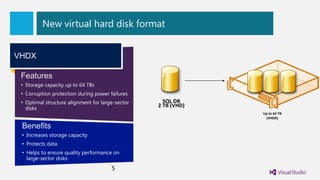
New virtual hard disk format


VHDX

 Features
 • Storage capacity up to 64 TBs
 • Corruption protection during power failures
 • Optimal structure alignment for large-sector     SQL DB
   disks
                                                  2 TB (VHD)
                                                               Up to 64 TB
                                                                (VHDX)

 Benefits
 • Increases storage capacity
 • Protects data
 • Helps to ensure quality performance on
   large-sector disks
                                       5
Dynamic Memory Improvement

                             New configuration Item:
                             Minimum Memory

                                  • Configure dynamic
                                    memory while the VM is
                                    up and running
                                  • Increase the maximum
                                    memory
                                  • Decrease the minimum
                                    memory
                                  • Hyper-V Smart Paging

                                           6
Demo
Live Dynamic Memory
Live Merging Snapshot



                           Test Writing
                               Yellow
                               Code





Demo
Snapshot
Mobility


Manage virtual machines
independently from underlying      Handle changing needs on
infrastructure                     demand
Improve Live Migration


                                          Concurrent Live Migrations:
                                          Multiple simultaneous LMs for a
                                               given source or target


                             Live Migration Queuing:
                         In-box tools queue & manage large
                                   numbers of VMs
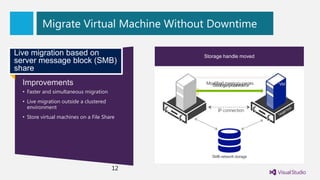
Migrate Virtual Machine Without Downtime

Live migration based on                                Modified pages transferred
                                                       Memorymigration setup
                                                        Storage handle moved
                                                         Live
server message block (SMB)
share
  Improvements                                VM         Modified memory pages
                                                           Configuration data
                                                           Memory content           VM


                                              MEMORY
  • Faster and simultaneous migration
  • Live migration outside a clustered
    environment
                                                               IP connection
  • Store virtual machines on a File Share


                                                            SMB network storage


                                         12
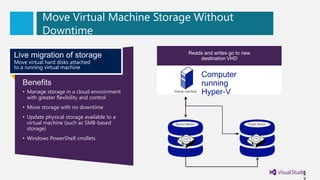
Move Virtual Machine Storage Without
           Downtime
                                              Disk writes Reads and writes go to new
                                                          are mirrored; outstanding changes are
Live migration of storage                     Disk Reads and writes go to new source VHDVHD
                                                   contents are copied to the destination
                                                               destination VHD
                                                                   replicated
Move virtual hard disks attached
to a running virtual machine
                                                                    Computer
   Benefits                                                         running
   • Manage storage in a cloud environment        Virtual machine
                                                                    Hyper-V
     with greater flexibility and control
   • Move storage with no downtime
   • Update physical storage available to a
     virtual machine (such as SMB-based            Source device                   Target device
     storage)
   • Windows PowerShell cmdlets


                                                                                                   1
Migrate Virtual Machines Without Downtime

                                              Disk writes are are copied to new the changes
                                               Disk contents mirrored; outstanding
                                                        Reads and writes go to destination
Shared-nothing live                                     Live Migration Completes
                                                         Live Migration Continues
                                                   source VHD. Live Migration Begins
                                                               are replicated
                                                                source VHD
                                                                    VHD
migration                                     Source                                                                              Destination
                                                                                        Live Migration
                                              Hyper-V                                  Configuration data
                                                                                                                                  Hyper-V


                                                                           MEMORY
                                                                                     Modified memory pages
                                                                                       Memory content
  Benefits                                                 Virtual
                                                           machine
                                                                                                                             Virtual
                                                                                                                             machine
  • Increase flexibility of virtual machine                                               IP connection
    placement
  • Increase administrator efficiency
  • Reduce downtime for migrations across
    cluster boundaries                                               Source device                           Target device


                                                                                                                                        1
Demo
Concurrent Live Migration
High Availability


Ensure highest uptime –             Ensure Business Continuity and
99.999%, 99.99%, 99.9% …..          Setup Disaster Environment
Hyper-V Clustering Enhancements

                        External Storage       iSCSI SAN
Flexible VM Guest
                             Arrays             Storage
clustering

•iSCSI                   Remote File Servers

•Fiber Channel                                  FC SAN
•SMB 3 Clustering             File Server
 Support                         SMB 3
Hyper-V VM Monitoring
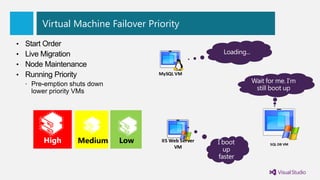
Virtual Machine Failover Priority


                            MySQL VM


High    Medium    Low        IIS Web Server
                                              SQL DB VM
                                  VM
Video
Failover Priority
22
Network Quality of Service


Network Quality of
Service (QoS)                             MySQL VM
Ability to control the
throughput of the
network and network
bandwidth control.

                         IIS Web Server
                                                          SQL DB VM
                              VM


                                                     23
Demo
Network QOS
NIC Teaming Technology


• Provides network fault tolerance and
  continuous availability when network adapters
  fail by teaming multiple network interfaces
• Vendor agnostic and shipped inbox               Virtual
                                                  adapters
• Provides local or remote management                        Team network
                                                                adapter
                                                                            Team network
                                                                               adapter
  through Windows PowerShell or UI
• Enables teams of up to 32 network adapters
• Aggregates bandwidth from multiple network
  adapters
• Includes multiple nodes: switch dependent
  and independent


                                      25
Disaster Happen Anywhere …

 Tsunami…Earthquake … 911 incident…


How to protect your datacenter?
Hyper-V Replica

New feature                                                             Primary site                                                           Replica site
Replicate Hyper-V virtual machines from a                                                        Exchange virtual machine
primary site to a replica site                    CRM virtual machine                               IIS virtual machine          Exchange
                                                                                                                                  replica
                                                  SQL virtual machine                                                              virtual
                                                 SharePoint virtual                                                              machine
                                                           machine
   Benefits                                                                                                                  CRM
                                                                                                                            replica
                                                                                                                             virtual
   • Affordable in-box business continuity and                                                                              machine

     disaster recovery                                                                                                                                           R2


   • Failure recovery in minutes                                                                             Replicate over
                                                                                                                                       R1                                          R3
                                                              P1                                  P2           WAN link
   • More secure replication across network
   • No need for storage arrays
   • No need for other software replication
                                                                              SMB file share                                                               SAN

                                                                    Hyper-V role and tools                                                     Hyper-V role and tools
     technologies
                                                                        Hyper-V           Hyper-V PS                                            Hyper-V            Hyper-V PS
   • Automatic handling of live migration                               cmdlets          integrated UI                                          cmdlets           integrated UI


   • Simpler configuration and management
                                                                                                               Send/receive
                                                                                                               replica traffic
                                                                     Hyper-V Management Module                                                 Hyper-V Management Module
                                                                    tracks and replicates changes for                                        receives and applies the changes to
                                                                          each virtual machine                                                    the replica virtual machine


                                        27
Demo
Hyper-V Replica
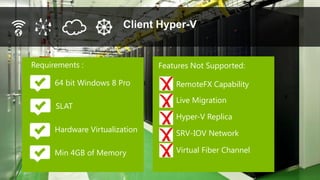
Client Hyper-V


Requirements :                  Features Not Supported:

      64 bit Windows 8 Pro          RemoteFX Capability
                                    Live Migration
      SLAT
                                    Hyper-V Replica
      Hardware Virtualization       SRV-IOV Network

      Min 4GB of Memory             Virtual Fiber Channel
64 virtual processors per VM
1TB virtual machine memory
New 64TB VHDX format
Native 4k disk support
Hyper-V Replica
Hyper-V virtual fiber channel
Live storage migration
Windows NIC teaming
Concurrent live migration
Support for AES/NI
Support for up to 64 nodes per
cluster
Support for 4000 VMs per cluster
Hyper-V support for up to 2 TB
of physical memory
Hyper-V intelligent second level
paging
Live VHD merge
Cluster shared volumes v2
SMB 3 Support
RDMA support in SMB
Scale-out file server
Multi-channel SMB
SRIOV Networking
   30
Thousands of PowerShell
commands
Q&A
                    Virtual
                    Lai’s Blog

Thank you   www.ms4u.info

                                       DOWNLOAD Windows
                                       Server 2012
            http://www.microsoftvirt   http://technet.microsoft.com/en-
            ualacademy.com             us/evalcenter/hh670538.aspx


                                                            31
We value your feedback!


Please remember to complete the overall
conference evaluation form and return it to the
Registration Counter.
© 2012 Microsoft Corporation. All rights reserved. Microsoft, Windows, and other product names are or may be registered trademarks and/or trademarks in the U.S. and/or other countries.
The information herein is for informational purposes only and represents the current view of Microsoft Corporation as of the date of this presentation. Because Microsoft must respond to changing market conditions, it should not be interpreted to be a commitment on the
part of Microsoft, and Microsoft cannot guarantee the accuracy of any information provided after the date of this presentation. MICROSOFT MAKES NO WARRANTIES, EXPRESS, IMPLIED OR STATUTORY, AS TO THE INFORMATION IN THIS PRESENTATION.

Building a Virtualized Development and Testing Environments

  • 1.
    Building a Virtualized Developmentand Testing Environments Lai Yoong Seng (MVP Virtual Machine) www.ms4u.info | laiys@redynamics.com
  • 2.
    Session Objectives &Key Takeaway Get excited! Learn what’s • Scalability • Mobility hot and new in • High Availability Windows Server 2012 Hyper-V Video & Demo 2
  • 3.
    Scalability Run more Take advantage demanding of newer hardware, while applications still using with better existing hardware performance to maximum advantage
  • 4.
    Hyper-V Host Scaleand Scale-up Workload Support Maximum number Improvement System Resource Windows 2008 R2 Windows Server 2012 factor Logical processors on hardware 64 320 5 Host Physical memory 1 TB 4 TB 4 Virtual processors per host 512 2048 2 Virtual processors per virtual machine 4 64 16 Virtual Memory per virtual machine 64 GB 1 TB 16 machine Active virtual machines 384 1,024 2.7 Nodes 16 64 4 Cluster Virtual machines 1,000 8,000 8 4
  • 5.
    New virtual harddisk format VHDX Features • Storage capacity up to 64 TBs • Corruption protection during power failures • Optimal structure alignment for large-sector SQL DB disks 2 TB (VHD) Up to 64 TB (VHDX) Benefits • Increases storage capacity • Protects data • Helps to ensure quality performance on large-sector disks 5
  • 6.
    Dynamic Memory Improvement New configuration Item: Minimum Memory • Configure dynamic memory while the VM is up and running • Increase the maximum memory • Decrease the minimum memory • Hyper-V Smart Paging 6
  • 7.
  • 8.
    Live Merging Snapshot   Test Writing Yellow Code  
  • 9.
  • 10.
    Mobility Manage virtual machines independentlyfrom underlying Handle changing needs on infrastructure demand
  • 11.
    Improve Live Migration Concurrent Live Migrations: Multiple simultaneous LMs for a given source or target Live Migration Queuing: In-box tools queue & manage large numbers of VMs
  • 12.
    Migrate Virtual MachineWithout Downtime Live migration based on Modified pages transferred Memorymigration setup Storage handle moved Live server message block (SMB) share Improvements VM Modified memory pages Configuration data Memory content VM MEMORY • Faster and simultaneous migration • Live migration outside a clustered environment IP connection • Store virtual machines on a File Share SMB network storage 12
  • 13.
    Move Virtual MachineStorage Without Downtime Disk writes Reads and writes go to new are mirrored; outstanding changes are Live migration of storage Disk Reads and writes go to new source VHDVHD contents are copied to the destination destination VHD replicated Move virtual hard disks attached to a running virtual machine Computer Benefits running • Manage storage in a cloud environment Virtual machine Hyper-V with greater flexibility and control • Move storage with no downtime • Update physical storage available to a virtual machine (such as SMB-based Source device Target device storage) • Windows PowerShell cmdlets 1
  • 15.
    Migrate Virtual MachinesWithout Downtime Disk writes are are copied to new the changes Disk contents mirrored; outstanding Reads and writes go to destination Shared-nothing live Live Migration Completes Live Migration Continues source VHD. Live Migration Begins are replicated source VHD VHD migration Source Destination Live Migration Hyper-V Configuration data Hyper-V MEMORY Modified memory pages Memory content Benefits Virtual machine Virtual machine • Increase flexibility of virtual machine IP connection placement • Increase administrator efficiency • Reduce downtime for migrations across cluster boundaries Source device Target device 1
  • 16.
  • 17.
    High Availability Ensure highestuptime – Ensure Business Continuity and 99.999%, 99.99%, 99.9% ….. Setup Disaster Environment
  • 18.
    Hyper-V Clustering Enhancements External Storage iSCSI SAN Flexible VM Guest Arrays Storage clustering •iSCSI Remote File Servers •Fiber Channel FC SAN •SMB 3 Clustering File Server Support SMB 3
  • 19.
  • 20.
    Virtual Machine FailoverPriority MySQL VM High Medium Low IIS Web Server SQL DB VM VM
  • 21.
  • 22.
  • 23.
    Network Quality ofService Network Quality of Service (QoS) MySQL VM Ability to control the throughput of the network and network bandwidth control. IIS Web Server SQL DB VM VM 23
  • 24.
  • 25.
    NIC Teaming Technology •Provides network fault tolerance and continuous availability when network adapters fail by teaming multiple network interfaces • Vendor agnostic and shipped inbox Virtual adapters • Provides local or remote management Team network adapter Team network adapter through Windows PowerShell or UI • Enables teams of up to 32 network adapters • Aggregates bandwidth from multiple network adapters • Includes multiple nodes: switch dependent and independent 25
  • 26.
    Disaster Happen Anywhere… Tsunami…Earthquake … 911 incident… How to protect your datacenter?
  • 27.
    Hyper-V Replica New feature Primary site Replica site Replicate Hyper-V virtual machines from a Exchange virtual machine primary site to a replica site CRM virtual machine IIS virtual machine Exchange replica SQL virtual machine virtual SharePoint virtual machine machine Benefits CRM replica virtual • Affordable in-box business continuity and machine disaster recovery R2 • Failure recovery in minutes Replicate over R1 R3 P1 P2 WAN link • More secure replication across network • No need for storage arrays • No need for other software replication SMB file share SAN Hyper-V role and tools Hyper-V role and tools technologies Hyper-V Hyper-V PS Hyper-V Hyper-V PS • Automatic handling of live migration cmdlets integrated UI cmdlets integrated UI • Simpler configuration and management Send/receive replica traffic Hyper-V Management Module Hyper-V Management Module tracks and replicates changes for receives and applies the changes to each virtual machine the replica virtual machine 27
  • 28.
  • 29.
    Client Hyper-V Requirements : Features Not Supported: 64 bit Windows 8 Pro RemoteFX Capability Live Migration SLAT Hyper-V Replica Hardware Virtualization SRV-IOV Network Min 4GB of Memory Virtual Fiber Channel
  • 30.
    64 virtual processorsper VM 1TB virtual machine memory New 64TB VHDX format Native 4k disk support Hyper-V Replica Hyper-V virtual fiber channel Live storage migration Windows NIC teaming Concurrent live migration Support for AES/NI Support for up to 64 nodes per cluster Support for 4000 VMs per cluster Hyper-V support for up to 2 TB of physical memory Hyper-V intelligent second level paging Live VHD merge Cluster shared volumes v2 SMB 3 Support RDMA support in SMB Scale-out file server Multi-channel SMB SRIOV Networking 30 Thousands of PowerShell commands
  • 31.
    Q&A Virtual Lai’s Blog Thank you www.ms4u.info DOWNLOAD Windows Server 2012 http://www.microsoftvirt http://technet.microsoft.com/en- ualacademy.com us/evalcenter/hh670538.aspx 31
  • 32.
    We value yourfeedback! Please remember to complete the overall conference evaluation form and return it to the Registration Counter.
  • 33.
    © 2012 MicrosoftCorporation. All rights reserved. Microsoft, Windows, and other product names are or may be registered trademarks and/or trademarks in the U.S. and/or other countries. The information herein is for informational purposes only and represents the current view of Microsoft Corporation as of the date of this presentation. Because Microsoft must respond to changing market conditions, it should not be interpreted to be a commitment on the part of Microsoft, and Microsoft cannot guarantee the accuracy of any information provided after the date of this presentation. MICROSOFT MAKES NO WARRANTIES, EXPRESS, IMPLIED OR STATUTORY, AS TO THE INFORMATION IN THIS PRESENTATION.

Editor's Notes

  • #2 Building a virtualized development and testing environmentsA virtual testing and development environment is the perfect place to test applications, operating systems and hardware before you place them into production -- whether it’s virtualized or not. Testing and development environments are frequent candidates for server virtualization deployments, especially for companies just starting out with virtualization. Testing and development environments provide a low-risk medium in which to test out virtualization and can improve resource allocation and storage. But there are several potential challenges for virtualized test and development environments, including networking, backup and recovery and high-availability concerns. In this session, we will talk about how to address these challenges with Windows Server 8 Hyper-V.
  • #6 64 TBMore better performance & resilient from corruption
  • #26 32 NICLoad Balance and FailoverGuest NICAny brand NIC
  • #27 A sync replicationReplicate every 5 minReplicate VM from DC1 to DC2Work with any server, storage & network