Andik Susilo
Most Valuable Professional (MVP)
Data Center Engineer and Cloud Service Consultan

                      http://www.infinyscloud.com/
                      http://www.telkomcloud.com
                      Email: andik@isi.co.id
Wikipedia, Cloud computing is computation,
software, data access, and storage services that do
not require end-user knowledge of the physical
location and configuration of the system that delivers
the services. Parallels to this concept can be drawn
with the electricity grid where end-users consume
power      resources     without    any    necessary
understanding of the component devices in the grid
required to provide the service.
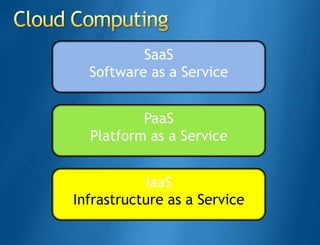
SaaS
  Software as a Service


          PaaS
  Platform as a Service


           IaaS
Infrastructure as a Service
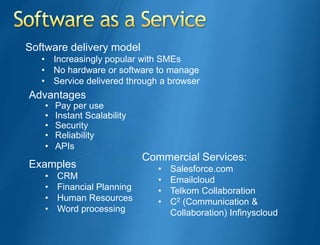
Software delivery model
   • Increasingly popular with SMEs
   • No hardware or software to manage
   • Service delivered through a browser
Advantages
   •   Pay per use
   •   Instant Scalability
   •   Security
   •   Reliability
   •   APIs
                             Commercial Services:
Examples                        •   Salesforce.com
   •   CRM                      •   Emailcloud
   •   Financial Planning       •   Telkom Collaboration
   •   Human Resources          •   C2 (Communication &
   •   Word processing              Collaboration) Infinyscloud
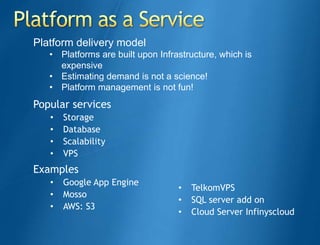
Platform delivery model
   • Platforms are built upon Infrastructure, which is
     expensive
   • Estimating demand is not a science!
   • Platform management is not fun!
Popular services
   •   Storage
   •   Database
   •   Scalability
   •   VPS
Examples
   •   Google App Engine
                                   •   TelkomVPS
   •   Mosso
                                   •   SQL server add on
   •   AWS: S3
                                   •   Cloud Server Infinyscloud
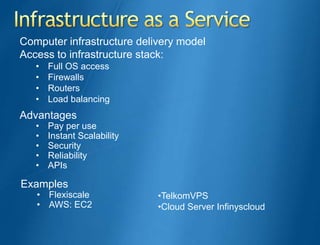
Computer infrastructure delivery model
Access to infrastructure stack:
   •   Full OS access
   •   Firewalls
   •   Routers
   •   Load balancing
Advantages
   •   Pay per use
   •   Instant Scalability
   •   Security
   •   Reliability
   •   APIs

Examples
   • Flexiscale              •TelkomVPS
   • AWS: EC2                •Cloud Server Infinyscloud
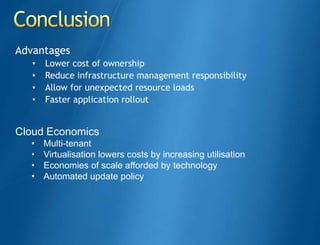
Advantages
   •   Lower cost of ownership
   •   Reduce infrastructure management responsibility
   •   Allow for unexpected resource loads
   •   Faster application rollout


Cloud Economics
  •    Multi-tenant
  •    Virtualisation lowers costs by increasing utilisation
  •    Economies of scale afforded by technology
  •    Automated update policy
With Hyper-V, it's easier than ever to take advantage of
the cost savings of virtualization through Windows Server
2008 R2. Optimize your server hardware investments by
consolidating multiple server roles as separate virtual
machines running on a single physical machine, efficiently
run multiple different operating systems in parallel, on a
single server, and fully leverage the power of x64
computing.
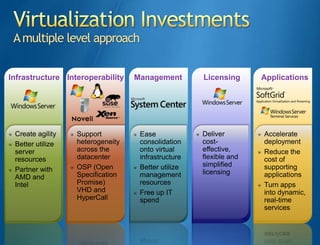
A multiple level approach


Infrastructure Interoperability   Management        Licensing      Applications


 Create agility   Support          Ease             Deliver        Accelerate
 Better utilize   heterogeneity    consolidation    cost-          deployment
 server           across the       onto virtual     effective,     Reduce the
 resources        datacenter       infrastructure   flexible and   cost of
                  OSP (Open        Better utilize   simplified     supporting
 Partner with                                       licensing
 AMD and          Specification    management                      applications
 Intel            Promise)         resources                       Turn apps
                  VHD and          Free up IT                      into dynamic,
                  HyperCall        spend                           real-time
                                                                   services
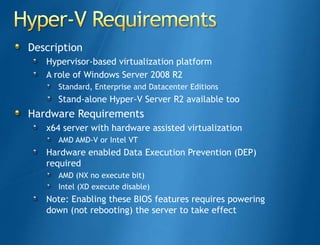
Description
   Hypervisor-based virtualization platform
   A role of Windows Server 2008 R2
      Standard, Enterprise and Datacenter Editions
      Stand-alone Hyper-V Server R2 available too
Hardware Requirements
   x64 server with hardware assisted virtualization
      AMD AMD-V or Intel VT
   Hardware enabled Data Execution Prevention (DEP)
   required
      AMD (NX no execute bit)
      Intel (XD execute disable)
   Note: Enabling these BIOS features requires powering
   down (not rebooting) the server to take effect
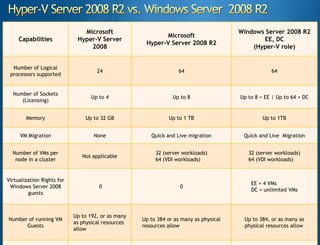
Microsoft                                               Windows Server 2008 R2
                                                           Microsoft
     Capabilities            Hyper-V Server                                                   EE, DC
                                                     Hyper-V Server 2008 R2
                                 2008                                                      (Hyper-V role)


  Number of Logical
                                     24                           64                               64
 processors supported


  Number of Sockets
                                   Up to 4                      Up to 8                Up to 8 = EE | Up to 64 = DC
     (Licensing)


        Memory                  Up to 32 GB                   Up to 1 TB                        Up to 1TB


     VM Migration                   None               Quick and Live migration         Quick and Live Migration


  Number of VMs per                                      32 (server workloads)            32 (server workloads)
                               Not applicable
   node in a cluster                                     64 (VDI workloads)               64 (VDI workloads)


Virtualization Rights for
                                                                                           EE = 4 VMs
 Windows Server 2008                  0                            0
                                                                                           DC = unlimited VMs
         guests


                            Up to 192, or as many
Number of running VM                                Up to 384 or as many as physical    Up to 384, or as many as
                            as physical resources
      Guests                                        resources allow                     physical resources allow
                            allow
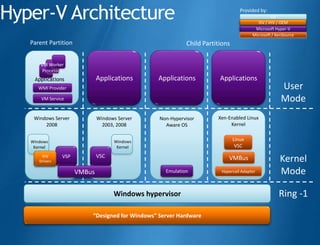
Hyper-V Architecture                                                             Provided by:
                                                                                                 OS
                                                                                          ISV / IHV / OEM
                                                                                        Microsoft Hyper-V
                                                                                       Microsoft / XenSource
   Parent Partition                                        Child Partitions

       VM Worker
        Processes
    Applications              Applications      Applications           Applications
      WMI Provider                                                                                   User
       VM Service                                                                                    Mode
    Windows Server            Windows Server     Non-Hypervisor       Xen-Enabled Linux
        2008                    2003, 2008         Aware OS                Kernel


   Windows                          Windows                                   Linux
    Kernel                           Kernel                                    VSC
                              VSC
       IHV
      Drivers
                VSP                                                        VMBus                    Kernel
                      VMBus                        Emulation            Hypercall Adapter           Mode

                                    Windows hypervisor                                              Ring -1

                          “Designed for Windows” Server Hardware
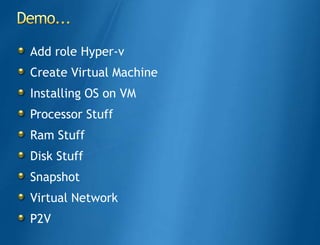
Add role Hyper-v
Create Virtual Machine
Installing OS on VM
Processor Stuff
Ram Stuff
Disk Stuff
Snapshot
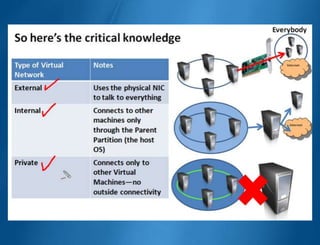
Virtual Network
P2V
http://mugi.or.id/


http://geeks.netindonesia.net/   http://wss-id.org/         http://sqlserver-indo.org/

Ready for cloud computing with hyper v

  • 1.
    Andik Susilo Most ValuableProfessional (MVP) Data Center Engineer and Cloud Service Consultan http://www.infinyscloud.com/ http://www.telkomcloud.com Email: andik@isi.co.id
  • 2.
    Wikipedia, Cloud computingis computation, software, data access, and storage services that do not require end-user knowledge of the physical location and configuration of the system that delivers the services. Parallels to this concept can be drawn with the electricity grid where end-users consume power resources without any necessary understanding of the component devices in the grid required to provide the service.
  • 3.
    SaaS Softwareas a Service PaaS Platform as a Service IaaS Infrastructure as a Service
  • 4.
    Software delivery model • Increasingly popular with SMEs • No hardware or software to manage • Service delivered through a browser Advantages • Pay per use • Instant Scalability • Security • Reliability • APIs Commercial Services: Examples • Salesforce.com • CRM • Emailcloud • Financial Planning • Telkom Collaboration • Human Resources • C2 (Communication & • Word processing Collaboration) Infinyscloud
  • 6.
    Platform delivery model • Platforms are built upon Infrastructure, which is expensive • Estimating demand is not a science! • Platform management is not fun! Popular services • Storage • Database • Scalability • VPS Examples • Google App Engine • TelkomVPS • Mosso • SQL server add on • AWS: S3 • Cloud Server Infinyscloud
  • 8.
    Computer infrastructure deliverymodel Access to infrastructure stack: • Full OS access • Firewalls • Routers • Load balancing Advantages • Pay per use • Instant Scalability • Security • Reliability • APIs Examples • Flexiscale •TelkomVPS • AWS: EC2 •Cloud Server Infinyscloud
  • 9.
    Advantages • Lower cost of ownership • Reduce infrastructure management responsibility • Allow for unexpected resource loads • Faster application rollout Cloud Economics • Multi-tenant • Virtualisation lowers costs by increasing utilisation • Economies of scale afforded by technology • Automated update policy
  • 10.
    With Hyper-V, it'seasier than ever to take advantage of the cost savings of virtualization through Windows Server 2008 R2. Optimize your server hardware investments by consolidating multiple server roles as separate virtual machines running on a single physical machine, efficiently run multiple different operating systems in parallel, on a single server, and fully leverage the power of x64 computing.
  • 11.
    A multiple levelapproach Infrastructure Interoperability Management Licensing Applications Create agility Support Ease Deliver Accelerate Better utilize heterogeneity consolidation cost- deployment server across the onto virtual effective, Reduce the resources datacenter infrastructure flexible and cost of OSP (Open Better utilize simplified supporting Partner with licensing AMD and Specification management applications Intel Promise) resources Turn apps VHD and Free up IT into dynamic, HyperCall spend real-time services
  • 12.
    Description Hypervisor-based virtualization platform A role of Windows Server 2008 R2 Standard, Enterprise and Datacenter Editions Stand-alone Hyper-V Server R2 available too Hardware Requirements x64 server with hardware assisted virtualization AMD AMD-V or Intel VT Hardware enabled Data Execution Prevention (DEP) required AMD (NX no execute bit) Intel (XD execute disable) Note: Enabling these BIOS features requires powering down (not rebooting) the server to take effect
  • 13.
    Microsoft Windows Server 2008 R2 Microsoft Capabilities Hyper-V Server EE, DC Hyper-V Server 2008 R2 2008 (Hyper-V role) Number of Logical 24 64 64 processors supported Number of Sockets Up to 4 Up to 8 Up to 8 = EE | Up to 64 = DC (Licensing) Memory Up to 32 GB Up to 1 TB Up to 1TB VM Migration None Quick and Live migration Quick and Live Migration Number of VMs per 32 (server workloads) 32 (server workloads) Not applicable node in a cluster 64 (VDI workloads) 64 (VDI workloads) Virtualization Rights for EE = 4 VMs Windows Server 2008 0 0 DC = unlimited VMs guests Up to 192, or as many Number of running VM Up to 384 or as many as physical Up to 384, or as many as as physical resources Guests resources allow physical resources allow allow
  • 14.
    Hyper-V Architecture Provided by: OS ISV / IHV / OEM Microsoft Hyper-V Microsoft / XenSource Parent Partition Child Partitions VM Worker Processes Applications Applications Applications Applications WMI Provider User VM Service Mode Windows Server Windows Server Non-Hypervisor Xen-Enabled Linux 2008 2003, 2008 Aware OS Kernel Windows Windows Linux Kernel Kernel VSC VSC IHV Drivers VSP VMBus Kernel VMBus Emulation Hypercall Adapter Mode Windows hypervisor Ring -1 “Designed for Windows” Server Hardware
  • 15.
    Add role Hyper-v CreateVirtual Machine Installing OS on VM Processor Stuff Ram Stuff Disk Stuff Snapshot Virtual Network P2V
  • 18.
    http://mugi.or.id/ http://geeks.netindonesia.net/ http://wss-id.org/ http://sqlserver-indo.org/