Microsoft Virtualization Technologies
Windows Server 2008 R2 Hyper-V

Sean Taylor– Microsoft Solutions Architect
Hyper-V


          Server virtualisation and consolidation
          Bundled in Server 2008 and enhanced with R2
          Provides highly available systems and applications
          Support for non Microsoft platforms
          Live migration now available
          Migrate individual VMs between LUNs
          Dynamic Memory available in SP1
          In guest management and monitoring (SCVMM and SCOM)
          Microsoft assessment and planning toolkit for virtualisation
          Highly scriptable using Powershell
          Centralised and automated backup managed by SCDPM
          Core parking for green computing
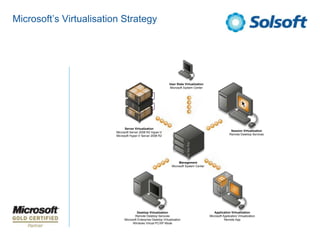
Microsoft’s Virtualisation Strategy


                                                                User State Virtualization
                                                                Microsoft System Center


                               Server Virtualization
                         Microsoft Server 2008 R2 Hyper-V                                                   Session Virtualization
                         Microsoft Hyper-V Server 2008 R2                                                  Remote Desktop Services


                                                                       Management
                                                                  Microsoft System Center


                                       Desktop Virtualization                                  Application Virtualization
                                      Remote Desktop Services                               Microsoft Application Virtualization
                              Microsoft Enterprise Desktop Virtualization                              Remote App
                                    Windows Virtual PC/XP Mode
Hyper-V


          Server virtualisation and consolidation
          Provides highly available systems and applications
          Bundled in Server 2008 and enhanced with R2
          Support for non Microsoft platforms
          Live migration now available
          Migrate individual VMs between LUNs
          Dynamic Memory available in SP1
          In guest management and monitoring (SCVMM and SCOM)
          Microsoft assessment and planning toolkit for virtualisation
          Highly scriptable using Powershell
          Centralised and automated backup managed by SCDPM
          Core parking for green computing
Defining the Case for Hyper-V


                  IT organizations must justify adoption of Microsoft Virtualisation
                  technology
                    – Must have positive cost impact
                    – Increase in capacity, security, reliability, and availability of resources
                    – Flexibility to rapidly adapt to changes in the business


                  A well-designed server Virtualisation infrastructure built on
                  Microsoft technology can enable an enterprise to accelerate
                  achievement of the following goals:
                    –   Reduction in IT capital and operational costs
                    –   Implementation of a flexible and dynamic enterprise infrastructure
                    –   Increase in workload availability
                    –   Reduction in the time to provision, distribute, or remove services
                    –   Reduction in management complexity
Microsoft Virtualisation Technologies


                   Windows Server 2008 R2 Hyper-V is installed as a role
                    – Supported in a full installation or a Server Core installation of 64-bit
                      Windows Server 2008 R2 Standard, Enterprise, and Datacenter editions
                    – Supports local graphical management in full installation mode
                   Hyper-V Server 2008 R2 is built on Windows technologies
                    – Comes only as a single, free edition
                    – Designed solely as a Virtualisation platform
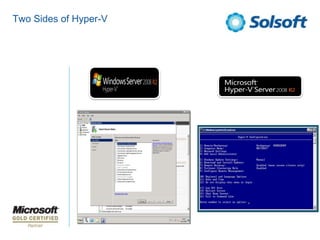
                    – Provides local command-line and a text-based configuration utility to
                      perform initial configuration tasks
                    – Designed to be remotely managed
                    – Leverages the Windows driver and management models / APIs
                   Management
                    – Both support full graphical management using standard Hyper-V
                      administration tools from remote workstation or server
                    – Both support full graphical management through System Center VMM
Two Sides of Hyper-V
Microsoft Virtualisation Technologies


                  Windows Server 2008 R2 Hyper-V is installed as a role
                   – Supported in a full installation or a Server Core installation of 64-bit
                     Windows Server 2008 R2 Standard, Enterprise, and Datacenter editions
                   – Supports local graphical management in full installation mode
                  Hyper-V Server 2008 R2 is built on Windows technologies
                   – Comes only as a single, free edition
                   – Designed solely as a Virtualisation platform
                   – Provides local command-line and a text-based configuration utility to
                     perform initial configuration tasks
                   – Designed to be remotely managed
                   – Leverages the Windows driver and management models / APIs
                  Management
                   – Both support full graphical management using standard Hyper-V
                     administration tools from remote workstation or server
                   – Both support full graphical management through System Center VMM
System Centre Virtual Machine Manager


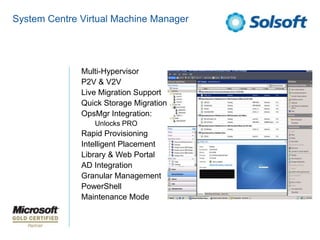
           •   Multi-Hypervisor
           •   P2V & V2V
           •   Live Migration Support
           •   Quick Storage Migration
           •   OpsMgr Integration:
               •   Unlocks PRO
           •   Rapid Provisioning
           •   Intelligent Placement
           •   Library & Web Portal
           •   AD Integration
           •   Granular Management
           •   PowerShell
           •   Maintenance Mode
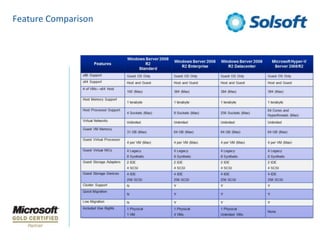
Feature Comparison
Understanding Licensing Options


                Windows Server 2008 R2 Hyper-V
                 – Standard Edition 1 VM per license
                 – Enterprise Edition 4 VM’s per license
                 – Datacentre Edition Unlimited VM’s per processor licensing


                 Microsoft Hyper-V Server 2008 R2
                 – Microsoft Hyper-V Server 2008 R2 is not a Windows Server
                   edition
                 – No Windows licenses are provided with it
                 – Must purchase a valid Windows license for each Windows-based
                   VM that you intend to run on it
Understanding Licensing Options


                 • By assigning a copy of WS
                   2008 R2 Enterprise:
                     – 4 free running Instances
                     – Cumulative...
                 • The same process with WS
                   2008 R2 Datacentre:
                     – Unlimited running instances
                 • Virtualisation Agnostic
Understanding Licensing Options


                Windows Server 2008 R2 Hyper-V
                 – Standard Edition 1 VM per license
                 – Enterprise Edition 4 VM’s per license
                 – Datacentre Edition Unlimited VM’s per processor licensing


                 Microsoft Hyper-V Server 2008 R2
                 – Microsoft Hyper-V Server 2008 R2 is not a Windows Server
                   edition
                 – No Windows licenses are provided with it
                 – Must purchase a valid Windows license for each Windows-based
                   VM that you intend to run on it
Defining Hyper-V Base Architectures


                Small to Medium Deployments
                 Single Server
                   – Server consolidation platform for small test lab, software
                     development, branch office, and other design scenarios that can tolerate
                     outages
                   – Direct-attached storage (DAS), or shared storage (NAS or iSCSI SAN)
                   – Lacks high-availability to prevent service interruption during planned or
                     unplanned maintenance events
                   – Management with out-of-the-box tools (Hyper-V Manager, Windows
                     Server Backup, and so on)
                 Two-Node Failover Cluster
                   – Server consolidation platform for software development, branch
                     office, and other design scenarios that require high-availability services
                   – Shared storage (iSCSI or Fibre Channel SAN)
                   – Failover clustering supports single Live Migration event (serial migration)
                   – Management with out-of-the-box tools (Hyper-V Manager, Windows
                     Server Backup, Failover Cluster Manager, and so on)
Defining Hyper-V Base Architectures


               Datacenter and Enterprise Deployments
                Server Farm (Multi-Node Failover Cluster)
                  – Server consolidation platform for datacenter and other design
                    scenarios that require large VM consolidation, high-performance, and
                    high-availability services
                  – Shared storage (Fibre-Channel SAN)
                  – Up to 16 node failover cluster to support multiple, concurrent Live
                    Migration events
                  – Maximum of 8 simultaneous live migrations in a 16 node cluster
                  – Dedicated failover nodes or load-balancing cluster designs
                  – Management with System Center suite
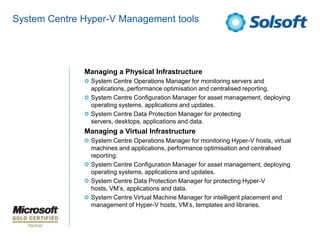
System Centre Hyper-V Management tools


              Managing a Physical Infrastructure
               System Centre Operations Manager for monitoring servers and
               applications, performance optimisation and centralised reporting.
               System Centre Configuration Manager for asset management, deploying
               operating systems, applications and updates.
               System Centre Data Protection Manager for protecting
               servers, desktops, applications and data.
              Managing a Virtual Infrastructure
               System Centre Operations Manager for monitoring Hyper-V hosts, virtual
               machines and applications, performance optimisation and centralised
               reporting.
               System Centre Configuration Manager for asset management, deploying
               operating systems, applications and updates.
               System Centre Data Protection Manager for protecting Hyper-V
               hosts, VM’s, applications and data.
               System Centre Virtual Machine Manager for intelligent placement and
               management of Hyper-V hosts, VM’s, templates and libraries.
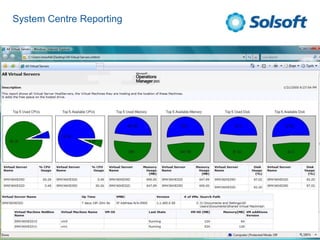
System Centre Reporting
High-Availability Considerations


                   Hyper-V host cluster implemented to minimize or eliminate service
                   interruptions due to planned or unplanned events
                     – Host hardware component failure
                     – Complete loss of one or more physical servers
                     – Host operating system maintenance
                   Hyper-V host clusters
                     – Up to 16 Hyper-V hosts configured as nodes of a failover cluster
                     – Hyper-V hosts must be connected to shared storage
                     – If Hyper-V host node fails, all VMs hosted on that node are migrated to
                       another Hyper-V host in the cluster
                   Hyper-V host cluster required for Live Migration
                   Cluster Shared Volumes (CSV)
                     – New Windows Server 2008 R2 feature
                     – Supported by Hyper-V
                     – Enables all nodes in a Hyper-V host cluster to access the same shared
                       storage volumes simultaneously
High-Availability Considerations


                   Hyper-V host cluster implemented to minimize or eliminate service
                   interruptions due to planned or unplanned events
                     – Host hardware component failure
                     – Complete loss of one or more physical servers
                     – Host operating system maintenance
                   Hyper-V host clusters
                     – Up to 16 Hyper-V hosts configured as nodes of a failover cluster
                     – Hyper-V hosts must be connected to shared storage
                     – If Hyper-V host node fails, all VMs hosted on that node are migrated to
                       another Hyper-V host in the cluster
                   Hyper-V host cluster required for Live Migration
                   Cluster Shared Volumes (CSV)
                     – New Windows Server 2008 R2 feature
                     – Supported by Hyper-V
                     – Enables all nodes in a Hyper-V host cluster to access the same shared
                       storage volumes simultaneously
Any questions?

Virtualization technologies - Windows Server 2008 R2 Hyper-V

  • 1.
    Microsoft Virtualization Technologies WindowsServer 2008 R2 Hyper-V Sean Taylor– Microsoft Solutions Architect
  • 2.
    Hyper-V Server virtualisation and consolidation Bundled in Server 2008 and enhanced with R2 Provides highly available systems and applications Support for non Microsoft platforms Live migration now available Migrate individual VMs between LUNs Dynamic Memory available in SP1 In guest management and monitoring (SCVMM and SCOM) Microsoft assessment and planning toolkit for virtualisation Highly scriptable using Powershell Centralised and automated backup managed by SCDPM Core parking for green computing
  • 3.
    Microsoft’s Virtualisation Strategy User State Virtualization Microsoft System Center Server Virtualization Microsoft Server 2008 R2 Hyper-V Session Virtualization Microsoft Hyper-V Server 2008 R2 Remote Desktop Services Management Microsoft System Center Desktop Virtualization Application Virtualization Remote Desktop Services Microsoft Application Virtualization Microsoft Enterprise Desktop Virtualization Remote App Windows Virtual PC/XP Mode
  • 4.
    Hyper-V Server virtualisation and consolidation Provides highly available systems and applications Bundled in Server 2008 and enhanced with R2 Support for non Microsoft platforms Live migration now available Migrate individual VMs between LUNs Dynamic Memory available in SP1 In guest management and monitoring (SCVMM and SCOM) Microsoft assessment and planning toolkit for virtualisation Highly scriptable using Powershell Centralised and automated backup managed by SCDPM Core parking for green computing
  • 5.
    Defining the Casefor Hyper-V IT organizations must justify adoption of Microsoft Virtualisation technology – Must have positive cost impact – Increase in capacity, security, reliability, and availability of resources – Flexibility to rapidly adapt to changes in the business A well-designed server Virtualisation infrastructure built on Microsoft technology can enable an enterprise to accelerate achievement of the following goals: – Reduction in IT capital and operational costs – Implementation of a flexible and dynamic enterprise infrastructure – Increase in workload availability – Reduction in the time to provision, distribute, or remove services – Reduction in management complexity
  • 6.
    Microsoft Virtualisation Technologies Windows Server 2008 R2 Hyper-V is installed as a role – Supported in a full installation or a Server Core installation of 64-bit Windows Server 2008 R2 Standard, Enterprise, and Datacenter editions – Supports local graphical management in full installation mode Hyper-V Server 2008 R2 is built on Windows technologies – Comes only as a single, free edition – Designed solely as a Virtualisation platform – Provides local command-line and a text-based configuration utility to perform initial configuration tasks – Designed to be remotely managed – Leverages the Windows driver and management models / APIs Management – Both support full graphical management using standard Hyper-V administration tools from remote workstation or server – Both support full graphical management through System Center VMM
  • 7.
    Two Sides ofHyper-V
  • 8.
    Microsoft Virtualisation Technologies Windows Server 2008 R2 Hyper-V is installed as a role – Supported in a full installation or a Server Core installation of 64-bit Windows Server 2008 R2 Standard, Enterprise, and Datacenter editions – Supports local graphical management in full installation mode Hyper-V Server 2008 R2 is built on Windows technologies – Comes only as a single, free edition – Designed solely as a Virtualisation platform – Provides local command-line and a text-based configuration utility to perform initial configuration tasks – Designed to be remotely managed – Leverages the Windows driver and management models / APIs Management – Both support full graphical management using standard Hyper-V administration tools from remote workstation or server – Both support full graphical management through System Center VMM
  • 9.
    System Centre VirtualMachine Manager • Multi-Hypervisor • P2V & V2V • Live Migration Support • Quick Storage Migration • OpsMgr Integration: • Unlocks PRO • Rapid Provisioning • Intelligent Placement • Library & Web Portal • AD Integration • Granular Management • PowerShell • Maintenance Mode
  • 10.
  • 11.
    Understanding Licensing Options Windows Server 2008 R2 Hyper-V – Standard Edition 1 VM per license – Enterprise Edition 4 VM’s per license – Datacentre Edition Unlimited VM’s per processor licensing Microsoft Hyper-V Server 2008 R2 – Microsoft Hyper-V Server 2008 R2 is not a Windows Server edition – No Windows licenses are provided with it – Must purchase a valid Windows license for each Windows-based VM that you intend to run on it
  • 12.
    Understanding Licensing Options • By assigning a copy of WS 2008 R2 Enterprise: – 4 free running Instances – Cumulative... • The same process with WS 2008 R2 Datacentre: – Unlimited running instances • Virtualisation Agnostic
  • 13.
    Understanding Licensing Options Windows Server 2008 R2 Hyper-V – Standard Edition 1 VM per license – Enterprise Edition 4 VM’s per license – Datacentre Edition Unlimited VM’s per processor licensing Microsoft Hyper-V Server 2008 R2 – Microsoft Hyper-V Server 2008 R2 is not a Windows Server edition – No Windows licenses are provided with it – Must purchase a valid Windows license for each Windows-based VM that you intend to run on it
  • 14.
    Defining Hyper-V BaseArchitectures Small to Medium Deployments Single Server – Server consolidation platform for small test lab, software development, branch office, and other design scenarios that can tolerate outages – Direct-attached storage (DAS), or shared storage (NAS or iSCSI SAN) – Lacks high-availability to prevent service interruption during planned or unplanned maintenance events – Management with out-of-the-box tools (Hyper-V Manager, Windows Server Backup, and so on) Two-Node Failover Cluster – Server consolidation platform for software development, branch office, and other design scenarios that require high-availability services – Shared storage (iSCSI or Fibre Channel SAN) – Failover clustering supports single Live Migration event (serial migration) – Management with out-of-the-box tools (Hyper-V Manager, Windows Server Backup, Failover Cluster Manager, and so on)
  • 15.
    Defining Hyper-V BaseArchitectures Datacenter and Enterprise Deployments Server Farm (Multi-Node Failover Cluster) – Server consolidation platform for datacenter and other design scenarios that require large VM consolidation, high-performance, and high-availability services – Shared storage (Fibre-Channel SAN) – Up to 16 node failover cluster to support multiple, concurrent Live Migration events – Maximum of 8 simultaneous live migrations in a 16 node cluster – Dedicated failover nodes or load-balancing cluster designs – Management with System Center suite
  • 16.
    System Centre Hyper-VManagement tools Managing a Physical Infrastructure System Centre Operations Manager for monitoring servers and applications, performance optimisation and centralised reporting. System Centre Configuration Manager for asset management, deploying operating systems, applications and updates. System Centre Data Protection Manager for protecting servers, desktops, applications and data. Managing a Virtual Infrastructure System Centre Operations Manager for monitoring Hyper-V hosts, virtual machines and applications, performance optimisation and centralised reporting. System Centre Configuration Manager for asset management, deploying operating systems, applications and updates. System Centre Data Protection Manager for protecting Hyper-V hosts, VM’s, applications and data. System Centre Virtual Machine Manager for intelligent placement and management of Hyper-V hosts, VM’s, templates and libraries.
  • 17.
  • 18.
    High-Availability Considerations Hyper-V host cluster implemented to minimize or eliminate service interruptions due to planned or unplanned events – Host hardware component failure – Complete loss of one or more physical servers – Host operating system maintenance Hyper-V host clusters – Up to 16 Hyper-V hosts configured as nodes of a failover cluster – Hyper-V hosts must be connected to shared storage – If Hyper-V host node fails, all VMs hosted on that node are migrated to another Hyper-V host in the cluster Hyper-V host cluster required for Live Migration Cluster Shared Volumes (CSV) – New Windows Server 2008 R2 feature – Supported by Hyper-V – Enables all nodes in a Hyper-V host cluster to access the same shared storage volumes simultaneously
  • 19.
    High-Availability Considerations Hyper-V host cluster implemented to minimize or eliminate service interruptions due to planned or unplanned events – Host hardware component failure – Complete loss of one or more physical servers – Host operating system maintenance Hyper-V host clusters – Up to 16 Hyper-V hosts configured as nodes of a failover cluster – Hyper-V hosts must be connected to shared storage – If Hyper-V host node fails, all VMs hosted on that node are migrated to another Hyper-V host in the cluster Hyper-V host cluster required for Live Migration Cluster Shared Volumes (CSV) – New Windows Server 2008 R2 feature – Supported by Hyper-V – Enables all nodes in a Hyper-V host cluster to access the same shared storage volumes simultaneously
  • 20.