Windows Server 8
   Hyper-V & Storage
    Hans Vredevoort
Speaker Bio
• Consultant & MVP
  •   INOVATIV – The System Center Specialists
  •   System Center, Hyper-V, Cluster, MS Private Cloud
  •   Cluster MVP (2009, 2010, 2011)
  •   Active in Hyper-V community: Hyper-V.nu
• Author & Editor
  •   Mastering Hyper-V Deployment (Technical Editor)
  •   Microsoft Private Cloud Computing: Building the Foundation (Co-Author)
• Contact
  •   hans.vredevoort@inovativ.nl | @hvredevoort | @hypervnu
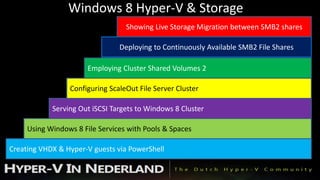
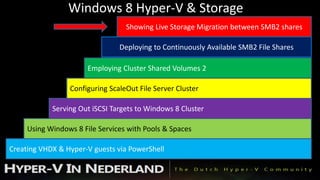
Windows 8 Hyper-V & Storage
                                  Showing Live Storage Migration between SMB2 shares

                                Deploying to Continuously Available SMB2 File Shares

                       Employing Cluster Shared Volumes 2

                 Configuring ScaleOut File Server Cluster

            Serving Out iSCSI Targets to Windows 8 Cluster

     Using Windows 8 File Services with Pools & Spaces

Creating VHDX & Hyper-V guests via PowerShell
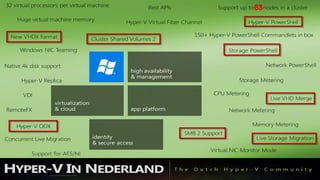
63
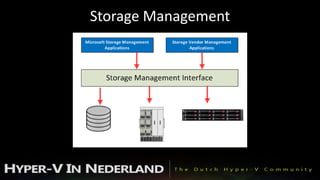
Storage Management
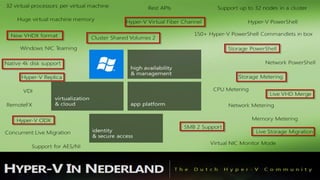
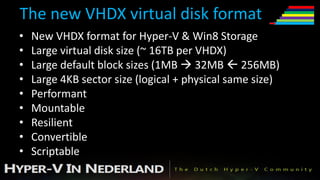
The new VHDX virtual disk format
•   New VHDX format for Hyper-V & Win8 Storage
•   Large virtual disk size (~ 16TB per VHDX)
•   Large default block sizes (1MB  32MB  256MB)
•   Large 4KB sector size (logical + physical same size)
•   Performant
•   Mountable
•   Resilient
•   Convertible
•   Scriptable
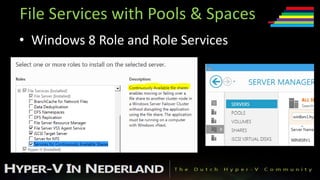
File Services with Pools & Spaces
• Windows 8 Role and Role Services
File Services with Pools & Spaces
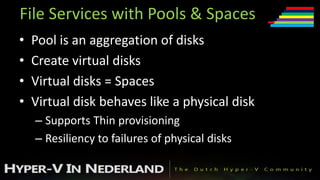
•   Pool is an aggregation of disks
•   Create virtual disks
•   Virtual disks = Spaces
•   Virtual disk behaves like a physical disk
    – Supports Thin provisioning
    – Resiliency to failures of physical disks
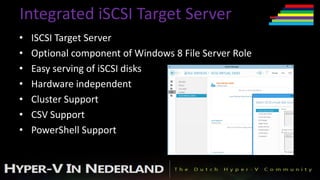
Integrated iSCSI Target Server
•   ISCSI Target Server
•   Optional component of Windows 8 File Server Role
•   Easy serving of iSCSI disks
•   Hardware independent
•   Cluster Support
•   CSV Support
•   PowerShell Support
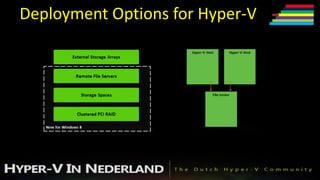
Deployment Options for Hyper-V
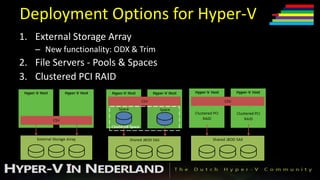
1. External Storage Array
   – New functionality: ODX & Trim
2. File Servers - Pools & Spaces
3. Clustered PCI RAID
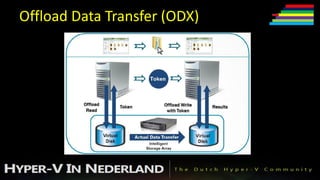
Offload Data Transfer (ODX)
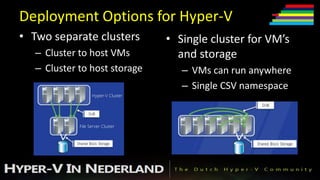
Deployment Options for Hyper-V
• Two separate clusters        • Single cluster for VM’s
   – Cluster to host VMs         and storage
   – Cluster to host storage      – VMs can run anywhere
                                  – Single CSV namespace
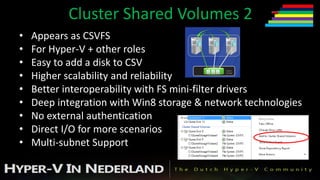
Cluster Shared Volumes 2
•   Appears as CSVFS
•   For Hyper-V + other roles
•   Easy to add a disk to CSV
•   Higher scalability and reliability
•   Better interoperability with FS mini-filter drivers
•   Deep integration with Win8 storage & network technologies
•   No external authentication
•   Direct I/O for more scenarios
•   Multi-subnet Support
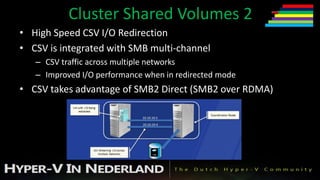
Cluster Shared Volumes 2
• High Speed CSV I/O Redirection
• CSV is integrated with SMB multi-channel
   – CSV traffic across multiple networks
   – Improved I/O performance when in redirected mode
• CSV takes advantage of SMB2 Direct (SMB2 over RDMA)
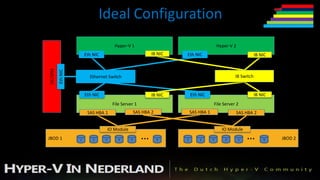
Ideal Configuration
                                        Hyper-V 1                                          Hyper-V 2
DC/DNS
                       Eth NIC                               IB NIC   Eth NIC                                    IB NIC
         Eth NIC


                         Ethernet Switch                                                             IB Switch


                       Eth NIC                               IB NIC       Eth NIC                                IB NIC
                                       File Server 1                                      File Server 2
                        SAS HBA 1                    SAS HBA 2            SAS HBA 1                  SAS HBA 2


                                     IO Module                                                IO Module
JBOD 1             1       2     3        4      5
                                                        …        9    1       2       3         4      5
                                                                                                           …         9    JBOD 2
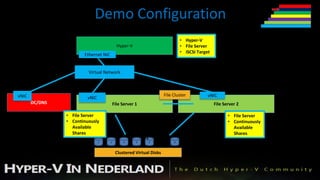
Demo Configuration
                                                                              • Hyper-V
                                            Hyper-V                           • File Server
                                                                              • iSCSI Target
                       Ethernet NIC


                         Virtual Network


vNIC                                                                 File Cluster          vNIC
                         vNIC
       DC/DNS                             File Server 1                                        File Server 2

                • File Server                                                                         • File Server
                • Continuously                                                                        • Continuously
                  Available                                                                             Available
                  Shares
                                1     2        3      4
                                                          …5              9
                                                                                                        Shares
                                                                                                               …
                                           Clustered Virtual Disks
Windows 8 Hyper-V & Storage
                                  Showing Live Storage Migration between SMB2 shares

                                Deploying to Continuously Available SMB2 File Shares

                       Employing Cluster Shared Volumes 2

                 Configuring ScaleOut File Server Cluster

            Serving Out iSCSI Targets to Windows 8 Cluster

     Using Windows 8 File Services with Pools & Spaces

Creating VHDX & Hyper-V guests via PowerShell
Big thanks for attending!!
      You can build great
    continuously available
   platforms that shine with
Hyper-V across a wide range of
 storage deployment options
Q&A
Hans Vredevoort
 @hvredevoort

Windows server 8 hyper v & storage (hans vredevoort)

  • 1.
    Windows Server 8 Hyper-V & Storage Hans Vredevoort
  • 2.
    Speaker Bio • Consultant& MVP • INOVATIV – The System Center Specialists • System Center, Hyper-V, Cluster, MS Private Cloud • Cluster MVP (2009, 2010, 2011) • Active in Hyper-V community: Hyper-V.nu • Author & Editor • Mastering Hyper-V Deployment (Technical Editor) • Microsoft Private Cloud Computing: Building the Foundation (Co-Author) • Contact • hans.vredevoort@inovativ.nl | @hvredevoort | @hypervnu
  • 4.
    Windows 8 Hyper-V& Storage Showing Live Storage Migration between SMB2 shares Deploying to Continuously Available SMB2 File Shares Employing Cluster Shared Volumes 2 Configuring ScaleOut File Server Cluster Serving Out iSCSI Targets to Windows 8 Cluster Using Windows 8 File Services with Pools & Spaces Creating VHDX & Hyper-V guests via PowerShell
  • 5.
  • 6.
  • 7.
    The new VHDXvirtual disk format • New VHDX format for Hyper-V & Win8 Storage • Large virtual disk size (~ 16TB per VHDX) • Large default block sizes (1MB  32MB  256MB) • Large 4KB sector size (logical + physical same size) • Performant • Mountable • Resilient • Convertible • Scriptable
  • 8.
    File Services withPools & Spaces • Windows 8 Role and Role Services
  • 9.
    File Services withPools & Spaces • Pool is an aggregation of disks • Create virtual disks • Virtual disks = Spaces • Virtual disk behaves like a physical disk – Supports Thin provisioning – Resiliency to failures of physical disks
  • 10.
    Integrated iSCSI TargetServer • ISCSI Target Server • Optional component of Windows 8 File Server Role • Easy serving of iSCSI disks • Hardware independent • Cluster Support • CSV Support • PowerShell Support
  • 11.
  • 12.
    Deployment Options forHyper-V 1. External Storage Array – New functionality: ODX & Trim 2. File Servers - Pools & Spaces 3. Clustered PCI RAID
  • 13.
  • 14.
    Deployment Options forHyper-V • Two separate clusters • Single cluster for VM’s – Cluster to host VMs and storage – Cluster to host storage – VMs can run anywhere – Single CSV namespace
  • 15.
    Cluster Shared Volumes2 • Appears as CSVFS • For Hyper-V + other roles • Easy to add a disk to CSV • Higher scalability and reliability • Better interoperability with FS mini-filter drivers • Deep integration with Win8 storage & network technologies • No external authentication • Direct I/O for more scenarios • Multi-subnet Support
  • 16.
    Cluster Shared Volumes2 • High Speed CSV I/O Redirection • CSV is integrated with SMB multi-channel – CSV traffic across multiple networks – Improved I/O performance when in redirected mode • CSV takes advantage of SMB2 Direct (SMB2 over RDMA)
  • 17.
    Ideal Configuration Hyper-V 1 Hyper-V 2 DC/DNS Eth NIC IB NIC Eth NIC IB NIC Eth NIC Ethernet Switch IB Switch Eth NIC IB NIC Eth NIC IB NIC File Server 1 File Server 2 SAS HBA 1 SAS HBA 2 SAS HBA 1 SAS HBA 2 IO Module IO Module JBOD 1 1 2 3 4 5 … 9 1 2 3 4 5 … 9 JBOD 2
  • 18.
    Demo Configuration • Hyper-V Hyper-V • File Server • iSCSI Target Ethernet NIC Virtual Network vNIC File Cluster vNIC vNIC DC/DNS File Server 1 File Server 2 • File Server • File Server • Continuously • Continuously Available Available Shares 1 2 3 4 …5 9 Shares … Clustered Virtual Disks
  • 19.
    Windows 8 Hyper-V& Storage Showing Live Storage Migration between SMB2 shares Deploying to Continuously Available SMB2 File Shares Employing Cluster Shared Volumes 2 Configuring ScaleOut File Server Cluster Serving Out iSCSI Targets to Windows 8 Cluster Using Windows 8 File Services with Pools & Spaces Creating VHDX & Hyper-V guests via PowerShell
  • 20.
    Big thanks forattending!! You can build great continuously available platforms that shine with Hyper-V across a wide range of storage deployment options
  • 21.