Windows Server 8 Beta - Pre Release Information Only


Dealing with planned and unplanned
failures in your Hyper-V Virtual
Infrastructure

SWUG Meet up – 16 August 2012

Daniel Mar
daniel@infrontconsulting.com


                                                                      SP1 CTP 2
                                                                                       1
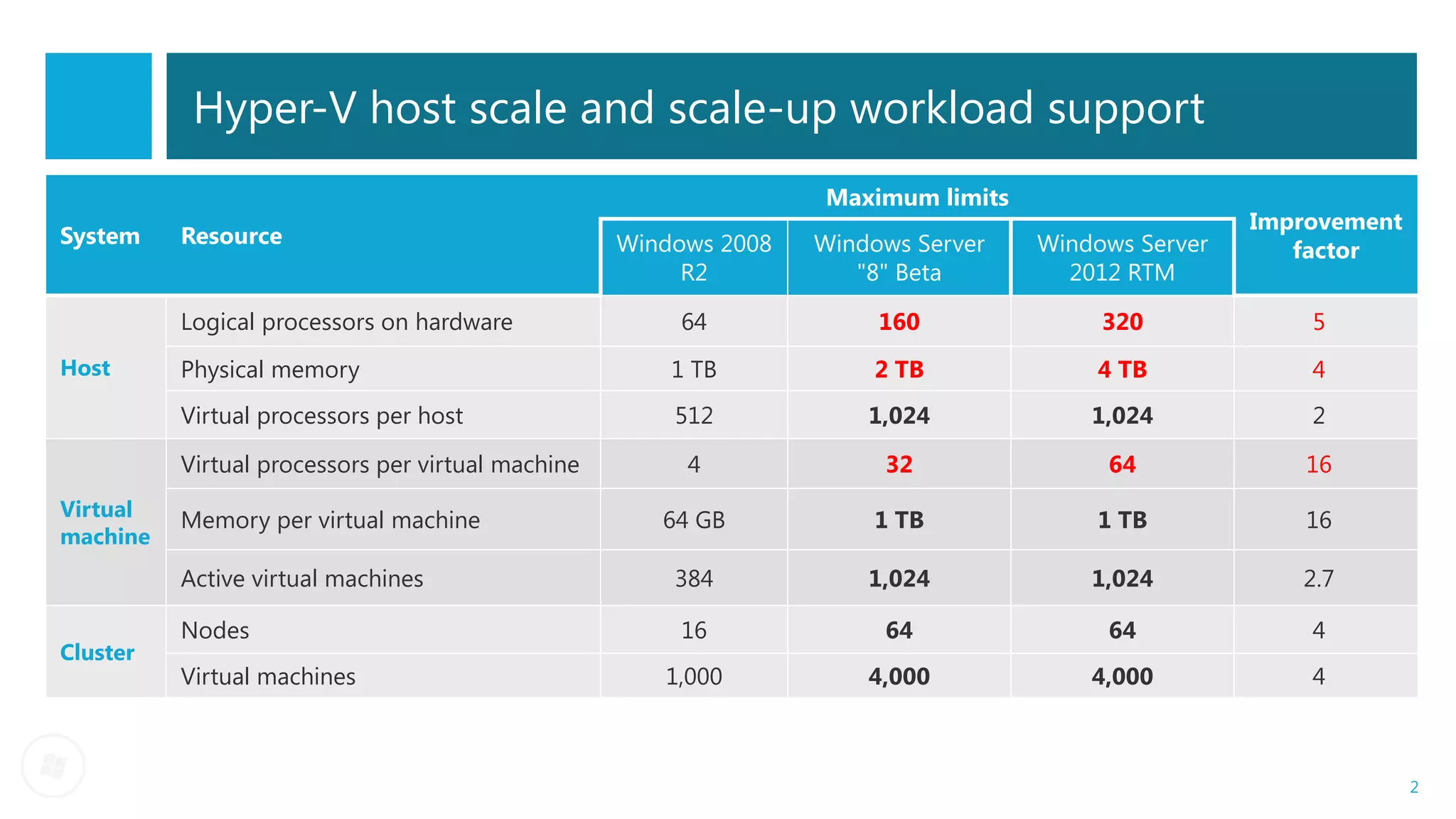
Hyper-V host scale and scale-up workload support
                                                                  Maximum limits
                                                                                                    Improvement
System    Resource                                 Windows 2008   Windows Server   Windows Server      factor
                                                        R2           "8" Beta        2012 RTM

          Logical processors on hardware                64             160              320             5
Host      Physical memory                              1 TB           2 TB             4 TB             4
          Virtual processors per host                  512            1,024            1,024            2

          Virtual processors per virtual machine        4              32               64              16
Virtual   Memory per virtual machine                  64 GB           1 TB             1 TB             16
machine
          Active virtual machines                      384            1,024            1,024           2.7

          Nodes                                         16             64               64              4
Cluster
          Virtual machines                            1,000           4,000            4,000            4


                                                                                                                  2
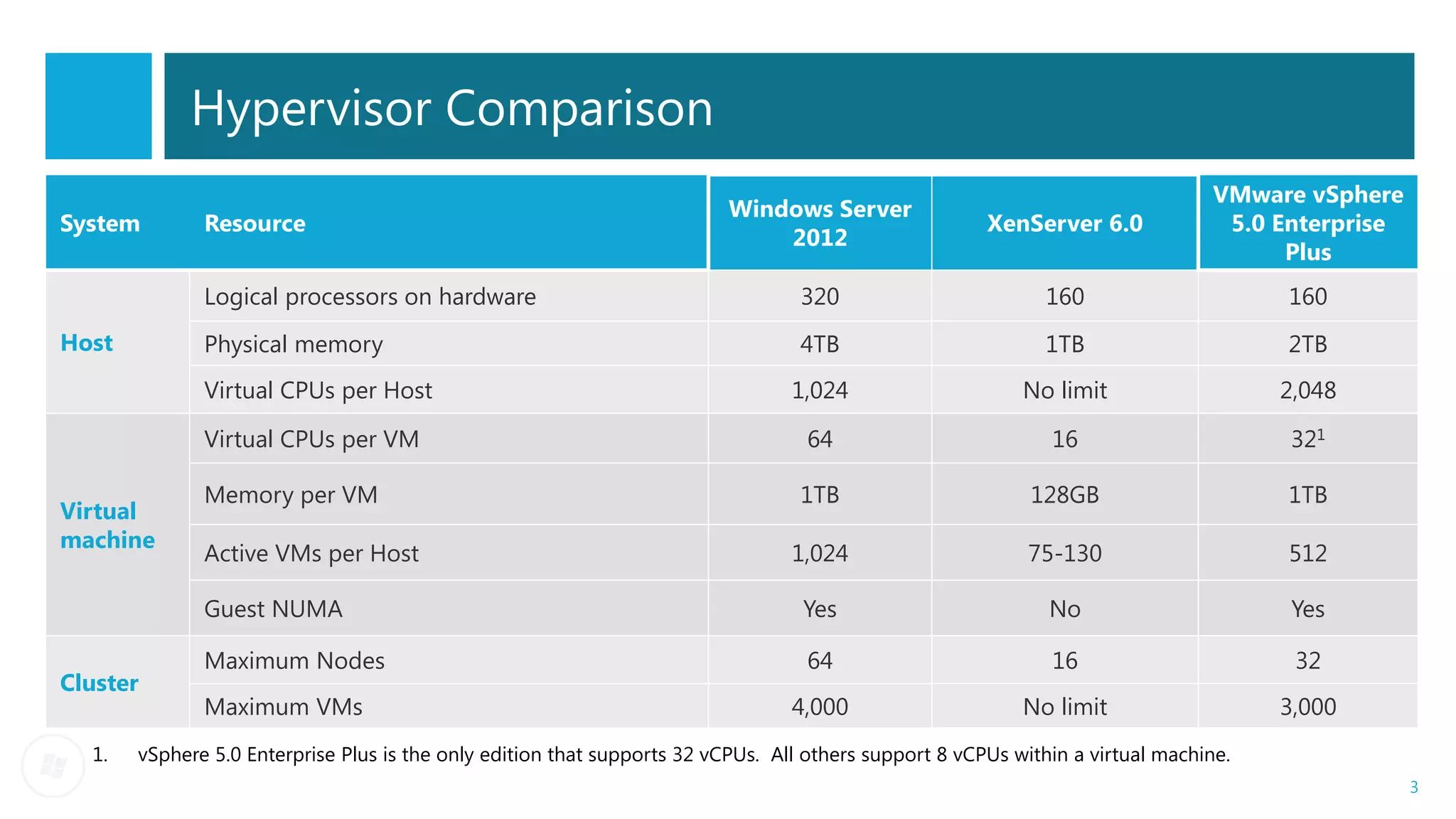
Hypervisor Comparison
                                                                                                                                 VMware vSphere
                                                                          Windows Server
System        Resource                                                                                 XenServer 6.0              5.0 Enterprise
                                                                              2012
                                                                                                                                       Plus
              Logical processors on hardware                                      320                         160                     160
Host          Physical memory                                                     4TB                         1TB                     2TB
              Virtual CPUs per Host                                              1,024                     No limit                   2,048

              Virtual CPUs per VM                                                 64                          16                       321

              Memory per VM                                                       1TB                       128GB                     1TB
Virtual
machine
              Active VMs per Host                                                1,024                      75-130                    512

              Guest NUMA                                                          Yes                         No                       Yes

              Maximum Nodes                                                       64                          16                       32
Cluster
              Maximum VMs                                                        4,000                     No limit                   3,000
  1.   vSphere 5.0 Enterprise Plus is the only edition that supports 32 vCPUs. All others support 8 vCPUs within a virtual machine.
                                                                                                                                                   3
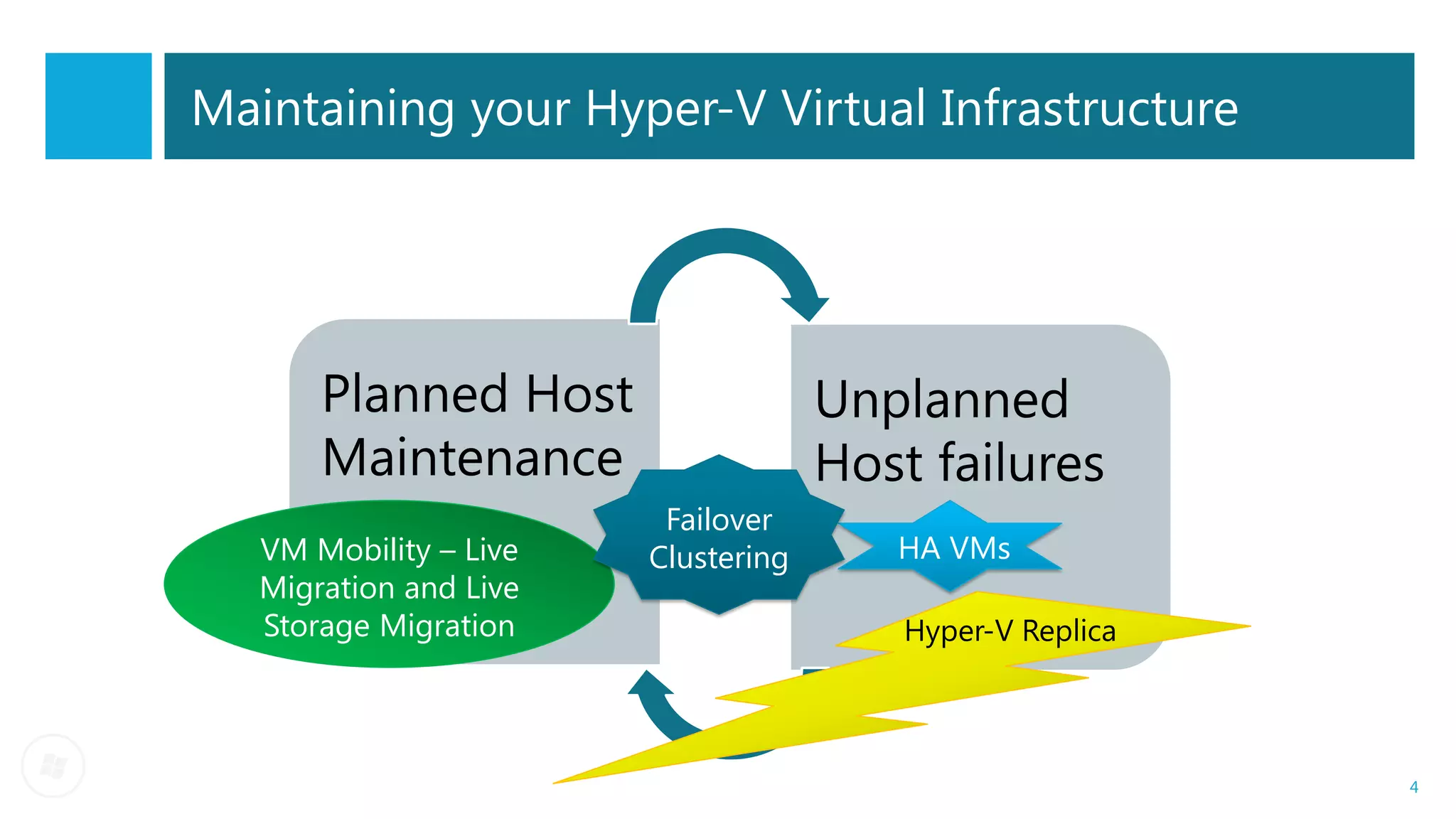
Maintaining your Hyper-V Virtual Infrastructure


       Planned Host                  Unplanned
       Maintenance                   Host failures
                         Failover
   VM Mobility – Live   Clustering      HA VMs
   Migration and Live
   Storage Migration                     Hyper-V Replica


                                                           4
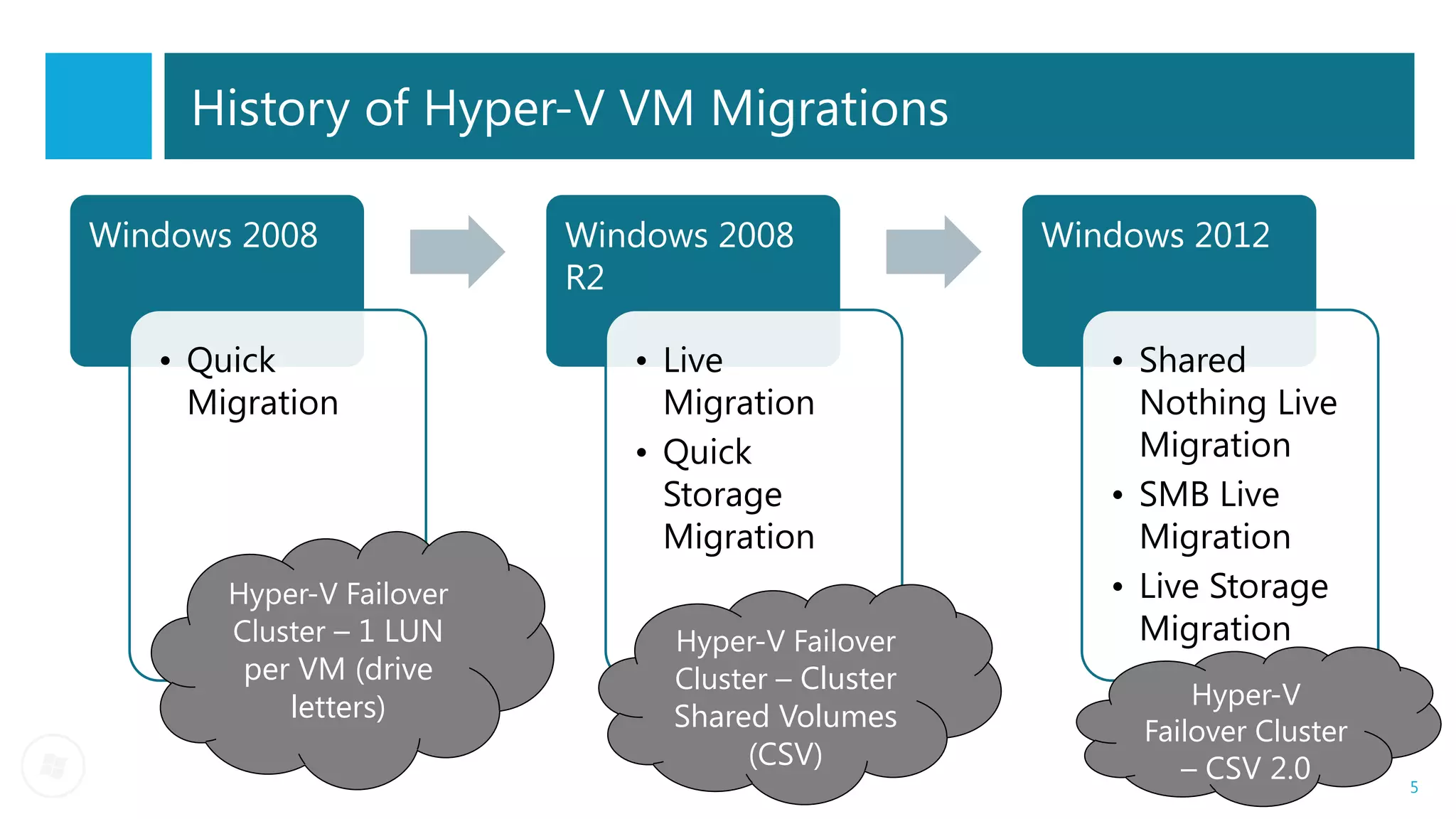
History of Hyper-V VM Migrations

Windows 2008              Windows 2008             Windows 2012
                          R2

   • Quick                   • Live                   • Shared
     Migration                 Migration                Nothing Live
                             • Quick                    Migration
                               Storage                • SMB Live
                               Migration                Migration
       Hyper-V Failover                               • Live Storage
       Cluster – 1 LUN         Hyper-V Failover         Migration
        per VM (drive          Cluster – Cluster
           letters)                                         Hyper-V
                               Shared Volumes           Failover Cluster
                                    (CSV)                  – CSV 2.0       5
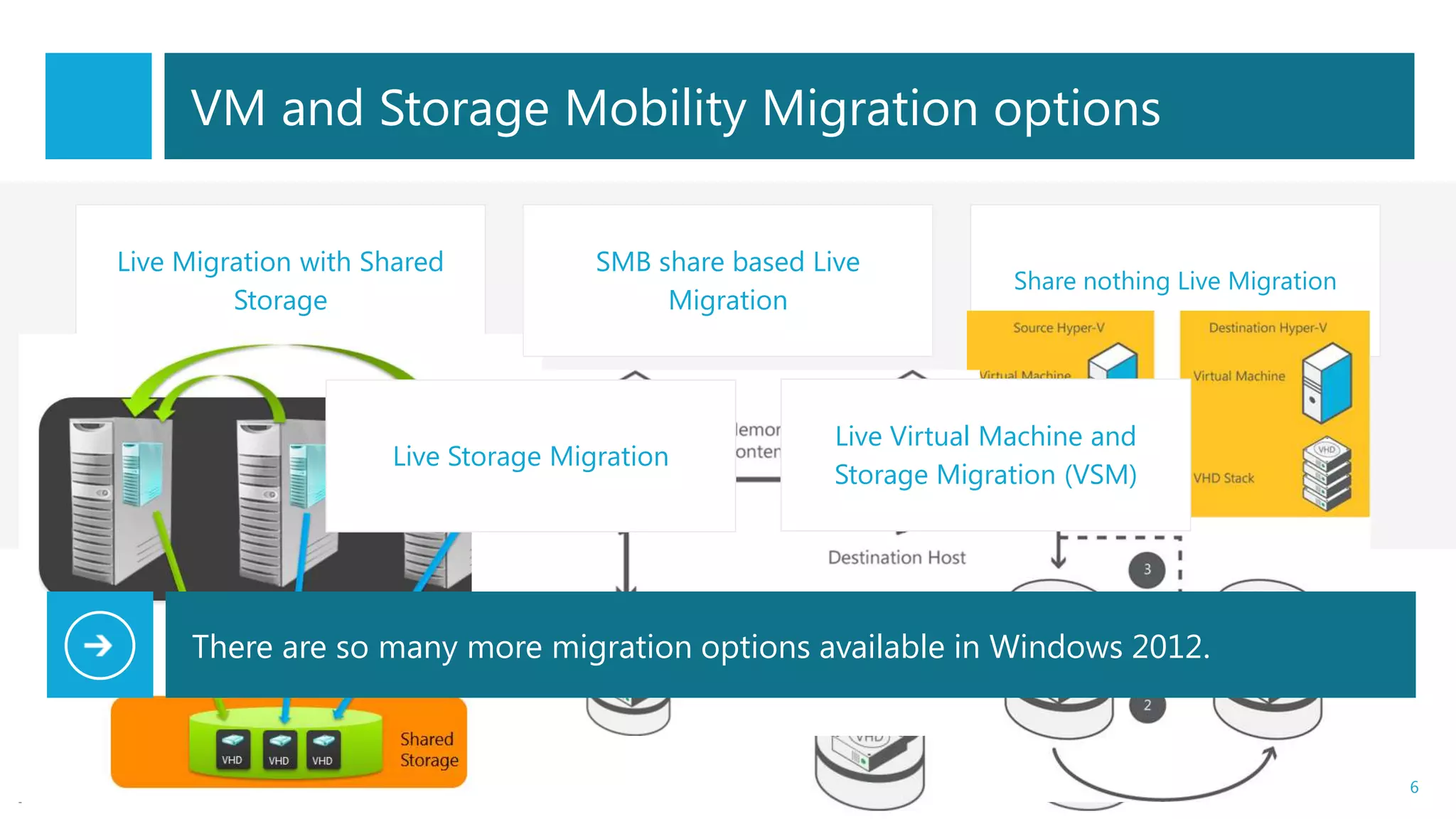
VM and Storage Mobility Migration options

Live Migration with Shared           SMB share based Live
                                                                     Share nothing Live Migration
         Storage                          Migration


                                                       Live Virtual Machine and
                     Live Storage Migration
                                                       Storage Migration (VSM)


     There are so many more migration options available in Windows 2012.


                                                                                                    6
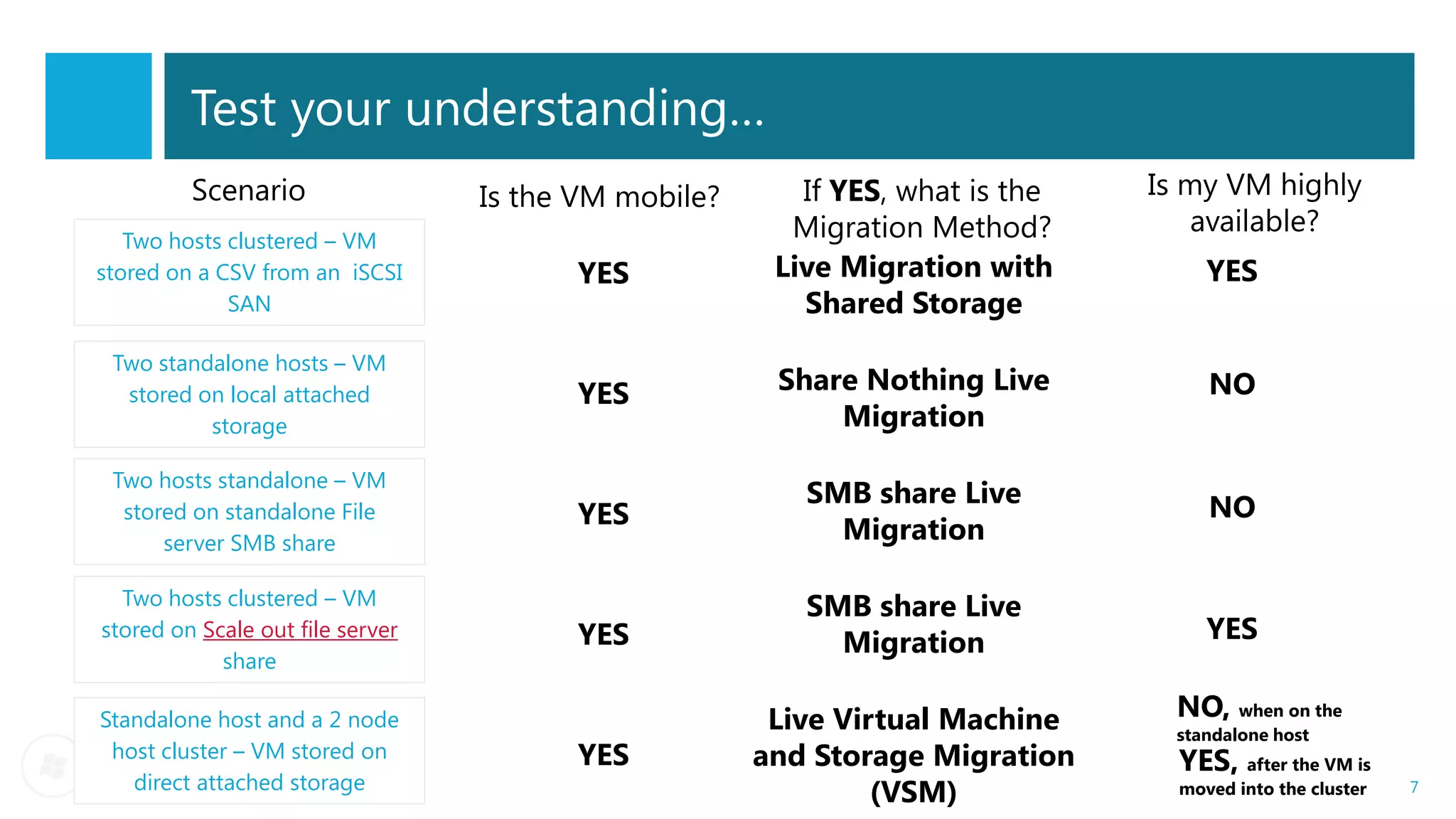
Test your understanding…
         Scenario                 Is the VM mobile?      If YES, what is the   Is my VM highly
                                                        Migration Method?         available?
   Two hosts clustered – VM
stored on a CSV from an iSCSI           YES            Live Migration with          YES
             SAN                                         Shared Storage
 Two standalone hosts – VM
  stored on local attached              YES            Share Nothing Live           NO
          storage                                          Migration

 Two hosts standalone – VM
                                                         SMB share Live             NO
  stored on standalone File             YES
      server SMB share                                     Migration

  Two hosts clustered – VM                               SMB share Live
stored on Scale out file server         YES                Migration                YES
            share

Standalone host and a 2 node                           Live Virtual Machine      NO, when on the
                                                                                 standalone host
 host cluster – VM stored on            YES           and Storage Migration      YES, after the VM is
   direct attached storage
                                                               (VSM)             moved into the cluster   7
Planned VM Mobility
- Share Nothing Live Migration
- Live Storage Migration
                                 DEMO
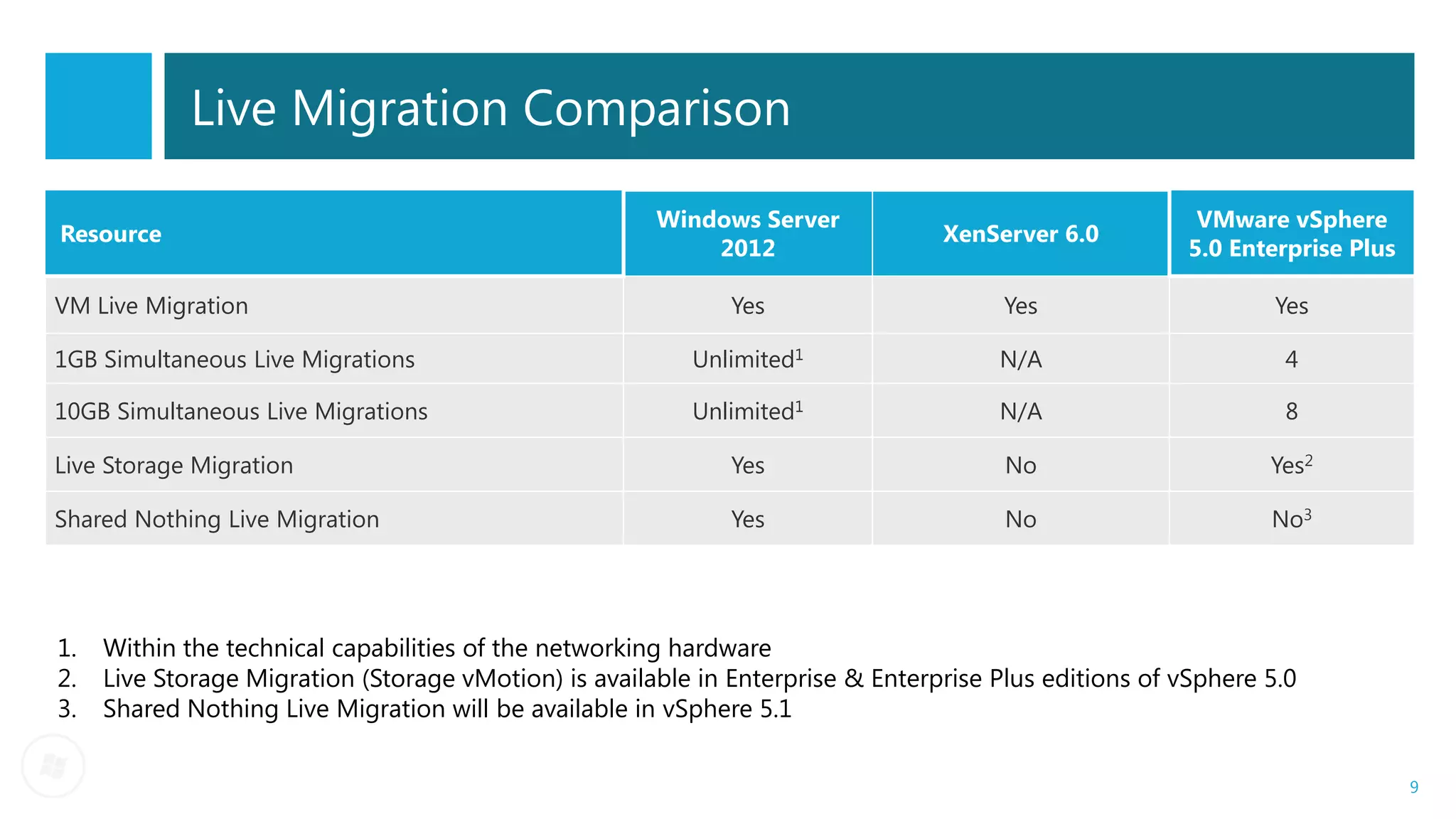
Live Migration Comparison

                                                       Windows Server                                    VMware vSphere
Resource                                                                         XenServer 6.0
                                                           2012                                         5.0 Enterprise Plus

VM Live Migration                                             Yes                      Yes                      Yes

1GB Simultaneous Live Migrations                          Unlimited1                  N/A                       4

10GB Simultaneous Live Migrations                         Unlimited1                  N/A                       8

Live Storage Migration                                        Yes                      No                      Yes2

Shared Nothing Live Migration                                 Yes                      No                      No3


1.   Within the technical capabilities of the networking hardware
2.   Live Storage Migration (Storage vMotion) is available in Enterprise & Enterprise Plus editions of vSphere 5.0
3.   Shared Nothing Live Migration will be available in vSphere 5.1

                                                                                                                              9
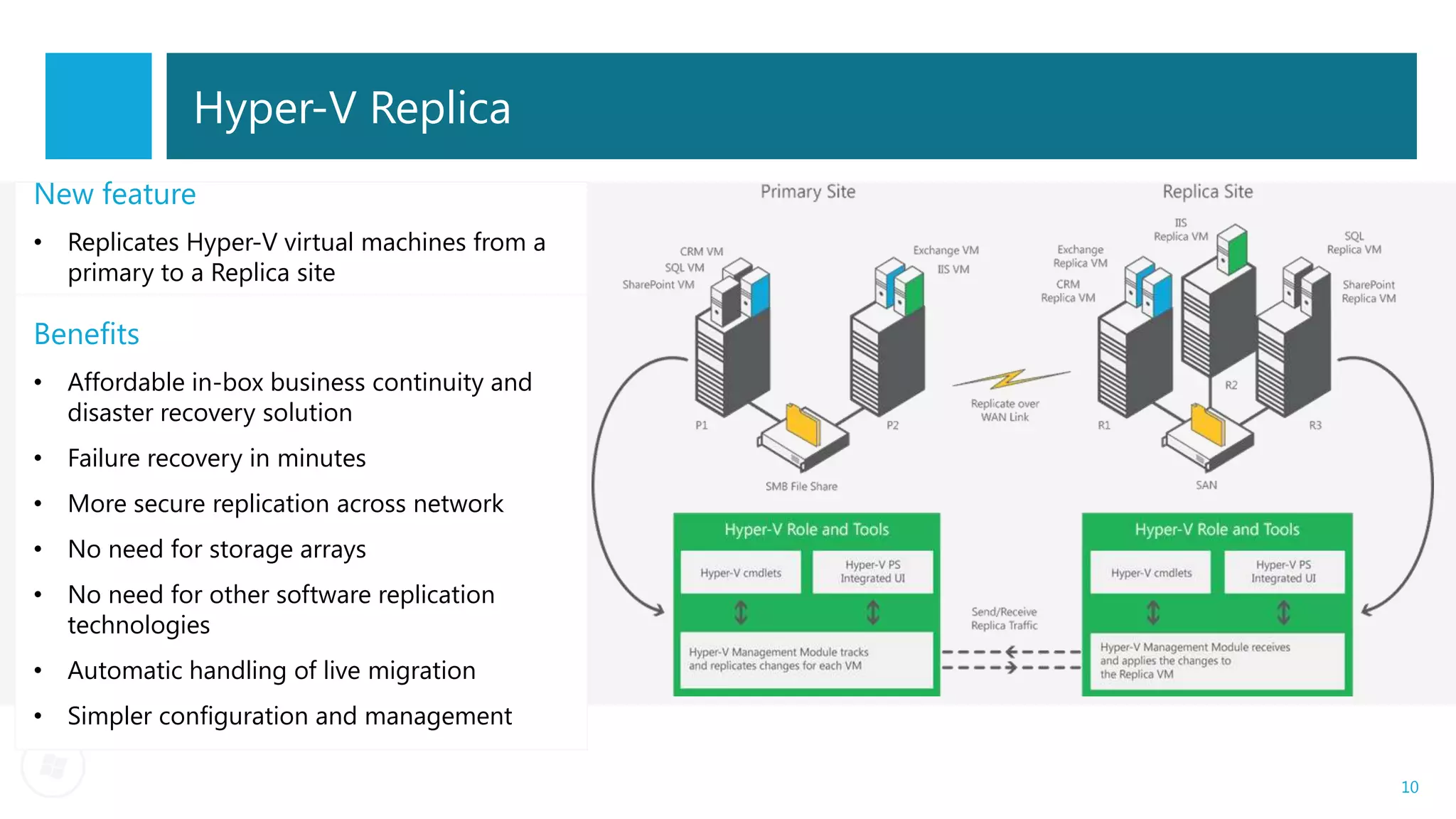
Hyper-V Replica
New feature
• Replicates Hyper-V virtual machines from a
  primary to a Replica site

Benefits
• Affordable in-box business continuity and
  disaster recovery solution
• Failure recovery in minutes
• More secure replication across network
• No need for storage arrays
• No need for other software replication
  technologies
• Automatic handling of live migration
• Simpler configuration and management

                                               10
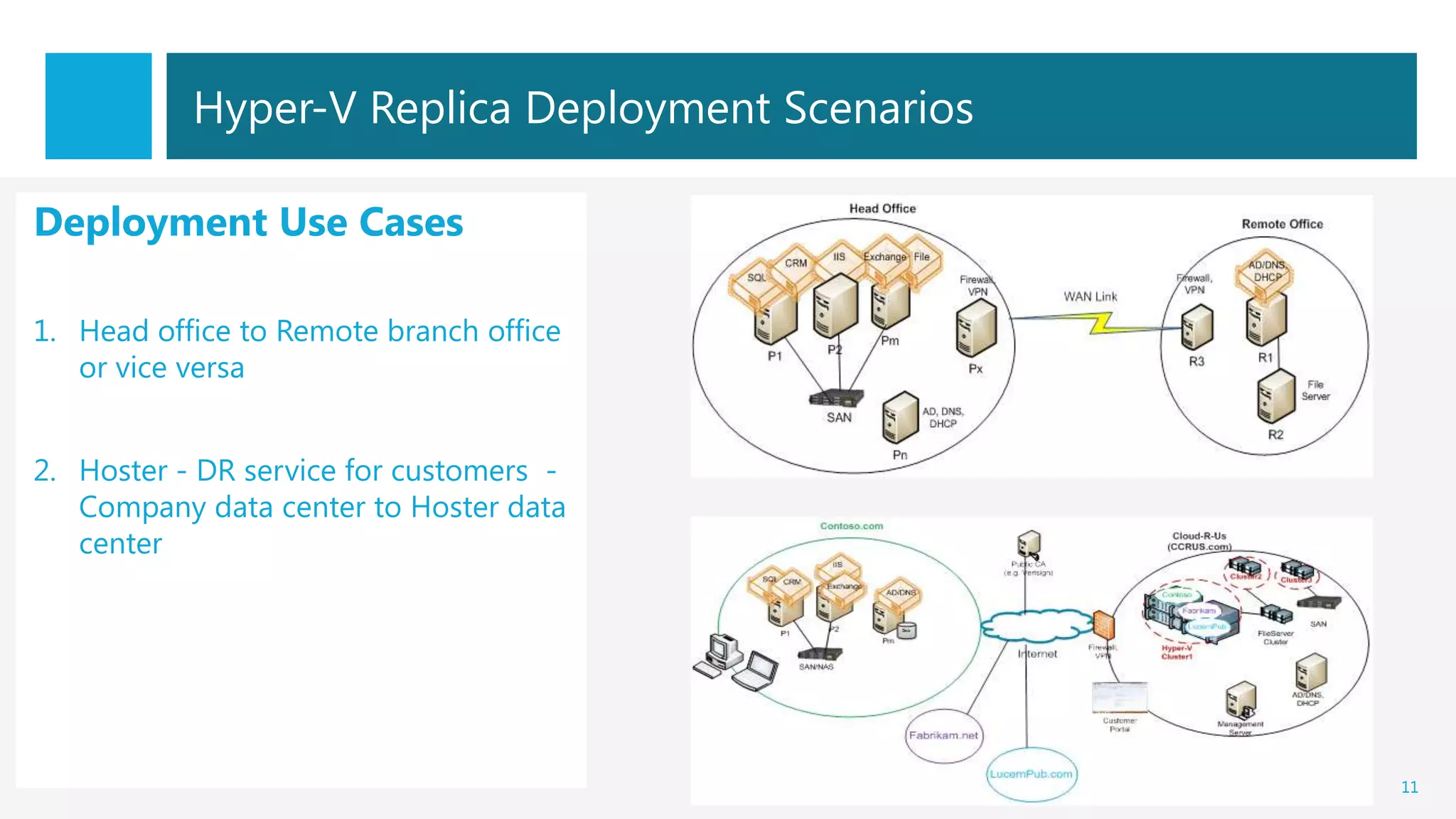
Hyper-V Replica Deployment Scenarios

Deployment Use Cases

1. Head office to Remote branch office
   or vice versa


2. Hoster - DR service for customers -
   Company data center to Hoster data
   center


                                                  11
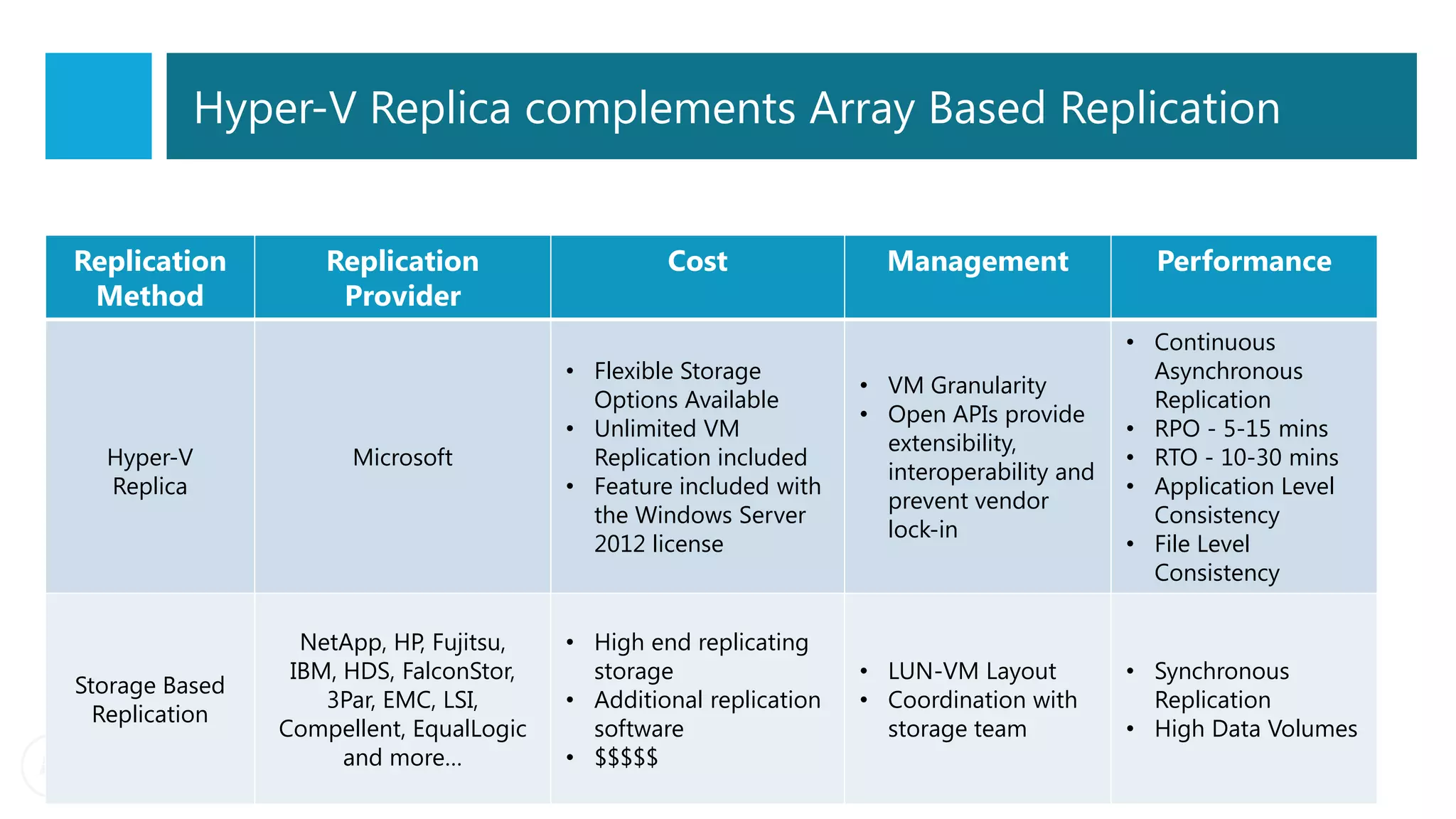
Hyper-V Replica complements Array Based Replication


Replication         Replication                   Cost                Management               Performance
 Method              Provider
                                                                                             • Continuous
                                         • Flexible Storage                                    Asynchronous
                                                                    • VM Granularity
                                           Options Available                                   Replication
                                                                    • Open APIs provide
                                         • Unlimited VM                                      • RPO - 5-15 mins
                                                                      extensibility,
  Hyper-V             Microsoft            Replication included                              • RTO - 10-30 mins
                                                                      interoperability and
  Replica                                • Feature included with                             • Application Level
                                                                      prevent vendor
                                           the Windows Server                                  Consistency
                                                                      lock-in
                                           2012 license                                      • File Level
                                                                                               Consistency

                  NetApp, HP, Fujitsu,   • High end replicating
                 IBM, HDS, FalconStor,     storage                  • LUN-VM Layout          • Synchronous
Storage Based
                    3Par, EMC, LSI,      • Additional replication   • Coordination with        Replication
  Replication
                Compellent, EqualLogic     software                   storage team           • High Data Volumes
                      and more…          • $$$$$
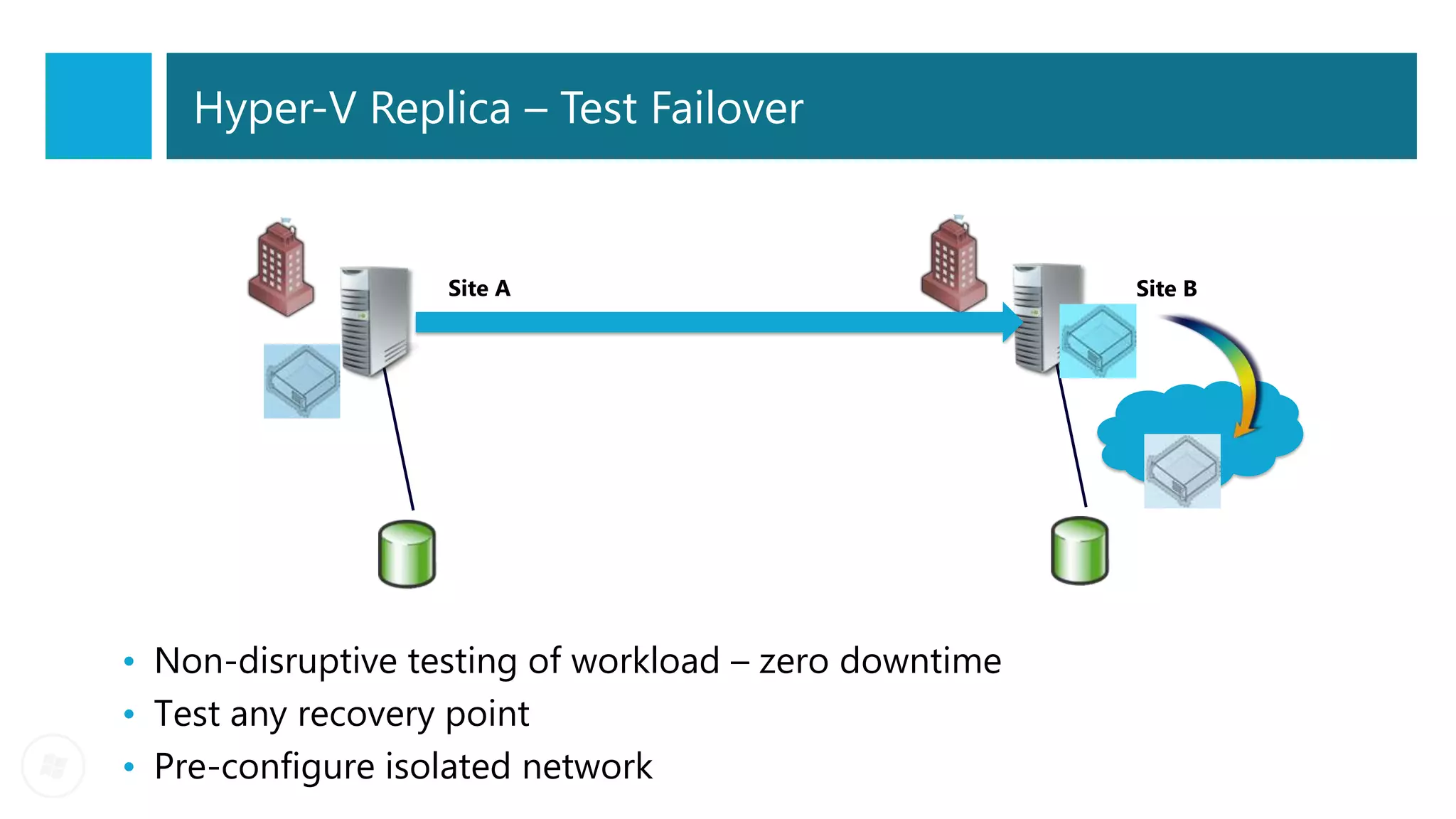
Hyper-V Replica – Test Failover


                   Site A                              Site B


• Non-disruptive testing of workload – zero downtime
• Test any recovery point
• Pre-configure isolated network
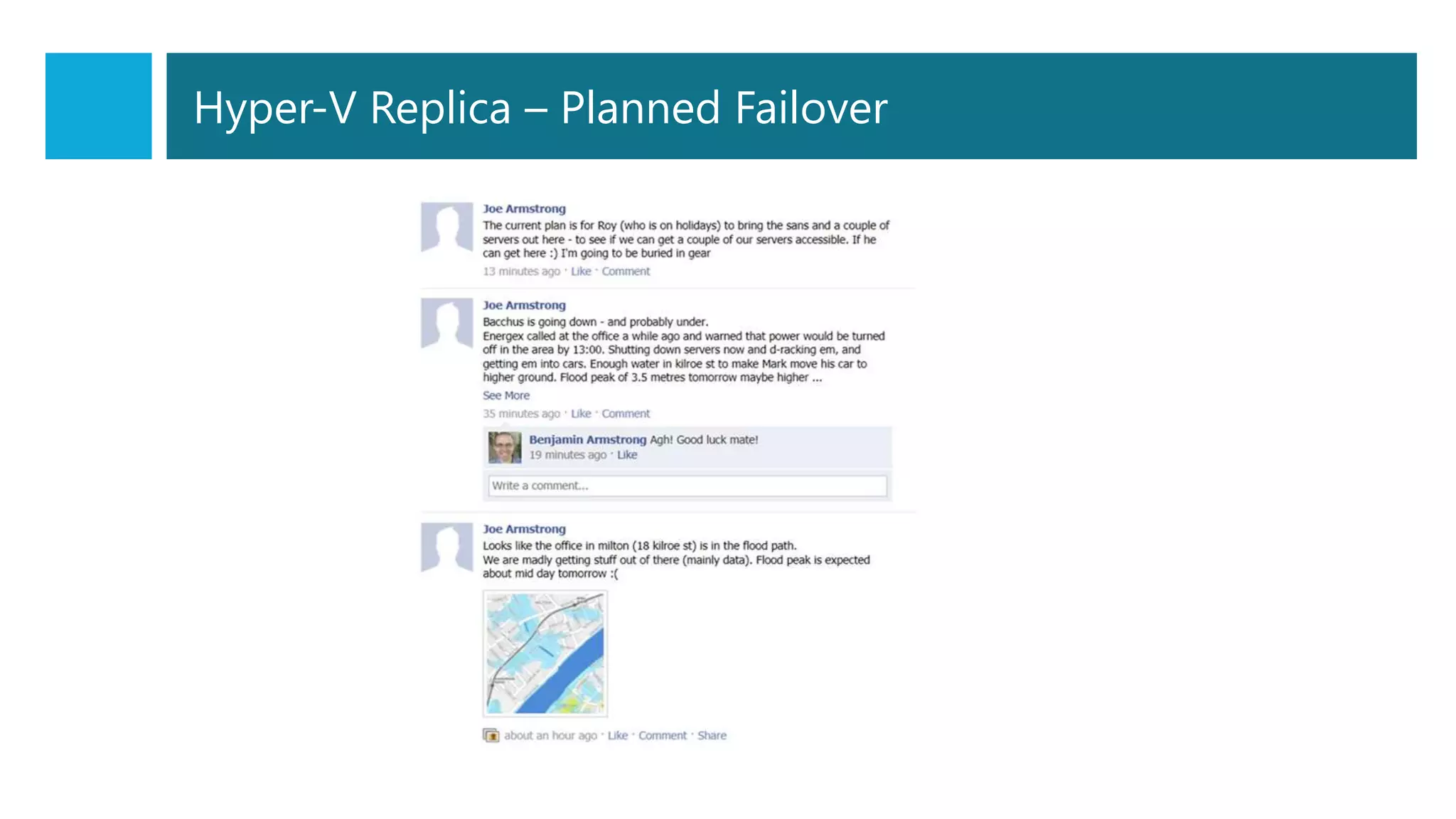
Hyper-V Replica – Planned Failover

                                                      1.   Shutdown primary
                                           Site B
                                                      2.   Send last delta
           Site A
                                                      3.   Failover to replica
                                                      4.   Reverse replication


• Testing DR or failover before disaster or planned maintenance
• Zero data loss but some downtime
• Efficient reverse replication
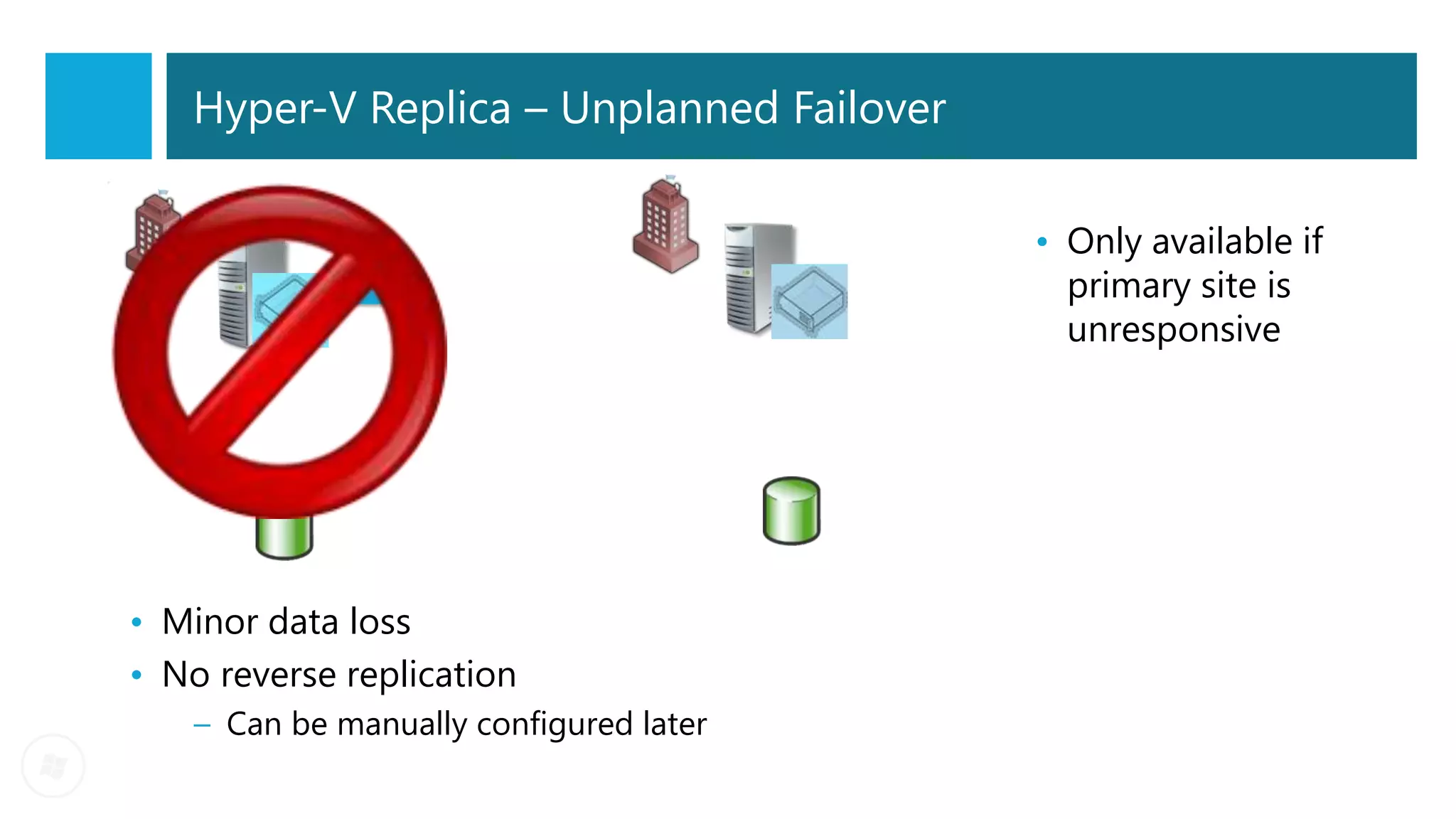
Hyper-V Replica – Unplanned Failover


            Site A                       Site B   • Only available if
                                                    primary site is
                                                    unresponsive


• Minor data loss
• No reverse replication
    – Can be manually configured later
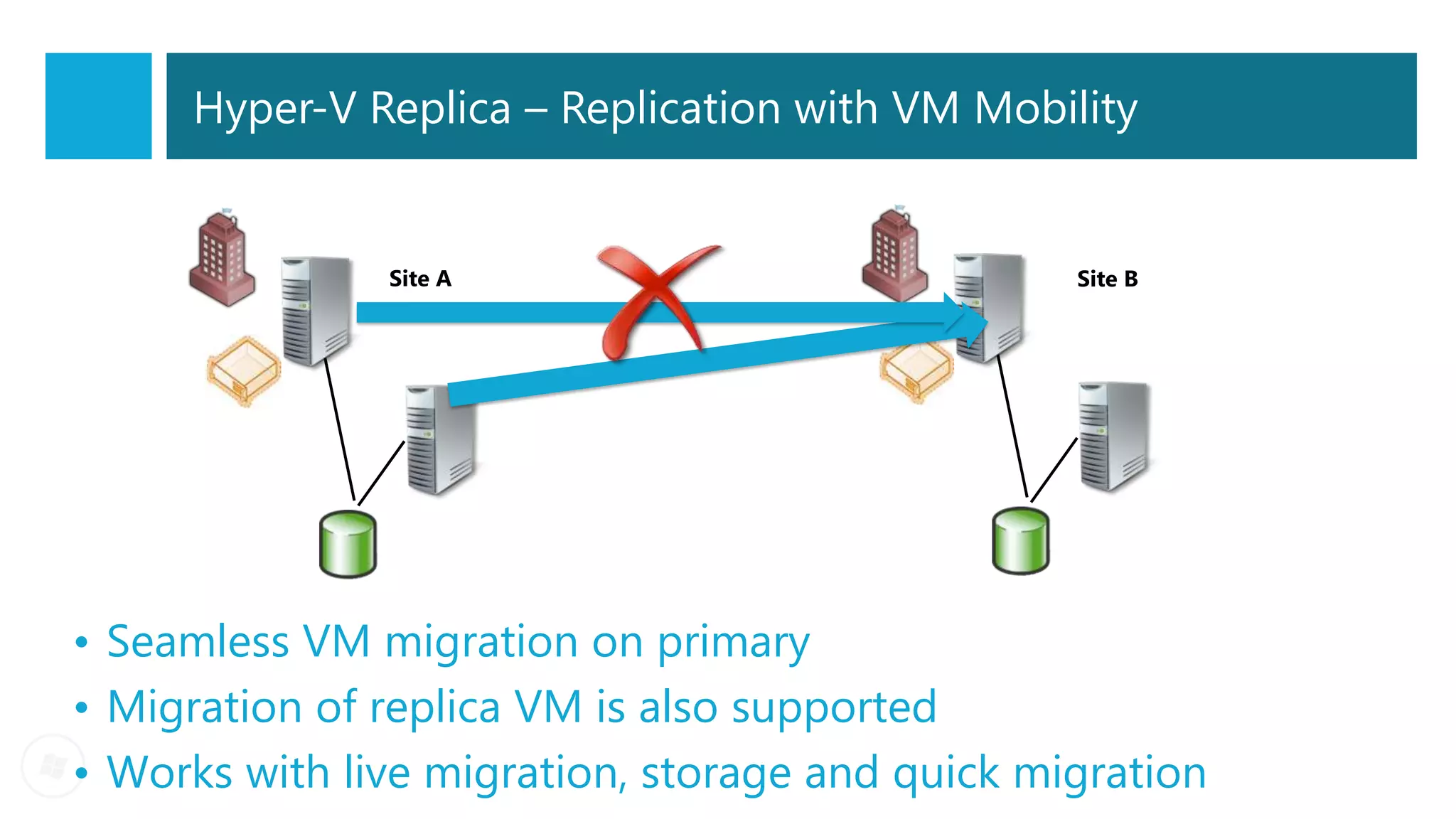
Hyper-V Replica – Replication with VM Mobility


               Site A                            Site B


• Seamless VM migration on primary
• Migration of replica VM is also supported
• Works with live migration, storage and quick migration
Hyper-V Replica
- Setup a VM Replica
- Planned Failover
- Unplanned Failover
                       DEMO
Questions?
daniel@infrontconsulting.com


                               18
Windows Server 8 Beta - Pre Release Information Only


Backup Slides


                                                                       19
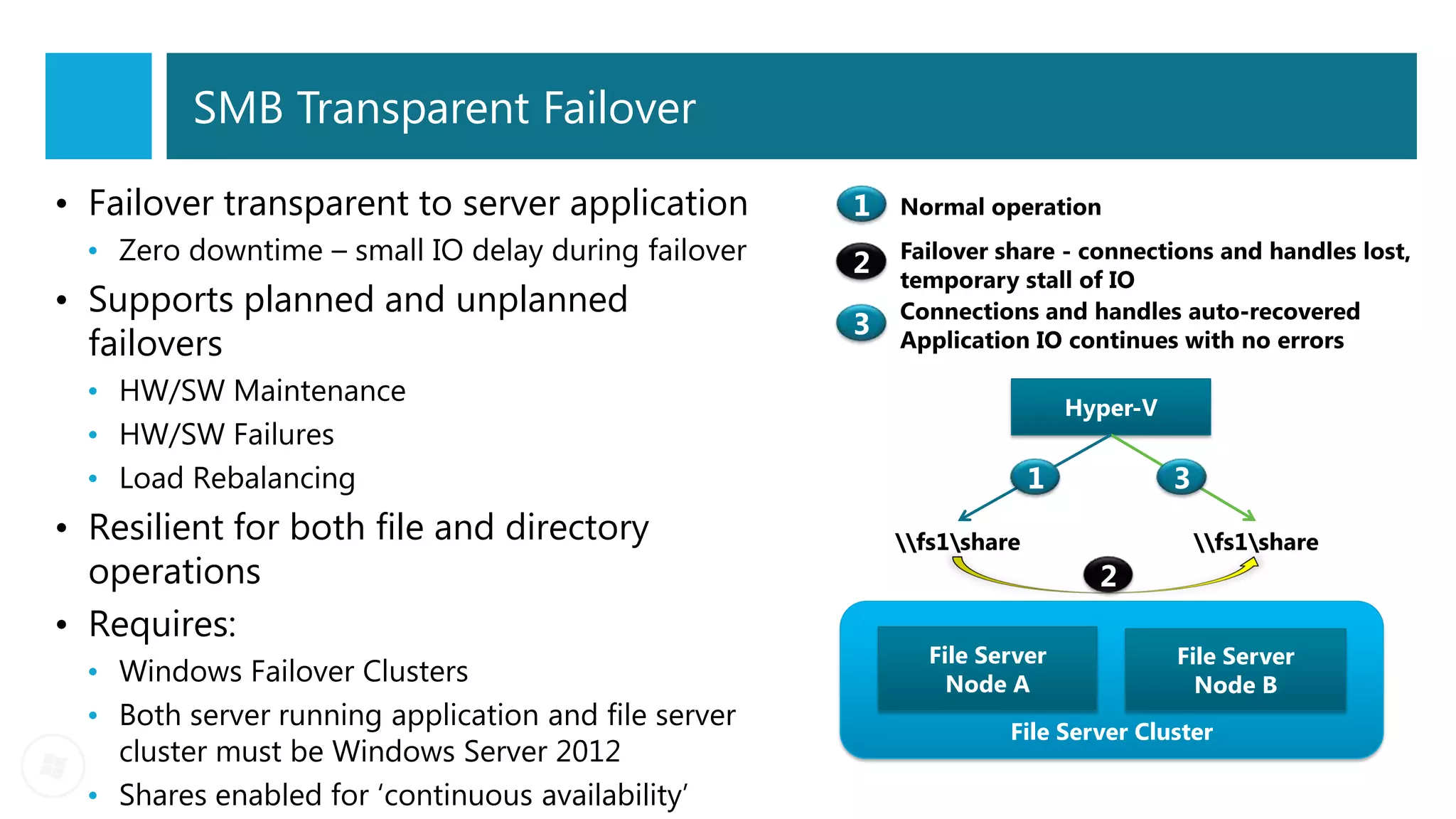
SMB Transparent Failover

• Failover transparent to server application
  • Zero downtime – small IO delay during failover
• Supports planned and unplanned
  failovers
  • HW/SW Maintenance                                                 Hyper-V
  • HW/SW Failures
  • Load Rebalancing
• Resilient for both file and directory               fs1share                fs1share
  operations
• Requires:
                                                        File Server             File Server
  • Windows Failover Clusters                             Node A                  Node B
  • Both server running application and file server             File Server Cluster
    cluster must be Windows Server 2012
  • Shares enabled for ‘continuous availability’
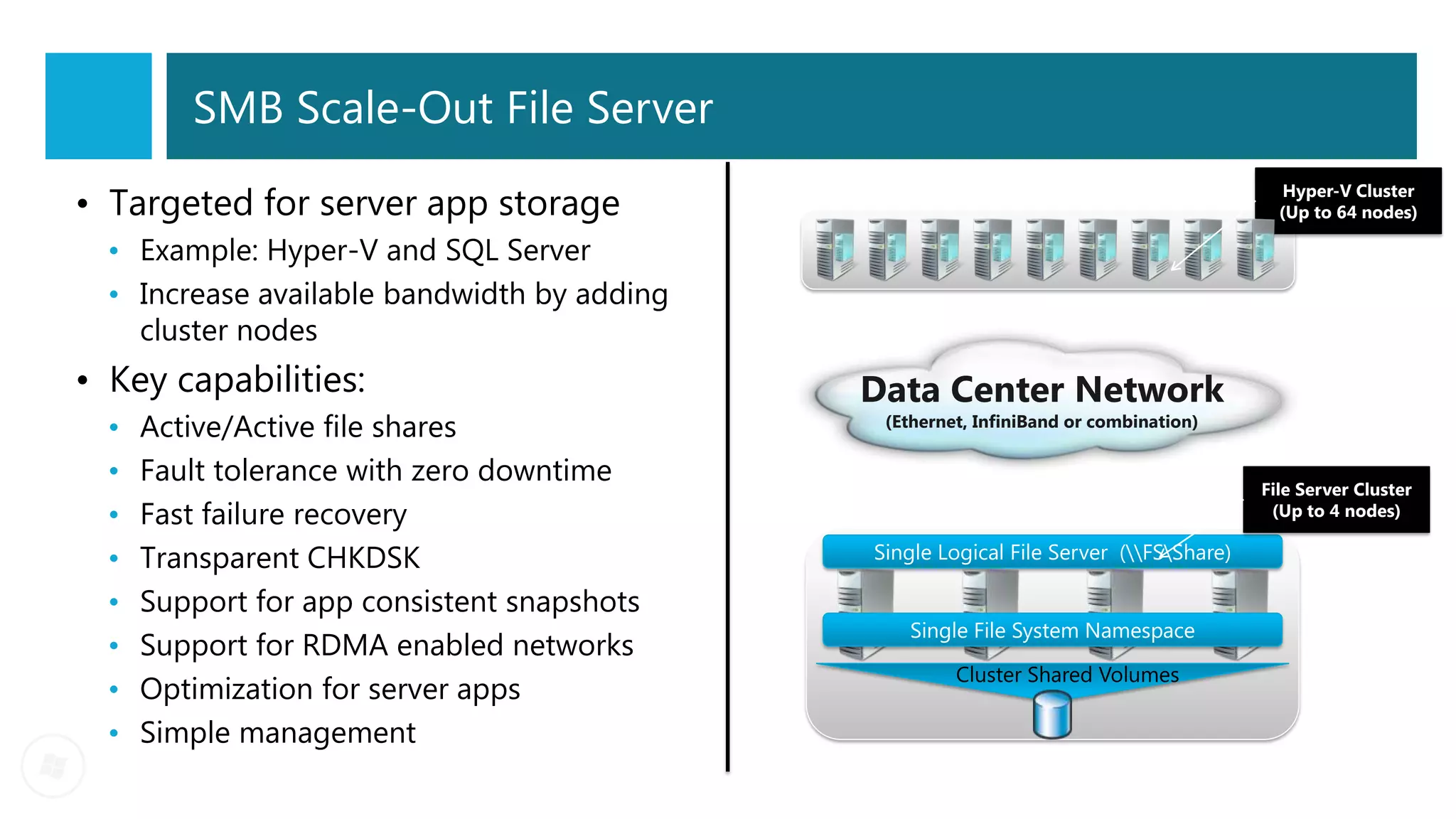
SMB Scale-Out File Server

• Targeted for server app storage                                                         Hyper-V Cluster
                                                                                         (Up to 64 nodes)

  • Example: Hyper-V and SQL Server
  • Increase available bandwidth by adding
    cluster nodes
• Key capabilities:                          Data Center Network
  •   Active/Active file shares               (Ethernet, InfiniBand or combination)

  •   Fault tolerance with zero downtime                                               File Server Cluster
  •   Fast failure recovery                                                             (Up to 4 nodes)

  •   Transparent CHKDSK                     Single Logical File Server (FSShare)

  •   Support for app consistent snapshots
                                                Single File System Namespace
  •   Support for RDMA enabled networks
                                                      Cluster Shared Volumes
  •   Optimization for server apps
  •   Simple management
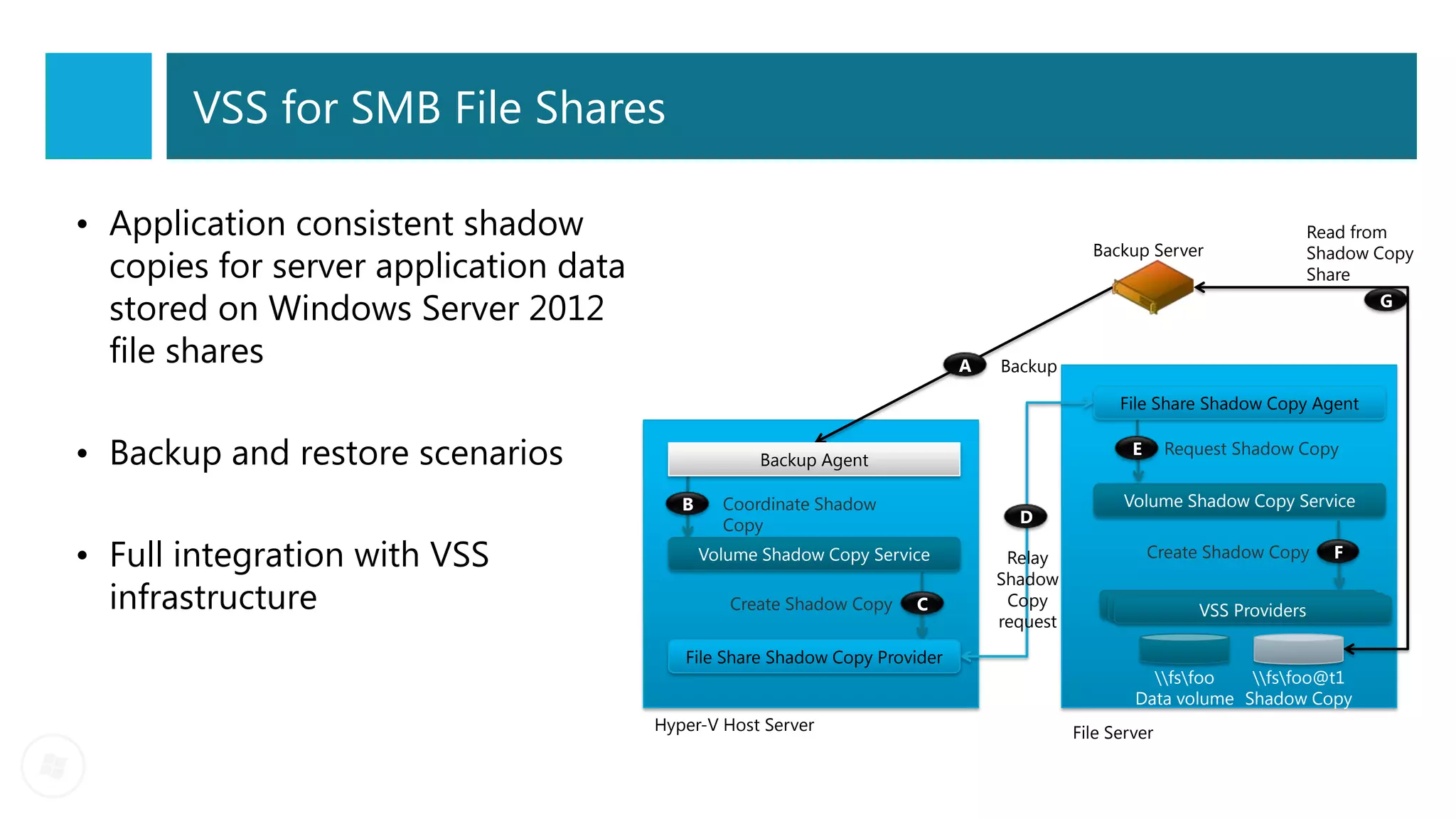
VSS for SMB File Shares

• Application consistent shadow                                                                                            Read from
                                                                                            Backup Server
  copies for server application data
                                                                                                                           Shadow Copy
                                                                                                                           Share

  stored on Windows Server 2012                                                                                                     G


  file shares                                                               A   Backup

                                                                                                File Share Shadow Copy Agent


• Backup and restore scenarios                      Backup Agent
                                                                                                  E     Request Shadow Copy


                                          B     Coordinate Shadow                               Volume Shadow Copy Service
                                                Copy                              D

• Full integration with VSS                   Volume Shadow Copy Service         Relay                Create Shadow Copy     F
                                                                                Shadow
  infrastructure                                 Create Shadow Copy   C          Copy
                                                                                                           VSS Providers
                                                                                request

                                          File Share Shadow Copy Provider
                                                                                                    fsfoo   fsfoo@t1
                                                                                                  Data volume Shadow Copy
                                       Hyper-V Host Server                                File Server

16 August 2012 - SWUG - Hyper-V in Windows 2012

  • 1.
    Windows Server 8Beta - Pre Release Information Only Dealing with planned and unplanned failures in your Hyper-V Virtual Infrastructure SWUG Meet up – 16 August 2012 Daniel Mar daniel@infrontconsulting.com SP1 CTP 2 1
  • 2.
    Hyper-V host scaleand scale-up workload support Maximum limits Improvement System Resource Windows 2008 Windows Server Windows Server factor R2 "8" Beta 2012 RTM Logical processors on hardware 64 160 320 5 Host Physical memory 1 TB 2 TB 4 TB 4 Virtual processors per host 512 1,024 1,024 2 Virtual processors per virtual machine 4 32 64 16 Virtual Memory per virtual machine 64 GB 1 TB 1 TB 16 machine Active virtual machines 384 1,024 1,024 2.7 Nodes 16 64 64 4 Cluster Virtual machines 1,000 4,000 4,000 4 2
  • 3.
    Hypervisor Comparison VMware vSphere Windows Server System Resource XenServer 6.0 5.0 Enterprise 2012 Plus Logical processors on hardware 320 160 160 Host Physical memory 4TB 1TB 2TB Virtual CPUs per Host 1,024 No limit 2,048 Virtual CPUs per VM 64 16 321 Memory per VM 1TB 128GB 1TB Virtual machine Active VMs per Host 1,024 75-130 512 Guest NUMA Yes No Yes Maximum Nodes 64 16 32 Cluster Maximum VMs 4,000 No limit 3,000 1. vSphere 5.0 Enterprise Plus is the only edition that supports 32 vCPUs. All others support 8 vCPUs within a virtual machine. 3
  • 4.
    Maintaining your Hyper-VVirtual Infrastructure Planned Host Unplanned Maintenance Host failures Failover VM Mobility – Live Clustering HA VMs Migration and Live Storage Migration Hyper-V Replica 4
  • 5.
    History of Hyper-VVM Migrations Windows 2008 Windows 2008 Windows 2012 R2 • Quick • Live • Shared Migration Migration Nothing Live • Quick Migration Storage • SMB Live Migration Migration Hyper-V Failover • Live Storage Cluster – 1 LUN Hyper-V Failover Migration per VM (drive Cluster – Cluster letters) Hyper-V Shared Volumes Failover Cluster (CSV) – CSV 2.0 5
  • 6.
    VM and StorageMobility Migration options Live Migration with Shared SMB share based Live Share nothing Live Migration Storage Migration Live Virtual Machine and Live Storage Migration Storage Migration (VSM) There are so many more migration options available in Windows 2012. 6
  • 7.
    Test your understanding… Scenario Is the VM mobile? If YES, what is the Is my VM highly Migration Method? available? Two hosts clustered – VM stored on a CSV from an iSCSI YES Live Migration with YES SAN Shared Storage Two standalone hosts – VM stored on local attached YES Share Nothing Live NO storage Migration Two hosts standalone – VM SMB share Live NO stored on standalone File YES server SMB share Migration Two hosts clustered – VM SMB share Live stored on Scale out file server YES Migration YES share Standalone host and a 2 node Live Virtual Machine NO, when on the standalone host host cluster – VM stored on YES and Storage Migration YES, after the VM is direct attached storage (VSM) moved into the cluster 7
  • 8.
    Planned VM Mobility -Share Nothing Live Migration - Live Storage Migration DEMO
  • 9.
    Live Migration Comparison Windows Server VMware vSphere Resource XenServer 6.0 2012 5.0 Enterprise Plus VM Live Migration Yes Yes Yes 1GB Simultaneous Live Migrations Unlimited1 N/A 4 10GB Simultaneous Live Migrations Unlimited1 N/A 8 Live Storage Migration Yes No Yes2 Shared Nothing Live Migration Yes No No3 1. Within the technical capabilities of the networking hardware 2. Live Storage Migration (Storage vMotion) is available in Enterprise & Enterprise Plus editions of vSphere 5.0 3. Shared Nothing Live Migration will be available in vSphere 5.1 9
  • 10.
    Hyper-V Replica New feature •Replicates Hyper-V virtual machines from a primary to a Replica site Benefits • Affordable in-box business continuity and disaster recovery solution • Failure recovery in minutes • More secure replication across network • No need for storage arrays • No need for other software replication technologies • Automatic handling of live migration • Simpler configuration and management 10
  • 11.
    Hyper-V Replica DeploymentScenarios Deployment Use Cases 1. Head office to Remote branch office or vice versa 2. Hoster - DR service for customers - Company data center to Hoster data center 11
  • 12.
    Hyper-V Replica complementsArray Based Replication Replication Replication Cost Management Performance Method Provider • Continuous • Flexible Storage Asynchronous • VM Granularity Options Available Replication • Open APIs provide • Unlimited VM • RPO - 5-15 mins extensibility, Hyper-V Microsoft Replication included • RTO - 10-30 mins interoperability and Replica • Feature included with • Application Level prevent vendor the Windows Server Consistency lock-in 2012 license • File Level Consistency NetApp, HP, Fujitsu, • High end replicating IBM, HDS, FalconStor, storage • LUN-VM Layout • Synchronous Storage Based 3Par, EMC, LSI, • Additional replication • Coordination with Replication Replication Compellent, EqualLogic software storage team • High Data Volumes and more… • $$$$$
  • 13.
    Hyper-V Replica –Test Failover Site A Site B • Non-disruptive testing of workload – zero downtime • Test any recovery point • Pre-configure isolated network
  • 14.
    Hyper-V Replica –Planned Failover 1. Shutdown primary Site B 2. Send last delta Site A 3. Failover to replica 4. Reverse replication • Testing DR or failover before disaster or planned maintenance • Zero data loss but some downtime • Efficient reverse replication
  • 15.
    Hyper-V Replica –Unplanned Failover Site A Site B • Only available if primary site is unresponsive • Minor data loss • No reverse replication – Can be manually configured later
  • 16.
    Hyper-V Replica –Replication with VM Mobility Site A Site B • Seamless VM migration on primary • Migration of replica VM is also supported • Works with live migration, storage and quick migration
  • 17.
    Hyper-V Replica - Setupa VM Replica - Planned Failover - Unplanned Failover DEMO
  • 18.
  • 19.
    Windows Server 8Beta - Pre Release Information Only Backup Slides 19
  • 20.
    SMB Transparent Failover •Failover transparent to server application • Zero downtime – small IO delay during failover • Supports planned and unplanned failovers • HW/SW Maintenance Hyper-V • HW/SW Failures • Load Rebalancing • Resilient for both file and directory fs1share fs1share operations • Requires: File Server File Server • Windows Failover Clusters Node A Node B • Both server running application and file server File Server Cluster cluster must be Windows Server 2012 • Shares enabled for ‘continuous availability’
  • 21.
    SMB Scale-Out FileServer • Targeted for server app storage Hyper-V Cluster (Up to 64 nodes) • Example: Hyper-V and SQL Server • Increase available bandwidth by adding cluster nodes • Key capabilities: Data Center Network • Active/Active file shares (Ethernet, InfiniBand or combination) • Fault tolerance with zero downtime File Server Cluster • Fast failure recovery (Up to 4 nodes) • Transparent CHKDSK Single Logical File Server (FSShare) • Support for app consistent snapshots Single File System Namespace • Support for RDMA enabled networks Cluster Shared Volumes • Optimization for server apps • Simple management
  • 22.
    VSS for SMBFile Shares • Application consistent shadow Read from Backup Server copies for server application data Shadow Copy Share stored on Windows Server 2012 G file shares A Backup File Share Shadow Copy Agent • Backup and restore scenarios Backup Agent E Request Shadow Copy B Coordinate Shadow Volume Shadow Copy Service Copy D • Full integration with VSS Volume Shadow Copy Service Relay Create Shadow Copy F Shadow infrastructure Create Shadow Copy C Copy VSS Providers request File Share Shadow Copy Provider fsfoo fsfoo@t1 Data volume Shadow Copy Hyper-V Host Server File Server