Screen Space Reflections in
Michele Giacalone
Graphics Programmer @ Deck13
▶ Current working title
▶ Sci-Fi third person action RPG
▶ Exoskeletons!
▶ In-house engine “Fledge”
▶ Multiplatform
▶ PC (D3D11)
▶ Xbox One
▶ PS4
Deck13 - The Surge
What this talk is NOT about:
▶ Novel rendering technique
▶ Accurate physically based approach
▶ Heavy math formulas
Disclaimer
What this talk IS about:
▶ What worked for us
▶ How we approached the problem
▶ Share ideas that can be used for other techniques
Disclaimer
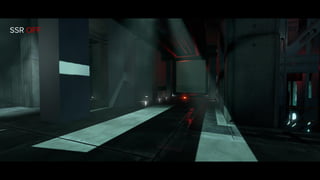
SSR OFF
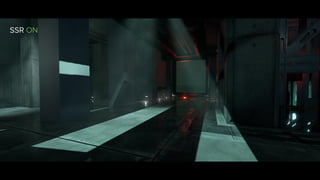
SSR ON
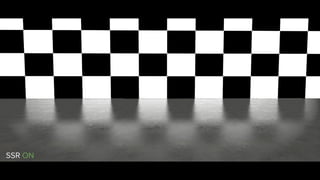
SSR ON
▶ Overview
▶ Rendering
▶ Async Compute
▶ Conclusions
Agenda
Overview
▶ Performance
▶ Not that much frame time to spare
▶ Maximum budget allowed < 2 ms in worst case
▶ Still other features to implement
▶ Particularly true on Xbox One platform
▶ Quality
▶ Plausible BRDF match with our IBL
▶ Contact hardening reflections
▶ Ambient specular occlusion approximation
▶ No aggressive masking based on roughness
Overview - What we wanted
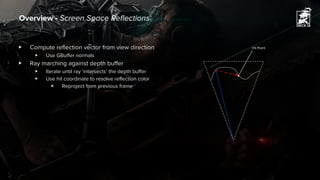
▶ Compute reflection vector from view direction
▶ Use GBuffer normals
▶ Ray marching against depth buffer
▶ Iterate until ray ‘intersects’ the depth buffer
▶ Use hit coordinate to resolve reflection color
▶ Reproject from previous frame
Overview - Screen Space Reflections
Hit Point
Rendering
▶ Tile classification
▶ Ray Marching
▶ Convolve Scene
▶ Resolve Reflections
▶ Deinterleave and Reproject
▶ Async Compute
Rendering - Overview
Rendering - Tile Classification
▶ Some texels are not contributing
▶ Other texels might require extra marching steps
▶ Divide screen in 16x16 texel tiles
▶ Fast ray march
▶ Sparse ray distribution [Wronski14]
▶ 64 rays in 16x16 texel
▶ Non-uniform jittered
▶ Different each frame to maximize coverage
▶ Estimate tile ray hit variance
▶ Discard non contributing tiles
▶ Produce GPU job queue
▶ Encode tile data into uint32
▶ Append to GPU job queue
▶ Consume later on with DispatchIndirect
(0, 4) (0,5) (0,6) (0, 8) ...
GPU job queue
▶ Naive approach is simple but it is also slow
▶ Hi-Z is sexy but might have too much overhead
▶ Depth sample distribution is a serious thing [McGuire14]
▶ Don’t forget you’re bound to screen space data
▶ What about depth thickness?
▶ And sampling coherency?
▶ What else?
▶ (ノಠ益ಠ)ノ彡┻━┻
Rendering - Ray Marching Overview
▶ Ray march at lower resolution (720p, 900p)
▶ Interleaved rendering
▶ Even/Odd checkerboard pattern [El Mansouri16]
▶ Successive passes work with interleaved data
▶ Use low resolution depth buffer
▶ Less bandwidth, better cache usage
▶ No big impact on quality
▶ Importance sampling (GGX distributed rays)
▶ Fixed ray step count
▶ Line segment intersection [Valient14][Timonen15]
▶ Jitter ray start time, reduce banding artifacts
▶ Noise filtered out with temporal reprojection
▶ Process 4 depth values at time to hide VMEM latency (GCN)
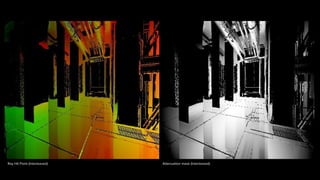
▶ Output hit coordinate in a R10G10B10A2_UNORM target
Rendering - Ray Marching
A B C D
E F G H
I J K L
M N O P
B D
E G
J L
M O
A C
F H
I K
N P
Odd Frame
Checkerboard Pattern
Even Frame
Ray Hit Point (Interleaved) Attenuation mask (Interleaved)
▶ Based on “Screen-Space Cone-Traced Reflections” [Uludag14]
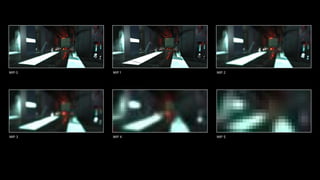
▶ Create convolved scene buffer mip chain
▶ Use previous frame buffer
▶ Includes reflections
▶ Accumulate multiple bounces
▶ 7x7 separable blur in a single dispatch
▶ Derive cone angle from roughness
▶ Best fit to match IBL
▶ Accumulate samples
▶ Use roughness as weight factor
▶ On Consoles
▶ Compute mip chain on same resource
▶ Avoid unnecessary copies
▶ Saves ~0.1 ms
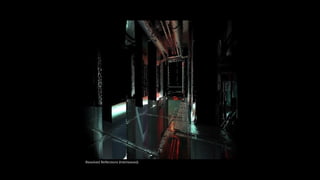
Rendering - Convolve Scene And Resolve Reflections
MIP 0 MIP 1 MIP 2
MIP 3 MIP 4 MIP 5
Resolved Reflections (Interleaved)
▶ Based on “Screen-Space Cone-Traced Reflections” [Uludag14]
▶ Create convolved scene buffer mip chain
▶ Use previous frame buffer
▶ Includes reflections
▶ Accumulate multiple bounces
▶ 7x7 separable blur in a single dispatch
▶ Derive cone angle from roughness
▶ Best fit to match IBL
▶ Accumulate samples
▶ Use roughness as weight factor
▶ On Consoles
▶ Compute mip chain on same resource
▶ Avoid unnecessary copies
▶ Saves ~0.1 ms
Rendering - Convolve Scene And Resolve Reflections
▶ Deinterleave samples into LDS (Local Data Share)
▶ Load samples into LDS
▶ Extra samples required for reconstruct neighbour data
▶ Combine reads with gather
▶ Reconstruct missing samples using neighbors
▶ Temporal Reprojection
▶ Neighbors color data already available in LDS ☺
▶ Clamp history with 3x3 neighborhood AABB [Karis14]
▶ Use reversible tone map operator to reduce fireflies [Karis13]
▶ Local Data Storage (Grandma's Home Remedy)
▶ "Careful With That Axe, Eugene"
▶ Store separate RGB channels
▶ Pack two color channel into a single slot
Rendering - Deinterleave and Reproject
Loaded Samples into LDS
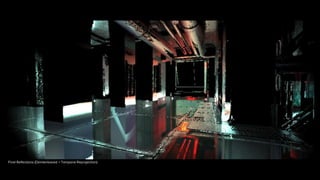
Final Reflections (Deinterleaved + Temporal Reprojection)
Async Compute
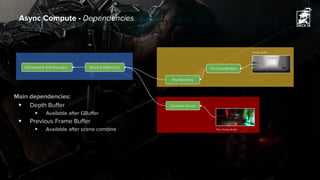
Async Compute - Dependencies
Tile Classification
Convolve Scene
Depth Buffer
Prev Frame Buffer
Deinterleave And Reproject Resolve Reflections
Ray Marching
Main dependencies:
▶ Depth Buffer
▶ Available after GBuffer
▶ Previous Frame Buffer
▶ Available after scene combine
▶ Start computing data in previous frame directly ☺
▶ Async dispatch Convolve Scene right after scene is resolved
▶ Overlaps mostly SAT and Post Process
▶ Bandwidth intensive, limit occupancy
▶ Async dispatch Tile Classification right after GBuffer
▶ Overlaps Decal Rendering
▶ Helps filling the holes in the pipeline
▶ Async dispatch Ray Marching
▶ Remaining Passes
▶ Async Dispatch while Shadow Rendering
▶ Find the right balance with Compute Lighting
▶ Do not use CS if you can use PS instead!
▶ On PC D3D11, no async dispatch available
▶ On GCN, going through CB cache is generally faster [Persson14]
Async Compute - Dispatch
Conclusions
▶ Usually few depth samples are enough
▶ Line segment intersection works great!
▶ Thin objects require more samples
▶ Use hybrid tracing algorithms [Stachowiak15]
▶ Interleaved rendering is awesome!
▶ Easy to use with other passes (e.g. SSAO)
▶ GPU work queues can be useful
▶ Dispatch only required threads
▶ Can overlap other Compute jobs (Console, D3D12, Vulkan, etc.)
▶ Reality check!
▶ Screen space data inherited problems
▶ Extremely easy to break
▶ Maybe invest GPU time in something else? [Pettineo11]
Conclusions - What we learnt
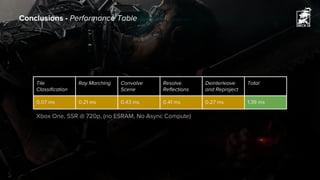
Conclusions - Performance Table
Tile
Classification
Ray Marching Convolve
Scene
Resolve
Reflections
Deinterleave
and Reproject
Total
0.07 ms 0.21 ms 0.43 ms 0.41 ms 0.27 ms 1.39 ms
Xbox One, SSR @ 720p, (no ESRAM, No Async Compute)
References
[ElMonsouri16] Jalal El Mansouri, “Rendering Rainbow Six Siege”, GDC, 2016
[Stachowiak15] Tomasz Stachowiak, “Stochastic Screen-Space Reflections”, SIGGRAPH, 2015
[Timonen15] Ari Silvennoinen and Ville Timonen, “Multi-Scale Global Illumination in Quantum Break”, SIGGRAPH, 2015
[McGuire14] Morgan McGuire and Michael Mara, “Efficient GPU Screen-Space Ray Tracing”, JCGT, 2014
[Uludag14] Yasin Uludag, “Hi-Z Screen-Space Cone-Traced Reflections”, In GPU Pro 5, 2014
[Valiant14] Michal Valient, “Reflections and Volumetrics of Killzone: Shadow Fall”, SIGGRAPH, 2014
[Karis14] Brian Karis, “High-Quality Temporal Supersampling”, SIGGRAPH, 2014
[Wronski14] Bart Wronski, “Assassin’s Creed 4: Road to Next-gen Graphics”, GDC, 2014
[Persson14] Emil Persson, “Low-Level Shader Optimization for Next-Gen and DX11”, GDC, 2014
[Pettineo11] Matt Pettineo, “10 Things that need to die for Next-Gen”,
https://mynameismjp.wordpress.com/2011/12/06/things-that-need-to-die/
[Karis13] Brian Karis, “Tone Mapping”, http://graphicrants.blogspot.de/2013/12/tone-mapping.html
Thank You!
Email: mgiacalone@deck13.com
Twitter: miccode

Screen Space Reflections in The Surge

  • 1.
    Screen Space Reflectionsin Michele Giacalone Graphics Programmer @ Deck13
  • 2.
    ▶ Current workingtitle ▶ Sci-Fi third person action RPG ▶ Exoskeletons! ▶ In-house engine “Fledge” ▶ Multiplatform ▶ PC (D3D11) ▶ Xbox One ▶ PS4 Deck13 - The Surge
  • 3.
    What this talkis NOT about: ▶ Novel rendering technique ▶ Accurate physically based approach ▶ Heavy math formulas Disclaimer
  • 4.
    What this talkIS about: ▶ What worked for us ▶ How we approached the problem ▶ Share ideas that can be used for other techniques Disclaimer
  • 5.
  • 6.
  • 7.
  • 8.
    ▶ Overview ▶ Rendering ▶Async Compute ▶ Conclusions Agenda
  • 9.
  • 10.
    ▶ Performance ▶ Notthat much frame time to spare ▶ Maximum budget allowed < 2 ms in worst case ▶ Still other features to implement ▶ Particularly true on Xbox One platform ▶ Quality ▶ Plausible BRDF match with our IBL ▶ Contact hardening reflections ▶ Ambient specular occlusion approximation ▶ No aggressive masking based on roughness Overview - What we wanted
  • 11.
    ▶ Compute reflectionvector from view direction ▶ Use GBuffer normals ▶ Ray marching against depth buffer ▶ Iterate until ray ‘intersects’ the depth buffer ▶ Use hit coordinate to resolve reflection color ▶ Reproject from previous frame Overview - Screen Space Reflections Hit Point
  • 12.
  • 13.
    ▶ Tile classification ▶Ray Marching ▶ Convolve Scene ▶ Resolve Reflections ▶ Deinterleave and Reproject ▶ Async Compute Rendering - Overview
  • 14.
    Rendering - TileClassification ▶ Some texels are not contributing ▶ Other texels might require extra marching steps ▶ Divide screen in 16x16 texel tiles ▶ Fast ray march ▶ Sparse ray distribution [Wronski14] ▶ 64 rays in 16x16 texel ▶ Non-uniform jittered ▶ Different each frame to maximize coverage ▶ Estimate tile ray hit variance ▶ Discard non contributing tiles ▶ Produce GPU job queue ▶ Encode tile data into uint32 ▶ Append to GPU job queue ▶ Consume later on with DispatchIndirect (0, 4) (0,5) (0,6) (0, 8) ... GPU job queue
  • 15.
    ▶ Naive approachis simple but it is also slow ▶ Hi-Z is sexy but might have too much overhead ▶ Depth sample distribution is a serious thing [McGuire14] ▶ Don’t forget you’re bound to screen space data ▶ What about depth thickness? ▶ And sampling coherency? ▶ What else? ▶ (ノಠ益ಠ)ノ彡┻━┻ Rendering - Ray Marching Overview
  • 16.
    ▶ Ray marchat lower resolution (720p, 900p) ▶ Interleaved rendering ▶ Even/Odd checkerboard pattern [El Mansouri16] ▶ Successive passes work with interleaved data ▶ Use low resolution depth buffer ▶ Less bandwidth, better cache usage ▶ No big impact on quality ▶ Importance sampling (GGX distributed rays) ▶ Fixed ray step count ▶ Line segment intersection [Valient14][Timonen15] ▶ Jitter ray start time, reduce banding artifacts ▶ Noise filtered out with temporal reprojection ▶ Process 4 depth values at time to hide VMEM latency (GCN) ▶ Output hit coordinate in a R10G10B10A2_UNORM target Rendering - Ray Marching A B C D E F G H I J K L M N O P B D E G J L M O A C F H I K N P Odd Frame Checkerboard Pattern Even Frame
  • 17.
    Ray Hit Point(Interleaved) Attenuation mask (Interleaved)
  • 18.
    ▶ Based on“Screen-Space Cone-Traced Reflections” [Uludag14] ▶ Create convolved scene buffer mip chain ▶ Use previous frame buffer ▶ Includes reflections ▶ Accumulate multiple bounces ▶ 7x7 separable blur in a single dispatch ▶ Derive cone angle from roughness ▶ Best fit to match IBL ▶ Accumulate samples ▶ Use roughness as weight factor ▶ On Consoles ▶ Compute mip chain on same resource ▶ Avoid unnecessary copies ▶ Saves ~0.1 ms Rendering - Convolve Scene And Resolve Reflections
  • 19.
    MIP 0 MIP1 MIP 2 MIP 3 MIP 4 MIP 5
  • 20.
  • 21.
    ▶ Based on“Screen-Space Cone-Traced Reflections” [Uludag14] ▶ Create convolved scene buffer mip chain ▶ Use previous frame buffer ▶ Includes reflections ▶ Accumulate multiple bounces ▶ 7x7 separable blur in a single dispatch ▶ Derive cone angle from roughness ▶ Best fit to match IBL ▶ Accumulate samples ▶ Use roughness as weight factor ▶ On Consoles ▶ Compute mip chain on same resource ▶ Avoid unnecessary copies ▶ Saves ~0.1 ms Rendering - Convolve Scene And Resolve Reflections
  • 22.
    ▶ Deinterleave samplesinto LDS (Local Data Share) ▶ Load samples into LDS ▶ Extra samples required for reconstruct neighbour data ▶ Combine reads with gather ▶ Reconstruct missing samples using neighbors ▶ Temporal Reprojection ▶ Neighbors color data already available in LDS ☺ ▶ Clamp history with 3x3 neighborhood AABB [Karis14] ▶ Use reversible tone map operator to reduce fireflies [Karis13] ▶ Local Data Storage (Grandma's Home Remedy) ▶ "Careful With That Axe, Eugene" ▶ Store separate RGB channels ▶ Pack two color channel into a single slot Rendering - Deinterleave and Reproject Loaded Samples into LDS
  • 23.
    Final Reflections (Deinterleaved+ Temporal Reprojection)
  • 24.
  • 25.
    Async Compute -Dependencies Tile Classification Convolve Scene Depth Buffer Prev Frame Buffer Deinterleave And Reproject Resolve Reflections Ray Marching Main dependencies: ▶ Depth Buffer ▶ Available after GBuffer ▶ Previous Frame Buffer ▶ Available after scene combine
  • 26.
    ▶ Start computingdata in previous frame directly ☺ ▶ Async dispatch Convolve Scene right after scene is resolved ▶ Overlaps mostly SAT and Post Process ▶ Bandwidth intensive, limit occupancy ▶ Async dispatch Tile Classification right after GBuffer ▶ Overlaps Decal Rendering ▶ Helps filling the holes in the pipeline ▶ Async dispatch Ray Marching ▶ Remaining Passes ▶ Async Dispatch while Shadow Rendering ▶ Find the right balance with Compute Lighting ▶ Do not use CS if you can use PS instead! ▶ On PC D3D11, no async dispatch available ▶ On GCN, going through CB cache is generally faster [Persson14] Async Compute - Dispatch
  • 27.
  • 28.
    ▶ Usually fewdepth samples are enough ▶ Line segment intersection works great! ▶ Thin objects require more samples ▶ Use hybrid tracing algorithms [Stachowiak15] ▶ Interleaved rendering is awesome! ▶ Easy to use with other passes (e.g. SSAO) ▶ GPU work queues can be useful ▶ Dispatch only required threads ▶ Can overlap other Compute jobs (Console, D3D12, Vulkan, etc.) ▶ Reality check! ▶ Screen space data inherited problems ▶ Extremely easy to break ▶ Maybe invest GPU time in something else? [Pettineo11] Conclusions - What we learnt
  • 29.
    Conclusions - PerformanceTable Tile Classification Ray Marching Convolve Scene Resolve Reflections Deinterleave and Reproject Total 0.07 ms 0.21 ms 0.43 ms 0.41 ms 0.27 ms 1.39 ms Xbox One, SSR @ 720p, (no ESRAM, No Async Compute)
  • 30.
    References [ElMonsouri16] Jalal ElMansouri, “Rendering Rainbow Six Siege”, GDC, 2016 [Stachowiak15] Tomasz Stachowiak, “Stochastic Screen-Space Reflections”, SIGGRAPH, 2015 [Timonen15] Ari Silvennoinen and Ville Timonen, “Multi-Scale Global Illumination in Quantum Break”, SIGGRAPH, 2015 [McGuire14] Morgan McGuire and Michael Mara, “Efficient GPU Screen-Space Ray Tracing”, JCGT, 2014 [Uludag14] Yasin Uludag, “Hi-Z Screen-Space Cone-Traced Reflections”, In GPU Pro 5, 2014 [Valiant14] Michal Valient, “Reflections and Volumetrics of Killzone: Shadow Fall”, SIGGRAPH, 2014 [Karis14] Brian Karis, “High-Quality Temporal Supersampling”, SIGGRAPH, 2014 [Wronski14] Bart Wronski, “Assassin’s Creed 4: Road to Next-gen Graphics”, GDC, 2014 [Persson14] Emil Persson, “Low-Level Shader Optimization for Next-Gen and DX11”, GDC, 2014 [Pettineo11] Matt Pettineo, “10 Things that need to die for Next-Gen”, https://mynameismjp.wordpress.com/2011/12/06/things-that-need-to-die/ [Karis13] Brian Karis, “Tone Mapping”, http://graphicrants.blogspot.de/2013/12/tone-mapping.html
  • 31.