Ivan Nevraev
Microsoft
Introduction to Direct3D 12
Goals & Assumptions
• Preview of Direct3D 12
• More API details in future talks
• Assuming familiarity with Direct3D 11
Direct3D 12 API – Goals
• Console API efficiency and performance
• Reduce CPU overhead
• Increase scalability across multiple CPU cores
• Greater developer control
• Superset of D3D 11 rendering functionality
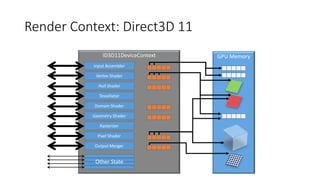
ID3D11DeviceContext
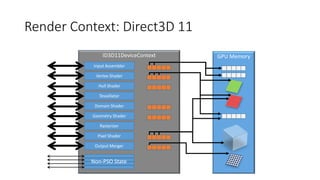
Render Context: Direct3D 11
Input Assembler
Vertex Shader
Hull Shader
Tessellator
Rasterizer
Domain Shader
Geometry Shader
Pixel Shader
Output Merger
GPU Memory
Other State
CPU Overhead: Changing Pipeline State
• Direct3D 10 reduced number of state objects
• Still mismatched from hardware state
• Drivers resolve state at Draw
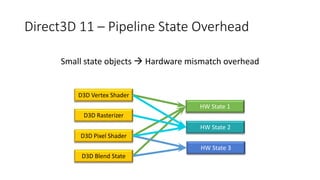
Direct3D 11 – Pipeline State Overhead
Small state objects  Hardware mismatch overhead
HW State 1
HW State 2
D3D Vertex Shader
D3D Rasterizer
D3D Pixel Shader
D3D Blend State
HW State 3
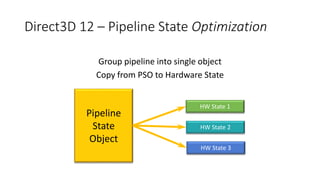
Direct3D 12 – Pipeline State Optimization
Group pipeline into single object
Copy from PSO to Hardware State
HW State 1
HW State 2
Pipeline
State
Object
HW State 3
ID3D11DeviceContext
Render Context: Direct3D 11
Input Assembler
Vertex Shader
Hull Shader
Tessellator
Rasterizer
Domain Shader
Geometry Shader
Pixel Shader
Output Merger
GPU Memory
Non-PSO State
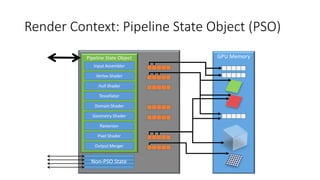
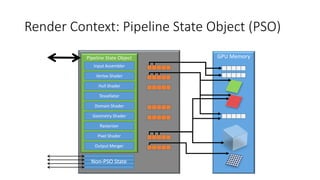
Render Context: Pipeline State Object (PSO)
Pipeline State Object
Input Assembler
Vertex Shader
Hull Shader
Tessellator
Rasterizer
Domain Shader
Geometry Shader
Pixel Shader
Output Merger
GPU Memory
Non-PSO State
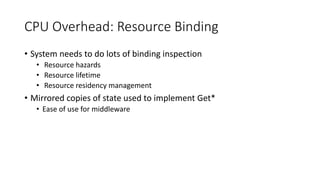
CPU Overhead: Resource Binding
• System needs to do lots of binding inspection
• Resource hazards
• Resource lifetime
• Resource residency management
• Mirrored copies of state used to implement Get*
• Ease of use for middleware
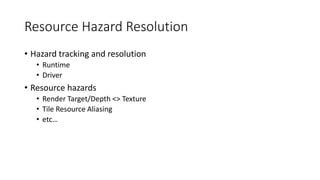
Resource Hazard Resolution
• Hazard tracking and resolution
• Runtime
• Driver
• Resource hazards
• Render Target/Depth <> Texture
• Tile Resource Aliasing
• etc…
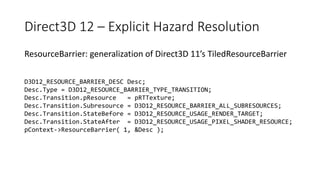
Direct3D 12 – Explicit Hazard Resolution
ResourceBarrier: generalization of Direct3D 11’s TiledResourceBarrier
D3D12_RESOURCE_BARRIER_DESC Desc;
Desc.Type = D3D12_RESOURCE_BARRIER_TYPE_TRANSITION;
Desc.Transition.pResource = pRTTexture;
Desc.Transition.Subresource = D3D12_RESOURCE_BARRIER_ALL_SUBRESOURCES;
Desc.Transition.StateBefore = D3D12_RESOURCE_USAGE_RENDER_TARGET;
Desc.Transition.StateAfter = D3D12_RESOURCE_USAGE_PIXEL_SHADER_RESOURCE;
pContext->ResourceBarrier( 1, &Desc );
Resource Lifetime and Residency
• Explicit application control over resource lifetime
• Resource destruction is immediate
• Application must ensure no queued GPU work
• Use Fence API to track GPU progress
• One fence per-frame is well amortized
• Explicit application control over resource residency
• Application declares resources currently in use on GPU
Remove State Mirroring
• Application responsibility to communicate current state to
middleware
Render Context: Pipeline State Object (PSO)
Pipeline State Object
Input Assembler
Vertex Shader
Hull Shader
Tessellator
Rasterizer
Domain Shader
Geometry Shader
Pixel Shader
Output Merger
GPU Memory
Non-PSO State
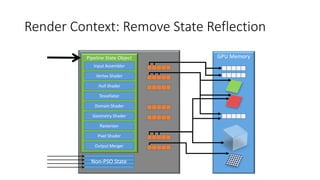
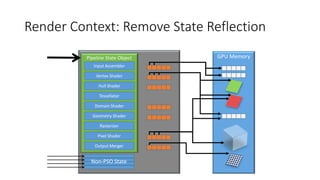
Render Context: Remove State Reflection
Pipeline State Object
Input Assembler
Vertex Shader
Hull Shader
Tessellator
Rasterizer
Domain Shader
Geometry Shader
Pixel Shader
Output Merger
GPU Memory
Non-PSO State
CPU Overhead: Redundant Resource Binding
• Streaming identical resource bindings frame over frame
• Partial changes require copying all bindings
Direct3D 12: Descriptor Heaps & Tables
• Scales across extremes of HW capability
• Unified approach serves breadth of app binding flows
• Streaming changes to bindings
• Reuse of static bindings
• And everything between
• Dynamic indexing of shader resources
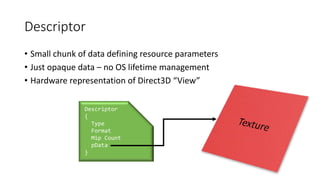
Descriptor
• Small chunk of data defining resource parameters
• Just opaque data – no OS lifetime management
• Hardware representation of Direct3D “View”
Descriptor
{
Type
Format
Mip Count
pData
}
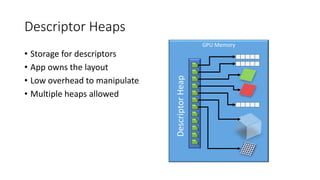
Descriptor Heaps
• Storage for descriptors
• App owns the layout
• Low overhead to manipulate
• Multiple heaps allowed
GPU Memory
DescriptorHeap
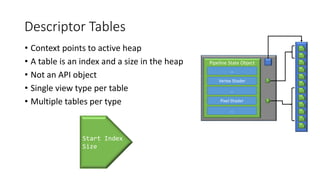
Descriptor Tables
• Context points to active heap
• A table is an index and a size in the heap
• Not an API object
• Single view type per table
• Multiple tables per type
Pipeline State Object
…
Vertex Shader
…
Pixel Shader
…
Start Index
Size
Render Context: Remove State Reflection
Pipeline State Object
Input Assembler
Vertex Shader
Hull Shader
Tessellator
Rasterizer
Domain Shader
Geometry Shader
Pixel Shader
Output Merger
GPU Memory
Non-PSO State
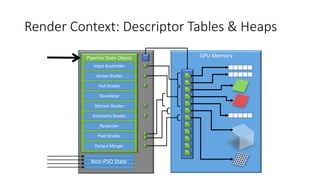
Render Context: Descriptor Tables & Heaps
Pipeline State Object
Input Assembler
Vertex Shader
Hull Shader
Tessellator
Rasterizer
Domain Shader
Geometry Shader
Pixel Shader
Output Merger
GPU Memory
Non-PSO State
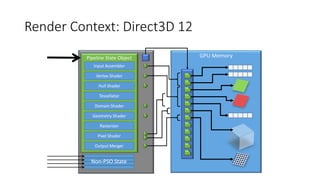
Render Context: Direct3D 12
Pipeline State Object
Input Assembler
Vertex Shader
Hull Shader
Tessellator
Rasterizer
Domain Shader
Geometry Shader
Pixel Shader
Output Merger
GPU Memory
Non-PSO State
CPU Overhead: Redundant Render Commands
• Typical applications send identical sequences of commands frame-
over-frame
• Measured 90-95% coherence on typical modern games
Bundles
• Small command list
• Recorded once
• Reused multiple times
• Free threaded creation
• Inherits from execute site
• Non-PSO State
• Descriptor Table Bindings
• Restrictions to ensure efficient driver implementation
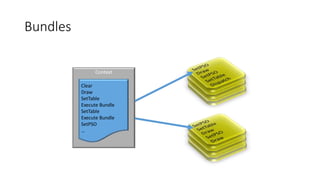
Bundles
Context
Clear
Draw
SetTable
Execute Bundle
SetTable
Execute Bundle
SetPSO
…
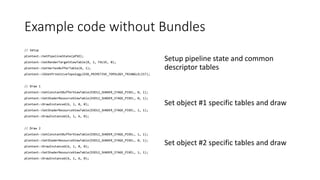
Example code without Bundles
// Setup
pContext->SetPipelineState(pPSO);
pContext->SetRenderTargetViewTable(0, 1, FALSE, 0);
pContext->SetVertexBufferTable(0, 1);
pContext->IASetPrimitiveTopology(D3D_PRIMITIVE_TOPOLOGY_TRIANGLELIST);
// Draw 1
pContext->SetConstantBufferViewTable(D3D12_SHADER_STAGE_PIXEL, 0, 1);
pContext->SetShaderResourceViewTable(D3D12_SHADER_STAGE_PIXEL, 0, 1);
pContext->DrawInstanced(6, 1, 0, 0);
pContext->SetShaderResourceViewTable(D3D12_SHADER_STAGE_PIXEL, 1, 1);
pContext->DrawInstanced(6, 1, 6, 0);
// Draw 2
pContext->SetConstantBufferViewTable(D3D12_SHADER_STAGE_PIXEL, 1, 1);
pContext->SetShaderResourceViewTable(D3D12_SHADER_STAGE_PIXEL, 0, 1);
pContext->DrawInstanced(6, 1, 0, 0);
pContext->SetShaderResourceViewTable(D3D12_SHADER_STAGE_PIXEL, 1, 1);
pContext->DrawInstanced(6, 1, 6, 0);
Set object #1 specific tables and draw
Setup pipeline state and common
descriptor tables
Set object #2 specific tables and draw
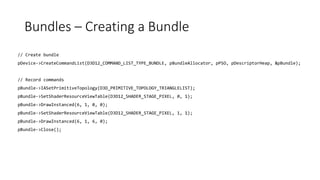
Bundles – Creating a Bundle
// Create bundle
pDevice->CreateCommandList(D3D12_COMMAND_LIST_TYPE_BUNDLE, pBundleAllocator, pPSO, pDescriptorHeap, &pBundle);
// Record commands
pBundle->IASetPrimitiveTopology(D3D_PRIMITIVE_TOPOLOGY_TRIANGLELIST);
pBundle->SetShaderResourceViewTable(D3D12_SHADER_STAGE_PIXEL, 0, 1);
pBundle->DrawInstanced(6, 1, 0, 0);
pBundle->SetShaderResourceViewTable(D3D12_SHADER_STAGE_PIXEL, 1, 1);
pBundle->DrawInstanced(6, 1, 6, 0);
pBundle->Close();
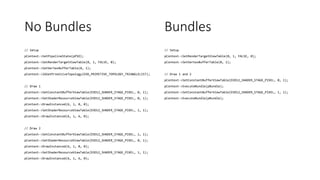
No Bundles
// Setup
pContext->SetPipelineState(pPSO);
pContext->SetRenderTargetViewTable(0, 1, FALSE, 0);
pContext->SetVertexBufferTable(0, 1);
pContext->IASetPrimitiveTopology(D3D_PRIMITIVE_TOPOLOGY_TRIANGLELIST);
// Draw 1
pContext->SetConstantBufferViewTable(D3D12_SHADER_STAGE_PIXEL, 0, 1);
pContext->SetShaderResourceViewTable(D3D12_SHADER_STAGE_PIXEL, 0, 1);
pContext->DrawInstanced(6, 1, 0, 0);
pContext->SetShaderResourceViewTable(D3D12_SHADER_STAGE_PIXEL, 1, 1);
pContext->DrawInstanced(6, 1, 6, 0);
// Draw 2
pContext->SetConstantBufferViewTable(D3D12_SHADER_STAGE_PIXEL, 1, 1);
pContext->SetShaderResourceViewTable(D3D12_SHADER_STAGE_PIXEL, 0, 1);
pContext->DrawInstanced(6, 1, 0, 0);
pContext->SetShaderResourceViewTable(D3D12_SHADER_STAGE_PIXEL, 1, 1);
pContext->DrawInstanced(6, 1, 6, 0);
// Setup
pContext->SetRenderTargetViewTable(0, 1, FALSE, 0);
pContext->SetVertexBufferTable(0, 1);
// Draw 1 and 2
pContext->SetConstantBufferViewTable(D3D12_SHADER_STAGE_PIXEL, 0, 1);
pContext->ExecuteBundle(pBundle);
pContext->SetConstantBufferViewTable(D3D12_SHADER_STAGE_PIXEL, 1, 1);
pContext->ExecuteBundle(pBundle);
Bundles
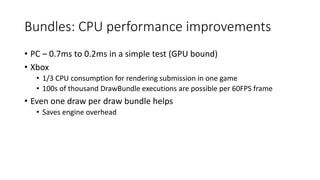
Bundles: CPU performance improvements
• PC – 0.7ms to 0.2ms in a simple test (GPU bound)
• Xbox
• 1/3 CPU consumption for rendering submission in one game
• 100s of thousand DrawBundle executions are possible per 60FPS frame
• Even one draw per draw bundle helps
• Saves engine overhead
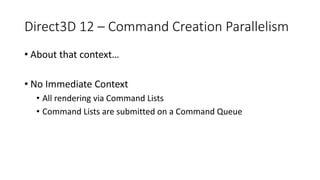
Direct3D 12 – Command Creation Parallelism
• About that context…
• No Immediate Context
• All rendering via Command Lists
• Command Lists are submitted on a Command Queue
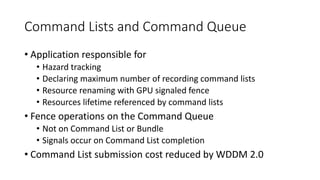
Command Lists and Command Queue
• Application responsible for
• Hazard tracking
• Declaring maximum number of recording command lists
• Resource renaming with GPU signaled fence
• Resources lifetime referenced by command lists
• Fence operations on the Command Queue
• Not on Command List or Bundle
• Signals occur on Command List completion
• Command List submission cost reduced by WDDM 2.0
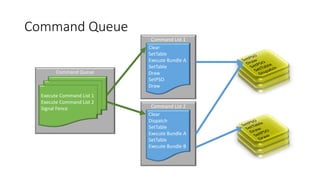
Command Queue
Command Queue
Execute Command List 1
Execute Command List 2
Signal Fence
Command List 1
Clear
SetTable
Execute Bundle A
SetTable
Draw
SetPSO
Draw
Command List 2
Clear
Dispatch
SetTable
Execute Bundle A
SetTable
Execute Bundle B
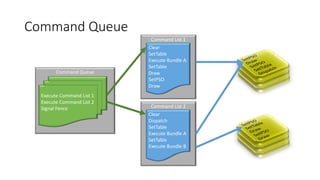
Command Queue
Command Queue
Execute Command List 1
Execute Command List 2
Signal Fence
Command List 1
Clear
SetTable
Execute Bundle A
SetTable
Draw
SetPSO
Draw
Command List 2
Clear
Dispatch
SetTable
Execute Bundle A
SetTable
Execute Bundle B
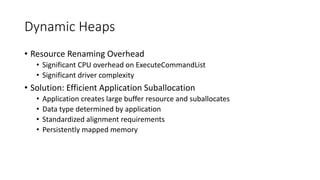
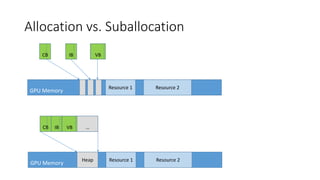
Dynamic Heaps
• Resource Renaming Overhead
• Significant CPU overhead on ExecuteCommandList
• Significant driver complexity
• Solution: Efficient Application Suballocation
• Application creates large buffer resource and suballocates
• Data type determined by application
• Standardized alignment requirements
• Persistently mapped memory
Allocation vs. Suballocation
GPU Memory
Resource 2Resource 1Heap
CB IB VB …
GPU Memory
Resource 2Resource 1
CB IB VB
Direct3D 12 – CPU Parallelism
• Direct3D 12 has several parallel tasks
• Command List Generation
• Bundle Generation
• PSO Creation
• Resource Creation
• Dynamic Data Generation
• Runtime and driver designed for parallelism
• Developer chooses what to make parallel
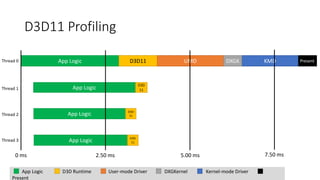
D3D11 Profiling
PresentApp Logic D3D11 UMD KMDDXGK
App Logic
D3D
11
App Logic D3D
11
App Logic D3D
11
Thread 0
Thread 1
Thread 2
Thread 3
0 ms 2.50 ms 5.00 ms 7.50 ms
App Logic D3D Runtime User-mode Driver DXGKernel Kernel-mode Driver
Present
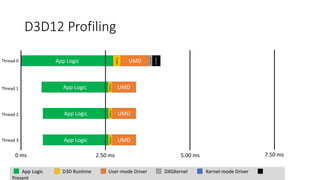
D3D12 Profiling
App Logic UMD
D3D12
Present
DXGK/KMD
App Logic UMD
D3D12
App Logic UMD
D3D12
App Logic UMD
D3D12
Thread 0
Thread 1
Thread 2
Thread 3
0 ms 2.50 ms 5.00 ms 7.50 ms
App Logic D3D Runtime User-mode Driver DXGKernel Kernel-mode Driver
Present
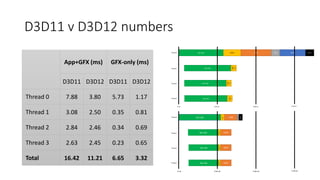
D3D11 v D3D12 numbers
App Logic UMD
D3D12
Present
DXGK/KMD
App Logic UMD
D3D12
App Logic UMD
D3D12
App Logic UMD
D3D12
Thread 0
Thread 1
Thread 2
Thread 3
0 ms 2.50 ms 5.00 ms 7.50 ms
PresentApp Logic D3D11 UMD KMDDXGK
App Logic
D3D
11
App Logic
D3D
11
App Logic
D3D1
1
Thread 0
Thread 1
Thread 2
Thread 3
0 ms 2.50 ms 5.00 ms 7.50 ms
App+GFX (ms) GFX-only (ms)
D3D11 D3D12 D3D11 D3D12
Thread 0 7.88 3.80 5.73 1.17
Thread 1 3.08 2.50 0.35 0.81
Thread 2 2.84 2.46 0.34 0.69
Thread 3 2.63 2.45 0.23 0.65
Total 16.42 11.21 6.65 3.32
Summary
• Greater CPU Efficiency
• Greater CPU Scalability
• Greater Developer Control
• CPU Parallelism
• Resource Lifetime
• Memory Usage
The End

Introduction to Direct 3D 12 by Ivan Nevraev

  • 1.
  • 2.
    Goals & Assumptions •Preview of Direct3D 12 • More API details in future talks • Assuming familiarity with Direct3D 11
  • 3.
    Direct3D 12 API– Goals • Console API efficiency and performance • Reduce CPU overhead • Increase scalability across multiple CPU cores • Greater developer control • Superset of D3D 11 rendering functionality
  • 4.
    ID3D11DeviceContext Render Context: Direct3D11 Input Assembler Vertex Shader Hull Shader Tessellator Rasterizer Domain Shader Geometry Shader Pixel Shader Output Merger GPU Memory Other State
  • 5.
    CPU Overhead: ChangingPipeline State • Direct3D 10 reduced number of state objects • Still mismatched from hardware state • Drivers resolve state at Draw
  • 6.
    Direct3D 11 –Pipeline State Overhead Small state objects  Hardware mismatch overhead HW State 1 HW State 2 D3D Vertex Shader D3D Rasterizer D3D Pixel Shader D3D Blend State HW State 3
  • 7.
    Direct3D 12 –Pipeline State Optimization Group pipeline into single object Copy from PSO to Hardware State HW State 1 HW State 2 Pipeline State Object HW State 3
  • 8.
    ID3D11DeviceContext Render Context: Direct3D11 Input Assembler Vertex Shader Hull Shader Tessellator Rasterizer Domain Shader Geometry Shader Pixel Shader Output Merger GPU Memory Non-PSO State
  • 9.
    Render Context: PipelineState Object (PSO) Pipeline State Object Input Assembler Vertex Shader Hull Shader Tessellator Rasterizer Domain Shader Geometry Shader Pixel Shader Output Merger GPU Memory Non-PSO State
  • 10.
    CPU Overhead: ResourceBinding • System needs to do lots of binding inspection • Resource hazards • Resource lifetime • Resource residency management • Mirrored copies of state used to implement Get* • Ease of use for middleware
  • 11.
    Resource Hazard Resolution •Hazard tracking and resolution • Runtime • Driver • Resource hazards • Render Target/Depth <> Texture • Tile Resource Aliasing • etc…
  • 12.
    Direct3D 12 –Explicit Hazard Resolution ResourceBarrier: generalization of Direct3D 11’s TiledResourceBarrier D3D12_RESOURCE_BARRIER_DESC Desc; Desc.Type = D3D12_RESOURCE_BARRIER_TYPE_TRANSITION; Desc.Transition.pResource = pRTTexture; Desc.Transition.Subresource = D3D12_RESOURCE_BARRIER_ALL_SUBRESOURCES; Desc.Transition.StateBefore = D3D12_RESOURCE_USAGE_RENDER_TARGET; Desc.Transition.StateAfter = D3D12_RESOURCE_USAGE_PIXEL_SHADER_RESOURCE; pContext->ResourceBarrier( 1, &Desc );
  • 13.
    Resource Lifetime andResidency • Explicit application control over resource lifetime • Resource destruction is immediate • Application must ensure no queued GPU work • Use Fence API to track GPU progress • One fence per-frame is well amortized • Explicit application control over resource residency • Application declares resources currently in use on GPU
  • 14.
    Remove State Mirroring •Application responsibility to communicate current state to middleware
  • 15.
    Render Context: PipelineState Object (PSO) Pipeline State Object Input Assembler Vertex Shader Hull Shader Tessellator Rasterizer Domain Shader Geometry Shader Pixel Shader Output Merger GPU Memory Non-PSO State
  • 16.
    Render Context: RemoveState Reflection Pipeline State Object Input Assembler Vertex Shader Hull Shader Tessellator Rasterizer Domain Shader Geometry Shader Pixel Shader Output Merger GPU Memory Non-PSO State
  • 17.
    CPU Overhead: RedundantResource Binding • Streaming identical resource bindings frame over frame • Partial changes require copying all bindings
  • 18.
    Direct3D 12: DescriptorHeaps & Tables • Scales across extremes of HW capability • Unified approach serves breadth of app binding flows • Streaming changes to bindings • Reuse of static bindings • And everything between • Dynamic indexing of shader resources
  • 19.
    Descriptor • Small chunkof data defining resource parameters • Just opaque data – no OS lifetime management • Hardware representation of Direct3D “View” Descriptor { Type Format Mip Count pData }
  • 20.
    Descriptor Heaps • Storagefor descriptors • App owns the layout • Low overhead to manipulate • Multiple heaps allowed GPU Memory DescriptorHeap
  • 21.
    Descriptor Tables • Contextpoints to active heap • A table is an index and a size in the heap • Not an API object • Single view type per table • Multiple tables per type Pipeline State Object … Vertex Shader … Pixel Shader … Start Index Size
  • 22.
    Render Context: RemoveState Reflection Pipeline State Object Input Assembler Vertex Shader Hull Shader Tessellator Rasterizer Domain Shader Geometry Shader Pixel Shader Output Merger GPU Memory Non-PSO State
  • 23.
    Render Context: DescriptorTables & Heaps Pipeline State Object Input Assembler Vertex Shader Hull Shader Tessellator Rasterizer Domain Shader Geometry Shader Pixel Shader Output Merger GPU Memory Non-PSO State
  • 24.
    Render Context: Direct3D12 Pipeline State Object Input Assembler Vertex Shader Hull Shader Tessellator Rasterizer Domain Shader Geometry Shader Pixel Shader Output Merger GPU Memory Non-PSO State
  • 25.
    CPU Overhead: RedundantRender Commands • Typical applications send identical sequences of commands frame- over-frame • Measured 90-95% coherence on typical modern games
  • 26.
    Bundles • Small commandlist • Recorded once • Reused multiple times • Free threaded creation • Inherits from execute site • Non-PSO State • Descriptor Table Bindings • Restrictions to ensure efficient driver implementation
  • 27.
  • 28.
    Example code withoutBundles // Setup pContext->SetPipelineState(pPSO); pContext->SetRenderTargetViewTable(0, 1, FALSE, 0); pContext->SetVertexBufferTable(0, 1); pContext->IASetPrimitiveTopology(D3D_PRIMITIVE_TOPOLOGY_TRIANGLELIST); // Draw 1 pContext->SetConstantBufferViewTable(D3D12_SHADER_STAGE_PIXEL, 0, 1); pContext->SetShaderResourceViewTable(D3D12_SHADER_STAGE_PIXEL, 0, 1); pContext->DrawInstanced(6, 1, 0, 0); pContext->SetShaderResourceViewTable(D3D12_SHADER_STAGE_PIXEL, 1, 1); pContext->DrawInstanced(6, 1, 6, 0); // Draw 2 pContext->SetConstantBufferViewTable(D3D12_SHADER_STAGE_PIXEL, 1, 1); pContext->SetShaderResourceViewTable(D3D12_SHADER_STAGE_PIXEL, 0, 1); pContext->DrawInstanced(6, 1, 0, 0); pContext->SetShaderResourceViewTable(D3D12_SHADER_STAGE_PIXEL, 1, 1); pContext->DrawInstanced(6, 1, 6, 0); Set object #1 specific tables and draw Setup pipeline state and common descriptor tables Set object #2 specific tables and draw
  • 29.
    Bundles – Creatinga Bundle // Create bundle pDevice->CreateCommandList(D3D12_COMMAND_LIST_TYPE_BUNDLE, pBundleAllocator, pPSO, pDescriptorHeap, &pBundle); // Record commands pBundle->IASetPrimitiveTopology(D3D_PRIMITIVE_TOPOLOGY_TRIANGLELIST); pBundle->SetShaderResourceViewTable(D3D12_SHADER_STAGE_PIXEL, 0, 1); pBundle->DrawInstanced(6, 1, 0, 0); pBundle->SetShaderResourceViewTable(D3D12_SHADER_STAGE_PIXEL, 1, 1); pBundle->DrawInstanced(6, 1, 6, 0); pBundle->Close();
  • 30.
    No Bundles // Setup pContext->SetPipelineState(pPSO); pContext->SetRenderTargetViewTable(0,1, FALSE, 0); pContext->SetVertexBufferTable(0, 1); pContext->IASetPrimitiveTopology(D3D_PRIMITIVE_TOPOLOGY_TRIANGLELIST); // Draw 1 pContext->SetConstantBufferViewTable(D3D12_SHADER_STAGE_PIXEL, 0, 1); pContext->SetShaderResourceViewTable(D3D12_SHADER_STAGE_PIXEL, 0, 1); pContext->DrawInstanced(6, 1, 0, 0); pContext->SetShaderResourceViewTable(D3D12_SHADER_STAGE_PIXEL, 1, 1); pContext->DrawInstanced(6, 1, 6, 0); // Draw 2 pContext->SetConstantBufferViewTable(D3D12_SHADER_STAGE_PIXEL, 1, 1); pContext->SetShaderResourceViewTable(D3D12_SHADER_STAGE_PIXEL, 0, 1); pContext->DrawInstanced(6, 1, 0, 0); pContext->SetShaderResourceViewTable(D3D12_SHADER_STAGE_PIXEL, 1, 1); pContext->DrawInstanced(6, 1, 6, 0); // Setup pContext->SetRenderTargetViewTable(0, 1, FALSE, 0); pContext->SetVertexBufferTable(0, 1); // Draw 1 and 2 pContext->SetConstantBufferViewTable(D3D12_SHADER_STAGE_PIXEL, 0, 1); pContext->ExecuteBundle(pBundle); pContext->SetConstantBufferViewTable(D3D12_SHADER_STAGE_PIXEL, 1, 1); pContext->ExecuteBundle(pBundle); Bundles
  • 31.
    Bundles: CPU performanceimprovements • PC – 0.7ms to 0.2ms in a simple test (GPU bound) • Xbox • 1/3 CPU consumption for rendering submission in one game • 100s of thousand DrawBundle executions are possible per 60FPS frame • Even one draw per draw bundle helps • Saves engine overhead
  • 32.
    Direct3D 12 –Command Creation Parallelism • About that context… • No Immediate Context • All rendering via Command Lists • Command Lists are submitted on a Command Queue
  • 33.
    Command Lists andCommand Queue • Application responsible for • Hazard tracking • Declaring maximum number of recording command lists • Resource renaming with GPU signaled fence • Resources lifetime referenced by command lists • Fence operations on the Command Queue • Not on Command List or Bundle • Signals occur on Command List completion • Command List submission cost reduced by WDDM 2.0
  • 34.
    Command Queue Command Queue ExecuteCommand List 1 Execute Command List 2 Signal Fence Command List 1 Clear SetTable Execute Bundle A SetTable Draw SetPSO Draw Command List 2 Clear Dispatch SetTable Execute Bundle A SetTable Execute Bundle B
  • 35.
    Command Queue Command Queue ExecuteCommand List 1 Execute Command List 2 Signal Fence Command List 1 Clear SetTable Execute Bundle A SetTable Draw SetPSO Draw Command List 2 Clear Dispatch SetTable Execute Bundle A SetTable Execute Bundle B
  • 36.
    Dynamic Heaps • ResourceRenaming Overhead • Significant CPU overhead on ExecuteCommandList • Significant driver complexity • Solution: Efficient Application Suballocation • Application creates large buffer resource and suballocates • Data type determined by application • Standardized alignment requirements • Persistently mapped memory
  • 37.
    Allocation vs. Suballocation GPUMemory Resource 2Resource 1Heap CB IB VB … GPU Memory Resource 2Resource 1 CB IB VB
  • 38.
    Direct3D 12 –CPU Parallelism • Direct3D 12 has several parallel tasks • Command List Generation • Bundle Generation • PSO Creation • Resource Creation • Dynamic Data Generation • Runtime and driver designed for parallelism • Developer chooses what to make parallel
  • 39.
    D3D11 Profiling PresentApp LogicD3D11 UMD KMDDXGK App Logic D3D 11 App Logic D3D 11 App Logic D3D 11 Thread 0 Thread 1 Thread 2 Thread 3 0 ms 2.50 ms 5.00 ms 7.50 ms App Logic D3D Runtime User-mode Driver DXGKernel Kernel-mode Driver Present
  • 40.
    D3D12 Profiling App LogicUMD D3D12 Present DXGK/KMD App Logic UMD D3D12 App Logic UMD D3D12 App Logic UMD D3D12 Thread 0 Thread 1 Thread 2 Thread 3 0 ms 2.50 ms 5.00 ms 7.50 ms App Logic D3D Runtime User-mode Driver DXGKernel Kernel-mode Driver Present
  • 41.
    D3D11 v D3D12numbers App Logic UMD D3D12 Present DXGK/KMD App Logic UMD D3D12 App Logic UMD D3D12 App Logic UMD D3D12 Thread 0 Thread 1 Thread 2 Thread 3 0 ms 2.50 ms 5.00 ms 7.50 ms PresentApp Logic D3D11 UMD KMDDXGK App Logic D3D 11 App Logic D3D 11 App Logic D3D1 1 Thread 0 Thread 1 Thread 2 Thread 3 0 ms 2.50 ms 5.00 ms 7.50 ms App+GFX (ms) GFX-only (ms) D3D11 D3D12 D3D11 D3D12 Thread 0 7.88 3.80 5.73 1.17 Thread 1 3.08 2.50 0.35 0.81 Thread 2 2.84 2.46 0.34 0.69 Thread 3 2.63 2.45 0.23 0.65 Total 16.42 11.21 6.65 3.32
  • 42.
    Summary • Greater CPUEfficiency • Greater CPU Scalability • Greater Developer Control • CPU Parallelism • Resource Lifetime • Memory Usage
  • 43.