TWO -LEVEL DIRECTORY


      http://raj-os.blogspot.in   1
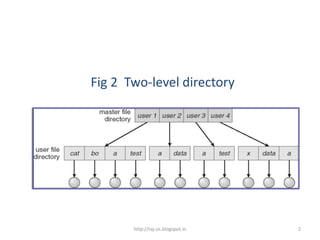
Fig 2 Two-level directory


       http://raj-os.blogspot.in   2
Features

• System maintains a master file directory ( MFD )
• A separate directory for each user
      – user file directory ( UFD )
• Each UFD has similar structure
• A UFD lists files of a single user
• MFD contains one entry for each user
• Each entry points to the UFD of that user
• User name and a file name constitute a path name

                        http://raj-os.blogspot.in    3
Advantages

• Solves the name collision problem

      -Different users may have files with same names


• Effective isolation of one user from others

• Efficient searching


                         http://raj-os.blogspot.in      4
Limitations

Sharing of files by different users is difficult
• User must know path name to access a file in other user’s
  directory

• Some systems do not allow sharing of files


                         http://raj-os.blogspot.in            5
TREE-STRUCTURED DIRECTORY


        http://raj-os.blogspot.in   6
Tree-structured Directory


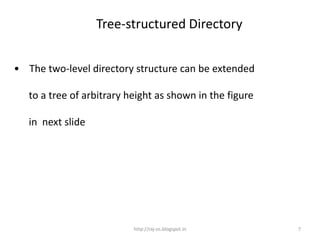
• The two-level directory structure can be extended

   to a tree of arbitrary height as shown in the figure

   in next slide


                           http://raj-os.blogspot.in      7
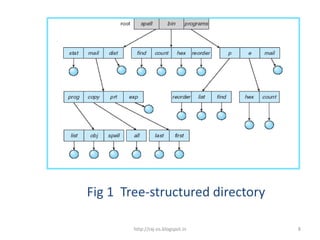
Fig 1 Tree-structured directory

        http://raj-os.blogspot.in   8
Tree is the most common directory structure


                 http://raj-os.blogspot.in    9
Examples of systems supporting tree structure

• MS-DOS

• UNIX


                   http://raj-os.blogspot.in     10
Tree is the most common directory structure
                             Features
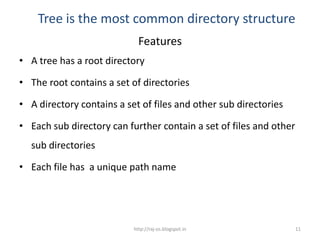
• A tree has a root directory

• The root contains a set of directories

• A directory contains a set of files and other sub directories

• Each sub directory can further contain a set of files and other
  sub directories

• Each file has a unique path name


                           http://raj-os.blogspot.in                11
Tree is the most common Directory Structure
                       Path Name
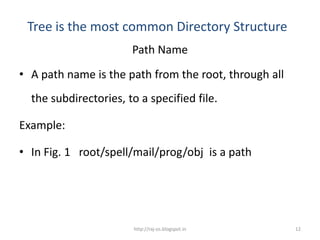
• A path name is the path from the root, through all
  the subdirectories, to a specified file.

Example:

• In Fig. 1 root/spell/mail/prog/obj is a path


                        http://raj-os.blogspot.in      12
Tree is the most common directory structure
                        Some more points
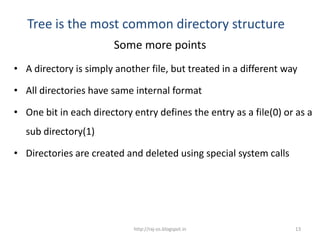
• A directory is simply another file, but treated in a different way

• All directories have same internal format

• One bit in each directory entry defines the entry as a file(0) or as a
  sub directory(1)

• Directories are created and deleted using special system calls


                            http://raj-os.blogspot.in              13
Tree is the most common directory structure
                    Current Directory

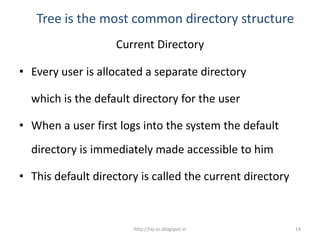
• Every user is allocated a separate directory

  which is the default directory for the user

• When a user first logs into the system the default
  directory is immediately made accessible to him

• This default directory is called the current directory


                       http://raj-os.blogspot.in           14
Tree is the most common directory structure

                   Current Directory

• The current directory should contain most of the files
  that are of current interest to the user

• When reference is made to a file, the current
  directory is searched


                          http://raj-os.blogspot.in    15
Tree is the most common directory structure
                      Current Directory

    If a file is needed that is not in the current
    directory, then
•       The user must either specify a path name
                                or
•       change the current directory to be the
        directory holding that file


                          http://raj-os.blogspot.in   16
Tree is the most common directory structure
                    Current Directory

To change the current directory to a different directory

• A system call is provided

• The new directory name acts as parameter to the
  system call which uses it to redefine the current
  directory


                       http://raj-os.blogspot.in           17
Types of path names

  Can be of two types

     • Absolute path name

     • Relative path name


                    http://raj-os.blogspot.in   18
Absolute Path Name


• An absolute path name begins at the root and

  follows a path down to the specified file giving the

  directory names on the path


                       http://raj-os.blogspot.in         19
Relative Path Name


• A relative path name defines a path from the current
  directory


                      http://raj-os.blogspot.in      20
Example

• With ref. To fig. 1, if the current directory is
  root/spell/mail, to reference the file list

  relative path name : prog/list

  absolute path name : root/spell/mail/prog/list


                         http://raj-os.blogspot.in   21
Summary


In this class, you have learnt:
• Single level directory structure


• Two level directory structure
• Tree structure directory


                         http://raj-os.blogspot.in   22
Frequently Asked Questions

 1.     Explain single level directory structure. State      its advantages
 and limitations

 2.     Explain two level directory structure. State its

      advantages and disadvantages

3. Explain tree directory structure. State its advantages and
        disadvantages


                                 http://raj-os.blogspot.in                    23
Quiz


http://raj-os.blogspot.in   24
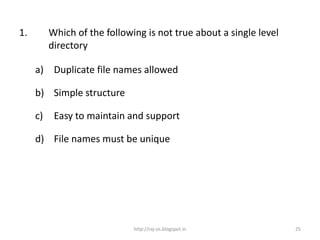
1.        Which of the following is not true about a single level
          directory

     a) Duplicate file names allowed

     b) Simple structure

     c)    Easy to maintain and support

     d) File names must be unique


                              http://raj-os.blogspot.in             25
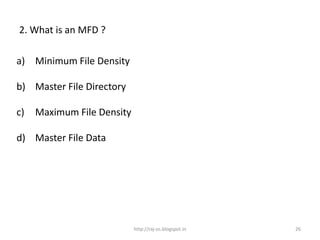
2. What is an MFD ?

a) Minimum File Density

b) Master File Directory

c)   Maximum File Density

d) Master File Data


                            http://raj-os.blogspot.in   26
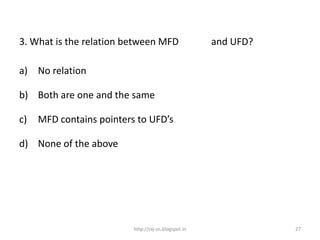
3. What is the relation between MFD                   and UFD?

a) No relation

b) Both are one and the same

c)   MFD contains pointers to UFD’s

d) None of the above


                          http://raj-os.blogspot.in              27
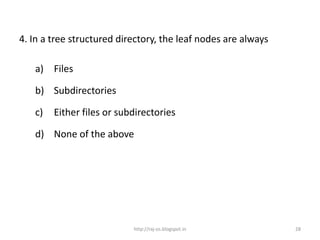
4. In a tree structured directory, the leaf nodes are always

   a) Files

   b) Subdirectories

   c)   Either files or subdirectories

   d) None of the above


                           http://raj-os.blogspot.in           28
5. The relative path name is

   a) A system call

   b) The path from current position to the specified file

   c)   The path from root to the specified file

   d) None of the above


                           http://raj-os.blogspot.in         29
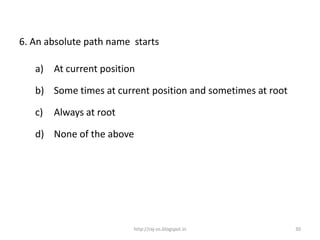
6. An absolute path name starts

   a) At current position

   b) Some times at current position and sometimes at root

   c)   Always at root

   d) None of the above


                         http://raj-os.blogspot.in           30
State whether the following are true or false


                  http://raj-os.blogspot.in     31
State true or false

A system can have any no of MFD’s

                                           False


               http://raj-os.blogspot.in           32
State true or false

There is only one UFD in a system

                                                  False


                      http://raj-os.blogspot.in           33
State true or false

There is no isolation of users in a single level directory

                                                     True


                         http://raj-os.blogspot.in           34
State true or false

Name collision problem is solved in two level directories

                                                    True


                        http://raj-os.blogspot.in           35
State true or false

A directory is also a file

                                                 True


                     http://raj-os.blogspot.in          36
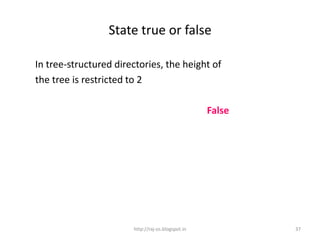
State true or false

In tree-structured directories, the height of
the tree is restricted to 2

                                                   False


                       http://raj-os.blogspot.in           37
State true or false

The relative path name is easier to specify than the absolute
path
                                True


                        http://raj-os.blogspot.in               38
State true or false

The current directory of a user can never be changed
                                                 False


                       http://raj-os.blogspot.in         39

Double level directory structure 55(1)

  • 1.
    TWO -LEVEL DIRECTORY http://raj-os.blogspot.in 1
  • 2.
    Fig 2 Two-leveldirectory http://raj-os.blogspot.in 2
  • 3.
    Features • System maintainsa master file directory ( MFD ) • A separate directory for each user – user file directory ( UFD ) • Each UFD has similar structure • A UFD lists files of a single user • MFD contains one entry for each user • Each entry points to the UFD of that user • User name and a file name constitute a path name http://raj-os.blogspot.in 3
  • 4.
    Advantages • Solves thename collision problem -Different users may have files with same names • Effective isolation of one user from others • Efficient searching http://raj-os.blogspot.in 4
  • 5.
    Limitations Sharing of filesby different users is difficult • User must know path name to access a file in other user’s directory • Some systems do not allow sharing of files http://raj-os.blogspot.in 5
  • 6.
    TREE-STRUCTURED DIRECTORY http://raj-os.blogspot.in 6
  • 7.
    Tree-structured Directory • Thetwo-level directory structure can be extended to a tree of arbitrary height as shown in the figure in next slide http://raj-os.blogspot.in 7
  • 8.
    Fig 1 Tree-structureddirectory http://raj-os.blogspot.in 8
  • 9.
    Tree is themost common directory structure http://raj-os.blogspot.in 9
  • 10.
    Examples of systemssupporting tree structure • MS-DOS • UNIX http://raj-os.blogspot.in 10
  • 11.
    Tree is themost common directory structure Features • A tree has a root directory • The root contains a set of directories • A directory contains a set of files and other sub directories • Each sub directory can further contain a set of files and other sub directories • Each file has a unique path name http://raj-os.blogspot.in 11
  • 12.
    Tree is themost common Directory Structure Path Name • A path name is the path from the root, through all the subdirectories, to a specified file. Example: • In Fig. 1 root/spell/mail/prog/obj is a path http://raj-os.blogspot.in 12

  • 13.
    Tree is themost common directory structure Some more points • A directory is simply another file, but treated in a different way • All directories have same internal format • One bit in each directory entry defines the entry as a file(0) or as a sub directory(1) • Directories are created and deleted using special system calls http://raj-os.blogspot.in 13
  • 14.
    Tree is themost common directory structure Current Directory • Every user is allocated a separate directory which is the default directory for the user • When a user first logs into the system the default directory is immediately made accessible to him • This default directory is called the current directory http://raj-os.blogspot.in 14
  • 15.
    Tree is themost common directory structure Current Directory • The current directory should contain most of the files that are of current interest to the user • When reference is made to a file, the current directory is searched http://raj-os.blogspot.in 15
  • 16.
    Tree is themost common directory structure Current Directory If a file is needed that is not in the current directory, then • The user must either specify a path name or • change the current directory to be the directory holding that file http://raj-os.blogspot.in 16
  • 17.
    Tree is themost common directory structure Current Directory To change the current directory to a different directory • A system call is provided • The new directory name acts as parameter to the system call which uses it to redefine the current directory http://raj-os.blogspot.in 17
  • 18.
    Types of pathnames Can be of two types • Absolute path name • Relative path name http://raj-os.blogspot.in 18
  • 19.
    Absolute Path Name •An absolute path name begins at the root and follows a path down to the specified file giving the directory names on the path http://raj-os.blogspot.in 19
  • 20.
    Relative Path Name •A relative path name defines a path from the current directory http://raj-os.blogspot.in 20
  • 21.
    Example • With ref.To fig. 1, if the current directory is root/spell/mail, to reference the file list relative path name : prog/list absolute path name : root/spell/mail/prog/list http://raj-os.blogspot.in 21
  • 22.
    Summary In this class,you have learnt: • Single level directory structure • Two level directory structure • Tree structure directory http://raj-os.blogspot.in 22
  • 23.
    Frequently Asked Questions 1. Explain single level directory structure. State its advantages and limitations 2. Explain two level directory structure. State its advantages and disadvantages 3. Explain tree directory structure. State its advantages and disadvantages http://raj-os.blogspot.in 23


  • 24.
  • 25.
    1. Which of the following is not true about a single level directory a) Duplicate file names allowed b) Simple structure c) Easy to maintain and support d) File names must be unique http://raj-os.blogspot.in 25
  • 26.
    2. What isan MFD ? a) Minimum File Density b) Master File Directory c) Maximum File Density d) Master File Data http://raj-os.blogspot.in 26
  • 27.
    3. What isthe relation between MFD and UFD? a) No relation b) Both are one and the same c) MFD contains pointers to UFD’s d) None of the above http://raj-os.blogspot.in 27
  • 28.
    4. In atree structured directory, the leaf nodes are always a) Files b) Subdirectories c) Either files or subdirectories d) None of the above http://raj-os.blogspot.in 28
  • 29.
    5. The relativepath name is a) A system call b) The path from current position to the specified file c) The path from root to the specified file d) None of the above http://raj-os.blogspot.in 29
  • 30.
    6. An absolutepath name starts a) At current position b) Some times at current position and sometimes at root c) Always at root d) None of the above http://raj-os.blogspot.in 30
  • 31.
    State whether thefollowing are true or false http://raj-os.blogspot.in 31
  • 32.
    State true orfalse A system can have any no of MFD’s False http://raj-os.blogspot.in 32
  • 33.
    State true orfalse There is only one UFD in a system False http://raj-os.blogspot.in 33
  • 34.
    State true orfalse There is no isolation of users in a single level directory True http://raj-os.blogspot.in 34
  • 35.
    State true orfalse Name collision problem is solved in two level directories True http://raj-os.blogspot.in 35
  • 36.
    State true orfalse A directory is also a file True http://raj-os.blogspot.in 36
  • 37.
    State true orfalse In tree-structured directories, the height of the tree is restricted to 2 False http://raj-os.blogspot.in 37
  • 38.
    State true orfalse The relative path name is easier to specify than the absolute path True http://raj-os.blogspot.in 38
  • 39.
    State true orfalse The current directory of a user can never be changed False http://raj-os.blogspot.in 39