Chapter 4
File and File Systems
Outline
 File and File System
 Properties of files
 Basic File System Operations
 File Naming
 File Structure
 Directories
 Access Methods of File
 File Protection
File and File System
File is a logical collection of information stored on secondary storage such as
hard disk. It is a collection of records.
File system is the one of the most important parts of the OS to a
user.
• It is used to control how data is stored and retrieved.
• It provide a means to store data organized as file as well as a collection of
function that can be performed on file.
• It Maintain a set of attributes associated with the file.
• Without a file system, information placed in a storage area would be one
large body of data with no way to tell where one piece of information
stops and the next begins.
• There are many different kinds of file systems. Each one has different
structure and logic, properties of speed, flexibility, security, size and more.
File Systems 3
Properties of files
Long-term existence
• Files or stored on disk or other storage and do not
disappear when a user logs off.
Sharable between processes
• Files have names and can have associated access
permission that permit controlled sharing
Structure
• Files can be organized into hierarchical or more complex
structure to reflect the relationships among files.
File Systems 4
Basic File System Operations
Several operations on files can be controlled. Operation
include:-
• read - read a file
• write - write a file
• execute - load and execute a file
• append - append information at the end of a file
• delete - free the space allocated to a file
• update – modifying, deleting and adding to a file
• copy- copy the contents of a file
• list- listing the name of the file
File Systems 5
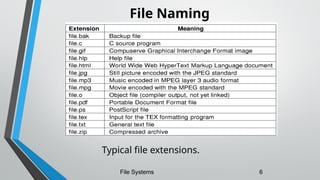
File Naming
Typical file extensions.
File Systems 6
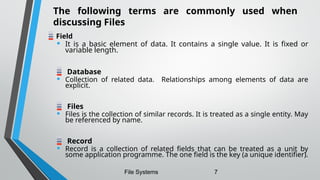
Field
• It is a basic element of data. It contains a single value. It is fixed or
variable length.
Database
• Collection of related data. Relationships among elements of data are
explicit.
Files
• Files is the collection of similar records. It is treated as a single entity. May
be referenced by name.
Record
• Record is a collection of related fields that can be treated as a unit by
some application programme. The one field is the key (a unique identifier).
File Systems 7
The following terms are commonly used when
discussing Files
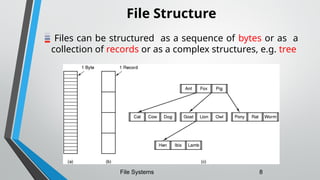
File Structure
Files can be structured as a sequence of bytes or as a
collection of records or as a complex structures, e.g. tree
File Systems 8
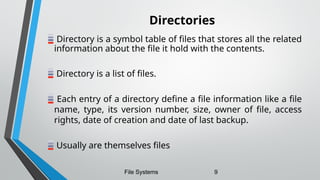
Directories
Directory is a symbol table of files that stores all the related
information about the file it hold with the contents.
Directory is a list of files.
Each entry of a directory define a file information like a file
name, type, its version number, size, owner of file, access
rights, date of creation and date of last backup.
Usually are themselves files
File Systems 9
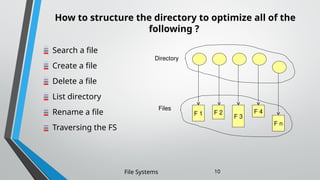
How to structure the directory to optimize all of the
following ?
Search a file
Create a file
Delete a file
List directory
Rename a file
Traversing the FS
File Systems 10
F 1 F 2
F 3
F 4
F n
Directory
Files
Solution  Logical Structure Of Directory
The directories can be structured in the following
ways:-
1. Single level directory
2. Two level directory
3. Tree structured directory
4. Acyclic graph directory
5. General graph directory
File Systems 11
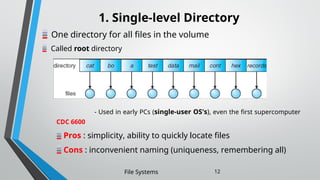
1. Single-level Directory
One directory for all files in the volume
Called root directory
File Systems 12
- Used in early PCs (single-user OS's), even the first supercomputer
CDC 6600
Pros : simplicity, ability to quickly locate files
Cons : inconvenient naming (uniqueness, remembering all)
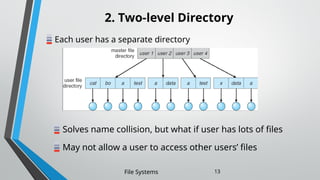
2. Two-level Directory
Each user has a separate directory
File Systems 13
Solves name collision, but what if user has lots of files
May not allow a user to access other users’ files
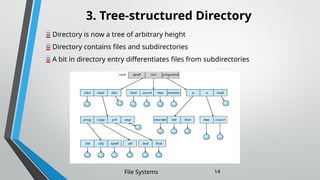
3. Tree-structured Directory
Directory is now a tree of arbitrary height
Directory contains files and subdirectories
A bit in directory entry differentiates files from subdirectories
File Systems 14
Path Names
To access a file, the user should either:
• Go to the directory where file resides, or
• Specify the path where the file is
Path names are either absolute or relative
• Absolute : path of file from the root directory
• Relative : path from the current working directory
Most Operating Systems have two special entries in each directory:
• “.” for current directory and “..” for parent
File Systems 15
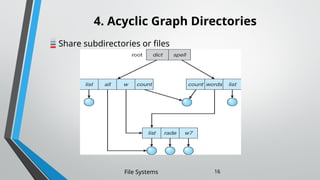
4. Acyclic Graph Directories
Share subdirectories or files
File Systems 16
Acyclic Graph Directories (cont’d)
How to implement shared files and subdirectories:
• Why not copy the file?
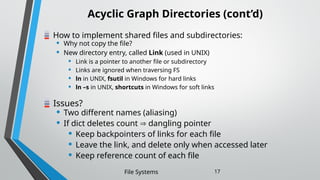
• New directory entry, called Link (used in UNIX)
• Link is a pointer to another file or subdirectory
• Links are ignored when traversing FS
• ln in UNIX, fsutil in Windows for hard links
• ln –s in UNIX, shortcuts in Windows for soft links
Issues?
• Two different names (aliasing)
• If dict deletes count  dangling pointer
• Keep backpointers of links for each file
• Leave the link, and delete only when accessed later
• Keep reference count of each file
File Systems 17
5. General graph directory
It is formed by adding links into an existing tree structure.
It overcomes the problem of acyclic graph by allows the cycles in a
directory.
Thus it avoids the searching of a component twice in a subdirectory.
File Systems 18
Access Methods of File
Files are used to store data.
The information present in the file can be accessed by various methods.
Thus, the way of retrieving data from a file is known as access methods.
Different systems use different access methods. The various access
methods used are:
1. Sequential access - file is accessed in the order it is stored in the file one
record after the other.
2. Direct access - it is possible to access the records of a file in any order.
3. Indexed access - an index is created for the file. This index contains pointer for various
blocks of a file, just like an index in the back of the book.
File Systems 19
File Protection
One of the major functions of the file system is to protect this information
against unauthorized access and physical damage.
Physical damage may occur because of hardware problems, power failure,
head crashes, dirt and extreme temperatures.
 In order to prevent such damage some systems performs backup at regular intervals.
Protection is achieved by limiting the type of file access which can be made.
Files use different access rights such as:
1.Access Control
2.Password Protection
3.File Naming.
File Systems 20
Questions

network and system admistration by Chapter 4.ppt

  • 1.
    Chapter 4 File andFile Systems
  • 2.
    Outline  File andFile System  Properties of files  Basic File System Operations  File Naming  File Structure  Directories  Access Methods of File  File Protection
  • 3.
    File and FileSystem File is a logical collection of information stored on secondary storage such as hard disk. It is a collection of records. File system is the one of the most important parts of the OS to a user. • It is used to control how data is stored and retrieved. • It provide a means to store data organized as file as well as a collection of function that can be performed on file. • It Maintain a set of attributes associated with the file. • Without a file system, information placed in a storage area would be one large body of data with no way to tell where one piece of information stops and the next begins. • There are many different kinds of file systems. Each one has different structure and logic, properties of speed, flexibility, security, size and more. File Systems 3
  • 4.
    Properties of files Long-termexistence • Files or stored on disk or other storage and do not disappear when a user logs off. Sharable between processes • Files have names and can have associated access permission that permit controlled sharing Structure • Files can be organized into hierarchical or more complex structure to reflect the relationships among files. File Systems 4
  • 5.
    Basic File SystemOperations Several operations on files can be controlled. Operation include:- • read - read a file • write - write a file • execute - load and execute a file • append - append information at the end of a file • delete - free the space allocated to a file • update – modifying, deleting and adding to a file • copy- copy the contents of a file • list- listing the name of the file File Systems 5
  • 6.
    File Naming Typical fileextensions. File Systems 6
  • 7.
    Field • It isa basic element of data. It contains a single value. It is fixed or variable length. Database • Collection of related data. Relationships among elements of data are explicit. Files • Files is the collection of similar records. It is treated as a single entity. May be referenced by name. Record • Record is a collection of related fields that can be treated as a unit by some application programme. The one field is the key (a unique identifier). File Systems 7 The following terms are commonly used when discussing Files
  • 8.
    File Structure Files canbe structured as a sequence of bytes or as a collection of records or as a complex structures, e.g. tree File Systems 8
  • 9.
    Directories Directory is asymbol table of files that stores all the related information about the file it hold with the contents. Directory is a list of files. Each entry of a directory define a file information like a file name, type, its version number, size, owner of file, access rights, date of creation and date of last backup. Usually are themselves files File Systems 9
  • 10.
    How to structurethe directory to optimize all of the following ? Search a file Create a file Delete a file List directory Rename a file Traversing the FS File Systems 10 F 1 F 2 F 3 F 4 F n Directory Files
  • 11.
    Solution  LogicalStructure Of Directory The directories can be structured in the following ways:- 1. Single level directory 2. Two level directory 3. Tree structured directory 4. Acyclic graph directory 5. General graph directory File Systems 11
  • 12.
    1. Single-level Directory Onedirectory for all files in the volume Called root directory File Systems 12 - Used in early PCs (single-user OS's), even the first supercomputer CDC 6600 Pros : simplicity, ability to quickly locate files Cons : inconvenient naming (uniqueness, remembering all)
  • 13.
    2. Two-level Directory Eachuser has a separate directory File Systems 13 Solves name collision, but what if user has lots of files May not allow a user to access other users’ files
  • 14.
    3. Tree-structured Directory Directoryis now a tree of arbitrary height Directory contains files and subdirectories A bit in directory entry differentiates files from subdirectories File Systems 14
  • 15.
    Path Names To accessa file, the user should either: • Go to the directory where file resides, or • Specify the path where the file is Path names are either absolute or relative • Absolute : path of file from the root directory • Relative : path from the current working directory Most Operating Systems have two special entries in each directory: • “.” for current directory and “..” for parent File Systems 15
  • 16.
    4. Acyclic GraphDirectories Share subdirectories or files File Systems 16
  • 17.
    Acyclic Graph Directories(cont’d) How to implement shared files and subdirectories: • Why not copy the file? • New directory entry, called Link (used in UNIX) • Link is a pointer to another file or subdirectory • Links are ignored when traversing FS • ln in UNIX, fsutil in Windows for hard links • ln –s in UNIX, shortcuts in Windows for soft links Issues? • Two different names (aliasing) • If dict deletes count  dangling pointer • Keep backpointers of links for each file • Leave the link, and delete only when accessed later • Keep reference count of each file File Systems 17
  • 18.
    5. General graphdirectory It is formed by adding links into an existing tree structure. It overcomes the problem of acyclic graph by allows the cycles in a directory. Thus it avoids the searching of a component twice in a subdirectory. File Systems 18
  • 19.
    Access Methods ofFile Files are used to store data. The information present in the file can be accessed by various methods. Thus, the way of retrieving data from a file is known as access methods. Different systems use different access methods. The various access methods used are: 1. Sequential access - file is accessed in the order it is stored in the file one record after the other. 2. Direct access - it is possible to access the records of a file in any order. 3. Indexed access - an index is created for the file. This index contains pointer for various blocks of a file, just like an index in the back of the book. File Systems 19
  • 20.
    File Protection One ofthe major functions of the file system is to protect this information against unauthorized access and physical damage. Physical damage may occur because of hardware problems, power failure, head crashes, dirt and extreme temperatures.  In order to prevent such damage some systems performs backup at regular intervals. Protection is achieved by limiting the type of file access which can be made. Files use different access rights such as: 1.Access Control 2.Password Protection 3.File Naming. File Systems 20
  • 21.