HC Document Management
Ahmad Fauzi, 2016
bapakesyamil@gmail.com
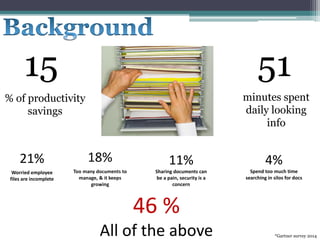
15
% of productivity
savings
51
minutes spent
daily looking
info
21%
Worried employee
files are incomplete
11%
Sharing documents can
be a pain, security is a
concern
4%
Spend too much time
searching in silos for docs
46 %
All of the above *Gartner survey 2014
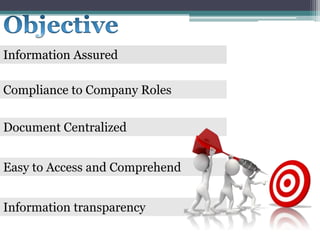
Information Assured
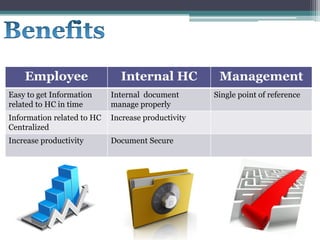
Employee Internal HC Management
Easy to get Information
related to HC in time
Internal document
manage properly
Single point of reference
Information related to HC
Centralized
Increase productivity
Increase productivity Document Secure
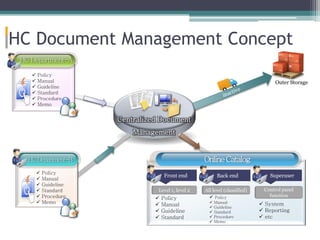
HC Document Management Concept
 Policy
 Manual
 Guideline
 Standard
 Procedure
 Memo
HCDepartment-A
Level 1, level 2
OnlineCatalog
 Policy
 Manual
 Guideline
 Standard
Centralized Document
Management
HCDepartment-B
 Policy
 Manual
 Guideline
 Standard
 Procedure
 Memo
Front end Back end
All level (classified)
 Policy
 Manual
 Guideline
 Standard
 Procedure
 Memo
Superuser
Control panel
function
 System
 Reporting
 etc
Outer Storage
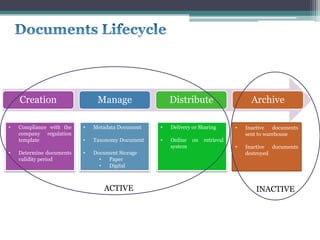
Creation Manage Distribute Archive
• Compliance with the
company regulation
template
• Determine documents
validity period
• Metadata Document
• Taxonomy Document
• Document Storage
• Paper
• Digital
• Delivery or Sharing
• Online on retrieval
system
• Inactive documents
sent to warehouse
• Inactive documents
destroyed
ACTIVE INACTIVE
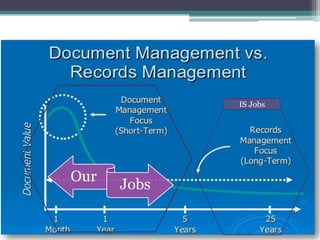
Our
Jobs
IS Jobs
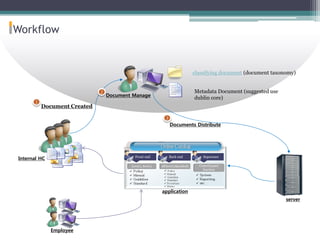
Workflow
server
1
2
3
classifying document (document taxonomy)
Metadata Document (suggested use
dublin core)
Document Created
Internal HC
Document Manage
Employee
application
Documents Distribute
*Gartner survey 2014
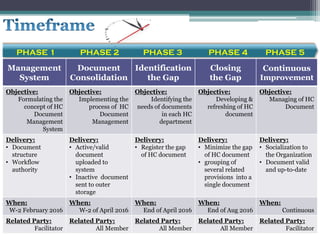
Management
System
Document
Consolidation
Identification
the Gap
Closing
the Gap
Continuous
Improvement
Objective:
Formulating the
concept of HC
Document
Management
System
Objective:
Implementing the
process of HC
Document
Management
Objective:
Identifying the
needs of documents
in each HC
department
Objective:
Developing &
refreshing of HC
document
Objective:
Managing of HC
Document
Delivery:
• Document
structure
• Workflow
authority
Delivery:
• Active/valid
document
uploaded to
system
• Inactive document
sent to outer
storage
Delivery:
• Register the gap
of HC document
Delivery:
• Minimize the gap
of HC document
• grouping of
several related
provisions into a
single document
Delivery:
• Socialization to
the Organization
• Document valid
and up-to-date
When:
W-2 February 2016
When:
W-2 of April 2016
When:
End of April 2016
When:
End of Aug 2016
When:
Continuous
Related Party:
Facilitator
Related Party:
All Member
Related Party:
All Member
Related Party:
All Member
Related Party:
Facilitator
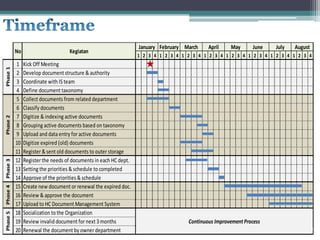
PHASE 1 PHASE 2 PHASE 3 PHASE 4 PHASE 5
1 2 3 4 1 2 3 4 1 2 3 4 1 2 3 4 1 2 3 4 1 2 3 4 1 2 3 4 1 2 3 4
1 Kick Off Meeting
2 Develop document structure & authority
3 Coordinate with IS team
4 Define document taxonomy
5 Collect documents from related department
6 Classify documents
7 Digitize & indexing active documents
8 Grouping active documents based on taxonomy
9 Upload and data entry for active documents
10 Digitize expired (old) documents
11 Register & sent old documents to outer storage
12 Register the needs of documents in each HC dept.
13 Setting the priorities & schedule to completed
14 Approve of the priorities & schedule
15 Create new document or renewal the expired doc.
16 Review & approve the document
17 Upload to HC Document Management System
18 Socialization to the Organization
19 Review invalid document for next 3months
20 Renewal the document by owner department
Kegiatan
January February March April JulyMay August
Phase3Phase4Phase5
Continuous Improvement Process
June
No
Phase2Phase1
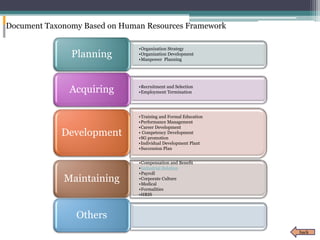
•Organization Strategy
•Organization Development
•Manpower Planning
Planning
•Recruitment and Selection
•Employment TerminationAcquiring
•Training and Formal Education
•Performance Management
•Career Development
• Competency Development
•SG promotion
•Individual Development Plant
•Succession Plan
Development
•Compensation and Benefit
•Industrial Relation
•Payroll
•Corporate Culture
•Medical
•Formalities
•HRIS
Maintaining
Others
Document Taxonomy Based on Human Resources Framework
back
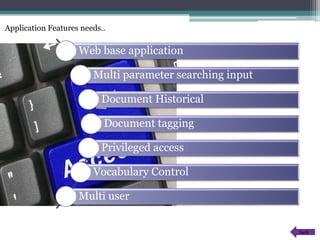
Application Features needs..
Web base application
Multi parameter searching input
Document Historical
Document tagging
Privileged access
Vocabulary Control
Multi user
back
Document Management System for Company

Document Management System for Company

  • 1.
    HC Document Management AhmadFauzi, 2016 bapakesyamil@gmail.com
  • 2.
    15 % of productivity savings 51 minutesspent daily looking info 21% Worried employee files are incomplete 11% Sharing documents can be a pain, security is a concern 4% Spend too much time searching in silos for docs 46 % All of the above *Gartner survey 2014
  • 4.
  • 5.
    Employee Internal HCManagement Easy to get Information related to HC in time Internal document manage properly Single point of reference Information related to HC Centralized Increase productivity Increase productivity Document Secure
  • 7.
    HC Document ManagementConcept  Policy  Manual  Guideline  Standard  Procedure  Memo HCDepartment-A Level 1, level 2 OnlineCatalog  Policy  Manual  Guideline  Standard Centralized Document Management HCDepartment-B  Policy  Manual  Guideline  Standard  Procedure  Memo Front end Back end All level (classified)  Policy  Manual  Guideline  Standard  Procedure  Memo Superuser Control panel function  System  Reporting  etc Outer Storage
  • 8.
    Creation Manage DistributeArchive • Compliance with the company regulation template • Determine documents validity period • Metadata Document • Taxonomy Document • Document Storage • Paper • Digital • Delivery or Sharing • Online on retrieval system • Inactive documents sent to warehouse • Inactive documents destroyed ACTIVE INACTIVE
  • 9.
  • 10.
    Workflow server 1 2 3 classifying document (documenttaxonomy) Metadata Document (suggested use dublin core) Document Created Internal HC Document Manage Employee application Documents Distribute
  • 11.
  • 12.
    Management System Document Consolidation Identification the Gap Closing the Gap Continuous Improvement Objective: Formulatingthe concept of HC Document Management System Objective: Implementing the process of HC Document Management Objective: Identifying the needs of documents in each HC department Objective: Developing & refreshing of HC document Objective: Managing of HC Document Delivery: • Document structure • Workflow authority Delivery: • Active/valid document uploaded to system • Inactive document sent to outer storage Delivery: • Register the gap of HC document Delivery: • Minimize the gap of HC document • grouping of several related provisions into a single document Delivery: • Socialization to the Organization • Document valid and up-to-date When: W-2 February 2016 When: W-2 of April 2016 When: End of April 2016 When: End of Aug 2016 When: Continuous Related Party: Facilitator Related Party: All Member Related Party: All Member Related Party: All Member Related Party: Facilitator PHASE 1 PHASE 2 PHASE 3 PHASE 4 PHASE 5
  • 13.
    1 2 34 1 2 3 4 1 2 3 4 1 2 3 4 1 2 3 4 1 2 3 4 1 2 3 4 1 2 3 4 1 Kick Off Meeting 2 Develop document structure & authority 3 Coordinate with IS team 4 Define document taxonomy 5 Collect documents from related department 6 Classify documents 7 Digitize & indexing active documents 8 Grouping active documents based on taxonomy 9 Upload and data entry for active documents 10 Digitize expired (old) documents 11 Register & sent old documents to outer storage 12 Register the needs of documents in each HC dept. 13 Setting the priorities & schedule to completed 14 Approve of the priorities & schedule 15 Create new document or renewal the expired doc. 16 Review & approve the document 17 Upload to HC Document Management System 18 Socialization to the Organization 19 Review invalid document for next 3months 20 Renewal the document by owner department Kegiatan January February March April JulyMay August Phase3Phase4Phase5 Continuous Improvement Process June No Phase2Phase1
  • 14.
    •Organization Strategy •Organization Development •ManpowerPlanning Planning •Recruitment and Selection •Employment TerminationAcquiring •Training and Formal Education •Performance Management •Career Development • Competency Development •SG promotion •Individual Development Plant •Succession Plan Development •Compensation and Benefit •Industrial Relation •Payroll •Corporate Culture •Medical •Formalities •HRIS Maintaining Others Document Taxonomy Based on Human Resources Framework back
  • 15.
    Application Features needs.. Webbase application Multi parameter searching input Document Historical Document tagging Privileged access Vocabulary Control Multi user back