WWW.TECHPERSPECT.COM
SharePoint 2013
DMS Capabilities
WWW.TECHPERSPECT.COM
Something, about us
TechPerspect is a technology consulting and software services
provider based out of INDIA. We are a young dynamic
organization working on different IT Consultancy &
Implementation Projects in India, US, Europe and Australia.
We are a team of dedicated, innovative and experienced IT
professionals specialized in Microsoft Business Technologies.
We believe Microsoft Technologies is our forte and hence we
primarily indulge in Microsoft based implementations. Microsoft
Share Point, Microsoft Dynamics CRM and Microsoft .NET are
technologies we excel in.
“We can make your business run on the wheels of technology”
WWW.TECHPERSPECT.COM
Microsoft SharePoint Offerings
WHAT WE OFFER IN SHAREPOINT
CONSULTING
SERVICES
• SharePoint Governance
₋ Information Architecture
₋ Capacity Planning
₋ Search Architecture
₋ Security Architecture
₋ Customization Policies
₋ Custom Framework Design
₋ Compliance
₋ Branding
• Go to Cloud Strategy
• Enterprise Collaboration & Content
Management Consulting
INFRASTRUCTURE
SERVICES
• SharePoint Farm Creation & Configuration
• Search Implementation
• Performance Tuning
• Business Continuity Planning
• Disaster Recovery Strategy
IMPLEMENTATION
SERVICES
• SharePoint Solution Design &
Architecture
• Enterprise Portals (Internet &
Intranet)
• Team Workspaces
• Knowledge Management Portals
• BI Solutions
INTEGRATION
SERVICES
• Integration with Lotus Notes,
Microsoft Exchange
• ERP integration with SAP, Oracle
ERP, Dynamics AX
• CRM Integration with Dynamics CRM,
Sales force, Sugar CRM
• Integration with Custom Applications
• Third party tools Integration
• Legacy Applications Integration
MIGRATION
SERVICES
• from Lotus Notes
• from any CMS
• from an old version to a newer
version
• from on premise to cloud
WWW.TECHPERSPECT.COM
SharePoint DMS
1. Content Creation & Storage
2. Column Metadata Properties
3. Review & Approval Workflow
4. Version Control
5. Access Control / Security
6. Searching / Content Indexing
7. Content Types
8. Document Sets (Group) & Linking
9. Metadata Navigation
10.Alerts & Notifications
OUT OF THE BOX FEATUERS
11.Mobile Accessibility
12.Microsoft Office Integration
13.Offline Editing
14.Audience Targeting
15.Barcode / Labeling
16.Retention Policy
17.Record Archival
18.Auditing
19.Unique Document Ids
20.Default Templates
WWW.TECHPERSPECT.COM
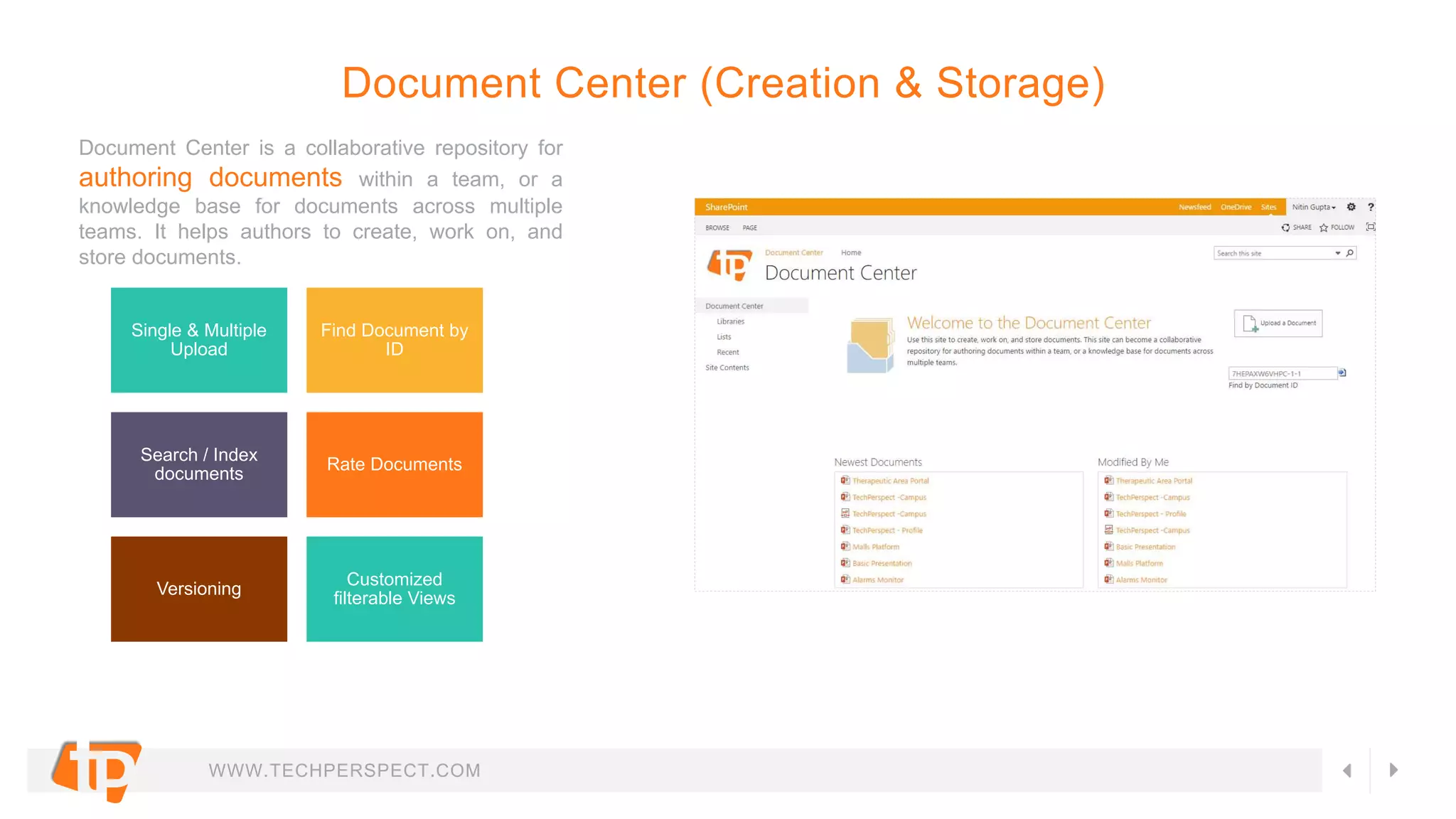
Document Center is a collaborative repository for
authoring documents within a team, or a
knowledge base for documents across multiple
teams. It helps authors to create, work on, and
store documents.
Single & Multiple
Upload
Find Document by
ID
Search / Index
documents
Rate Documents
Versioning
Customized
filterable Views
Document Center (Creation & Storage)
WWW.TECHPERSPECT.COM
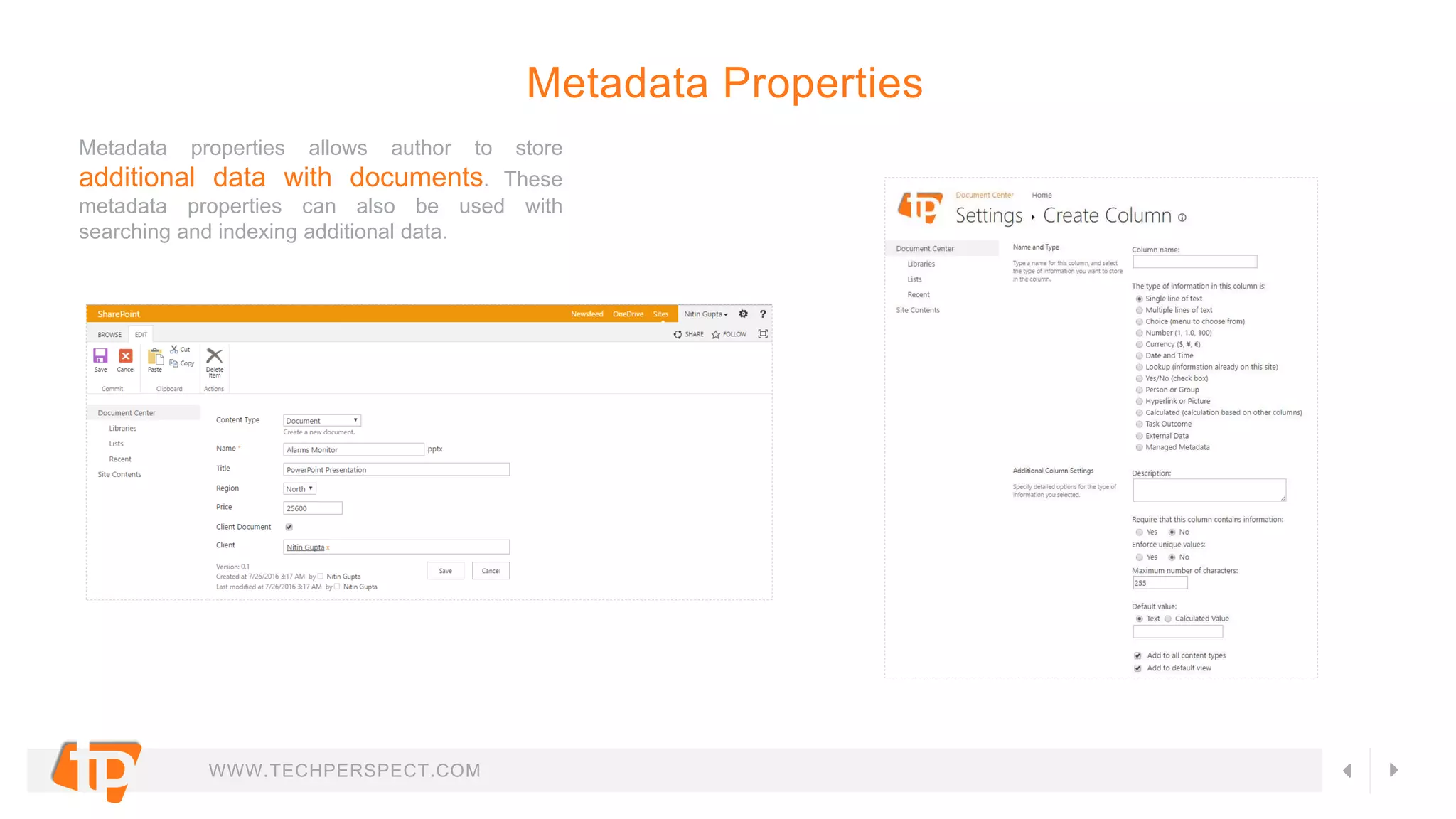
Metadata properties allows author to store
additional data with documents. These
metadata properties can also be used with
searching and indexing additional data.
Metadata Properties
WWW.TECHPERSPECT.COM
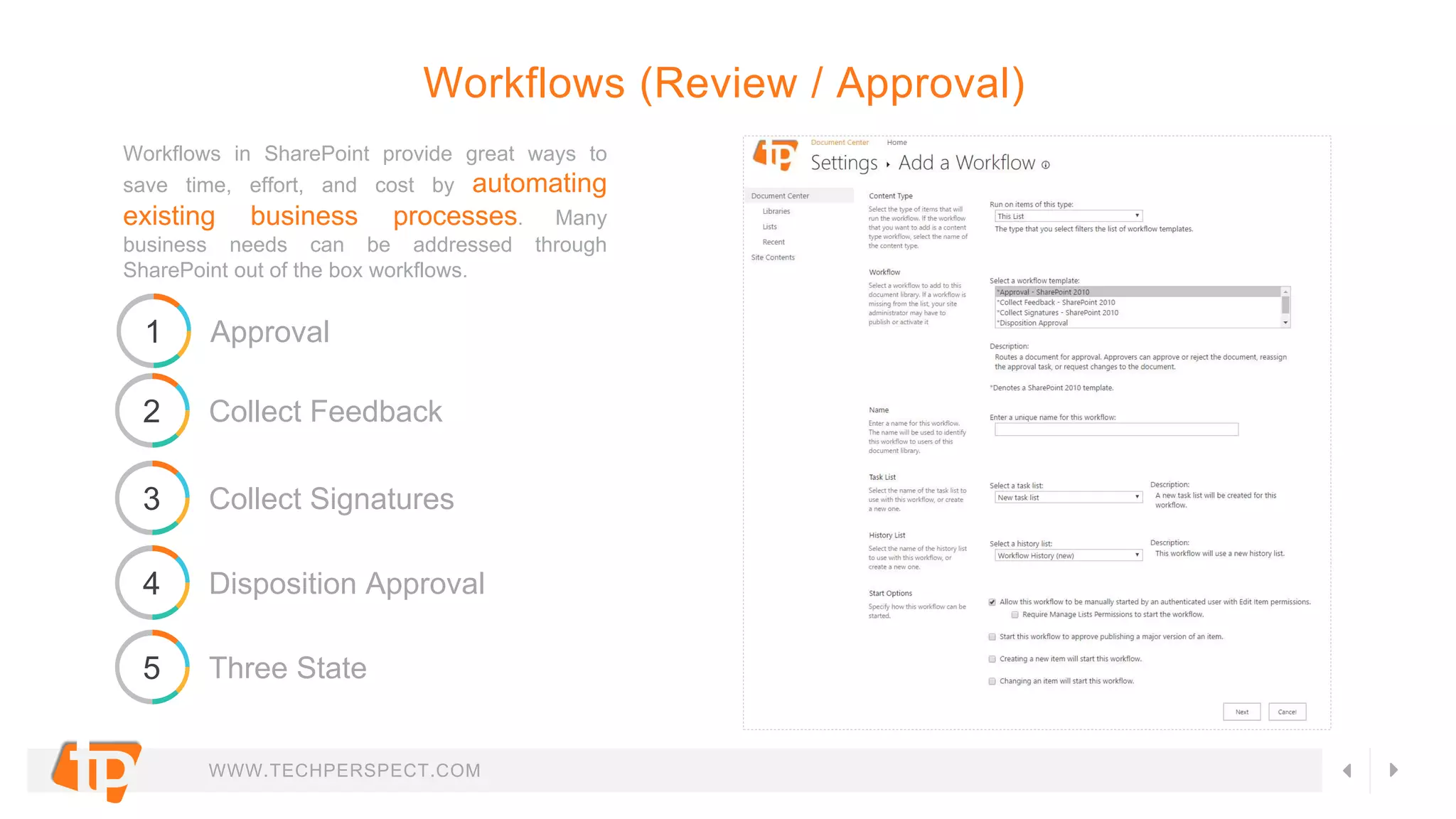
Workflows in SharePoint provide great ways to
save time, effort, and cost by automating
existing business processes. Many
business needs can be addressed through
SharePoint out of the box workflows.
Workflows (Review / Approval)
1 Approval
2 Collect Feedback
3 Collect Signatures
4 Disposition Approval
5 Three State
WWW.TECHPERSPECT.COM
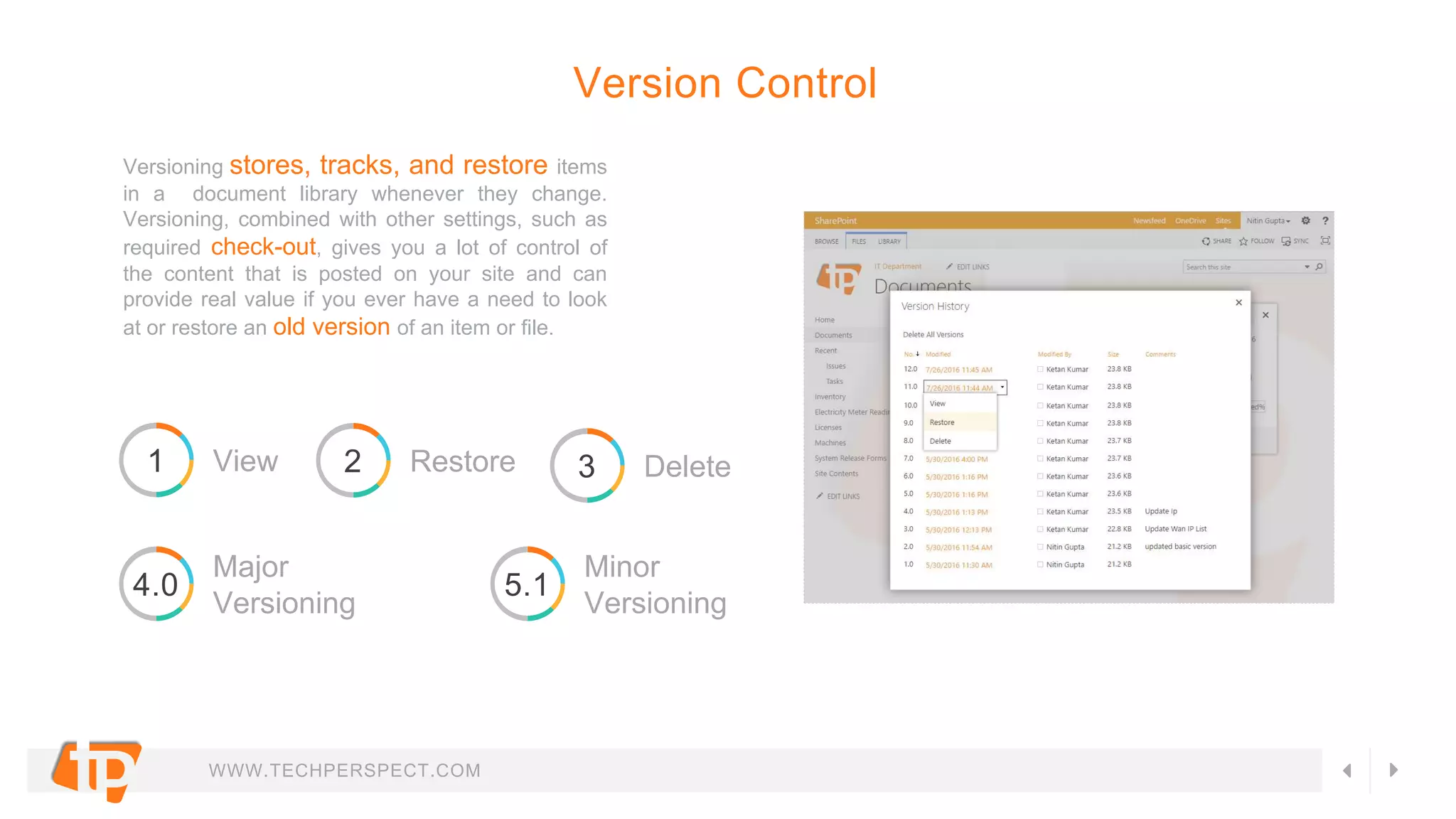
Versioning stores, tracks, and restore items
in a document library whenever they change.
Versioning, combined with other settings, such as
required check-out, gives you a lot of control of
the content that is posted on your site and can
provide real value if you ever have a need to look
at or restore an old version of an item or file.
Version Control
1 View 2 Restore 3 Delete
4.0
Major
Versioning
5.1
Minor
Versioning
WWW.TECHPERSPECT.COM
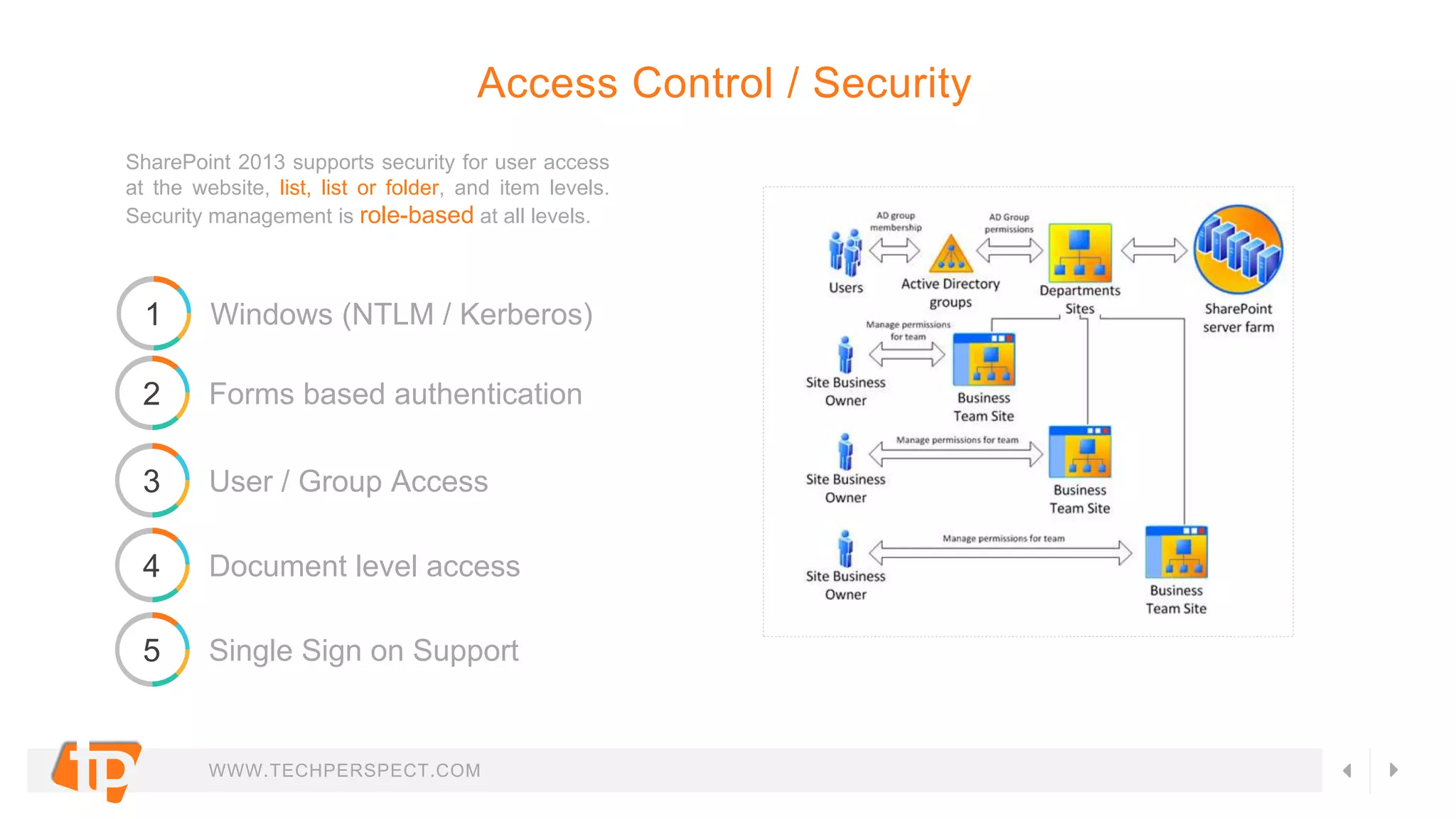
SharePoint 2013 supports security for user access
at the website, list, list or folder, and item levels.
Security management is role-based at all levels.
Access Control / Security
1 Windows (NTLM / Kerberos)
2 Forms based authentication
3 User / Group Access
4 Document level access
5 Single Sign on Support
WWW.TECHPERSPECT.COM
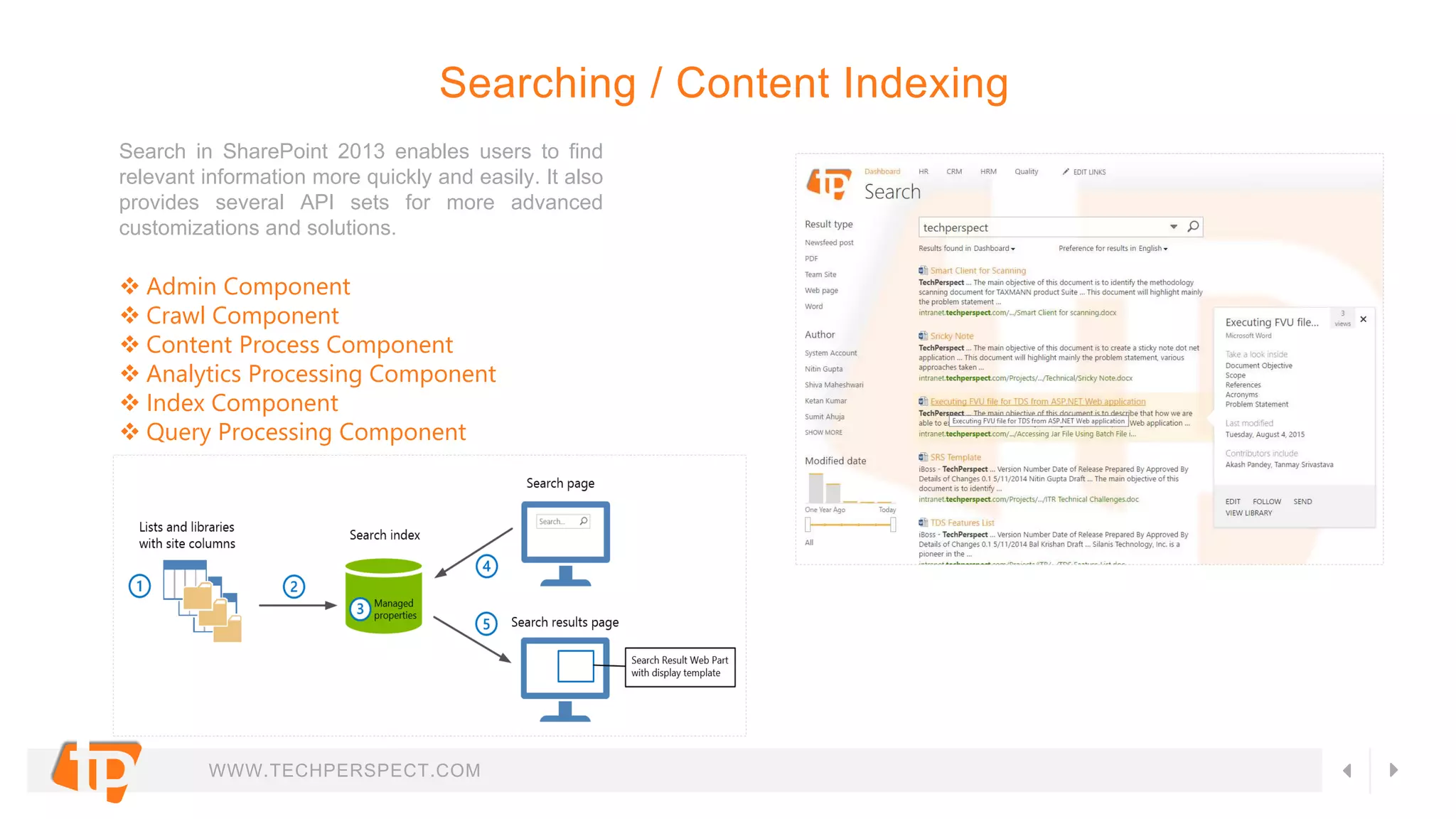
Search in SharePoint 2013 enables users to find
relevant information more quickly and easily. It also
provides several API sets for more advanced
customizations and solutions.
Searching / Content Indexing
 Admin Component
 Crawl Component
 Content Process Component
 Analytics Processing Component
 Index Component
 Query Processing Component
WWW.TECHPERSPECT.COM
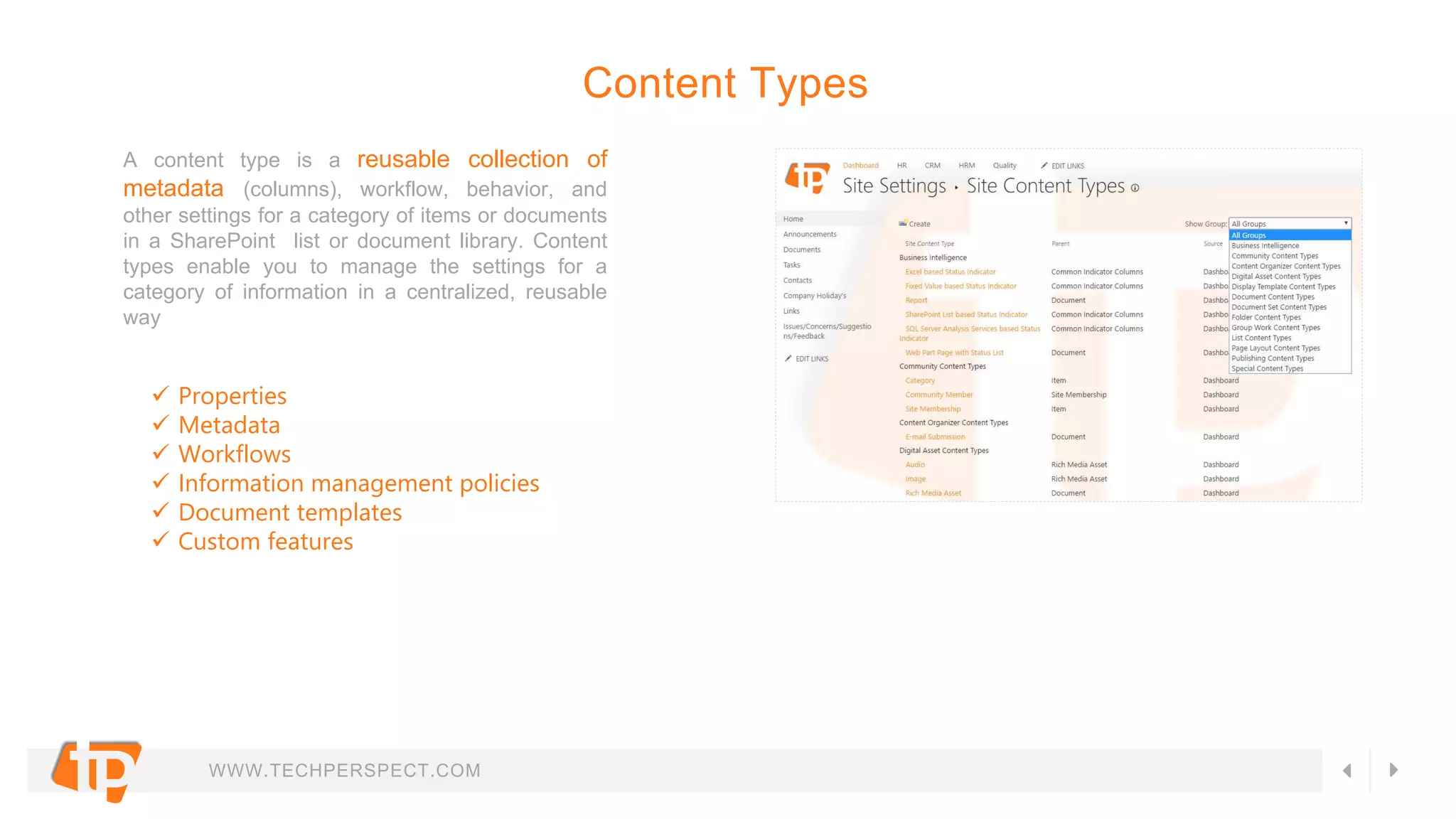
A content type is a reusable collection of
metadata (columns), workflow, behavior, and
other settings for a category of items or documents
in a SharePoint list or document library. Content
types enable you to manage the settings for a
category of information in a centralized, reusable
way
Content Types
 Properties
 Metadata
 Workflows
 Information management policies
 Document templates
 Custom features
WWW.TECHPERSPECT.COM
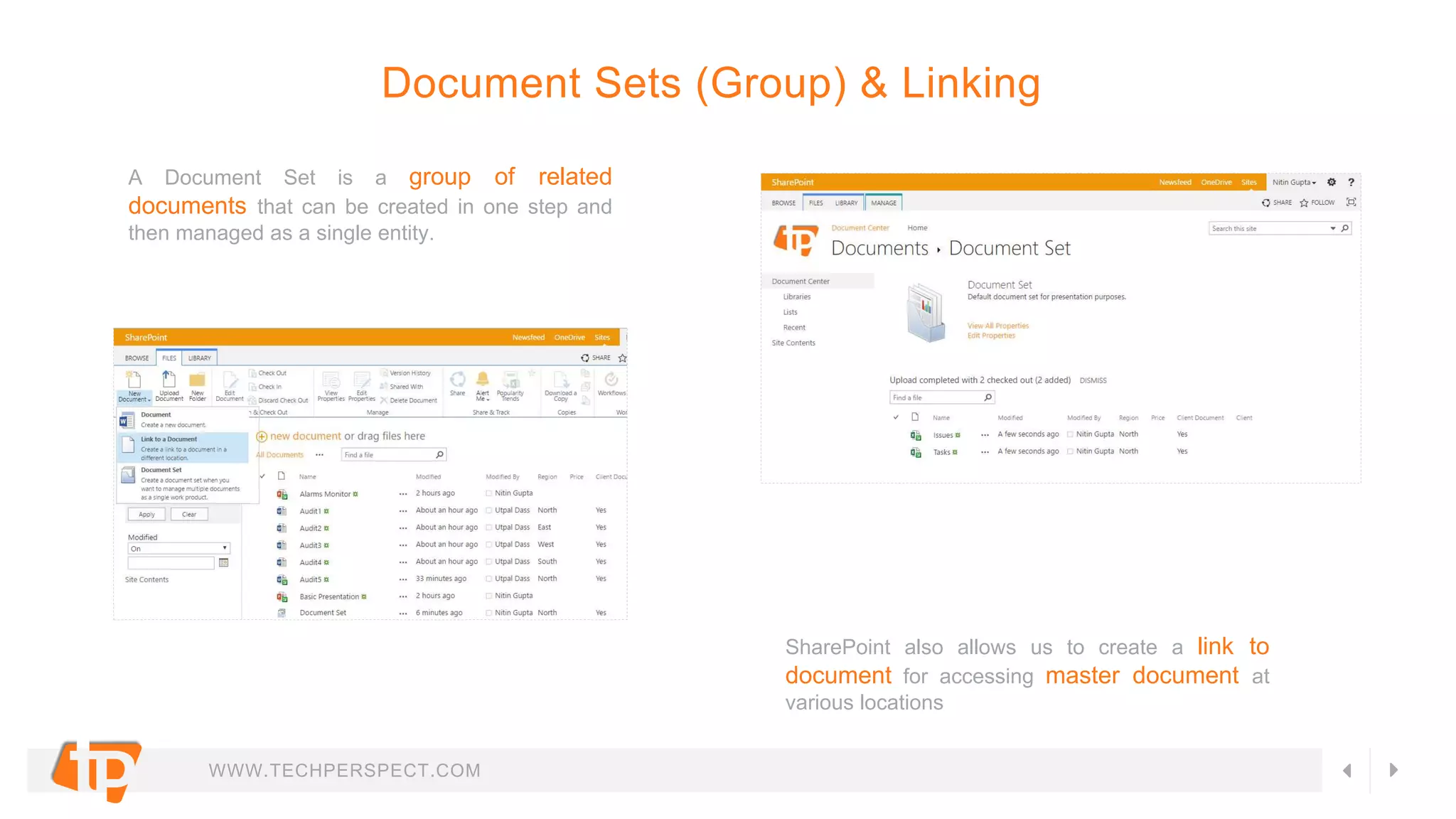
A Document Set is a group of related
documents that can be created in one step and
then managed as a single entity.
Document Sets (Group) & Linking
SharePoint also allows us to create a link to
document for accessing master document at
various locations
WWW.TECHPERSPECT.COM
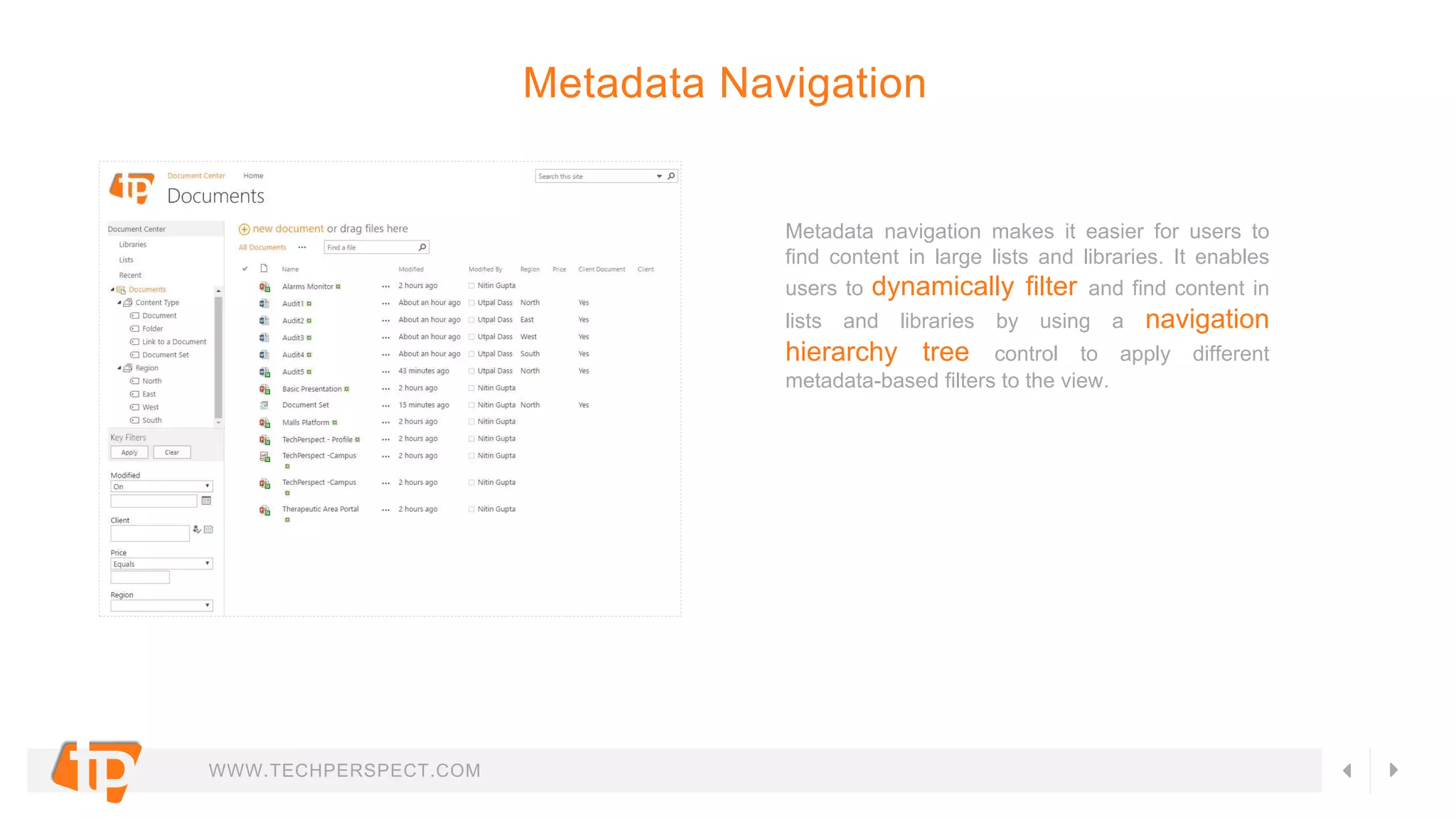
Metadata navigation makes it easier for users to
find content in large lists and libraries. It enables
users to dynamically filter and find content in
lists and libraries by using a navigation
hierarchy tree control to apply different
metadata-based filters to the view.
Metadata Navigation
WWW.TECHPERSPECT.COM
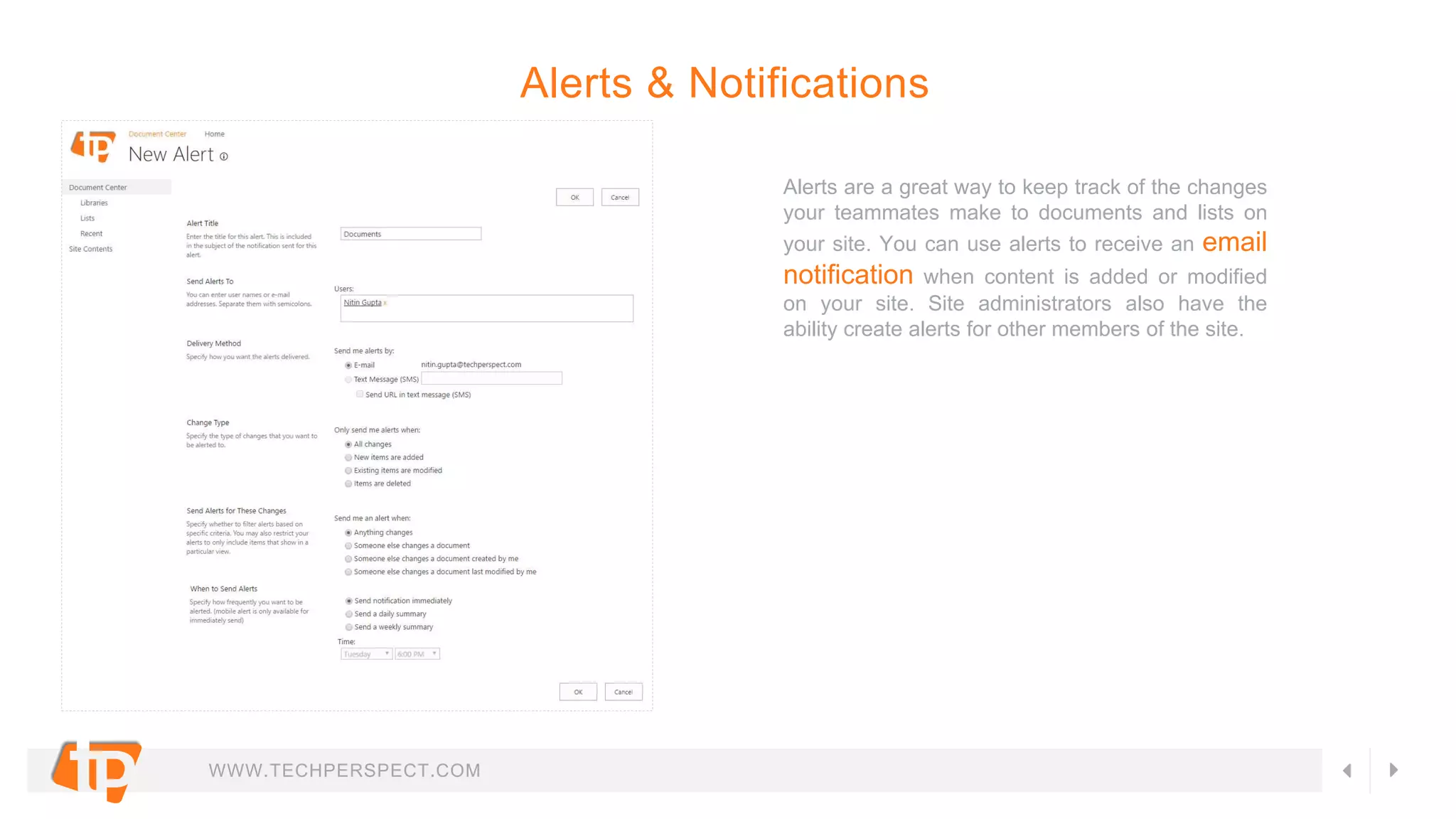
Alerts are a great way to keep track of the changes
your teammates make to documents and lists on
your site. You can use alerts to receive an email
notification when content is added or modified
on your site. Site administrators also have the
ability create alerts for other members of the site.
Alerts & Notifications
WWW.TECHPERSPECT.COM
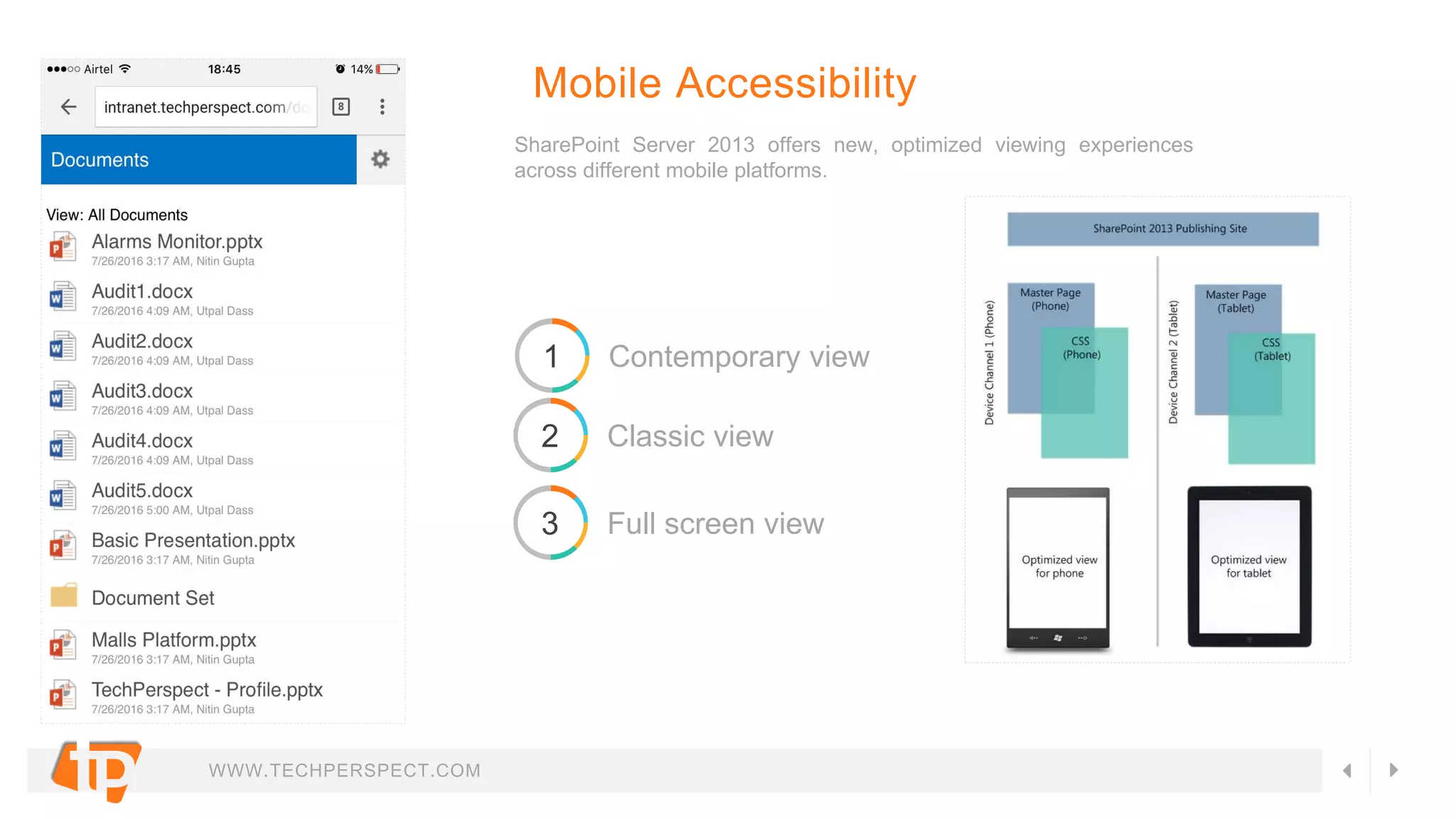
SharePoint Server 2013 offers new, optimized viewing experiences
across different mobile platforms.
Mobile Accessibility
1 Contemporary view
2 Classic view
3 Full screen view
WWW.TECHPERSPECT.COM
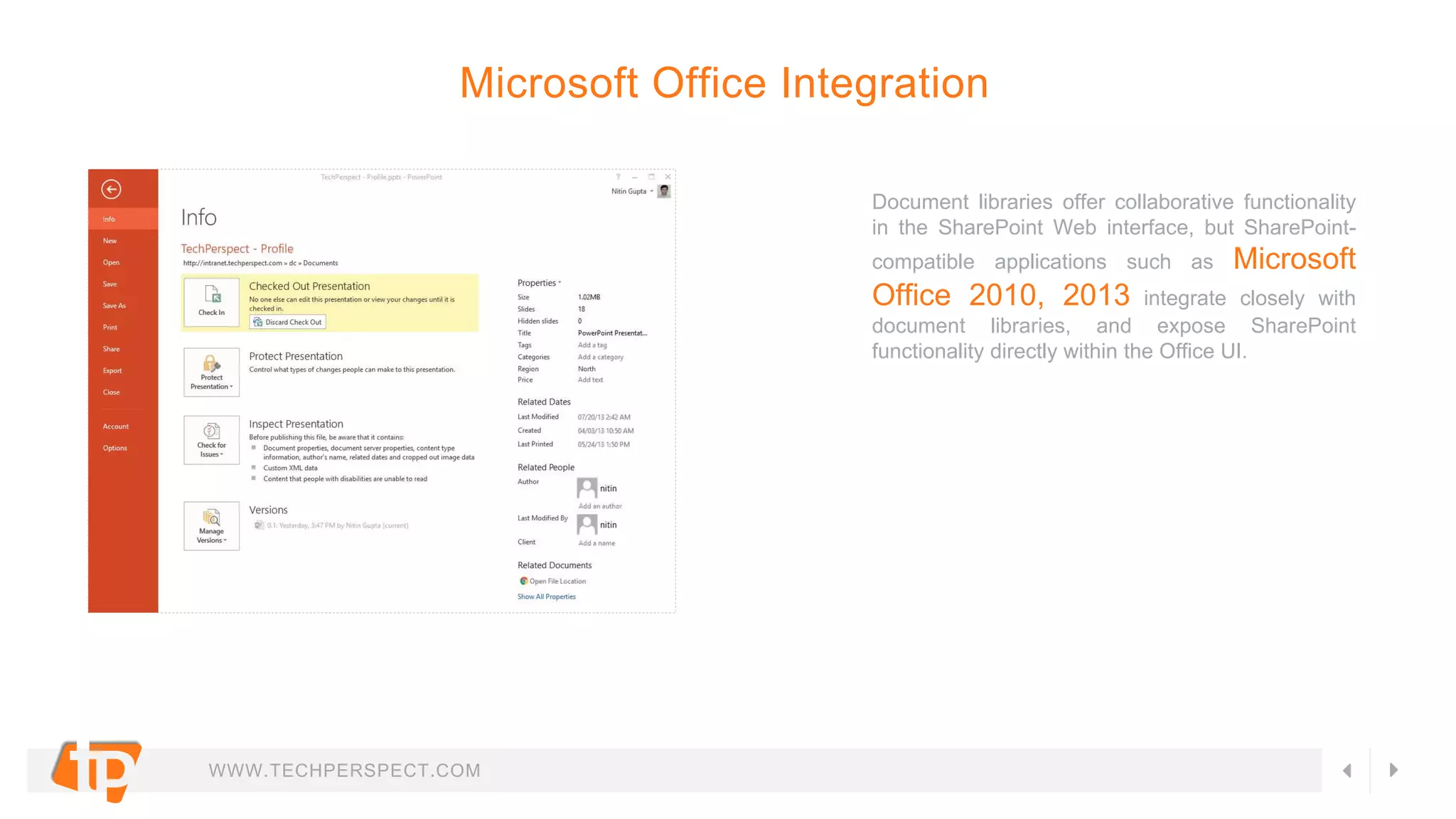
Document libraries offer collaborative functionality
in the SharePoint Web interface, but SharePoint-
compatible applications such as Microsoft
Office 2010, 2013 integrate closely with
document libraries, and expose SharePoint
functionality directly within the Office UI.
Microsoft Office Integration
WWW.TECHPERSPECT.COM
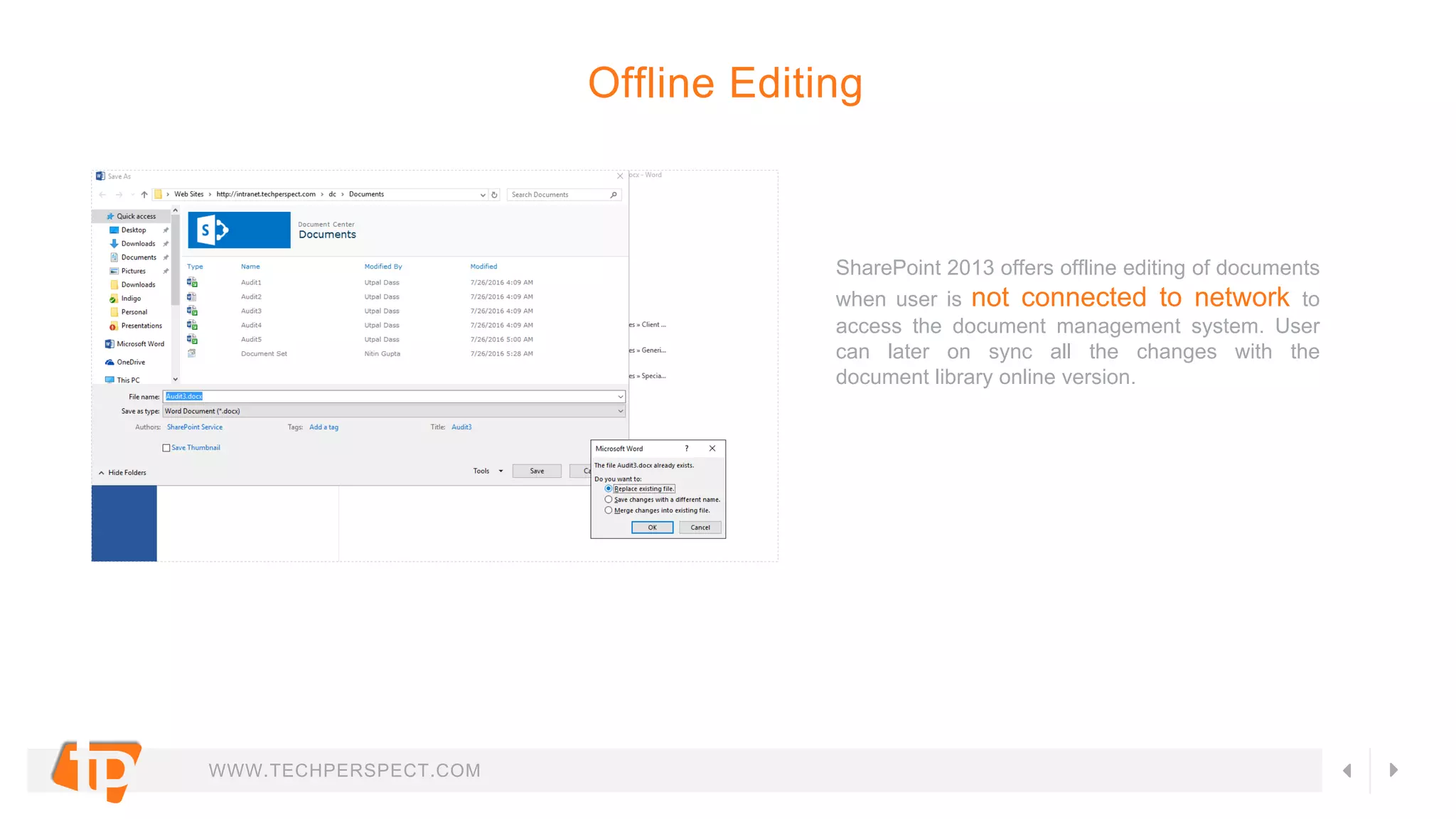
SharePoint 2013 offers offline editing of documents
when user is not connected to network to
access the document management system. User
can later on sync all the changes with the
document library online version.
Offline Editing
WWW.TECHPERSPECT.COM
Documents in SharePoint can be targeted to
appear only to people who are members of a
particular group or audience. An audience can be
identified by using SharePoint groups,
distribution lists, or security groups or by
using a rules-based system to create a global
audience.
Audience Targeting
WWW.TECHPERSPECT.COM
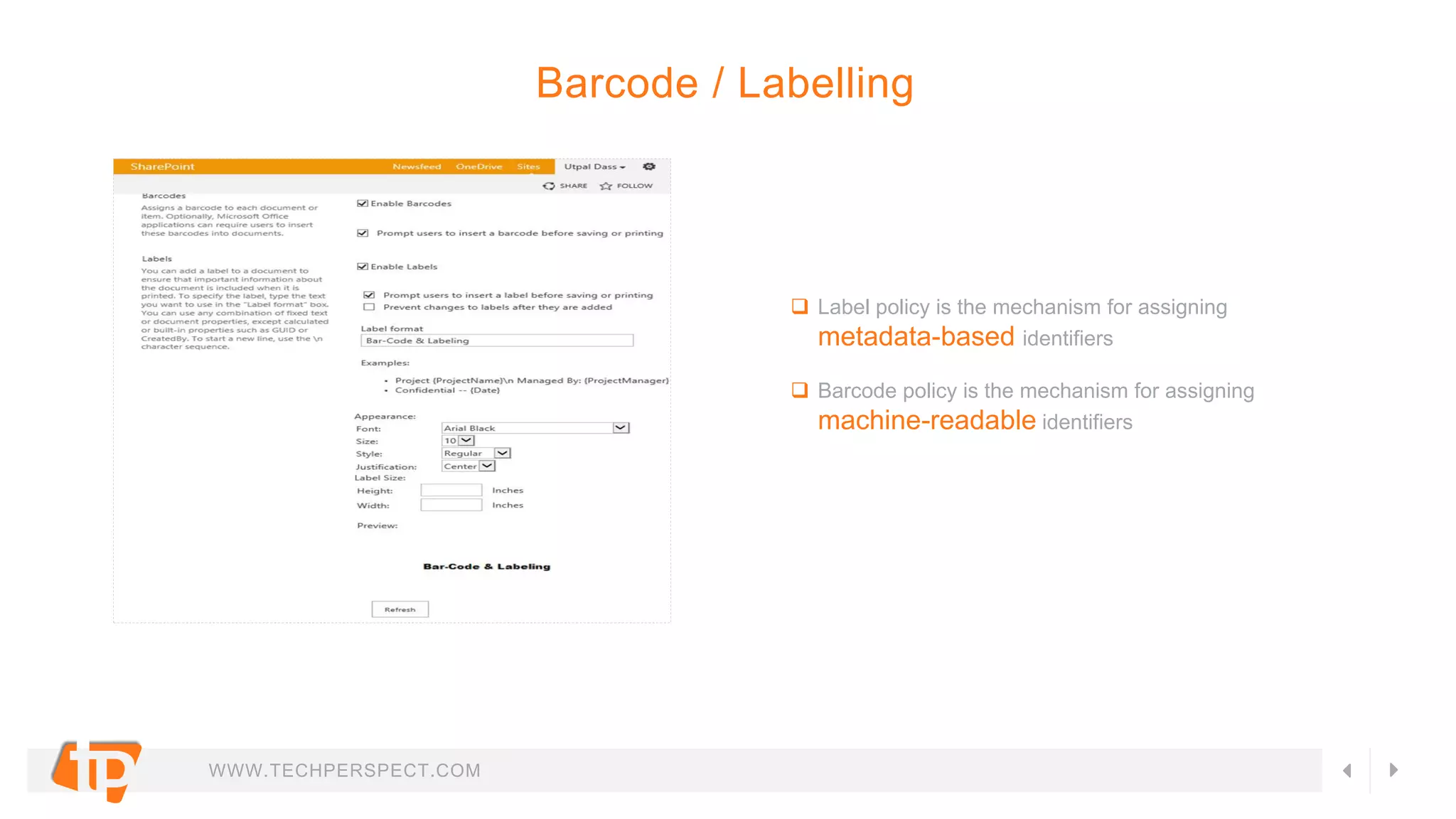
 Label policy is the mechanism for assigning
metadata-based identifiers
 Barcode policy is the mechanism for assigning
machine-readable identifiers
Barcode / Labelling
WWW.TECHPERSPECT.COM
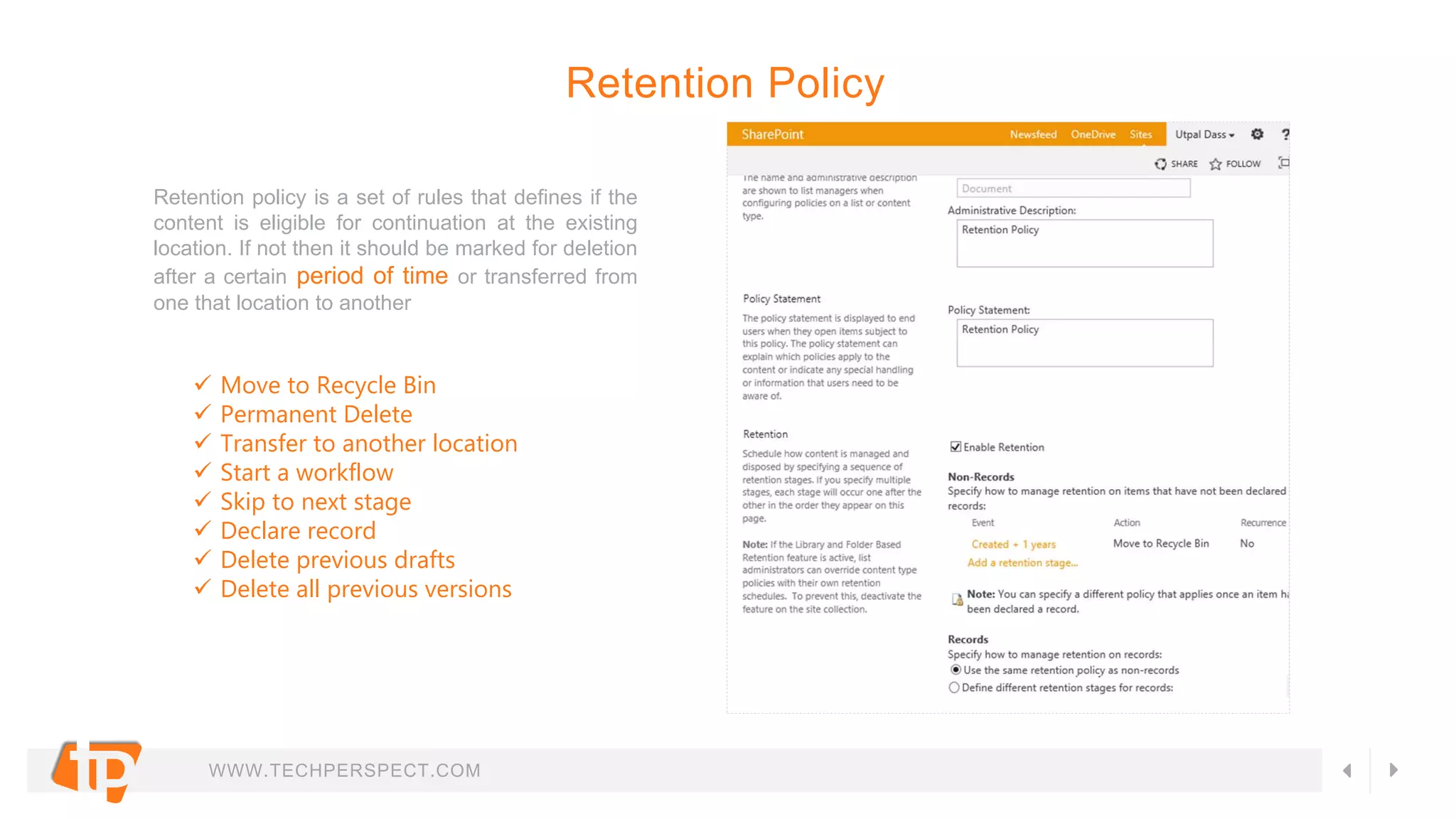
Retention policy is a set of rules that defines if the
content is eligible for continuation at the existing
location. If not then it should be marked for deletion
after a certain period of time or transferred from
one that location to another
Retention Policy
 Move to Recycle Bin
 Permanent Delete
 Transfer to another location
 Start a workflow
 Skip to next stage
 Declare record
 Delete previous drafts
 Delete all previous versions
WWW.TECHPERSPECT.COM
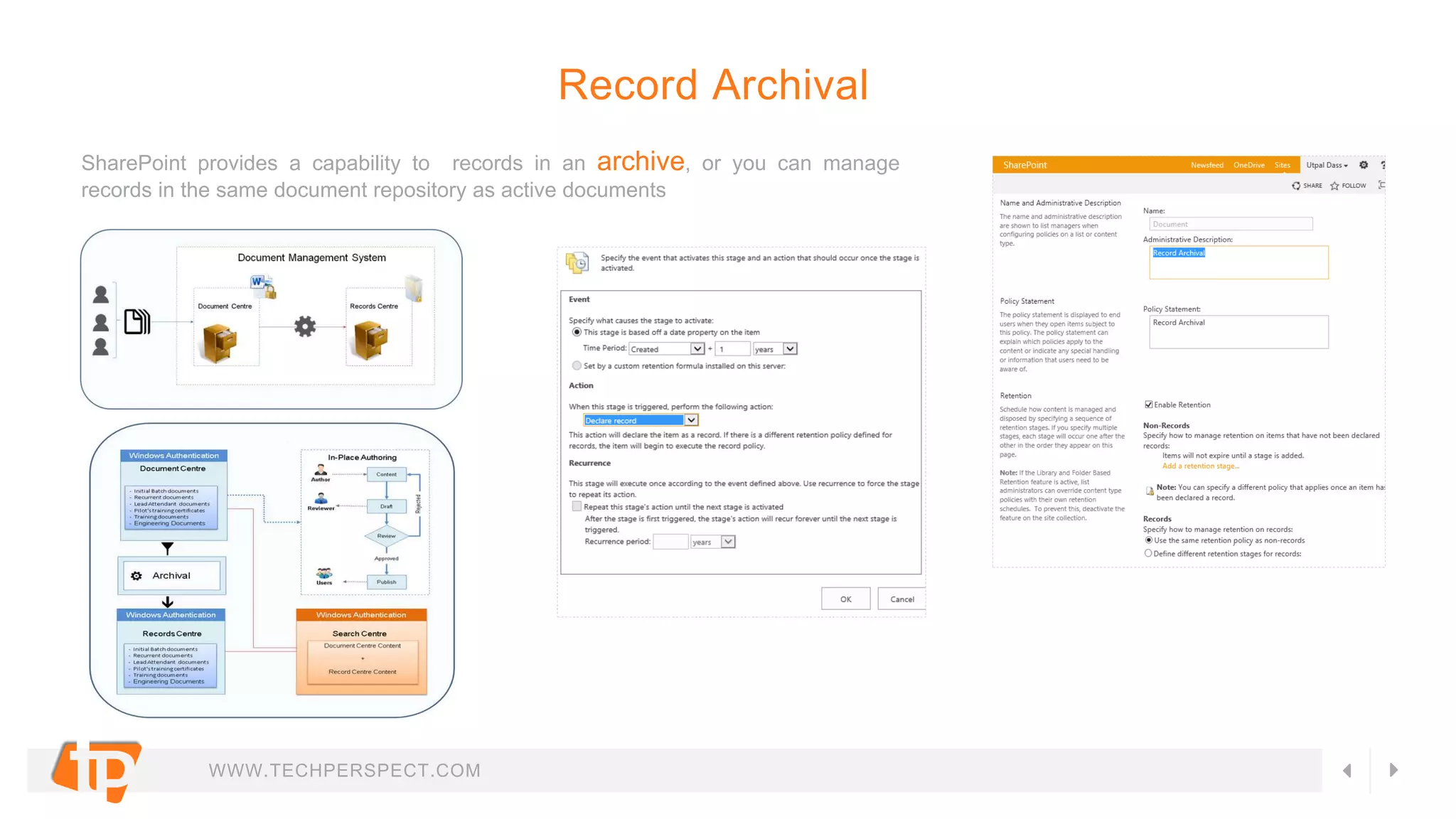
SharePoint provides a capability to records in an archive, or you can manage
records in the same document repository as active documents
Record Archival
WWW.TECHPERSPECT.COM
The audit feature of Microsoft SharePoint Server or
SharePoint Online let you track user actions
on a sites content types, lists, libraries, list items,
and library files within your site collections.
Auditing
WWW.TECHPERSPECT.COM
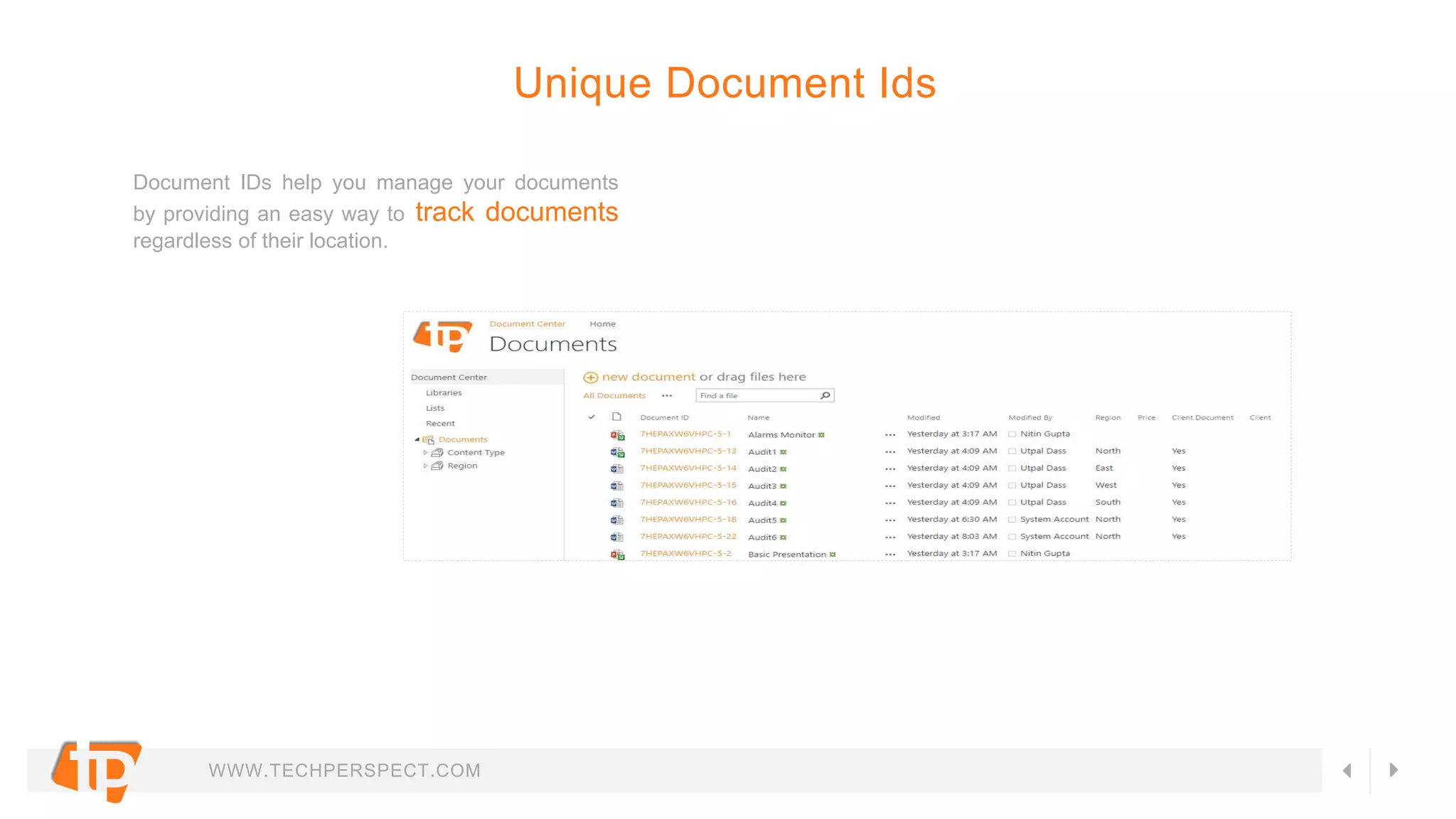
Document IDs help you manage your documents
by providing an easy way to track documents
regardless of their location.
Unique Document Ids
WWW.TECHPERSPECT.COM
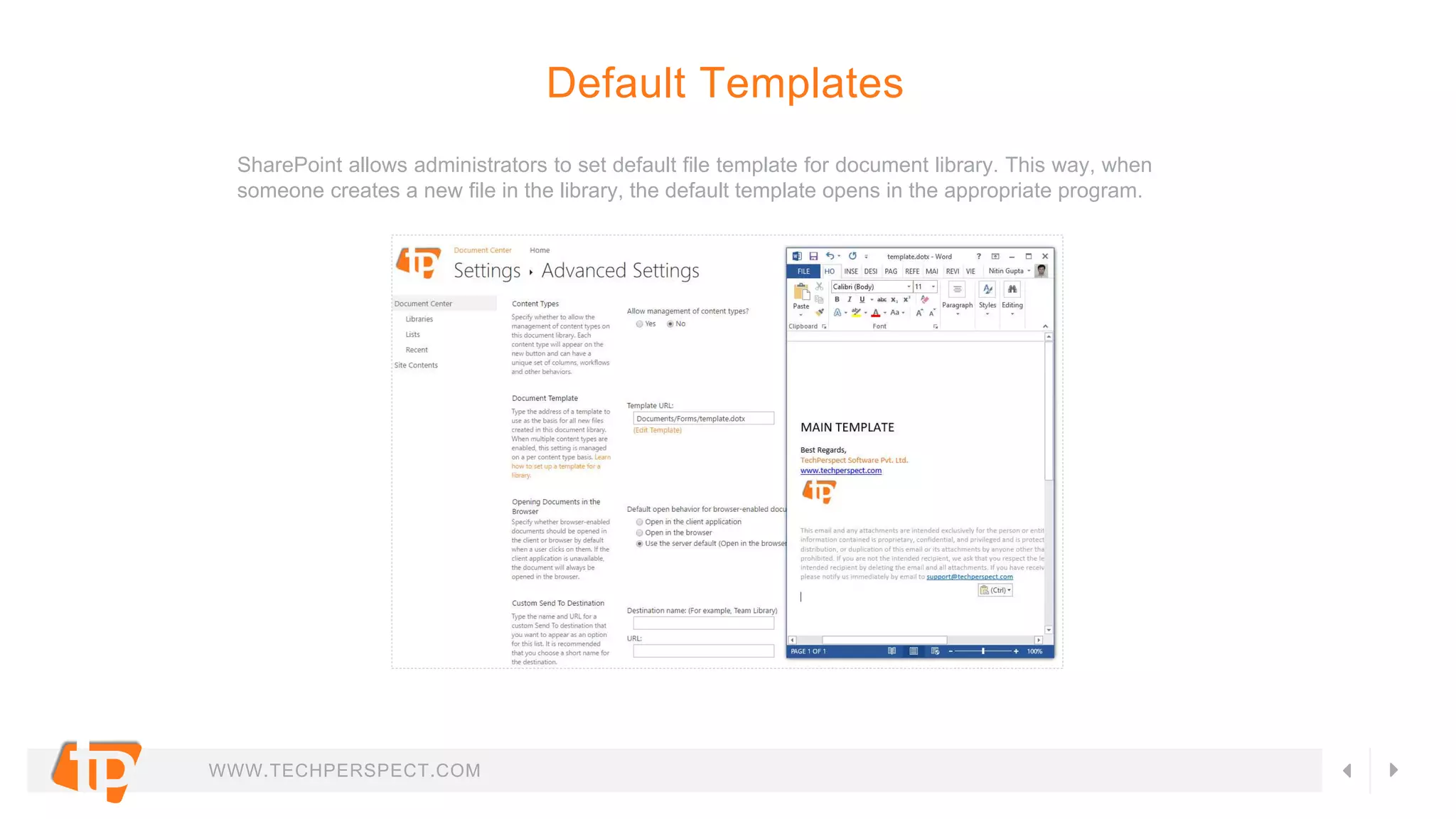
SharePoint allows administrators to set default file template for document library. This way, when
someone creates a new file in the library, the default template opens in the appropriate program.
Default Templates
WWW.TECHPERSPECT.COM
Contact Us
United Kingdom
10, E39QW, London
+44-743-565-0074
Australia
7/461, Willoughby Road,
Willoughby, NSW 2068
+61-401908485
Have any questions?
consult@techperspect.com
Call Us?
+91-120-2484404/05/06
For more information visit
www.techperspect.com
India
B-14, Sector-67,
Noida 201301,Uttar Pradesh
+91-120-2484406
United States
2720 Brighton Way,
St. Charles, MO 63303
+1-314-322-7189
GET IN TOUCH
Skype Us
techperspect
WWW.TECHPERSPECT.COM
consult@techperspect.com

Sharepoint Document Management System (DMS) Features

  • 1.
  • 2.
    WWW.TECHPERSPECT.COM Something, about us TechPerspectis a technology consulting and software services provider based out of INDIA. We are a young dynamic organization working on different IT Consultancy & Implementation Projects in India, US, Europe and Australia. We are a team of dedicated, innovative and experienced IT professionals specialized in Microsoft Business Technologies. We believe Microsoft Technologies is our forte and hence we primarily indulge in Microsoft based implementations. Microsoft Share Point, Microsoft Dynamics CRM and Microsoft .NET are technologies we excel in. “We can make your business run on the wheels of technology”
  • 3.
    WWW.TECHPERSPECT.COM Microsoft SharePoint Offerings WHATWE OFFER IN SHAREPOINT CONSULTING SERVICES • SharePoint Governance ₋ Information Architecture ₋ Capacity Planning ₋ Search Architecture ₋ Security Architecture ₋ Customization Policies ₋ Custom Framework Design ₋ Compliance ₋ Branding • Go to Cloud Strategy • Enterprise Collaboration & Content Management Consulting INFRASTRUCTURE SERVICES • SharePoint Farm Creation & Configuration • Search Implementation • Performance Tuning • Business Continuity Planning • Disaster Recovery Strategy IMPLEMENTATION SERVICES • SharePoint Solution Design & Architecture • Enterprise Portals (Internet & Intranet) • Team Workspaces • Knowledge Management Portals • BI Solutions INTEGRATION SERVICES • Integration with Lotus Notes, Microsoft Exchange • ERP integration with SAP, Oracle ERP, Dynamics AX • CRM Integration with Dynamics CRM, Sales force, Sugar CRM • Integration with Custom Applications • Third party tools Integration • Legacy Applications Integration MIGRATION SERVICES • from Lotus Notes • from any CMS • from an old version to a newer version • from on premise to cloud
  • 4.
    WWW.TECHPERSPECT.COM SharePoint DMS 1. ContentCreation & Storage 2. Column Metadata Properties 3. Review & Approval Workflow 4. Version Control 5. Access Control / Security 6. Searching / Content Indexing 7. Content Types 8. Document Sets (Group) & Linking 9. Metadata Navigation 10.Alerts & Notifications OUT OF THE BOX FEATUERS 11.Mobile Accessibility 12.Microsoft Office Integration 13.Offline Editing 14.Audience Targeting 15.Barcode / Labeling 16.Retention Policy 17.Record Archival 18.Auditing 19.Unique Document Ids 20.Default Templates
  • 5.
    WWW.TECHPERSPECT.COM Document Center isa collaborative repository for authoring documents within a team, or a knowledge base for documents across multiple teams. It helps authors to create, work on, and store documents. Single & Multiple Upload Find Document by ID Search / Index documents Rate Documents Versioning Customized filterable Views Document Center (Creation & Storage)
  • 6.
    WWW.TECHPERSPECT.COM Metadata properties allowsauthor to store additional data with documents. These metadata properties can also be used with searching and indexing additional data. Metadata Properties
  • 7.
    WWW.TECHPERSPECT.COM Workflows in SharePointprovide great ways to save time, effort, and cost by automating existing business processes. Many business needs can be addressed through SharePoint out of the box workflows. Workflows (Review / Approval) 1 Approval 2 Collect Feedback 3 Collect Signatures 4 Disposition Approval 5 Three State
  • 8.
    WWW.TECHPERSPECT.COM Versioning stores, tracks,and restore items in a document library whenever they change. Versioning, combined with other settings, such as required check-out, gives you a lot of control of the content that is posted on your site and can provide real value if you ever have a need to look at or restore an old version of an item or file. Version Control 1 View 2 Restore 3 Delete 4.0 Major Versioning 5.1 Minor Versioning
  • 9.
    WWW.TECHPERSPECT.COM SharePoint 2013 supportssecurity for user access at the website, list, list or folder, and item levels. Security management is role-based at all levels. Access Control / Security 1 Windows (NTLM / Kerberos) 2 Forms based authentication 3 User / Group Access 4 Document level access 5 Single Sign on Support
  • 10.
    WWW.TECHPERSPECT.COM Search in SharePoint2013 enables users to find relevant information more quickly and easily. It also provides several API sets for more advanced customizations and solutions. Searching / Content Indexing  Admin Component  Crawl Component  Content Process Component  Analytics Processing Component  Index Component  Query Processing Component
  • 11.
    WWW.TECHPERSPECT.COM A content typeis a reusable collection of metadata (columns), workflow, behavior, and other settings for a category of items or documents in a SharePoint list or document library. Content types enable you to manage the settings for a category of information in a centralized, reusable way Content Types  Properties  Metadata  Workflows  Information management policies  Document templates  Custom features
  • 12.
    WWW.TECHPERSPECT.COM A Document Setis a group of related documents that can be created in one step and then managed as a single entity. Document Sets (Group) & Linking SharePoint also allows us to create a link to document for accessing master document at various locations
  • 13.
    WWW.TECHPERSPECT.COM Metadata navigation makesit easier for users to find content in large lists and libraries. It enables users to dynamically filter and find content in lists and libraries by using a navigation hierarchy tree control to apply different metadata-based filters to the view. Metadata Navigation
  • 14.
    WWW.TECHPERSPECT.COM Alerts are agreat way to keep track of the changes your teammates make to documents and lists on your site. You can use alerts to receive an email notification when content is added or modified on your site. Site administrators also have the ability create alerts for other members of the site. Alerts & Notifications
  • 15.
    WWW.TECHPERSPECT.COM SharePoint Server 2013offers new, optimized viewing experiences across different mobile platforms. Mobile Accessibility 1 Contemporary view 2 Classic view 3 Full screen view
  • 16.
    WWW.TECHPERSPECT.COM Document libraries offercollaborative functionality in the SharePoint Web interface, but SharePoint- compatible applications such as Microsoft Office 2010, 2013 integrate closely with document libraries, and expose SharePoint functionality directly within the Office UI. Microsoft Office Integration
  • 17.
    WWW.TECHPERSPECT.COM SharePoint 2013 offersoffline editing of documents when user is not connected to network to access the document management system. User can later on sync all the changes with the document library online version. Offline Editing
  • 18.
    WWW.TECHPERSPECT.COM Documents in SharePointcan be targeted to appear only to people who are members of a particular group or audience. An audience can be identified by using SharePoint groups, distribution lists, or security groups or by using a rules-based system to create a global audience. Audience Targeting
  • 19.
    WWW.TECHPERSPECT.COM  Label policyis the mechanism for assigning metadata-based identifiers  Barcode policy is the mechanism for assigning machine-readable identifiers Barcode / Labelling
  • 20.
    WWW.TECHPERSPECT.COM Retention policy isa set of rules that defines if the content is eligible for continuation at the existing location. If not then it should be marked for deletion after a certain period of time or transferred from one that location to another Retention Policy  Move to Recycle Bin  Permanent Delete  Transfer to another location  Start a workflow  Skip to next stage  Declare record  Delete previous drafts  Delete all previous versions
  • 21.
    WWW.TECHPERSPECT.COM SharePoint provides acapability to records in an archive, or you can manage records in the same document repository as active documents Record Archival
  • 22.
    WWW.TECHPERSPECT.COM The audit featureof Microsoft SharePoint Server or SharePoint Online let you track user actions on a sites content types, lists, libraries, list items, and library files within your site collections. Auditing
  • 23.
    WWW.TECHPERSPECT.COM Document IDs helpyou manage your documents by providing an easy way to track documents regardless of their location. Unique Document Ids
  • 24.
    WWW.TECHPERSPECT.COM SharePoint allows administratorsto set default file template for document library. This way, when someone creates a new file in the library, the default template opens in the appropriate program. Default Templates
  • 25.
    WWW.TECHPERSPECT.COM Contact Us United Kingdom 10,E39QW, London +44-743-565-0074 Australia 7/461, Willoughby Road, Willoughby, NSW 2068 +61-401908485 Have any questions? consult@techperspect.com Call Us? +91-120-2484404/05/06 For more information visit www.techperspect.com India B-14, Sector-67, Noida 201301,Uttar Pradesh +91-120-2484406 United States 2720 Brighton Way, St. Charles, MO 63303 +1-314-322-7189 GET IN TOUCH Skype Us techperspect
  • 26.