DOCUMENT TRACKING SYSTEM 1.0
Developer: Biodor P. Bonifacio Jr.
Howard C. Paquiz
Jay A. Jovellanos
1.0 INTRODUCTION AND BACKGROUND INFORMATION
The goal of a paperless office continues to get closer, due to the rising popularity of digital
document management systems. Document management systems use scanners to make digital
copies of every document. These documents are coded to attach them to specific files or accounts
and optical character reading, OCR, systems provide insight into the contents of each page. From
the time it enters the organization, the digital version of the document is stored and filed for
future use.
The DOTC Central Office (DOTC-CO) currently uses the Log Book to record and monitor the
Memo/Letter/Communication and other documents for the incoming and outgoing from other
offices.
To this, a Document Tracking System (DTS) is created, which will be hosted by Computer
Systems Division. The application can be accessed inside DOTC building or where there is
computer connected in the LAN; is capable of the record keeping, monitoring, and easy retrieval
of documents; single repository of database (Server database); and can use windows operating
systems, and environments. Being locally developed, this will not entail any costs in additional
hardware, maintenance, procurement and licensing, setup/configuration, upgrading, and
administration; and improved archiving.
Its limitation are; the system is only internal to DOTC and cannot be accessed by users (i.e.
Officials and employees of the Central Office) outside DOTC-CO.
2.0 OBJECTIVE
The objective of the project is the creation of integrated repository for managing document that
can be accessed easily by the end-user/office concern. This will be hosted by Computer Systems
Division server using client/server technology. The service will be provided to all office/division.
The system should have the following features:
 Easy Access
From the moment the document is scanned, it becomes accessible from any computer by
an authorized employee. Compare this immediate access to a traditional paper file, which
has to be housed in a file cabinet or room and then must be must be requested, retrieved
and delivered to an employee. During its use that paper file cannot be accessed by
another employee, nor is it easily tracked during its journey. Electronic documents can be
retrieved immediately, shared and routed to any employee who needs it.
 Searchable Text
When a document is scanned, OCR examines the text and creates a digital version of the
contents. This text is stored with the document, creating a file that can be searched by any
employee. If a company needed to find every file that mentions a particular client, they
could search the document database for every mention of that name. This turns ordinary
files into huge databases of information that can be used for marketing, audit and
management purposes.
 Cost Savings
The switch to electronic documents can be a tremendous cost-saving opportunity for most
companies. The cost for filing cabinets, supplies and the real estate required to store them
on site is substantial. If a company uses an off-site storage facility the cost to store and
retrieve files is equally expensive. Add to this the cost for filing clerks and the downtime
required to find specific files and the price of a manual filing system is substantial. With
digital systems, there is a cost for the scanning and filing technologies, but once digitized,
the cost for data storage is quite low.
 Security
The difficult task of securing confidential information is simplified with a digital
document management system. Whereas paper files need to be stored in secure cabinets
and controlled using a manual access system, electronic documents are easily encrypted
with access controls using passwords and an authentication system. Electronic files never
go missing, nor do they easily fall into the wrong hands.
 Remote storage with safeguards against data loss, viruses/spamware and security
breaches.
 Updates/revisions of the system will automatically be done by the CSD without
downtimes.
 User-enabled password and security features, as well as sharing permission controls to
enhance privacy.
3.0 SCOPE
The scope of the integrated applications for business environment service shall include the
following:
3.1 Deployment and implementation of Document Tracking System, with the following
services:
3.1.1 Record keeping of incoming documents
3.1.2 Record searching of documents
3.1.3 Record monitoring of document from different division
3.1.4 Document history of incoming/outgoingdocument
3.2 Half day administrator and user trainings
3.3 24/7 technical support
4.0 COVERAGE
The main coverage of the service shall apply within the DOTC Central Office at the Columbia
Tower, Ortigas Avenue, Wack-Wack, Mandaluyong City.
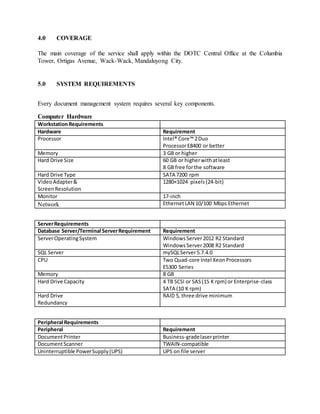
5.0 SYSTEM REQUIREMENTS
Every document management system requires several key components.
Computer Hardware
WorkstationRequirements
Hardware Requirement
Processor Intel® Core™ 2Duo
ProcessorE8400 or better
Memory 3 GB or higher
Hard Drive Size 60 GB or higherwithatleast
8 GB free forthe software
Hard Drive Type SATA 7200 rpm
VideoAdapter&
ScreenResolution
1280×1024 pixels(24-bit)
Monitor 17-inch
Network EthernetLAN 10/100 Mbps Ethernet
ServerRequirements
Database Server/Terminal ServerRequirement Requirement
ServerOperatingSystem WindowsServer2012 R2 Standard
WindowsServer2008 R2 Standard
SQL Server mySQLServer5.7.4.0
CPU Two Quad-core Intel XeonProcessors
E5300 Series
Memory 8 GB
Hard Drive Capacity 4 TB SCSI or SAS(15 K rpm) or Enterprise-class
SATA (10 K rpm)
Hard Drive
Redundancy
RAID 5, three drive minimum
Peripheral Requirements
Peripheral Requirement
DocumentPrinter Business-gradelaserprinter
DocumentScanner TWAIN-compatible
Uninterruptible PowerSupply(UPS) UPS on file server
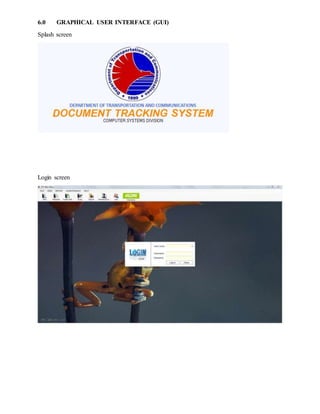
6.0 GRAPHICAL USER INTERFACE (GUI)
Splash screen
Login screen
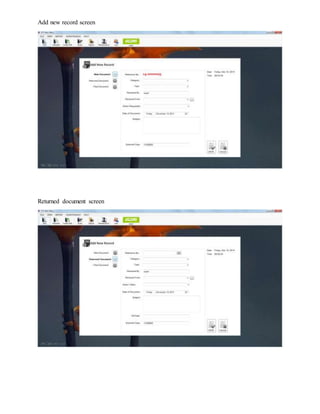
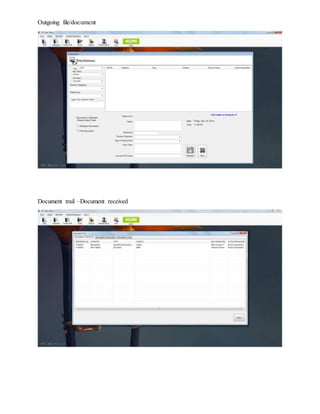
Add new record screen
Returned document screen
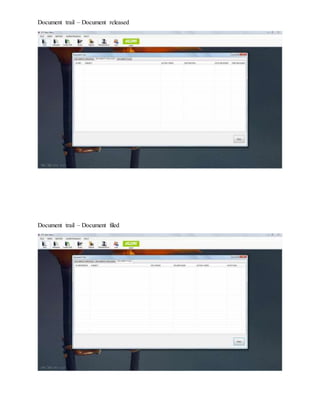
Outgoing file/document
Document trail –Document received
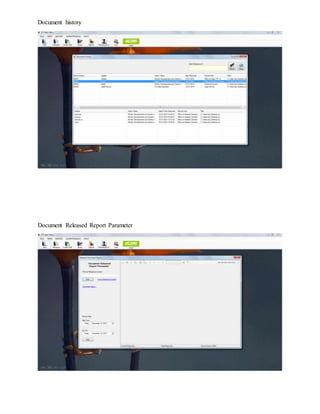
Document trail – Document released
Document trail – Document filed
Document history
Document Released Report Parameter
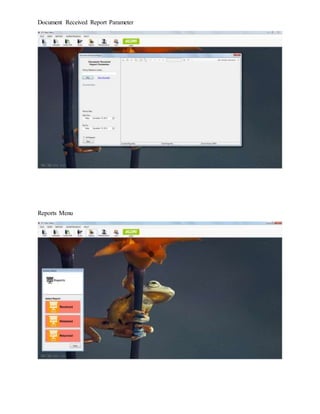
Document Received Report Parameter
Reports Menu
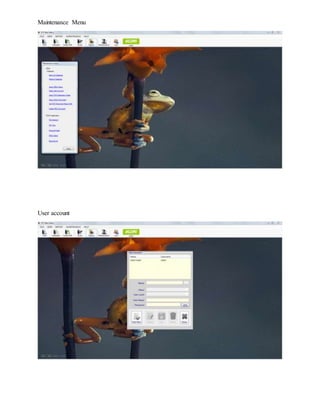
Maintenance Menu
User account
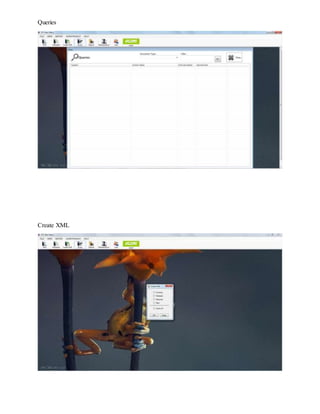
Queries
Create XML
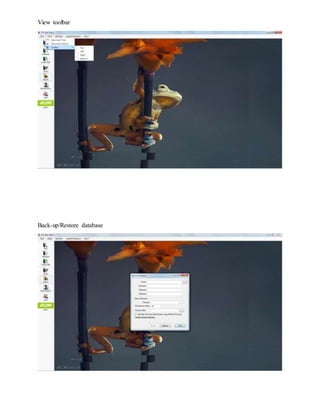
View toolbar
Back-up/Restore database
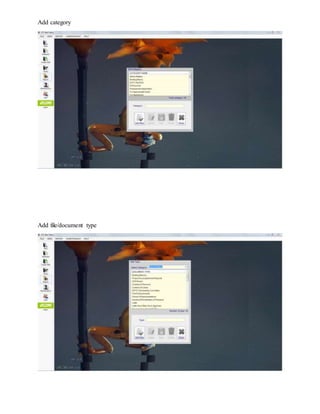
Add category
Add file/document type
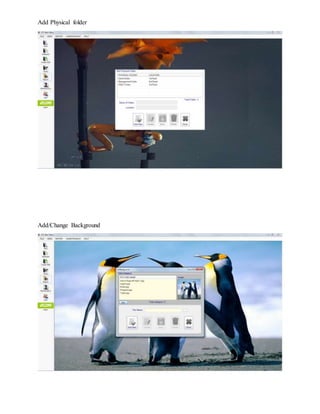
Add Physical folder
Add/Change Background
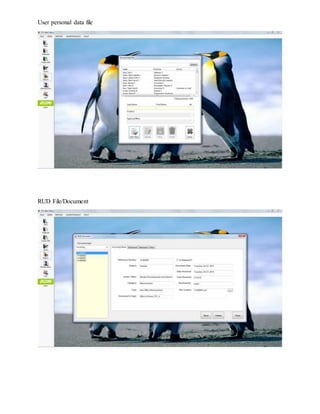
User personal data file
RUD File/Document
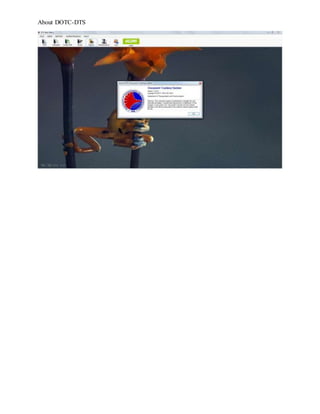
About DOTC-DTS
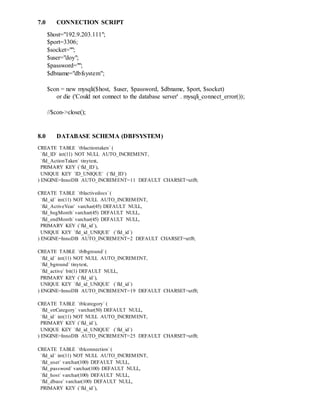
7.0 CONNECTION SCRIPT
$host="192.9.203.111";
$port=3306;
$socket="";
$user="doy";
$password="";
$dbname="dbfsystem";
$con = new mysqli($host, $user, $password, $dbname, $port, $socket)
or die ('Could not connect to the database server' . mysqli_connect_error());
//$con->close();
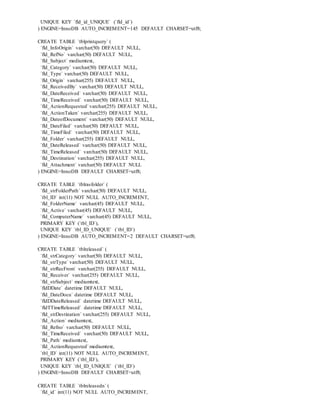
8.0 DATABASE SCHEMA (DBFSYSTEM)
CREATE TABLE `tblactiontaken` (
`fld_ID` int(11) NOT NULL AUTO_INCREMENT,
`fld_ActionTaken` tinytext,
PRIMARY KEY (`fld_ID`),
UNIQUE KEY `ID_UNIQUE` (`fld_ID`)
) ENGINE=InnoDB AUTO_INCREMENT=11 DEFAULT CHARSET=utf8;
CREATE TABLE `tblactivedocs`(
`fld_id` int(11) NOT NULL AUTO_INCREMENT,
`fld_ActiveYear` varchar(45) DEFAULT NULL,
`fld_begMonth`varchar(45) DEFAULT NULL,
`fld_endMonth`varchar(45) DEFAULT NULL,
PRIMARY KEY (`fld_id`),
UNIQUE KEY `fld_id_UNIQUE` (`fld_id`)
) ENGINE=InnoDB AUTO_INCREMENT=2 DEFAULT CHARSET=utf8;
CREATE TABLE `tblbground`(
`fld_id` int(11) NOT NULL AUTO_INCREMENT,
`fld_bground` tinytext,
`fld_active` bit(1) DEFAULT NULL,
PRIMARY KEY (`fld_id`),
UNIQUE KEY `fld_id_UNIQUE` (`fld_id`)
) ENGINE=InnoDB AUTO_INCREMENT=19 DEFAULT CHARSET=utf8;
CREATE TABLE `tblcategory` (
`fld_strCategory` varchar(50) DEFAULT NULL,
`fld_id` int(11) NOT NULL AUTO_INCREMENT,
PRIMARY KEY (`fld_id`),
UNIQUE KEY `fld_id_UNIQUE` (`fld_id`)
) ENGINE=InnoDB AUTO_INCREMENT=25 DEFAULT CHARSET=utf8;
CREATE TABLE `tblconnection`(
`fld_id` int(11) NOT NULL AUTO_INCREMENT,
`fld_user` varchar(100) DEFAULT NULL,
`fld_password` varchar(100) DEFAULT NULL,
`fld_host` varchar(100) DEFAULT NULL,
`fld_dbase` varchar(100) DEFAULT NULL,
PRIMARY KEY (`fld_id`),
UNIQUE KEY `fld_id_UNIQUE` (`fld_id`)
) ENGINE=InnoDB AUTO_INCREMENT=2 DEFAULT CHARSET=utf8;
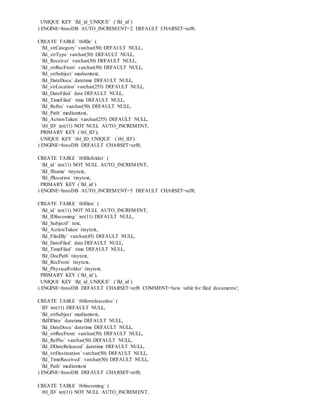
CREATE TABLE `tblfile` (
`fld_strCategory` varchar(50) DEFAULT NULL,
`fld_strType` varchar(50) DEFAULT NULL,
`fld_Receiver` varchar(50) DEFAULT NULL,
`fld_strRecFrom` varchar(50) DEFAULT NULL,
`fld_strSubject` mediumtext,
`fld_DateDocu` datetime DEFAULT NULL,
`fld_strLocation` varchar(255) DEFAULT NULL,
`fld_DateFiled` date DEFAULT NULL,
`fld_TimeFiled` time DEFAULT NULL,
`fld_Refno` varchar(50) DEFAULT NULL,
`fld_Path` mediumtext,
`fld_ActionTaken` varchar(255) DEFAULT NULL,
`tbl_ID` int(11) NOT NULL AUTO_INCREMENT,
PRIMARY KEY (`tbl_ID`),
UNIQUE KEY `tbl_ID_UNIQUE` (`tbl_ID`)
) ENGINE=InnoDB DEFAULT CHARSET=utf8;
CREATE TABLE `tblfilefolder` (
`fld_id` int(11) NOT NULL AUTO_INCREMENT,
`fld_ffname` tinytext,
`fld_fflocation` tinytext,
PRIMARY KEY (`fld_id`)
) ENGINE=InnoDB AUTO_INCREMENT=5 DEFAULT CHARSET=utf8;
CREATE TABLE `tblfilen` (
`fld_id` int(11) NOT NULL AUTO_INCREMENT,
`fld_IDIncoming` int(11) DEFAULT NULL,
`fld_SubjectF` text,
`fld_ActionTaken` tinytext,
`fld_FiledBy` varchar(45) DEFAULT NULL,
`fld_DateFiled` date DEFAULT NULL,
`fld_TimeFiled` time DEFAULT NULL,
`fld_DocPath` tinytext,
`fld_RecFrom` tinytext,
`fld_PhysicalFolder` tinytext,
PRIMARY KEY (`fld_id`),
UNIQUE KEY `fld_id_UNIQUE` (`fld_id`)
) ENGINE=InnoDB DEFAULT CHARSET=utf8 COMMENT='new table for filed documents';
CREATE TABLE `tblforreleasedoc` (
`ID` int(11) DEFAULT NULL,
`fld_strSubject` mediumtext,
`fldDDate` datetime DEFAULT NULL,
`fld_DateDocu` datetime DEFAULT NULL,
`fld_strRecFrom` varchar(50) DEFAULT NULL,
`fld_RefNo` varchar(50) DEFAULT NULL,
`fld_DDateReleased` datetime DEFAULT NULL,
`fld_strDestination` varchar(50) DEFAULT NULL,
`fld_TimeReceived` varchar(50) DEFAULT NULL,
`fld_Path` mediumtext
) ENGINE=InnoDB DEFAULT CHARSET=utf8;
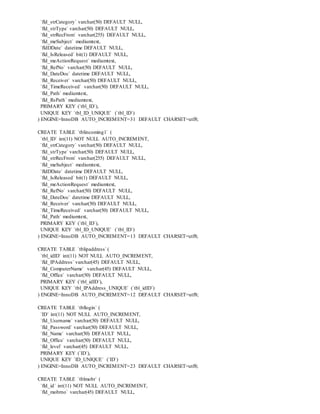
CREATE TABLE `tblincoming` (
`tbl_ID` int(11) NOT NULL AUTO_INCREMENT,
`fld_strCategory` varchar(50) DEFAULT NULL,
`fld_strType` varchar(50) DEFAULT NULL,
`fld_strRecFrom` varchar(255) DEFAULT NULL,
`fld_meSubject` mediumtext,
`fldDDate` datetime DEFAULT NULL,
`fld_IsReleased` bit(1) DEFAULT NULL,
`fld_meActionRequest` mediumtext,
`fld_RefNo` varchar(50) DEFAULT NULL,
`fld_DateDoc` datetime DEFAULT NULL,
`fld_Receiver` varchar(50) DEFAULT NULL,
`fld_TimeReceived` varchar(50) DEFAULT NULL,
`fld_Path` mediumtext,
`fld_RsPath` mediumtext,
PRIMARY KEY (`tbl_ID`),
UNIQUE KEY `tbl_ID_UNIQUE` (`tbl_ID`)
) ENGINE=InnoDB AUTO_INCREMENT=31 DEFAULT CHARSET=utf8;
CREATE TABLE `tblincoming1` (
`tbl_ID` int(11) NOT NULL AUTO_INCREMENT,
`fld_strCategory` varchar(50) DEFAULT NULL,
`fld_strType` varchar(50) DEFAULT NULL,
`fld_strRecFrom` varchar(255) DEFAULT NULL,
`fld_meSubject` mediumtext,
`fldDDate` datetime DEFAULT NULL,
`fld_IsReleased` bit(1) DEFAULT NULL,
`fld_meActionRequest` mediumtext,
`fld_RefNo` varchar(50) DEFAULT NULL,
`fld_DateDoc` datetime DEFAULT NULL,
`fld_Receiver` varchar(50) DEFAULT NULL,
`fld_TimeReceived` varchar(50) DEFAULT NULL,
`fld_Path` mediumtext,
PRIMARY KEY (`tbl_ID`),
UNIQUE KEY `tbl_ID_UNIQUE` (`tbl_ID`)
) ENGINE=InnoDB AUTO_INCREMENT=13 DEFAULT CHARSET=utf8;
CREATE TABLE `tblipaddress`(
`tbl_idID` int(11) NOT NULL AUTO_INCREMENT,
`fld_IPAddress` varchar(45) DEFAULT NULL,
`fld_ComputerName` varchar(45) DEFAULT NULL,
`fld_Office` varchar(50) DEFAULT NULL,
PRIMARY KEY (`tbl_idID`),
UNIQUE KEY `tbl_IPAddress_UNIQUE` (`tbl_idID`)
) ENGINE=InnoDB AUTO_INCREMENT=12 DEFAULT CHARSET=utf8;
CREATE TABLE `tbllogin` (
`ID` int(11) NOT NULL AUTO_INCREMENT,
`fld_Username` varchar(50) DEFAULT NULL,
`fld_Password` varchar(50) DEFAULT NULL,
`fld_Name` varchar(50) DEFAULT NULL,
`fld_Office` varchar(50) DEFAULT NULL,
`fld_level` varchar(45) DEFAULT NULL,
PRIMARY KEY (`ID`),
UNIQUE KEY `ID_UNIQUE` (`ID`)
) ENGINE=InnoDB AUTO_INCREMENT=23 DEFAULT CHARSET=utf8;
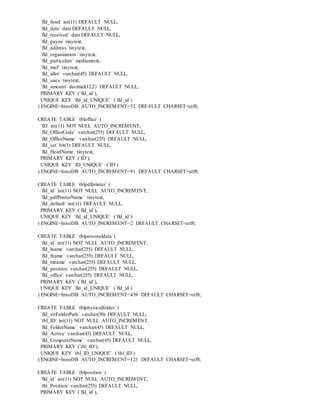
CREATE TABLE `tblmobr` (
`fld_id` int(11) NOT NULL AUTO_INCREMENT,
`fld_mobrno` varchar(45) DEFAULT NULL,
`fld_fund` int(11) DEFAULT NULL,
`fld_date` date DEFAULT NULL,
`fld_received` date DEFAULT NULL,
`fld_payee` tinytext,
`fld_address`tinytext,
`fld_organization` tinytext,
`fld_particulars` mediumtext,
`fld_mof` tinytext,
`fld_allot` varchar(45) DEFAULT NULL,
`fld_uacs` tinytext,
`fld_amount` decimal(12,2) DEFAULT NULL,
PRIMARY KEY (`fld_id`),
UNIQUE KEY `fld_id_UNIQUE` (`fld_id`)
) ENGINE=InnoDB AUTO_INCREMENT=32 DEFAULT CHARSET=utf8;
CREATE TABLE `tbloffice` (
`ID` int(11) NOT NULL AUTO_INCREMENT,
`fld_OfficeCode` varchar(255) DEFAULT NULL,
`fld_OfficeName` varchar(255) DEFAULT NULL,
`fld_set` bit(1) DEFAULT NULL,
`fld_HeadName` tinytext,
PRIMARY KEY (`ID`),
UNIQUE KEY `ID_UNIQUE` (`ID`)
) ENGINE=InnoDB AUTO_INCREMENT=91 DEFAULT CHARSET=utf8;
CREATE TABLE `tblpdfprinter` (
`fld_id` int(11) NOT NULL AUTO_INCREMENT,
`fld_pdfPrinterName` tinytext,
`fld_default` int(11) DEFAULT NULL,
PRIMARY KEY (`fld_id`),
UNIQUE KEY `fld_id_UNIQUE` (`fld_id`)
) ENGINE=InnoDB AUTO_INCREMENT=2 DEFAULT CHARSET=utf8;
CREATE TABLE `tblpersoneldata`(
`fld_id` int(11) NOT NULL AUTO_INCREMENT,
`fld_lname` varchar(255) DEFAULT NULL,
`fld_fname` varchar(255) DEFAULT NULL,
`fld_mname` varchar(255) DEFAULT NULL,
`fld_position` varchar(255) DEFAULT NULL,
`fld_office` varchar(255) DEFAULT NULL,
PRIMARY KEY (`fld_id`),
UNIQUE KEY `fld_id_UNIQUE` (`fld_id`)
) ENGINE=InnoDB AUTO_INCREMENT=439 DEFAULT CHARSET=utf8;
CREATE TABLE `tblphysicalfolder` (
`fld_strFolderPath` varchar(50) DEFAULT NULL,
`tbl_ID` int(11) NOT NULL AUTO_INCREMENT,
`fld_FolderName` varchar(45) DEFAULT NULL,
`fld_Active` varchar(45) DEFAULT NULL,
`fld_ComputerName` varchar(45) DEFAULT NULL,
PRIMARY KEY (`tbl_ID`),
UNIQUE KEY `tbl_ID_UNIQUE` (`tbl_ID`)
) ENGINE=InnoDB AUTO_INCREMENT=123 DEFAULT CHARSET=utf8;
CREATE TABLE `tblposition` (
`fld_id` int(11) NOT NULL AUTO_INCREMENT,
`fld_Position` varchar(255) DEFAULT NULL,
PRIMARY KEY (`fld_id`),
UNIQUE KEY `fld_id_UNIQUE` (`fld_id`)
) ENGINE=InnoDB AUTO_INCREMENT=145 DEFAULT CHARSET=utf8;
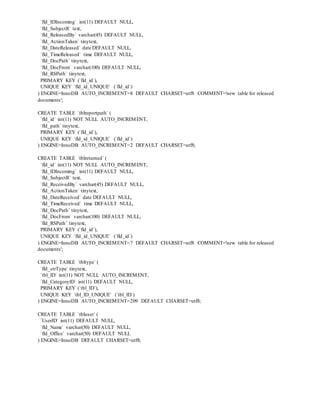
CREATE TABLE `tblprintquery` (
`fld_InfoOrigin` varchar(50) DEFAULT NULL,
`fld_RefNo` varchar(50) DEFAULT NULL,
`fld_Subject` mediumtext,
`fld_Category` varchar(50) DEFAULT NULL,
`fld_Type` varchar(50) DEFAULT NULL,
`fld_Origin` varchar(255) DEFAULT NULL,
`fld_ReceivedBy` varchar(50) DEFAULT NULL,
`fld_DateReceived` varchar(50) DEFAULT NULL,
`fld_TimeReceived` varchar(50) DEFAULT NULL,
`fld_ActionRequested`varchar(255) DEFAULT NULL,
`fld_ActionTaken` varchar(255) DEFAULT NULL,
`fld_DateofDocument` varchar(50) DEFAULT NULL,
`fld_DateFiled` varchar(50) DEFAULT NULL,
`fld_TimeFiled` varchar(50) DEFAULT NULL,
`fld_Folder` varchar(255) DEFAULT NULL,
`fld_DateReleased` varchar(50) DEFAULT NULL,
`fld_TimeReleased` varchar(50) DEFAULT NULL,
`fld_Destination` varchar(255) DEFAULT NULL,
`fld_Attachment` varchar(50) DEFAULT NULL
) ENGINE=InnoDB DEFAULT CHARSET=utf8;
CREATE TABLE `tblrasfolder` (
`fld_strFolderPath` varchar(50) DEFAULT NULL,
`tbl_ID` int(11) NOT NULL AUTO_INCREMENT,
`fld_FolderName` varchar(45) DEFAULT NULL,
`fld_Active` varchar(45) DEFAULT NULL,
`fld_ComputerName` varchar(45) DEFAULT NULL,
PRIMARY KEY (`tbl_ID`),
UNIQUE KEY `tbl_ID_UNIQUE` (`tbl_ID`)
) ENGINE=InnoDB AUTO_INCREMENT=2 DEFAULT CHARSET=utf8;
CREATE TABLE `tblreleased` (
`fld_strCategory` varchar(50) DEFAULT NULL,
`fld_strType` varchar(50) DEFAULT NULL,
`fld_strRecFrom` varchar(255) DEFAULT NULL,
`fld_Receiver` varchar(255) DEFAULT NULL,
`fld_strSubject` mediumtext,
`fldDDate` datetime DEFAULT NULL,
`fld_DateDocu` datetime DEFAULT NULL,
`fldDDateReleased` datetime DEFAULT NULL,
`fldTTimeReleased` datetime DEFAULT NULL,
`fld_strDestination` varchar(255) DEFAULT NULL,
`fld_Action` mediumtext,
`fld_Refno` varchar(50) DEFAULT NULL,
`fld_TimeReceived` varchar(50) DEFAULT NULL,
`fld_Path` mediumtext,
`fld_ActionRequested`mediumtext,
`tbl_ID` int(11) NOT NULL AUTO_INCREMENT,
PRIMARY KEY (`tbl_ID`),
UNIQUE KEY `tbl_ID_UNIQUE` (`tbl_ID`)
) ENGINE=InnoDB DEFAULT CHARSET=utf8;
CREATE TABLE `tblreleasedn` (
`fld_id` int(11) NOT NULL AUTO_INCREMENT,
`fld_IDIncoming` int(11) DEFAULT NULL,
`fld_SubjectR` text,
`fld_ReleasedBy` varchar(45) DEFAULT NULL,
`fld_ActionTaken` tinytext,
`fld_DateReleased` date DEFAULT NULL,
`fld_TimeReleased` time DEFAULT NULL,
`fld_DocPath` tinytext,
`fld_DocFrom` varchar(100) DEFAULT NULL,
`fld_RSPath` tinytext,
PRIMARY KEY (`fld_id`),
UNIQUE KEY `fld_id_UNIQUE` (`fld_id`)
) ENGINE=InnoDB AUTO_INCREMENT=8 DEFAULT CHARSET=utf8 COMMENT='new table for released
documents';
CREATE TABLE `tblreportpath` (
`fld_id` int(11) NOT NULL AUTO_INCREMENT,
`fld_path` tinytext,
PRIMARY KEY (`fld_id`),
UNIQUE KEY `fld_id_UNIQUE` (`fld_id`)
) ENGINE=InnoDB AUTO_INCREMENT=2 DEFAULT CHARSET=utf8;
CREATE TABLE `tblreturned` (
`fld_id` int(11) NOT NULL AUTO_INCREMENT,
`fld_IDIncoming` int(11) DEFAULT NULL,
`fld_SubjectR` text,
`fld_ReceivedBy` varchar(45) DEFAULT NULL,
`fld_ActionTaken` tinytext,
`fld_DateReceived` date DEFAULT NULL,
`fld_TimeReceived` time DEFAULT NULL,
`fld_DocPath` tinytext,
`fld_DocFrom` varchar(100) DEFAULT NULL,
`fld_RSPath` tinytext,
PRIMARY KEY (`fld_id`),
UNIQUE KEY `fld_id_UNIQUE` (`fld_id`)
) ENGINE=InnoDB AUTO_INCREMENT=7 DEFAULT CHARSET=utf8 COMMENT='new table for released
documents';
CREATE TABLE `tbltype` (
`fld_strType` tinytext,
`tbl_ID` int(11) NOT NULL AUTO_INCREMENT,
`fld_CategoryID` int(11) DEFAULT NULL,
PRIMARY KEY (`tbl_ID`),
UNIQUE KEY `tbl_ID_UNIQUE` (`tbl_ID`)
) ENGINE=InnoDB AUTO_INCREMENT=209 DEFAULT CHARSET=utf8;
CREATE TABLE `tbluser` (
`UserID` int(11) DEFAULT NULL,
`fld_Name` varchar(50) DEFAULT NULL,
`fld_Office` varchar(50) DEFAULT NULL
) ENGINE=InnoDB DEFAULT CHARSET=utf8;

Electronic document management system

  • 1.
    DOCUMENT TRACKING SYSTEM1.0 Developer: Biodor P. Bonifacio Jr. Howard C. Paquiz Jay A. Jovellanos 1.0 INTRODUCTION AND BACKGROUND INFORMATION The goal of a paperless office continues to get closer, due to the rising popularity of digital document management systems. Document management systems use scanners to make digital copies of every document. These documents are coded to attach them to specific files or accounts and optical character reading, OCR, systems provide insight into the contents of each page. From the time it enters the organization, the digital version of the document is stored and filed for future use. The DOTC Central Office (DOTC-CO) currently uses the Log Book to record and monitor the Memo/Letter/Communication and other documents for the incoming and outgoing from other offices. To this, a Document Tracking System (DTS) is created, which will be hosted by Computer Systems Division. The application can be accessed inside DOTC building or where there is computer connected in the LAN; is capable of the record keeping, monitoring, and easy retrieval of documents; single repository of database (Server database); and can use windows operating systems, and environments. Being locally developed, this will not entail any costs in additional hardware, maintenance, procurement and licensing, setup/configuration, upgrading, and administration; and improved archiving. Its limitation are; the system is only internal to DOTC and cannot be accessed by users (i.e. Officials and employees of the Central Office) outside DOTC-CO. 2.0 OBJECTIVE The objective of the project is the creation of integrated repository for managing document that can be accessed easily by the end-user/office concern. This will be hosted by Computer Systems Division server using client/server technology. The service will be provided to all office/division. The system should have the following features:  Easy Access From the moment the document is scanned, it becomes accessible from any computer by an authorized employee. Compare this immediate access to a traditional paper file, which has to be housed in a file cabinet or room and then must be must be requested, retrieved and delivered to an employee. During its use that paper file cannot be accessed by another employee, nor is it easily tracked during its journey. Electronic documents can be retrieved immediately, shared and routed to any employee who needs it.  Searchable Text When a document is scanned, OCR examines the text and creates a digital version of the contents. This text is stored with the document, creating a file that can be searched by any
  • 2.
    employee. If acompany needed to find every file that mentions a particular client, they could search the document database for every mention of that name. This turns ordinary files into huge databases of information that can be used for marketing, audit and management purposes.  Cost Savings The switch to electronic documents can be a tremendous cost-saving opportunity for most companies. The cost for filing cabinets, supplies and the real estate required to store them on site is substantial. If a company uses an off-site storage facility the cost to store and retrieve files is equally expensive. Add to this the cost for filing clerks and the downtime required to find specific files and the price of a manual filing system is substantial. With digital systems, there is a cost for the scanning and filing technologies, but once digitized, the cost for data storage is quite low.  Security The difficult task of securing confidential information is simplified with a digital document management system. Whereas paper files need to be stored in secure cabinets and controlled using a manual access system, electronic documents are easily encrypted with access controls using passwords and an authentication system. Electronic files never go missing, nor do they easily fall into the wrong hands.  Remote storage with safeguards against data loss, viruses/spamware and security breaches.  Updates/revisions of the system will automatically be done by the CSD without downtimes.  User-enabled password and security features, as well as sharing permission controls to enhance privacy. 3.0 SCOPE The scope of the integrated applications for business environment service shall include the following: 3.1 Deployment and implementation of Document Tracking System, with the following services: 3.1.1 Record keeping of incoming documents 3.1.2 Record searching of documents 3.1.3 Record monitoring of document from different division 3.1.4 Document history of incoming/outgoingdocument 3.2 Half day administrator and user trainings 3.3 24/7 technical support
  • 3.
    4.0 COVERAGE The maincoverage of the service shall apply within the DOTC Central Office at the Columbia Tower, Ortigas Avenue, Wack-Wack, Mandaluyong City. 5.0 SYSTEM REQUIREMENTS Every document management system requires several key components. Computer Hardware WorkstationRequirements Hardware Requirement Processor Intel® Core™ 2Duo ProcessorE8400 or better Memory 3 GB or higher Hard Drive Size 60 GB or higherwithatleast 8 GB free forthe software Hard Drive Type SATA 7200 rpm VideoAdapter& ScreenResolution 1280×1024 pixels(24-bit) Monitor 17-inch Network EthernetLAN 10/100 Mbps Ethernet ServerRequirements Database Server/Terminal ServerRequirement Requirement ServerOperatingSystem WindowsServer2012 R2 Standard WindowsServer2008 R2 Standard SQL Server mySQLServer5.7.4.0 CPU Two Quad-core Intel XeonProcessors E5300 Series Memory 8 GB Hard Drive Capacity 4 TB SCSI or SAS(15 K rpm) or Enterprise-class SATA (10 K rpm) Hard Drive Redundancy RAID 5, three drive minimum Peripheral Requirements Peripheral Requirement DocumentPrinter Business-gradelaserprinter DocumentScanner TWAIN-compatible Uninterruptible PowerSupply(UPS) UPS on file server
  • 4.
    6.0 GRAPHICAL USERINTERFACE (GUI) Splash screen Login screen
  • 5.
    Add new recordscreen Returned document screen
  • 6.
  • 7.
    Document trail –Document released Document trail – Document filed
  • 8.
  • 9.
    Document Received ReportParameter Reports Menu
  • 10.
  • 11.
  • 12.
  • 13.
  • 14.
  • 15.
    User personal datafile RUD File/Document
  • 16.
  • 17.
    7.0 CONNECTION SCRIPT $host="192.9.203.111"; $port=3306; $socket=""; $user="doy"; $password=""; $dbname="dbfsystem"; $con= new mysqli($host, $user, $password, $dbname, $port, $socket) or die ('Could not connect to the database server' . mysqli_connect_error()); //$con->close(); 8.0 DATABASE SCHEMA (DBFSYSTEM) CREATE TABLE `tblactiontaken` ( `fld_ID` int(11) NOT NULL AUTO_INCREMENT, `fld_ActionTaken` tinytext, PRIMARY KEY (`fld_ID`), UNIQUE KEY `ID_UNIQUE` (`fld_ID`) ) ENGINE=InnoDB AUTO_INCREMENT=11 DEFAULT CHARSET=utf8; CREATE TABLE `tblactivedocs`( `fld_id` int(11) NOT NULL AUTO_INCREMENT, `fld_ActiveYear` varchar(45) DEFAULT NULL, `fld_begMonth`varchar(45) DEFAULT NULL, `fld_endMonth`varchar(45) DEFAULT NULL, PRIMARY KEY (`fld_id`), UNIQUE KEY `fld_id_UNIQUE` (`fld_id`) ) ENGINE=InnoDB AUTO_INCREMENT=2 DEFAULT CHARSET=utf8; CREATE TABLE `tblbground`( `fld_id` int(11) NOT NULL AUTO_INCREMENT, `fld_bground` tinytext, `fld_active` bit(1) DEFAULT NULL, PRIMARY KEY (`fld_id`), UNIQUE KEY `fld_id_UNIQUE` (`fld_id`) ) ENGINE=InnoDB AUTO_INCREMENT=19 DEFAULT CHARSET=utf8; CREATE TABLE `tblcategory` ( `fld_strCategory` varchar(50) DEFAULT NULL, `fld_id` int(11) NOT NULL AUTO_INCREMENT, PRIMARY KEY (`fld_id`), UNIQUE KEY `fld_id_UNIQUE` (`fld_id`) ) ENGINE=InnoDB AUTO_INCREMENT=25 DEFAULT CHARSET=utf8; CREATE TABLE `tblconnection`( `fld_id` int(11) NOT NULL AUTO_INCREMENT, `fld_user` varchar(100) DEFAULT NULL, `fld_password` varchar(100) DEFAULT NULL, `fld_host` varchar(100) DEFAULT NULL, `fld_dbase` varchar(100) DEFAULT NULL, PRIMARY KEY (`fld_id`),
  • 18.
    UNIQUE KEY `fld_id_UNIQUE`(`fld_id`) ) ENGINE=InnoDB AUTO_INCREMENT=2 DEFAULT CHARSET=utf8; CREATE TABLE `tblfile` ( `fld_strCategory` varchar(50) DEFAULT NULL, `fld_strType` varchar(50) DEFAULT NULL, `fld_Receiver` varchar(50) DEFAULT NULL, `fld_strRecFrom` varchar(50) DEFAULT NULL, `fld_strSubject` mediumtext, `fld_DateDocu` datetime DEFAULT NULL, `fld_strLocation` varchar(255) DEFAULT NULL, `fld_DateFiled` date DEFAULT NULL, `fld_TimeFiled` time DEFAULT NULL, `fld_Refno` varchar(50) DEFAULT NULL, `fld_Path` mediumtext, `fld_ActionTaken` varchar(255) DEFAULT NULL, `tbl_ID` int(11) NOT NULL AUTO_INCREMENT, PRIMARY KEY (`tbl_ID`), UNIQUE KEY `tbl_ID_UNIQUE` (`tbl_ID`) ) ENGINE=InnoDB DEFAULT CHARSET=utf8; CREATE TABLE `tblfilefolder` ( `fld_id` int(11) NOT NULL AUTO_INCREMENT, `fld_ffname` tinytext, `fld_fflocation` tinytext, PRIMARY KEY (`fld_id`) ) ENGINE=InnoDB AUTO_INCREMENT=5 DEFAULT CHARSET=utf8; CREATE TABLE `tblfilen` ( `fld_id` int(11) NOT NULL AUTO_INCREMENT, `fld_IDIncoming` int(11) DEFAULT NULL, `fld_SubjectF` text, `fld_ActionTaken` tinytext, `fld_FiledBy` varchar(45) DEFAULT NULL, `fld_DateFiled` date DEFAULT NULL, `fld_TimeFiled` time DEFAULT NULL, `fld_DocPath` tinytext, `fld_RecFrom` tinytext, `fld_PhysicalFolder` tinytext, PRIMARY KEY (`fld_id`), UNIQUE KEY `fld_id_UNIQUE` (`fld_id`) ) ENGINE=InnoDB DEFAULT CHARSET=utf8 COMMENT='new table for filed documents'; CREATE TABLE `tblforreleasedoc` ( `ID` int(11) DEFAULT NULL, `fld_strSubject` mediumtext, `fldDDate` datetime DEFAULT NULL, `fld_DateDocu` datetime DEFAULT NULL, `fld_strRecFrom` varchar(50) DEFAULT NULL, `fld_RefNo` varchar(50) DEFAULT NULL, `fld_DDateReleased` datetime DEFAULT NULL, `fld_strDestination` varchar(50) DEFAULT NULL, `fld_TimeReceived` varchar(50) DEFAULT NULL, `fld_Path` mediumtext ) ENGINE=InnoDB DEFAULT CHARSET=utf8; CREATE TABLE `tblincoming` ( `tbl_ID` int(11) NOT NULL AUTO_INCREMENT,
  • 19.
    `fld_strCategory` varchar(50) DEFAULTNULL, `fld_strType` varchar(50) DEFAULT NULL, `fld_strRecFrom` varchar(255) DEFAULT NULL, `fld_meSubject` mediumtext, `fldDDate` datetime DEFAULT NULL, `fld_IsReleased` bit(1) DEFAULT NULL, `fld_meActionRequest` mediumtext, `fld_RefNo` varchar(50) DEFAULT NULL, `fld_DateDoc` datetime DEFAULT NULL, `fld_Receiver` varchar(50) DEFAULT NULL, `fld_TimeReceived` varchar(50) DEFAULT NULL, `fld_Path` mediumtext, `fld_RsPath` mediumtext, PRIMARY KEY (`tbl_ID`), UNIQUE KEY `tbl_ID_UNIQUE` (`tbl_ID`) ) ENGINE=InnoDB AUTO_INCREMENT=31 DEFAULT CHARSET=utf8; CREATE TABLE `tblincoming1` ( `tbl_ID` int(11) NOT NULL AUTO_INCREMENT, `fld_strCategory` varchar(50) DEFAULT NULL, `fld_strType` varchar(50) DEFAULT NULL, `fld_strRecFrom` varchar(255) DEFAULT NULL, `fld_meSubject` mediumtext, `fldDDate` datetime DEFAULT NULL, `fld_IsReleased` bit(1) DEFAULT NULL, `fld_meActionRequest` mediumtext, `fld_RefNo` varchar(50) DEFAULT NULL, `fld_DateDoc` datetime DEFAULT NULL, `fld_Receiver` varchar(50) DEFAULT NULL, `fld_TimeReceived` varchar(50) DEFAULT NULL, `fld_Path` mediumtext, PRIMARY KEY (`tbl_ID`), UNIQUE KEY `tbl_ID_UNIQUE` (`tbl_ID`) ) ENGINE=InnoDB AUTO_INCREMENT=13 DEFAULT CHARSET=utf8; CREATE TABLE `tblipaddress`( `tbl_idID` int(11) NOT NULL AUTO_INCREMENT, `fld_IPAddress` varchar(45) DEFAULT NULL, `fld_ComputerName` varchar(45) DEFAULT NULL, `fld_Office` varchar(50) DEFAULT NULL, PRIMARY KEY (`tbl_idID`), UNIQUE KEY `tbl_IPAddress_UNIQUE` (`tbl_idID`) ) ENGINE=InnoDB AUTO_INCREMENT=12 DEFAULT CHARSET=utf8; CREATE TABLE `tbllogin` ( `ID` int(11) NOT NULL AUTO_INCREMENT, `fld_Username` varchar(50) DEFAULT NULL, `fld_Password` varchar(50) DEFAULT NULL, `fld_Name` varchar(50) DEFAULT NULL, `fld_Office` varchar(50) DEFAULT NULL, `fld_level` varchar(45) DEFAULT NULL, PRIMARY KEY (`ID`), UNIQUE KEY `ID_UNIQUE` (`ID`) ) ENGINE=InnoDB AUTO_INCREMENT=23 DEFAULT CHARSET=utf8; CREATE TABLE `tblmobr` ( `fld_id` int(11) NOT NULL AUTO_INCREMENT, `fld_mobrno` varchar(45) DEFAULT NULL,
  • 20.
    `fld_fund` int(11) DEFAULTNULL, `fld_date` date DEFAULT NULL, `fld_received` date DEFAULT NULL, `fld_payee` tinytext, `fld_address`tinytext, `fld_organization` tinytext, `fld_particulars` mediumtext, `fld_mof` tinytext, `fld_allot` varchar(45) DEFAULT NULL, `fld_uacs` tinytext, `fld_amount` decimal(12,2) DEFAULT NULL, PRIMARY KEY (`fld_id`), UNIQUE KEY `fld_id_UNIQUE` (`fld_id`) ) ENGINE=InnoDB AUTO_INCREMENT=32 DEFAULT CHARSET=utf8; CREATE TABLE `tbloffice` ( `ID` int(11) NOT NULL AUTO_INCREMENT, `fld_OfficeCode` varchar(255) DEFAULT NULL, `fld_OfficeName` varchar(255) DEFAULT NULL, `fld_set` bit(1) DEFAULT NULL, `fld_HeadName` tinytext, PRIMARY KEY (`ID`), UNIQUE KEY `ID_UNIQUE` (`ID`) ) ENGINE=InnoDB AUTO_INCREMENT=91 DEFAULT CHARSET=utf8; CREATE TABLE `tblpdfprinter` ( `fld_id` int(11) NOT NULL AUTO_INCREMENT, `fld_pdfPrinterName` tinytext, `fld_default` int(11) DEFAULT NULL, PRIMARY KEY (`fld_id`), UNIQUE KEY `fld_id_UNIQUE` (`fld_id`) ) ENGINE=InnoDB AUTO_INCREMENT=2 DEFAULT CHARSET=utf8; CREATE TABLE `tblpersoneldata`( `fld_id` int(11) NOT NULL AUTO_INCREMENT, `fld_lname` varchar(255) DEFAULT NULL, `fld_fname` varchar(255) DEFAULT NULL, `fld_mname` varchar(255) DEFAULT NULL, `fld_position` varchar(255) DEFAULT NULL, `fld_office` varchar(255) DEFAULT NULL, PRIMARY KEY (`fld_id`), UNIQUE KEY `fld_id_UNIQUE` (`fld_id`) ) ENGINE=InnoDB AUTO_INCREMENT=439 DEFAULT CHARSET=utf8; CREATE TABLE `tblphysicalfolder` ( `fld_strFolderPath` varchar(50) DEFAULT NULL, `tbl_ID` int(11) NOT NULL AUTO_INCREMENT, `fld_FolderName` varchar(45) DEFAULT NULL, `fld_Active` varchar(45) DEFAULT NULL, `fld_ComputerName` varchar(45) DEFAULT NULL, PRIMARY KEY (`tbl_ID`), UNIQUE KEY `tbl_ID_UNIQUE` (`tbl_ID`) ) ENGINE=InnoDB AUTO_INCREMENT=123 DEFAULT CHARSET=utf8; CREATE TABLE `tblposition` ( `fld_id` int(11) NOT NULL AUTO_INCREMENT, `fld_Position` varchar(255) DEFAULT NULL, PRIMARY KEY (`fld_id`),
  • 21.
    UNIQUE KEY `fld_id_UNIQUE`(`fld_id`) ) ENGINE=InnoDB AUTO_INCREMENT=145 DEFAULT CHARSET=utf8; CREATE TABLE `tblprintquery` ( `fld_InfoOrigin` varchar(50) DEFAULT NULL, `fld_RefNo` varchar(50) DEFAULT NULL, `fld_Subject` mediumtext, `fld_Category` varchar(50) DEFAULT NULL, `fld_Type` varchar(50) DEFAULT NULL, `fld_Origin` varchar(255) DEFAULT NULL, `fld_ReceivedBy` varchar(50) DEFAULT NULL, `fld_DateReceived` varchar(50) DEFAULT NULL, `fld_TimeReceived` varchar(50) DEFAULT NULL, `fld_ActionRequested`varchar(255) DEFAULT NULL, `fld_ActionTaken` varchar(255) DEFAULT NULL, `fld_DateofDocument` varchar(50) DEFAULT NULL, `fld_DateFiled` varchar(50) DEFAULT NULL, `fld_TimeFiled` varchar(50) DEFAULT NULL, `fld_Folder` varchar(255) DEFAULT NULL, `fld_DateReleased` varchar(50) DEFAULT NULL, `fld_TimeReleased` varchar(50) DEFAULT NULL, `fld_Destination` varchar(255) DEFAULT NULL, `fld_Attachment` varchar(50) DEFAULT NULL ) ENGINE=InnoDB DEFAULT CHARSET=utf8; CREATE TABLE `tblrasfolder` ( `fld_strFolderPath` varchar(50) DEFAULT NULL, `tbl_ID` int(11) NOT NULL AUTO_INCREMENT, `fld_FolderName` varchar(45) DEFAULT NULL, `fld_Active` varchar(45) DEFAULT NULL, `fld_ComputerName` varchar(45) DEFAULT NULL, PRIMARY KEY (`tbl_ID`), UNIQUE KEY `tbl_ID_UNIQUE` (`tbl_ID`) ) ENGINE=InnoDB AUTO_INCREMENT=2 DEFAULT CHARSET=utf8; CREATE TABLE `tblreleased` ( `fld_strCategory` varchar(50) DEFAULT NULL, `fld_strType` varchar(50) DEFAULT NULL, `fld_strRecFrom` varchar(255) DEFAULT NULL, `fld_Receiver` varchar(255) DEFAULT NULL, `fld_strSubject` mediumtext, `fldDDate` datetime DEFAULT NULL, `fld_DateDocu` datetime DEFAULT NULL, `fldDDateReleased` datetime DEFAULT NULL, `fldTTimeReleased` datetime DEFAULT NULL, `fld_strDestination` varchar(255) DEFAULT NULL, `fld_Action` mediumtext, `fld_Refno` varchar(50) DEFAULT NULL, `fld_TimeReceived` varchar(50) DEFAULT NULL, `fld_Path` mediumtext, `fld_ActionRequested`mediumtext, `tbl_ID` int(11) NOT NULL AUTO_INCREMENT, PRIMARY KEY (`tbl_ID`), UNIQUE KEY `tbl_ID_UNIQUE` (`tbl_ID`) ) ENGINE=InnoDB DEFAULT CHARSET=utf8; CREATE TABLE `tblreleasedn` ( `fld_id` int(11) NOT NULL AUTO_INCREMENT,
  • 22.
    `fld_IDIncoming` int(11) DEFAULTNULL, `fld_SubjectR` text, `fld_ReleasedBy` varchar(45) DEFAULT NULL, `fld_ActionTaken` tinytext, `fld_DateReleased` date DEFAULT NULL, `fld_TimeReleased` time DEFAULT NULL, `fld_DocPath` tinytext, `fld_DocFrom` varchar(100) DEFAULT NULL, `fld_RSPath` tinytext, PRIMARY KEY (`fld_id`), UNIQUE KEY `fld_id_UNIQUE` (`fld_id`) ) ENGINE=InnoDB AUTO_INCREMENT=8 DEFAULT CHARSET=utf8 COMMENT='new table for released documents'; CREATE TABLE `tblreportpath` ( `fld_id` int(11) NOT NULL AUTO_INCREMENT, `fld_path` tinytext, PRIMARY KEY (`fld_id`), UNIQUE KEY `fld_id_UNIQUE` (`fld_id`) ) ENGINE=InnoDB AUTO_INCREMENT=2 DEFAULT CHARSET=utf8; CREATE TABLE `tblreturned` ( `fld_id` int(11) NOT NULL AUTO_INCREMENT, `fld_IDIncoming` int(11) DEFAULT NULL, `fld_SubjectR` text, `fld_ReceivedBy` varchar(45) DEFAULT NULL, `fld_ActionTaken` tinytext, `fld_DateReceived` date DEFAULT NULL, `fld_TimeReceived` time DEFAULT NULL, `fld_DocPath` tinytext, `fld_DocFrom` varchar(100) DEFAULT NULL, `fld_RSPath` tinytext, PRIMARY KEY (`fld_id`), UNIQUE KEY `fld_id_UNIQUE` (`fld_id`) ) ENGINE=InnoDB AUTO_INCREMENT=7 DEFAULT CHARSET=utf8 COMMENT='new table for released documents'; CREATE TABLE `tbltype` ( `fld_strType` tinytext, `tbl_ID` int(11) NOT NULL AUTO_INCREMENT, `fld_CategoryID` int(11) DEFAULT NULL, PRIMARY KEY (`tbl_ID`), UNIQUE KEY `tbl_ID_UNIQUE` (`tbl_ID`) ) ENGINE=InnoDB AUTO_INCREMENT=209 DEFAULT CHARSET=utf8; CREATE TABLE `tbluser` ( `UserID` int(11) DEFAULT NULL, `fld_Name` varchar(50) DEFAULT NULL, `fld_Office` varchar(50) DEFAULT NULL ) ENGINE=InnoDB DEFAULT CHARSET=utf8;