Document Control
FSP-KL Project
What is the Document
Management?
 Document management is a process taken with
document within an organization, with respect to the
creation, distribution and deletion of documents.
 “Document Management includes every action taken
with a document within an organization, with respect
to the creation, distribution and deletion of documents
Why need Document Control?
How important it?
 Controlling documents ensures that access and use only
the most current versions of documents
 Controlling and tracking what is overall status of
documents Submittial.
 Saving all people time for finding/looking documents
Benefits of Document
Management/ Document control
1. Improve staff productivity
2. Reduce costs associated with manual document (if
use server or other DC software)
3. Promote sharing of knowledge and information
4. Enhance corporate transparency all level of people
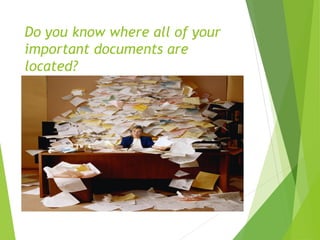
Do you know where all of your
important documents are
located?
3 Way for Documented
 Manually
 Paper based
 Semi-Manually
 Common network to store/make available
documents electronically
 Document Control Application
 ACONEX, Other DC software
Where do I start and
document it…..?
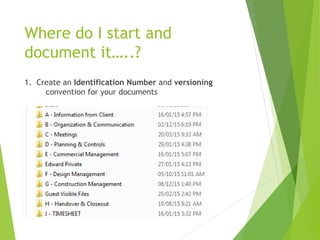
1. Create an Identification Number and versioning
convention for your documents
What I do for NEXT??
2. Create a Master Index
 Database or spreadsheet
 Divide/delegate by process or department if it is too
large to manage in a consolidated fashion
 Identify responsibility for the Master Index
3. Gather your documents
 Apply the document identifier
 Determine where all copies of the document are in use
4. Create a master document file
 Place the master into that file with all of the
appropriate authorization and scheduled review
signatures
 Apply the “Control” mechanism to controlled working
copies of the master document
5. Perform all document checks.. We
want Quality Document in our
system
• Title
• Document Identifier
• Responsible Person/Position
• Authorizer(s)
• Distribution locations
• Version Number/ Revision Number
• Effective Date
• Next Scheduled Review Date
6. Create your document
processes
 Document Creation, Review & Approval
 Document Versioning, Distribution & Audit
 Document Change
 Document Archive
7. Write relevant document
control procedures
including:
 How to write a procedure
(templates, etc.)
 Assign an identification number
 Register the document on the
Master Index
 Identify “Controlled”
documents
 Set the target days for transmit
document when you receive
NSC transmittals.
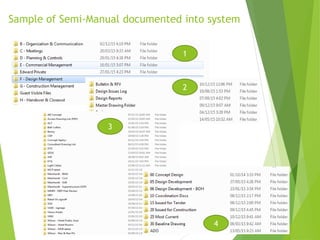
Sample of Semi-Manual documented into system
1
2
3
4
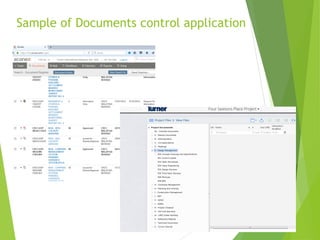
Sample of Documents control application
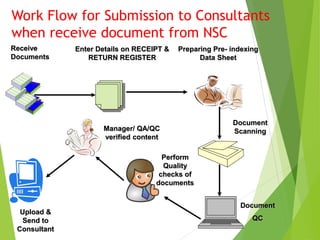
Work Flow for Submission to Consultants
when receive document from NSC
Receive
Documents
Enter Details on RECEIPT &
RETURN REGISTER
Preparing Pre- indexing
Data Sheet
Document
Scanning
Document
QC
Manager/ QA/QC
verified content
Perform
Quality
checks of
documents
Upload &
Send to
Consultant
Work Flow for Submission to Consultants
when receive document from NSC
Start
Receive incoming
documents from
email/ by hand.
etc
Perform Quality
Checks of the
Documents?
Does the
incoming
documents
pass all
quality Checks
Manager/
QA/QC
verify
document
content.
Upload and
Send to
Consultants
Yes Yes
Send back to individual
NSC
No
Work as TEAM
Thank you
Q & A

FSP-KL DC Presentation

  • 1.
  • 2.
    What is theDocument Management?  Document management is a process taken with document within an organization, with respect to the creation, distribution and deletion of documents.  “Document Management includes every action taken with a document within an organization, with respect to the creation, distribution and deletion of documents
  • 3.
    Why need DocumentControl? How important it?  Controlling documents ensures that access and use only the most current versions of documents  Controlling and tracking what is overall status of documents Submittial.  Saving all people time for finding/looking documents
  • 4.
    Benefits of Document Management/Document control 1. Improve staff productivity 2. Reduce costs associated with manual document (if use server or other DC software) 3. Promote sharing of knowledge and information 4. Enhance corporate transparency all level of people
  • 5.
    Do you knowwhere all of your important documents are located?
  • 6.
    3 Way forDocumented  Manually  Paper based  Semi-Manually  Common network to store/make available documents electronically  Document Control Application  ACONEX, Other DC software
  • 7.
    Where do Istart and document it…..? 1. Create an Identification Number and versioning convention for your documents
  • 8.
    What I dofor NEXT?? 2. Create a Master Index  Database or spreadsheet  Divide/delegate by process or department if it is too large to manage in a consolidated fashion  Identify responsibility for the Master Index 3. Gather your documents  Apply the document identifier  Determine where all copies of the document are in use 4. Create a master document file  Place the master into that file with all of the appropriate authorization and scheduled review signatures  Apply the “Control” mechanism to controlled working copies of the master document
  • 9.
    5. Perform alldocument checks.. We want Quality Document in our system • Title • Document Identifier • Responsible Person/Position • Authorizer(s) • Distribution locations • Version Number/ Revision Number • Effective Date • Next Scheduled Review Date
  • 10.
    6. Create yourdocument processes  Document Creation, Review & Approval  Document Versioning, Distribution & Audit  Document Change  Document Archive
  • 11.
    7. Write relevantdocument control procedures including:  How to write a procedure (templates, etc.)  Assign an identification number  Register the document on the Master Index  Identify “Controlled” documents  Set the target days for transmit document when you receive NSC transmittals.
  • 12.
    Sample of Semi-Manualdocumented into system 1 2 3 4
  • 13.
    Sample of Documentscontrol application
  • 14.
    Work Flow forSubmission to Consultants when receive document from NSC Receive Documents Enter Details on RECEIPT & RETURN REGISTER Preparing Pre- indexing Data Sheet Document Scanning Document QC Manager/ QA/QC verified content Perform Quality checks of documents Upload & Send to Consultant
  • 15.
    Work Flow forSubmission to Consultants when receive document from NSC Start Receive incoming documents from email/ by hand. etc Perform Quality Checks of the Documents? Does the incoming documents pass all quality Checks Manager/ QA/QC verify document content. Upload and Send to Consultants Yes Yes Send back to individual NSC No
  • 16.
  • 17.