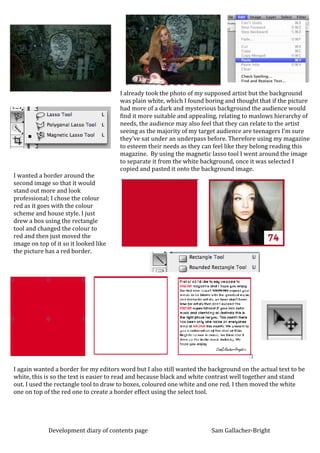
I already took the photo of my supposed artist but the background
                                       was plain white, which I found boring and thought that if the picture
                                       had more of a dark and mysterious background the audience would
                                       find it more suitable and appealing, relating to maslows hierarchy of
                                       needs, the audience may also feel that they can relate to the artist
                                       seeing as the majority of my target audience are teenagers I’m sure
                                       they’ve sat under an underpass before. Therefore using my magazine
                                       to esteem their needs as they can feel like they belong reading this
                                       magazine. By using the magnetic lasso tool I went around the image
                                       to separate it from the white background, once it was selected I
                                       copied and pasted it onto the background image.
I wanted a border around the
second image so that it would
stand out more and look
professional; I chose the colour
red as it goes with the colour
scheme and house style. I just
drew a box using the rectangle
tool and changed the colour to
red and then just moved the
image on top of it so it looked like
the picture has a red border.


I again wanted a border for my editors word but I also still wanted the background on the actual text to be
white, this is so the text is easier to read and because black and white contrast well together and stand
out. I used the rectangle tool to draw to boxes, coloured one white and one red. I then moved the white
one on top of the red one to create a border effect using the select tool.


             Development diary of contents page                         Sam Gallacher-Bright

Development diary contents page

  • 1.
    I already tookthe photo of my supposed artist but the background was plain white, which I found boring and thought that if the picture had more of a dark and mysterious background the audience would find it more suitable and appealing, relating to maslows hierarchy of needs, the audience may also feel that they can relate to the artist seeing as the majority of my target audience are teenagers I’m sure they’ve sat under an underpass before. Therefore using my magazine to esteem their needs as they can feel like they belong reading this magazine. By using the magnetic lasso tool I went around the image to separate it from the white background, once it was selected I copied and pasted it onto the background image. I wanted a border around the second image so that it would stand out more and look professional; I chose the colour red as it goes with the colour scheme and house style. I just drew a box using the rectangle tool and changed the colour to red and then just moved the image on top of it so it looked like the picture has a red border. I again wanted a border for my editors word but I also still wanted the background on the actual text to be white, this is so the text is easier to read and because black and white contrast well together and stand out. I used the rectangle tool to draw to boxes, coloured one white and one red. I then moved the white one on top of the red one to create a border effect using the select tool. Development diary of contents page Sam Gallacher-Bright