DEVELOPMENT
DIARY FRONT
COVER
SAM GALLACHER-BRIGHT
In order to make the text for the masthead to stand out and
     catch the audiences eye I right clicked on the layer, then
 clicked on blending options which brings up the pop up to the
 left. This tool allows you to put a drop shadow, inner shadow,
  glows and contouring to make the text look a little more 3D. I
  used this to obviously make it stand out but too also make it
look a little ‘edgier’ and my target audience listen to indie/ rock
  music, therefore stereotypically like the ‘edgier’ look. Linking
in with Branston and Staffords stereotypes theory (2010) which
     states that media gives us a way of imagining particular
 groups, identities and situations, the font I have used and the
     colour I have used are ones found in a lot of indie music
    magazines that I researched, therefore this means that by
    using the font and making it a little 3D I am appealing to a
       particular group of people. This group of people are
stereotypically going to be found in my target audience as they
 listen to indie music and all do the same things. As this is the
 masthead I made sure it was larger in font size than the cover
  lines, I also made sure that you could clearly see the title by
 doing the floor test, in making sure you can see the masthead
      from the floor it means that you will be able to see the
 magazine from a reasonable distance which means that it will
           be able to catch the audiences eye from afar.
To make the circle I used the ellipse tool, once you click on it you can
 draw whatever size circle you want. To insert text in the circle I clicked
 on the Text icon which then allows you to draw a little box that will let
 you type in, by doing this I created an insert which you conventionally
see one on the front cover of a magazine, I also placed it to the left side
  of the front cover as on a shelf in a shop you only usually see the left
  side of the magazine. I included it to catch the readers eye and it will
 also make them want to buy the magazine as they have the chance to
win something. It is also advertising tickets to a festival, reason being is
 that my target audience like to attend festivals so therefore this would
   appeal to them more. Relating to Branston and Staffords theory on
      stereotypes, by advertising the chance to go to a festival I have
 excluded people who don’t like festivals which means I have created a
certain group of people that identify themselves with my magazine and
feel like they belong reading this magazine. The insert is a circle shape
       as conventionally inserts are either star shaped or in a circle.
To draw the box I used the rectangle tool, by clicking on it the
  tool allows to draw a rectangle whatever size and where you
   want and then to insert text I clicked on the text tool which
     allows you to put text wherever you want. This created a
strapline which I placed at the top of my magazine front cover, I
wanted to make one as its an obvious magazine convention, by
 creating one it makes it look more realistic, again it advertises
    festival line up as my target audience like festivals. I also
   changed the words reading and V Fest to red to make them
   stand out and to also fit in with the whole magazines colour
 scheme as throughout the pages the main colour used is red,
  this is so the audience will familiarize the colour red with my
                              magazine.

Front cover development diary

  • 1.
  • 2.
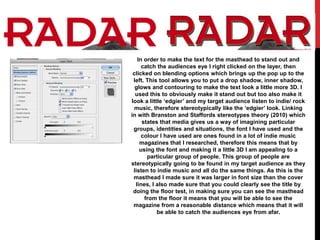
    In order tomake the text for the masthead to stand out and catch the audiences eye I right clicked on the layer, then clicked on blending options which brings up the pop up to the left. This tool allows you to put a drop shadow, inner shadow, glows and contouring to make the text look a little more 3D. I used this to obviously make it stand out but too also make it look a little ‘edgier’ and my target audience listen to indie/ rock music, therefore stereotypically like the ‘edgier’ look. Linking in with Branston and Staffords stereotypes theory (2010) which states that media gives us a way of imagining particular groups, identities and situations, the font I have used and the colour I have used are ones found in a lot of indie music magazines that I researched, therefore this means that by using the font and making it a little 3D I am appealing to a particular group of people. This group of people are stereotypically going to be found in my target audience as they listen to indie music and all do the same things. As this is the masthead I made sure it was larger in font size than the cover lines, I also made sure that you could clearly see the title by doing the floor test, in making sure you can see the masthead from the floor it means that you will be able to see the magazine from a reasonable distance which means that it will be able to catch the audiences eye from afar.
  • 3.
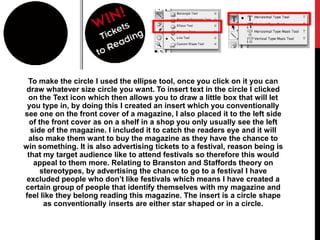
    To make thecircle I used the ellipse tool, once you click on it you can draw whatever size circle you want. To insert text in the circle I clicked on the Text icon which then allows you to draw a little box that will let you type in, by doing this I created an insert which you conventionally see one on the front cover of a magazine, I also placed it to the left side of the front cover as on a shelf in a shop you only usually see the left side of the magazine. I included it to catch the readers eye and it will also make them want to buy the magazine as they have the chance to win something. It is also advertising tickets to a festival, reason being is that my target audience like to attend festivals so therefore this would appeal to them more. Relating to Branston and Staffords theory on stereotypes, by advertising the chance to go to a festival I have excluded people who don’t like festivals which means I have created a certain group of people that identify themselves with my magazine and feel like they belong reading this magazine. The insert is a circle shape as conventionally inserts are either star shaped or in a circle.
  • 4.
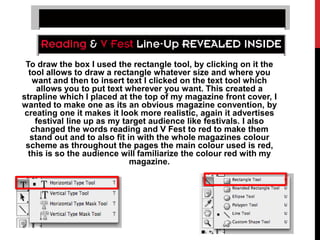
    To draw thebox I used the rectangle tool, by clicking on it the tool allows to draw a rectangle whatever size and where you want and then to insert text I clicked on the text tool which allows you to put text wherever you want. This created a strapline which I placed at the top of my magazine front cover, I wanted to make one as its an obvious magazine convention, by creating one it makes it look more realistic, again it advertises festival line up as my target audience like festivals. I also changed the words reading and V Fest to red to make them stand out and to also fit in with the whole magazines colour scheme as throughout the pages the main colour used is red, this is so the audience will familiarize the colour red with my magazine.