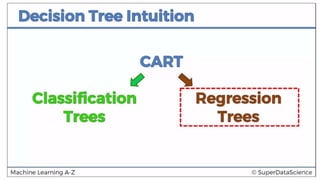


DECISION TREE
REGRESSION
Akhilesh Joshi
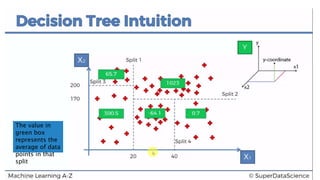
The value in
green box
represents the
average of data
points in that
split
PYTHON
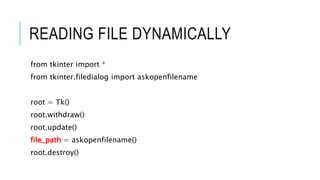
READING FILE DYNAMICALLY
from tkinter import *
from tkinter.filedialog import askopenfilename
root = Tk()
root.withdraw()
root.update()
file_path = askopenfilename()
root.destroy()
IMPORTING LIBRARIES
import pandas as pd
import numpy as np
import matplotlib.pyplot as plt
IMPORTING DATASET
dataset = pd.read_csv(file_path)
X= dataset.iloc[:,1:2].values
y= dataset.iloc[:,2:3].values
DECISION TREE REGRESSOR
from sklearn.tree import DecisionTreeRegressor
regressor = DecisionTreeRegressor(random_state=42)
model = regressor.fit(X,y)
PREDICTION
model.predict(6.5)
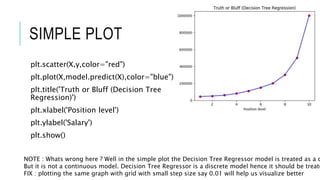
SIMPLE PLOT
plt.scatter(X,y,color="red")
plt.plot(X,model.predict(X),color="blue")
plt.title('Truth or Bluff (Decision Tree
Regression)')
plt.xlabel('Position level')
plt.ylabel('Salary')
plt.show()
NOTE : Whats wrong here ? Well in the simple plot the Decision Tree Regressor model is treated as a c
But it is not a continuous model. Decision Tree Regressor is a discrete model hence it should be treate
FIX : plotting the same graph with grid with small step size say 0.01 will help us visualize better
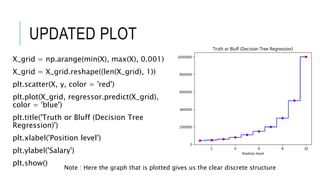
UPDATED PLOT
X_grid = np.arange(min(X), max(X), 0.001)
X_grid = X_grid.reshape((len(X_grid), 1))
plt.scatter(X, y, color = 'red')
plt.plot(X_grid, regressor.predict(X_grid),
color = 'blue')
plt.title('Truth or Bluff (Decision Tree
Regression)')
plt.xlabel('Position level')
plt.ylabel('Salary')
plt.show()
Note : Here the graph that is plotted gives us the clear discrete structure
R
READ DATASET
library(readr)
dataset <- read_csv("D:/machine learning AZ/Machine Learning A-Z
Template Folder/Part 2 - Regression/Section 7 - Support Vector
Regression (SVR)/SVR/Position_Salaries.csv")
dataset= dataset[2:3]
LIBRARY REQUIRED - RPART
library('rpart')
regressor = rpart(Salary ~ . , data= dataset , control =
rpart.control(minsplit = 1))
NOTE : do not forget to include control parameter as it decides the
number of splits in your model.
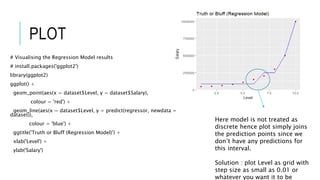
PLOT
# Visualising the Regression Model results
# install.packages('ggplot2')
library(ggplot2)
ggplot() +
geom_point(aes(x = dataset$Level, y = dataset$Salary),
colour = 'red') +
geom_line(aes(x = dataset$Level, y = predict(regressor, newdata =
dataset)),
colour = 'blue') +
ggtitle('Truth or Bluff (Regression Model)') +
xlab('Level') +
ylab('Salary')
Here model is not treated as
discrete hence plot simply joins
the prediction points since we
don’t have any predictions for
this interval.
Solution : plot Level as grid with
step size as small as 0.01 or
whatever you want it to be
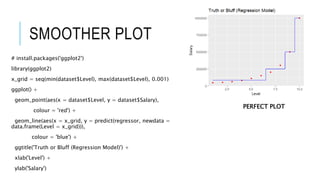
SMOOTHER PLOT
# install.packages('ggplot2')
library(ggplot2)
x_grid = seq(min(dataset$Level), max(dataset$Level), 0.001)
ggplot() +
geom_point(aes(x = dataset$Level, y = dataset$Salary),
colour = 'red') +
geom_line(aes(x = x_grid, y = predict(regressor, newdata =
data.frame(Level = x_grid))),
colour = 'blue') +
ggtitle('Truth or Bluff (Regression Model)') +
xlab('Level') +
ylab('Salary')
PERFECT PLOT
PREDICTIONS
prediction = predict(regressor,data.frame(Level=6.5))

decision tree regression

  • 1.
  • 4.
    The value in greenbox represents the average of data points in that split
  • 7.
  • 8.
    READING FILE DYNAMICALLY fromtkinter import * from tkinter.filedialog import askopenfilename root = Tk() root.withdraw() root.update() file_path = askopenfilename() root.destroy()
  • 9.
    IMPORTING LIBRARIES import pandasas pd import numpy as np import matplotlib.pyplot as plt
  • 10.
    IMPORTING DATASET dataset =pd.read_csv(file_path) X= dataset.iloc[:,1:2].values y= dataset.iloc[:,2:3].values
  • 11.
    DECISION TREE REGRESSOR fromsklearn.tree import DecisionTreeRegressor regressor = DecisionTreeRegressor(random_state=42) model = regressor.fit(X,y)
  • 12.
  • 13.
    SIMPLE PLOT plt.scatter(X,y,color="red") plt.plot(X,model.predict(X),color="blue") plt.title('Truth orBluff (Decision Tree Regression)') plt.xlabel('Position level') plt.ylabel('Salary') plt.show() NOTE : Whats wrong here ? Well in the simple plot the Decision Tree Regressor model is treated as a c But it is not a continuous model. Decision Tree Regressor is a discrete model hence it should be treate FIX : plotting the same graph with grid with small step size say 0.01 will help us visualize better
  • 14.
    UPDATED PLOT X_grid =np.arange(min(X), max(X), 0.001) X_grid = X_grid.reshape((len(X_grid), 1)) plt.scatter(X, y, color = 'red') plt.plot(X_grid, regressor.predict(X_grid), color = 'blue') plt.title('Truth or Bluff (Decision Tree Regression)') plt.xlabel('Position level') plt.ylabel('Salary') plt.show() Note : Here the graph that is plotted gives us the clear discrete structure
  • 15.
  • 16.
    READ DATASET library(readr) dataset <-read_csv("D:/machine learning AZ/Machine Learning A-Z Template Folder/Part 2 - Regression/Section 7 - Support Vector Regression (SVR)/SVR/Position_Salaries.csv") dataset= dataset[2:3]
  • 17.
    LIBRARY REQUIRED -RPART library('rpart') regressor = rpart(Salary ~ . , data= dataset , control = rpart.control(minsplit = 1)) NOTE : do not forget to include control parameter as it decides the number of splits in your model.
  • 18.
    PLOT # Visualising theRegression Model results # install.packages('ggplot2') library(ggplot2) ggplot() + geom_point(aes(x = dataset$Level, y = dataset$Salary), colour = 'red') + geom_line(aes(x = dataset$Level, y = predict(regressor, newdata = dataset)), colour = 'blue') + ggtitle('Truth or Bluff (Regression Model)') + xlab('Level') + ylab('Salary') Here model is not treated as discrete hence plot simply joins the prediction points since we don’t have any predictions for this interval. Solution : plot Level as grid with step size as small as 0.01 or whatever you want it to be
  • 19.
    SMOOTHER PLOT # install.packages('ggplot2') library(ggplot2) x_grid= seq(min(dataset$Level), max(dataset$Level), 0.001) ggplot() + geom_point(aes(x = dataset$Level, y = dataset$Salary), colour = 'red') + geom_line(aes(x = x_grid, y = predict(regressor, newdata = data.frame(Level = x_grid))), colour = 'blue') + ggtitle('Truth or Bluff (Regression Model)') + xlab('Level') + ylab('Salary') PERFECT PLOT
  • 20.