Unit: 3
Graphs
Ravinandan A P
Assistant Professor
Sree Siddaganga College of Pharmacy
Tumkur-02
Presentation Outlines
1. Introduction
2. Histogram
3. Pie Chart
4. Cubic Graph
5. Response surface plot
6. Counter Plot graph
Learning Outcomes
At the end of the
session students should
be able to:
1. Identify and
construct graphs
form the available
data.
2. Labeling of graphs.
• Important, convincing appealing & easily
understood method of presenting the
statistical data is the use of diagrams &
graphs.
• They are nothing but geometrical figures like
points, lines, bars, squares, rectangles, circles,
cubes, picture, maps and charts.
Advantages
• Graphs & Diagrams are more visual aids which
give a bird’s eye view of a given set of
numerical data
• These are more attractive, impressive than the
set of numerical data.
• They register a meaningful impression on the
mind almost before we think.
• Save a lot of time to understand the data.
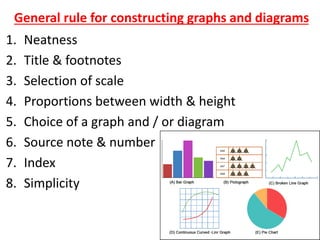
General rule for constructing graphs and diagrams
1. Neatness
2. Title & footnotes
3. Selection of scale
4. Proportions between width & height
5. Choice of a graph and / or diagram
6. Source note & number
7. Index
8. Simplicity
• Data collected & compiled from
experimental work, registers, records, or
surveys should be accurate & complete.
• They must be checked for accuracy &
adequacy before processing further.
• The data that are obtained on the units of
the population or sample under inquiry
are in terms of the observations taken on
the variable or attribute associated with
the units of the population or sample.
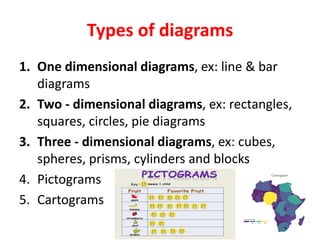
Types of diagrams
1. One dimensional diagrams, ex: line & bar
diagrams
2. Two - dimensional diagrams, ex: rectangles,
squares, circles, pie diagrams
3. Three - dimensional diagrams, ex: cubes,
spheres, prisms, cylinders and blocks
4. Pictograms
5. Cartograms
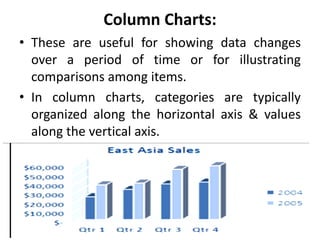
Column Charts:
• These are useful for showing data changes
over a period of time or for illustrating
comparisons among items.
• In column charts, categories are typically
organized along the horizontal axis & values
along the vertical axis.
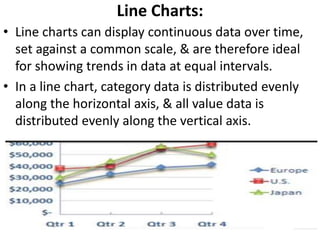
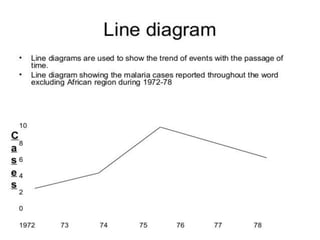
Line Charts:
• Line charts can display continuous data over time,
set against a common scale, & are therefore ideal
for showing trends in data at equal intervals.
• In a line chart, category data is distributed evenly
along the horizontal axis, & all value data is
distributed evenly along the vertical axis.
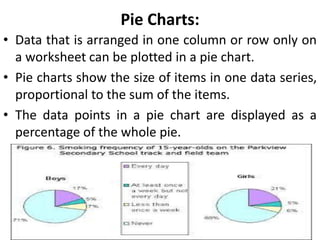
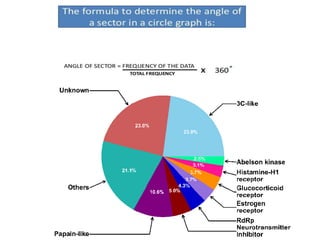
Pie Charts:
• Data that is arranged in one column or row only on
a worksheet can be plotted in a pie chart.
• Pie charts show the size of items in one data series,
proportional to the sum of the items.
• The data points in a pie chart are displayed as a
percentage of the whole pie.
• A pie chart is a type of graph that
represents the data in the circular graph.
• The slices of pie show the relative size of
the data.
• It is a type of pictorial representation of
data.
• A pie chart requires a list of categorical
variables and the numerical variables.
• Here, the term “pie” represents the whole,
and the “slices” represent the parts of the
whole.
• The “pie chart” is also known as “circle
chart”, that divides the circular statistical
graphic into sectors or slices in order to
illustrate the numerical problems.
• Each sector denotes a proportionate part of
the whole.
• To find out the composition of something,
Pie-chart works the best at that time.
• In most cases, pie charts replace some other
graphs like the bar graph, line plots,
histograms, etc.
Advantages
• The picture is simple and easy-to-understand
• Data can be represented visually as a fractional
part of a whole
• It helps in providing an effective communication
tool for the even uninformed audience
• Provides a data comparison for the audience at
a glance to give an immediate analysis or to
quickly understand information
• No need for readers to examine or measure
underlying numbers themselves, which can be
removed by using this chart
• To emphasize a few points you want to make,
you can manipulate pieces of data in the pie
chart
Disadvantages
• It becomes less effective, if there are too
many pieces of data to use
• If there are too many pieces of data. Even if
you add data labels and numbers may not
help here, they themselves may become
crowded and hard to read
• As this chart only represents one data set,
you need a series to compare multiple sets
• This may make it more difficult for readers
when it comes to analyze and assimilate
information quickly
Histogram:
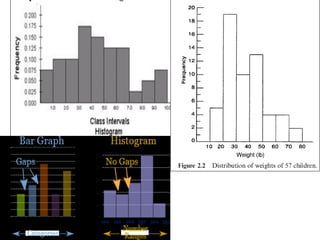
• A histogram is similar to a bar chart, but the base of the
rectangle has a length exactly equal to the class width of
the corresponding interval.
• a graphical display of data using bars of different
heights. It is similar to a Bar Chart, but
a histogram groups numbers into ranges . The
height of each bar shows how many fall into each
range.
• As the rectangle is centered on the average of the lower
and upper class limits, the rectangles of a class interval are
adjacent to the rectangles of adjoining class intervals--
there are no spaces between rectangles.
Use of Histogram
• The histogram is a popular graphing tool.
• It is used to summarize discrete or
continuous data that are measured on an
interval scale.
• It is often used to illustrate the major
features of the distribution of the data in a
convenient form.
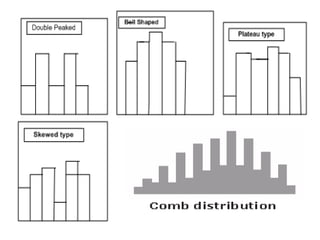
• Histograms are of five types. They are:
• Bell shaped: It can be applied for concepts such as
average and standard deviation.
• Double peaked: It is used to compare two different
processes with different centers.
• Plateau distribution: It is used when the process is not
well-defined.
• Since the process is handled by different people in
different ways, different measurements arise with none
standing out. Plateau distribution is used to define an
efficient process.
• Comb type distribution: It is a result of the faulty
construction of the histogram, with data combined
together into a group called „greater than?.
• Skewed distribution: The skewed distribution is
asymmetrical since a natural limit prevents outcomes on
one side. A distribution of analyses of a very pure
product would be skewed, as any product cannot be
more than 100 percent pure.
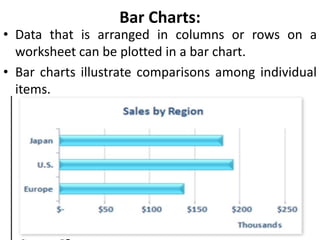
Bar Charts:
• Data that is arranged in columns or rows on a
worksheet can be plotted in a bar chart.
• Bar charts illustrate comparisons among individual
items.
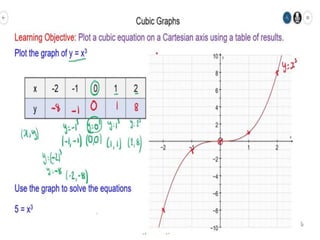
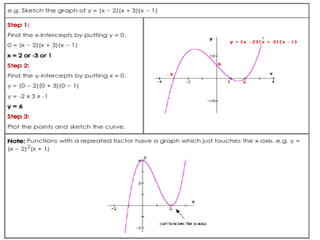
Step 1: Find the x-intercepts by putting y = 0.
Step 2: Find the y-intercept by putting x = 0.
Step 3:
Plot the points above to sketch the
cubic curve.
CUBIC GRAPHS
A cubic function is a polynomial of degree three.
e.g. y = x3 + 3x2 − 2x + 5
Cubic graphs can be drawn by finding the x and y
intercepts.
Because cubic graphs do not have axes of symmetry
the turning points have to be found using calculus.
Sketching Cubics
Method 1: Factorisation.
If the equation is in the form y = (x − a)(x − b)(x − c)
the following method should be used:
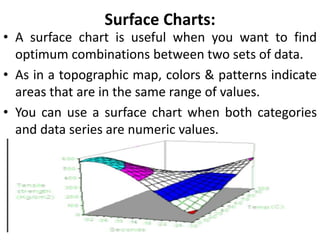
Surface Charts:
• A surface chart is useful when you want to find
optimum combinations between two sets of data.
• As in a topographic map, colors & patterns indicate
areas that are in the same range of values.
• You can use a surface chart when both categories
and data series are numeric values.
Response surface plot
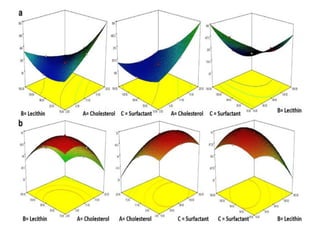
• Response surface plots such
as contour and surface plots are useful for
establishing desirable response values and
operating conditions.
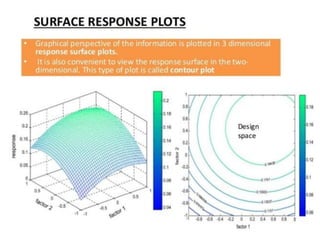
• In a contour plot, the response surface is viewed
as a two-dimensional plane where all points that
have the same response are connected to
produce contour lines of constant responses.
• Use a surface plot to see how
fitted response values relate to two continuous
variables based on a model equation. A surface
plot is a three-dimensional wireframe graph that is
useful for establishing desirable response values
and operating conditions.
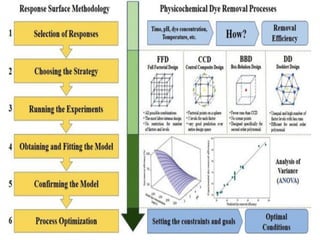
• The response surface method (RSM) is a
representative method for generating meta-
models.
• The original model is evaluated at multiple
sample points and the meta-model is
constructed usually as a linear or a quadratic
function.
• The coefficients of the meta-model function
are determined by minimizing the error
Counter Plot graph
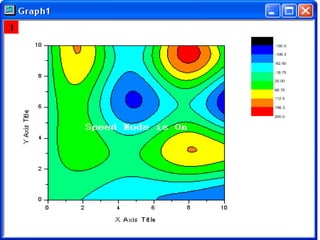
• A contour plot is a graphical technique for
representing a 3-dimensional surface
by plotting constant z slices,
called contours, on a 2-dimensional format.
This contour plot shows that the surface is
symmetric and peaks in the center.
• Definition. The contour plot is formed by:
Vertical axis: Independent variable 2.
Counter Plot graph
• Contour plots (sometimes called
Level Plots) are a way to show a three-
dimensional surface on a two-dimensional
plane.
• These contours are sometimes called z-
slices or iso-response values.
• This type of graph is widely used in
cartography, where contour lines on a
topological map indicate elevations that are
the same
• Use a contour plot to see how a response variable
relates to two predictor variables.
A contour plot contains the following elements:
1.Predictors on the x- and y-axes.
2.Contour lines that connect points that have
the same response value.
3.Colored contour bands that represent ranges
of the response values.
• Three Types:
1. Rectangular contour plot
2. Polar contour plots are circular.
3. Ternary plots
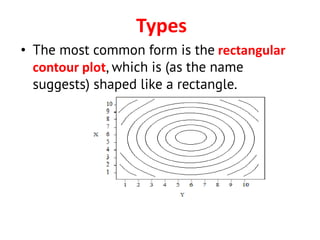
Types
• The most common form is the rectangular
contour plot, which is (as the name
suggests) shaped like a rectangle.
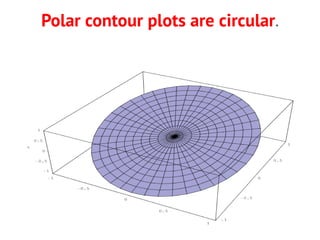
Polar contour plots are circular.
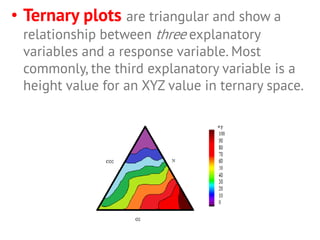
• Ternary plots are triangular and show a
relationship between three explanatory
variables and a response variable. Most
commonly, the third explanatory variable is a
height value for an XYZ value in ternary space.
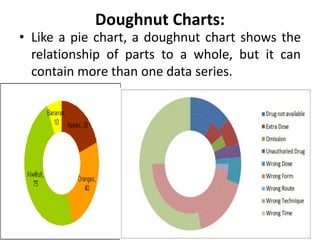
Doughnut Charts:
• Like a pie chart, a doughnut chart shows the
relationship of parts to a whole, but it can
contain more than one data series.
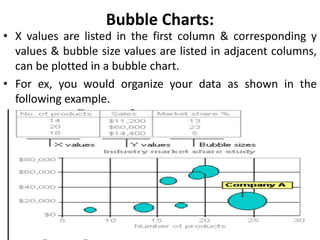
Bubble Charts:
• X values are listed in the first column & corresponding y
values & bubble size values are listed in adjacent columns,
can be plotted in a bubble chart.
• For ex, you would organize your data as shown in the
following example.
Thank
You

DATA GRAPHICS 8th Sem.pdf

  • 1.
    Unit: 3 Graphs Ravinandan AP Assistant Professor Sree Siddaganga College of Pharmacy Tumkur-02
  • 2.
    Presentation Outlines 1. Introduction 2.Histogram 3. Pie Chart 4. Cubic Graph 5. Response surface plot 6. Counter Plot graph Learning Outcomes At the end of the session students should be able to: 1. Identify and construct graphs form the available data. 2. Labeling of graphs.
  • 3.
    • Important, convincingappealing & easily understood method of presenting the statistical data is the use of diagrams & graphs. • They are nothing but geometrical figures like points, lines, bars, squares, rectangles, circles, cubes, picture, maps and charts.
  • 4.
    Advantages • Graphs &Diagrams are more visual aids which give a bird’s eye view of a given set of numerical data • These are more attractive, impressive than the set of numerical data. • They register a meaningful impression on the mind almost before we think. • Save a lot of time to understand the data.
  • 5.
    General rule forconstructing graphs and diagrams 1. Neatness 2. Title & footnotes 3. Selection of scale 4. Proportions between width & height 5. Choice of a graph and / or diagram 6. Source note & number 7. Index 8. Simplicity
  • 6.
    • Data collected& compiled from experimental work, registers, records, or surveys should be accurate & complete. • They must be checked for accuracy & adequacy before processing further. • The data that are obtained on the units of the population or sample under inquiry are in terms of the observations taken on the variable or attribute associated with the units of the population or sample.
  • 7.
    Types of diagrams 1.One dimensional diagrams, ex: line & bar diagrams 2. Two - dimensional diagrams, ex: rectangles, squares, circles, pie diagrams 3. Three - dimensional diagrams, ex: cubes, spheres, prisms, cylinders and blocks 4. Pictograms 5. Cartograms
  • 8.
    Column Charts: • Theseare useful for showing data changes over a period of time or for illustrating comparisons among items. • In column charts, categories are typically organized along the horizontal axis & values along the vertical axis.
  • 9.
    Line Charts: • Linecharts can display continuous data over time, set against a common scale, & are therefore ideal for showing trends in data at equal intervals. • In a line chart, category data is distributed evenly along the horizontal axis, & all value data is distributed evenly along the vertical axis.
  • 11.
    Pie Charts: • Datathat is arranged in one column or row only on a worksheet can be plotted in a pie chart. • Pie charts show the size of items in one data series, proportional to the sum of the items. • The data points in a pie chart are displayed as a percentage of the whole pie.
  • 12.
    • A piechart is a type of graph that represents the data in the circular graph. • The slices of pie show the relative size of the data. • It is a type of pictorial representation of data. • A pie chart requires a list of categorical variables and the numerical variables. • Here, the term “pie” represents the whole, and the “slices” represent the parts of the whole.
  • 13.
    • The “piechart” is also known as “circle chart”, that divides the circular statistical graphic into sectors or slices in order to illustrate the numerical problems. • Each sector denotes a proportionate part of the whole. • To find out the composition of something, Pie-chart works the best at that time. • In most cases, pie charts replace some other graphs like the bar graph, line plots, histograms, etc.
  • 14.
    Advantages • The pictureis simple and easy-to-understand • Data can be represented visually as a fractional part of a whole • It helps in providing an effective communication tool for the even uninformed audience • Provides a data comparison for the audience at a glance to give an immediate analysis or to quickly understand information • No need for readers to examine or measure underlying numbers themselves, which can be removed by using this chart • To emphasize a few points you want to make, you can manipulate pieces of data in the pie chart
  • 15.
    Disadvantages • It becomesless effective, if there are too many pieces of data to use • If there are too many pieces of data. Even if you add data labels and numbers may not help here, they themselves may become crowded and hard to read • As this chart only represents one data set, you need a series to compare multiple sets • This may make it more difficult for readers when it comes to analyze and assimilate information quickly
  • 17.
    Histogram: • A histogramis similar to a bar chart, but the base of the rectangle has a length exactly equal to the class width of the corresponding interval. • a graphical display of data using bars of different heights. It is similar to a Bar Chart, but a histogram groups numbers into ranges . The height of each bar shows how many fall into each range. • As the rectangle is centered on the average of the lower and upper class limits, the rectangles of a class interval are adjacent to the rectangles of adjoining class intervals-- there are no spaces between rectangles.
  • 18.
    Use of Histogram •The histogram is a popular graphing tool. • It is used to summarize discrete or continuous data that are measured on an interval scale. • It is often used to illustrate the major features of the distribution of the data in a convenient form.
  • 19.
    • Histograms areof five types. They are: • Bell shaped: It can be applied for concepts such as average and standard deviation. • Double peaked: It is used to compare two different processes with different centers. • Plateau distribution: It is used when the process is not well-defined. • Since the process is handled by different people in different ways, different measurements arise with none standing out. Plateau distribution is used to define an efficient process. • Comb type distribution: It is a result of the faulty construction of the histogram, with data combined together into a group called „greater than?. • Skewed distribution: The skewed distribution is asymmetrical since a natural limit prevents outcomes on one side. A distribution of analyses of a very pure product would be skewed, as any product cannot be more than 100 percent pure.
  • 22.
    Bar Charts: • Datathat is arranged in columns or rows on a worksheet can be plotted in a bar chart. • Bar charts illustrate comparisons among individual items.
  • 23.
    Step 1: Findthe x-intercepts by putting y = 0. Step 2: Find the y-intercept by putting x = 0. Step 3: Plot the points above to sketch the cubic curve. CUBIC GRAPHS A cubic function is a polynomial of degree three. e.g. y = x3 + 3x2 − 2x + 5 Cubic graphs can be drawn by finding the x and y intercepts. Because cubic graphs do not have axes of symmetry the turning points have to be found using calculus. Sketching Cubics Method 1: Factorisation. If the equation is in the form y = (x − a)(x − b)(x − c) the following method should be used:
  • 26.
    Surface Charts: • Asurface chart is useful when you want to find optimum combinations between two sets of data. • As in a topographic map, colors & patterns indicate areas that are in the same range of values. • You can use a surface chart when both categories and data series are numeric values.
  • 27.
    Response surface plot •Response surface plots such as contour and surface plots are useful for establishing desirable response values and operating conditions. • In a contour plot, the response surface is viewed as a two-dimensional plane where all points that have the same response are connected to produce contour lines of constant responses. • Use a surface plot to see how fitted response values relate to two continuous variables based on a model equation. A surface plot is a three-dimensional wireframe graph that is useful for establishing desirable response values and operating conditions.
  • 28.
    • The responsesurface method (RSM) is a representative method for generating meta- models. • The original model is evaluated at multiple sample points and the meta-model is constructed usually as a linear or a quadratic function. • The coefficients of the meta-model function are determined by minimizing the error
  • 32.
    Counter Plot graph •A contour plot is a graphical technique for representing a 3-dimensional surface by plotting constant z slices, called contours, on a 2-dimensional format. This contour plot shows that the surface is symmetric and peaks in the center. • Definition. The contour plot is formed by: Vertical axis: Independent variable 2.
  • 33.
    Counter Plot graph •Contour plots (sometimes called Level Plots) are a way to show a three- dimensional surface on a two-dimensional plane. • These contours are sometimes called z- slices or iso-response values. • This type of graph is widely used in cartography, where contour lines on a topological map indicate elevations that are the same
  • 34.
    • Use acontour plot to see how a response variable relates to two predictor variables. A contour plot contains the following elements: 1.Predictors on the x- and y-axes. 2.Contour lines that connect points that have the same response value. 3.Colored contour bands that represent ranges of the response values. • Three Types: 1. Rectangular contour plot 2. Polar contour plots are circular. 3. Ternary plots
  • 36.
    Types • The mostcommon form is the rectangular contour plot, which is (as the name suggests) shaped like a rectangle.
  • 37.
    Polar contour plotsare circular.
  • 38.
    • Ternary plotsare triangular and show a relationship between three explanatory variables and a response variable. Most commonly, the third explanatory variable is a height value for an XYZ value in ternary space.
  • 39.
    Doughnut Charts: • Likea pie chart, a doughnut chart shows the relationship of parts to a whole, but it can contain more than one data series.
  • 40.
    Bubble Charts: • Xvalues are listed in the first column & corresponding y values & bubble size values are listed in adjacent columns, can be plotted in a bubble chart. • For ex, you would organize your data as shown in the following example.
  • 41.