I N P U T / O U T P U T I N T E R F A C E S
•P A R A L L E L C O M M U N I C A T I O N
•S E R I A L C O M M U N I C A T I O N
Data Communication Basics
Introduction
 Peripherals connected to a computer need special
communication links for interfacing them with the CPU
 The purpose of those communication links are to resolve
the differences that exist between the processor and each
peripherals.
 The major differences are:
 Peripherals are electromechanical and electromagnetic
devices and their manner of operation is different from
operation of CPU and memory which are electronic
devices. So, conversion of signal value is required.
Introduction
The data transfer rate of peripherals is usually
slower than the transfer rate of CPU, and
consequently synchronization mechanism may be
needed.
The operating modes of peripherals are different
from each other and each must be controlled so as
not to disturb the operation of other peripherals
connected to CPU.
Data codes and formats of peripherals differ from
that of CPU and memory.
I/O Interfaces
 To resolve these differences, computer system
include special hardware components between the
CPU and peripherals, to supervise and synchronize
all inputs and outputs transfer.
 These components are called Interface Unit
because they interface between the processor bus
and peripheral devices.
 The two major types of I/O Interfaces are:
Serial Interfacing
Parallel Interfacing
Serial Interfacing
 Exchanges data with the peripherals in serial mode.
 Data are transmitted one bit at a time.
 Slow, inexpensive to implement.
 Serial interface converts parallel mode bus system to
serial mode.
 If the bus has ‘n’ data lines, the serial I/O interface
accepts ‘n’ bits of data simultaneously from the bus.
These ‘n’ bits are sent to the I/O devices, one bit at a
time, requiring ‘n’ time slots for transmission.
 Eg. Keyboard Interfacing
Parallel Interfacing
 Some I/O devices can handle data at speeds that cannot
be supported by serial interfaces. In such cases, parallel
interface is required.
 In parallel interface, ‘n’ bits of data are handled
simultaneously by the bus and on the links to the device.
 Faster interchange of data
 Expensive due to need of multiple wires
 Many I/O devices, particularly those requiring high data
transfer rate use this arrangement.
 Eg: Printer Interface
Method of Communication
 Generally, there are two methods of data
communication.
Parallel Communication
Serial Communication
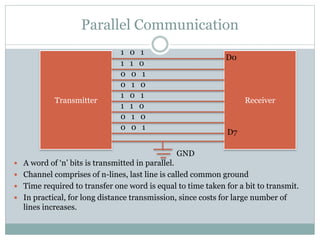
Parallel Communication
 A word of ‘n’ bits is transmitted in parallel.
 Channel comprises of n-lines, last line is called common ground
 Time required to transfer one word is equal to time taken for a bit to transmit.
 In practical, for long distance transmission, since costs for large number of
lines increases.
Transmitter Receiver
D0
D7
1 0 1
1 1 0
0 0 1
0 1 0
1 0 1
1 1 0
0 1 0
0 0 1
GND
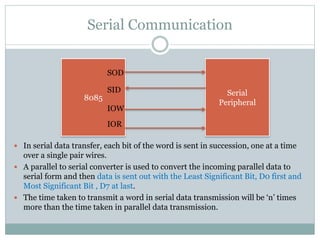
Serial Communication
 In serial data transfer, each bit of the word is sent in succession, one at a time
over a single pair wires.
 A parallel to serial converter is used to convert the incoming parallel data to
serial form and then data is sent out with the Least Significant Bit, D0 first and
Most Significant Bit , D7 at last.
 The time taken to transmit a word in serial data transmission will be ‘n’ times
more than the time taken in parallel data transmission.
8085
Serial
Peripheral
SOD
SID
IOW
IOR
Parallel Vs Serial Communication
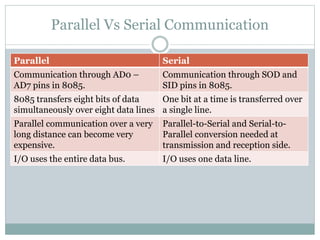
Parallel Serial
Communication through AD0 –
AD7 pins in 8085.
Communication through SOD and
SID pins in 8085.
8085 transfers eight bits of data
simultaneously over eight data lines
One bit at a time is transferred over
a single line.
Parallel communication over a very
long distance can become very
expensive.
Parallel-to-Serial and Serial-to-
Parallel conversion needed at
transmission and reception side.
I/O uses the entire data bus. I/O uses one data line.
Types of Serial Data Transfer
 There are two types of serial data transfer
Asynchronous Serial Data Transfer
Synchronous Serial Data Transfer
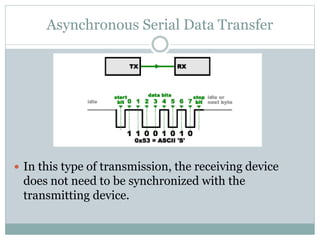
Asynchronous Serial Data Transfer
 In this type of transmission, the receiving device
does not need to be synchronized with the
transmitting device.
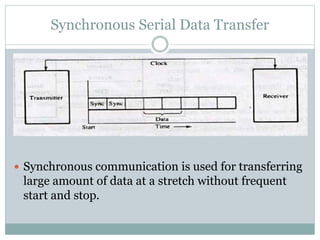
Synchronous Serial Data Transfer
 Synchronous communication is used for transferring
large amount of data at a stretch without frequent
start and stop.
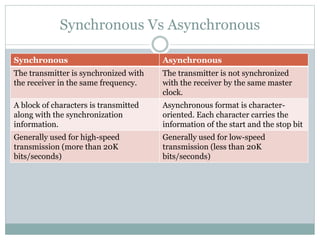
Synchronous Vs Asynchronous
Synchronous Asynchronous
The transmitter is synchronized with
the receiver in the same frequency.
The transmitter is not synchronized
with the receiver by the same master
clock.
A block of characters is transmitted
along with the synchronization
information.
Asynchronous format is character-
oriented. Each character carries the
information of the start and the stop bit
Generally used for high-speed
transmission (more than 20K
bits/seconds)
Generally used for low-speed
transmission (less than 20K
bits/seconds)

Data Communication Basics

  • 1.
    I N PU T / O U T P U T I N T E R F A C E S •P A R A L L E L C O M M U N I C A T I O N •S E R I A L C O M M U N I C A T I O N Data Communication Basics
  • 2.
    Introduction  Peripherals connectedto a computer need special communication links for interfacing them with the CPU  The purpose of those communication links are to resolve the differences that exist between the processor and each peripherals.  The major differences are:  Peripherals are electromechanical and electromagnetic devices and their manner of operation is different from operation of CPU and memory which are electronic devices. So, conversion of signal value is required.
  • 3.
    Introduction The data transferrate of peripherals is usually slower than the transfer rate of CPU, and consequently synchronization mechanism may be needed. The operating modes of peripherals are different from each other and each must be controlled so as not to disturb the operation of other peripherals connected to CPU. Data codes and formats of peripherals differ from that of CPU and memory.
  • 4.
    I/O Interfaces  Toresolve these differences, computer system include special hardware components between the CPU and peripherals, to supervise and synchronize all inputs and outputs transfer.  These components are called Interface Unit because they interface between the processor bus and peripheral devices.  The two major types of I/O Interfaces are: Serial Interfacing Parallel Interfacing
  • 5.
    Serial Interfacing  Exchangesdata with the peripherals in serial mode.  Data are transmitted one bit at a time.  Slow, inexpensive to implement.  Serial interface converts parallel mode bus system to serial mode.  If the bus has ‘n’ data lines, the serial I/O interface accepts ‘n’ bits of data simultaneously from the bus. These ‘n’ bits are sent to the I/O devices, one bit at a time, requiring ‘n’ time slots for transmission.  Eg. Keyboard Interfacing
  • 6.
    Parallel Interfacing  SomeI/O devices can handle data at speeds that cannot be supported by serial interfaces. In such cases, parallel interface is required.  In parallel interface, ‘n’ bits of data are handled simultaneously by the bus and on the links to the device.  Faster interchange of data  Expensive due to need of multiple wires  Many I/O devices, particularly those requiring high data transfer rate use this arrangement.  Eg: Printer Interface
  • 7.
    Method of Communication Generally, there are two methods of data communication. Parallel Communication Serial Communication
  • 8.
    Parallel Communication  Aword of ‘n’ bits is transmitted in parallel.  Channel comprises of n-lines, last line is called common ground  Time required to transfer one word is equal to time taken for a bit to transmit.  In practical, for long distance transmission, since costs for large number of lines increases. Transmitter Receiver D0 D7 1 0 1 1 1 0 0 0 1 0 1 0 1 0 1 1 1 0 0 1 0 0 0 1 GND
  • 9.
    Serial Communication  Inserial data transfer, each bit of the word is sent in succession, one at a time over a single pair wires.  A parallel to serial converter is used to convert the incoming parallel data to serial form and then data is sent out with the Least Significant Bit, D0 first and Most Significant Bit , D7 at last.  The time taken to transmit a word in serial data transmission will be ‘n’ times more than the time taken in parallel data transmission. 8085 Serial Peripheral SOD SID IOW IOR
  • 10.
    Parallel Vs SerialCommunication Parallel Serial Communication through AD0 – AD7 pins in 8085. Communication through SOD and SID pins in 8085. 8085 transfers eight bits of data simultaneously over eight data lines One bit at a time is transferred over a single line. Parallel communication over a very long distance can become very expensive. Parallel-to-Serial and Serial-to- Parallel conversion needed at transmission and reception side. I/O uses the entire data bus. I/O uses one data line.
  • 11.
    Types of SerialData Transfer  There are two types of serial data transfer Asynchronous Serial Data Transfer Synchronous Serial Data Transfer
  • 12.
    Asynchronous Serial DataTransfer  In this type of transmission, the receiving device does not need to be synchronized with the transmitting device.
  • 13.
    Synchronous Serial DataTransfer  Synchronous communication is used for transferring large amount of data at a stretch without frequent start and stop.
  • 14.
    Synchronous Vs Asynchronous SynchronousAsynchronous The transmitter is synchronized with the receiver in the same frequency. The transmitter is not synchronized with the receiver by the same master clock. A block of characters is transmitted along with the synchronization information. Asynchronous format is character- oriented. Each character carries the information of the start and the stop bit Generally used for high-speed transmission (more than 20K bits/seconds) Generally used for low-speed transmission (less than 20K bits/seconds)