Instructor
Mr. S.Christalin Nelson
CPU Scheduling
CPU–I/O Burst Cycle (1/2)
• Either one process (single-processor
systems) or multiple processes
(Multiprogramming systems) can run
at a time
• CPU is one of the primary computer
resources. Its scheduling is central to
OS design.
• Process execution = cycle of CPU + I/O
wait
– i.e. Alternating sequence of CPU
bursts & I/O bursts
4/1/2022 Instructor: Mr.S.Christalin Nelson 3 of 59
CPU–I/O Burst Cycle (2/2)
• CPU-burst durations
– Vary greatly from process to process & computer to computer
– Observations from Histogram of CPU-burst durations
• The curve is generally exponential or hyper-exponential
– i.e. Has large number of short CPU bursts (I/O bound process) &
small number of long CPU bursts(CPU-bound process)
4/1/2022 Instructor: Mr.S.Christalin Nelson 4 of 59
CPU Scheduler
• Short-term scheduler (CPU scheduler)
• Select process in the ready queue
4/1/2022 Instructor: Mr.S.Christalin Nelson 5 of 59
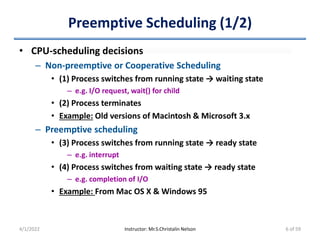
Preemptive Scheduling (1/2)
• CPU-scheduling decisions
– Non-preemptive or Cooperative Scheduling
• (1) Process switches from running state → waiting state
– e.g. I/O request, wait() for child
• (2) Process terminates
• Example: Old versions of Macintosh & Microsoft 3.x
– Preemptive scheduling
• (3) Process switches from running state → ready state
– e.g. interrupt
• (4) Process switches from waiting state → ready state
– e.g. completion of I/O
• Example: From Mac OS X & Windows 95
4/1/2022 Instructor: Mr.S.Christalin Nelson 6 of 59
Preemptive Scheduling (2/2)
• Other features of Preemptive scheduling
– Provides a choice for scheduling
– Requires special hardware (e.g. timer)
– Can lead to race condition
• Race condition:
– Multiple concurrently executing process access a shared data item
– Result of execution depends on order of execution
• Deadlock?
– Set of processes wait for a resource held by another process in set
– Affects design of OS kernel
• In simple designs, kernel will not preempt a process while kernel
data structures are in an inconsistent state -> unsuited for RT sys.
• OS needs to accept interrupts at almost all times
4/1/2022 Instructor: Mr.S.Christalin Nelson 7 of 59
Dispatcher
• What is Dispatcher?
– Provides control of the CPU to the process selected by short-
term scheduler
• It should be fast
– Dispatch Latency: Time taken to Stop a process & then start
another process
• Functions
– Switching context
– Switching to user mode
– Jump to proper location in user program & restart it
4/1/2022 Instructor: Mr.S.Christalin Nelson 8 of 59
Comparing CPU-scheduling algo. (1/2)
• Particular algorithm may favor one class of processes over
another. Choice of algorithm varies according to situations.
• Criteria
– CPU utilization
• 0% to 100% (RT system: light loaded 40%, heavily loaded 90%)
– Throughput (No. of processes completed per unit time)
– Turnaround time (Completion Time – Time of submission)
• Waiting time (in Job Queue & Ready queue) + Execution on CPU +
Performing I/O
• Not a best criterion for Interactive systems
– Waiting time
• Total time spent waiting in Ready queue
– Response time (Time of first response - Time of submission)
• For Interactive Systems
4/1/2022 Instructor: Mr.S.Christalin Nelson 10 of 59
Comparing CPU-scheduling algo. (2/2)
• Desirable features
– Maximum: CPU utilization & Throughput
– Minimum: Turnaround time, Waiting time & Response time
– Algorithms can be optimized wrt. Min. or Max. or Average
values of different criteria
• Example: Interactive systems opt to minimize variance in
response time rather than to minimize average response time
4/1/2022 Instructor: Mr.S.Christalin Nelson 11 of 59
Short List of Scheduling Algorithms
• First-Come First-Served (FCFS) Scheduling
• Shortest Job First (SJF) Scheduling
• Shortest Remaining-Time First (SRTF) Scheduling
• Priority Scheduling
• Round Robin Scheduling
• Multilevel Queue Scheduling
• Multilevel Feedback Queue Scheduling
4/1/2022 Instructor: Mr.S.Christalin Nelson 13 of 59
FCFS Scheduling (1/3)
• Depends on order processes arrive
• Example
– Gantt Chart
• Case-1 Case-2
– Analysis
4/1/2022 Instructor: Mr.S.Christalin Nelson
Case-1 Case-2
Order in which Processes arrive: P1, P2, P3 P3, P2, P1
Waiting Time: P1=0; P2=25; P3=29 P1=11; P2=7; P3=0
Average Waiting Time: (0 + 25 + 29)/3 = 18ms (11 + 7 + 0)/3 = 6ms
Remarks Poor (Convoy effect) 3 times as good
14 of 59
FCFS Scheduling (2/3)
• Performance in dynamic situation
– Consider 1 CPU-bound process & many I/O-bound processes
4/1/2022 Instructor: Mr.S.Christalin Nelson
CPU bound process I/O bound process Remarks
Allocated CPU -> Executes Performs I/O
CPU bound process long
CPU burst
Continues Execution
Completes I/O -> Moves to
Ready Queue
I/O devices are idle
Completes Exec. ->
Allocated I/O -> Performs
I/O
Allocated CPU -> Executes
quickly -> Moves to I/O
Queue
(1) I/O bound process long
CPU burst
(2) CPU is idle
Completes I/O -> Moves to
Ready Queue
Can be repeated again & again !!
15 of 59
FCFS Scheduling (3/3)
• Convoy Effect
– Other processes wait for one big process to get off the CPU
– Result: Lower CPU & Device utilization
• FCFS scheduling algorithm is non-preemptive
– Not suitable for Time-sharing systems
4/1/2022 Instructor: Mr.S.Christalin Nelson 16 of 59
SJF Scheduling (1/5)
• Assign CPU to process that has smallest next CPU burst
– If next CPU bursts of two processes are same -> Use FCFS
scheduling
– Also called “Shortest-next-CPU-burst algorithm”
• Example:
– Gant Chart
• Waiting time: P1=3, P2=16, P3=9, P4=0
• Average waiting time: (3+16+9+0)/4 = 7ms
4/1/2022 Instructor: Mr.S.Christalin Nelson
Waiting time
& Avg.
waiting time
for FCFS ?
WT : P1=0, P2=6, P3=14, P4=21
Avg. WT = 10.25
17 of 59
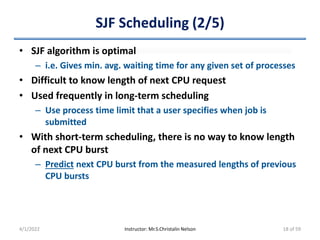
SJF Scheduling (2/5)
• SJF algorithm is optimal
– i.e. Gives min. avg. waiting time for any given set of processes
• Difficult to know length of next CPU request
• Used frequently in long-term scheduling
– Use process time limit that a user specifies when job is
submitted
• With short-term scheduling, there is no way to know length
of next CPU burst
– Predict next CPU burst from the measured lengths of previous
CPU bursts
4/1/2022 Instructor: Mr.S.Christalin Nelson 18 of 59
SJF Scheduling (3/5)
• Exponentially-Weighted Moving Average (EWMA) method
– Predicted value for next CPU burst (Ƭn+1) = αtn+(1-α)Ƭn
• Where
– tn = Actual length of nth CPU burst
– α = Controls relative weight of recent & past history in prediction
– Assume α and Ƭ0 to predict length of next CPU burst
• 0 ≤ α ≤ 1
– α = 0 (Recent history has no effect, current conditions are assumed
to be transient)
– α = 0.5 (Recent & Past history is equally weighed)
– α = 1 (only the most recent CPU burst matters, history is assumed to
be old & irrelevant)
• Ƭ0 = Constant or Overall system average
– Note: EWMA is a good predictor if the variance is small
4/1/2022 Instructor: Mr.S.Christalin Nelson 19 of 59
SJF Scheduling (4/5)
• EWMA method (contd.)
– Prediction of length of next CPU burst assuming α = 0.5, Ƭ0 = 10
• Ƭn+1 = αtn + (1-α)Ƭn
4/1/2022 Instructor: Mr.S.Christalin Nelson
CPU Burst (ti) 6 4 6 4 13 13 13 …
Predicted (Ƭi) 10 8 6 6 5 9 11 12 …
20 of 59
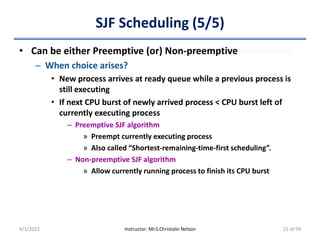
SJF Scheduling (5/5)
• Can be either Preemptive (or) Non-preemptive
– When choice arises?
• New process arrives at ready queue while a previous process is
still executing
• If next CPU burst of newly arrived process < CPU burst left of
currently executing process
– Preemptive SJF algorithm
» Preempt currently executing process
» Also called “Shortest-remaining-time-first scheduling”.
– Non-preemptive SJF algorithm
» Allow currently running process to finish its CPU burst
4/1/2022 Instructor: Mr.S.Christalin Nelson 21 of 59
Non-Preemptive SJF algorithm
• Example
– Gant Chart
• Waiting time: P1=0, P2=6, P3=3, P4=7
• Average waiting time: (0+6+3+7)/4 = 4ms
4/1/2022 Instructor: Mr.S.Christalin Nelson 22 of 59
Preemptive SJF algorithm
• “Shortest-Remaining-Time-First (SRTF)” scheduling
• Example-1
– Gant Chart
• Waiting time: P1=9, P2=1, P3=0, P4=2
• Average waiting time: (9+1+0+2)/4 = 3ms
4/1/2022 Instructor: Mr.S.Christalin Nelson 23 of 59
Activity
• Consider the following four processes, with length of CPU
burst given in milliseconds. Draw Gantt charts and find the
waiting time and average waiting time of the preemptive
SJF, non-preemptive SJF & FCFS scheduling algorithms.
– Answer
4/1/2022 Instructor: Mr.S.Christalin Nelson
Waiting Time (ms) Avg. Waiting Time (ms)
Preemptive SJF P1=9, P2=0, P3=15, P4=2 6.5
Non-Preemptive SJF P1=0, P2=7, P3=15, P4=9 7.75
FCFS P1=0, P2=7, P3=10, P4=18 8.75
24 of 59
Priority Scheduling (1/4)
• Each process is associated with priority (an integer)
• Allocate CPU to the highest priority process
– Assume: ‘Highest priority’ typically means smallest integer
– Equal-priority processes are scheduled in FCFS order
• Note:
– SJF is a priority scheduling algorithm
• Where, priority = predicted next CPU burst time
• Larger CPU burst -> lower priority
4/1/2022 Instructor: Mr.S.Christalin Nelson 25 of 59
Priority Scheduling (2/4)
• Priorities can be defined either internally or externally
– Internally defined priorities
• Priority is computed using some measurable quantity/quantities
– Example
» Time limits, memory requirements, number of open files, ratio
of average I/O burst to average CPU burst
– External priorities
• Set by criteria outside the OS
– Example
» Importance of process, type & amount of funds being paid for
computer use, department sponsoring the work, political
factors
4/1/2022 Instructor: Mr.S.Christalin Nelson 26 of 59
Priority Scheduling (3/4)
• Activity:
– Processes have arrived at time 0. Find waiting time & average
waiting time and provide the Gantt chart.
– Answer
4/1/2022 Instructor: Mr.S.Christalin Nelson
Waiting Time (ms) Avg. Waiting Time (ms)
P1=6, P2=0, P3=16, P4=18, P5=1 8.2
27 of 59
Priority Scheduling (4/4)
• Preemptive vs. Non-preemptive Priority Scheduling
– On process arrival in Ready Queue, Compare priority of
process
• Newly arrived Vs. Currently running & In Ready Queue
– Preempt CPU, if Priority(newly arrived) > Priority(currently running)
• Newly arrived Vs. In Ready Queue
– Put in head of Ready queue, if Priority (newly arrived) > Priority (In
Ready Queue)
• Can lead to indefinite blocking (or) starvation
– Solution: Aging
• Gradually increase priority of processes that wait for a long time
4/1/2022 Instructor: Mr.S.Christalin Nelson 28 of 59
Round-Robin Scheduling (1/5)
• Similar to FCFS scheduling, but preemption is added
• Designed for timesharing systems
• Allocate CPU to each process in ready queue for up to 1 time
quantum or time slice (generally 10ms - 100ms)
– Voluntary release -> If CPU burst of Process < 1 time quantum
– Context Switch -> If CPU burst of Process > 1 time quantum
• Ready queue is treated as a FIFO Circular queue
– After time quantum, process will be put at tail of ready queue
4/1/2022 Instructor: Mr.S.Christalin Nelson 29 of 59
Round-Robin Scheduling (2/5)
• Activity:
– Processes have arrived at time 0. Time quantum (q) = 4ms.
Find waiting time, average waiting time and provide the Gantt
chart.
– Answer
4/1/2022 Instructor: Mr.S.Christalin Nelson
Waiting Time (ms) Avg. Waiting Time (ms)
P1=6, P2=4, P3=7 5.66
30 of 59
Round-Robin Scheduling (3/5)
• Note:
– Time quantum is allocated in a row ONLY if there exists only
one runnable process
• Time quantum (q), no. of processes in ready queue (n)
– CPU time for each process = 1/n
– CPU time is allocated in chunks of at most q time units
– Waiting time of each process until it gets next q is <= (n−1)×q
time units
• Activity:
– Consider 5 processes and q=20ms. Find waiting time of each
process until it gets the next time quantum.
4/1/2022 Instructor: Mr.S.Christalin Nelson
Waiting time of each process until next quantum = 80ms
31 of 59
Round-Robin Scheduling (4/5)
• Size of time quantum (q) affects performance
– Very high (Like FCFS) or Very low (Frequent context switches)
– q > Time for context switch
• Time for each context switch = approx. <10ms
• Example: Time Quantum vs. No. of context switches for a process
with 10ms burst time
4/1/2022 Instructor: Mr.S.Christalin Nelson 32 of 59
Round-Robin Scheduling (5/5)
• Turnaround time depends on Size of Time Quantum (q)
– Activity: Following processes arrive at time 0. Using RR
scheduling, plot average turnaround time vs q (x-axis) in the
graph for q = 1,2,3,4,5,6,7
4/1/2022 Instructor: Mr.S.Christalin Nelson
Reminder
Turnaround time would increase is
context switching time is considered
Rule of Thumb
80% of CPU bursts should be
shorter than time quantum (q)
33 of 59
Multilevel Queue Scheduling (1/3)
• Processes can have different response-time requirements &
scheduling needs
• Ready queue is partitioned into several separate queues
– Permanently assign processes to a queue
• Based on property of process (like memory size, process priority,
or process type)
– Example: Separate queues for foreground (interactive) processes &
background (batch) processes
• Pros & Cons
– Low scheduling overhead (Adv.)
– Inflexible (Disadv.)
4/1/2022 Instructor: Mr.S.Christalin Nelson
Solution
Multilevel Feedback
Queue Scheduling
34 of 59
Multilevel Queue Scheduling (2/3)
• Intra queue scheduling
– Independent choice of scheduling algorithm
• Example:
– Foreground queue -> RR
– Background queue -> FCFS
• Inter queue scheduling (scheduling among queues)
– Fixed-priority preemptive scheduling
• Example:
– Foreground queue always have absolute priority over Background
queue
– Time slice between queues
• Example:
– Foreground queue -> 80% CPU time (RR scheduling)
– Background queue -> 20% CPU time (FCFS scheduling)
4/1/2022 Instructor: Mr.S.Christalin Nelson 35 of 59
Multilevel Queue Scheduling (3/3)
• Example of Multilevel Queue Scheduling
– Preemption
• Low priority process in a queue can be preempted when high
priority process arrives in another queue
4/1/2022 Instructor: Mr.S.Christalin Nelson 36 of 59
Multilevel Feedback Queue Scheduling (1/2)
• Processes can move from one queue to the other
• Separate processes based on their CPU bursts
– Long CPU burst => Low priority queue
• I/O bound & Interactive processes gain high priority. Aging can be
used to avoid starvation
• Parameters used to define Multilevel feedback queue
scheduler
– Number of queues
– Scheduling algorithms for each queue
– Method used to determine
• When to Upgrade/Demote a process
• Placing a process in appropriate queue when it needs service
• Most general and complex CPU-scheduling algorithm
4/1/2022 Instructor: Mr.S.Christalin Nelson 37 of 59
Multilevel Feedback Queue Scheduling (2/2)
• Example: Consider 3 queues
4/1/2022 Instructor: Mr.S.Christalin Nelson
Queue-0
Queue-1
Queue-2
Processes in which Queue has the highest
priority?
38 of 59
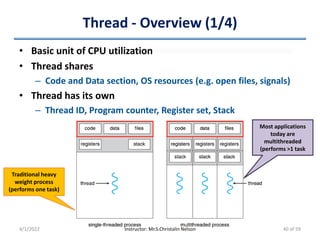
Thread - Overview (1/4)
• Basic unit of CPU utilization
• Thread shares
– Code and Data section, OS resources (e.g. open files, signals)
• Thread has its own
– Thread ID, Program counter, Register set, Stack
4/1/2022 Instructor: Mr.S.Christalin Nelson
Traditional heavy
weight process
(performs one task)
Most applications
today are
multithreaded
(performs >1 task
40 of 59
Thread - Overview (2/4)
• Motivation
– As process creation is time consuming & resource intensive -
More efficient to use a process that contains multiple threads
• Example:
– Web browser
• Thread-1: Display images/text
• Thread-2: Retrieves data from network
– Word processor
• Thread-1: Displaying graphics
• Thread-2: Responds to user's keystrokes
• Thread-3: Perform background spell/grammar check
4/1/2022 Instructor: Mr.S.Christalin Nelson 41 of 59
Thread - Overview (3/4)
• Other multithreaded scenarios
– Applications can perform several CPU-intensive tasks in
parallel across the multiple computing cores
– One application is required to perform several similar tasks
• Example: Multithreaded Server Architecture
– RPC servers can service several concurrent requests
– Most OS kernels are multithreaded
• Threads manage devices, manage memory, handle interrupts,
etc.
4/1/2022 Instructor: Mr.S.Christalin Nelson 42 of 59
Thread - Overview (4/4)
• Benefits of multithreaded environment
– Responsiveness
• A program remains responsive to the user even if part of it is
blocked or performs a lengthy operation
– Resource sharing
• Threads by default share memory & resources of the process to
which they belong
– Vs. Normal process: Programmer should explicitly arrange resource
sharing techniques (like shared memory, message passing)
– Economy
• More economical to create and context-switch threads
– Note: In Solaris – Process creation is about 30 times slower than
thread creation, Process context switching is about 5 times slower
– Scalability/Utilization
4/1/2022 Instructor: Mr.S.Christalin Nelson 43 of 59
User vs. Kernel level threads
User-level thread Kernel-level thread
Implemented by Users OS
Implementation Easy Complicated
Recognized by OS? No Yes
Context Switch needs
hardware support?
No Yes
Context Switch time Less More
Priority Set by Programmer System
Designed as Dependent threads Independent threads
Blocking If one thread performs a
blocking operation then
entire process will be blocked
If one thread performs a
blocking operation then another
thread can continue execution
Example Java thread Solaris thread
4/1/2022 Instructor: Mr.S.Christalin Nelson 44 of 59
Multithreading Models (1/2)
• Many-to-One
• One-to-One
• Many-to-Many
4/1/2022 Instructor: Mr.S.Christalin Nelson
Many-to-one
model
Many-to-Many
model
One-to-One
model
45 of 59
Multithreading Models (2/2)
Pros Example
Many-to-One Model Efficiency Green threads (Solaris)
One-to-One Model Parallelism
Windows NT/2000/XP, Linux, OS/2,
Solaris 9
Many-to-Many Model Efficiency & Parallelism
Solaris 2 & 9, IRIX, HP-UX, Tru64
UNIX
4/1/2022 Instructor: Mr.S.Christalin Nelson
• Two-level model
46 of 59
Thread Scheduling (1/3)
• General strategies for creating threads
– Asynchronous threading: Parent does not know children
– Synchronous threading: Parent must wait for all of its children
(fork-join)
• Kernel-level threads are scheduled by OS
• User-level threads are managed by a thread library
– Kernel is unaware of User-level threads
• Main thread libraries
– POSIX Pthreads: User or kernel level
– Windows: Kernel level
– Java: Level depending on thread library on host system
4/1/2022 Instructor: Mr.S.Christalin Nelson 47 of 59
Thread Scheduling (2/3)
• Contention Scope
– Process Contention Scope (PCS)
• In Many-to-one & many-to-many models
• Competition for CPU takes place among threads belonging to
same process
– Thread library schedules user-level threads to run on an available
LWP
» Threads are not actually running on a CPU -> Requires OS to
schedule the kernel thread onto a physical CPU
• PCS will typically preempt the currently running thread (in favor
of a higher-priority thread)
– System Contention Scope (SCS)
• In One-to-one model
• Competition for CPU takes place among all threads in the system
– Kernel uses SCS to decide which kernel thread can run on CPU
4/1/2022 Instructor: Mr.S.Christalin Nelson 48 of 59
Thread Scheduling (3/3)
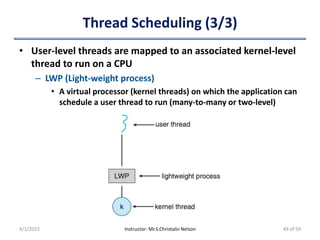
• User-level threads are mapped to an associated kernel-level
thread to run on a CPU
– LWP (Light-weight process)
• A virtual processor (kernel threads) on which the application can
schedule a user thread to run (many-to-many or two-level)
4/1/2022 Instructor: Mr.S.Christalin Nelson 49 of 59
Overview
• In multiprocessor systems load sharing is possible
• Processors could be
– Identical (Homogeneous) or Not identical (Heterogeneous)
– Multiple physical processor or Multicore processors (same
chip)
4/1/2022 Instructor: Mr.S.Christalin Nelson 51 of 59
Approaches to Multiple-Processor Scheduling
• Asymmetric multiprocessing
– Master server: Scheduling decisions, I/O processing, and other
system activities
• Accesses system data structures -> Reduced need for data sharing
– Other processors: Execute only user code
• Symmetric multiprocessing (SMP)
– Each processor is self-scheduling
• Common Ready Queue or Private Queue per processor (mostly)
• Accesses system data structures
– Example: Windows, Linux, Mac OS X
4/1/2022 Instructor: Mr.S.Christalin Nelson 52 of 59
Processor Affinity (1/2)
• Process migration
– Cache invalidation and repopulation
• Costly in SMP -> Process migration is avoided
• Processor Affinity
– A process has an affinity for the processor on which it is
currently running
• Types
– Soft affinity (OS does not guarantee) & Hard affinity
– Example: Linux OS supports both
• Uses sched_setaffinity() system call for hard affinity
4/1/2022 Instructor: Mr.S.Christalin Nelson 53 of 59
Processor Affinity (2/2)
• Main-memory architecture of a system can affect processor
affinity
– Example: NUMA & CPU scheduling
• OS’s CPU scheduler & memory-placement algorithms should
work together
4/1/2022 Instructor: Mr.S.Christalin Nelson
CPU & Memory
in same board
54 of 59
Load Balancing
• Fully utilize benefits of having >1 processor
– Idle Processors & Processes waiting for CPU
• Typically necessary for SMP with private queue
• Approaches
– Push migration
– Pull migration
• Maintaining a threshold
• Note-1: The approaches are not mutually exclusive
– Implemented in parallel on load-balancing systems
– Example: Linux scheduler and ULE scheduler in FreeBSD
systems implement both techniques
• Note-2: Often counteracts the benefits of processor affinity
4/1/2022 Instructor: Mr.S.Christalin Nelson 55 of 59
Multicore Processors (1/2)
• Faster, Consume less power, Complicate scheduling issues
• Memory Stall
– Processor waits for data to be available in memory
• Solution: Multithreaded multicore systems
– Two/More hardware threads are assigned to each core
» Each hardware thread appears as a logical processor that is
available to run a software thread
4/1/2022 Instructor: Mr.S.Christalin Nelson
50%
Stalling time ___ %
UltraSPARC T3 CPU has
16 cores per chip & 8
Hardware threads per
core. From OS's
perspective there
appears to be ____
logical processors.
128
56 of 59
Multicore Processors (2/2)
• Approaches
– Coarse-grained multithreading
• A thread executes on a processor until a long-latency event
occurs (such as a memory stall)
• High switching cost
– Fine-grained or interleaved multithreading
• Switches between threads at the boundary of an instruction cycle
• Small switching cost
4/1/2022 Instructor: Mr.S.Christalin Nelson 57 of 59
Scheduling
• Two levels of Scheduling
– L1: Choose the software thread to run on each hardware
thread (logical processor)
• OS may choose any scheduling algorithm
– L2: Specify how each core decides which hardware thread to
run
• Depends on the processor
– UltraSPARC T3
» RR algorithm to schedule 8 hardware threads to each core
– Intel Itanium (dual-core) -> 2 hardware threads per core
» Each hardware thread has dynamic urgency value (Low-0 to 7)
» Event occurs -> Compare urgency of 2 threads -> Thread with
highest urgency value executes on processor core
4/1/2022 Instructor: Mr.S.Christalin Nelson 58 of 59
CPU Scheduling

CPU Scheduling

  • 1.
  • 3.
    CPU–I/O Burst Cycle(1/2) • Either one process (single-processor systems) or multiple processes (Multiprogramming systems) can run at a time • CPU is one of the primary computer resources. Its scheduling is central to OS design. • Process execution = cycle of CPU + I/O wait – i.e. Alternating sequence of CPU bursts & I/O bursts 4/1/2022 Instructor: Mr.S.Christalin Nelson 3 of 59
  • 4.
    CPU–I/O Burst Cycle(2/2) • CPU-burst durations – Vary greatly from process to process & computer to computer – Observations from Histogram of CPU-burst durations • The curve is generally exponential or hyper-exponential – i.e. Has large number of short CPU bursts (I/O bound process) & small number of long CPU bursts(CPU-bound process) 4/1/2022 Instructor: Mr.S.Christalin Nelson 4 of 59
  • 5.
    CPU Scheduler • Short-termscheduler (CPU scheduler) • Select process in the ready queue 4/1/2022 Instructor: Mr.S.Christalin Nelson 5 of 59
  • 6.
    Preemptive Scheduling (1/2) •CPU-scheduling decisions – Non-preemptive or Cooperative Scheduling • (1) Process switches from running state → waiting state – e.g. I/O request, wait() for child • (2) Process terminates • Example: Old versions of Macintosh & Microsoft 3.x – Preemptive scheduling • (3) Process switches from running state → ready state – e.g. interrupt • (4) Process switches from waiting state → ready state – e.g. completion of I/O • Example: From Mac OS X & Windows 95 4/1/2022 Instructor: Mr.S.Christalin Nelson 6 of 59
  • 7.
    Preemptive Scheduling (2/2) •Other features of Preemptive scheduling – Provides a choice for scheduling – Requires special hardware (e.g. timer) – Can lead to race condition • Race condition: – Multiple concurrently executing process access a shared data item – Result of execution depends on order of execution • Deadlock? – Set of processes wait for a resource held by another process in set – Affects design of OS kernel • In simple designs, kernel will not preempt a process while kernel data structures are in an inconsistent state -> unsuited for RT sys. • OS needs to accept interrupts at almost all times 4/1/2022 Instructor: Mr.S.Christalin Nelson 7 of 59
  • 8.
    Dispatcher • What isDispatcher? – Provides control of the CPU to the process selected by short- term scheduler • It should be fast – Dispatch Latency: Time taken to Stop a process & then start another process • Functions – Switching context – Switching to user mode – Jump to proper location in user program & restart it 4/1/2022 Instructor: Mr.S.Christalin Nelson 8 of 59
  • 10.
    Comparing CPU-scheduling algo.(1/2) • Particular algorithm may favor one class of processes over another. Choice of algorithm varies according to situations. • Criteria – CPU utilization • 0% to 100% (RT system: light loaded 40%, heavily loaded 90%) – Throughput (No. of processes completed per unit time) – Turnaround time (Completion Time – Time of submission) • Waiting time (in Job Queue & Ready queue) + Execution on CPU + Performing I/O • Not a best criterion for Interactive systems – Waiting time • Total time spent waiting in Ready queue – Response time (Time of first response - Time of submission) • For Interactive Systems 4/1/2022 Instructor: Mr.S.Christalin Nelson 10 of 59
  • 11.
    Comparing CPU-scheduling algo.(2/2) • Desirable features – Maximum: CPU utilization & Throughput – Minimum: Turnaround time, Waiting time & Response time – Algorithms can be optimized wrt. Min. or Max. or Average values of different criteria • Example: Interactive systems opt to minimize variance in response time rather than to minimize average response time 4/1/2022 Instructor: Mr.S.Christalin Nelson 11 of 59
  • 13.
    Short List ofScheduling Algorithms • First-Come First-Served (FCFS) Scheduling • Shortest Job First (SJF) Scheduling • Shortest Remaining-Time First (SRTF) Scheduling • Priority Scheduling • Round Robin Scheduling • Multilevel Queue Scheduling • Multilevel Feedback Queue Scheduling 4/1/2022 Instructor: Mr.S.Christalin Nelson 13 of 59
  • 14.
    FCFS Scheduling (1/3) •Depends on order processes arrive • Example – Gantt Chart • Case-1 Case-2 – Analysis 4/1/2022 Instructor: Mr.S.Christalin Nelson Case-1 Case-2 Order in which Processes arrive: P1, P2, P3 P3, P2, P1 Waiting Time: P1=0; P2=25; P3=29 P1=11; P2=7; P3=0 Average Waiting Time: (0 + 25 + 29)/3 = 18ms (11 + 7 + 0)/3 = 6ms Remarks Poor (Convoy effect) 3 times as good 14 of 59
  • 15.
    FCFS Scheduling (2/3) •Performance in dynamic situation – Consider 1 CPU-bound process & many I/O-bound processes 4/1/2022 Instructor: Mr.S.Christalin Nelson CPU bound process I/O bound process Remarks Allocated CPU -> Executes Performs I/O CPU bound process long CPU burst Continues Execution Completes I/O -> Moves to Ready Queue I/O devices are idle Completes Exec. -> Allocated I/O -> Performs I/O Allocated CPU -> Executes quickly -> Moves to I/O Queue (1) I/O bound process long CPU burst (2) CPU is idle Completes I/O -> Moves to Ready Queue Can be repeated again & again !! 15 of 59
  • 16.
    FCFS Scheduling (3/3) •Convoy Effect – Other processes wait for one big process to get off the CPU – Result: Lower CPU & Device utilization • FCFS scheduling algorithm is non-preemptive – Not suitable for Time-sharing systems 4/1/2022 Instructor: Mr.S.Christalin Nelson 16 of 59
  • 17.
    SJF Scheduling (1/5) •Assign CPU to process that has smallest next CPU burst – If next CPU bursts of two processes are same -> Use FCFS scheduling – Also called “Shortest-next-CPU-burst algorithm” • Example: – Gant Chart • Waiting time: P1=3, P2=16, P3=9, P4=0 • Average waiting time: (3+16+9+0)/4 = 7ms 4/1/2022 Instructor: Mr.S.Christalin Nelson Waiting time & Avg. waiting time for FCFS ? WT : P1=0, P2=6, P3=14, P4=21 Avg. WT = 10.25 17 of 59
  • 18.
    SJF Scheduling (2/5) •SJF algorithm is optimal – i.e. Gives min. avg. waiting time for any given set of processes • Difficult to know length of next CPU request • Used frequently in long-term scheduling – Use process time limit that a user specifies when job is submitted • With short-term scheduling, there is no way to know length of next CPU burst – Predict next CPU burst from the measured lengths of previous CPU bursts 4/1/2022 Instructor: Mr.S.Christalin Nelson 18 of 59
  • 19.
    SJF Scheduling (3/5) •Exponentially-Weighted Moving Average (EWMA) method – Predicted value for next CPU burst (Ƭn+1) = αtn+(1-α)Ƭn • Where – tn = Actual length of nth CPU burst – α = Controls relative weight of recent & past history in prediction – Assume α and Ƭ0 to predict length of next CPU burst • 0 ≤ α ≤ 1 – α = 0 (Recent history has no effect, current conditions are assumed to be transient) – α = 0.5 (Recent & Past history is equally weighed) – α = 1 (only the most recent CPU burst matters, history is assumed to be old & irrelevant) • Ƭ0 = Constant or Overall system average – Note: EWMA is a good predictor if the variance is small 4/1/2022 Instructor: Mr.S.Christalin Nelson 19 of 59
  • 20.
    SJF Scheduling (4/5) •EWMA method (contd.) – Prediction of length of next CPU burst assuming α = 0.5, Ƭ0 = 10 • Ƭn+1 = αtn + (1-α)Ƭn 4/1/2022 Instructor: Mr.S.Christalin Nelson CPU Burst (ti) 6 4 6 4 13 13 13 … Predicted (Ƭi) 10 8 6 6 5 9 11 12 … 20 of 59
  • 21.
    SJF Scheduling (5/5) •Can be either Preemptive (or) Non-preemptive – When choice arises? • New process arrives at ready queue while a previous process is still executing • If next CPU burst of newly arrived process < CPU burst left of currently executing process – Preemptive SJF algorithm » Preempt currently executing process » Also called “Shortest-remaining-time-first scheduling”. – Non-preemptive SJF algorithm » Allow currently running process to finish its CPU burst 4/1/2022 Instructor: Mr.S.Christalin Nelson 21 of 59
  • 22.
    Non-Preemptive SJF algorithm •Example – Gant Chart • Waiting time: P1=0, P2=6, P3=3, P4=7 • Average waiting time: (0+6+3+7)/4 = 4ms 4/1/2022 Instructor: Mr.S.Christalin Nelson 22 of 59
  • 23.
    Preemptive SJF algorithm •“Shortest-Remaining-Time-First (SRTF)” scheduling • Example-1 – Gant Chart • Waiting time: P1=9, P2=1, P3=0, P4=2 • Average waiting time: (9+1+0+2)/4 = 3ms 4/1/2022 Instructor: Mr.S.Christalin Nelson 23 of 59
  • 24.
    Activity • Consider thefollowing four processes, with length of CPU burst given in milliseconds. Draw Gantt charts and find the waiting time and average waiting time of the preemptive SJF, non-preemptive SJF & FCFS scheduling algorithms. – Answer 4/1/2022 Instructor: Mr.S.Christalin Nelson Waiting Time (ms) Avg. Waiting Time (ms) Preemptive SJF P1=9, P2=0, P3=15, P4=2 6.5 Non-Preemptive SJF P1=0, P2=7, P3=15, P4=9 7.75 FCFS P1=0, P2=7, P3=10, P4=18 8.75 24 of 59
  • 25.
    Priority Scheduling (1/4) •Each process is associated with priority (an integer) • Allocate CPU to the highest priority process – Assume: ‘Highest priority’ typically means smallest integer – Equal-priority processes are scheduled in FCFS order • Note: – SJF is a priority scheduling algorithm • Where, priority = predicted next CPU burst time • Larger CPU burst -> lower priority 4/1/2022 Instructor: Mr.S.Christalin Nelson 25 of 59
  • 26.
    Priority Scheduling (2/4) •Priorities can be defined either internally or externally – Internally defined priorities • Priority is computed using some measurable quantity/quantities – Example » Time limits, memory requirements, number of open files, ratio of average I/O burst to average CPU burst – External priorities • Set by criteria outside the OS – Example » Importance of process, type & amount of funds being paid for computer use, department sponsoring the work, political factors 4/1/2022 Instructor: Mr.S.Christalin Nelson 26 of 59
  • 27.
    Priority Scheduling (3/4) •Activity: – Processes have arrived at time 0. Find waiting time & average waiting time and provide the Gantt chart. – Answer 4/1/2022 Instructor: Mr.S.Christalin Nelson Waiting Time (ms) Avg. Waiting Time (ms) P1=6, P2=0, P3=16, P4=18, P5=1 8.2 27 of 59
  • 28.
    Priority Scheduling (4/4) •Preemptive vs. Non-preemptive Priority Scheduling – On process arrival in Ready Queue, Compare priority of process • Newly arrived Vs. Currently running & In Ready Queue – Preempt CPU, if Priority(newly arrived) > Priority(currently running) • Newly arrived Vs. In Ready Queue – Put in head of Ready queue, if Priority (newly arrived) > Priority (In Ready Queue) • Can lead to indefinite blocking (or) starvation – Solution: Aging • Gradually increase priority of processes that wait for a long time 4/1/2022 Instructor: Mr.S.Christalin Nelson 28 of 59
  • 29.
    Round-Robin Scheduling (1/5) •Similar to FCFS scheduling, but preemption is added • Designed for timesharing systems • Allocate CPU to each process in ready queue for up to 1 time quantum or time slice (generally 10ms - 100ms) – Voluntary release -> If CPU burst of Process < 1 time quantum – Context Switch -> If CPU burst of Process > 1 time quantum • Ready queue is treated as a FIFO Circular queue – After time quantum, process will be put at tail of ready queue 4/1/2022 Instructor: Mr.S.Christalin Nelson 29 of 59
  • 30.
    Round-Robin Scheduling (2/5) •Activity: – Processes have arrived at time 0. Time quantum (q) = 4ms. Find waiting time, average waiting time and provide the Gantt chart. – Answer 4/1/2022 Instructor: Mr.S.Christalin Nelson Waiting Time (ms) Avg. Waiting Time (ms) P1=6, P2=4, P3=7 5.66 30 of 59
  • 31.
    Round-Robin Scheduling (3/5) •Note: – Time quantum is allocated in a row ONLY if there exists only one runnable process • Time quantum (q), no. of processes in ready queue (n) – CPU time for each process = 1/n – CPU time is allocated in chunks of at most q time units – Waiting time of each process until it gets next q is <= (n−1)×q time units • Activity: – Consider 5 processes and q=20ms. Find waiting time of each process until it gets the next time quantum. 4/1/2022 Instructor: Mr.S.Christalin Nelson Waiting time of each process until next quantum = 80ms 31 of 59
  • 32.
    Round-Robin Scheduling (4/5) •Size of time quantum (q) affects performance – Very high (Like FCFS) or Very low (Frequent context switches) – q > Time for context switch • Time for each context switch = approx. <10ms • Example: Time Quantum vs. No. of context switches for a process with 10ms burst time 4/1/2022 Instructor: Mr.S.Christalin Nelson 32 of 59
  • 33.
    Round-Robin Scheduling (5/5) •Turnaround time depends on Size of Time Quantum (q) – Activity: Following processes arrive at time 0. Using RR scheduling, plot average turnaround time vs q (x-axis) in the graph for q = 1,2,3,4,5,6,7 4/1/2022 Instructor: Mr.S.Christalin Nelson Reminder Turnaround time would increase is context switching time is considered Rule of Thumb 80% of CPU bursts should be shorter than time quantum (q) 33 of 59
  • 34.
    Multilevel Queue Scheduling(1/3) • Processes can have different response-time requirements & scheduling needs • Ready queue is partitioned into several separate queues – Permanently assign processes to a queue • Based on property of process (like memory size, process priority, or process type) – Example: Separate queues for foreground (interactive) processes & background (batch) processes • Pros & Cons – Low scheduling overhead (Adv.) – Inflexible (Disadv.) 4/1/2022 Instructor: Mr.S.Christalin Nelson Solution Multilevel Feedback Queue Scheduling 34 of 59
  • 35.
    Multilevel Queue Scheduling(2/3) • Intra queue scheduling – Independent choice of scheduling algorithm • Example: – Foreground queue -> RR – Background queue -> FCFS • Inter queue scheduling (scheduling among queues) – Fixed-priority preemptive scheduling • Example: – Foreground queue always have absolute priority over Background queue – Time slice between queues • Example: – Foreground queue -> 80% CPU time (RR scheduling) – Background queue -> 20% CPU time (FCFS scheduling) 4/1/2022 Instructor: Mr.S.Christalin Nelson 35 of 59
  • 36.
    Multilevel Queue Scheduling(3/3) • Example of Multilevel Queue Scheduling – Preemption • Low priority process in a queue can be preempted when high priority process arrives in another queue 4/1/2022 Instructor: Mr.S.Christalin Nelson 36 of 59
  • 37.
    Multilevel Feedback QueueScheduling (1/2) • Processes can move from one queue to the other • Separate processes based on their CPU bursts – Long CPU burst => Low priority queue • I/O bound & Interactive processes gain high priority. Aging can be used to avoid starvation • Parameters used to define Multilevel feedback queue scheduler – Number of queues – Scheduling algorithms for each queue – Method used to determine • When to Upgrade/Demote a process • Placing a process in appropriate queue when it needs service • Most general and complex CPU-scheduling algorithm 4/1/2022 Instructor: Mr.S.Christalin Nelson 37 of 59
  • 38.
    Multilevel Feedback QueueScheduling (2/2) • Example: Consider 3 queues 4/1/2022 Instructor: Mr.S.Christalin Nelson Queue-0 Queue-1 Queue-2 Processes in which Queue has the highest priority? 38 of 59
  • 40.
    Thread - Overview(1/4) • Basic unit of CPU utilization • Thread shares – Code and Data section, OS resources (e.g. open files, signals) • Thread has its own – Thread ID, Program counter, Register set, Stack 4/1/2022 Instructor: Mr.S.Christalin Nelson Traditional heavy weight process (performs one task) Most applications today are multithreaded (performs >1 task 40 of 59
  • 41.
    Thread - Overview(2/4) • Motivation – As process creation is time consuming & resource intensive - More efficient to use a process that contains multiple threads • Example: – Web browser • Thread-1: Display images/text • Thread-2: Retrieves data from network – Word processor • Thread-1: Displaying graphics • Thread-2: Responds to user's keystrokes • Thread-3: Perform background spell/grammar check 4/1/2022 Instructor: Mr.S.Christalin Nelson 41 of 59
  • 42.
    Thread - Overview(3/4) • Other multithreaded scenarios – Applications can perform several CPU-intensive tasks in parallel across the multiple computing cores – One application is required to perform several similar tasks • Example: Multithreaded Server Architecture – RPC servers can service several concurrent requests – Most OS kernels are multithreaded • Threads manage devices, manage memory, handle interrupts, etc. 4/1/2022 Instructor: Mr.S.Christalin Nelson 42 of 59
  • 43.
    Thread - Overview(4/4) • Benefits of multithreaded environment – Responsiveness • A program remains responsive to the user even if part of it is blocked or performs a lengthy operation – Resource sharing • Threads by default share memory & resources of the process to which they belong – Vs. Normal process: Programmer should explicitly arrange resource sharing techniques (like shared memory, message passing) – Economy • More economical to create and context-switch threads – Note: In Solaris – Process creation is about 30 times slower than thread creation, Process context switching is about 5 times slower – Scalability/Utilization 4/1/2022 Instructor: Mr.S.Christalin Nelson 43 of 59
  • 44.
    User vs. Kernellevel threads User-level thread Kernel-level thread Implemented by Users OS Implementation Easy Complicated Recognized by OS? No Yes Context Switch needs hardware support? No Yes Context Switch time Less More Priority Set by Programmer System Designed as Dependent threads Independent threads Blocking If one thread performs a blocking operation then entire process will be blocked If one thread performs a blocking operation then another thread can continue execution Example Java thread Solaris thread 4/1/2022 Instructor: Mr.S.Christalin Nelson 44 of 59
  • 45.
    Multithreading Models (1/2) •Many-to-One • One-to-One • Many-to-Many 4/1/2022 Instructor: Mr.S.Christalin Nelson Many-to-one model Many-to-Many model One-to-One model 45 of 59
  • 46.
    Multithreading Models (2/2) ProsExample Many-to-One Model Efficiency Green threads (Solaris) One-to-One Model Parallelism Windows NT/2000/XP, Linux, OS/2, Solaris 9 Many-to-Many Model Efficiency & Parallelism Solaris 2 & 9, IRIX, HP-UX, Tru64 UNIX 4/1/2022 Instructor: Mr.S.Christalin Nelson • Two-level model 46 of 59
  • 47.
    Thread Scheduling (1/3) •General strategies for creating threads – Asynchronous threading: Parent does not know children – Synchronous threading: Parent must wait for all of its children (fork-join) • Kernel-level threads are scheduled by OS • User-level threads are managed by a thread library – Kernel is unaware of User-level threads • Main thread libraries – POSIX Pthreads: User or kernel level – Windows: Kernel level – Java: Level depending on thread library on host system 4/1/2022 Instructor: Mr.S.Christalin Nelson 47 of 59
  • 48.
    Thread Scheduling (2/3) •Contention Scope – Process Contention Scope (PCS) • In Many-to-one & many-to-many models • Competition for CPU takes place among threads belonging to same process – Thread library schedules user-level threads to run on an available LWP » Threads are not actually running on a CPU -> Requires OS to schedule the kernel thread onto a physical CPU • PCS will typically preempt the currently running thread (in favor of a higher-priority thread) – System Contention Scope (SCS) • In One-to-one model • Competition for CPU takes place among all threads in the system – Kernel uses SCS to decide which kernel thread can run on CPU 4/1/2022 Instructor: Mr.S.Christalin Nelson 48 of 59
  • 49.
    Thread Scheduling (3/3) •User-level threads are mapped to an associated kernel-level thread to run on a CPU – LWP (Light-weight process) • A virtual processor (kernel threads) on which the application can schedule a user thread to run (many-to-many or two-level) 4/1/2022 Instructor: Mr.S.Christalin Nelson 49 of 59
  • 51.
    Overview • In multiprocessorsystems load sharing is possible • Processors could be – Identical (Homogeneous) or Not identical (Heterogeneous) – Multiple physical processor or Multicore processors (same chip) 4/1/2022 Instructor: Mr.S.Christalin Nelson 51 of 59
  • 52.
    Approaches to Multiple-ProcessorScheduling • Asymmetric multiprocessing – Master server: Scheduling decisions, I/O processing, and other system activities • Accesses system data structures -> Reduced need for data sharing – Other processors: Execute only user code • Symmetric multiprocessing (SMP) – Each processor is self-scheduling • Common Ready Queue or Private Queue per processor (mostly) • Accesses system data structures – Example: Windows, Linux, Mac OS X 4/1/2022 Instructor: Mr.S.Christalin Nelson 52 of 59
  • 53.
    Processor Affinity (1/2) •Process migration – Cache invalidation and repopulation • Costly in SMP -> Process migration is avoided • Processor Affinity – A process has an affinity for the processor on which it is currently running • Types – Soft affinity (OS does not guarantee) & Hard affinity – Example: Linux OS supports both • Uses sched_setaffinity() system call for hard affinity 4/1/2022 Instructor: Mr.S.Christalin Nelson 53 of 59
  • 54.
    Processor Affinity (2/2) •Main-memory architecture of a system can affect processor affinity – Example: NUMA & CPU scheduling • OS’s CPU scheduler & memory-placement algorithms should work together 4/1/2022 Instructor: Mr.S.Christalin Nelson CPU & Memory in same board 54 of 59
  • 55.
    Load Balancing • Fullyutilize benefits of having >1 processor – Idle Processors & Processes waiting for CPU • Typically necessary for SMP with private queue • Approaches – Push migration – Pull migration • Maintaining a threshold • Note-1: The approaches are not mutually exclusive – Implemented in parallel on load-balancing systems – Example: Linux scheduler and ULE scheduler in FreeBSD systems implement both techniques • Note-2: Often counteracts the benefits of processor affinity 4/1/2022 Instructor: Mr.S.Christalin Nelson 55 of 59
  • 56.
    Multicore Processors (1/2) •Faster, Consume less power, Complicate scheduling issues • Memory Stall – Processor waits for data to be available in memory • Solution: Multithreaded multicore systems – Two/More hardware threads are assigned to each core » Each hardware thread appears as a logical processor that is available to run a software thread 4/1/2022 Instructor: Mr.S.Christalin Nelson 50% Stalling time ___ % UltraSPARC T3 CPU has 16 cores per chip & 8 Hardware threads per core. From OS's perspective there appears to be ____ logical processors. 128 56 of 59
  • 57.
    Multicore Processors (2/2) •Approaches – Coarse-grained multithreading • A thread executes on a processor until a long-latency event occurs (such as a memory stall) • High switching cost – Fine-grained or interleaved multithreading • Switches between threads at the boundary of an instruction cycle • Small switching cost 4/1/2022 Instructor: Mr.S.Christalin Nelson 57 of 59
  • 58.
    Scheduling • Two levelsof Scheduling – L1: Choose the software thread to run on each hardware thread (logical processor) • OS may choose any scheduling algorithm – L2: Specify how each core decides which hardware thread to run • Depends on the processor – UltraSPARC T3 » RR algorithm to schedule 8 hardware threads to each core – Intel Itanium (dual-core) -> 2 hardware threads per core » Each hardware thread has dynamic urgency value (Low-0 to 7) » Event occurs -> Compare urgency of 2 threads -> Thread with highest urgency value executes on processor core 4/1/2022 Instructor: Mr.S.Christalin Nelson 58 of 59