DATA STORAGE & INFORMATION
MANAGEMENT
Instructor
Mr. S.Christalin Nelson
AP(SG)/SoCS
At a Glance
• Meeting today’s Data Storage Needs
• Data Storage Solutions
• Data Center Infrastructure
• Information Management
11-Feb-20 2 of 64
Module – 1/4
Meeting today’s Data Storage
Needs
Introduction (1/4)
• Information Storage – Central pillar for IT
– Traditional (Data stored in HDD, CD, Floppy, etc.)
– Now?
• Flash Drives, External Storage, On the cloud?
• Grown into Highly sophisticated technology
– Provides solutions for creating, storing, managing, connecting,
protecting, securing, sharing & optimizing digital information
11-Feb-20 4 of 64
Introduction (2/4)
• Need of Information Storage Professionals/Technologists
– Today’s even seasoned IT professionals (including application,
systems, database, and network administrators) do not share a
common foundation about how storage technology affects
their areas of expertise.
– Increasing demand for personnel who understand data storage
and the value of data to businesses.
• It would be beneficial to examine
– Who is creating data?
– What types of data are being created?
– When data becomes information?
11-Feb-20 5 of 64
Introduction (3/4)
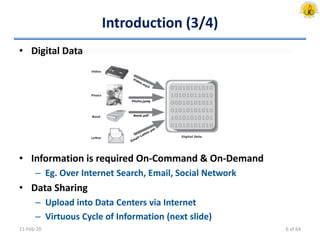
• Digital Data
• Information is required On-Command & On-Demand
– Eg. Over Internet Search, Email, Social Network
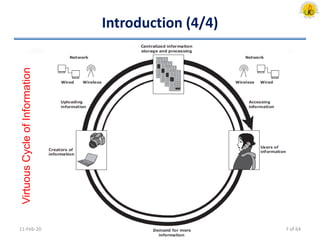
• Data Sharing
– Upload into Data Centers via Internet
– Virtuous Cycle of Information (next slide)
11-Feb-20 6 of 64
Introduction (4/4)
11-Feb-20
VirtuousCycleofInformation
7 of 64
Data Creation (1/4)
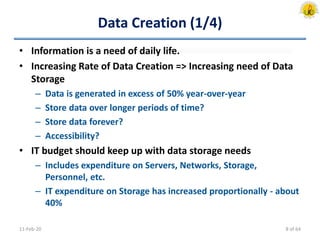
• Information is a need of daily life.
• Increasing Rate of Data Creation => Increasing need of Data
Storage
– Data is generated in excess of 50% year-over-year
– Store data over longer periods of time?
– Store data forever?
– Accessibility?
• IT budget should keep up with data storage needs
– Includes expenditure on Servers, Networks, Storage,
Personnel, etc.
– IT expenditure on Storage has increased proportionally - about
40%
11-Feb-20 8 of 64
Data Creation (2/4)
• Individuals
– More Data created by Individuals than at business
– What data is created?
• Photos, Documents, Spreadsheets, Video, etc.
– Where is the data stored - locally?
• Cameras, MP3 players, Laptop HDD, CDROM/DVDs, USB, etc.
• Challenge !!
– Managing data stored in diverse location
11-Feb-20 9 of 64
Data Creation (3/4)
• Business
– What data is created?
• The data that a business collects is about their customers,
partners, products and services.
– Product data: inventory, description, pricing, availability, sales
numbers and projections
– Customer data: orders, shipping details
– Account data: banking, financial services industry
– Medical data: health care providers, insurance industry, hospitals
11-Feb-20 10 of 64
Data Creation (4/4)
• Business
– Where is Data stored?
• Depends on size of Business
– Local, individual work stations or on centralized disk array systems,
Servers, Tapes, CDROM/DVDs, Off-site libraries
• Challenge !!
– Information is stored securely and accurately
– Information should be available “on demand” 24/7
11-Feb-20 11 of 64
Value of Data to Business
• What do businesses “do” with the data they collect?
– Businesses “mine” the “Data” and turn it into “Information”
• Extract meaningful patterns or trends
• Businesses create information to better manage the business.
• Examples of information include
– Buying habits and patterns of customers
– GPS locations of delivery trucks
– Health history of patients
– Locations where a credit card is used
11-Feb-20 12 of 64
Value of Individual Data to a Business
• What data created by individuals might be valuable to a
business?
• Examples of business value from individuals’ data include:
– On-line resume storage and management service
– On-line photo storage and organizer
– Discussion: Job Search Engine
11-Feb-20 13 of 64
Value of Information to Business
• Identifying new business opportunities
– Buying/spending patterns: Internet stores, retail stores,
supermarkets
– Customer satisfaction/service: tracking shipments & deliveries
• Identifying patterns that lead to changes in existing
business. For example:
– Reduced cost: delivery service optimizing utilization of vehicles and gas
– New products: MP3 player speaker systems
– New services: security alerts for “stolen” credit card purchases
– Targeted marketing campaigns: communicate to bank customers with
high checking account balances about a special savings plan
• Creating a competitive advantage!
• Discussion: Bank – Special Savings Plan
11-Feb-20 14 of 64
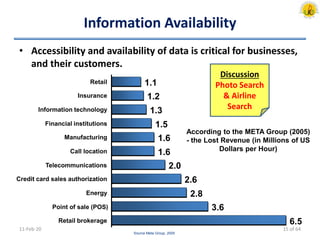
Information Availability
• Accessibility and availability of data is critical for businesses,
and their customers.
11-Feb-20
6.5
3.6
2.8
2.6
2.0
1.6
1.6
1.5
1.3
1.2
1.1
Retail brokerage
Point of sale (POS)
Energy
Credit card sales authorization
Telecommunications
Call location
Manufacturing
Financial institutions
Information technology
Insurance
Retail
Source Meta Group, 2005
Discussion
Photo Search
& Airline
Search
According to the META Group (2005)
- the Lost Revenue (in Millions of US
Dollars per Hour)
15 of 64
Type of Data (1/2)
11-Feb-20 16 of 64
Type of Data (2/2)
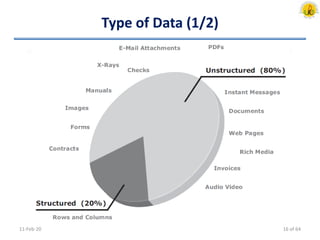
• Structured Data
– Formal & well organized
– Stored in: Relational database or spreadsheet
• Unstructured Data
– Informal, possibly text (such as XML tagged content) &
disorganized
– Stored in: Files as whole documents (or) in content
management systems
– Businesses generate unstructured data in the form of emails,
forms, marketing materials, web pages, etc.
• Over 80% of enterprise information is unstructured (Fulcrum
Research, 2004).
– Might require a lot more effort in searching, retrieving, and
presenting to the end-user, than structured data.
11-Feb-20 17 of 64
Evolution of Storage Tech. & Architecture (1/6)
• Centralized
– Terminals connected to a Mainframe computer which had
connectivity to internal/external storage devices (disks, tapes).
– Processes had to be in place for data access.
– Introduces considerable delay in new application development
and deployment.
• Access to data (such as a report request or for archived data) was
predicated on business needs.
• Computational power was deemed more important than the
immediacy of access.
11-Feb-20 18 of 64
Evolution of Storage Tech. & Architecture (2/6)
• Decentralized/Distributed
– With advances in networking, the client-server model became
prevalent
– Business units within an enterprise could have access to their
own servers and storage
– Applications no longer had to wait in one central queue for
data access and execution
– Lead to fragmentation of information. It also becomes difficult
to enforce uniform processes and policies, as well as to
manage these islands of information
11-Feb-20 19 of 64
Evolution of Storage Tech. & Architecture (3/6)
• Networked Storage (1/3)
– Best practice model used in IT where data is located centrally
and kept on disk in a storage system.
– Data can be stored centrally. Access to it is allowed for
different applications.
– Network Storage allows servers to access data.
• Each department (Production/HR/Finance/..) had its collection of
clients, servers, and storage.
– Benefits
• Connects many computers to a central place for data storage and
retrieval
• Data can be more easily managed, shared and protected
• Data can be made highly available
11-Feb-20 20 of 64
Evolution of Storage Tech. & Architecture (4/6)
• Networked Storage (2/3)
– Redundant Array of Independent Disks (RAID)
• Addresses cost, performance & availability requirements of data
• It continues to evolve & used in all storage architectures
– Direct Attached Storage (DAS)
• Connects directly to a server or a group of servers (cluster)
• Storage can be either internal (limited storage) or external to the
server
– Storage Area Network (SAN)
• Storage is partitioned & assigned to a server for data access
• Dedicated, high-performance Fiber Channel (FC) network to
facilitate block-level communication between servers & storage
• Offers scalability, availability, performance & cost benefits
compared to DAS
11-Feb-20 21 of 64
Evolution of Storage Tech. & Architecture (5/6)
• Networked Storage (3/3)
– Network Attached Storage (NAS)
• Dedicated storage for file serving applications
• Unlike a SAN, it connects to an existing communication network
(LAN) and provides file access to heterogeneous clients
• Offers higher scalability, availability, performance & cost benefits
compared to general purpose file servers
– IP-SAN
• Convergence of technologies used in SAN & NAS
• Provides block-level communication across LAN or WAN resulting
in greater consolidation and availability of data
11-Feb-20 22 of 64
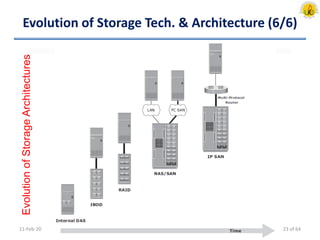
Evolution of Storage Tech. & Architecture (6/6)
11-Feb-20
EvolutionofStorageArchitectures
23 of 64
World-wide Information Growth
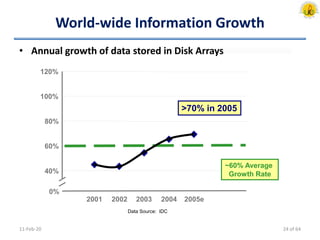
• Annual growth of data stored in Disk Arrays
11-Feb-20
~60% Average
Growth Rate
>70% in 2005
0%
40%
60%
80%
100%
120%
2001 2002 2003 2004 2005e
Data Source: IDC
24 of 64
Module – 2/4
Data Storage Solutions
Storage Solution Alternatives
• Internal or external to the server (Tape, Optical/Hard Disk)
• Common Data Storage Media
– Tape Library: A collection of tape drives and tapes
– Jukeboxes: A collection of optical disks and drives
– Disk Arrays: A collection hard disks
• Note: Each solution addresses specific needs for data storage
and management
– Tape Library => To Backup/Restore, Archival of data
– Jukeboxes => To store non-changing content over long periods
of time
– Disk Arrays => To store data that has to be immediately
accessible and on-line
11-Feb-20 26 of 64
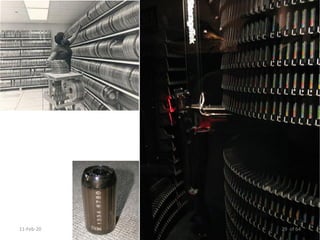
Tape Storage Systems (1/3)
• Primary storage solution in early days
• Data is recorded sequentially
• Random access to specific bits of data: slow & time
consuming (not possible)
• Cannot be shared among multiple users or applications
• R/W heads record bits of data onto thin polyester tape
surface coated with magnetic particles
• Bulky reel-to-reel systems to compact cassette (or cartridge)
based storage systems with automatic loaders & storage
racks
• Formats have changed over time to allow for more data per
reel & faster transfers rates
11-Feb-20 27 of 64
Tape Storage Systems (2/3)
• Modern tape libraries (tape silos or tape jukebox) can have
thousands of cartridges and robotics to locate, load, and
unload tapes into different drive units in the same frame
• Technology Evolution (Size, Storage capacity, greater
reliability, and improved performance)
• Tape Access
– Locate File and Relocate into computer’s memory OR Re-locate
entire information into another location such as a hard disk
• Prevalent low cost application for backup & archival of data
• E.g. IBM3850 Mass Storage System
11-Feb-20 28 of 64
11-Feb-20 29 of 64
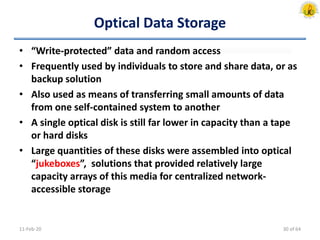
Optical Data Storage
• “Write-protected” data and random access
• Frequently used by individuals to store and share data, or as
backup solution
• Also used as means of transferring small amounts of data
from one self-contained system to another
• A single optical disk is still far lower in capacity than a tape
or hard disks
• Large quantities of these disks were assembled into optical
“jukeboxes”, solutions that provided relatively large
capacity arrays of this media for centralized network-
accessible storage
11-Feb-20 30 of 64
Disk Based Storage (1/5)
• Preferred media for storing data
• As data storage needs started exceeding the capacities of
individual drives, solutions emerged to make a collection of
drives available to either a single server or multiple servers
concurrently - media storage array
• Available Solutions
– DASD: Direct Access Storage Device
– JBOD: “Just a Bunch Of Disks”
– Disk Arrays
– “Intelligent” Disk Arrays
11-Feb-20 31 of 64
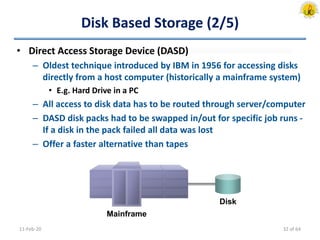
Disk Based Storage (2/5)
• Direct Access Storage Device (DASD)
– Oldest technique introduced by IBM in 1956 for accessing disks
directly from a host computer (historically a mainframe system)
• E.g. Hard Drive in a PC
– All access to disk data has to be routed through server/computer
– DASD disk packs had to be swapped in/out for specific job runs -
If a disk in the pack failed all data was lost
– Offer a faster alternative than tapes
11-Feb-20
Mainframe
Disk
32 of 64
Disk Based Storage (3/5)
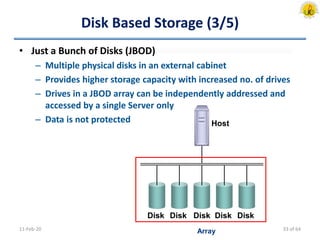
• Just a Bunch of Disks (JBOD)
– Multiple physical disks in an external cabinet
– Provides higher storage capacity with increased no. of drives
– Drives in a JBOD array can be independently addressed and
accessed by a single Server only
– Data is not protected
11-Feb-20
Host
Disk Disk Disk Disk Disk
Array 33 of 64
Disk Based Storage (4/5)
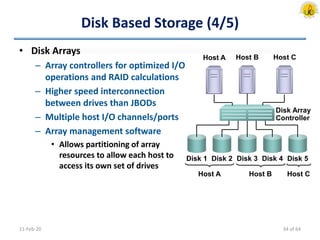
• Disk Arrays
– Array controllers for optimized I/O
operations and RAID calculations
– Higher speed interconnection
between drives than JBODs
– Multiple host I/O channels/ports
– Array management software
• Allows partitioning of array
resources to allow each host to
access its own set of drives
11-Feb-20
Host B
Disk 1 Disk 2 Disk 3 Disk 4 Disk 5
Disk Array
Controller
Host A Host C
Host A Host B Host C
34 of 64
Disk Based Storage (5/5)
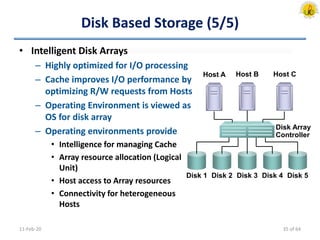
• Intelligent Disk Arrays
– Highly optimized for I/O processing
– Cache improves I/O performance by
optimizing R/W requests from Hosts
– Operating Environment is viewed as
OS for disk array
– Operating environments provide
• Intelligence for managing Cache
• Array resource allocation (Logical
Unit)
• Host access to Array resources
• Connectivity for heterogeneous
Hosts
11-Feb-20
Host B
Disk 1 Disk 2 Disk 3 Disk 4 Disk 5
Disk Array
Controller
Host A Host C
35 of 64
Direct Attached Storage - DAS (1/2)
11-Feb-20
Client 2
Server A
Application A
Server B
Application B
Server C
Application C
Disks for Server A
Disks for Server B
Disks for Server C
Client 3
Client 1
SCSI
Local Area
Network
36 of 64
Direct Attached Storage - DAS (2/2)
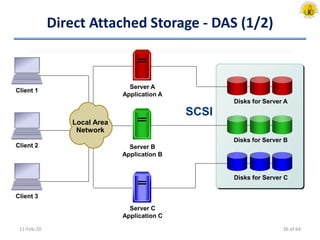
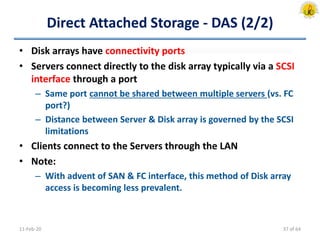
• Disk arrays have connectivity ports
• Servers connect directly to the disk array typically via a SCSI
interface through a port
– Same port cannot be shared between multiple servers (vs. FC
port?)
– Distance between Server & Disk array is governed by the SCSI
limitations
• Clients connect to the Servers through the LAN
• Note:
– With advent of SAN & FC interface, this method of Disk array
access is becoming less prevalent.
11-Feb-20 37 of 64
Network Attached Storage (1/2)
11-Feb-20
Disks for File System A
Disks for File System B
NAS Device A
File System A
NAS Device B
File System B
Internal/External connectivity
to disks or arrays
Server A
File System A
Server B
File System B
Client 1
Client 2
Client 3
Local Area
Network
Linux
Windows
38 of 64
Network Attached Storage (2/2)
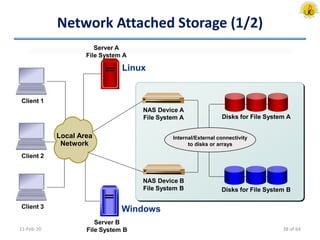
• NAS Devices access the disks in an array via direct
connection or through external connectivity
– The NAS heads are optimized for file serving and are setup to
export/share file systems
• Servers called NAS clients access these file systems over the
LAN to run applications
• Clients connect to servers also over the LAN
11-Feb-20 39 of 64
Storage Area Network (1/2)
11-Feb-20
Client 2
Client 3
Client 1 Server A
Application A
Server B
Application B
Server C
Application C
Disks for Server A
Disks for Server B
Disks for Server C
SAN FC
Switch
Disk Array
Fiber Channel
Data Block
Local Area
Network
40 of 64
Storage Area Network (2/2)
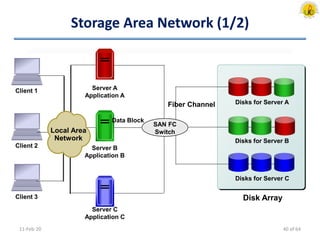
• SAN consists of Fiber Channel (FC) switches that provide
connectivity between the servers & the disk array
• Multiple servers can access the same FC port on disk array
• The distance between the server and the disk array can also
be greater than that permitted in a direct attached SCSI
environment
• Servers access the disk array through a dedicated network
designated as SAN
• Clients communicate with the servers over the LAN
11-Feb-20 41 of 64
Module – 3/4
Data Center Infrastructure
Core Elements (1/4)
• Applications
– Specialized and dedicated software to manipulate data
• Databases
– DBMS & physical and logical storage of data
• Servers/OS
– Provides computing platform required to run the applications
and databases
• Networks
– Provides data communication path between clients & servers
or between servers and storage
• Storage Arrays
– Place where “information lives”
11-Feb-20 43 of 64
Core Elements (2/4)
• Example: Order Entry System
– Consider an order processing system consisting of
• Application [Order entry]
• DBMS [Store customer and product information]
• Server/OS [Application & Database programs are run]
• Networks [Connectivity between Clients & Application/DB
Server, Connectivity between Server & Storage system]
• Storage Array
11-Feb-20
Local Area
Network
Storage Area
Network
Storage
Array
Client
Server
Application
User Interface
DatabaseOS & DBMS
44 of 64
Core Elements (3/4)
• Example: Optimal Order Processing
– Application [Optimized for fast interaction with DBMS]
– Database [The tables should be designed such that the number
of R/W operations can be minimized]
– Server [Contain sufficient CPU & memory resources to satisfy
need of Application and DBMS]
– Network [Provide fast communication between Client and
Server, as well as Server and Storage Array]
– Storage Array [Service R/W requests from Server for optimal
performance]
11-Feb-20 45 of 64
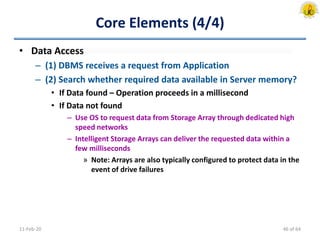
Core Elements (4/4)
• Data Access
– (1) DBMS receives a request from Application
– (2) Search whether required data available in Server memory?
• If Data found – Operation proceeds in a millisecond
• If Data not found
– Use OS to request data from Storage Array through dedicated high
speed networks
– Intelligent Storage Arrays can deliver the requested data within a
few milliseconds
» Note: Arrays are also typically configured to protect data in the
event of drive failures
11-Feb-20 46 of 64
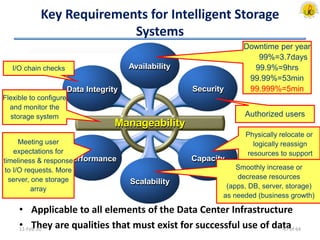
Key Requirements for Intelligent Storage
Systems
• Applicable to all elements of the Data Center Infrastructure
• They are qualities that must exist for successful use of data11-Feb-20
Availability
Data Integrity Security
Capacity
Scalability
Performance
Manageability
Downtime per year
99%=3.7days
99.9%=9hrs
99.99%=53min
99.999%=5min
Authorized users
Physically relocate or
logically reassign
resources to support
different critical business
needs. (DBMS)
Smoothly increase or
decrease resources
(apps, DB, server, storage)
as needed (business growth)
Meeting user
expectations for
timeliness & response
to I/O requests. More
server, one storage
array
I/O chain checks
Flexible to configure
and monitor the
storage system
47 of 64
Constraints to meet the Requirements
• Cost [Budget]
• Physical Environment [Site]
• Maintenance & Support [Human resource]
• Compliance: Regulatory & Legal [Business rule]
• Hardware & Software infrastructure
• Interoperability & Compatibility
11-Feb-20 48 of 64
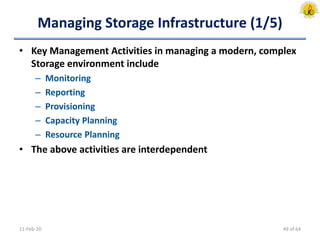
Managing Storage Infrastructure (1/5)
• Key Management Activities in managing a modern, complex
Storage environment include
– Monitoring
– Reporting
– Provisioning
– Capacity Planning
– Resource Planning
• The above activities are interdependent
11-Feb-20 49 of 64
Managing Storage Infrastructure (2/5)
• Monitoring
– Critical to ensure uninterrupted business activities
– Monitoring the Performance of Array will help in identifying
bottlenecks in I/O chain & provides clue for better data layout
– Monitoring Security
• Prohibits unauthorized access of device & changes [Configuration]
• E.g. Intrusion Attempts/Types
– Monitoring Data Protection ensures continual data protection
• E.g. Hardware errors – detected/corrected
– Monitoring Utilization
• E.g. Data transfers or transactions per minute, No. of users,
Resource use (CPU, Memory, Storage), Network traffic
11-Feb-20 50 of 64
Managing Storage Infrastructure (3/5)
• Reporting [Utilization, Performance]
– Proactive understanding of business growth & predict future
capacity requirements
– Aid in Trend Analysis
• Provisioning
– Data from monitoring & reporting are used
• For reserving required resources to meet anticipated growth
• Justifying budgetary levels for ongoing data center operations
– Provide and Install required Hardware, Software & Resources
11-Feb-20 51 of 64
Managing Storage Infrastructure (4/5)
• Capacity Planning
– Understanding Business model helps to
• Estimate growth/ support needs
• Anticipate data needs
– Understanding Data life cycle for the business helps to
• Identify various stages of data
• Gather requirements for migrating data to archived backup
• Anticipate or plan for the increasing capacity needs
– Understanding changes in Storage technology helps to
• Introduce new and more efficient storage methods to meet
future capacity needs and manage costs
11-Feb-20 52 of 64
Managing Storage Infrastructure (5/5)
• Resource Planning
– Understanding the procedures and tasks in the data center
– Changes in policy, procedures, or business needs
– Availability of qualified candidates
– Ability to train data center resources
– Sufficient budget to supply staff 24x7
11-Feb-20 53 of 64
Module – 4/4
Information Management
Key Information Management Challenges
• Consolidation of data storage into centralized arrays is just
a part of overall Information Management
• Challenges to be addressed
– Planning for capacity growth
• Information growth is relentless. With the explosion of data
creation, the solutions deployed should be able to keep up with
this ever increasing demand.
– Dependency on Information
– Changing value of information
• Value of information changes over time. E.g. Storage Arrays come
in different types and costs. Classification of data will enable the
correct choice of storage array for each class of data
– Address data availability & Security
11-Feb-20 55 of 64
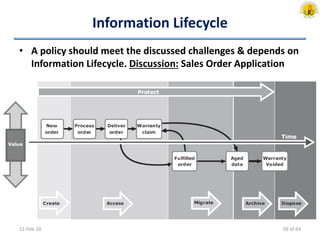
Information Lifecycle
• A policy should meet the discussed challenges & depends on
Information Lifecycle. Discussion: Sales Order Application
11-Feb-20 56 of 64
Information Lifecycle Management (1/2)
• Proactive strategy enables an IT organization
– Effectively manage the data throughout its lifecycle based on
predefined business policies
– Optimize storage infrastructure for maximum return on
investment
• Characteristics
– Business-centric
• It is integrated with key processes, applications, and initiatives of
business to meet both current and future growth in information
– Centrally managed
• All information assets of business should be under purview of ILM
strategy
11-Feb-20 57 of 64
Information Lifecycle Management (2/2)
• Characteristics (contd.)
– Policy-based
• ILM implementation should not be restricted to few departments
but should be implemented as a policy & encompass all business
applications, processes, and resources
– Heterogeneous
• Accommodate different types of storage platforms and OSs
– Optimized
• Allocate storage resources based on information’s value &
considering the different storage requirements
• Tiered Storage: Each tier has different levels of protection,
performance, data access frequency, and other considerations
– i.e. Tier 1: Mission-criticial & most accessed, Tier 2: Medium
accessed, Other tiers: Rarely accessed
11-Feb-20 58 of 64
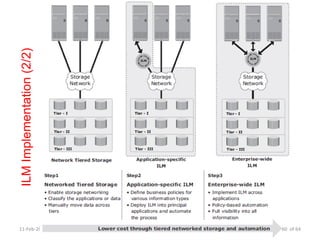
ILM Implementation (1/2)
• ILM Implementation [Related activities]
– Classify data and applications
• Enable differentiated treatment of information on the basis of
business rules and policies
– Implement policies
• Use of Information management tools from Data creation to Data
disposal
– E.g. EndNote, Mendeley, Papers, RefWorks, Zotero
– Managing the environment
• Use of integrated tools to reduce operational complexity
– Organizing storage resources in tiers
• Align the resources with data classes, and store information in the
right type of infrastructure based on information’s current value
11-Feb-20 59 of 64
11-Feb-20
ILMImplementation(2/2)
60 of 64
ILM Benefits
• Improved utilization
– Tiered storage platforms increases visibility of all information
• Simplified management
– Integrate process steps and interfaces with individual tools
– Automation
• A wider range of options for backup & recovery to balance
the need for business continuity
• Maintaining Compliance
– Data needs to be protected for specified length of time
• Lower Total Cost of Ownership (TCO)
– Align infrastructure & management costs with information
value
– Adv.: Resources are not wasted, Complexity is not introduced
11-Feb-20 61 of 64
Video Observations
• Data Storage
– Magnetism and Data Storage
– Tape Drive
– Hard Disk Drive
– Compact Disc
– SSD vs. HDD
• Data Center
– Google & Facebook DC
– What is DC?
– Security and Risk Management,
– Infrastructure Management
– Cooling and Cabling
11-Feb-20 62 of 64
References
• “Information Storage & Management”, EMC Education
Services
11-Feb-20 63 of 64
Data Storage and Information Management

Data Storage and Information Management

  • 1.
    DATA STORAGE &INFORMATION MANAGEMENT Instructor Mr. S.Christalin Nelson AP(SG)/SoCS
  • 2.
    At a Glance •Meeting today’s Data Storage Needs • Data Storage Solutions • Data Center Infrastructure • Information Management 11-Feb-20 2 of 64
  • 3.
    Module – 1/4 Meetingtoday’s Data Storage Needs
  • 4.
    Introduction (1/4) • InformationStorage – Central pillar for IT – Traditional (Data stored in HDD, CD, Floppy, etc.) – Now? • Flash Drives, External Storage, On the cloud? • Grown into Highly sophisticated technology – Provides solutions for creating, storing, managing, connecting, protecting, securing, sharing & optimizing digital information 11-Feb-20 4 of 64
  • 5.
    Introduction (2/4) • Needof Information Storage Professionals/Technologists – Today’s even seasoned IT professionals (including application, systems, database, and network administrators) do not share a common foundation about how storage technology affects their areas of expertise. – Increasing demand for personnel who understand data storage and the value of data to businesses. • It would be beneficial to examine – Who is creating data? – What types of data are being created? – When data becomes information? 11-Feb-20 5 of 64
  • 6.
    Introduction (3/4) • DigitalData • Information is required On-Command & On-Demand – Eg. Over Internet Search, Email, Social Network • Data Sharing – Upload into Data Centers via Internet – Virtuous Cycle of Information (next slide) 11-Feb-20 6 of 64
  • 7.
  • 8.
    Data Creation (1/4) •Information is a need of daily life. • Increasing Rate of Data Creation => Increasing need of Data Storage – Data is generated in excess of 50% year-over-year – Store data over longer periods of time? – Store data forever? – Accessibility? • IT budget should keep up with data storage needs – Includes expenditure on Servers, Networks, Storage, Personnel, etc. – IT expenditure on Storage has increased proportionally - about 40% 11-Feb-20 8 of 64
  • 9.
    Data Creation (2/4) •Individuals – More Data created by Individuals than at business – What data is created? • Photos, Documents, Spreadsheets, Video, etc. – Where is the data stored - locally? • Cameras, MP3 players, Laptop HDD, CDROM/DVDs, USB, etc. • Challenge !! – Managing data stored in diverse location 11-Feb-20 9 of 64
  • 10.
    Data Creation (3/4) •Business – What data is created? • The data that a business collects is about their customers, partners, products and services. – Product data: inventory, description, pricing, availability, sales numbers and projections – Customer data: orders, shipping details – Account data: banking, financial services industry – Medical data: health care providers, insurance industry, hospitals 11-Feb-20 10 of 64
  • 11.
    Data Creation (4/4) •Business – Where is Data stored? • Depends on size of Business – Local, individual work stations or on centralized disk array systems, Servers, Tapes, CDROM/DVDs, Off-site libraries • Challenge !! – Information is stored securely and accurately – Information should be available “on demand” 24/7 11-Feb-20 11 of 64
  • 12.
    Value of Datato Business • What do businesses “do” with the data they collect? – Businesses “mine” the “Data” and turn it into “Information” • Extract meaningful patterns or trends • Businesses create information to better manage the business. • Examples of information include – Buying habits and patterns of customers – GPS locations of delivery trucks – Health history of patients – Locations where a credit card is used 11-Feb-20 12 of 64
  • 13.
    Value of IndividualData to a Business • What data created by individuals might be valuable to a business? • Examples of business value from individuals’ data include: – On-line resume storage and management service – On-line photo storage and organizer – Discussion: Job Search Engine 11-Feb-20 13 of 64
  • 14.
    Value of Informationto Business • Identifying new business opportunities – Buying/spending patterns: Internet stores, retail stores, supermarkets – Customer satisfaction/service: tracking shipments & deliveries • Identifying patterns that lead to changes in existing business. For example: – Reduced cost: delivery service optimizing utilization of vehicles and gas – New products: MP3 player speaker systems – New services: security alerts for “stolen” credit card purchases – Targeted marketing campaigns: communicate to bank customers with high checking account balances about a special savings plan • Creating a competitive advantage! • Discussion: Bank – Special Savings Plan 11-Feb-20 14 of 64
  • 15.
    Information Availability • Accessibilityand availability of data is critical for businesses, and their customers. 11-Feb-20 6.5 3.6 2.8 2.6 2.0 1.6 1.6 1.5 1.3 1.2 1.1 Retail brokerage Point of sale (POS) Energy Credit card sales authorization Telecommunications Call location Manufacturing Financial institutions Information technology Insurance Retail Source Meta Group, 2005 Discussion Photo Search & Airline Search According to the META Group (2005) - the Lost Revenue (in Millions of US Dollars per Hour) 15 of 64
  • 16.
    Type of Data(1/2) 11-Feb-20 16 of 64
  • 17.
    Type of Data(2/2) • Structured Data – Formal & well organized – Stored in: Relational database or spreadsheet • Unstructured Data – Informal, possibly text (such as XML tagged content) & disorganized – Stored in: Files as whole documents (or) in content management systems – Businesses generate unstructured data in the form of emails, forms, marketing materials, web pages, etc. • Over 80% of enterprise information is unstructured (Fulcrum Research, 2004). – Might require a lot more effort in searching, retrieving, and presenting to the end-user, than structured data. 11-Feb-20 17 of 64
  • 18.
    Evolution of StorageTech. & Architecture (1/6) • Centralized – Terminals connected to a Mainframe computer which had connectivity to internal/external storage devices (disks, tapes). – Processes had to be in place for data access. – Introduces considerable delay in new application development and deployment. • Access to data (such as a report request or for archived data) was predicated on business needs. • Computational power was deemed more important than the immediacy of access. 11-Feb-20 18 of 64
  • 19.
    Evolution of StorageTech. & Architecture (2/6) • Decentralized/Distributed – With advances in networking, the client-server model became prevalent – Business units within an enterprise could have access to their own servers and storage – Applications no longer had to wait in one central queue for data access and execution – Lead to fragmentation of information. It also becomes difficult to enforce uniform processes and policies, as well as to manage these islands of information 11-Feb-20 19 of 64
  • 20.
    Evolution of StorageTech. & Architecture (3/6) • Networked Storage (1/3) – Best practice model used in IT where data is located centrally and kept on disk in a storage system. – Data can be stored centrally. Access to it is allowed for different applications. – Network Storage allows servers to access data. • Each department (Production/HR/Finance/..) had its collection of clients, servers, and storage. – Benefits • Connects many computers to a central place for data storage and retrieval • Data can be more easily managed, shared and protected • Data can be made highly available 11-Feb-20 20 of 64
  • 21.
    Evolution of StorageTech. & Architecture (4/6) • Networked Storage (2/3) – Redundant Array of Independent Disks (RAID) • Addresses cost, performance & availability requirements of data • It continues to evolve & used in all storage architectures – Direct Attached Storage (DAS) • Connects directly to a server or a group of servers (cluster) • Storage can be either internal (limited storage) or external to the server – Storage Area Network (SAN) • Storage is partitioned & assigned to a server for data access • Dedicated, high-performance Fiber Channel (FC) network to facilitate block-level communication between servers & storage • Offers scalability, availability, performance & cost benefits compared to DAS 11-Feb-20 21 of 64
  • 22.
    Evolution of StorageTech. & Architecture (5/6) • Networked Storage (3/3) – Network Attached Storage (NAS) • Dedicated storage for file serving applications • Unlike a SAN, it connects to an existing communication network (LAN) and provides file access to heterogeneous clients • Offers higher scalability, availability, performance & cost benefits compared to general purpose file servers – IP-SAN • Convergence of technologies used in SAN & NAS • Provides block-level communication across LAN or WAN resulting in greater consolidation and availability of data 11-Feb-20 22 of 64
  • 23.
    Evolution of StorageTech. & Architecture (6/6) 11-Feb-20 EvolutionofStorageArchitectures 23 of 64
  • 24.
    World-wide Information Growth •Annual growth of data stored in Disk Arrays 11-Feb-20 ~60% Average Growth Rate >70% in 2005 0% 40% 60% 80% 100% 120% 2001 2002 2003 2004 2005e Data Source: IDC 24 of 64
  • 25.
    Module – 2/4 DataStorage Solutions
  • 26.
    Storage Solution Alternatives •Internal or external to the server (Tape, Optical/Hard Disk) • Common Data Storage Media – Tape Library: A collection of tape drives and tapes – Jukeboxes: A collection of optical disks and drives – Disk Arrays: A collection hard disks • Note: Each solution addresses specific needs for data storage and management – Tape Library => To Backup/Restore, Archival of data – Jukeboxes => To store non-changing content over long periods of time – Disk Arrays => To store data that has to be immediately accessible and on-line 11-Feb-20 26 of 64
  • 27.
    Tape Storage Systems(1/3) • Primary storage solution in early days • Data is recorded sequentially • Random access to specific bits of data: slow & time consuming (not possible) • Cannot be shared among multiple users or applications • R/W heads record bits of data onto thin polyester tape surface coated with magnetic particles • Bulky reel-to-reel systems to compact cassette (or cartridge) based storage systems with automatic loaders & storage racks • Formats have changed over time to allow for more data per reel & faster transfers rates 11-Feb-20 27 of 64
  • 28.
    Tape Storage Systems(2/3) • Modern tape libraries (tape silos or tape jukebox) can have thousands of cartridges and robotics to locate, load, and unload tapes into different drive units in the same frame • Technology Evolution (Size, Storage capacity, greater reliability, and improved performance) • Tape Access – Locate File and Relocate into computer’s memory OR Re-locate entire information into another location such as a hard disk • Prevalent low cost application for backup & archival of data • E.g. IBM3850 Mass Storage System 11-Feb-20 28 of 64
  • 29.
  • 30.
    Optical Data Storage •“Write-protected” data and random access • Frequently used by individuals to store and share data, or as backup solution • Also used as means of transferring small amounts of data from one self-contained system to another • A single optical disk is still far lower in capacity than a tape or hard disks • Large quantities of these disks were assembled into optical “jukeboxes”, solutions that provided relatively large capacity arrays of this media for centralized network- accessible storage 11-Feb-20 30 of 64
  • 31.
    Disk Based Storage(1/5) • Preferred media for storing data • As data storage needs started exceeding the capacities of individual drives, solutions emerged to make a collection of drives available to either a single server or multiple servers concurrently - media storage array • Available Solutions – DASD: Direct Access Storage Device – JBOD: “Just a Bunch Of Disks” – Disk Arrays – “Intelligent” Disk Arrays 11-Feb-20 31 of 64
  • 32.
    Disk Based Storage(2/5) • Direct Access Storage Device (DASD) – Oldest technique introduced by IBM in 1956 for accessing disks directly from a host computer (historically a mainframe system) • E.g. Hard Drive in a PC – All access to disk data has to be routed through server/computer – DASD disk packs had to be swapped in/out for specific job runs - If a disk in the pack failed all data was lost – Offer a faster alternative than tapes 11-Feb-20 Mainframe Disk 32 of 64
  • 33.
    Disk Based Storage(3/5) • Just a Bunch of Disks (JBOD) – Multiple physical disks in an external cabinet – Provides higher storage capacity with increased no. of drives – Drives in a JBOD array can be independently addressed and accessed by a single Server only – Data is not protected 11-Feb-20 Host Disk Disk Disk Disk Disk Array 33 of 64
  • 34.
    Disk Based Storage(4/5) • Disk Arrays – Array controllers for optimized I/O operations and RAID calculations – Higher speed interconnection between drives than JBODs – Multiple host I/O channels/ports – Array management software • Allows partitioning of array resources to allow each host to access its own set of drives 11-Feb-20 Host B Disk 1 Disk 2 Disk 3 Disk 4 Disk 5 Disk Array Controller Host A Host C Host A Host B Host C 34 of 64
  • 35.
    Disk Based Storage(5/5) • Intelligent Disk Arrays – Highly optimized for I/O processing – Cache improves I/O performance by optimizing R/W requests from Hosts – Operating Environment is viewed as OS for disk array – Operating environments provide • Intelligence for managing Cache • Array resource allocation (Logical Unit) • Host access to Array resources • Connectivity for heterogeneous Hosts 11-Feb-20 Host B Disk 1 Disk 2 Disk 3 Disk 4 Disk 5 Disk Array Controller Host A Host C 35 of 64
  • 36.
    Direct Attached Storage- DAS (1/2) 11-Feb-20 Client 2 Server A Application A Server B Application B Server C Application C Disks for Server A Disks for Server B Disks for Server C Client 3 Client 1 SCSI Local Area Network 36 of 64
  • 37.
    Direct Attached Storage- DAS (2/2) • Disk arrays have connectivity ports • Servers connect directly to the disk array typically via a SCSI interface through a port – Same port cannot be shared between multiple servers (vs. FC port?) – Distance between Server & Disk array is governed by the SCSI limitations • Clients connect to the Servers through the LAN • Note: – With advent of SAN & FC interface, this method of Disk array access is becoming less prevalent. 11-Feb-20 37 of 64
  • 38.
    Network Attached Storage(1/2) 11-Feb-20 Disks for File System A Disks for File System B NAS Device A File System A NAS Device B File System B Internal/External connectivity to disks or arrays Server A File System A Server B File System B Client 1 Client 2 Client 3 Local Area Network Linux Windows 38 of 64
  • 39.
    Network Attached Storage(2/2) • NAS Devices access the disks in an array via direct connection or through external connectivity – The NAS heads are optimized for file serving and are setup to export/share file systems • Servers called NAS clients access these file systems over the LAN to run applications • Clients connect to servers also over the LAN 11-Feb-20 39 of 64
  • 40.
    Storage Area Network(1/2) 11-Feb-20 Client 2 Client 3 Client 1 Server A Application A Server B Application B Server C Application C Disks for Server A Disks for Server B Disks for Server C SAN FC Switch Disk Array Fiber Channel Data Block Local Area Network 40 of 64
  • 41.
    Storage Area Network(2/2) • SAN consists of Fiber Channel (FC) switches that provide connectivity between the servers & the disk array • Multiple servers can access the same FC port on disk array • The distance between the server and the disk array can also be greater than that permitted in a direct attached SCSI environment • Servers access the disk array through a dedicated network designated as SAN • Clients communicate with the servers over the LAN 11-Feb-20 41 of 64
  • 42.
    Module – 3/4 DataCenter Infrastructure
  • 43.
    Core Elements (1/4) •Applications – Specialized and dedicated software to manipulate data • Databases – DBMS & physical and logical storage of data • Servers/OS – Provides computing platform required to run the applications and databases • Networks – Provides data communication path between clients & servers or between servers and storage • Storage Arrays – Place where “information lives” 11-Feb-20 43 of 64
  • 44.
    Core Elements (2/4) •Example: Order Entry System – Consider an order processing system consisting of • Application [Order entry] • DBMS [Store customer and product information] • Server/OS [Application & Database programs are run] • Networks [Connectivity between Clients & Application/DB Server, Connectivity between Server & Storage system] • Storage Array 11-Feb-20 Local Area Network Storage Area Network Storage Array Client Server Application User Interface DatabaseOS & DBMS 44 of 64
  • 45.
    Core Elements (3/4) •Example: Optimal Order Processing – Application [Optimized for fast interaction with DBMS] – Database [The tables should be designed such that the number of R/W operations can be minimized] – Server [Contain sufficient CPU & memory resources to satisfy need of Application and DBMS] – Network [Provide fast communication between Client and Server, as well as Server and Storage Array] – Storage Array [Service R/W requests from Server for optimal performance] 11-Feb-20 45 of 64
  • 46.
    Core Elements (4/4) •Data Access – (1) DBMS receives a request from Application – (2) Search whether required data available in Server memory? • If Data found – Operation proceeds in a millisecond • If Data not found – Use OS to request data from Storage Array through dedicated high speed networks – Intelligent Storage Arrays can deliver the requested data within a few milliseconds » Note: Arrays are also typically configured to protect data in the event of drive failures 11-Feb-20 46 of 64
  • 47.
    Key Requirements forIntelligent Storage Systems • Applicable to all elements of the Data Center Infrastructure • They are qualities that must exist for successful use of data11-Feb-20 Availability Data Integrity Security Capacity Scalability Performance Manageability Downtime per year 99%=3.7days 99.9%=9hrs 99.99%=53min 99.999%=5min Authorized users Physically relocate or logically reassign resources to support different critical business needs. (DBMS) Smoothly increase or decrease resources (apps, DB, server, storage) as needed (business growth) Meeting user expectations for timeliness & response to I/O requests. More server, one storage array I/O chain checks Flexible to configure and monitor the storage system 47 of 64
  • 48.
    Constraints to meetthe Requirements • Cost [Budget] • Physical Environment [Site] • Maintenance & Support [Human resource] • Compliance: Regulatory & Legal [Business rule] • Hardware & Software infrastructure • Interoperability & Compatibility 11-Feb-20 48 of 64
  • 49.
    Managing Storage Infrastructure(1/5) • Key Management Activities in managing a modern, complex Storage environment include – Monitoring – Reporting – Provisioning – Capacity Planning – Resource Planning • The above activities are interdependent 11-Feb-20 49 of 64
  • 50.
    Managing Storage Infrastructure(2/5) • Monitoring – Critical to ensure uninterrupted business activities – Monitoring the Performance of Array will help in identifying bottlenecks in I/O chain & provides clue for better data layout – Monitoring Security • Prohibits unauthorized access of device & changes [Configuration] • E.g. Intrusion Attempts/Types – Monitoring Data Protection ensures continual data protection • E.g. Hardware errors – detected/corrected – Monitoring Utilization • E.g. Data transfers or transactions per minute, No. of users, Resource use (CPU, Memory, Storage), Network traffic 11-Feb-20 50 of 64
  • 51.
    Managing Storage Infrastructure(3/5) • Reporting [Utilization, Performance] – Proactive understanding of business growth & predict future capacity requirements – Aid in Trend Analysis • Provisioning – Data from monitoring & reporting are used • For reserving required resources to meet anticipated growth • Justifying budgetary levels for ongoing data center operations – Provide and Install required Hardware, Software & Resources 11-Feb-20 51 of 64
  • 52.
    Managing Storage Infrastructure(4/5) • Capacity Planning – Understanding Business model helps to • Estimate growth/ support needs • Anticipate data needs – Understanding Data life cycle for the business helps to • Identify various stages of data • Gather requirements for migrating data to archived backup • Anticipate or plan for the increasing capacity needs – Understanding changes in Storage technology helps to • Introduce new and more efficient storage methods to meet future capacity needs and manage costs 11-Feb-20 52 of 64
  • 53.
    Managing Storage Infrastructure(5/5) • Resource Planning – Understanding the procedures and tasks in the data center – Changes in policy, procedures, or business needs – Availability of qualified candidates – Ability to train data center resources – Sufficient budget to supply staff 24x7 11-Feb-20 53 of 64
  • 54.
  • 55.
    Key Information ManagementChallenges • Consolidation of data storage into centralized arrays is just a part of overall Information Management • Challenges to be addressed – Planning for capacity growth • Information growth is relentless. With the explosion of data creation, the solutions deployed should be able to keep up with this ever increasing demand. – Dependency on Information – Changing value of information • Value of information changes over time. E.g. Storage Arrays come in different types and costs. Classification of data will enable the correct choice of storage array for each class of data – Address data availability & Security 11-Feb-20 55 of 64
  • 56.
    Information Lifecycle • Apolicy should meet the discussed challenges & depends on Information Lifecycle. Discussion: Sales Order Application 11-Feb-20 56 of 64
  • 57.
    Information Lifecycle Management(1/2) • Proactive strategy enables an IT organization – Effectively manage the data throughout its lifecycle based on predefined business policies – Optimize storage infrastructure for maximum return on investment • Characteristics – Business-centric • It is integrated with key processes, applications, and initiatives of business to meet both current and future growth in information – Centrally managed • All information assets of business should be under purview of ILM strategy 11-Feb-20 57 of 64
  • 58.
    Information Lifecycle Management(2/2) • Characteristics (contd.) – Policy-based • ILM implementation should not be restricted to few departments but should be implemented as a policy & encompass all business applications, processes, and resources – Heterogeneous • Accommodate different types of storage platforms and OSs – Optimized • Allocate storage resources based on information’s value & considering the different storage requirements • Tiered Storage: Each tier has different levels of protection, performance, data access frequency, and other considerations – i.e. Tier 1: Mission-criticial & most accessed, Tier 2: Medium accessed, Other tiers: Rarely accessed 11-Feb-20 58 of 64
  • 59.
    ILM Implementation (1/2) •ILM Implementation [Related activities] – Classify data and applications • Enable differentiated treatment of information on the basis of business rules and policies – Implement policies • Use of Information management tools from Data creation to Data disposal – E.g. EndNote, Mendeley, Papers, RefWorks, Zotero – Managing the environment • Use of integrated tools to reduce operational complexity – Organizing storage resources in tiers • Align the resources with data classes, and store information in the right type of infrastructure based on information’s current value 11-Feb-20 59 of 64
  • 60.
  • 61.
    ILM Benefits • Improvedutilization – Tiered storage platforms increases visibility of all information • Simplified management – Integrate process steps and interfaces with individual tools – Automation • A wider range of options for backup & recovery to balance the need for business continuity • Maintaining Compliance – Data needs to be protected for specified length of time • Lower Total Cost of Ownership (TCO) – Align infrastructure & management costs with information value – Adv.: Resources are not wasted, Complexity is not introduced 11-Feb-20 61 of 64
  • 62.
    Video Observations • DataStorage – Magnetism and Data Storage – Tape Drive – Hard Disk Drive – Compact Disc – SSD vs. HDD • Data Center – Google & Facebook DC – What is DC? – Security and Risk Management, – Infrastructure Management – Cooling and Cabling 11-Feb-20 62 of 64
  • 63.
    References • “Information Storage& Management”, EMC Education Services 11-Feb-20 63 of 64