By Anis LARGUEM
Docker Security Paradigm
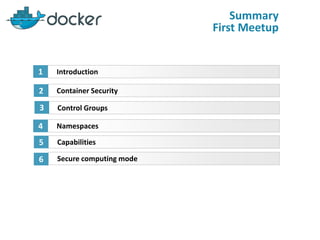
Container Security
Control Groups
2
3
Introduction1
Namespaces4
Capabilities5
Summary
First Meetup
Secure computing mode6
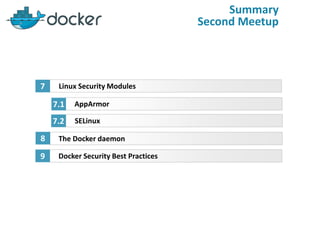
Summary
Second Meetup
Linux Security Modules
AppArmor
7
7.1
SELinux7.2
The Docker daemon8
Docker Security Best Practices9
Container Security
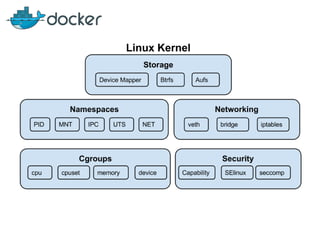
Containers use several mechanisms for security :
 Control Groups (cgroups)
 Namespaces.
 Capabilities.
 Seccomp.
 Linux security mechanisms.
 The Docker daemon.
Control Groups (cgroups)
By default, a container has no resource constraints and can use as much of a
given resource as the host’s kernel scheduler will allow…
https://docs.docker.com/engine/admin/resource_constraints/
Control Groups (cgroups)
Denial Of Service (cpu, memory, disk)
Fork bomb :(){:|:&};:
Human Redable :
bomb() {
bomb | bomb &
}; bomb
import os
while 1:
os.fork()
perl -e "fork while fork" &
Control Groups (cgroups)
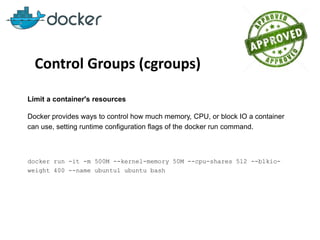
Limit a container's resources
Docker provides ways to control how much memory, CPU, or block IO a container
can use, setting runtime configuration flags of the docker run command.
docker run -it -m 500M --kernel-memory 50M --cpu-shares 512 --blkio-
weight 400 --name ubuntu1 ubuntu bash
Control Groups (cgroups)
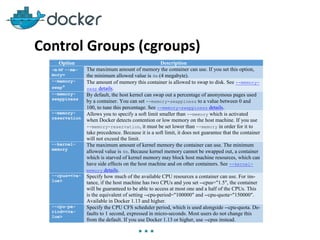
Option Description
-m or --me-
mory=
The maximum amount of memory the container can use. If you set this option,
the minimum allowed value is 4m (4 megabyte).
--memory-
swap*
The amount of memory this container is allowed to swap to disk. See --memory-
swap details.
--memory-
swappiness
By default, the host kernel can swap out a percentage of anonymous pages used
by a container. You can set --memory-swappiness to a value between 0 and
100, to tune this percentage. See --memory-swappiness details.
--memory-
reservation
Allows you to specify a soft limit smaller than --memory which is activated
when Docker detects contention or low memory on the host machine. If you use
--memory-reservation, it must be set lower than --memory in order for it to
take precedence. Because it is a soft limit, it does not guarantee that the container
will not exceed the limit.
--kernel-
memory
The maximum amount of kernel memory the container can use. The minimum
allowed value is 4m. Because kernel memory cannot be swapped out, a container
which is starved of kernel memory may block host machine resources, which can
have side effects on the host machine and on other containers. See --kernel-
memory details.
--cpus=<va-
lue>
Specify how much of the available CPU resources a container can use. For ins-
tance, if the host machine has two CPUs and you set --cpus="1.5", the container
will be guaranteed to be able to access at most one and a half of the CPUs. This
is the equivalent of setting --cpu-period="100000" and --cpu-quota="150000".
Available in Docker 1.13 and higher.
--cpu-pe-
riod=<va-
lue>
Specify the CPU CFS scheduler period, which is used alongside --cpu-quota. De-
faults to 1 second, expressed in micro-seconds. Most users do not change this
from the default. If you use Docker 1.13 or higher, use --cpus instead.
…
Control Groups (cgroups)
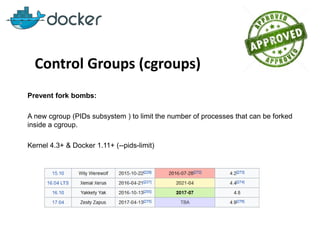
Prevent fork bombs:
A new cgroup (PIDs subsystem ) to limit the number of processes that can be forked
inside a cgroup.
Kernel 4.3+ & Docker 1.11+ (--pids-limit)
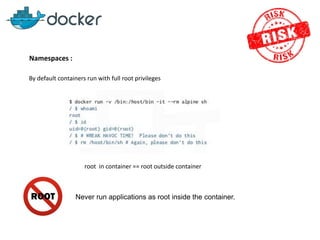
Namespaces :
By default containers run with full root privileges
root in container == root outside container
Never run applications as root inside the container.
User Namespaces
Docker introduced support for user
namespace in version 1.10
run as user :
--user UID:GID
Need root inside container :
--userns-remap [uid[:gid]]
Docker daemon needs to be started with : --userns-
remap=username/uid:groupname/gid”. Using “default” will create “dockremap” user
(--userns-remap=defaults)
Docker internals
Architecture & Layouts
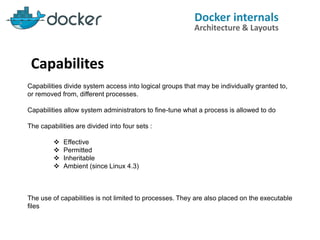
Capabilites
Capabilities divide system access into logical groups that may be individually granted to,
or removed from, different processes.
Capabilities allow system administrators to fine-tune what a process is allowed to do
The capabilities are divided into four sets :
 Effective
 Permitted
 Inheritable
 Ambient (since Linux 4.3)
The use of capabilities is not limited to processes. They are also placed on the executable
files
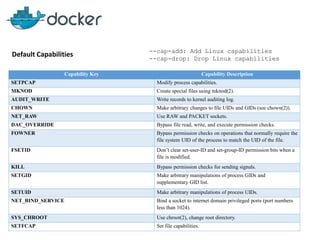
Default Capabilities
Capability Key Capability Description
SETPCAP Modify process capabilities.
MKNOD Create special files using mknod(2).
AUDIT_WRITE Write records to kernel auditing log.
CHOWN Make arbitrary changes to file UIDs and GIDs (see chown(2)).
NET_RAW Use RAW and PACKET sockets.
DAC_OVERRIDE Bypass file read, write, and execute permission checks.
FOWNER Bypass permission checks on operations that normally require the
file system UID of the process to match the UID of the file.
FSETID Don’t clear set-user-ID and set-group-ID permission bits when a
file is modified.
KILL Bypass permission checks for sending signals.
SETGID Make arbitrary manipulations of process GIDs and
supplementary GID list.
SETUID Make arbitrary manipulations of process UIDs.
NET_BIND_SERVICE Bind a socket to internet domain privileged ports (port numbers
less than 1024).
SYS_CHROOT Use chroot(2), change root directory.
SETFCAP Set file capabilities.
--cap-add: Add Linux capabilities
--cap-drop: Drop Linux capabilities
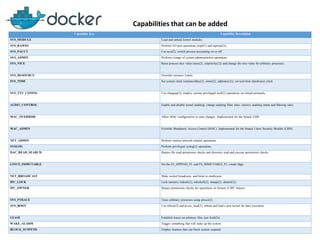
Capabilities that can be added
Capability Key Capability Description
SYS_MODULE Load and unload kernel modules.
SYS_RAWIO Perform I/O port operations (iopl(2) and ioperm(2)).
SYS_PACCT Use acct(2), switch process accounting on or off.
SYS_ADMIN Perform a range of system administration operations.
SYS_NICE Raise process nice value (nice(2), setpriority(2)) and change the nice value for arbitrary processes.
SYS_RESOURCE Override resource Limits.
SYS_TIME Set system clock (settimeofday(2), stime(2), adjtimex(2)); set real-time (hardware) clock.
SYS_TTY_CONFIG Use vhangup(2); employ various privileged ioctl(2) operations on virtual terminals.
AUDIT_CONTROL Enable and disable kernel auditing; change auditing filter rules; retrieve auditing status and filtering rules.
MAC_OVERRIDE Allow MAC configuration or state changes. Implemented for the Smack LSM.
MAC_ADMIN Override Mandatory Access Control (MAC). Implemented for the Smack Linux Security Module (LSM).
NET_ADMIN Perform various network-related operations.
SYSLOG Perform privileged syslog(2) operations.
DAC_READ_SEARCH Bypass file read permission checks and directory read and execute permission checks.
LINUX_IMMUTABLE Set the FS_APPEND_FL and FS_IMMUTABLE_FL i-node flags.
NET_BROADCAST Make socket broadcasts, and listen to multicasts.
IPC_LOCK Lock memory (mlock(2), mlockall(2), mmap(2), shmctl(2)).
IPC_OWNER Bypass permission checks for operations on System V IPC objects.
SYS_PTRACE Trace arbitrary processes using ptrace(2).
SYS_BOOT Use reboot(2) and kexec_load(2), reboot and load a new kernel for later execution.
LEASE Establish leases on arbitrary files (see fcntl(2)).
WAKE_ALARM Trigger something that will wake up the system.
BLOCK_SUSPEND Employ features that can block system suspend.
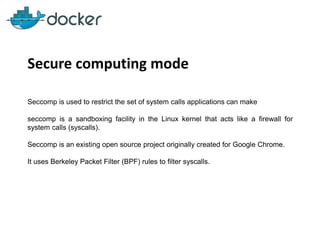
Secure computing mode
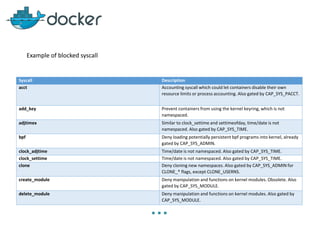
Seccomp is used to restrict the set of system calls applications can make
seccomp is a sandboxing facility in the Linux kernel that acts like a firewall for
system calls (syscalls).
Seccomp is an existing open source project originally created for Google Chrome.
It uses Berkeley Packet Filter (BPF) rules to filter syscalls.
Example of blocked syscall
Syscall Description
acct Accounting syscall which could let containers disable their own
resource limits or process accounting. Also gated by CAP_SYS_PACCT.
add_key Prevent containers from using the kernel keyring, which is not
namespaced.
adjtimex Similar to clock_settime and settimeofday, time/date is not
namespaced. Also gated by CAP_SYS_TIME.
bpf Deny loading potentially persistent bpf programs into kernel, already
gated by CAP_SYS_ADMIN.
clock_adjtime Time/date is not namespaced. Also gated by CAP_SYS_TIME.
clock_settime Time/date is not namespaced. Also gated by CAP_SYS_TIME.
clone Deny cloning new namespaces. Also gated by CAP_SYS_ADMIN for
CLONE_* flags, except CLONE_USERNS.
create_module Deny manipulation and functions on kernel modules. Obsolete. Also
gated by CAP_SYS_MODULE.
delete_module Deny manipulation and functions on kernel modules. Also gated by
CAP_SYS_MODULE.
…
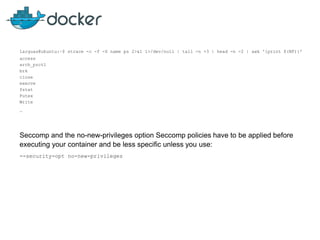
larguas@ubuntu:~$ strace -c -f -S name ps 2>&1 1>/dev/null | tail -n +3 | head -n -2 | awk '{print $(NF)}'
access
arch_prctl
brk
close
execve
fstat
Futex
Write
…
Seccomp and the no-new-privileges option Seccomp policies have to be applied before
executing your container and be less specific unless you use:
--security-opt no-new-privileges
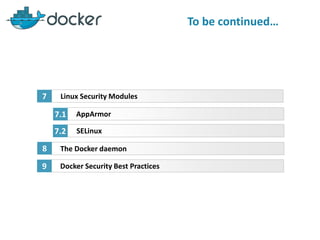
To be continued…
Linux Security Modules
AppArmor
7
7.1
SELinux7.2
The Docker daemon8
Docker Security Best Practices9

Docker Security Paradigm

  • 1.
    By Anis LARGUEM DockerSecurity Paradigm
  • 2.
  • 3.
    Summary Second Meetup Linux SecurityModules AppArmor 7 7.1 SELinux7.2 The Docker daemon8 Docker Security Best Practices9
  • 5.
    Container Security Containers useseveral mechanisms for security :  Control Groups (cgroups)  Namespaces.  Capabilities.  Seccomp.  Linux security mechanisms.  The Docker daemon.
  • 6.
    Control Groups (cgroups) Bydefault, a container has no resource constraints and can use as much of a given resource as the host’s kernel scheduler will allow… https://docs.docker.com/engine/admin/resource_constraints/
  • 7.
    Control Groups (cgroups) DenialOf Service (cpu, memory, disk) Fork bomb :(){:|:&};: Human Redable : bomb() { bomb | bomb & }; bomb import os while 1: os.fork() perl -e "fork while fork" &
  • 8.
    Control Groups (cgroups) Limita container's resources Docker provides ways to control how much memory, CPU, or block IO a container can use, setting runtime configuration flags of the docker run command. docker run -it -m 500M --kernel-memory 50M --cpu-shares 512 --blkio- weight 400 --name ubuntu1 ubuntu bash
  • 9.
    Control Groups (cgroups) OptionDescription -m or --me- mory= The maximum amount of memory the container can use. If you set this option, the minimum allowed value is 4m (4 megabyte). --memory- swap* The amount of memory this container is allowed to swap to disk. See --memory- swap details. --memory- swappiness By default, the host kernel can swap out a percentage of anonymous pages used by a container. You can set --memory-swappiness to a value between 0 and 100, to tune this percentage. See --memory-swappiness details. --memory- reservation Allows you to specify a soft limit smaller than --memory which is activated when Docker detects contention or low memory on the host machine. If you use --memory-reservation, it must be set lower than --memory in order for it to take precedence. Because it is a soft limit, it does not guarantee that the container will not exceed the limit. --kernel- memory The maximum amount of kernel memory the container can use. The minimum allowed value is 4m. Because kernel memory cannot be swapped out, a container which is starved of kernel memory may block host machine resources, which can have side effects on the host machine and on other containers. See --kernel- memory details. --cpus=<va- lue> Specify how much of the available CPU resources a container can use. For ins- tance, if the host machine has two CPUs and you set --cpus="1.5", the container will be guaranteed to be able to access at most one and a half of the CPUs. This is the equivalent of setting --cpu-period="100000" and --cpu-quota="150000". Available in Docker 1.13 and higher. --cpu-pe- riod=<va- lue> Specify the CPU CFS scheduler period, which is used alongside --cpu-quota. De- faults to 1 second, expressed in micro-seconds. Most users do not change this from the default. If you use Docker 1.13 or higher, use --cpus instead. …
  • 10.
    Control Groups (cgroups) Preventfork bombs: A new cgroup (PIDs subsystem ) to limit the number of processes that can be forked inside a cgroup. Kernel 4.3+ & Docker 1.11+ (--pids-limit)
  • 11.
    Namespaces : By defaultcontainers run with full root privileges root in container == root outside container Never run applications as root inside the container.
  • 12.
    User Namespaces Docker introducedsupport for user namespace in version 1.10 run as user : --user UID:GID Need root inside container : --userns-remap [uid[:gid]] Docker daemon needs to be started with : --userns- remap=username/uid:groupname/gid”. Using “default” will create “dockremap” user (--userns-remap=defaults)
  • 13.
    Docker internals Architecture &Layouts Capabilites Capabilities divide system access into logical groups that may be individually granted to, or removed from, different processes. Capabilities allow system administrators to fine-tune what a process is allowed to do The capabilities are divided into four sets :  Effective  Permitted  Inheritable  Ambient (since Linux 4.3) The use of capabilities is not limited to processes. They are also placed on the executable files
  • 14.
    Default Capabilities Capability KeyCapability Description SETPCAP Modify process capabilities. MKNOD Create special files using mknod(2). AUDIT_WRITE Write records to kernel auditing log. CHOWN Make arbitrary changes to file UIDs and GIDs (see chown(2)). NET_RAW Use RAW and PACKET sockets. DAC_OVERRIDE Bypass file read, write, and execute permission checks. FOWNER Bypass permission checks on operations that normally require the file system UID of the process to match the UID of the file. FSETID Don’t clear set-user-ID and set-group-ID permission bits when a file is modified. KILL Bypass permission checks for sending signals. SETGID Make arbitrary manipulations of process GIDs and supplementary GID list. SETUID Make arbitrary manipulations of process UIDs. NET_BIND_SERVICE Bind a socket to internet domain privileged ports (port numbers less than 1024). SYS_CHROOT Use chroot(2), change root directory. SETFCAP Set file capabilities. --cap-add: Add Linux capabilities --cap-drop: Drop Linux capabilities
  • 15.
    Capabilities that canbe added Capability Key Capability Description SYS_MODULE Load and unload kernel modules. SYS_RAWIO Perform I/O port operations (iopl(2) and ioperm(2)). SYS_PACCT Use acct(2), switch process accounting on or off. SYS_ADMIN Perform a range of system administration operations. SYS_NICE Raise process nice value (nice(2), setpriority(2)) and change the nice value for arbitrary processes. SYS_RESOURCE Override resource Limits. SYS_TIME Set system clock (settimeofday(2), stime(2), adjtimex(2)); set real-time (hardware) clock. SYS_TTY_CONFIG Use vhangup(2); employ various privileged ioctl(2) operations on virtual terminals. AUDIT_CONTROL Enable and disable kernel auditing; change auditing filter rules; retrieve auditing status and filtering rules. MAC_OVERRIDE Allow MAC configuration or state changes. Implemented for the Smack LSM. MAC_ADMIN Override Mandatory Access Control (MAC). Implemented for the Smack Linux Security Module (LSM). NET_ADMIN Perform various network-related operations. SYSLOG Perform privileged syslog(2) operations. DAC_READ_SEARCH Bypass file read permission checks and directory read and execute permission checks. LINUX_IMMUTABLE Set the FS_APPEND_FL and FS_IMMUTABLE_FL i-node flags. NET_BROADCAST Make socket broadcasts, and listen to multicasts. IPC_LOCK Lock memory (mlock(2), mlockall(2), mmap(2), shmctl(2)). IPC_OWNER Bypass permission checks for operations on System V IPC objects. SYS_PTRACE Trace arbitrary processes using ptrace(2). SYS_BOOT Use reboot(2) and kexec_load(2), reboot and load a new kernel for later execution. LEASE Establish leases on arbitrary files (see fcntl(2)). WAKE_ALARM Trigger something that will wake up the system. BLOCK_SUSPEND Employ features that can block system suspend.
  • 16.
    Secure computing mode Seccompis used to restrict the set of system calls applications can make seccomp is a sandboxing facility in the Linux kernel that acts like a firewall for system calls (syscalls). Seccomp is an existing open source project originally created for Google Chrome. It uses Berkeley Packet Filter (BPF) rules to filter syscalls.
  • 17.
    Example of blockedsyscall Syscall Description acct Accounting syscall which could let containers disable their own resource limits or process accounting. Also gated by CAP_SYS_PACCT. add_key Prevent containers from using the kernel keyring, which is not namespaced. adjtimex Similar to clock_settime and settimeofday, time/date is not namespaced. Also gated by CAP_SYS_TIME. bpf Deny loading potentially persistent bpf programs into kernel, already gated by CAP_SYS_ADMIN. clock_adjtime Time/date is not namespaced. Also gated by CAP_SYS_TIME. clock_settime Time/date is not namespaced. Also gated by CAP_SYS_TIME. clone Deny cloning new namespaces. Also gated by CAP_SYS_ADMIN for CLONE_* flags, except CLONE_USERNS. create_module Deny manipulation and functions on kernel modules. Obsolete. Also gated by CAP_SYS_MODULE. delete_module Deny manipulation and functions on kernel modules. Also gated by CAP_SYS_MODULE. …
  • 18.
    larguas@ubuntu:~$ strace -c-f -S name ps 2>&1 1>/dev/null | tail -n +3 | head -n -2 | awk '{print $(NF)}' access arch_prctl brk close execve fstat Futex Write … Seccomp and the no-new-privileges option Seccomp policies have to be applied before executing your container and be less specific unless you use: --security-opt no-new-privileges
  • 19.
    To be continued… LinuxSecurity Modules AppArmor 7 7.1 SELinux7.2 The Docker daemon8 Docker Security Best Practices9