© Copyright 2014 Hewlett-Packard Development Company, L.P. The information contained herein is subject to change without notice.
Inserting CoreOS DNA for
Creating Docker Clusters.
Advanced Technology Group
July 22, 2015
© Copyright 2014 Hewlett-Packard Development Company, L.P. The information contained herein is subject to change without notice.
Inserting CoreOS DNA for
Creating Docker Clusters.
Why? What’s the goal of this presentation?
© Copyright 2014 Hewlett-Packard Development Company, L.P. The information contained herein is subject to change without notice.
About the speaker
● Patrick Galbraith
● HP Advanced Technology Group
● Has worked at Blue Gecko, MySQL AB, Classmates,
Slashdot, Cobalt Group, US Navy, K-mart
● MySQL projects: memcached UDFs, DBD::mysql,
Ansible HP switch drivers
● federated storage engine
● Family
● Outdoors
© Copyright 2014 Hewlett-Packard Development Company, L.P. The information contained herein is subject to change without notice.4
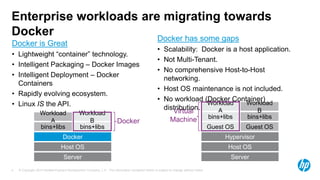
Enterprise workloads are migrating towards
Docker
Server
Host OS
Docker
bins+libs
Workload
B
Workload
A
bins+libs
Docker
Server
Host OS
Hypervisor
Guest OSGuest OS
bins+libs
Workload
B
Workload
A
bins+libs
Virtual
Machine
Docker is Great
• Lightweight “container” technology.
• Intelligent Packaging – Docker Images
• Intelligent Deployment – Docker
Containers
• Rapidly evolving ecosystem.
• Linux IS the API.
Docker has some gaps
• Scalability: Docker is a host application.
• Not Multi-Tenant.
• No comprehensive Host-to-Host
networking.
• Host OS maintenance is not included.
• No workload (Docker Container)
distribution.
© Copyright 2014 Hewlett-Packard Development Company, L.P. The information contained herein is subject to change without notice.5
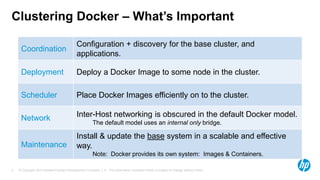
Clustering Docker – What’s Important
Coordination
Configuration + discovery for the base cluster, and
applications.
Deployment Deploy a Docker Image to some node in the cluster.
Scheduler Place Docker Images efficiently on to the cluster.
Network Inter-Host networking is obscured in the default Docker model.
The default model uses an internal only bridge.
Maintenance
Install & update the base system in a scalable and effective
way.
Note: Docker provides its own system: Images & Containers.
© Copyright 2014 Hewlett-Packard Development Company, L.P. The information contained herein is subject to change without notice.6
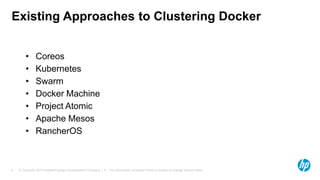
Existing Approaches to Clustering Docker
• Coreos
• Kubernetes
• Swarm
• Docker Machine
• Project Atomic
• Apache Mesos
• RancherOS
© Copyright 2014 Hewlett-Packard Development Company, L.P. The information contained herein is subject to change without notice.
CoreOS DNA
The Clustered
Docker Proof of
Concept
© Copyright 2014 Hewlett-Packard Development Company, L.P. The information contained herein is subject to change without notice.8
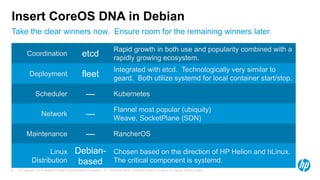
Take the clear winners now. Ensure room for the remaining winners later.
Insert CoreOS DNA in Debian
Coordination etcd
Rapid growth in both use and popularity combined with a
rapidly growing ecosystem.
Deployment fleet
Integrated with etcd. Technologically very similar to
geard. Both utilize systemd for local container start/stop.
Scheduler — Kubernetes
Network —
Flannel most popular (ubiquity)
Weave, SocketPlane (SDN)
Maintenance — RancherOS
Linux
Distribution
Debian-
based
Chosen based on the direction of HP Helion and hLinux.
The critical component is systemd.
© Copyright 2014 Hewlett-Packard Development Company, L.P. The information contained herein is subject to change without notice.
CoreOS DNA
Architecture
© Copyright 2014 Hewlett-Packard Development Company, L.P. The information contained herein is subject to change without notice.10
Use Cases:
• In Cloud
• Moonshot
• Bare metal
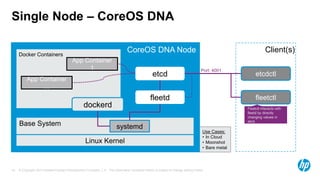
Single Node – CoreOS DNA
Linux Kernel
etcd
fleetd
Base System
CoreOS DNA Node
dockerd
Docker Containers
systemd
App Container
1
App Container
…
Port: 4001
Fleetctl interacts with
fleetd by directly
changing values in
etcd.
etcdctl
Client(s)
fleetctl
© Copyright 2014 Hewlett-Packard Development Company, L.P. The information contained herein is subject to change without notice.11
CoreOS DNA Cluster
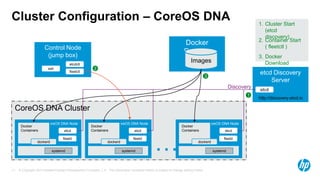
Cluster Configuration – CoreOS DNA
CoreOS DNA Node
Docker
Containers etcd
fleetd
dockerd
systemd
CoreOS DNA Node
Docker
Containers etcd
fleetd
dockerd
systemd
CoreOS DNA Node
Docker
Containers etcd
fleetd
dockerd
systemd…
etcd Discovery
Server
etcd
http://discovery.etcd.io
Docker
Registry
Images
Discovery
Control Node
(jump box)
etcdctl
fleetctl
ssh
1
2
3
1. Cluster Start
(etcd
discovery)
2. Container Start
( fleetctl )
3. Docker
Download
© Copyright 2014 Hewlett-Packard Development Company, L.P. The information contained herein is subject to change without notice.12
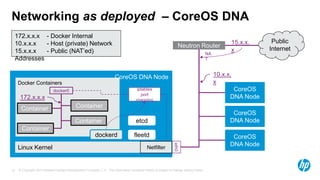
Networking as deployed – CoreOS DNA
eth0
Linux Kernel
etcd
fleetd
CoreOS DNA Node
dockerd
Docker Containers
Container
Container
Container
Container
docker0
172.x.x.x
iptables
port
mapping
Netfilter
CoreOS
DNA Node
CoreOS
DNA Node
CoreOS
DNA Node
Neutron Router
10.x.x.
x
Public
Internet
15.x.x.
x
NA
T
172.x.x.x - Docker Internal
10.x.x.x - Host (private) Network
15.x.x.x - Public (NAT’ed)
Addresses
© Copyright 2014 Hewlett-Packard Development Company, L.P. The information contained herein is subject to change without notice.13
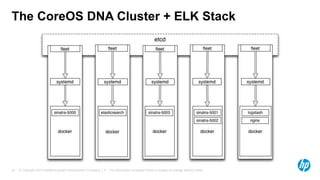
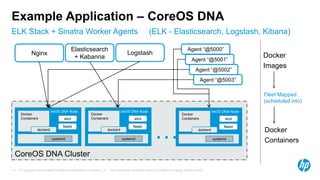
ELK Stack + Sinatra Worker Agents (ELK - Elasticsearch, Logstash, Kibana)
Example Application – CoreOS DNA
CoreOS DNA Cluster
CoreOS DNA Node
Docker
Containers etcd
fleetd
dockerd
systemd
CoreOS DNA Node
Docker
Containers etcd
fleetd
dockerd
systemd
CoreOS DNA Node
Docker
Containers etcd
fleetd
dockerd
systemd…
Agent “@5001”
Agent “@5003”
Agent “@5002”
Agent “@5000”
Nginx Logstash
Elasticsearch
+ Kabanna Docker
Images
Fleet Mapped
(scheduled into)
Docker
Containers
© Copyright 2014 Hewlett-Packard Development Company, L.P. The information contained herein is subject to change without notice.
Building the POC – Lessons
Learned
© Copyright 2014 Hewlett-Packard Development Company, L.P. The information contained herein is subject to change without notice.15
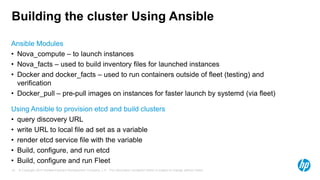
Building the cluster Using Ansible
Ansible Modules
• Nova_compute – to launch instances
• Nova_facts – used to build inventory files for launched instances
• Docker and docker_facts – used to run containers outside of fleet (testing) and
verification
• Docker_pull – pre-pull images on instances for faster launch by systemd (via fleet)
Using Ansible to provision etcd and build clusters
• query discovery URL
• write URL to local file ad set as a variable
• render etcd service file with the variable
• Build, configure, and run etcd
• Build, configure and run Fleet
© Copyright 2014 Hewlett-Packard Development Company, L.P. The information contained herein is subject to change without notice.16
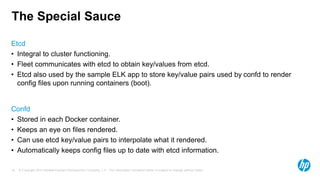
The Special Sauce
Etcd
• Integral to cluster functioning.
• Fleet communicates with etcd to obtain key/values from etcd.
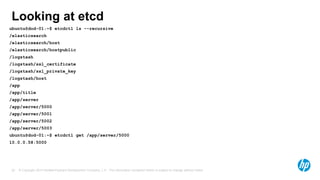
• Etcd also used by the sample ELK app to store key/value pairs used by confd to render
config files upon running containers (boot).
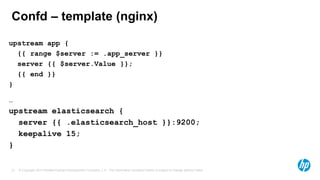
Confd
• Stored in each Docker container.
• Keeps an eye on files rendered.
• Can use etcd key/value pairs to interpolate what it rendered.
• Automatically keeps config files up to date with etcd information.
© Copyright 2014 Hewlett-Packard Development Company, L.P. The information contained herein is subject to change without notice.17
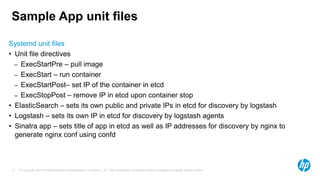
Sample App unit files
Systemd unit files
• Unit file directives
– ExecStartPre – pull image
– ExecStart – run container
– ExecStartPost– set IP of the container in etcd
– ExecStopPost – remove IP in etcd upon container stop
• ElasticSearch – sets its own public and private IPs in etcd for discovery by logstash
• Logstash – sets its own IP in etcd for discovery by logstash agents
• Sinatra app – sets title of app in etcd as well as IP addresses for discovery by nginx to
generate nginx conf using confd
© Copyright 2014 Hewlett-Packard Development Company, L.P. The information contained herein is subject to change without notice.18
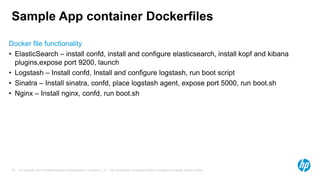
Sample App container Dockerfiles
Docker file functionality
• ElasticSearch – install confd, install and configure elasticsearch, install kopf and kibana
plugins,expose port 9200, launch
• Logstash – Install confd, Install and configure logstash, run boot script
• Sinatra – Install sinatra, confd, place logstash agent, expose port 5000, run boot.sh
• Nginx – Install nginx, confd, run boot.sh
© Copyright 2014 Hewlett-Packard Development Company, L.P. The information contained herein is subject to change without notice.19
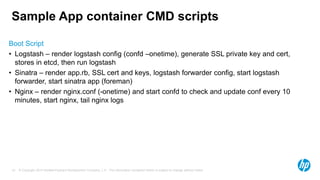
Sample App container CMD scripts
Boot Script
• Logstash – render logstash config (confd –onetime), generate SSL private key and cert,
stores in etcd, then run logstash
• Sinatra – render app.rb, SSL cert and keys, logstash forwarder config, start logstash
forwarder, start sinatra app (foreman)
• Nginx – render nginx.conf (-onetime) and start confd to check and update conf every 10
minutes, start nginx, tail nginx logs
© Copyright 2014 Hewlett-Packard Development Company, L.P. The information contained herein is subject to change without notice.20
Confd – resource file (nginx)
[template]
keys = [ "app/server", "elasticsearch/host" ]
owner = "nginx"
mode = "0644"
src = "nginx.conf.tmpl"
dest = "/etc/nginx/sites-enabled/docker_dns.conf"
check_cmd = "/usr/sbin/nginx -t -c /etc/nginx/nginx.conf"
reload_cmd = "/usr/sbin/service nginx reload"
© Copyright 2014 Hewlett-Packard Development Company, L.P. The information contained herein is subject to change without notice.21
Confd – template (nginx)
upstream app {
{{ range $server := .app_server }}
server {{ $server.Value }};
{{ end }}
}
…
upstream elasticsearch {
server {{ .elasticsearch_host }}:9200;
keepalive 15;
}
© Copyright 2014 Hewlett-Packard Development Company, L.P. The information contained herein is subject to change without notice.22
Looking at etcd
ubuntu@dod-01:~$ etcdctl ls --recursive
/elasticsearch
/elasticsearch/host
/elasticsearch/hostpublic
/logstash
/logstash/ssl_certificate
/logstash/ssl_private_key
/logstash/host
/app
/app/title
/app/server
/app/server/5000
/app/server/5001
/app/server/5002
/app/server/5003
ubuntu@dod-01:~$ etcdctl get /app/server/5000
10.0.0.58:5000
© Copyright 2014 Hewlett-Packard Development Company, L.P. The information contained herein is subject to change without notice.23
The CoreOS DNA Cluster + ELK Stack
© Copyright 2014 Hewlett-Packard Development Company, L.P. The information contained herein is subject to change without notice.24
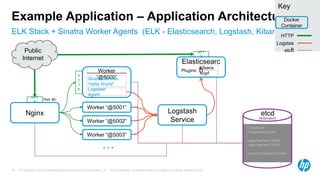
ELK Stack + Sinatra Worker Agents (ELK - Elasticsearch, Logstash, Kibana)
Example Application – Application Architecture
HTT
P
Logstash
Service
HTT
P
Nginx
Port: 80
Key
Docker
Container
HTTP
Logstas
hPublic
Internet
Worker “@5001”
Worker “@5002”
Worker “@5003”
…
Worker
“@5000”Sinatra Service:
“Hello World”
Logstash
Agent
H
T
T
P
etcd
/logstash
/logstash/host
…
/app/server/5000
/app/server/5001
…
/elasticsearch/host
…
etcd
(federated)
Elasticsearc
hKibana
Kopf
Plugins:
© Copyright 2014 Hewlett-Packard Development Company, L.P. The information contained herein is subject to change without notice.
Demohttps://youtu.be/pRtQ0AXYe6M
© Copyright 2014 Hewlett-Packard Development Company, L.P. The information contained herein is subject to change without notice.26
TODO
• Use etcd2 setup
• Set up flannel and inter-host container networking
• Add Kubernetes components
• Other Linux distributions
© Copyright 2014 Hewlett-Packard Development Company, L.P. The information contained herein is subject to change without notice.
Questions, Comments &
Feedback?
Dod Ansible Repository https://github.com/HPATG/DeCore
Sample app code https://github.com/HPATG/sample_a
pp
Marcel De Graaf’s blog post http://marceldegraaf.net/2014/05/05/
coreos-follow-up-sinatra-logstash-
elasticsearch-kibana.html
© Copyright 2014 Hewlett-Packard Development Company, L.P. The information contained herein is subject to change without notice.
Thank You
Advanced Technology Group
Eric Gustafson gustafson@hp.com
Yazz Atlas yazz.atlas@hp.com
Patrick Galbraith patg@hp.com
Special Thanks
Marcel De Graaf http://marceldegraaf.net/
Kelsey Hightower https://github.com/kelseyhightower

Core os dna_oscon

  • 1.
    © Copyright 2014Hewlett-Packard Development Company, L.P. The information contained herein is subject to change without notice. Inserting CoreOS DNA for Creating Docker Clusters. Advanced Technology Group July 22, 2015
  • 2.
    © Copyright 2014Hewlett-Packard Development Company, L.P. The information contained herein is subject to change without notice. Inserting CoreOS DNA for Creating Docker Clusters. Why? What’s the goal of this presentation?
  • 3.
    © Copyright 2014Hewlett-Packard Development Company, L.P. The information contained herein is subject to change without notice. About the speaker ● Patrick Galbraith ● HP Advanced Technology Group ● Has worked at Blue Gecko, MySQL AB, Classmates, Slashdot, Cobalt Group, US Navy, K-mart ● MySQL projects: memcached UDFs, DBD::mysql, Ansible HP switch drivers ● federated storage engine ● Family ● Outdoors
  • 4.
    © Copyright 2014Hewlett-Packard Development Company, L.P. The information contained herein is subject to change without notice.4 Enterprise workloads are migrating towards Docker Server Host OS Docker bins+libs Workload B Workload A bins+libs Docker Server Host OS Hypervisor Guest OSGuest OS bins+libs Workload B Workload A bins+libs Virtual Machine Docker is Great • Lightweight “container” technology. • Intelligent Packaging – Docker Images • Intelligent Deployment – Docker Containers • Rapidly evolving ecosystem. • Linux IS the API. Docker has some gaps • Scalability: Docker is a host application. • Not Multi-Tenant. • No comprehensive Host-to-Host networking. • Host OS maintenance is not included. • No workload (Docker Container) distribution.
  • 5.
    © Copyright 2014Hewlett-Packard Development Company, L.P. The information contained herein is subject to change without notice.5 Clustering Docker – What’s Important Coordination Configuration + discovery for the base cluster, and applications. Deployment Deploy a Docker Image to some node in the cluster. Scheduler Place Docker Images efficiently on to the cluster. Network Inter-Host networking is obscured in the default Docker model. The default model uses an internal only bridge. Maintenance Install & update the base system in a scalable and effective way. Note: Docker provides its own system: Images & Containers.
  • 6.
    © Copyright 2014Hewlett-Packard Development Company, L.P. The information contained herein is subject to change without notice.6 Existing Approaches to Clustering Docker • Coreos • Kubernetes • Swarm • Docker Machine • Project Atomic • Apache Mesos • RancherOS
  • 7.
    © Copyright 2014Hewlett-Packard Development Company, L.P. The information contained herein is subject to change without notice. CoreOS DNA The Clustered Docker Proof of Concept
  • 8.
    © Copyright 2014Hewlett-Packard Development Company, L.P. The information contained herein is subject to change without notice.8 Take the clear winners now. Ensure room for the remaining winners later. Insert CoreOS DNA in Debian Coordination etcd Rapid growth in both use and popularity combined with a rapidly growing ecosystem. Deployment fleet Integrated with etcd. Technologically very similar to geard. Both utilize systemd for local container start/stop. Scheduler — Kubernetes Network — Flannel most popular (ubiquity) Weave, SocketPlane (SDN) Maintenance — RancherOS Linux Distribution Debian- based Chosen based on the direction of HP Helion and hLinux. The critical component is systemd.
  • 9.
    © Copyright 2014Hewlett-Packard Development Company, L.P. The information contained herein is subject to change without notice. CoreOS DNA Architecture
  • 10.
    © Copyright 2014Hewlett-Packard Development Company, L.P. The information contained herein is subject to change without notice.10 Use Cases: • In Cloud • Moonshot • Bare metal Single Node – CoreOS DNA Linux Kernel etcd fleetd Base System CoreOS DNA Node dockerd Docker Containers systemd App Container 1 App Container … Port: 4001 Fleetctl interacts with fleetd by directly changing values in etcd. etcdctl Client(s) fleetctl
  • 11.
    © Copyright 2014Hewlett-Packard Development Company, L.P. The information contained herein is subject to change without notice.11 CoreOS DNA Cluster Cluster Configuration – CoreOS DNA CoreOS DNA Node Docker Containers etcd fleetd dockerd systemd CoreOS DNA Node Docker Containers etcd fleetd dockerd systemd CoreOS DNA Node Docker Containers etcd fleetd dockerd systemd… etcd Discovery Server etcd http://discovery.etcd.io Docker Registry Images Discovery Control Node (jump box) etcdctl fleetctl ssh 1 2 3 1. Cluster Start (etcd discovery) 2. Container Start ( fleetctl ) 3. Docker Download
  • 12.
    © Copyright 2014Hewlett-Packard Development Company, L.P. The information contained herein is subject to change without notice.12 Networking as deployed – CoreOS DNA eth0 Linux Kernel etcd fleetd CoreOS DNA Node dockerd Docker Containers Container Container Container Container docker0 172.x.x.x iptables port mapping Netfilter CoreOS DNA Node CoreOS DNA Node CoreOS DNA Node Neutron Router 10.x.x. x Public Internet 15.x.x. x NA T 172.x.x.x - Docker Internal 10.x.x.x - Host (private) Network 15.x.x.x - Public (NAT’ed) Addresses
  • 13.
    © Copyright 2014Hewlett-Packard Development Company, L.P. The information contained herein is subject to change without notice.13 ELK Stack + Sinatra Worker Agents (ELK - Elasticsearch, Logstash, Kibana) Example Application – CoreOS DNA CoreOS DNA Cluster CoreOS DNA Node Docker Containers etcd fleetd dockerd systemd CoreOS DNA Node Docker Containers etcd fleetd dockerd systemd CoreOS DNA Node Docker Containers etcd fleetd dockerd systemd… Agent “@5001” Agent “@5003” Agent “@5002” Agent “@5000” Nginx Logstash Elasticsearch + Kabanna Docker Images Fleet Mapped (scheduled into) Docker Containers
  • 14.
    © Copyright 2014Hewlett-Packard Development Company, L.P. The information contained herein is subject to change without notice. Building the POC – Lessons Learned
  • 15.
    © Copyright 2014Hewlett-Packard Development Company, L.P. The information contained herein is subject to change without notice.15 Building the cluster Using Ansible Ansible Modules • Nova_compute – to launch instances • Nova_facts – used to build inventory files for launched instances • Docker and docker_facts – used to run containers outside of fleet (testing) and verification • Docker_pull – pre-pull images on instances for faster launch by systemd (via fleet) Using Ansible to provision etcd and build clusters • query discovery URL • write URL to local file ad set as a variable • render etcd service file with the variable • Build, configure, and run etcd • Build, configure and run Fleet
  • 16.
    © Copyright 2014Hewlett-Packard Development Company, L.P. The information contained herein is subject to change without notice.16 The Special Sauce Etcd • Integral to cluster functioning. • Fleet communicates with etcd to obtain key/values from etcd. • Etcd also used by the sample ELK app to store key/value pairs used by confd to render config files upon running containers (boot). Confd • Stored in each Docker container. • Keeps an eye on files rendered. • Can use etcd key/value pairs to interpolate what it rendered. • Automatically keeps config files up to date with etcd information.
  • 17.
    © Copyright 2014Hewlett-Packard Development Company, L.P. The information contained herein is subject to change without notice.17 Sample App unit files Systemd unit files • Unit file directives – ExecStartPre – pull image – ExecStart – run container – ExecStartPost– set IP of the container in etcd – ExecStopPost – remove IP in etcd upon container stop • ElasticSearch – sets its own public and private IPs in etcd for discovery by logstash • Logstash – sets its own IP in etcd for discovery by logstash agents • Sinatra app – sets title of app in etcd as well as IP addresses for discovery by nginx to generate nginx conf using confd
  • 18.
    © Copyright 2014Hewlett-Packard Development Company, L.P. The information contained herein is subject to change without notice.18 Sample App container Dockerfiles Docker file functionality • ElasticSearch – install confd, install and configure elasticsearch, install kopf and kibana plugins,expose port 9200, launch • Logstash – Install confd, Install and configure logstash, run boot script • Sinatra – Install sinatra, confd, place logstash agent, expose port 5000, run boot.sh • Nginx – Install nginx, confd, run boot.sh
  • 19.
    © Copyright 2014Hewlett-Packard Development Company, L.P. The information contained herein is subject to change without notice.19 Sample App container CMD scripts Boot Script • Logstash – render logstash config (confd –onetime), generate SSL private key and cert, stores in etcd, then run logstash • Sinatra – render app.rb, SSL cert and keys, logstash forwarder config, start logstash forwarder, start sinatra app (foreman) • Nginx – render nginx.conf (-onetime) and start confd to check and update conf every 10 minutes, start nginx, tail nginx logs
  • 20.
    © Copyright 2014Hewlett-Packard Development Company, L.P. The information contained herein is subject to change without notice.20 Confd – resource file (nginx) [template] keys = [ "app/server", "elasticsearch/host" ] owner = "nginx" mode = "0644" src = "nginx.conf.tmpl" dest = "/etc/nginx/sites-enabled/docker_dns.conf" check_cmd = "/usr/sbin/nginx -t -c /etc/nginx/nginx.conf" reload_cmd = "/usr/sbin/service nginx reload"
  • 21.
    © Copyright 2014Hewlett-Packard Development Company, L.P. The information contained herein is subject to change without notice.21 Confd – template (nginx) upstream app { {{ range $server := .app_server }} server {{ $server.Value }}; {{ end }} } … upstream elasticsearch { server {{ .elasticsearch_host }}:9200; keepalive 15; }
  • 22.
    © Copyright 2014Hewlett-Packard Development Company, L.P. The information contained herein is subject to change without notice.22 Looking at etcd ubuntu@dod-01:~$ etcdctl ls --recursive /elasticsearch /elasticsearch/host /elasticsearch/hostpublic /logstash /logstash/ssl_certificate /logstash/ssl_private_key /logstash/host /app /app/title /app/server /app/server/5000 /app/server/5001 /app/server/5002 /app/server/5003 ubuntu@dod-01:~$ etcdctl get /app/server/5000 10.0.0.58:5000
  • 23.
    © Copyright 2014Hewlett-Packard Development Company, L.P. The information contained herein is subject to change without notice.23 The CoreOS DNA Cluster + ELK Stack
  • 24.
    © Copyright 2014Hewlett-Packard Development Company, L.P. The information contained herein is subject to change without notice.24 ELK Stack + Sinatra Worker Agents (ELK - Elasticsearch, Logstash, Kibana) Example Application – Application Architecture HTT P Logstash Service HTT P Nginx Port: 80 Key Docker Container HTTP Logstas hPublic Internet Worker “@5001” Worker “@5002” Worker “@5003” … Worker “@5000”Sinatra Service: “Hello World” Logstash Agent H T T P etcd /logstash /logstash/host … /app/server/5000 /app/server/5001 … /elasticsearch/host … etcd (federated) Elasticsearc hKibana Kopf Plugins:
  • 25.
    © Copyright 2014Hewlett-Packard Development Company, L.P. The information contained herein is subject to change without notice. Demohttps://youtu.be/pRtQ0AXYe6M
  • 26.
    © Copyright 2014Hewlett-Packard Development Company, L.P. The information contained herein is subject to change without notice.26 TODO • Use etcd2 setup • Set up flannel and inter-host container networking • Add Kubernetes components • Other Linux distributions
  • 27.
    © Copyright 2014Hewlett-Packard Development Company, L.P. The information contained herein is subject to change without notice. Questions, Comments & Feedback? Dod Ansible Repository https://github.com/HPATG/DeCore Sample app code https://github.com/HPATG/sample_a pp Marcel De Graaf’s blog post http://marceldegraaf.net/2014/05/05/ coreos-follow-up-sinatra-logstash- elasticsearch-kibana.html
  • 28.
    © Copyright 2014Hewlett-Packard Development Company, L.P. The information contained herein is subject to change without notice. Thank You Advanced Technology Group Eric Gustafson gustafson@hp.com Yazz Atlas yazz.atlas@hp.com Patrick Galbraith patg@hp.com Special Thanks Marcel De Graaf http://marceldegraaf.net/ Kelsey Hightower https://github.com/kelseyhightower

Editor's Notes

  • #3 Our goal is to begin a conversation across a set of Helion teams. The topic is deeply technical  involving engineering early, (and not just PM). History: ATG was asked to form an opinion regarding CoreOS Conclusion: neither CoreOS, nor Project Atomic were ideal. #1 – Create a proof-of-concept in the form of a reusable prototype + demo as a means of discovery. #2 – Present the results to the appropriate audience(s). The discoveries do not fit neatly into existing team(s). It is unclear which product management team(s) could be responsible. The issues are sufficiently technical to require both eng & pm engagement. This presentation is the beginning of the discussion. A note about the code name: CoreOS DNA It is intentionally a code name. The term is NOT intended to be a product name. The “product” may not even be a single Helion product.
  • #6 Flannel solves this by giving us networking between containers on that bridged network
  • #9 RancherOS – manage packages as docker containers
  • #12 Cluster Start (etcd discovery) Container Start (fleetctl) Docker Image download.
  • #13 This diagram depicts “as deployed” networking. * Homogeneous – all the same The “demo” environment depicts todays typical configuration and is instructional. Terminology, today, can be ambiguous. Use the subnet prefix when reading this presentation and the demo to disambiguate. Docker-Networking projects are rapidly evolving. It is not clear if the proof-of-concept’s architecture will remain. The proof-of-concept is flexible to major changes in the Docker-Networking best practices.