CoreOS 
What is it and why should I care? 
1 / 80
Who am 
I? 
Karl Grzeszczak 
Senior Software Engineer - Mediafly 
twitter @karl_grz 
karlgrz.com 
2 / 80
At Mediafly, a lot of our infrastructure is 
service oriented distributed systems 
running docker containers 
3 / 80
CoreOS seems like an ideal fit for our 
needs, so I decided to investigate 
4 / 80
I am -not- affiliated with CoreOS 
(I'm just curious and wanted to understand it!) 
5 / 80
Brief Overview 
6 / 80
Lightweight 
CoreOS is designed to be a modern, minimal base to build your 
platform. Consumes 40% less RAM on boot than an average 
Linux installation. 
https://coreos.com/ 
7 / 80
Painless Updating 
Utilizes an active/passive dual-partition scheme to update 
the OS as a single unit instead of package by package. This 
makes each update quick, reliable and able to be easily rolled 
back. 
https://coreos.com/ 
8 / 80
Docker Containers 
Applications on CoreOS run as Docker containers. Containers 
provide maximum flexibility in packaging and can start in 
milliseconds. 
https://coreos.com/ 
9 / 80
Clustered By Default 
CoreOS works well on a single machine, but it's designed to 
be clustered. Easily run application containers across 
multiple machines with fleet and connect them together with 
service discovery. 
https://coreos.com/ 
10 / 80
Distributed Systems Tools 
Built-in primitives such as distributed locking and master 
election are the building blocks for large scale distributed 
systems. 
https://coreos.com/ 
11 / 80
Service Discovery 
Easily locate where services are being run within the cluster 
and be notified when something changes. Essential for a 
complex, highly dynamic cluster. Built into CoreOS with high 
availability and automatic fail-over. 
https://coreos.com/ 
12 / 80
How is it different from other *NIXes? 
13 / 80
No package manager 
All your applications should run as a container 
Linux kernel, docker, systemd, fleetd, etcd, sshd 
According to https://coreos.com, it uses 114MB of RAM at 
boot, approximately 40% less than average Linux server 
Designed specifically for running distributed systems 
14 / 80
This is ideal if you already use docker 
15 / 80
What do you have to do differently? 
16 / 80
What do 
you have to 
do 
differently? 
etcd service discovery 
17 / 80
What do 
you have to 
do 
differently? 
etcd service discovery 
broadcast your applications key 
infrastructure settings back to etcd 
18 / 80
What do 
you have to 
do 
differently? 
etcd service discovery 
broadcast your applications key 
infrastructure settings back to etcd 
use fleet to orchestrate your containers 
19 / 80
etcd 
20 / 80
http://github.com/coreos/etcd 
21 / 80
A highly-available key value store for 
shared configuration and service 
discovery. etcd is inspired by Apache 
ZooKeeper and doozer 
https://github.com/coreos/etcd#readme-version-046 
22 / 80
Simple: curl'able user facing API (HTTP+JSON) 
Secure: optional SSL client cert authentication 
Fast: benchmarked 1000s of writes/s per instance 
Reliable: properly distributed using Raft 
etcd is written in Go and uses the Raft consensus algorithm 
to manage a highly-available replicated log. 
https://github.com/coreos/etcd#readme-version-046 
23 / 80
Raft Concensus Algorithm 
24 / 80
In Search of an Understandable Concensus Algorithm by 
Stanford's Diego Ongaro and John Ousterhout 
https://ramcloud.stanford.edu/wiki/download/attachments/11370504/raft.pdf 
"As a result, each state machine processes the same series 
of commands and thus produces the same series of results 
and arrives at the same series of states." 
http://raftconsensus.github.io/ 
25 / 80
Basically... 
26 / 80
Raft elects a leader, and the leader records a master version 
and distributes that to the other nodes in the cluster. It does 
not write a confirmation until it hears back from a concensus 
of nodes that agree. 
If the leader goes AWOL for a certain time, then a new 
election process begins to find a new leader and continue. 
27 / 80
For now, just understand... 
Raft is similar to Paxos in fault-tolerance and performance 
and it makes sure that etcd and your cluster can continue 
operating even if some nodes experience partitions (or are 
terminated!) 
28 / 80
This is an AWESOME animation you should watch because it 
explains Raft MUCH better than I can: 
http://thesecretlivesofdata.com/raft/ 
29 / 80
fleet 
30 / 80
http://github.com/coreos/fleet 
31 / 80
fleet ties systemd and etcd together into a distributed init 
system 
32 / 80
Supported Deployment Patterns 
33 / 80
Deploy a single unit anywhere on the 
cluster 
https://github.com/coreos/fleet#supported-deployment-patterns 
34 / 80
Deploy a unit globally everywhere in the 
cluster 
https://github.com/coreos/fleet#supported-deployment-patterns 
35 / 80
Automatic rescheduling of units on 
machine failure 
https://github.com/coreos/fleet#supported-deployment-patterns 
36 / 80
Ensure that units are deployed together 
on the same machine 
https://github.com/coreos/fleet#supported-deployment-patterns 
37 / 80
Forbid specific units from colocation on 
the same machine (anti-affinity) 
https://github.com/coreos/fleet#supported-deployment-patterns 
38 / 80
Deploy units to machines only with 
specific metadata 
https://github.com/coreos/fleet#supported-deployment-patterns 
39 / 80
It makes it very easy to know what is running in your cluster, 
where, and how it's doing 
40 / 80
fleet has a LOT of promise, and is my 
favorite part of CoreOS 
41 / 80
...but... 
42 / 80
...it's also my least favorite part of 
CoreOS 
43 / 80
fleet (0.8) seems very early, rough, and 
opinionated whereas etcd seems ready 
for production 
44 / 80
...but it feels like the best option out 
there right now 
45 / 80
Read this post later: 
http://lukebond.ghost.io/deploying-docker-containers-on-a- 
coreos-cluster-with-fleet/ 
I found this while putting together this presentation, and I 
think it does a great job explaining all this in written form 
46 / 80
Show me teh codez 
47 / 80
Walkthrough on Vagrant 
http://github.com/coreos/coreos-vagrant 
https://coreos.com/docs/running-coreos/ 
platforms/vagrant/ 
48 / 80
bootstrapping the cluster 
karl@karl-mediafly:~$ curl discovery.etcd.io/new 
https://discovery.etcd.io/b9845b31a57793fe9f88137220b7f454 
49 / 80
Output gets pasted into user-data: 
#cloud-config 
coreos: 
etcd: 
# generate a new token for each unique cluster from https://discovery.etcd.io/new 
# WARNING: replace each time you 'vagrant destroy' 
discovery: https://discovery.etcd.io/b9845b31a57793fe9f88137220b7f454 
addr: $public_ipv4:4001 
peer-addr: $public_ipv4:7001 
fleet: 
public-ip: $public_ipv4 
units: 
- name: etcd.service 
command: start 
- name: fleet.service 
command: start 
- name: docker-tcp.socket 
command: start 
enable: true 
50 / 80
show all machines in your cluster 
core@core-01 ~/share $ fleetctl list-machines 
MACHINE IP METADATA 
78e5ab3e... 172.17.8.103 - 
adddf8be... 172.17.8.102 - 
df763c2f... 172.17.8.101 - 
51 / 80
service unit 
[Unit] 
Description=karlgrz.com 
After=docker.service 
Requires=docker.service 
[Service] 
TimeoutStartSec=0 
ExecStartPre=-/usr/bin/docker kill karlgrz_web 
ExecStartPre=-/usr/bin/docker rm karlgrz_web 
ExecStartPre=/usr/bin/docker pull karlgrz/ubuntu-14.04-base-nginx 
ExecStartPre=/bin/sh -c "cd /srv/karlgrz.com &&  
/usr/bin/docker build -t karlgrz/karlgrz_web ." 
ExecStart=/usr/bin/docker run --name karlgrz_web -p 8001:8001 karlgrz/karlgrz_web 
ExecStop=/usr/bin/docker stop karlgrz_web 
52 / 80
start up some units 
core@core-01 ~/share/karlgrz-docker/fleet $ fleetctl start fantasy_web.service  
jcsdoorsolutions_web.service stickfigureninjas_web.service karlgrz_web.service 
Unit fantasy_web.service launched on adddf8be.../172.17.8.102 
Unit karlgrz_web.service launched on adddf8be.../172.17.8.102 
Unit jcsdoorsolutions_web.service launched on 78e5ab3e.../172.17.8.103 
Unit stickfigureninjas_web.service launched on 78e5ab3e.../172.17.8.103 
53 / 80
list loaded units and their status 
core@core-01 ~/share/karlgrz-docker/fleet $ fleetctl list-units 
UNIT MACHINE ACTIVE SUB 
fantasy_web.service adddf8be.../172.17.8.102 activating start-pre 
jcsdoorsolutions_web.service 78e5ab3e.../172.17.8.103 activating start-pre 
karlgrz_web.service adddf8be.../172.17.8.102 active running 
stickfigureninjas_web.service 78e5ab3e.../172.17.8.103 activating start-pre 
core@core-01 ~/share/karlgrz-docker/fleet $ fleetctl list-units 
UNIT MACHINE ACTIVE SUB 
fantasy_web.service adddf8be.../172.17.8.102 active running 
jcsdoorsolutions_web.service 78e5ab3e.../172.17.8.103 active running 
karlgrz_web.service adddf8be.../172.17.8.102 active running 
stickfigureninjas_web.service 78e5ab3e.../172.17.8.103 active running 
54 / 80
discovery sidekick 
[Unit] 
Description=Announce karlgrz.com 
BindsTo=karlgrz_web.service 
[Service] 
EnvironmentFile=/etc/environment 
ExecStart=/bin/sh -c "while true;  
do etcdctl set /apps/karlgrz_web  
'{ "host": "karlgrz.com", 
"appkey": "karlgrz_web", 
"ip" :"${COREOS_PUBLIC_IPV4}", 
"port" :"8001" }'  
--ttl 60; sleep 45; done" 
ExecStop=/usr/bin/etcdctl rm /apps/karlgrz_web 
[X-Fleet] 
MachineOf=karlgrz_web.service 
55 / 80
run discovery sidekicks 
core@core-01 ~/share/karlgrz-docker/fleet $ etcdctl ls /apps 
core@core-01 ~/share/karlgrz-docker/fleet $ fleetctl start fantasy_discovery.service  
jcsdoorsolutions_discovery.service stickfigureninjas_discovery.service  
karlgrz_discovery.service 
Unit jcsdoorsolutions_discovery.service launched on 78e5ab3e.../172.17.8.103 
Unit stickfigureninjas_discovery.service launched on 78e5ab3e.../172.17.8.103 
Unit fantasy_discovery.service launched on adddf8be.../172.17.8.102 
Unit karlgrz_discovery.service launched on adddf8be.../172.17.8.102 
core@core-01 ~/share/karlgrz-docker/fleet $ etcdctl ls /apps 
/apps/rethinkdb_services 
/apps/fantasy_web 
/apps/karlgrz_web 
/apps/jcsdoorsolutions_web 
/apps/stickfigureninjas_web 
56 / 80
etcd values 
core@core-01 ~/share/karlgrz-docker/fleet $ etcdctl get /apps/karlgrz_web 
{ "host": "karlgrz.com", "appkey": "karlgrz_web", "ip" :"172.17.8.102", "port" :"8001" } 
57 / 80
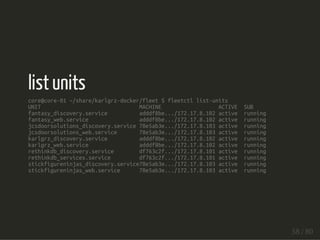
list units 
core@core-01 ~/share/karlgrz-docker/fleet $ fleetctl list-units 
UNIT MACHINE ACTIVE SUB 
fantasy_discovery.service adddf8be.../172.17.8.102 active running 
fantasy_web.service adddf8be.../172.17.8.102 active running 
jcsdoorsolutions_discovery.service 78e5ab3e.../172.17.8.103 active running 
jcsdoorsolutions_web.service 78e5ab3e.../172.17.8.103 active running 
karlgrz_discovery.service adddf8be.../172.17.8.102 active running 
karlgrz_web.service adddf8be.../172.17.8.102 active running 
rethinkdb_discovery.service df763c2f.../172.17.8.101 active running 
rethinkdb_services.service df763c2f.../172.17.8.101 active running 
stickfigureninjas_discovery.service78e5ab3e.../172.17.8.103 active running 
stickfigureninjas_web.service 78e5ab3e.../172.17.8.103 active running 
58 / 80
run a unit on ONLY one SPECIFIC node 
[Unit] 
Description=rethinkdb 
After=docker.service 
Requires=docker.service 
[Service] 
TimeoutStartSec=0 
ExecStartPre=-/usr/bin/docker kill rethinkdb_services 
ExecStartPre=-/usr/bin/docker rm rethinkdb_services 
ExecStartPre=/usr/bin/docker pull dockerfile/rethinkdb 
ExecStart=/usr/bin/docker run --name rethinkdb_services  
-p 8080:8080 -p 28015:28015 -p 29015:29105 -v /home/core/rethinkdb:/data  
-t dockerfile/rethinkdb rethinkdb -d /data --bind all 
ExecStop=/usr/bin/docker stop rethinkdb_services 
[X-Fleet] 
MachineID=9f152bf8 
59 / 80
see logging output from a running container 
core@core-01 ~ $ fleetctl journal fantasy_web 
-- Logs begin at Wed 2014-09-24 21:32:32 UTC, end at Thu 2014-09-25 19:55:26 UTC. -- 
Sep 25 18:22:08 core-02 docker[1572]: Python version: 2.7.6 (default, Mar 22 2014, 23:03:41) Sep 25 18:22:08 core-02 docker[1572]: Python main interpreter initialized at 0xc53540 
Sep 25 18:22:08 core-02 docker[1572]: python threads support enabled 
Sep 25 18:22:08 core-02 docker[1572]: your server socket listen backlog is limited to 
100 connections 
Sep 25 18:22:08 core-02 docker[1572]: your mercy for graceful operations on workers is 
60 seconds 
Sep 25 18:22:08 core-02 docker[1572]: mapped 72768 bytes (71 KB) for 1 cores 
Sep 25 18:22:08 core-02 docker[1572]: *** Operational MODE: single process *** 
Sep 25 18:22:09 core-02 docker[1572]: WSGI app 0 (mountpoint='') ready in 1 seconds on 
interpreter 0xc53540 pid: 13 (default app) 
Sep 25 18:22:09 core-02 docker[1572]: *** uWSGI is running in multiple interpreter mode *** 
Sep 25 18:22:09 core-02 docker[1572]: spawned uWSGI worker 1 (and the only) (pid: 13, cores: 60 / 80
core@core-03 ~ $ fleetctl journal karlgrz_web 
-- Logs begin at Wed 2014-09-24 21:32:32 UTC, end at Thu 2014-09-25 19:56:33 UTC. -- 
Sep 25 18:21:58 core-03 sh[1315]: ---> Using cache 
Sep 25 18:21:58 core-03 sh[1315]: ---> ce8cd32fe157 
Sep 25 18:21:58 core-03 sh[1315]: Step 6 : RUN cd /srv && make publish 
Sep 25 18:21:58 core-03 sh[1315]: ---> Using cache 
Sep 25 18:21:58 core-03 sh[1315]: ---> 83f7f333889b 
Sep 25 18:21:58 core-03 sh[1315]: Step 7 : CMD ["nginx"] 
Sep 25 18:21:58 core-03 sh[1315]: ---> Using cache 
Sep 25 18:21:58 core-03 sh[1315]: ---> 4cf274f01dae 
Sep 25 18:21:58 core-03 sh[1315]: Successfully built 4cf274f01dae 
Sep 25 18:21:59 core-03 systemd[1]: Started karlgrz.com. 
61 / 80
core@core-02 ~/share/karlgrz-docker/fleet $ fleetctl journal classholes_web 
-- Logs begin at Wed 2014-09-24 21:32:01 UTC, end at Thu 2014-09-25 20:03:55 UTC. -- 
Sep 25 20:01:40 core-02 systemd[1]: Starting classholes.com... 
Sep 25 20:01:40 core-02 docker[3071]: Error response from daemon: No such container: 
classholes_web 
Sep 25 20:01:40 core-02 docker[3071]: 2014/09/25 20:01:40 Error: failed to kill one or 
more containers 
Sep 25 20:01:40 core-02 docker[3085]: Error response from daemon: No such container: 
classholes_web 
Sep 25 20:01:40 core-02 docker[3085]: 2014/09/25 20:01:40 Error: failed to remove one or 
more containers 
Sep 25 20:01:40 core-02 docker[3095]: Pulling repository karlgrz/ubuntu-14.04-base-nginx 
Sep 25 20:01:42 core-02 systemd[1]: classholes_web.service: control process exited, code= 
exited status=1 
Sep 25 20:01:42 core-02 systemd[1]: Failed to start classholes.com. 
Sep 25 20:01:42 core-02 sh[3110]: /bin/sh: line 0: cd: /home/core/share/classholes: No such 
file or directory 
Sep 25 20:01:42 core-02 systemd[1]: Unit classholes_web.service entered failed state. 
62 / 80
terminate a node and see the services running on it moved to 
another node in the cluster 
karl@karl-mediafly:~/workspace/coreos-vagrant$ vagrant ssh core-03 -- -A 
Last login: Thu Sep 25 16:37:01 2014 from 10.0.2.2 
CoreOS (beta) 
core@core-03 ~ $ shutdown -n 
shutdown: invalid option -- 'n' 
core@core-03 ~ $ shutdown 
Must be root. 
core@core-03 ~ $ sudo shutdown -n 
shutdown: invalid option -- 'n' 
core@core-03 ~ $ sudo shutdown 
Shutdown scheduled for Thu 2014-09-25 16:46:14 UTC, use 'shutdown -c' to cancel. 
Broadcast message from root@core-03 (Thu 2014-09-25 16:45:14 UTC): 
The system is going down for power-off at Thu 2014-09-25 16:46:14 UTC! 
63 / 80
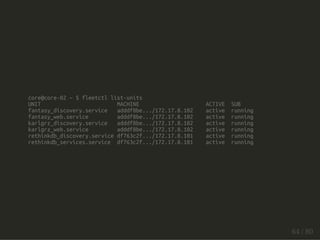
core@core-02 ~ $ fleetctl list-units 
UNIT MACHINE ACTIVE SUB 
fantasy_discovery.service adddf8be.../172.17.8.102 active running 
fantasy_web.service adddf8be.../172.17.8.102 active running 
karlgrz_discovery.service adddf8be.../172.17.8.102 active running 
karlgrz_web.service adddf8be.../172.17.8.102 active running 
rethinkdb_discovery.service df763c2f.../172.17.8.101 active running 
rethinkdb_services.service df763c2f.../172.17.8.101 active running 
64 / 80
core@core-02 ~ $ fleetctl list-units 
UNIT MACHINE ACTIVE SUB 
fantasy_discovery.service adddf8be.../172.17.8.102 active running 
fantasy_web.service adddf8be.../172.17.8.102 active running 
jcsdoorsolutions_discovery.service df763c2f.../172.17.8.101 active running 
jcsdoorsolutions_web.service df763c2f.../172.17.8.101 activating start-pre 
karlgrz_discovery.service adddf8be.../172.17.8.102 active running 
karlgrz_web.service adddf8be.../172.17.8.102 active running 
rethinkdb_discovery.service df763c2f.../172.17.8.101 active running 
rethinkdb_services.service df763c2f.../172.17.8.101 active running 
stickfigureninjas_discovery.servicedf763c2f.../172.17.8.101 active running 
stickfigureninjas_web.service df763c2f.../172.17.8.101 activating start-pre 
65 / 80
core@core-02 ~ $ fleetctl list-machines 
MACHINE IP METADATA 
adddf8be... 172.17.8.102 - 
df763c2f... 172.17.8.101 - 
66 / 80
core@core-02 ~ $ fleetctl list-units 
UNIT MACHINE ACTIVE SUB 
fantasy_discovery.service adddf8be.../172.17.8.102 active running 
fantasy_web.service adddf8be.../172.17.8.102 active running 
jcsdoorsolutions_discovery.service df763c2f.../172.17.8.101 active running 
jcsdoorsolutions_web.service df763c2f.../172.17.8.101 active running 
karlgrz_discovery.service adddf8be.../172.17.8.102 active running 
karlgrz_web.service adddf8be.../172.17.8.102 active running 
rethinkdb_discovery.service df763c2f.../172.17.8.101 active running 
rethinkdb_services.service df763c2f.../172.17.8.101 active running 
stickfigureninjas_discovery.servicedf763c2f.../172.17.8.101 active running 
stickfigureninjas_web.service df763c2f.../172.17.8.101 active running 
67 / 80
Conclusions 
68 / 80
Please keep in mind I ran this cluster on my laptop using 
Vagrant, not on cloud infrastructure 
69 / 80
Clustering just worked 
(I didn't even really have to think about failover or replication 
myself) 
70 / 80
alpha software 
fleet and etcd are great, but they both need some more work 
before being "production ready" 
71 / 80
fleet in particular gets into situations sometimes where I 
have destroyed a unit but it still shows in the list of units for 
a while 
72 / 80
fleet doesn't have a nice mechanism to restart all your units 
or groups (at least that I found) 
73 / 80
etcd is awesome :-) 
74 / 80
not quite ready for Mediafly 
75 / 80
...but... 
76 / 80
I plan on deploying CoreOS to power my 
side projects, blog, and the handful of 
sites I run for friends soon 
77 / 80
I feel that after a bit of work this will be 
the OS that powers distributed systems 
in the future 
78 / 80
Questions? 
79 / 80
Fin. 
80 / 80

Karl Grzeszczak: September Docker Presentation at Mediafly

  • 1.
    CoreOS What isit and why should I care? 1 / 80
  • 2.
    Who am I? Karl Grzeszczak Senior Software Engineer - Mediafly twitter @karl_grz karlgrz.com 2 / 80
  • 3.
    At Mediafly, alot of our infrastructure is service oriented distributed systems running docker containers 3 / 80
  • 4.
    CoreOS seems likean ideal fit for our needs, so I decided to investigate 4 / 80
  • 5.
    I am -not-affiliated with CoreOS (I'm just curious and wanted to understand it!) 5 / 80
  • 6.
  • 7.
    Lightweight CoreOS isdesigned to be a modern, minimal base to build your platform. Consumes 40% less RAM on boot than an average Linux installation. https://coreos.com/ 7 / 80
  • 8.
    Painless Updating Utilizesan active/passive dual-partition scheme to update the OS as a single unit instead of package by package. This makes each update quick, reliable and able to be easily rolled back. https://coreos.com/ 8 / 80
  • 9.
    Docker Containers Applicationson CoreOS run as Docker containers. Containers provide maximum flexibility in packaging and can start in milliseconds. https://coreos.com/ 9 / 80
  • 10.
    Clustered By Default CoreOS works well on a single machine, but it's designed to be clustered. Easily run application containers across multiple machines with fleet and connect them together with service discovery. https://coreos.com/ 10 / 80
  • 11.
    Distributed Systems Tools Built-in primitives such as distributed locking and master election are the building blocks for large scale distributed systems. https://coreos.com/ 11 / 80
  • 12.
    Service Discovery Easilylocate where services are being run within the cluster and be notified when something changes. Essential for a complex, highly dynamic cluster. Built into CoreOS with high availability and automatic fail-over. https://coreos.com/ 12 / 80
  • 13.
    How is itdifferent from other *NIXes? 13 / 80
  • 14.
    No package manager All your applications should run as a container Linux kernel, docker, systemd, fleetd, etcd, sshd According to https://coreos.com, it uses 114MB of RAM at boot, approximately 40% less than average Linux server Designed specifically for running distributed systems 14 / 80
  • 15.
    This is idealif you already use docker 15 / 80
  • 16.
    What do youhave to do differently? 16 / 80
  • 17.
    What do youhave to do differently? etcd service discovery 17 / 80
  • 18.
    What do youhave to do differently? etcd service discovery broadcast your applications key infrastructure settings back to etcd 18 / 80
  • 19.
    What do youhave to do differently? etcd service discovery broadcast your applications key infrastructure settings back to etcd use fleet to orchestrate your containers 19 / 80
  • 20.
  • 21.
  • 22.
    A highly-available keyvalue store for shared configuration and service discovery. etcd is inspired by Apache ZooKeeper and doozer https://github.com/coreos/etcd#readme-version-046 22 / 80
  • 23.
    Simple: curl'able userfacing API (HTTP+JSON) Secure: optional SSL client cert authentication Fast: benchmarked 1000s of writes/s per instance Reliable: properly distributed using Raft etcd is written in Go and uses the Raft consensus algorithm to manage a highly-available replicated log. https://github.com/coreos/etcd#readme-version-046 23 / 80
  • 24.
  • 25.
    In Search ofan Understandable Concensus Algorithm by Stanford's Diego Ongaro and John Ousterhout https://ramcloud.stanford.edu/wiki/download/attachments/11370504/raft.pdf "As a result, each state machine processes the same series of commands and thus produces the same series of results and arrives at the same series of states." http://raftconsensus.github.io/ 25 / 80
  • 26.
  • 27.
    Raft elects aleader, and the leader records a master version and distributes that to the other nodes in the cluster. It does not write a confirmation until it hears back from a concensus of nodes that agree. If the leader goes AWOL for a certain time, then a new election process begins to find a new leader and continue. 27 / 80
  • 28.
    For now, justunderstand... Raft is similar to Paxos in fault-tolerance and performance and it makes sure that etcd and your cluster can continue operating even if some nodes experience partitions (or are terminated!) 28 / 80
  • 29.
    This is anAWESOME animation you should watch because it explains Raft MUCH better than I can: http://thesecretlivesofdata.com/raft/ 29 / 80
  • 30.
  • 31.
  • 32.
    fleet ties systemdand etcd together into a distributed init system 32 / 80
  • 33.
  • 34.
    Deploy a singleunit anywhere on the cluster https://github.com/coreos/fleet#supported-deployment-patterns 34 / 80
  • 35.
    Deploy a unitglobally everywhere in the cluster https://github.com/coreos/fleet#supported-deployment-patterns 35 / 80
  • 36.
    Automatic rescheduling ofunits on machine failure https://github.com/coreos/fleet#supported-deployment-patterns 36 / 80
  • 37.
    Ensure that unitsare deployed together on the same machine https://github.com/coreos/fleet#supported-deployment-patterns 37 / 80
  • 38.
    Forbid specific unitsfrom colocation on the same machine (anti-affinity) https://github.com/coreos/fleet#supported-deployment-patterns 38 / 80
  • 39.
    Deploy units tomachines only with specific metadata https://github.com/coreos/fleet#supported-deployment-patterns 39 / 80
  • 40.
    It makes itvery easy to know what is running in your cluster, where, and how it's doing 40 / 80
  • 41.
    fleet has aLOT of promise, and is my favorite part of CoreOS 41 / 80
  • 42.
  • 43.
    ...it's also myleast favorite part of CoreOS 43 / 80
  • 44.
    fleet (0.8) seemsvery early, rough, and opinionated whereas etcd seems ready for production 44 / 80
  • 45.
    ...but it feelslike the best option out there right now 45 / 80
  • 46.
    Read this postlater: http://lukebond.ghost.io/deploying-docker-containers-on-a- coreos-cluster-with-fleet/ I found this while putting together this presentation, and I think it does a great job explaining all this in written form 46 / 80
  • 47.
    Show me tehcodez 47 / 80
  • 48.
    Walkthrough on Vagrant http://github.com/coreos/coreos-vagrant https://coreos.com/docs/running-coreos/ platforms/vagrant/ 48 / 80
  • 49.
    bootstrapping the cluster karl@karl-mediafly:~$ curl discovery.etcd.io/new https://discovery.etcd.io/b9845b31a57793fe9f88137220b7f454 49 / 80
  • 50.
    Output gets pastedinto user-data: #cloud-config coreos: etcd: # generate a new token for each unique cluster from https://discovery.etcd.io/new # WARNING: replace each time you 'vagrant destroy' discovery: https://discovery.etcd.io/b9845b31a57793fe9f88137220b7f454 addr: $public_ipv4:4001 peer-addr: $public_ipv4:7001 fleet: public-ip: $public_ipv4 units: - name: etcd.service command: start - name: fleet.service command: start - name: docker-tcp.socket command: start enable: true 50 / 80
  • 51.
    show all machinesin your cluster core@core-01 ~/share $ fleetctl list-machines MACHINE IP METADATA 78e5ab3e... 172.17.8.103 - adddf8be... 172.17.8.102 - df763c2f... 172.17.8.101 - 51 / 80
  • 52.
    service unit [Unit] Description=karlgrz.com After=docker.service Requires=docker.service [Service] TimeoutStartSec=0 ExecStartPre=-/usr/bin/docker kill karlgrz_web ExecStartPre=-/usr/bin/docker rm karlgrz_web ExecStartPre=/usr/bin/docker pull karlgrz/ubuntu-14.04-base-nginx ExecStartPre=/bin/sh -c "cd /srv/karlgrz.com && /usr/bin/docker build -t karlgrz/karlgrz_web ." ExecStart=/usr/bin/docker run --name karlgrz_web -p 8001:8001 karlgrz/karlgrz_web ExecStop=/usr/bin/docker stop karlgrz_web 52 / 80
  • 53.
    start up someunits core@core-01 ~/share/karlgrz-docker/fleet $ fleetctl start fantasy_web.service jcsdoorsolutions_web.service stickfigureninjas_web.service karlgrz_web.service Unit fantasy_web.service launched on adddf8be.../172.17.8.102 Unit karlgrz_web.service launched on adddf8be.../172.17.8.102 Unit jcsdoorsolutions_web.service launched on 78e5ab3e.../172.17.8.103 Unit stickfigureninjas_web.service launched on 78e5ab3e.../172.17.8.103 53 / 80
  • 54.
    list loaded unitsand their status core@core-01 ~/share/karlgrz-docker/fleet $ fleetctl list-units UNIT MACHINE ACTIVE SUB fantasy_web.service adddf8be.../172.17.8.102 activating start-pre jcsdoorsolutions_web.service 78e5ab3e.../172.17.8.103 activating start-pre karlgrz_web.service adddf8be.../172.17.8.102 active running stickfigureninjas_web.service 78e5ab3e.../172.17.8.103 activating start-pre core@core-01 ~/share/karlgrz-docker/fleet $ fleetctl list-units UNIT MACHINE ACTIVE SUB fantasy_web.service adddf8be.../172.17.8.102 active running jcsdoorsolutions_web.service 78e5ab3e.../172.17.8.103 active running karlgrz_web.service adddf8be.../172.17.8.102 active running stickfigureninjas_web.service 78e5ab3e.../172.17.8.103 active running 54 / 80
  • 55.
    discovery sidekick [Unit] Description=Announce karlgrz.com BindsTo=karlgrz_web.service [Service] EnvironmentFile=/etc/environment ExecStart=/bin/sh -c "while true; do etcdctl set /apps/karlgrz_web '{ "host": "karlgrz.com", "appkey": "karlgrz_web", "ip" :"${COREOS_PUBLIC_IPV4}", "port" :"8001" }' --ttl 60; sleep 45; done" ExecStop=/usr/bin/etcdctl rm /apps/karlgrz_web [X-Fleet] MachineOf=karlgrz_web.service 55 / 80
  • 56.
    run discovery sidekicks core@core-01 ~/share/karlgrz-docker/fleet $ etcdctl ls /apps core@core-01 ~/share/karlgrz-docker/fleet $ fleetctl start fantasy_discovery.service jcsdoorsolutions_discovery.service stickfigureninjas_discovery.service karlgrz_discovery.service Unit jcsdoorsolutions_discovery.service launched on 78e5ab3e.../172.17.8.103 Unit stickfigureninjas_discovery.service launched on 78e5ab3e.../172.17.8.103 Unit fantasy_discovery.service launched on adddf8be.../172.17.8.102 Unit karlgrz_discovery.service launched on adddf8be.../172.17.8.102 core@core-01 ~/share/karlgrz-docker/fleet $ etcdctl ls /apps /apps/rethinkdb_services /apps/fantasy_web /apps/karlgrz_web /apps/jcsdoorsolutions_web /apps/stickfigureninjas_web 56 / 80
  • 57.
    etcd values core@core-01~/share/karlgrz-docker/fleet $ etcdctl get /apps/karlgrz_web { "host": "karlgrz.com", "appkey": "karlgrz_web", "ip" :"172.17.8.102", "port" :"8001" } 57 / 80
  • 58.
    list units core@core-01~/share/karlgrz-docker/fleet $ fleetctl list-units UNIT MACHINE ACTIVE SUB fantasy_discovery.service adddf8be.../172.17.8.102 active running fantasy_web.service adddf8be.../172.17.8.102 active running jcsdoorsolutions_discovery.service 78e5ab3e.../172.17.8.103 active running jcsdoorsolutions_web.service 78e5ab3e.../172.17.8.103 active running karlgrz_discovery.service adddf8be.../172.17.8.102 active running karlgrz_web.service adddf8be.../172.17.8.102 active running rethinkdb_discovery.service df763c2f.../172.17.8.101 active running rethinkdb_services.service df763c2f.../172.17.8.101 active running stickfigureninjas_discovery.service78e5ab3e.../172.17.8.103 active running stickfigureninjas_web.service 78e5ab3e.../172.17.8.103 active running 58 / 80
  • 59.
    run a uniton ONLY one SPECIFIC node [Unit] Description=rethinkdb After=docker.service Requires=docker.service [Service] TimeoutStartSec=0 ExecStartPre=-/usr/bin/docker kill rethinkdb_services ExecStartPre=-/usr/bin/docker rm rethinkdb_services ExecStartPre=/usr/bin/docker pull dockerfile/rethinkdb ExecStart=/usr/bin/docker run --name rethinkdb_services -p 8080:8080 -p 28015:28015 -p 29015:29105 -v /home/core/rethinkdb:/data -t dockerfile/rethinkdb rethinkdb -d /data --bind all ExecStop=/usr/bin/docker stop rethinkdb_services [X-Fleet] MachineID=9f152bf8 59 / 80
  • 60.
    see logging outputfrom a running container core@core-01 ~ $ fleetctl journal fantasy_web -- Logs begin at Wed 2014-09-24 21:32:32 UTC, end at Thu 2014-09-25 19:55:26 UTC. -- Sep 25 18:22:08 core-02 docker[1572]: Python version: 2.7.6 (default, Mar 22 2014, 23:03:41) Sep 25 18:22:08 core-02 docker[1572]: Python main interpreter initialized at 0xc53540 Sep 25 18:22:08 core-02 docker[1572]: python threads support enabled Sep 25 18:22:08 core-02 docker[1572]: your server socket listen backlog is limited to 100 connections Sep 25 18:22:08 core-02 docker[1572]: your mercy for graceful operations on workers is 60 seconds Sep 25 18:22:08 core-02 docker[1572]: mapped 72768 bytes (71 KB) for 1 cores Sep 25 18:22:08 core-02 docker[1572]: *** Operational MODE: single process *** Sep 25 18:22:09 core-02 docker[1572]: WSGI app 0 (mountpoint='') ready in 1 seconds on interpreter 0xc53540 pid: 13 (default app) Sep 25 18:22:09 core-02 docker[1572]: *** uWSGI is running in multiple interpreter mode *** Sep 25 18:22:09 core-02 docker[1572]: spawned uWSGI worker 1 (and the only) (pid: 13, cores: 60 / 80
  • 61.
    core@core-03 ~ $fleetctl journal karlgrz_web -- Logs begin at Wed 2014-09-24 21:32:32 UTC, end at Thu 2014-09-25 19:56:33 UTC. -- Sep 25 18:21:58 core-03 sh[1315]: ---> Using cache Sep 25 18:21:58 core-03 sh[1315]: ---> ce8cd32fe157 Sep 25 18:21:58 core-03 sh[1315]: Step 6 : RUN cd /srv && make publish Sep 25 18:21:58 core-03 sh[1315]: ---> Using cache Sep 25 18:21:58 core-03 sh[1315]: ---> 83f7f333889b Sep 25 18:21:58 core-03 sh[1315]: Step 7 : CMD ["nginx"] Sep 25 18:21:58 core-03 sh[1315]: ---> Using cache Sep 25 18:21:58 core-03 sh[1315]: ---> 4cf274f01dae Sep 25 18:21:58 core-03 sh[1315]: Successfully built 4cf274f01dae Sep 25 18:21:59 core-03 systemd[1]: Started karlgrz.com. 61 / 80
  • 62.
    core@core-02 ~/share/karlgrz-docker/fleet $fleetctl journal classholes_web -- Logs begin at Wed 2014-09-24 21:32:01 UTC, end at Thu 2014-09-25 20:03:55 UTC. -- Sep 25 20:01:40 core-02 systemd[1]: Starting classholes.com... Sep 25 20:01:40 core-02 docker[3071]: Error response from daemon: No such container: classholes_web Sep 25 20:01:40 core-02 docker[3071]: 2014/09/25 20:01:40 Error: failed to kill one or more containers Sep 25 20:01:40 core-02 docker[3085]: Error response from daemon: No such container: classholes_web Sep 25 20:01:40 core-02 docker[3085]: 2014/09/25 20:01:40 Error: failed to remove one or more containers Sep 25 20:01:40 core-02 docker[3095]: Pulling repository karlgrz/ubuntu-14.04-base-nginx Sep 25 20:01:42 core-02 systemd[1]: classholes_web.service: control process exited, code= exited status=1 Sep 25 20:01:42 core-02 systemd[1]: Failed to start classholes.com. Sep 25 20:01:42 core-02 sh[3110]: /bin/sh: line 0: cd: /home/core/share/classholes: No such file or directory Sep 25 20:01:42 core-02 systemd[1]: Unit classholes_web.service entered failed state. 62 / 80
  • 63.
    terminate a nodeand see the services running on it moved to another node in the cluster karl@karl-mediafly:~/workspace/coreos-vagrant$ vagrant ssh core-03 -- -A Last login: Thu Sep 25 16:37:01 2014 from 10.0.2.2 CoreOS (beta) core@core-03 ~ $ shutdown -n shutdown: invalid option -- 'n' core@core-03 ~ $ shutdown Must be root. core@core-03 ~ $ sudo shutdown -n shutdown: invalid option -- 'n' core@core-03 ~ $ sudo shutdown Shutdown scheduled for Thu 2014-09-25 16:46:14 UTC, use 'shutdown -c' to cancel. Broadcast message from root@core-03 (Thu 2014-09-25 16:45:14 UTC): The system is going down for power-off at Thu 2014-09-25 16:46:14 UTC! 63 / 80
  • 64.
    core@core-02 ~ $fleetctl list-units UNIT MACHINE ACTIVE SUB fantasy_discovery.service adddf8be.../172.17.8.102 active running fantasy_web.service adddf8be.../172.17.8.102 active running karlgrz_discovery.service adddf8be.../172.17.8.102 active running karlgrz_web.service adddf8be.../172.17.8.102 active running rethinkdb_discovery.service df763c2f.../172.17.8.101 active running rethinkdb_services.service df763c2f.../172.17.8.101 active running 64 / 80
  • 65.
    core@core-02 ~ $fleetctl list-units UNIT MACHINE ACTIVE SUB fantasy_discovery.service adddf8be.../172.17.8.102 active running fantasy_web.service adddf8be.../172.17.8.102 active running jcsdoorsolutions_discovery.service df763c2f.../172.17.8.101 active running jcsdoorsolutions_web.service df763c2f.../172.17.8.101 activating start-pre karlgrz_discovery.service adddf8be.../172.17.8.102 active running karlgrz_web.service adddf8be.../172.17.8.102 active running rethinkdb_discovery.service df763c2f.../172.17.8.101 active running rethinkdb_services.service df763c2f.../172.17.8.101 active running stickfigureninjas_discovery.servicedf763c2f.../172.17.8.101 active running stickfigureninjas_web.service df763c2f.../172.17.8.101 activating start-pre 65 / 80
  • 66.
    core@core-02 ~ $fleetctl list-machines MACHINE IP METADATA adddf8be... 172.17.8.102 - df763c2f... 172.17.8.101 - 66 / 80
  • 67.
    core@core-02 ~ $fleetctl list-units UNIT MACHINE ACTIVE SUB fantasy_discovery.service adddf8be.../172.17.8.102 active running fantasy_web.service adddf8be.../172.17.8.102 active running jcsdoorsolutions_discovery.service df763c2f.../172.17.8.101 active running jcsdoorsolutions_web.service df763c2f.../172.17.8.101 active running karlgrz_discovery.service adddf8be.../172.17.8.102 active running karlgrz_web.service adddf8be.../172.17.8.102 active running rethinkdb_discovery.service df763c2f.../172.17.8.101 active running rethinkdb_services.service df763c2f.../172.17.8.101 active running stickfigureninjas_discovery.servicedf763c2f.../172.17.8.101 active running stickfigureninjas_web.service df763c2f.../172.17.8.101 active running 67 / 80
  • 68.
  • 69.
    Please keep inmind I ran this cluster on my laptop using Vagrant, not on cloud infrastructure 69 / 80
  • 70.
    Clustering just worked (I didn't even really have to think about failover or replication myself) 70 / 80
  • 71.
    alpha software fleetand etcd are great, but they both need some more work before being "production ready" 71 / 80
  • 72.
    fleet in particulargets into situations sometimes where I have destroyed a unit but it still shows in the list of units for a while 72 / 80
  • 73.
    fleet doesn't havea nice mechanism to restart all your units or groups (at least that I found) 73 / 80
  • 74.
    etcd is awesome:-) 74 / 80
  • 75.
    not quite readyfor Mediafly 75 / 80
  • 76.
  • 77.
    I plan ondeploying CoreOS to power my side projects, blog, and the handful of sites I run for friends soon 77 / 80
  • 78.
    I feel thatafter a bit of work this will be the OS that powers distributed systems in the future 78 / 80
  • 79.
  • 80.