McGraw-Hill Technology Education

Copyright © 2006 by The McGraw-Hill Companies, Inc. All rights reserved.
Chapter 10A

Connecting to the
Internet

McGraw-Hill Technology Education

Copyright © 2006 by The McGraw-Hill Companies, Inc. All rights reserved.
Wired Internet Connections
• Dial-up connections
– Standard phone lines and a modem
– Computer dials a number for your ISP
– All Internet programs use the connection
– Applications might need configured
Wired Internet Connections
• High-speed broadband connections
– Any connection faster than dialup
– Networks share the broadband connection
• All users access the same connection
• T or DSL lines common

– Home use increasing due to
• Lower cost
• Increased availability
Wired Internet Connections
• ISDN
– Offers speeds up to 1.5 Mbps
– Uses standard phone lines
– Requires special equipment
– Simultaneous use of phone and data
Wired Internet Connections
• DSL
– Offers speeds up to 30 Mbps
– Uses modified phone lines
• Needs special DSL modem

– Simultaneous use of phone and data
– Asynchronous DSL
• Different up and download speeds

– Synchronous DSL
– Variable DSL
• Speed changes based on traffic
DSL Connections
Wired Internet Connections
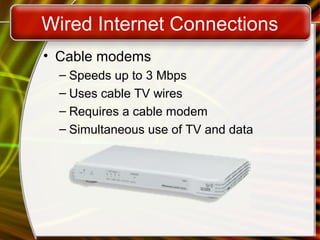
• Cable modems
– Speeds up to 3 Mbps
– Uses cable TV wires
– Requires a cable modem
– Simultaneous use of TV and data
Software Accessing The Internet
• Application programming interface (API)
– Simplifies connection to network devices
– Allows any application to access Internet
– UNIX API uses sockets
– Windows API uses winsock
Software Accessing The Internet
• Network drivers
– Control access to the hardware
– Ethernet and dial-up require a driver
– API connects to the driver
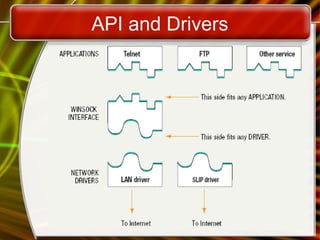
API and Drivers
Wireless Internet Connection
• Wireless WAN (WWAN)
– Wireless network over a large area
– Uses radio signals to transfer data
– Speeds range from 1 to 100 Mbps
– Antennas required
– Subject to atmospheric disturbances
Wireless Internet Connection
• Satellite services
– Internet access in remote regions
– Suitable for home and office use
– Needs a VSAT at the client
• Very Small Aperture Terminal
• Connects to the satellite

– Modem connects to the VSAT
Wireless Internet Connection
• Wireless LANs (WLAN)
– Network without wires
– Connects to a broadband LAN connection
– WAP are wired directly into the LAN
– Nodes use wireless
Wireless LAN
Wireless Internet Connection
• Wireless security
– Crucial to protect wireless transmissions
– Encryption protects transmissions
– Wireless Encryption Protocol is quite weak
– Wi-Fi Protected Access is stronger
– MAC address of trusted computers
– War driving
Chapter 10A

End of Chapter

McGraw-Hill Technology Education

Copyright © 2006 by The McGraw-Hill Companies, Inc. All rights reserved.
Project due Dec. 28
• Use WWW to find ten best home pages about the
following ten topics and sort
• them by content quality, completeness, and
relevance:
• Trinidad Tobago, San Francisco, Taipei Satellite
Images,
• Systemic Lupus Erythematosus, Stanford University,
Science Citation Index,
• Airbus A380, Benq, Bioinformatics, National Parks in
United States.
• Each of the ten best home pages must have different
domain name.

Connecting to the internet

  • 1.
    McGraw-Hill Technology Education McGraw-HillTechnology Education Copyright © 2006 by The McGraw-Hill Companies, Inc. All rights reserved. Copyright © 2006 by The McGraw-Hill Companies, Inc. All rights reserved.
  • 2.
    Chapter 10A Connecting tothe Internet McGraw-Hill Technology Education Copyright © 2006 by The McGraw-Hill Companies, Inc. All rights reserved.
  • 3.
    Wired Internet Connections •Dial-up connections – Standard phone lines and a modem – Computer dials a number for your ISP – All Internet programs use the connection – Applications might need configured
  • 4.
    Wired Internet Connections •High-speed broadband connections – Any connection faster than dialup – Networks share the broadband connection • All users access the same connection • T or DSL lines common – Home use increasing due to • Lower cost • Increased availability
  • 5.
    Wired Internet Connections •ISDN – Offers speeds up to 1.5 Mbps – Uses standard phone lines – Requires special equipment – Simultaneous use of phone and data
  • 6.
    Wired Internet Connections •DSL – Offers speeds up to 30 Mbps – Uses modified phone lines • Needs special DSL modem – Simultaneous use of phone and data – Asynchronous DSL • Different up and download speeds – Synchronous DSL – Variable DSL • Speed changes based on traffic
  • 7.
  • 8.
    Wired Internet Connections •Cable modems – Speeds up to 3 Mbps – Uses cable TV wires – Requires a cable modem – Simultaneous use of TV and data
  • 9.
    Software Accessing TheInternet • Application programming interface (API) – Simplifies connection to network devices – Allows any application to access Internet – UNIX API uses sockets – Windows API uses winsock
  • 10.
    Software Accessing TheInternet • Network drivers – Control access to the hardware – Ethernet and dial-up require a driver – API connects to the driver
  • 11.
  • 12.
    Wireless Internet Connection •Wireless WAN (WWAN) – Wireless network over a large area – Uses radio signals to transfer data – Speeds range from 1 to 100 Mbps – Antennas required – Subject to atmospheric disturbances
  • 13.
    Wireless Internet Connection •Satellite services – Internet access in remote regions – Suitable for home and office use – Needs a VSAT at the client • Very Small Aperture Terminal • Connects to the satellite – Modem connects to the VSAT
  • 14.
    Wireless Internet Connection •Wireless LANs (WLAN) – Network without wires – Connects to a broadband LAN connection – WAP are wired directly into the LAN – Nodes use wireless
  • 15.
  • 16.
    Wireless Internet Connection •Wireless security – Crucial to protect wireless transmissions – Encryption protects transmissions – Wireless Encryption Protocol is quite weak – Wi-Fi Protected Access is stronger – MAC address of trusted computers – War driving
  • 17.
    Chapter 10A End ofChapter McGraw-Hill Technology Education Copyright © 2006 by The McGraw-Hill Companies, Inc. All rights reserved.
  • 18.
    Project due Dec.28 • Use WWW to find ten best home pages about the following ten topics and sort • them by content quality, completeness, and relevance: • Trinidad Tobago, San Francisco, Taipei Satellite Images, • Systemic Lupus Erythematosus, Stanford University, Science Citation Index, • Airbus A380, Benq, Bioinformatics, National Parks in United States. • Each of the ten best home pages must have different domain name.

Editor's Notes

  • #6 Teaching tip More information on ISDN can be found on webopedia.com/TERM/I/ISDN.html.
  • #7 Teaching tip For more information on dsl see www.dslreports.com.
  • #10 Insider information A socket (UNIX or Windows) is a combination of an IP address and a port. For example, connecting to the HTTPS port on machine 192.168.110.15. The socket is 192.168.110.15:443.
  • #11 Teaching tip Figure 10A.4 on page 387 describes this interaction very well.
  • #13 Teaching tip Grok Technologies of Pittsburgh PA provides a good example of WWAN plans. Visit www.groktechnologies.com for more information.
  • #14 Teaching tip Satellite services are not inexpensive. Www.groundcontrol.com is one site offering satellite Internet services.