Copyright © 2006 by The McGraw-Hill Companies, Inc. All rights reserved.
McGraw-Hill Technology Education
McGraw-Hill Technology Education Copyright © 2006 by The McGraw-Hill Companies, Inc. All rights reserved.
Copyright © 2006 by The McGraw-Hill Companies, Inc. All rights reserved.
McGraw-Hill Technology Education
Chapter 2A
The Internet and the
World Wide Web
2A-3
The Internet’s History
• 1969 – ARPANET
– Advanced Research Projects Agency
Network.
– Developed by the Department of Defense
– Connected universities and defense bases
• 1973 – ARPANET connects to Europe
2A-4
ARPANET 1973
2A-5
The Internet’s History
• Mid-1980s – NSFNet
– National Science Foundation Network
– Network between supercomputers
– Internet was the link to ARPANET
– No commercial traffic allowed
• 1990s
– ARPANET shut down
– NSFNet abandoned
– Commercial networks take over
2A-6
Today and the Future
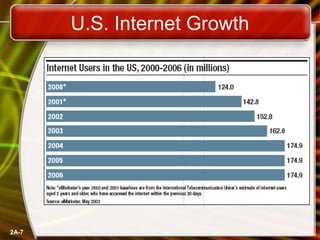
• 100,000 new web sites per month
• More than 50% of U.S. households
online
• Access is available throughout the U.S.
• Eventually access will be global
2A-7
U.S. Internet Growth
2A-8
The Internet’s Major Services
• The World Wide Web (WWW)
– Developed in 1993 by Tim-Berners Lee
– Allowed connection of documents
– Required a browser to read documents
• Electronic mail (e-mail)
– Instantaneous transmission of documents
2A-9
The Internet’s Major Services
• News
– Often called newsgroups
– Electronic discussions on several topics
• File Transfer Protocol (FTP)
– Sends and receives files
2A-10
The Internet’s Major Services
• Chat
– Public real time conversation
• Instant messaging
– Private real time conversation
• Peer-to-peer services
– Allows sharing of files among users
– Napster and Kazaa are examples
– (Napster is an online music store)
– Illegal to share copyrighted material
2A-11
Accessing The Internet
• Internet Service Provider (ISP)
– Company that provides Internet access
• Dialup
– Connects to Internet through phone line
– Modem connects to the phone line
– Slow connection
2A-12
Accessing The Internet
• High-speed access
– Connect through a special line
– 2 – 25 times faster than dialup
– DSL, Cable, T1 are common
2A-13
Understanding the Internet
• The Internet allows accessing resources
• The Web simplifies the Internet
• The Web connects documents
– Hypertext creates links between documents
– Documents are stored on a web server
– HTTP delivers documents
2A-14
Understanding the Internet
• Web site is a collection of documents
– Document is a web page
– Pages are published to the web
• Hypertext Markup Language
– Creates web pages
– Describes how pages should look
– Content enclosed in tags
– <tag>content</tag>
2A-15
Understanding The Internet
• Browsers
– Read and translate the HTML
– Display web content
• Uniform Resource Locator (URL)
– Address of a web page
2A-16
Understanding The Internet
• Helper applications
– Plug-ins
– Enhance a browser’s functionality
• Streaming audio and video
– Sends the file in small chunks
– Chunks downloaded while others play
2A-17
Streaming Audio
2A-18
Using a Browser And The WWW
• Browser starts on the home page
• Navigating the web
– Enter a URL in the browser
– Click a link
– Links are typically blue underlined words
– Image maps are picture links
• When finished, close the browser
2A-19
Searching the Web
• The Web is unorganized
• Directories
– Categorize the Internet
• Search engines
– Find sites by keyword
2A-20
Searching the Web
• Site searches
– Large sites have an internal search
• Metasearch sites
– Search several web sites at once
• Sponsored links
– Sites pay for better search results
2A-21
Search Techniques
• Quote the exact phrase
• Use the keyword AND
• Use the keyword NEAR
• Avoid common words
• Use the site’s advanced tools
Copyright © 2006 by The McGraw-Hill Companies, Inc. All rights reserved.
McGraw-Hill Technology Education
Chapter 2A
End of Chapter

zain presentatin.ppt

  • 1.
    Copyright © 2006by The McGraw-Hill Companies, Inc. All rights reserved. McGraw-Hill Technology Education McGraw-Hill Technology Education Copyright © 2006 by The McGraw-Hill Companies, Inc. All rights reserved.
  • 2.
    Copyright © 2006by The McGraw-Hill Companies, Inc. All rights reserved. McGraw-Hill Technology Education Chapter 2A The Internet and the World Wide Web
  • 3.
    2A-3 The Internet’s History •1969 – ARPANET – Advanced Research Projects Agency Network. – Developed by the Department of Defense – Connected universities and defense bases • 1973 – ARPANET connects to Europe
  • 4.
  • 5.
    2A-5 The Internet’s History •Mid-1980s – NSFNet – National Science Foundation Network – Network between supercomputers – Internet was the link to ARPANET – No commercial traffic allowed • 1990s – ARPANET shut down – NSFNet abandoned – Commercial networks take over
  • 6.
    2A-6 Today and theFuture • 100,000 new web sites per month • More than 50% of U.S. households online • Access is available throughout the U.S. • Eventually access will be global
  • 7.
  • 8.
    2A-8 The Internet’s MajorServices • The World Wide Web (WWW) – Developed in 1993 by Tim-Berners Lee – Allowed connection of documents – Required a browser to read documents • Electronic mail (e-mail) – Instantaneous transmission of documents
  • 9.
    2A-9 The Internet’s MajorServices • News – Often called newsgroups – Electronic discussions on several topics • File Transfer Protocol (FTP) – Sends and receives files
  • 10.
    2A-10 The Internet’s MajorServices • Chat – Public real time conversation • Instant messaging – Private real time conversation • Peer-to-peer services – Allows sharing of files among users – Napster and Kazaa are examples – (Napster is an online music store) – Illegal to share copyrighted material
  • 11.
    2A-11 Accessing The Internet •Internet Service Provider (ISP) – Company that provides Internet access • Dialup – Connects to Internet through phone line – Modem connects to the phone line – Slow connection
  • 12.
    2A-12 Accessing The Internet •High-speed access – Connect through a special line – 2 – 25 times faster than dialup – DSL, Cable, T1 are common
  • 13.
    2A-13 Understanding the Internet •The Internet allows accessing resources • The Web simplifies the Internet • The Web connects documents – Hypertext creates links between documents – Documents are stored on a web server – HTTP delivers documents
  • 14.
    2A-14 Understanding the Internet •Web site is a collection of documents – Document is a web page – Pages are published to the web • Hypertext Markup Language – Creates web pages – Describes how pages should look – Content enclosed in tags – <tag>content</tag>
  • 15.
    2A-15 Understanding The Internet •Browsers – Read and translate the HTML – Display web content • Uniform Resource Locator (URL) – Address of a web page
  • 16.
    2A-16 Understanding The Internet •Helper applications – Plug-ins – Enhance a browser’s functionality • Streaming audio and video – Sends the file in small chunks – Chunks downloaded while others play
  • 17.
  • 18.
    2A-18 Using a BrowserAnd The WWW • Browser starts on the home page • Navigating the web – Enter a URL in the browser – Click a link – Links are typically blue underlined words – Image maps are picture links • When finished, close the browser
  • 19.
    2A-19 Searching the Web •The Web is unorganized • Directories – Categorize the Internet • Search engines – Find sites by keyword
  • 20.
    2A-20 Searching the Web •Site searches – Large sites have an internal search • Metasearch sites – Search several web sites at once • Sponsored links – Sites pay for better search results
  • 21.
    2A-21 Search Techniques • Quotethe exact phrase • Use the keyword AND • Use the keyword NEAR • Avoid common words • Use the site’s advanced tools
  • 22.
    Copyright © 2006by The McGraw-Hill Companies, Inc. All rights reserved. McGraw-Hill Technology Education Chapter 2A End of Chapter