Information
Technology
The Internet
Aniqa Amir
Internet
 The word “Internet” stands for International
Network.
 The information can be sent and received
through internet all over the world.
 It connects millions of computers.
 Due to internet, our world has become a
“global village”.
How the Internet
works?
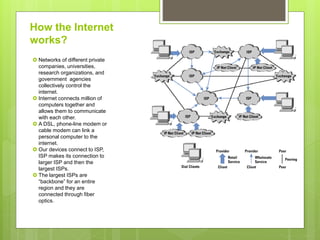
 Networks of different private
companies, universities,
research organizations, and
government agencies
collectively control the
internet.
 Internet connects million of
computers together and
allows them to communicate
with each other.
 A DSL, phone-line modem or
cable modem can link a
personal computer to the
internet.
 Our devices connect to ISP,
ISP makes its connection to
larger ISP and then the
largest ISPs.
 The largest ISPs are
“backbone” for an entire
region and they are
connected through fiber
optics.
The Intranet
 An internal private network of an organization
that can be accessed only by the users of the
organization is called Intranet.
 It is a private version of internet.
 It uses web technologies for sharing
information and data between the users of
same company.
The Extranet
 A network of an organization that can be
accessed by authorized outside users is
called Extranet.
 It is used for business and educational
purpose.
 These users may be customers, suppliers,
business partners etc.
 An outside user accesses the username and
password.
Terminologies & Tool used
for Internet
1. Web Server
 A web server stores web pages or files and
sends information.
 You can also set up your own web server.
 The web server software is available to set up
a computer as web server.
2. Client
 The program through which the user gets
information from server as well as sends
information to other user through server is
called Client.
 The personal computer and browser
programs are used to get information from the
server.
3. Hosts
 The computers that are connected to the
internet and exchange information between
users on the internet are called Hosts.
 Host on the internet behaves both as a server
and as a client.
 There is no central computer on the internet
but there are millions of hosts computers that
can both send and receive.
4. Web Browser
 A program that allows the users to access and
view web pages on the internet is known as Web
browser or Internet browser.
 Browsers include the features for sending and
receiving data and files.
 The mobile devices, PDAs use a special type of
browser called micro browser, designed for small
screens.
5. Internet Protocols
 The internet protocols are set of defined rules and
procedure used for communication.
 The first protocol was designed in early 1970s for
data communication on network and was named
as Network Control Protocol (NCP).
 Some common protocols are:
• TCP/IP- stands for Transmission Control
Protocol or Internet Protocol. This protocol
enables users for data communication on the
internet.
• FTP- stands for File Transfer Protocol. This protocol
exchanges files between users.
• HTTP- stands for Hyper Text Transfer Protocol. This
protocol is used for communication between
browsers and web servers.
• SMTP- stands for Simple Mail Transfer Protocol. This
protocol is used to send and receive e-mails on the
internet.
• NNTP- stands for Network News Transfer Protocol.
This protocol is used to exchange messages on the
worldwide news bulletin board.
6. Web Page
 The documents on the web are called Web
Pages.
 These are electronic documents stored on the
special servers known as web servers.
 A web page may contain simple text, images
and hyperlinks.
7. Web Site
 A collection of related web pages stored on a
web server is called Website.
 The web browser is used to access website.
 A website may contain many web pages.
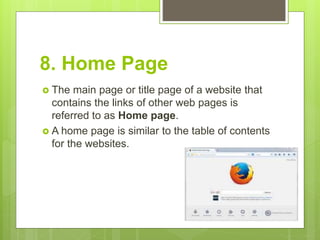
8. Home Page
 The main page or title page of a website that
contains the links of other web pages is
referred to as Home page.
 A home page is similar to the table of contents
for the websites.
9. HTML
 HTML stands for Hyper Text Markup
Language.
 It is a fundamental language, which is used to
design web pages.
 It is easy to write and understand.
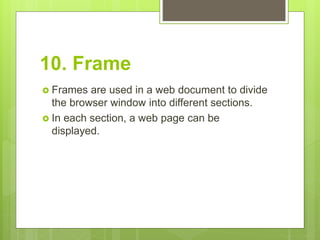
10. Frame
 Frames are used in a web document to divide
the browser window into different sections.
 In each section, a web page can be
displayed.
11. Web Master
 A person who develops and maintains
websites is known as Web master.
 Web master and other web developers design
web pages/ website.
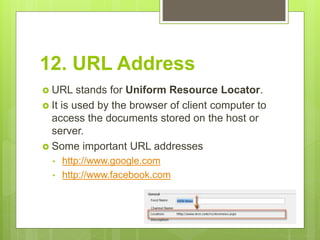
12. URL Address
 URL stands for Uniform Resource Locator.
 It is used by the browser of client computer to
access the documents stored on the host or
server.
 Some important URL addresses
• http://www.google.com
• http://www.facebook.com
13. Addressing Schemes
 On the internet, every computer has a unique
address and computers communicate with each
other with references to their addresses.
 The addresses are assigned to the computers on
the internet according to some set of rules. These
rules are called Addressing schemes.
 There are two types of addressing scheme:
• IP Addressing
• DNS Addressing
• IP Addressing- stands for Internet protocol. It is a
unique identifier for a host or node on the internet. A
typical IP address looks like this: 216. 27. 61. 137.
Every machine on the internet has a unique IP
address. A server has static IP address that does not
change.
• DNS Addressing- stands for Domain Name System.
The human-readable name assigned to the computer
on the internet is called the domain name. The domain
name has two parts, a host name and domain.
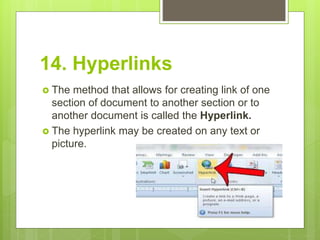
14. Hyperlinks
 The method that allows for creating link of one
section of document to another section or to
another document is called the Hyperlink.
 The hyperlink may be created on any text or
picture.
15. ISP
 ISP stands for Internet Service Provider.
 It is a company that provides the internet
connections to the users.
 The ISP company provides you, a username for
your identification, a password and a telephone
number to connects its server computer.
 The popular ISPs in Pakistan are Comsats, PTCL
and WOL etc.
How to connect to
Internet?
 You must have Internet account of any ISP
company to connect to Internet.
 In Pakistan there are many ISP companies
like, PTCL, WOL etc.
 Most ISPs have their internet cards available
in local market.
 It is very easy and fast way to get internet
account for internet connection.
The following hardware and software are required to
connect to the internet.
Hardware:
• A computer running under Windows operating
system like Windows 2000 and Windows XP.
• A telephone line to connect to the ISP server.
• A modem to exchange information between user’s
computer and server of ISP.
Software:
• Web browser for browsing the internet like Internet
Explorer.
• TCP/IP Protocol. The Windows operating system
already includes the TCP/IP.
• Dial up software to establish connection between
your personal computer and server of ISP.
Accessing the Internet
 The internet can be accessed through
different ways:
I. Connecting through Modem.
II. Connecting through LAN.
III. Connecting through High-speed line.
1. Connecting through a
Modem
 We can connect to the internet through modem.
 Most of the individual users connect to the internet
by using a telephone line, a modem of 56 Kbps
and a SLIP (Serial Line Interface Protocol).
 When we connect to the ISP’s server computer by
dialing through a telephone number, we have to
give our username, password provided by that
ISP company.
2. Connecting through a LAN
 We can connect to the Internet through a
LAN, if LAN uses TCP/IP protocols has an
internet connection.
 This type of connection is commonly used by
business.
 The computer on the LAN connects to the
internet through a router or modem.
3. Connection through High
Speed Lines
 The data accessing speed of modem
connection is very slow.
 High Speed Lines are available from different
telephone companies, cable TV services etc.
 We can access data with very high speed i.e.
20 or more times faster by using fiber optics,
microwaves, satellites etc.
Internet
Advantages
 We can share information
with other people around
the world.
 Sharing information
through internet is very
easy, cheap and a fast
method.
 A lot of information of
different types is stored on
the web servers on the
internet.
Disadvantages
 Internet is the most
common source of
spreading viruses.
 The valuable websites can
be damages by hackers
and your valuable data
might be deleted.
 There are many security
problems on internet.
 We can get latest news of
the world on the internet.
 Most of the newspapers of
the world are available on
the internet.
 We can search different
types of jobs all over the
world.
 Most of the commercial
organizations advertise their
products through internet.
 We can communicate with
other people through
internet.
 Internet also provides
different types of
entertainment to the people.
 Internet provides the facility
to get online education.
 Our data on internet can
easily accessed by
unauthorized person.
 Some websites contain
immoral materials in the form
of text, pictures or movies
etc.
 These websites damage the
character of new generation.
 When a keyword is given to
a search engine to search
information, a large number
of related links are
displayed.
 It is difficult to filter out the
required information.
 A lot of information about
particular topic is stored on
the websites. Some
information may be
incorrect or not authentic.
 A lot of time is wasted in
collecting the information
on the internet.
 Most of the universities
and education boards
display result on internet,
the students can check
their result in any part of
country.
 Many Airline companies
and Pakistan Railway
provide their schedules of
flights and trains, on the
internet.
 Many websites are also
available on the internet to
get information about
different diseases.
 We can consult a panel of
online doctors.
Services Provided by
Internet
 Internet plays very important role in our society.
 It provides a lot of informative information about
business, education etc.
 The main services provided by the internet are;
1. World Wide Web (WWW)
2. Newsgroups
3. Chatting
4. FTP
5. E-commerce
6. Telnet
7. Gopher
8. E-mail (Electronic Mail)
1. World Wide Web
 The world wide web is simply referred to as
web.
 It is the latest addition to the internet to
exchange information.
 It is abbreviated as www or 3w.
 It is easiest way to search and to get
information on the internet.
2. Newsgroups
 News Groups are discussion groups or forums.
 They provide the services to exchange messages
on the internet about a particular subject.
 Different newsgroups are available for different
purposes.
 Usually the news client program “Microsoft
Internet News” is used to read and write articles in
the newsgroup.
3. FTP
 FTP stands for File Transfer Protocol.
 It is a way of transferring files to others
through internet.
 The files are stored on a special type of
server called the FTP server.
 The files from your computer can be uploaded
to the FTP server.
 Example of these programs are WS_FTP and
Cute FTP.
4. Chatting
 Internet also provide the facility to internet
user to chat with people online all over the
world.
 Different programs like MSN Messenger,
Yahoo Messenger, ICQ, AOL online etc. are
available for chatting on internet.
 Some chat rooms support voice chats and
video chats.
5. E-Commerce
 E-Commerce stands for Electronic
Commerce.
 It is the modern way to run business on
international basis.
 The examples of E-Commerce are; online
shopping, online advertising, online banking
etc.
6. Telnet
 Telnet is an Internet service (or tool) that is
used to login and run commands on a remote
server on the internet.
 Through this service, we can also access
information on the internet.
 When telnet client program is run on local
computer, we have to give our account name
and password to start the operating session.
7. Gopher
 Gopher is an internet service.
 It organizes resources into multilevel menus
to make finding information easier on the
internet.
 Before gopher it was difficult to find
information on the internet.
8. E-mail
 E-mail stands for Electronic mail.
 We can send and receive messages
anywhere in the world.
 We can also send documents, pictures, audio
and video files via e-mail.
 It is also possible to send or receive e-mail
messages through a mobile phone.
The internet

The internet

  • 1.
  • 2.
    Internet  The word“Internet” stands for International Network.  The information can be sent and received through internet all over the world.  It connects millions of computers.  Due to internet, our world has become a “global village”.
  • 3.
    How the Internet works? Networks of different private companies, universities, research organizations, and government agencies collectively control the internet.  Internet connects million of computers together and allows them to communicate with each other.  A DSL, phone-line modem or cable modem can link a personal computer to the internet.  Our devices connect to ISP, ISP makes its connection to larger ISP and then the largest ISPs.  The largest ISPs are “backbone” for an entire region and they are connected through fiber optics.
  • 4.
    The Intranet  Aninternal private network of an organization that can be accessed only by the users of the organization is called Intranet.  It is a private version of internet.  It uses web technologies for sharing information and data between the users of same company.
  • 5.
    The Extranet  Anetwork of an organization that can be accessed by authorized outside users is called Extranet.  It is used for business and educational purpose.  These users may be customers, suppliers, business partners etc.  An outside user accesses the username and password.
  • 6.
    Terminologies & Toolused for Internet
  • 7.
    1. Web Server A web server stores web pages or files and sends information.  You can also set up your own web server.  The web server software is available to set up a computer as web server.
  • 8.
    2. Client  Theprogram through which the user gets information from server as well as sends information to other user through server is called Client.  The personal computer and browser programs are used to get information from the server.
  • 9.
    3. Hosts  Thecomputers that are connected to the internet and exchange information between users on the internet are called Hosts.  Host on the internet behaves both as a server and as a client.  There is no central computer on the internet but there are millions of hosts computers that can both send and receive.
  • 10.
    4. Web Browser A program that allows the users to access and view web pages on the internet is known as Web browser or Internet browser.  Browsers include the features for sending and receiving data and files.  The mobile devices, PDAs use a special type of browser called micro browser, designed for small screens.
  • 11.
    5. Internet Protocols The internet protocols are set of defined rules and procedure used for communication.  The first protocol was designed in early 1970s for data communication on network and was named as Network Control Protocol (NCP).  Some common protocols are: • TCP/IP- stands for Transmission Control Protocol or Internet Protocol. This protocol enables users for data communication on the internet.
  • 12.
    • FTP- standsfor File Transfer Protocol. This protocol exchanges files between users. • HTTP- stands for Hyper Text Transfer Protocol. This protocol is used for communication between browsers and web servers. • SMTP- stands for Simple Mail Transfer Protocol. This protocol is used to send and receive e-mails on the internet. • NNTP- stands for Network News Transfer Protocol. This protocol is used to exchange messages on the worldwide news bulletin board.
  • 13.
    6. Web Page The documents on the web are called Web Pages.  These are electronic documents stored on the special servers known as web servers.  A web page may contain simple text, images and hyperlinks.
  • 14.
    7. Web Site A collection of related web pages stored on a web server is called Website.  The web browser is used to access website.  A website may contain many web pages.
  • 15.
    8. Home Page The main page or title page of a website that contains the links of other web pages is referred to as Home page.  A home page is similar to the table of contents for the websites.
  • 16.
    9. HTML  HTMLstands for Hyper Text Markup Language.  It is a fundamental language, which is used to design web pages.  It is easy to write and understand.
  • 17.
    10. Frame  Framesare used in a web document to divide the browser window into different sections.  In each section, a web page can be displayed.
  • 18.
    11. Web Master A person who develops and maintains websites is known as Web master.  Web master and other web developers design web pages/ website.
  • 19.
    12. URL Address URL stands for Uniform Resource Locator.  It is used by the browser of client computer to access the documents stored on the host or server.  Some important URL addresses • http://www.google.com • http://www.facebook.com
  • 20.
    13. Addressing Schemes On the internet, every computer has a unique address and computers communicate with each other with references to their addresses.  The addresses are assigned to the computers on the internet according to some set of rules. These rules are called Addressing schemes.  There are two types of addressing scheme: • IP Addressing • DNS Addressing
  • 21.
    • IP Addressing-stands for Internet protocol. It is a unique identifier for a host or node on the internet. A typical IP address looks like this: 216. 27. 61. 137. Every machine on the internet has a unique IP address. A server has static IP address that does not change. • DNS Addressing- stands for Domain Name System. The human-readable name assigned to the computer on the internet is called the domain name. The domain name has two parts, a host name and domain.
  • 22.
    14. Hyperlinks  Themethod that allows for creating link of one section of document to another section or to another document is called the Hyperlink.  The hyperlink may be created on any text or picture.
  • 23.
    15. ISP  ISPstands for Internet Service Provider.  It is a company that provides the internet connections to the users.  The ISP company provides you, a username for your identification, a password and a telephone number to connects its server computer.  The popular ISPs in Pakistan are Comsats, PTCL and WOL etc.
  • 24.
    How to connectto Internet?  You must have Internet account of any ISP company to connect to Internet.  In Pakistan there are many ISP companies like, PTCL, WOL etc.  Most ISPs have their internet cards available in local market.  It is very easy and fast way to get internet account for internet connection.
  • 25.
    The following hardwareand software are required to connect to the internet. Hardware: • A computer running under Windows operating system like Windows 2000 and Windows XP. • A telephone line to connect to the ISP server. • A modem to exchange information between user’s computer and server of ISP. Software: • Web browser for browsing the internet like Internet Explorer. • TCP/IP Protocol. The Windows operating system already includes the TCP/IP. • Dial up software to establish connection between your personal computer and server of ISP.
  • 26.
    Accessing the Internet The internet can be accessed through different ways: I. Connecting through Modem. II. Connecting through LAN. III. Connecting through High-speed line.
  • 27.
    1. Connecting througha Modem  We can connect to the internet through modem.  Most of the individual users connect to the internet by using a telephone line, a modem of 56 Kbps and a SLIP (Serial Line Interface Protocol).  When we connect to the ISP’s server computer by dialing through a telephone number, we have to give our username, password provided by that ISP company.
  • 28.
    2. Connecting througha LAN  We can connect to the Internet through a LAN, if LAN uses TCP/IP protocols has an internet connection.  This type of connection is commonly used by business.  The computer on the LAN connects to the internet through a router or modem.
  • 29.
    3. Connection throughHigh Speed Lines  The data accessing speed of modem connection is very slow.  High Speed Lines are available from different telephone companies, cable TV services etc.  We can access data with very high speed i.e. 20 or more times faster by using fiber optics, microwaves, satellites etc.
  • 30.
    Internet Advantages  We canshare information with other people around the world.  Sharing information through internet is very easy, cheap and a fast method.  A lot of information of different types is stored on the web servers on the internet. Disadvantages  Internet is the most common source of spreading viruses.  The valuable websites can be damages by hackers and your valuable data might be deleted.  There are many security problems on internet.
  • 31.
     We canget latest news of the world on the internet.  Most of the newspapers of the world are available on the internet.  We can search different types of jobs all over the world.  Most of the commercial organizations advertise their products through internet.  We can communicate with other people through internet.  Internet also provides different types of entertainment to the people.  Internet provides the facility to get online education.  Our data on internet can easily accessed by unauthorized person.  Some websites contain immoral materials in the form of text, pictures or movies etc.  These websites damage the character of new generation.  When a keyword is given to a search engine to search information, a large number of related links are displayed.  It is difficult to filter out the required information.
  • 32.
     A lotof information about particular topic is stored on the websites. Some information may be incorrect or not authentic.  A lot of time is wasted in collecting the information on the internet.  Most of the universities and education boards display result on internet, the students can check their result in any part of country.  Many Airline companies and Pakistan Railway provide their schedules of flights and trains, on the internet.  Many websites are also available on the internet to get information about different diseases.  We can consult a panel of online doctors.
  • 33.
    Services Provided by Internet Internet plays very important role in our society.  It provides a lot of informative information about business, education etc.  The main services provided by the internet are; 1. World Wide Web (WWW) 2. Newsgroups 3. Chatting 4. FTP 5. E-commerce 6. Telnet 7. Gopher 8. E-mail (Electronic Mail)
  • 34.
    1. World WideWeb  The world wide web is simply referred to as web.  It is the latest addition to the internet to exchange information.  It is abbreviated as www or 3w.  It is easiest way to search and to get information on the internet.
  • 35.
    2. Newsgroups  NewsGroups are discussion groups or forums.  They provide the services to exchange messages on the internet about a particular subject.  Different newsgroups are available for different purposes.  Usually the news client program “Microsoft Internet News” is used to read and write articles in the newsgroup.
  • 36.
    3. FTP  FTPstands for File Transfer Protocol.  It is a way of transferring files to others through internet.  The files are stored on a special type of server called the FTP server.  The files from your computer can be uploaded to the FTP server.  Example of these programs are WS_FTP and Cute FTP.
  • 37.
    4. Chatting  Internetalso provide the facility to internet user to chat with people online all over the world.  Different programs like MSN Messenger, Yahoo Messenger, ICQ, AOL online etc. are available for chatting on internet.  Some chat rooms support voice chats and video chats.
  • 38.
    5. E-Commerce  E-Commercestands for Electronic Commerce.  It is the modern way to run business on international basis.  The examples of E-Commerce are; online shopping, online advertising, online banking etc.
  • 39.
    6. Telnet  Telnetis an Internet service (or tool) that is used to login and run commands on a remote server on the internet.  Through this service, we can also access information on the internet.  When telnet client program is run on local computer, we have to give our account name and password to start the operating session.
  • 40.
    7. Gopher  Gopheris an internet service.  It organizes resources into multilevel menus to make finding information easier on the internet.  Before gopher it was difficult to find information on the internet.
  • 41.
    8. E-mail  E-mailstands for Electronic mail.  We can send and receive messages anywhere in the world.  We can also send documents, pictures, audio and video files via e-mail.  It is also possible to send or receive e-mail messages through a mobile phone.