Introduction to the
Internet
FOLASADE ADEDEJI
Internet Basics
What exactly is the internet, and how
does it work?
 In this lesson, we will discuss a brief overview of the internet and some
fundamental concepts
Content
 Definition And History
 Basic services of INTERNET
 The World Wide Web (W.W.W.)
 WWW browsers
 INTERNET search engines
 Uses of INTERNET
Before
 The internet was used to search for information
Today
The Internet provides new ways of
 Accessing,
 Interacting and
 Connecting with people and content.
As a result, new terms are constantly appearing as new technologies are
introduced.
What is the Internet ?
 The internet is the largest computer network in the world, connecting
millions of computers.
 A network is a group of two or more computer systems linked together.
Types of computer
network There are two main types of computer
network
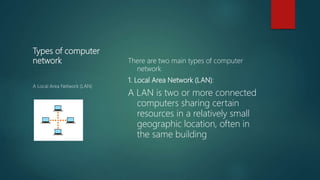
1. Local Area Network (LAN):
A LAN is two or more connected
computers sharing certain
resources in a relatively small
geographic location, often in
the same building
A Local Area Network (LAN)
Types of computer
network
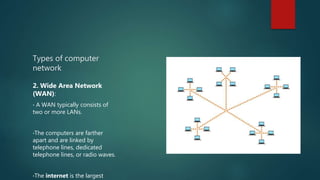
2. Wide Area Network
(WAN):
• A WAN typically consists of
two or more LANs.
•The computers are farther
apart and are linked by
telephone lines, dedicated
telephone lines, or radio waves.
•The internet is the largest
Servers and Clients
 A server is a computer that "serves" many different computers in a
network by running specialized software and storing information.
 For example, web pages are stored on web servers.
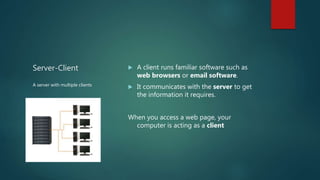
Server-Client  A client runs familiar software such as
web browsers or email software.
 It communicates with the server to get
the information it requires.
When you access a web page, your
computer is acting as a client
A server with multiple clients
WWW
 The World Wide Web (WWW)
The World Wide Web is a virtual
network of web sites connected by
hyperlinks (or "links").
Web sites are stored on servers on the
internet,
The World Wide Web is a part of the
internet.
Difference between the Internet and
WWW
 The Internet is the physical network of computers all over the world.
 The World Wide Web is a virtual network of web sites connected by
hyperlinks (or "links"). Web sites are stored on servers on the internet, so
the World Wide Web is a part of the internet.
HTML
 HTML stands for Hyper Text Markup Language. A "markup language" is
a computer language that describes how a page should be formatted
Web Browser
 A Web browser is a computer program (also known as a software
application, or simply an application) that does two things:
1. A Web browser knows how to go to a Web server on the Internet and request a
page, so that the browser can pull the page through the network and into your
machine.
2. A Web browser knows how to interpret the set of HTML tags within the page
in order to display the page on your screen as the page's creator intended it to
be viewed.
URL (UNIFORM RESOURCE LOCATOR)
 The URL, also known as the web address, tells the browser exactly where
to find the page.
 However, most of the time, people get to a web page by following a link
from a different page or by searching for the page with a search engine.
Additional Info
 The foundation of the internet began in 1969, when the US Department of
Defense created ARPAnet, a project to allow military personnel to
communicate with each other in an emergency.
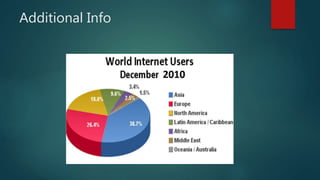
 By 2012, the number of internet users worldwide reached 2.4 billion—
about one third of the world's population.
 To store all of the information on the internet, you would need over 1
billion DVDs or 200 million Blu-ray discs.
Simple test
 A home network is an example of ______
 Web pages are stored on a _________
 A URL is usually typed in a browser's ___
 What is tabbed browsing used for?
Basic Service of the Internet
 Electronic Mail (E-Mail) –
Allow user to send a mail (message ) to another internet user in any part of
the world in a near-real-time manner .
 File Transfer Protocol (FTP) –
Allow user to move a file from one computer to another on the internet.
(Downloading, uploading)
 Telnet –
Allow a user to log into another computer somewhere on the internet .
 Common uses of telnet are:
- Using a software on the remote computer.
- Accessing remote computers data base or achieve.
- Logging into ones own computer from another computer.
 WWW
Additional Info
Some uses of the Internet
 On-line communication
 Software sharing
 Exchange of views on topics of common interest
 Posting of information of general interest
 Organization promotion
 Product promotion and feedback about products
 Customer support service
 On-line journals, magazines, Encyclopedia, and dictionary
 On-line shopping
 World-wide conferencing

Introduction to the internet

  • 1.
  • 2.
  • 3.
    What exactly isthe internet, and how does it work?  In this lesson, we will discuss a brief overview of the internet and some fundamental concepts
  • 4.
    Content  Definition AndHistory  Basic services of INTERNET  The World Wide Web (W.W.W.)  WWW browsers  INTERNET search engines  Uses of INTERNET
  • 5.
    Before  The internetwas used to search for information
  • 6.
    Today The Internet providesnew ways of  Accessing,  Interacting and  Connecting with people and content. As a result, new terms are constantly appearing as new technologies are introduced.
  • 7.
    What is theInternet ?  The internet is the largest computer network in the world, connecting millions of computers.  A network is a group of two or more computer systems linked together.
  • 8.
    Types of computer networkThere are two main types of computer network 1. Local Area Network (LAN): A LAN is two or more connected computers sharing certain resources in a relatively small geographic location, often in the same building A Local Area Network (LAN)
  • 9.
    Types of computer network 2.Wide Area Network (WAN): • A WAN typically consists of two or more LANs. •The computers are farther apart and are linked by telephone lines, dedicated telephone lines, or radio waves. •The internet is the largest
  • 10.
    Servers and Clients A server is a computer that "serves" many different computers in a network by running specialized software and storing information.  For example, web pages are stored on web servers.
  • 11.
    Server-Client  Aclient runs familiar software such as web browsers or email software.  It communicates with the server to get the information it requires. When you access a web page, your computer is acting as a client A server with multiple clients
  • 12.
    WWW  The WorldWide Web (WWW) The World Wide Web is a virtual network of web sites connected by hyperlinks (or "links"). Web sites are stored on servers on the internet, The World Wide Web is a part of the internet.
  • 13.
    Difference between theInternet and WWW  The Internet is the physical network of computers all over the world.  The World Wide Web is a virtual network of web sites connected by hyperlinks (or "links"). Web sites are stored on servers on the internet, so the World Wide Web is a part of the internet.
  • 14.
    HTML  HTML standsfor Hyper Text Markup Language. A "markup language" is a computer language that describes how a page should be formatted
  • 15.
    Web Browser  AWeb browser is a computer program (also known as a software application, or simply an application) that does two things: 1. A Web browser knows how to go to a Web server on the Internet and request a page, so that the browser can pull the page through the network and into your machine. 2. A Web browser knows how to interpret the set of HTML tags within the page in order to display the page on your screen as the page's creator intended it to be viewed.
  • 16.
    URL (UNIFORM RESOURCELOCATOR)  The URL, also known as the web address, tells the browser exactly where to find the page.  However, most of the time, people get to a web page by following a link from a different page or by searching for the page with a search engine.
  • 17.
    Additional Info  Thefoundation of the internet began in 1969, when the US Department of Defense created ARPAnet, a project to allow military personnel to communicate with each other in an emergency.  By 2012, the number of internet users worldwide reached 2.4 billion— about one third of the world's population.  To store all of the information on the internet, you would need over 1 billion DVDs or 200 million Blu-ray discs.
  • 18.
    Simple test  Ahome network is an example of ______  Web pages are stored on a _________  A URL is usually typed in a browser's ___  What is tabbed browsing used for?
  • 19.
    Basic Service ofthe Internet  Electronic Mail (E-Mail) – Allow user to send a mail (message ) to another internet user in any part of the world in a near-real-time manner .  File Transfer Protocol (FTP) – Allow user to move a file from one computer to another on the internet. (Downloading, uploading)
  • 20.
     Telnet – Allowa user to log into another computer somewhere on the internet .  Common uses of telnet are: - Using a software on the remote computer. - Accessing remote computers data base or achieve. - Logging into ones own computer from another computer.  WWW
  • 21.
  • 22.
    Some uses ofthe Internet  On-line communication  Software sharing  Exchange of views on topics of common interest  Posting of information of general interest  Organization promotion  Product promotion and feedback about products  Customer support service  On-line journals, magazines, Encyclopedia, and dictionary  On-line shopping  World-wide conferencing

Editor's Notes

  • #17 The World Wide Web was created in 1989 by Tim Berners-Lee, a software engineer. Before then, computers could communicate over the internet, but there were no web pages.