Connecting Devices to the 
Internet of Things 
Bernard Kufluk, MessageSight Product Manager
© 2014 IBM Corporation 
Please Note 
IBM’s statements regarding its plans, directions, and intent are subject to change or withdrawal 
without notice at IBM’s sole discretion. Information regarding potential future products is 
intended to outline our general product direction and it should not be relied on in making a 
purchasing decision. 
The information mentioned regarding potential future products is not a commitment, promise, 
or legal obligation to deliver any material, code or functionality. Information about potential 
future products may not be incorporated into any contract. The development, release, and 
timing of any future features or functionality described for our products remains at our sole 
discretion 
Performance is based on measurements and projections using standard IBM benchmarks in a 
controlled environment. The actual throughput or performance that any user will experience 
will vary depending upon many factors, including considerations such as the amount of 
multiprogramming in the user’s job stream, the I/O configuration, the storage configuration, and 
the workload processed. Therefore, no assurance can be given that an individual user will 
achieve results similar to those stated here. 
2
Agenda 
• The Internet of Things and its Ecosystem 
• The IBM IoT Foundation and the IoT Foundation Quickstart 
• Quickstart device recipes and demonstration 
• How is Quickstart implemented? 
• Writing your own device code 
• Signing up and registering a device 
3
The Internet of Things and its Ecosystem
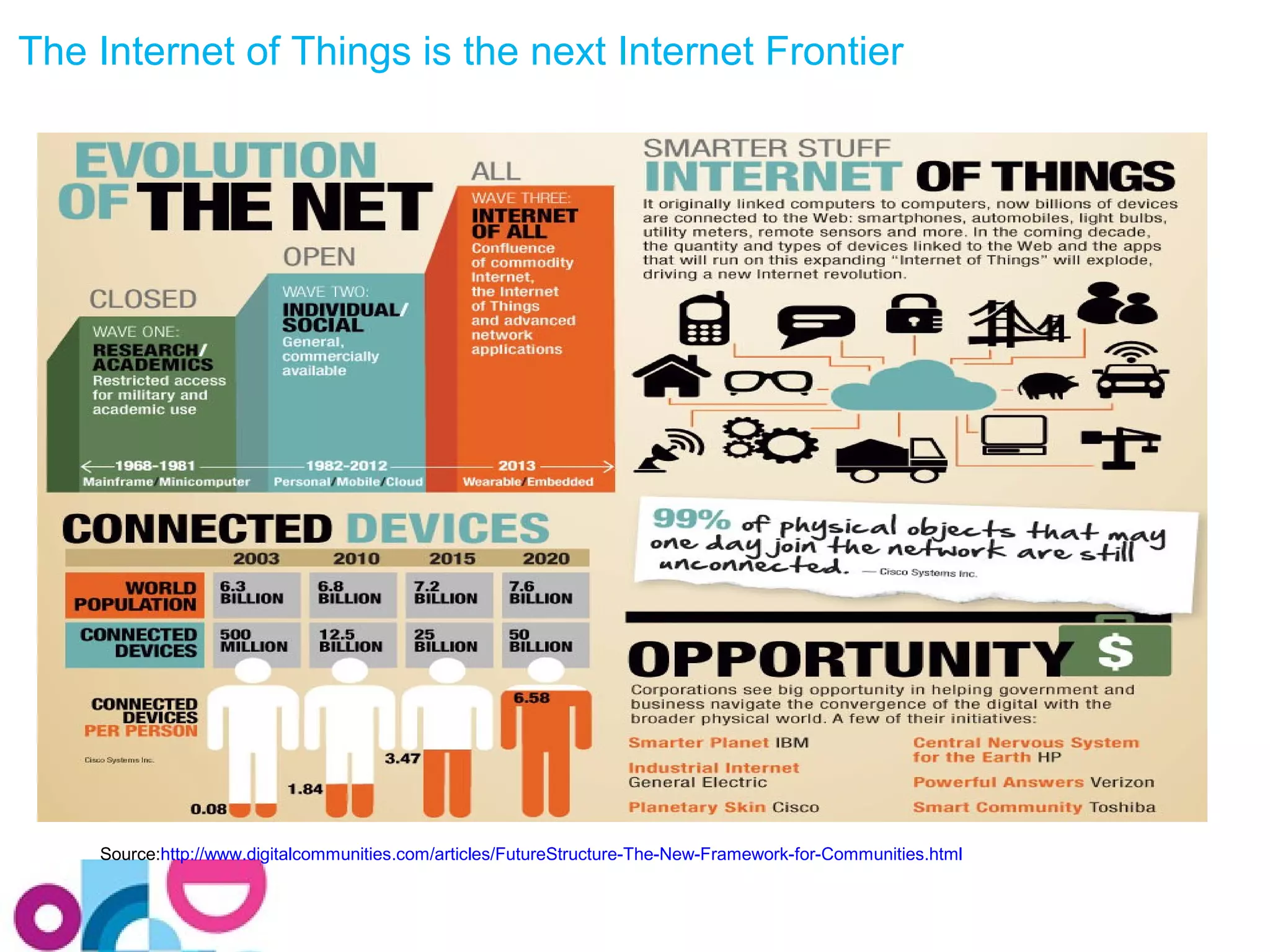
The Internet of Things is the next Internet Frontier 
Source:http://www.digitalcommunities.com/articles/FutureStructure-The-New-Framework-for-Communities.html
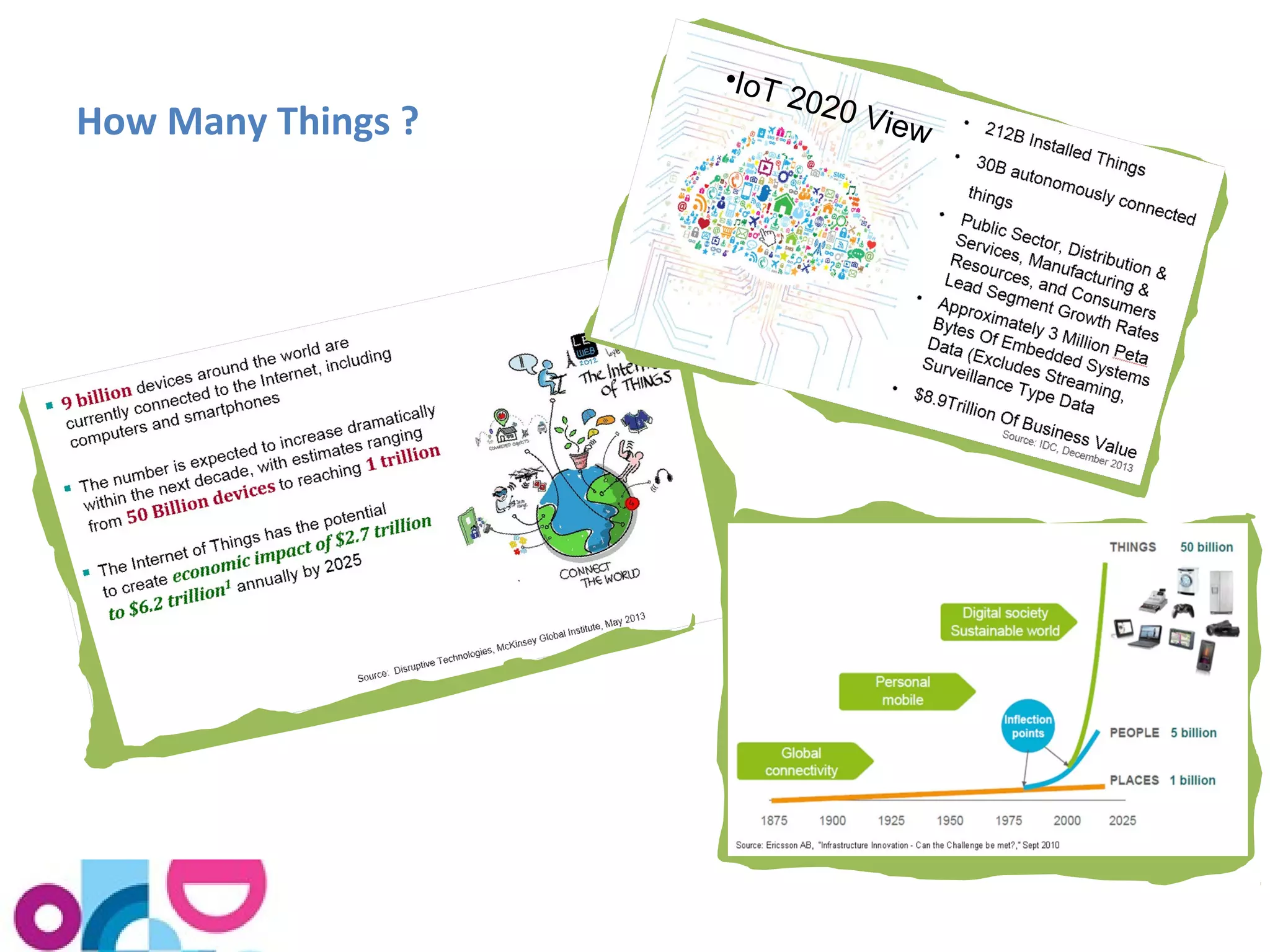
How Many Things ? 
•IoT 2020 View
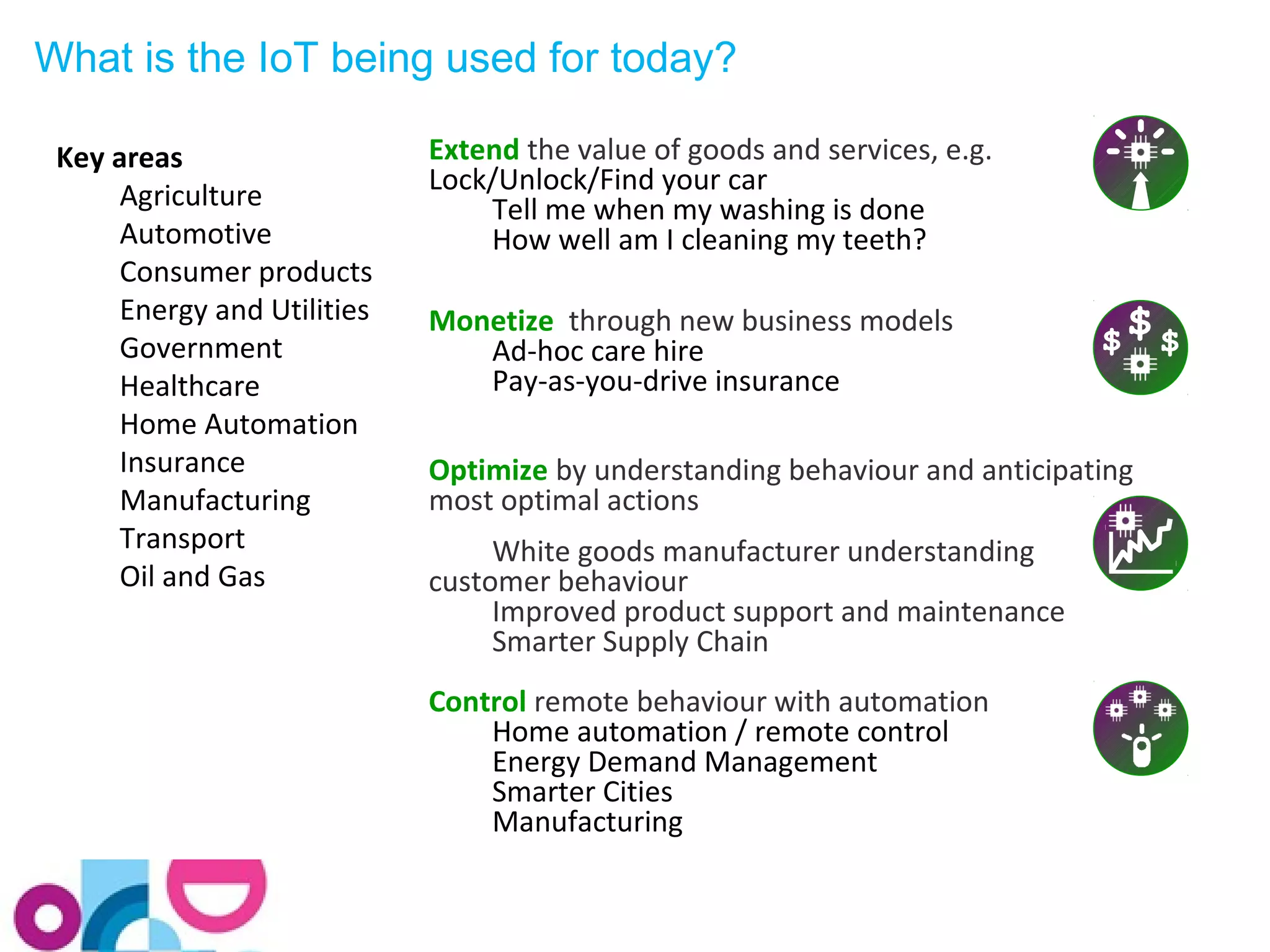
What is the IoT being used for today? 
Extend the value of goods and services, e.g. 
Lock/Unlock/Find your car 
Tell me when my washing is done 
How well am I cleaning my teeth? 
Monetize through new business models 
Ad-hoc care hire 
Pay-as-you-drive insurance 
Optimize by understanding behaviour and anticipating 
most optimal actions 
White goods manufacturer understanding 
customer behaviour 
Improved product support and maintenance 
Smarter Supply Chain 
Control remote behaviour with automation 
Home automation / remote control 
Energy Demand Management 
Smarter Cities 
Manufacturing 
Key areas 
Agriculture 
Automotive 
Consumer products 
Energy and Utilities 
Government 
Healthcare 
Home Automation 
Insurance 
Manufacturing 
Transport 
Oil and Gas
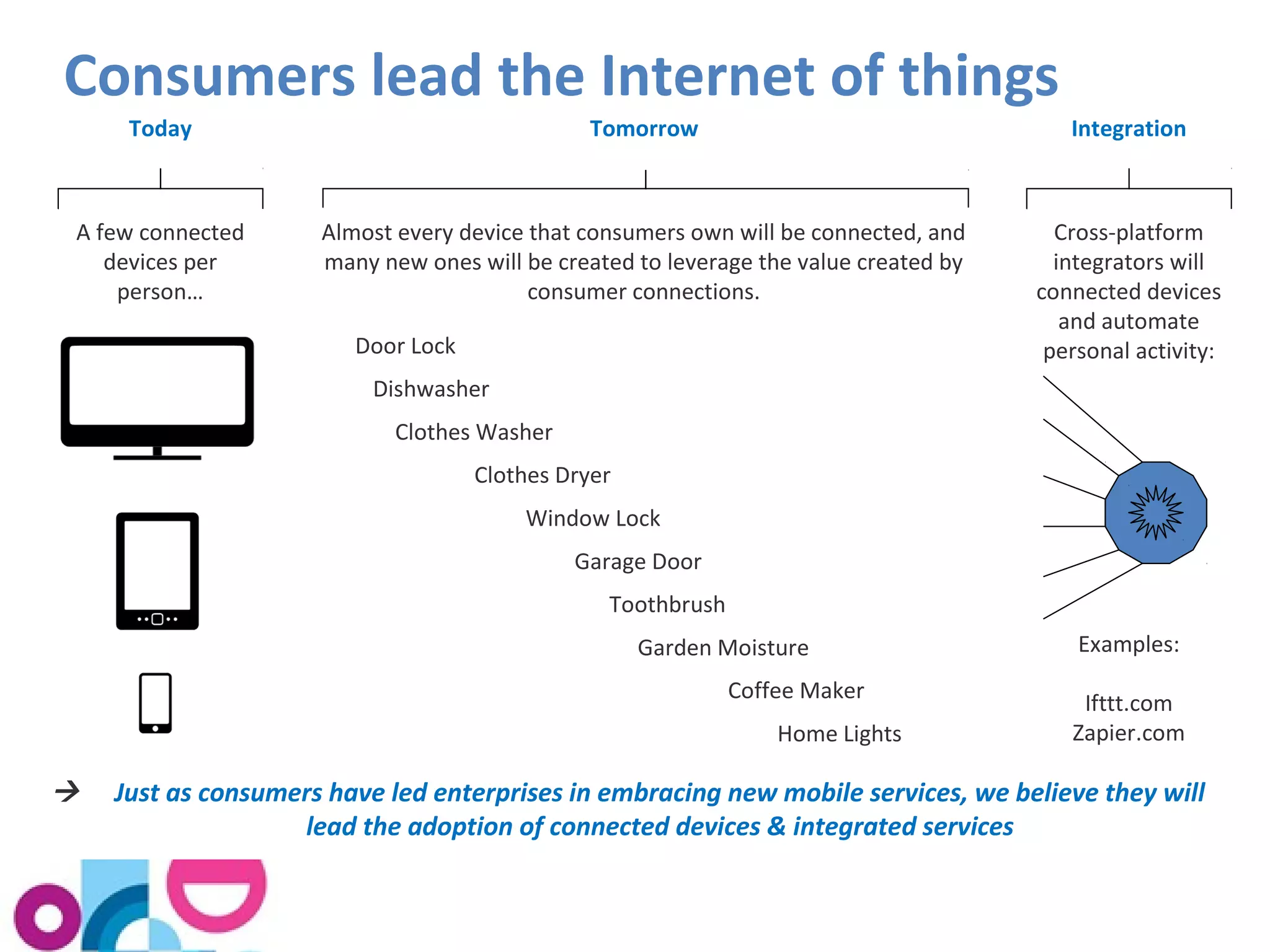
Consumers lead the Internet of things 
Today Tomorrow Integration 
A few connected 
devices per 
person… 
Almost every device that consumers own will be connected, and 
many new ones will be created to leverage the value created by 
consumer connections. 
Cross-platform 
integrators will 
connected devices 
and automate 
Door Lock personal activity: 
Dishwasher 
Clothes Washer 
Clothes Dryer 
Window Lock 
Garage Door 
Toothbrush 
Garden Moisture 
Coffee Maker 
Home Lights 
Examples: 
Ifttt.com 
Zapier.com 
 Just as consumers have led enterprises in embracing new mobile services, we believe they will 
lead the adoption of connected devices & integrated services
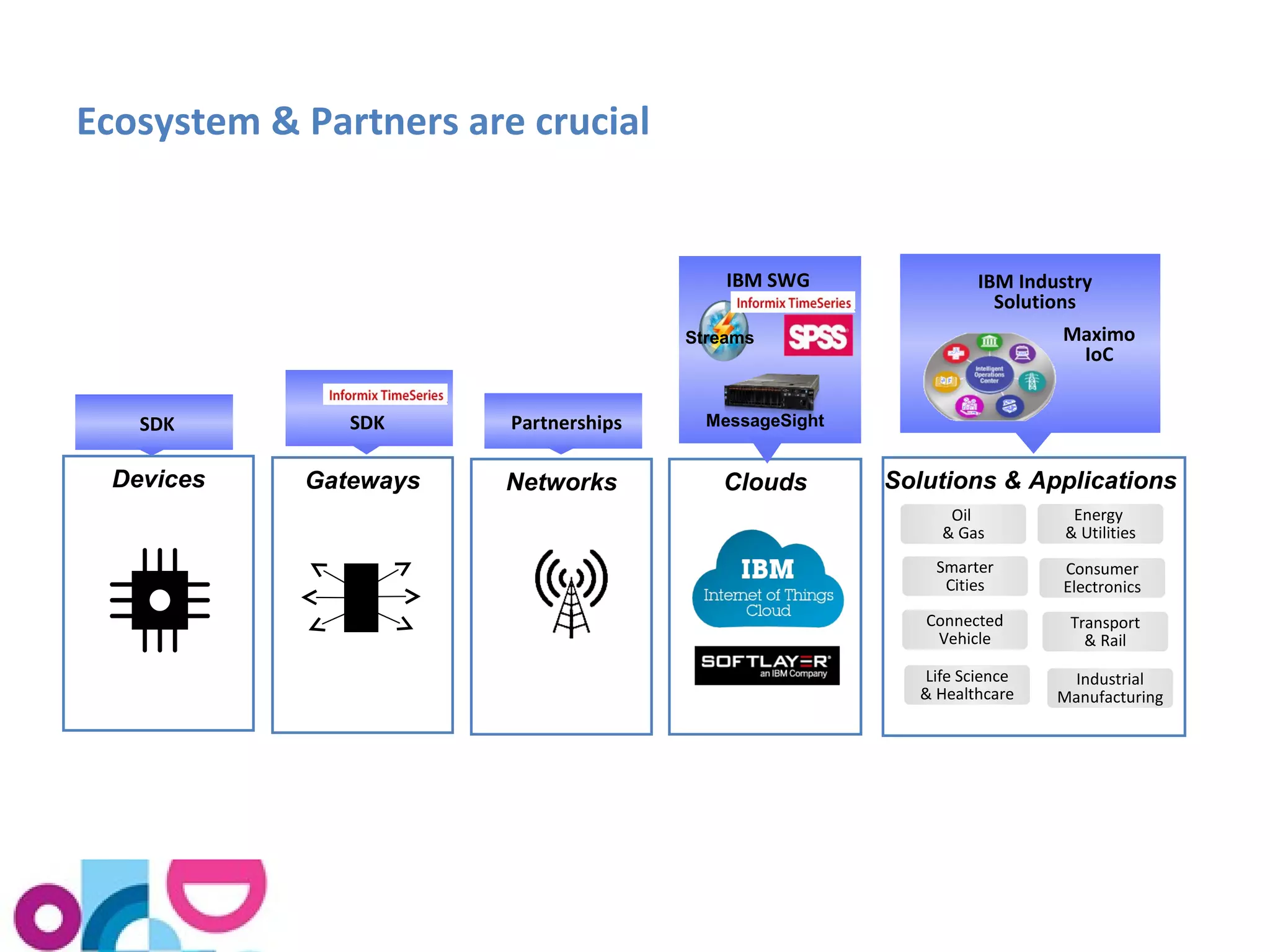
Ecosystem & Partners are crucial 
Solutions & Applications 
Oil 
& Gas 
Smarter 
Cities 
Energy 
& Utilities 
Consumer 
Electronics 
Transport 
& Rail 
Connected 
Vehicle 
Life Science 
& Healthcare 
Industrial 
Manufacturing 
Streams 
Devices Gateways Networks Clouds 
IBM Industry 
Solutions 
IBM SWG 
MessageSight 
SDK SDK Partnerships 
Maximo 
IoC
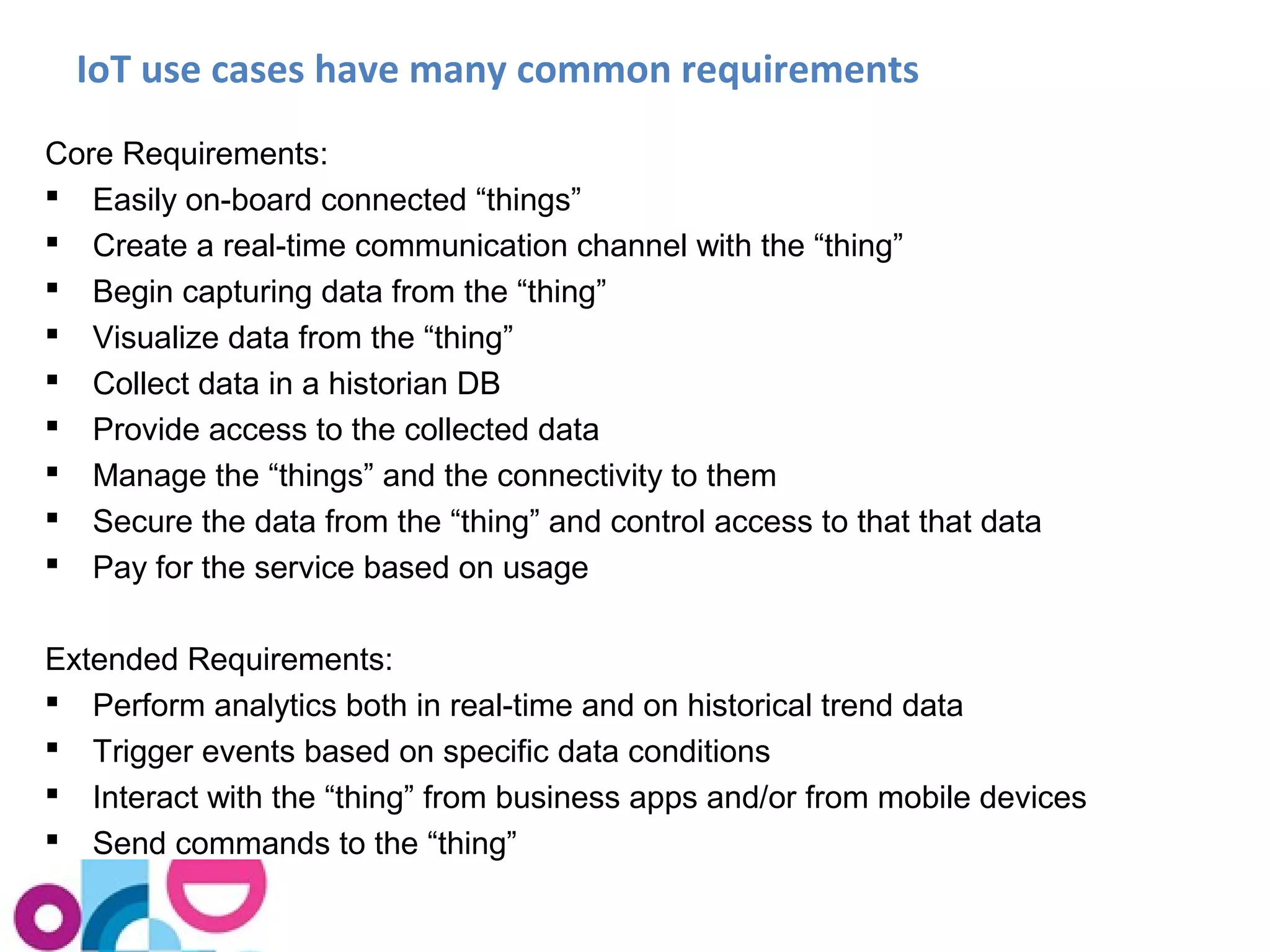
IoT use cases have many common requirements 
Core Requirements: 
 Easily on-board connected “things” 
 Create a real-time communication channel with the “thing” 
 Begin capturing data from the “thing” 
 Visualize data from the “thing” 
 Collect data in a historian DB 
 Provide access to the collected data 
 Manage the “things” and the connectivity to them 
 Secure the data from the “thing” and control access to that that data 
 Pay for the service based on usage 
Extended Requirements: 
 Perform analytics both in real-time and on historical trend data 
 Trigger events based on specific data conditions 
 Interact with the “thing” from business apps and/or from mobile devices 
 Send commands to the “thing”
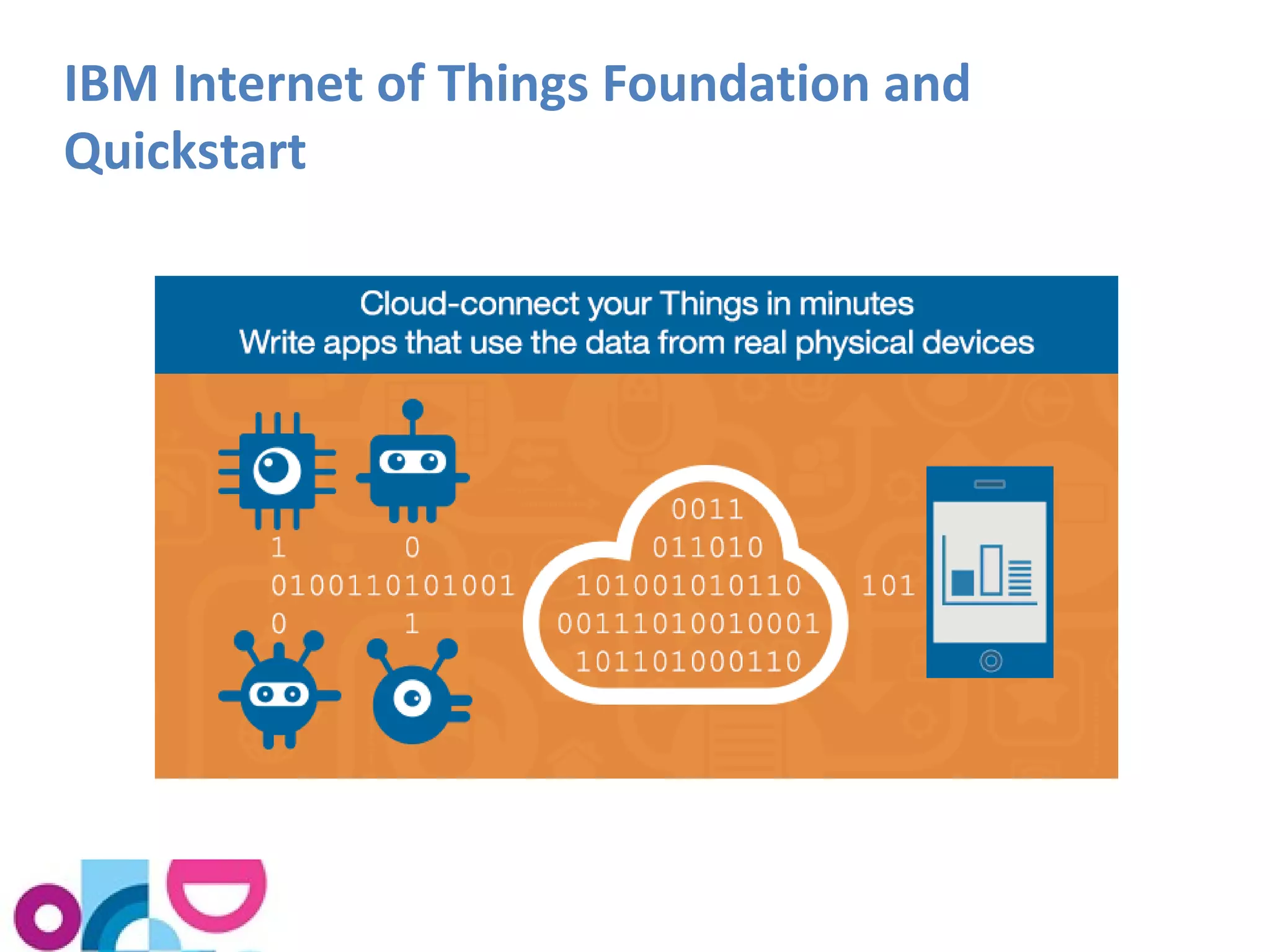
IBM Internet of Things Foundation and 
Quickstart
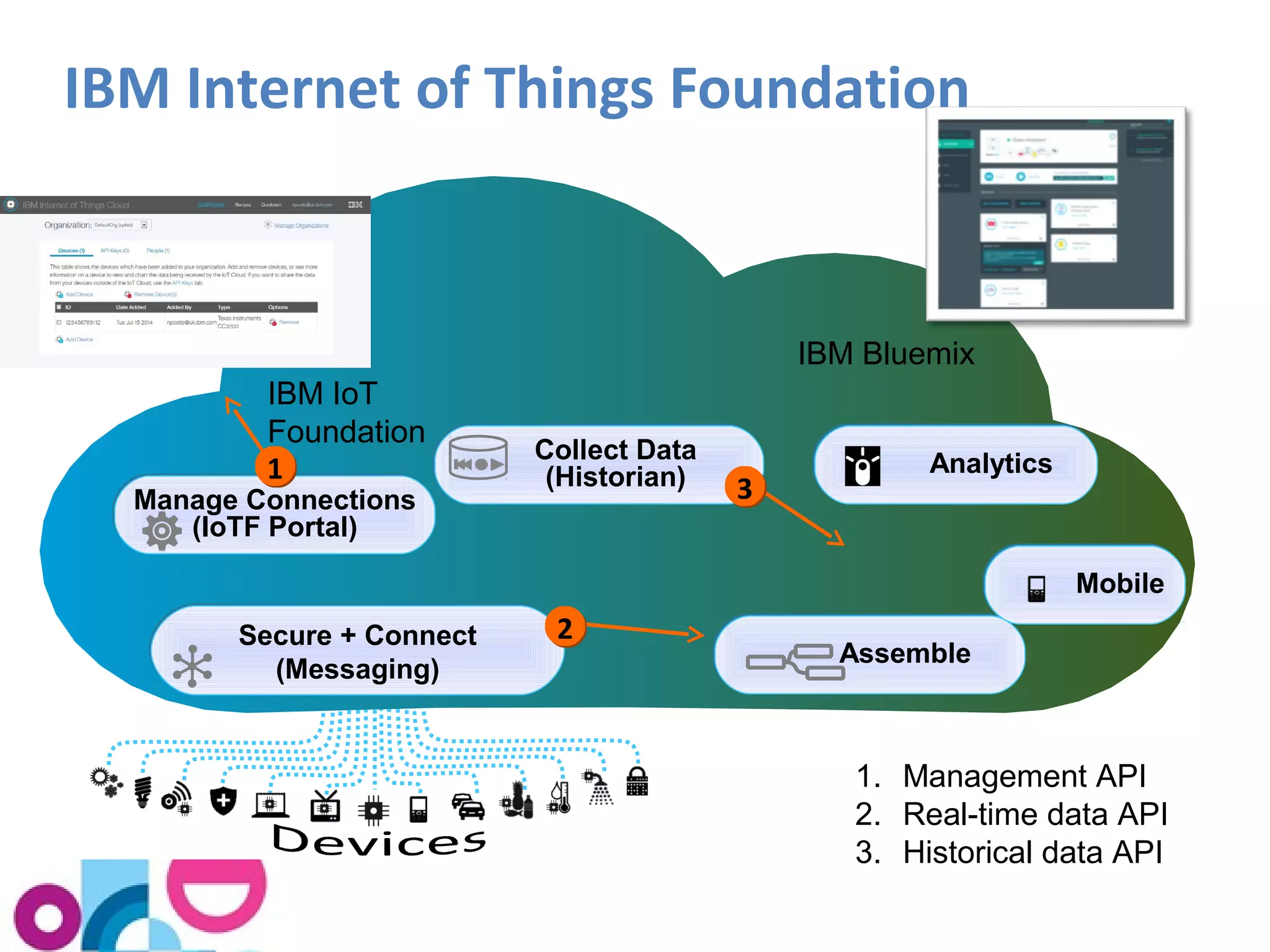
IBM Internet of Things Foundation 
Secure + Connect 
(Messaging) 
Collect Data 
(Historian) 
Manage Connections 
(IoTF Portal) 
22 
AAnnaallyyttiiccss 
AAsssseemmbbllee 
IBM IoT 
Foundation 
IBM Bluemix 
MMoobbiillee 
1. Management API 
2. Real-time data API 
3. Historical data API 
11 
33
IBM Internet of Things Foundation Quickstart 
What Users Can Do: 
Connect devices, collect, route, and visualize data 
Build internet of things applications to analyze data 
Customize and add further devices 
Key Capabilities: 
• Extremely rapid device onboarding 
• Real-time collection of data from devices 
• Visualization of data from devices 
• Communications api to allow custom devices to be added 
• Access to data for Bluemix applications via the IoT Service 
Platform 
as a Service 
Note: IoT Foundation Quickstart is a tool to let embedded device developers 
connect to the IoT and see data from their device, and to provide data for IoT 
application developers to use. It is not intended for production use. 
It is a free service, there is no device or user registration step, and all data sent to 
the Quickstart service could potentially be viewed by any internet user.
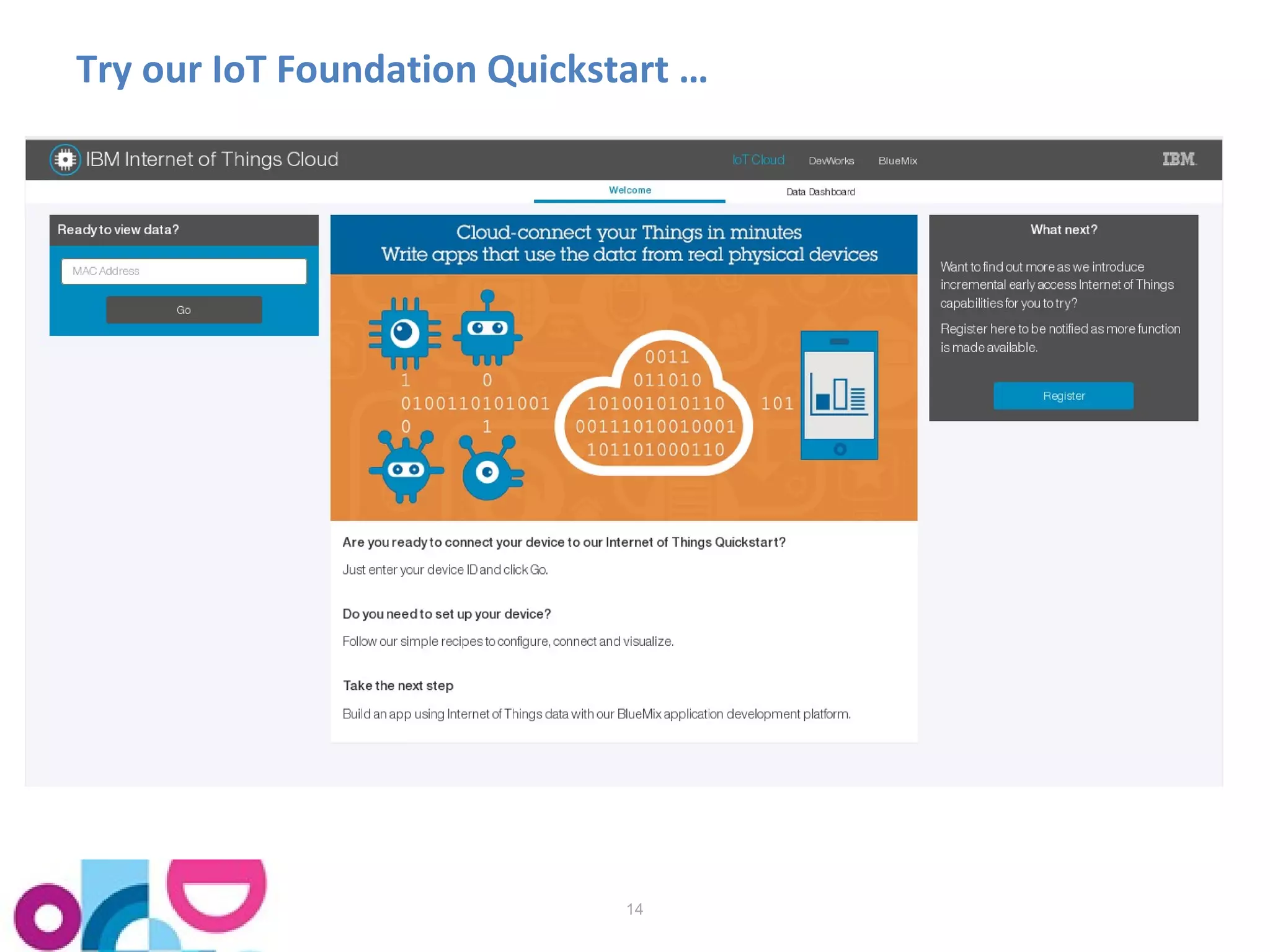
Try our IoT Foundation Quickstart … 
14
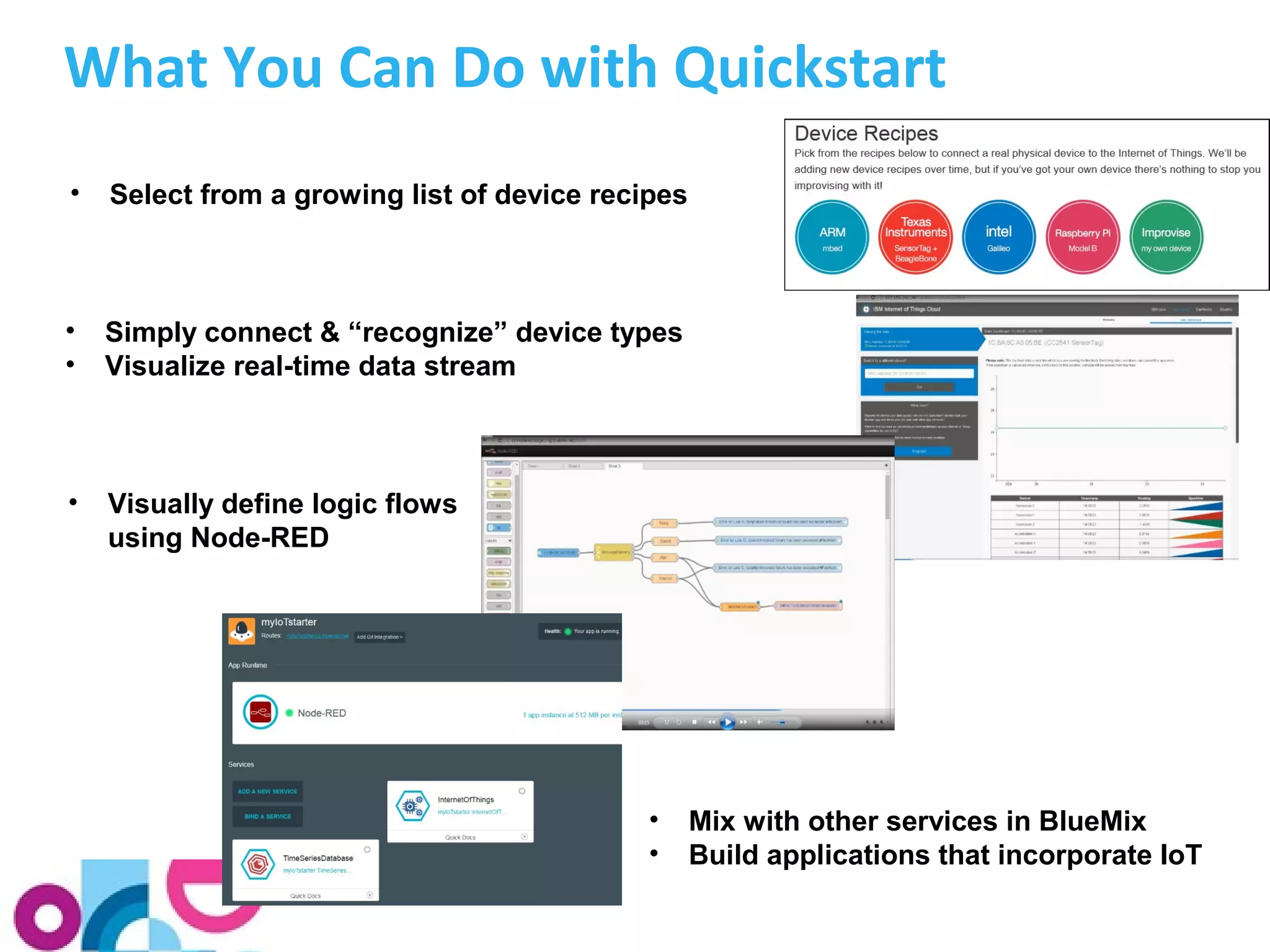
What You Can Do with Quickstart 
• Select from a growing list of device recipes 
• Simply connect & “recognize” device types 
• Visualize real-time data stream 
• Visually define logic flows 
using Node-RED 
• Mix with other services in BlueMix 
• Build applications that incorporate IoT
Quickstart Device Recipes
Simple Connection for Internet of Things 
Unpack device and connect it to the Internet 
Install software* on the device 
Start collecting and visualizing data 
* We provide source code samples for a variety of devices on 
https://github.com/ibm-messaging
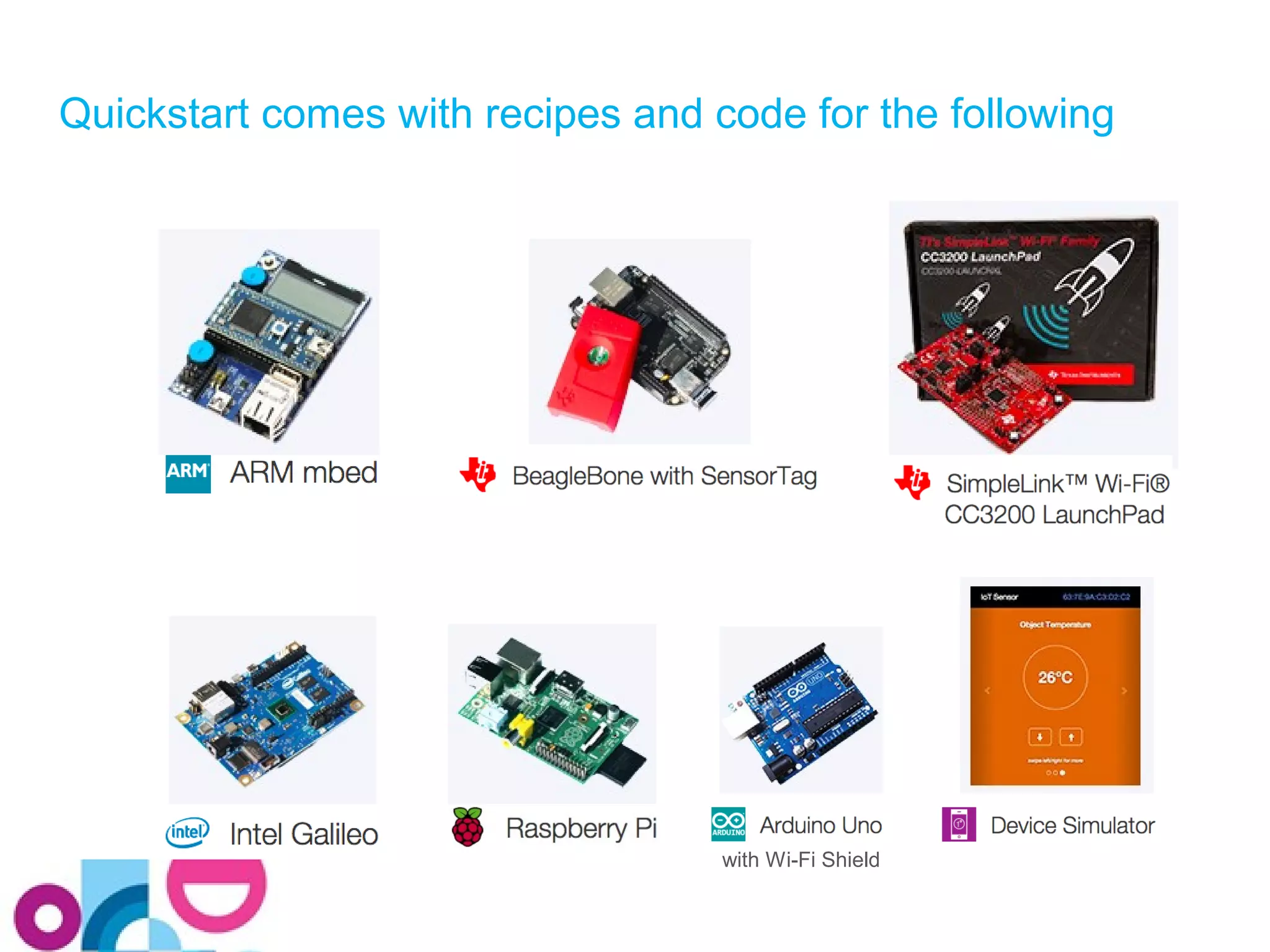
Quickstart comes with recipes and code for the following 
with Wi-Fi Shield
The parts of each Recipe 
• Ingredients 
– The hardware that you need 
• Preparation 
– Unpacking the device, installing the OS if necessary, connecting 
it to your Computer, etc. 
• Connecting 
– Installing the QuickStart software and starting it up 
• Visualization 
– Type in your device’s MAC address and see the results
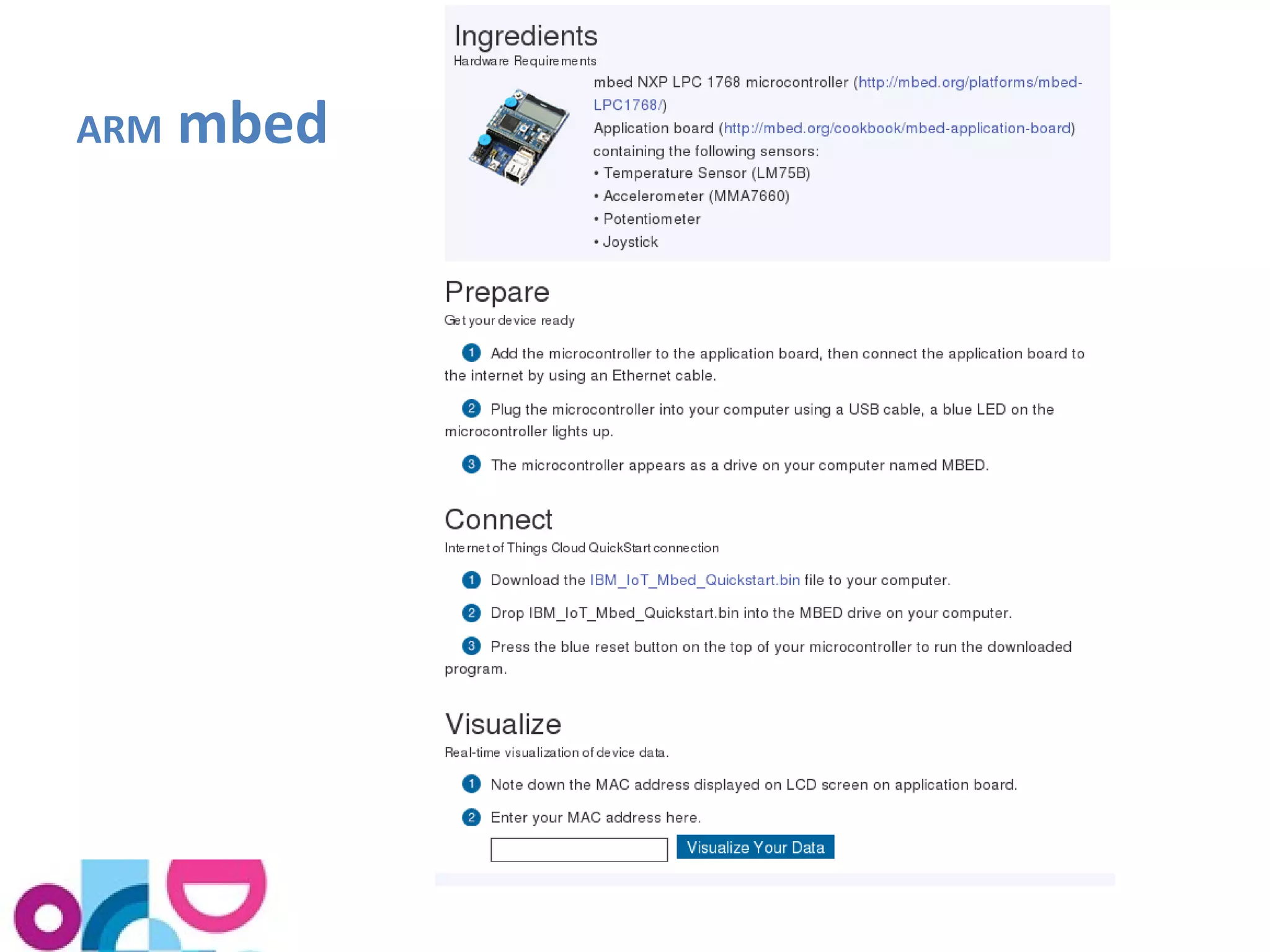
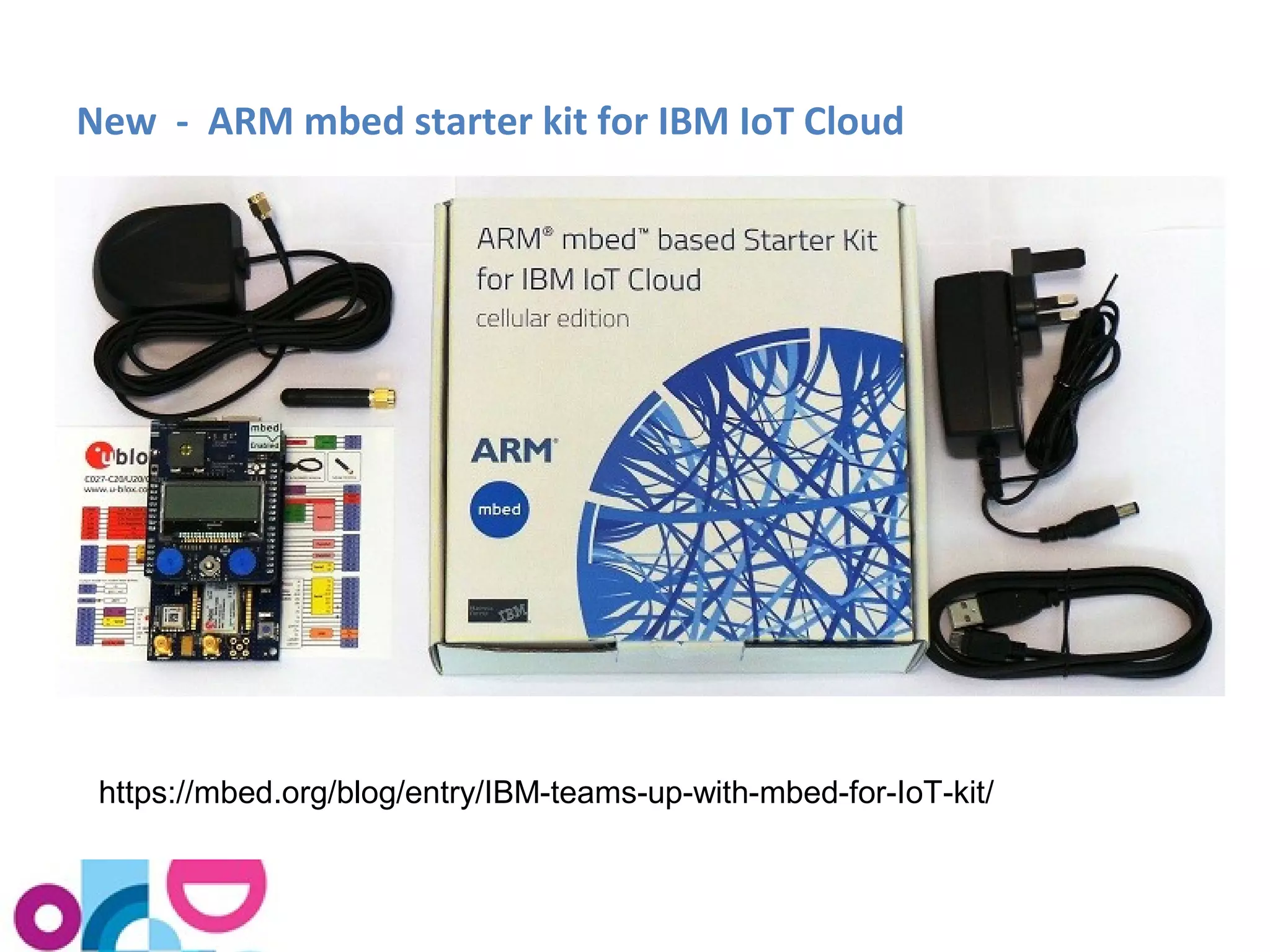
ARM mbed
New - ARM mbed starter kit for IBM IoT Cloud 
https://mbed.org/blog/entry/IBM-teams-up-with-mbed-for-IoT-kit/
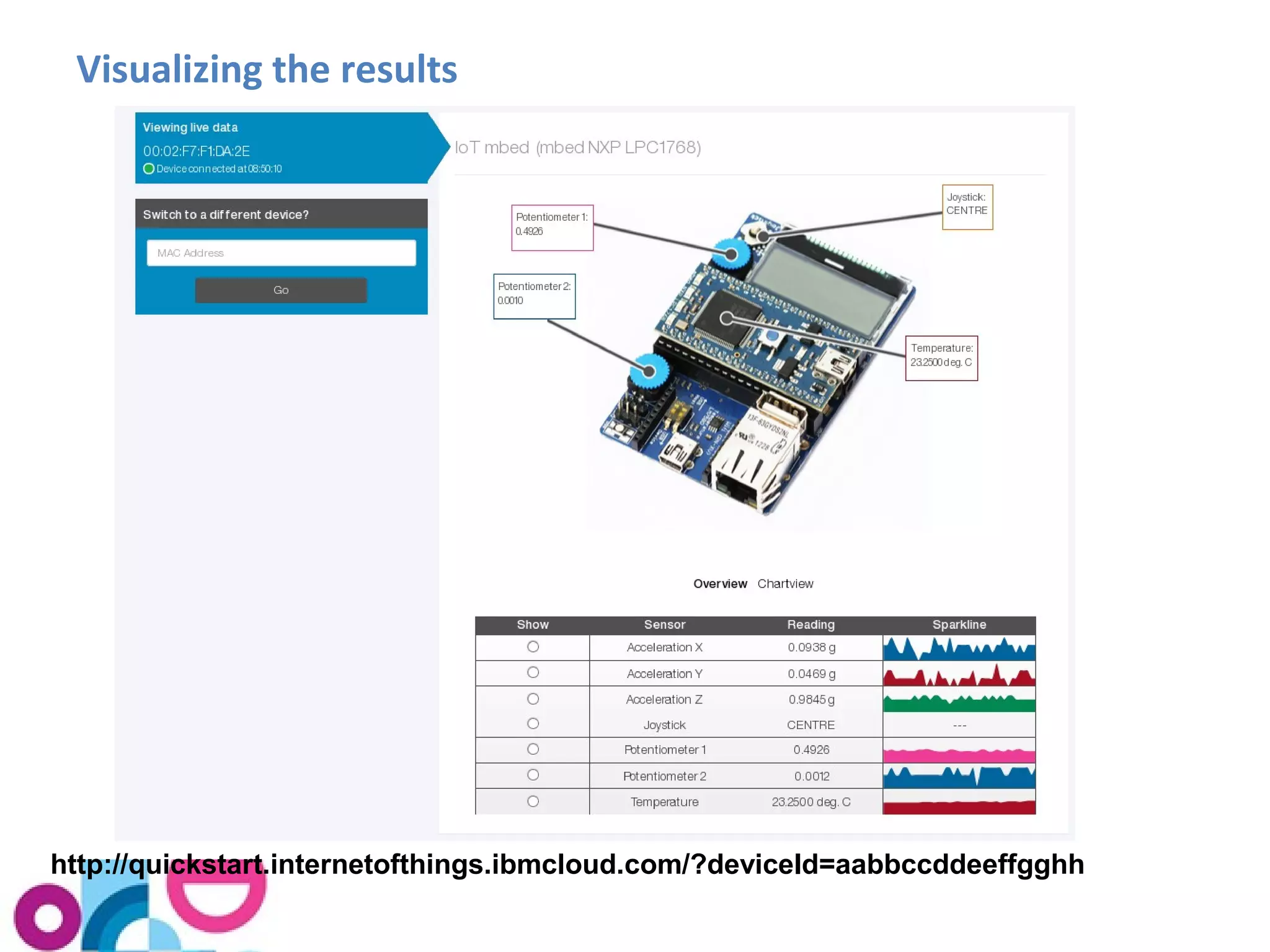
Visualizing the results 
http://quickstart.internetofthings.ibmcloud.com/?deviceId=aabbccddeeffgghh
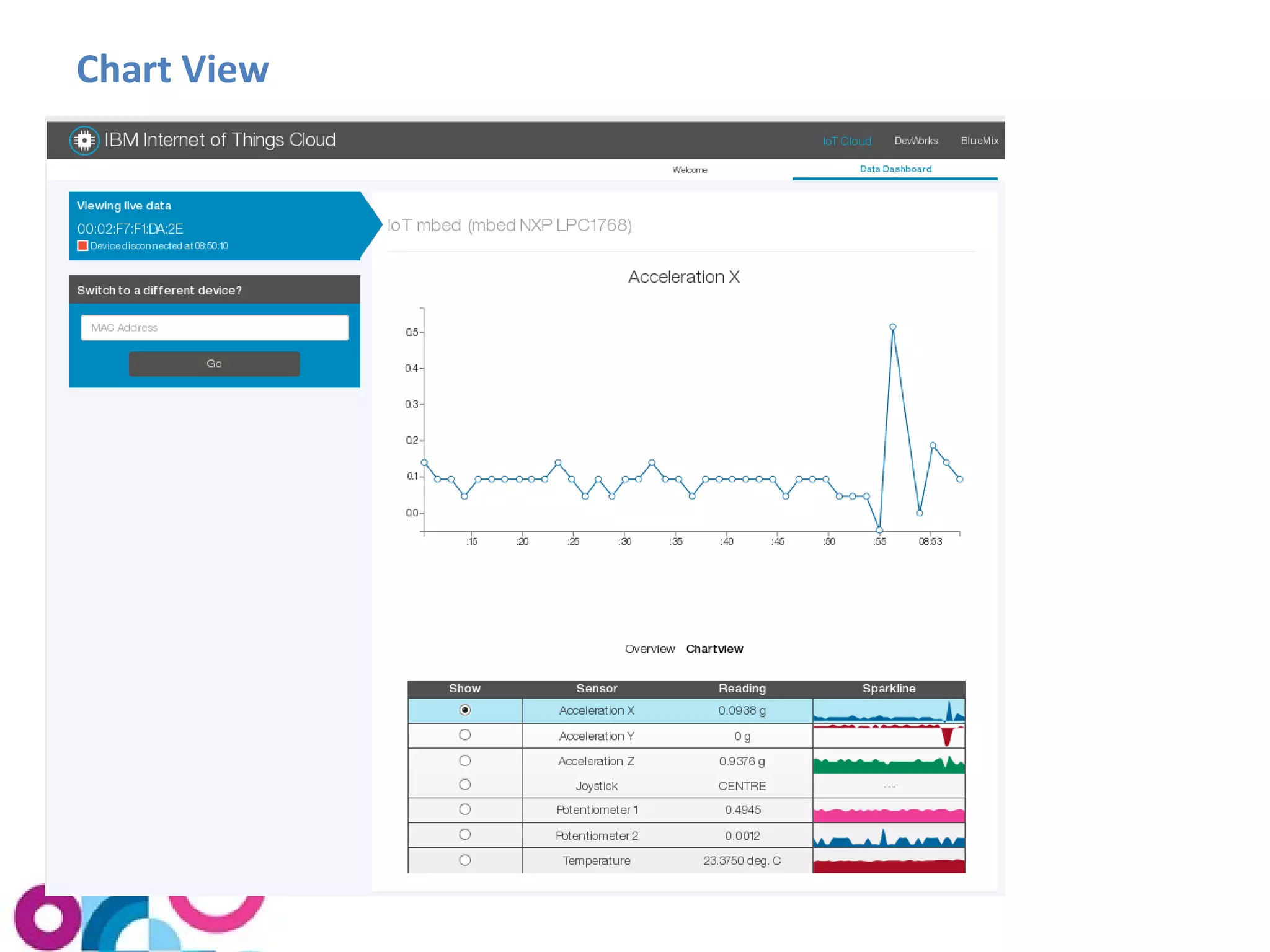
Chart View
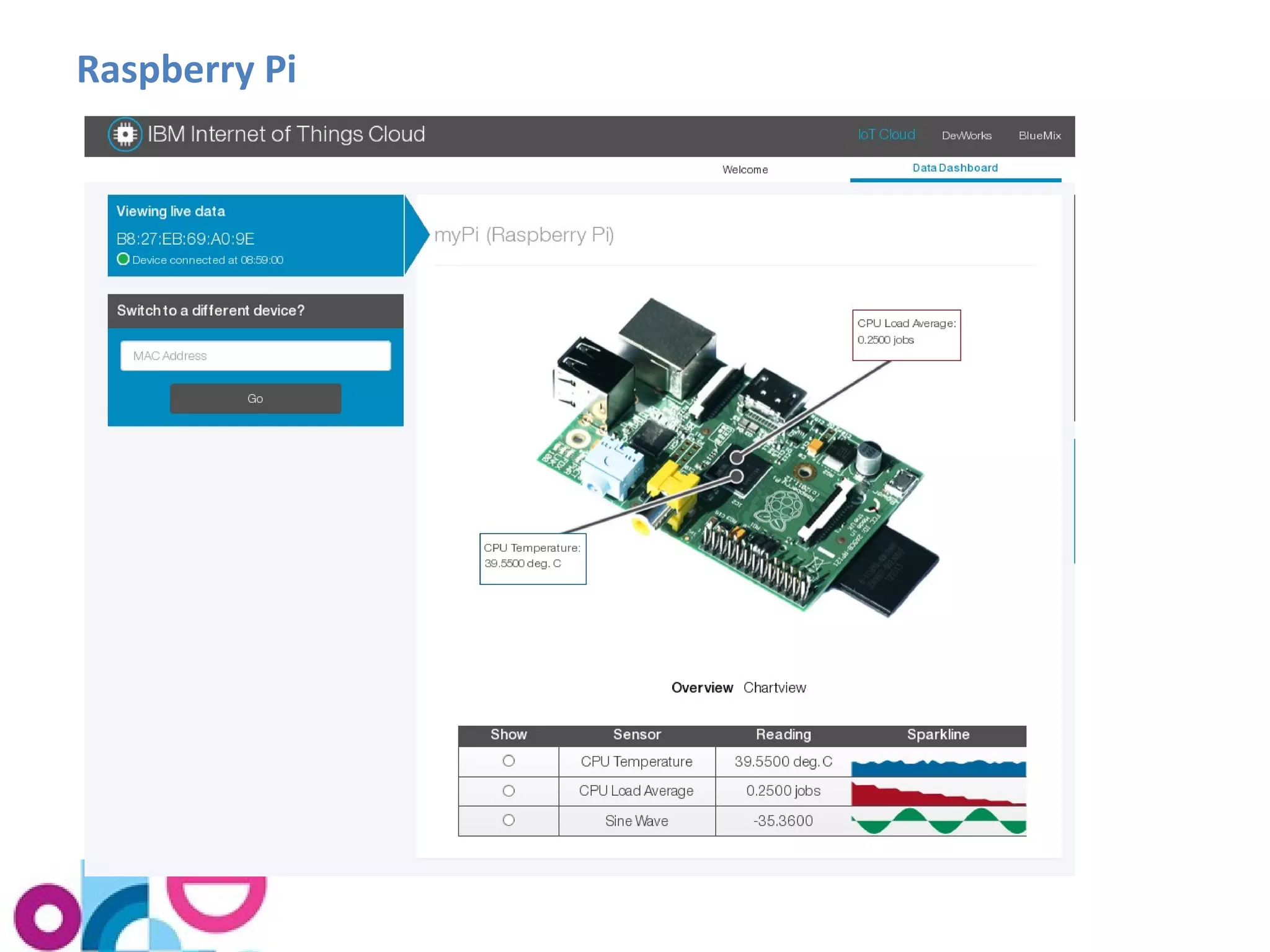
Raspberry Pi
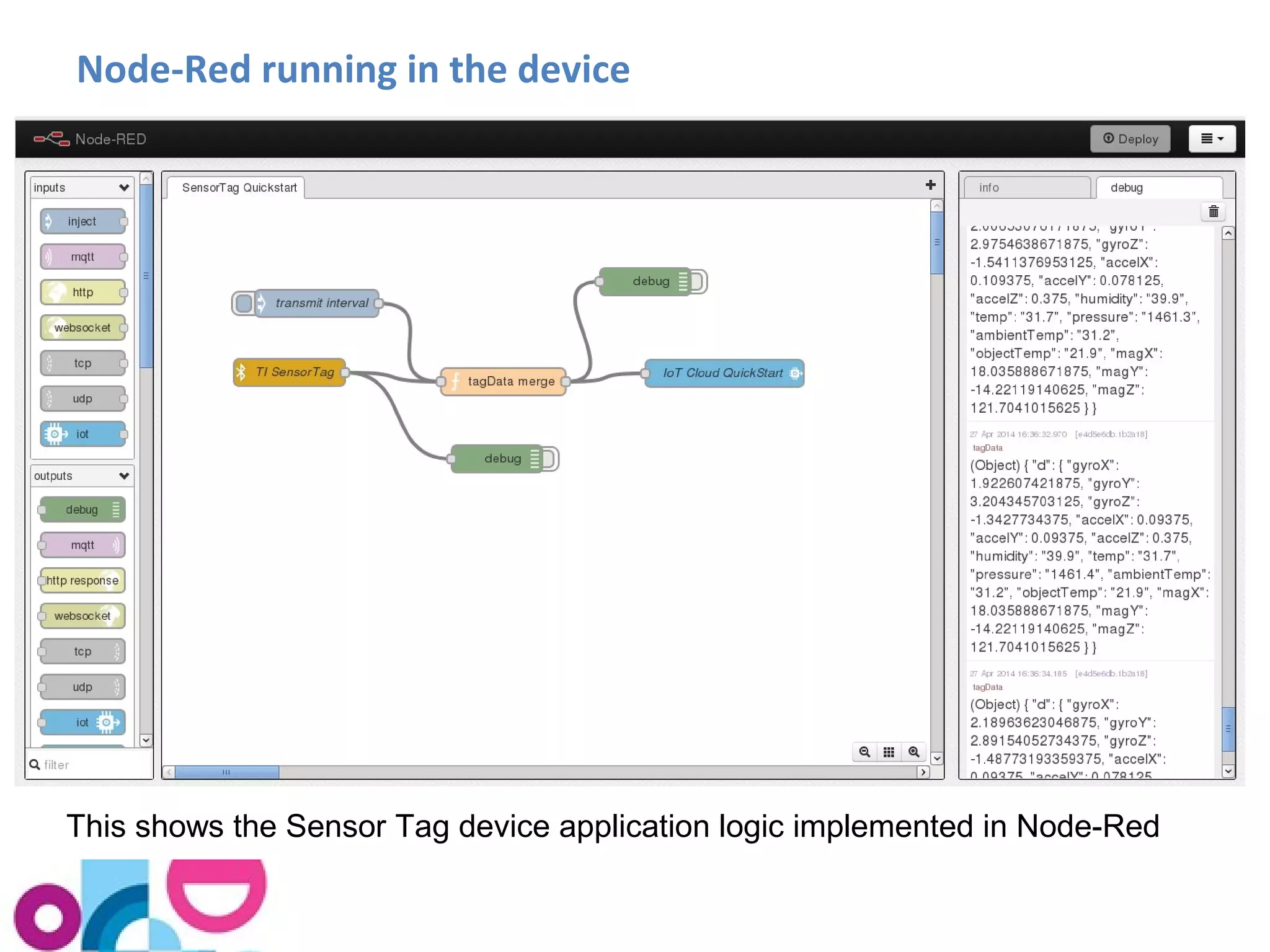
Node-Red running in the device 
This shows the Sensor Tag device application logic implemented in Node-Red
Writing your own Device Code
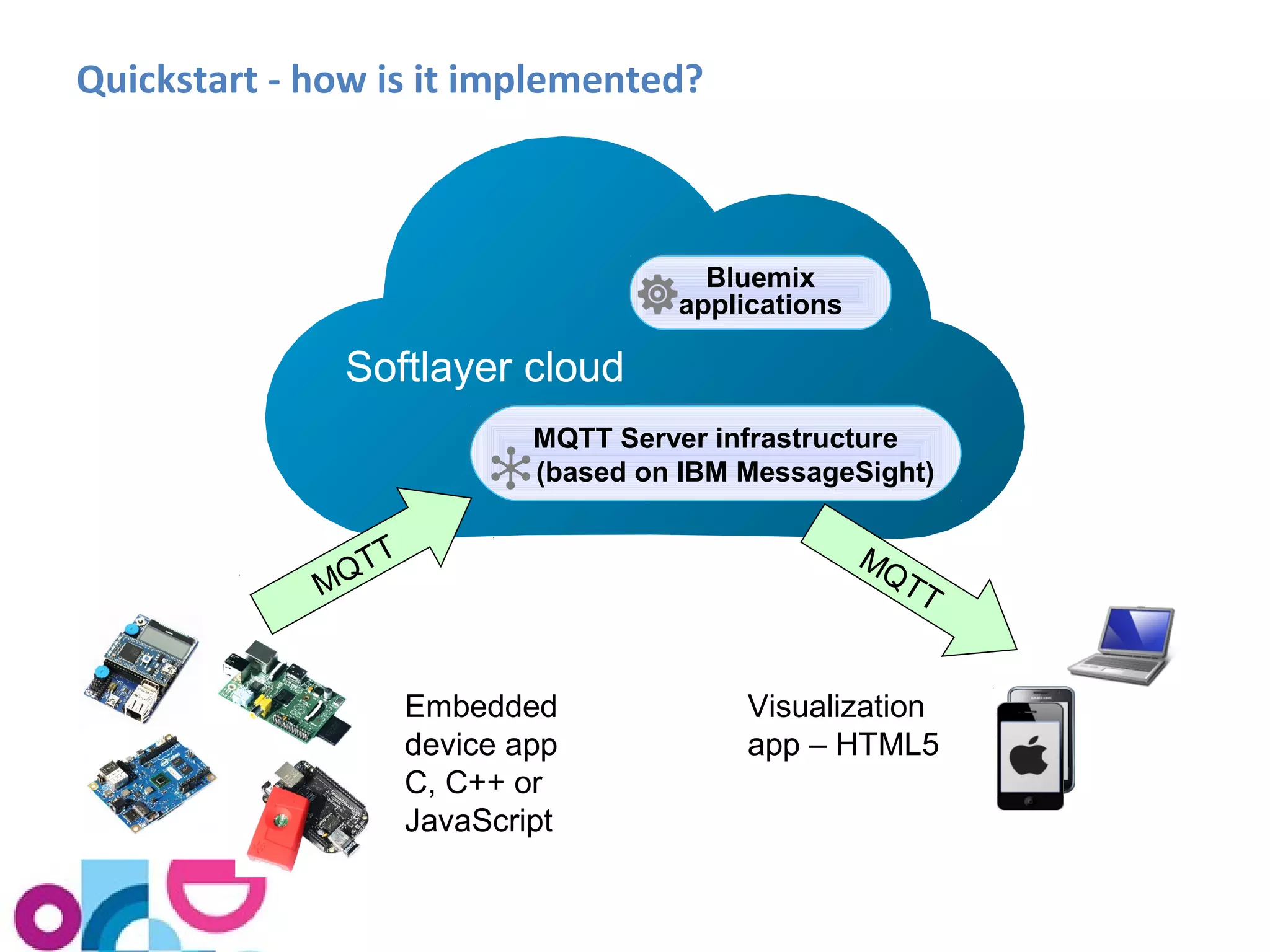
Quickstart - how is it implemented? 
Bluemix 
applications 
Softlayer cloud 
MQTT Server infrastructure 
(based on IBM MessageSight) 
MQTT 
MQTT 
Embedded 
device app 
C, C++ or 
JavaScript 
Visualization 
app – HTML5
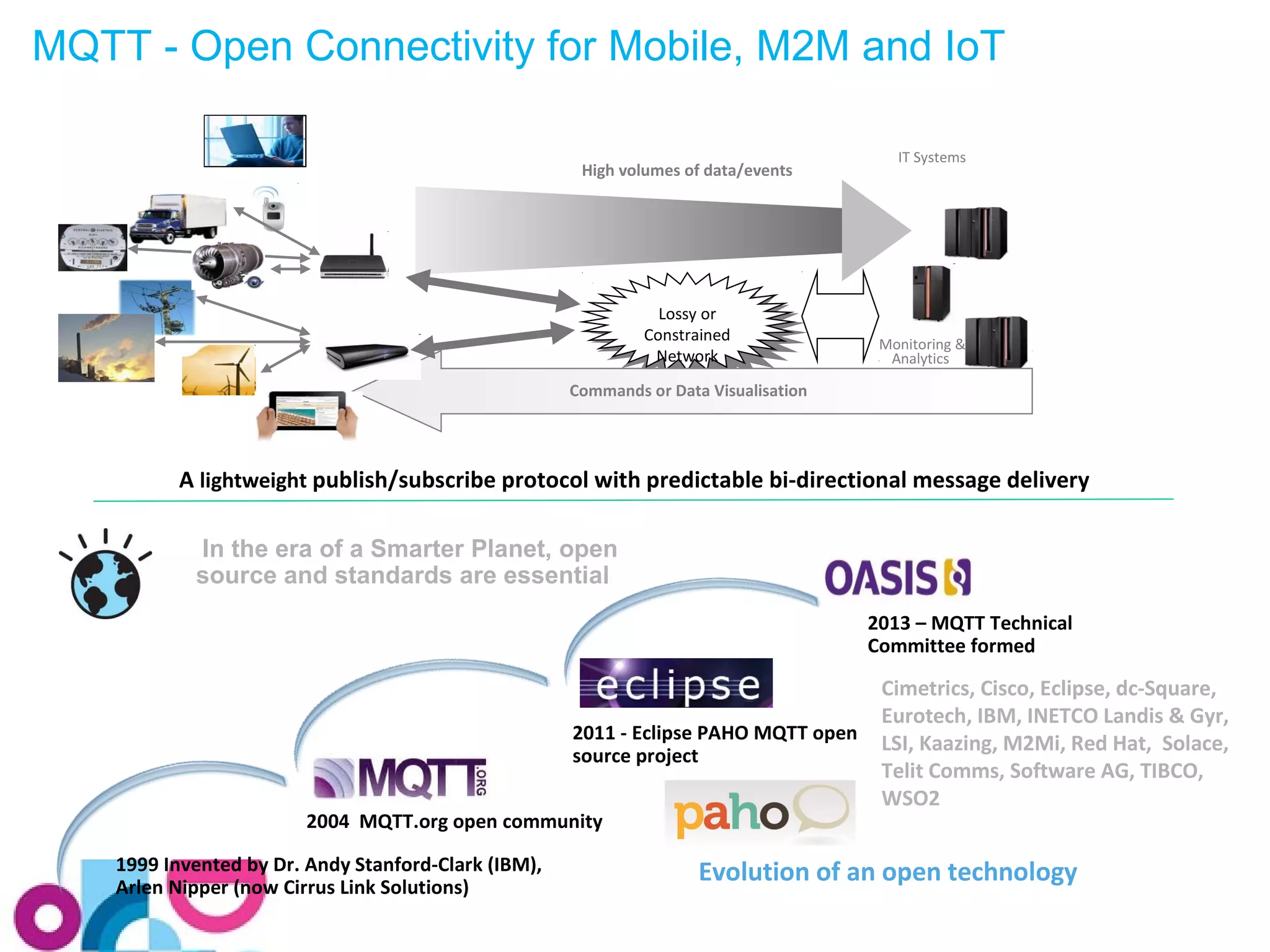
MQTT - Open Connectivity for Mobile, M2M and IoT 
High volumes of data/events 
Lossy or 
Constrained 
Network 
Lossy or 
Constrained 
Network 
IT Systems 
Monitoring & 
Analytics 
Server 
Commands or Data Visualisation 
A lightweight publish/subscribe protocol with predictable bi-directional message delivery 
In the era of a Smarter Planet, open 
source and standards are essential 
1999 Invented by Dr. Andy Stanford-Clark (IBM), 
Arlen Nipper (now Cirrus Link Solutions) 
2011 - Eclipse PAHO MQTT open 
source project 
2004 MQTT.org open community 
2013 – MQTT Technical 
Committee formed 
Cimetrics, Cisco, Eclipse, dc-Square, 
Eurotech, IBM, INETCO Landis & Gyr, 
LSI, Kaazing, M2Mi, Red Hat, Solace, 
Telit Comms, Software AG, TIBCO, 
WSO2 
Evolution of an open technology
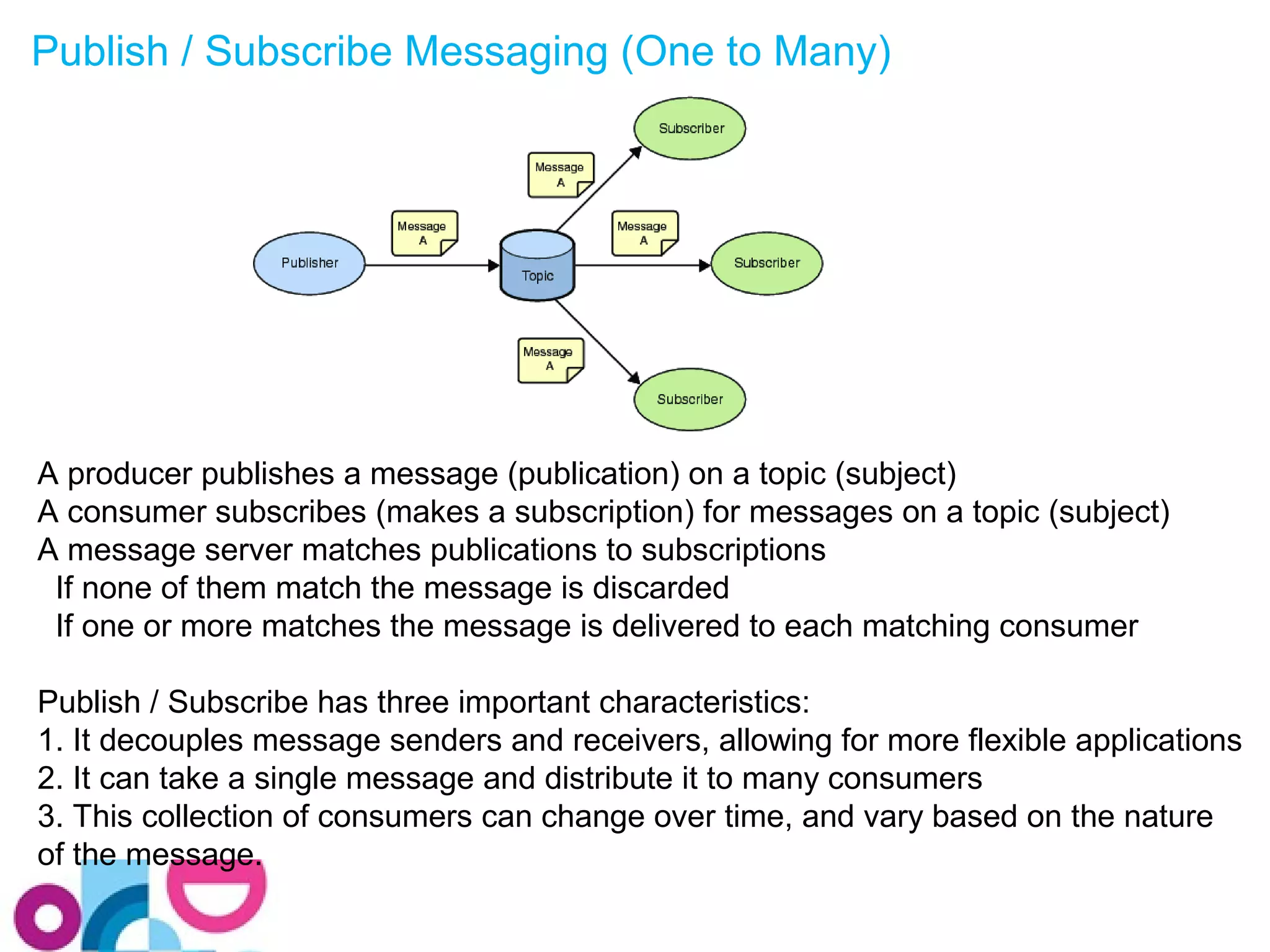
Publish / Subscribe Messaging (One to Many) 
A producer publishes a message (publication) on a topic (subject) 
A consumer subscribes (makes a subscription) for messages on a topic (subject) 
A message server matches publications to subscriptions 
If none of them match the message is discarded 
If one or more matches the message is delivered to each matching consumer 
Publish / Subscribe has three important characteristics: 
1. It decouples message senders and receivers, allowing for more flexible applications 
2. It can take a single message and distribute it to many consumers 
3. This collection of consumers can change over time, and vary based on the nature 
of the message.
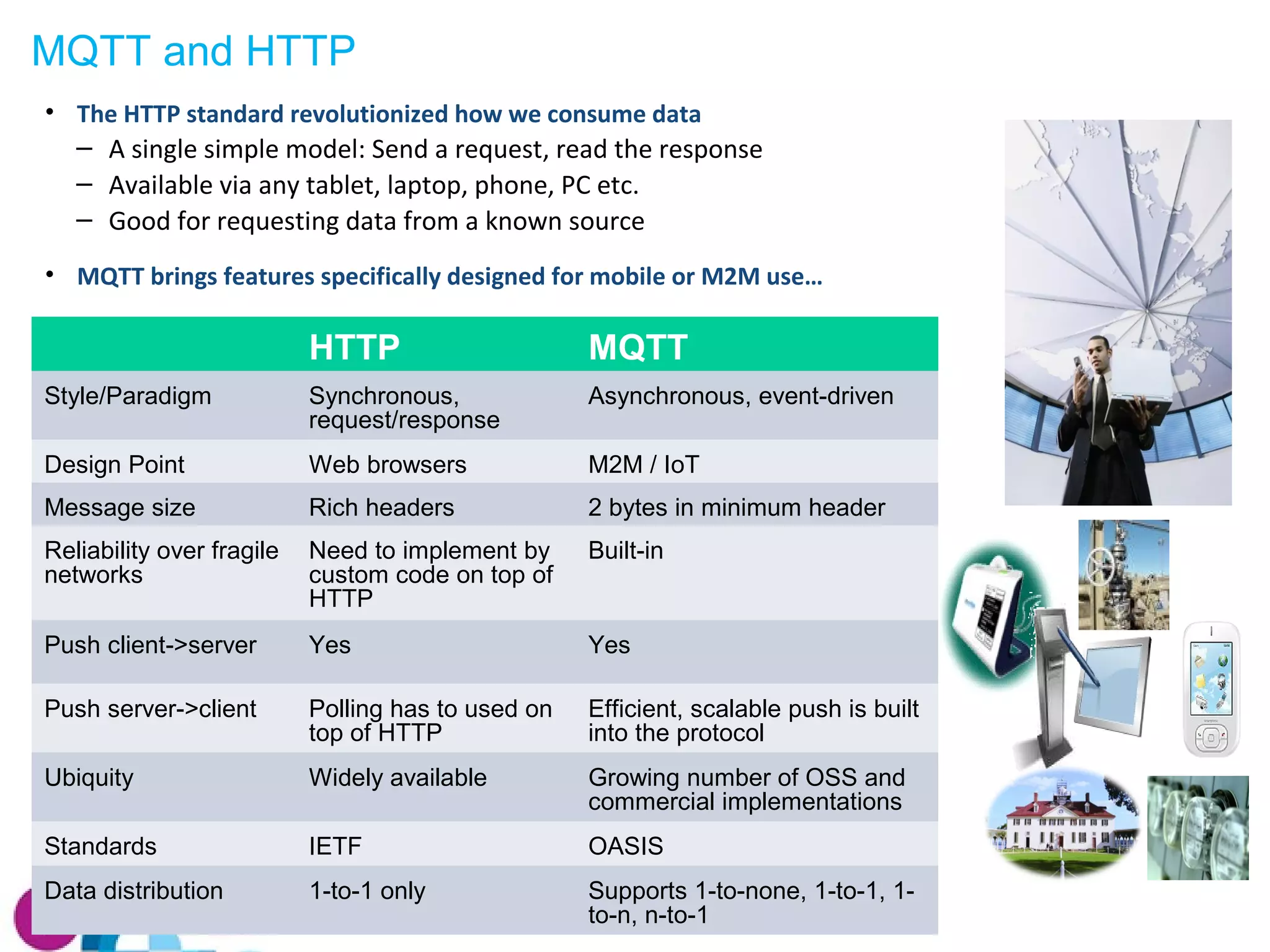
MQTT and HTTP 
• The HTTP standard revolutionized how we consume data 
‒ A single simple model: Send a request, read the response 
‒ Available via any tablet, laptop, phone, PC etc. 
‒ Good for requesting data from a known source 
• MQTT brings features specifically designed for mobile or M2M use… 
HTTP MQTT 
Style/Paradigm Synchronous, 
request/response 
Asynchronous, event-driven 
Design Point Web browsers M2M / IoT 
Message size Rich headers 2 bytes in minimum header 
Reliability over fragile 
networks 
Need to implement by 
custom code on top of 
HTTP 
Built-in 
Push client->server Yes Yes 
Push server->client Polling has to used on 
top of HTTP 
Efficient, scalable push is built 
into the protocol 
Ubiquity Widely available Growing number of OSS and 
commercial implementations 
Standards IETF OASIS 
Data distribution 1-to-1 only Supports 1-to-none, 1-to-1, 1- 
to-n, n-to-1
MQTT Clients and APIs 
You can develop an MQTT client application by programming directly to the MQTT 
protocol specification, however it is more convenient to use a prebuilt client 
Client libraries provide some or all of the following: 
• Functions to build and parse the MQTT protocol control packets 
• Threads to handle receipt of incoming control packets 
• QoS 1 and QoS 2 delivery using a local persistence store 
• KeepAlive handling 
• Simple API for developers to use 
 Open Source clients available in Eclipse Paho project 
• C, C++, Java, JavaScript, Lua, Python and Go 
 Clients for other languages are available, see mqtt.org/software 
• E.g. Delphi, Erlang, .Net, Objective-C, PERL, PHP, Ruby 
• Not all of the client libraries listed on mqtt.org are current. Some are at an early or 
experimental stage of development, whilst others are stable and mature.
Eclipse Paho clients 
• C / C++ 
– MQTT C Client for Posix and Windows 
– MQTT C++ Client for Posix and Windows 
– Embedded MQTT C Client 
• Java 
– J2SE client 
– J2ME client 
– Android service 
• Others 
– JavaScript (for browser and hybrid applications) 
– Lua 
– Python 
– Go
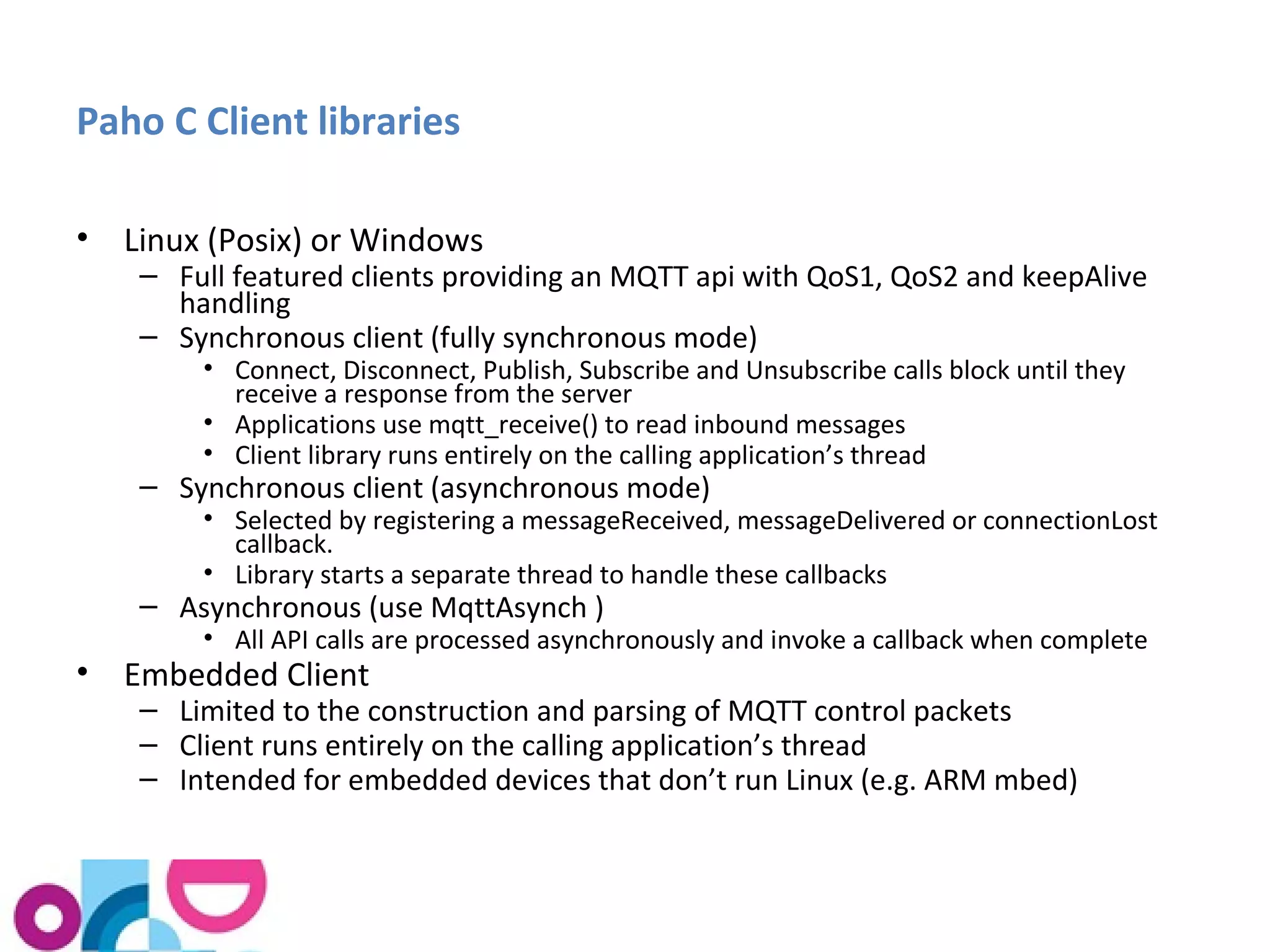
Paho C Client libraries 
• Linux (Posix) or Windows 
– Full featured clients providing an MQTT api with QoS1, QoS2 and keepAlive 
handling 
– Synchronous client (fully synchronous mode) 
• Connect, Disconnect, Publish, Subscribe and Unsubscribe calls block until they 
receive a response from the server 
• Applications use mqtt_receive() to read inbound messages 
• Client library runs entirely on the calling application’s thread 
– Synchronous client (asynchronous mode) 
• Selected by registering a messageReceived, messageDelivered or connectionLost 
callback. 
• Library starts a separate thread to handle these callbacks 
– Asynchronous (use MqttAsynch ) 
• All API calls are processed asynchronously and invoke a callback when complete 
• Embedded Client 
– Limited to the construction and parsing of MQTT control packets 
– Client runs entirely on the calling application’s thread 
– Intended for embedded devices that don’t run Linux (e.g. ARM mbed)
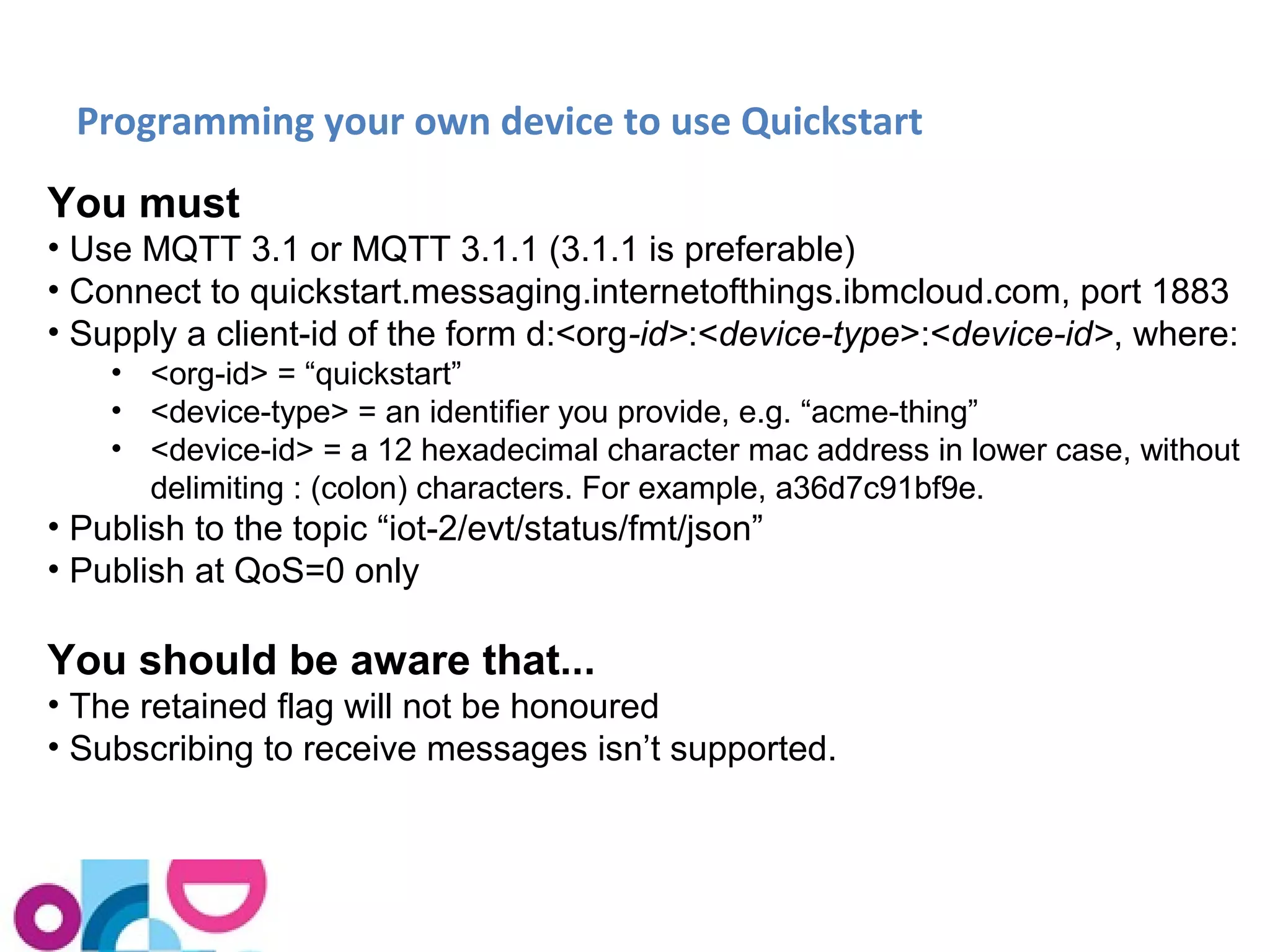
Programming your own device to use Quickstart 
You must 
• Use MQTT 3.1 or MQTT 3.1.1 (3.1.1 is preferable) 
• Connect to quickstart.messaging.internetofthings.ibmcloud.com, port 1883 
• Supply a client-id of the form d:<org-id>:<device-type>:<device-id>, where: 
• <org-id> = “quickstart” 
• <device-type> = an identifier you provide, e.g. “acme-thing” 
• <device-id> = a 12 hexadecimal character mac address in lower case, without 
delimiting : (colon) characters. For example, a36d7c91bf9e. 
• Publish to the topic “iot-2/evt/status/fmt/json” 
• Publish at QoS=0 only 
You should be aware that... 
• The retained flag will not be honoured 
• Subscribing to receive messages isn’t supported.
Programming your own device – Quickstart message format 
The message payload must be in JSON and must not exceed 4096 bytes 
(that’s the QuickStart limit). 
The message payload must contain a single top-level property called "d". 
This property may contain an arbitrary number of child properties, these 
having either integer or string datatypes: 
{ "d": { "name1": "stringvalue", "name2": intvalue, ... } } 
Here's an example: 
{ "d": { "myName": "Stuart's Pi", "cputemp": 46, "sine": -10, "cpuload", 
1.45 } } 
"myName" is optional – but if you supply it, it’s displayed as a title on the 
visualization page.
Security Considerations 
As we have already noted, the IBM IoT Cloud Quickstart service is free and does 
not provide any security features. 
When designing an IoT application for production use, you need to consider its 
security implications, including: 
1. Do I need to secure the data coming from the devices? This could mean 
• Authenticating the devices when they connect, to protect against an 
attacker who attempts to impersonate them 
• Using TLS to protect the data as it travels from the device, to prevent the 
data from being modified in transit 
• Protecting the devices and the software that runs on them from being 
subverted by an attacker. 
2. Do I need to restrict access to the data itself, for privacy or other reasons? 
• Use TLS to encrypt the data as it travels from the device 
• Authenticate any applications that try to access the device data
Registering devices with the IoT Foundation
Signing up to the IoT Foundation Service 
Signing up allows permanent usage of the IoTF service in a secure fashion. 
• Administration dashboard that lets you register devices and monitor their 
status 
• Security of data, the device and the communications channel (TLS + 
authentication and authorisation for devices & applications) 
• Inbuilt historian with API for time series data access 
• Allows publishing of information to registered devices (i.e. sending commands to 
devices) 
Available Plans 
 30-day Free Trial: Available from IBM Marketplace 
 Free plan: Available from IBM Bluemix 
 Bronze: Get started quickly and move to production with a small number of 
devices 
 Silver: For standard needs: development, test and production use 
 Gold: For advanced needs and large-scale production use
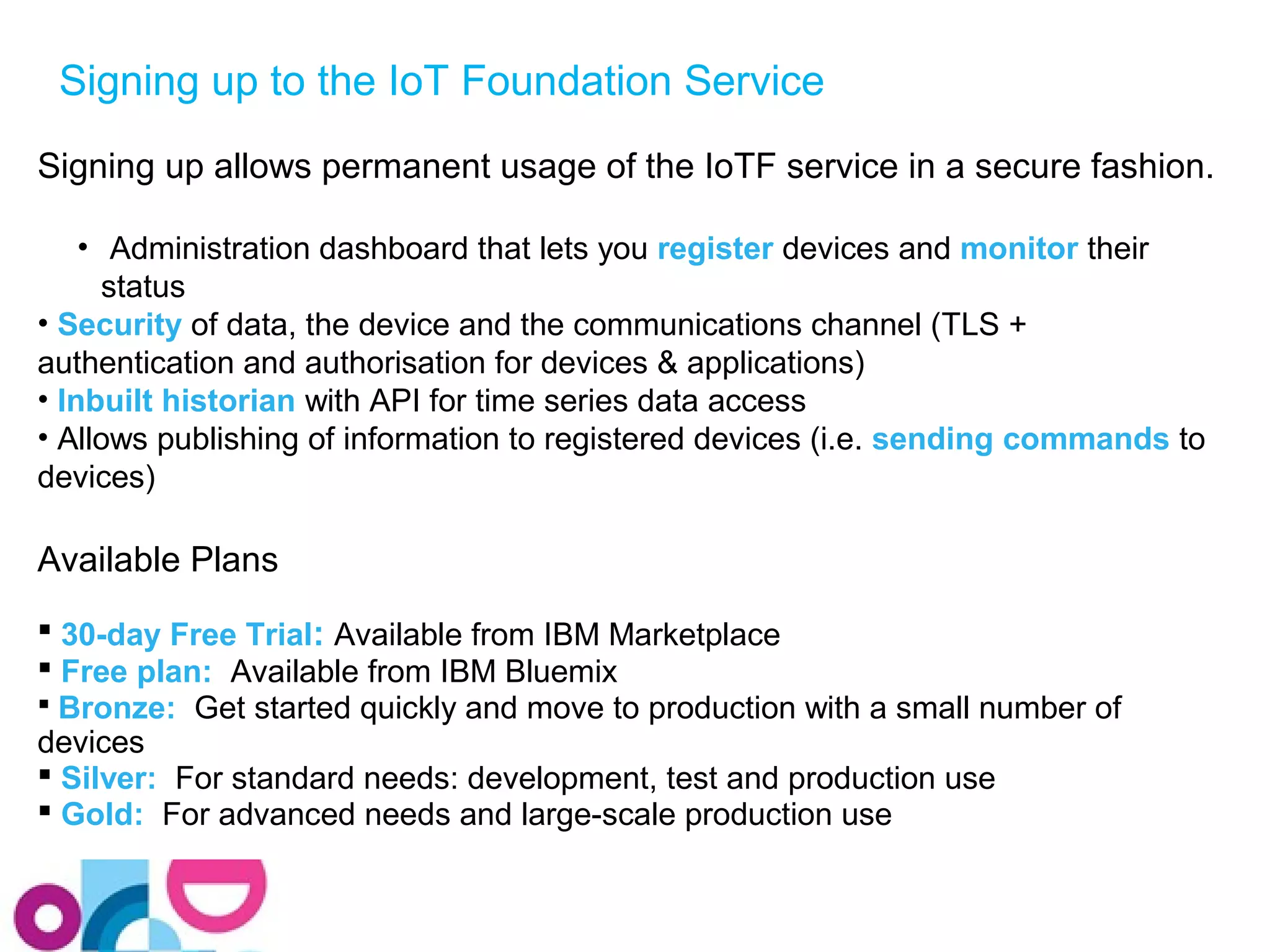
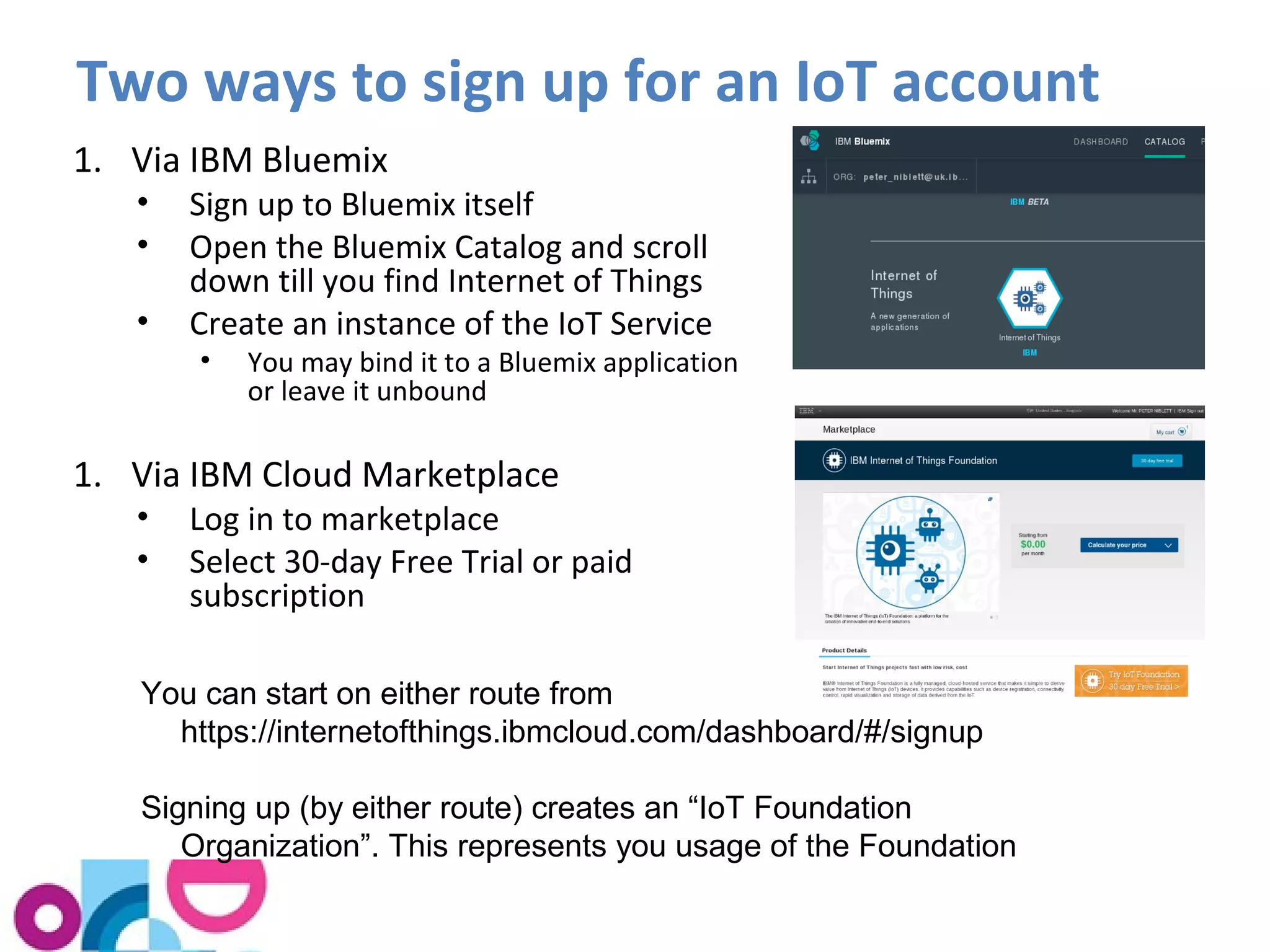
Two ways to sign up for an IoT account 
1. Via IBM Bluemix 
• Sign up to Bluemix itself 
• Open the Bluemix Catalog and scroll 
down till you find Internet of Things 
• Create an instance of the IoT Service 
• You may bind it to a Bluemix application 
or leave it unbound 
1. Via IBM Cloud Marketplace 
• Log in to marketplace 
• Select 30-day Free Trial or paid 
subscription 
You can start on either route from 
https://internetofthings.ibmcloud.com/dashboard/#/signup 
Signing up (by either route) creates an “IoT Foundation 
Organization”. This represents you usage of the Foundation
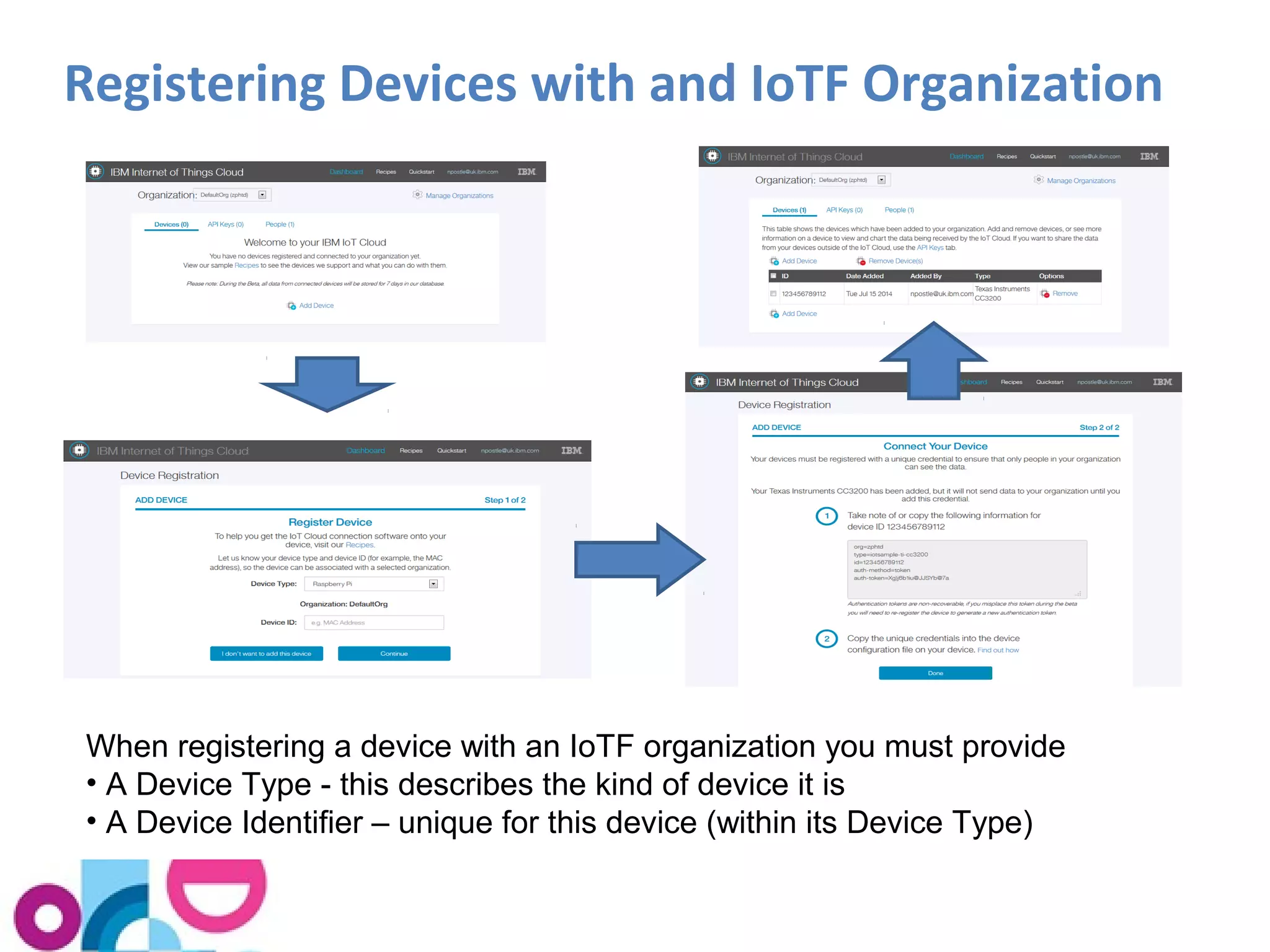
Registering Devices with and IoTF Organization 
When registering a device with an IoTF organization you must provide 
• A Device Type - this describes the kind of device it is 
• A Device Identifier – unique for this device (within its Device Type)
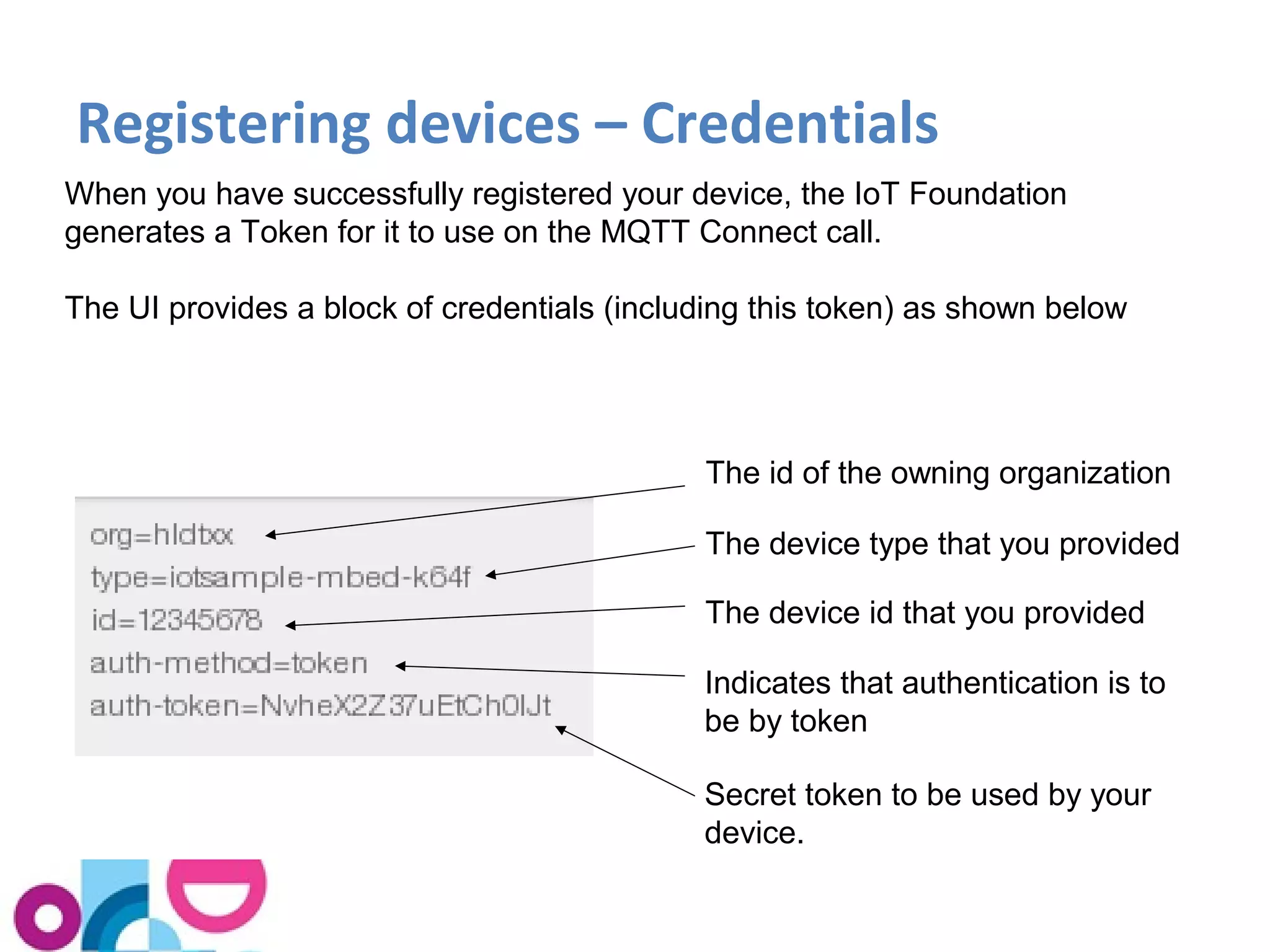
Registering devices – Credentials 
When you have successfully registered your device, the IoT Foundation 
generates a Token for it to use on the MQTT Connect call. 
The UI provides a block of credentials (including this token) as shown below 
The id of the owning organization 
The device type that you provided 
The device id that you provided 
Indicates that authentication is to 
be by token 
Secret token to be used by your 
device.
Registering devices – using the 
Credentials 
• The recipes that come with the Quickstart devices tell 
you how to update the device code so that it uses the 
credentials generated by the IoTF 
– In some cases this is simply a question of downloading a 
file onto the device. 
• If you are writing your own device code, you need to 
connect as follows: 
– Make the MQTT connection to 
<org-id>xyzzyz.messaging.internetofthings.ibmcloud.com:1883, or 
<org-id>xyzzyz.messaging.internetofthings.ibmcloud.com:8883 (TLS) 
– Use an MQTT client identifier of the form: 
d:<org-id>:<device-type>:<device-id> 
– Supply the literal "use-token-auth" as the MQTT username 
– Supply the authorization token as the MQTT password
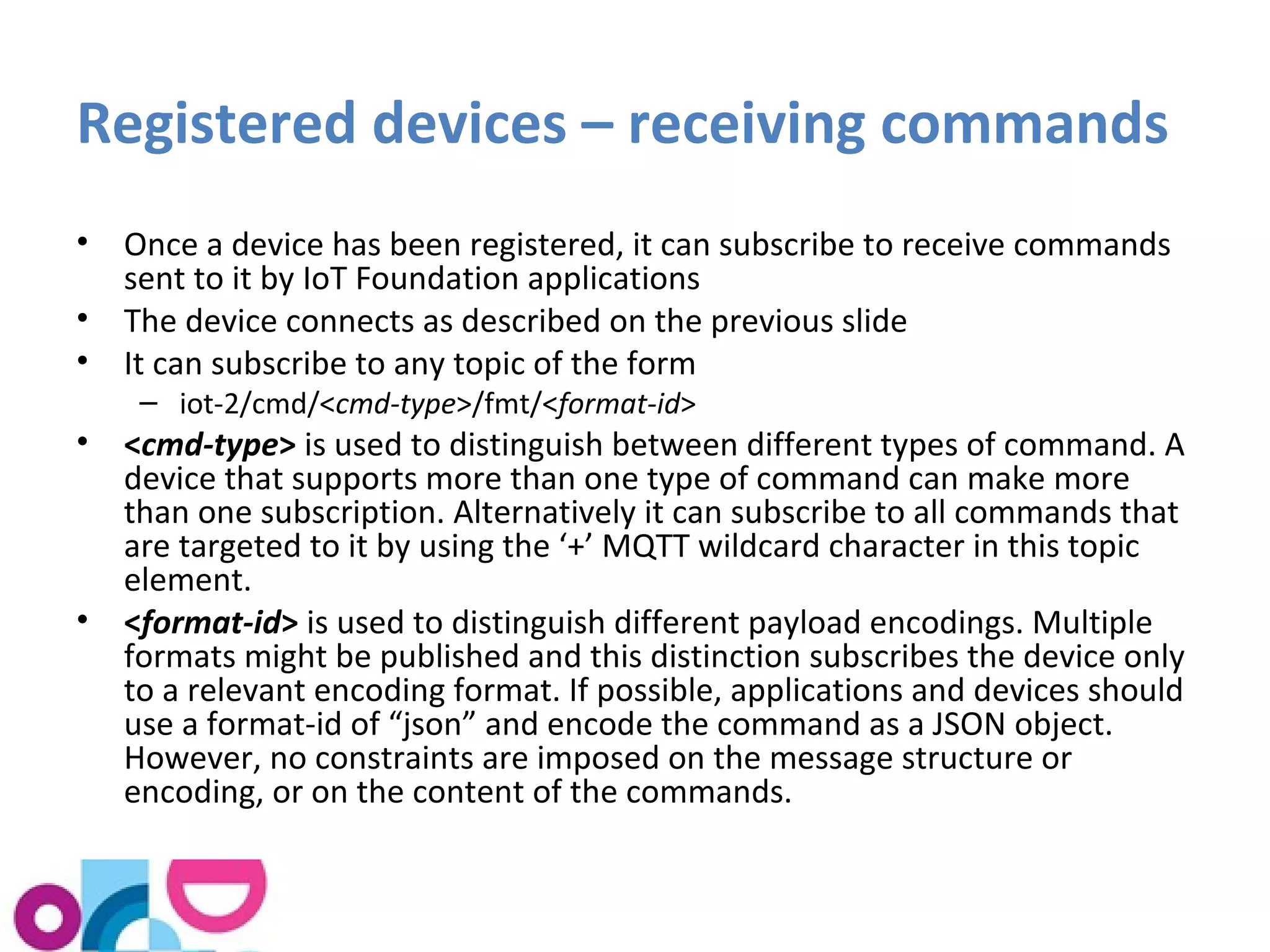
Registered devices – receiving commands 
• Once a device has been registered, it can subscribe to receive commands 
sent to it by IoT Foundation applications 
• The device connects as described on the previous slide 
• It can subscribe to any topic of the form 
– iot-2/cmd/<cmd-type>/fmt/<format-id> 
• <cmd-type> is used to distinguish between different types of command. A 
device that supports more than one type of command can make more 
than one subscription. Alternatively it can subscribe to all commands that 
are targeted to it by using the ‘+’ MQTT wildcard character in this topic 
element. 
• <format-id> is used to distinguish different payload encodings. Multiple 
formats might be published and this distinction subscribes the device only 
to a relevant encoding format. If possible, applications and devices should 
use a format-id of “json” and encode the command as a JSON object. 
However, no constraints are imposed on the message structure or 
encoding, or on the content of the commands.
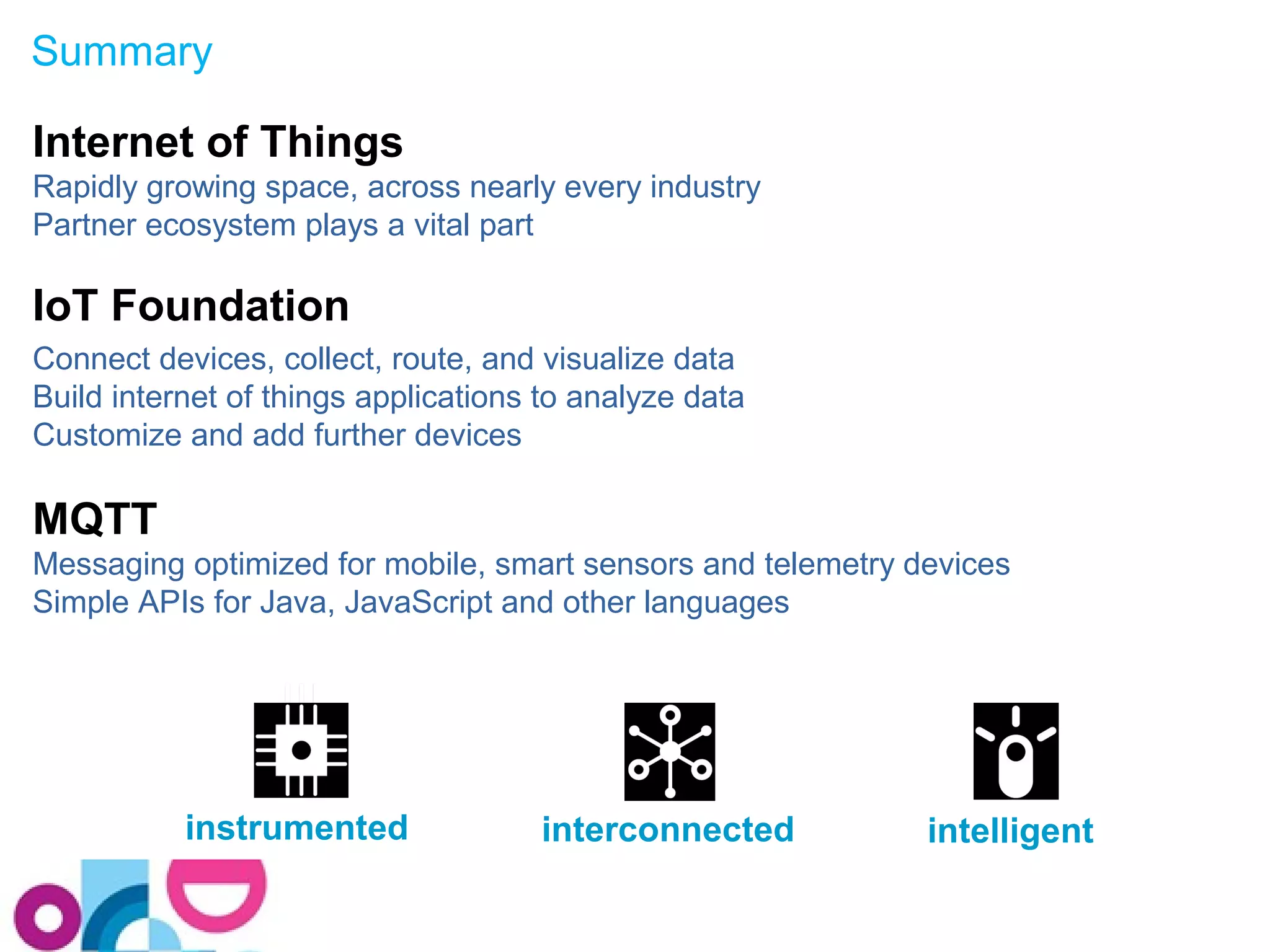
Summary 
Internet of Things 
Rapidly growing space, across nearly every industry 
Partner ecosystem plays a vital part 
IoT Foundation 
Connect devices, collect, route, and visualize data 
Build internet of things applications to analyze data 
Customize and add further devices 
MQTT 
Messaging optimized for mobile, smart sensors and telemetry devices 
Simple APIs for Java, JavaScript and other languages 
instrumented interconnected intelligent
Useful Links 
 IBM IoT Foundation and Quickstart 
- http://internetofthings.ibmcloud.com 
 Quickstart recipes on developerWorks 
- https://www.ibmdw.net/iot/recipes 
 Quickstart code on GitHub 
- https://github.com/ibm-messaging 
 MQTT information 
- http://mqtt.org 
 MQTT 3.1.1 Specification 
• http://docs.oasis-open.org/mqtt/mqtt/v3.1.1/cos02/mqtt-v3.1.1-cos02.pdf
Questions?
Thank You
WebSphere Technical University and Digital Experience Europe 2014 
Your feedback is valuable - please complete your session or lab evaluation! 
Session number 
A34 
Provide your evaluations by: 
Evaluation forms: 
Fill out a form at the end of each session 
Paper forms are located in each of the session or lab rooms 
Place the completed form in the tray as you exit the room 
- Or – 
Complete the session survey on Event Connect Portal: ibmeventconnect.eu/euxdx 
Select Sessions, then Session Finder, and complete the survey

Connecting devices to the internet of things

  • 1.
    Connecting Devices tothe Internet of Things Bernard Kufluk, MessageSight Product Manager
  • 2.
    © 2014 IBMCorporation Please Note IBM’s statements regarding its plans, directions, and intent are subject to change or withdrawal without notice at IBM’s sole discretion. Information regarding potential future products is intended to outline our general product direction and it should not be relied on in making a purchasing decision. The information mentioned regarding potential future products is not a commitment, promise, or legal obligation to deliver any material, code or functionality. Information about potential future products may not be incorporated into any contract. The development, release, and timing of any future features or functionality described for our products remains at our sole discretion Performance is based on measurements and projections using standard IBM benchmarks in a controlled environment. The actual throughput or performance that any user will experience will vary depending upon many factors, including considerations such as the amount of multiprogramming in the user’s job stream, the I/O configuration, the storage configuration, and the workload processed. Therefore, no assurance can be given that an individual user will achieve results similar to those stated here. 2
  • 3.
    Agenda • TheInternet of Things and its Ecosystem • The IBM IoT Foundation and the IoT Foundation Quickstart • Quickstart device recipes and demonstration • How is Quickstart implemented? • Writing your own device code • Signing up and registering a device 3
  • 4.
    The Internet ofThings and its Ecosystem
  • 5.
    The Internet ofThings is the next Internet Frontier Source:http://www.digitalcommunities.com/articles/FutureStructure-The-New-Framework-for-Communities.html
  • 6.
    How Many Things? •IoT 2020 View
  • 7.
    What is theIoT being used for today? Extend the value of goods and services, e.g. Lock/Unlock/Find your car Tell me when my washing is done How well am I cleaning my teeth? Monetize through new business models Ad-hoc care hire Pay-as-you-drive insurance Optimize by understanding behaviour and anticipating most optimal actions White goods manufacturer understanding customer behaviour Improved product support and maintenance Smarter Supply Chain Control remote behaviour with automation Home automation / remote control Energy Demand Management Smarter Cities Manufacturing Key areas Agriculture Automotive Consumer products Energy and Utilities Government Healthcare Home Automation Insurance Manufacturing Transport Oil and Gas
  • 8.
    Consumers lead theInternet of things Today Tomorrow Integration A few connected devices per person… Almost every device that consumers own will be connected, and many new ones will be created to leverage the value created by consumer connections. Cross-platform integrators will connected devices and automate Door Lock personal activity: Dishwasher Clothes Washer Clothes Dryer Window Lock Garage Door Toothbrush Garden Moisture Coffee Maker Home Lights Examples: Ifttt.com Zapier.com  Just as consumers have led enterprises in embracing new mobile services, we believe they will lead the adoption of connected devices & integrated services
  • 9.
    Ecosystem & Partnersare crucial Solutions & Applications Oil & Gas Smarter Cities Energy & Utilities Consumer Electronics Transport & Rail Connected Vehicle Life Science & Healthcare Industrial Manufacturing Streams Devices Gateways Networks Clouds IBM Industry Solutions IBM SWG MessageSight SDK SDK Partnerships Maximo IoC
  • 10.
    IoT use caseshave many common requirements Core Requirements:  Easily on-board connected “things”  Create a real-time communication channel with the “thing”  Begin capturing data from the “thing”  Visualize data from the “thing”  Collect data in a historian DB  Provide access to the collected data  Manage the “things” and the connectivity to them  Secure the data from the “thing” and control access to that that data  Pay for the service based on usage Extended Requirements:  Perform analytics both in real-time and on historical trend data  Trigger events based on specific data conditions  Interact with the “thing” from business apps and/or from mobile devices  Send commands to the “thing”
  • 11.
    IBM Internet ofThings Foundation and Quickstart
  • 12.
    IBM Internet ofThings Foundation Secure + Connect (Messaging) Collect Data (Historian) Manage Connections (IoTF Portal) 22 AAnnaallyyttiiccss AAsssseemmbbllee IBM IoT Foundation IBM Bluemix MMoobbiillee 1. Management API 2. Real-time data API 3. Historical data API 11 33
  • 13.
    IBM Internet ofThings Foundation Quickstart What Users Can Do: Connect devices, collect, route, and visualize data Build internet of things applications to analyze data Customize and add further devices Key Capabilities: • Extremely rapid device onboarding • Real-time collection of data from devices • Visualization of data from devices • Communications api to allow custom devices to be added • Access to data for Bluemix applications via the IoT Service Platform as a Service Note: IoT Foundation Quickstart is a tool to let embedded device developers connect to the IoT and see data from their device, and to provide data for IoT application developers to use. It is not intended for production use. It is a free service, there is no device or user registration step, and all data sent to the Quickstart service could potentially be viewed by any internet user.
  • 14.
    Try our IoTFoundation Quickstart … 14
  • 15.
    What You CanDo with Quickstart • Select from a growing list of device recipes • Simply connect & “recognize” device types • Visualize real-time data stream • Visually define logic flows using Node-RED • Mix with other services in BlueMix • Build applications that incorporate IoT
  • 16.
  • 17.
    Simple Connection forInternet of Things Unpack device and connect it to the Internet Install software* on the device Start collecting and visualizing data * We provide source code samples for a variety of devices on https://github.com/ibm-messaging
  • 18.
    Quickstart comes withrecipes and code for the following with Wi-Fi Shield
  • 19.
    The parts ofeach Recipe • Ingredients – The hardware that you need • Preparation – Unpacking the device, installing the OS if necessary, connecting it to your Computer, etc. • Connecting – Installing the QuickStart software and starting it up • Visualization – Type in your device’s MAC address and see the results
  • 20.
  • 21.
    New - ARMmbed starter kit for IBM IoT Cloud https://mbed.org/blog/entry/IBM-teams-up-with-mbed-for-IoT-kit/
  • 22.
    Visualizing the results http://quickstart.internetofthings.ibmcloud.com/?deviceId=aabbccddeeffgghh
  • 23.
  • 24.
  • 25.
    Node-Red running inthe device This shows the Sensor Tag device application logic implemented in Node-Red
  • 26.
    Writing your ownDevice Code
  • 27.
    Quickstart - howis it implemented? Bluemix applications Softlayer cloud MQTT Server infrastructure (based on IBM MessageSight) MQTT MQTT Embedded device app C, C++ or JavaScript Visualization app – HTML5
  • 28.
    MQTT - OpenConnectivity for Mobile, M2M and IoT High volumes of data/events Lossy or Constrained Network Lossy or Constrained Network IT Systems Monitoring & Analytics Server Commands or Data Visualisation A lightweight publish/subscribe protocol with predictable bi-directional message delivery In the era of a Smarter Planet, open source and standards are essential 1999 Invented by Dr. Andy Stanford-Clark (IBM), Arlen Nipper (now Cirrus Link Solutions) 2011 - Eclipse PAHO MQTT open source project 2004 MQTT.org open community 2013 – MQTT Technical Committee formed Cimetrics, Cisco, Eclipse, dc-Square, Eurotech, IBM, INETCO Landis & Gyr, LSI, Kaazing, M2Mi, Red Hat, Solace, Telit Comms, Software AG, TIBCO, WSO2 Evolution of an open technology
  • 29.
    Publish / SubscribeMessaging (One to Many) A producer publishes a message (publication) on a topic (subject) A consumer subscribes (makes a subscription) for messages on a topic (subject) A message server matches publications to subscriptions If none of them match the message is discarded If one or more matches the message is delivered to each matching consumer Publish / Subscribe has three important characteristics: 1. It decouples message senders and receivers, allowing for more flexible applications 2. It can take a single message and distribute it to many consumers 3. This collection of consumers can change over time, and vary based on the nature of the message.
  • 30.
    MQTT and HTTP • The HTTP standard revolutionized how we consume data ‒ A single simple model: Send a request, read the response ‒ Available via any tablet, laptop, phone, PC etc. ‒ Good for requesting data from a known source • MQTT brings features specifically designed for mobile or M2M use… HTTP MQTT Style/Paradigm Synchronous, request/response Asynchronous, event-driven Design Point Web browsers M2M / IoT Message size Rich headers 2 bytes in minimum header Reliability over fragile networks Need to implement by custom code on top of HTTP Built-in Push client->server Yes Yes Push server->client Polling has to used on top of HTTP Efficient, scalable push is built into the protocol Ubiquity Widely available Growing number of OSS and commercial implementations Standards IETF OASIS Data distribution 1-to-1 only Supports 1-to-none, 1-to-1, 1- to-n, n-to-1
  • 31.
    MQTT Clients andAPIs You can develop an MQTT client application by programming directly to the MQTT protocol specification, however it is more convenient to use a prebuilt client Client libraries provide some or all of the following: • Functions to build and parse the MQTT protocol control packets • Threads to handle receipt of incoming control packets • QoS 1 and QoS 2 delivery using a local persistence store • KeepAlive handling • Simple API for developers to use  Open Source clients available in Eclipse Paho project • C, C++, Java, JavaScript, Lua, Python and Go  Clients for other languages are available, see mqtt.org/software • E.g. Delphi, Erlang, .Net, Objective-C, PERL, PHP, Ruby • Not all of the client libraries listed on mqtt.org are current. Some are at an early or experimental stage of development, whilst others are stable and mature.
  • 32.
    Eclipse Paho clients • C / C++ – MQTT C Client for Posix and Windows – MQTT C++ Client for Posix and Windows – Embedded MQTT C Client • Java – J2SE client – J2ME client – Android service • Others – JavaScript (for browser and hybrid applications) – Lua – Python – Go
  • 33.
    Paho C Clientlibraries • Linux (Posix) or Windows – Full featured clients providing an MQTT api with QoS1, QoS2 and keepAlive handling – Synchronous client (fully synchronous mode) • Connect, Disconnect, Publish, Subscribe and Unsubscribe calls block until they receive a response from the server • Applications use mqtt_receive() to read inbound messages • Client library runs entirely on the calling application’s thread – Synchronous client (asynchronous mode) • Selected by registering a messageReceived, messageDelivered or connectionLost callback. • Library starts a separate thread to handle these callbacks – Asynchronous (use MqttAsynch ) • All API calls are processed asynchronously and invoke a callback when complete • Embedded Client – Limited to the construction and parsing of MQTT control packets – Client runs entirely on the calling application’s thread – Intended for embedded devices that don’t run Linux (e.g. ARM mbed)
  • 34.
    Programming your owndevice to use Quickstart You must • Use MQTT 3.1 or MQTT 3.1.1 (3.1.1 is preferable) • Connect to quickstart.messaging.internetofthings.ibmcloud.com, port 1883 • Supply a client-id of the form d:<org-id>:<device-type>:<device-id>, where: • <org-id> = “quickstart” • <device-type> = an identifier you provide, e.g. “acme-thing” • <device-id> = a 12 hexadecimal character mac address in lower case, without delimiting : (colon) characters. For example, a36d7c91bf9e. • Publish to the topic “iot-2/evt/status/fmt/json” • Publish at QoS=0 only You should be aware that... • The retained flag will not be honoured • Subscribing to receive messages isn’t supported.
  • 35.
    Programming your owndevice – Quickstart message format The message payload must be in JSON and must not exceed 4096 bytes (that’s the QuickStart limit). The message payload must contain a single top-level property called "d". This property may contain an arbitrary number of child properties, these having either integer or string datatypes: { "d": { "name1": "stringvalue", "name2": intvalue, ... } } Here's an example: { "d": { "myName": "Stuart's Pi", "cputemp": 46, "sine": -10, "cpuload", 1.45 } } "myName" is optional – but if you supply it, it’s displayed as a title on the visualization page.
  • 36.
    Security Considerations Aswe have already noted, the IBM IoT Cloud Quickstart service is free and does not provide any security features. When designing an IoT application for production use, you need to consider its security implications, including: 1. Do I need to secure the data coming from the devices? This could mean • Authenticating the devices when they connect, to protect against an attacker who attempts to impersonate them • Using TLS to protect the data as it travels from the device, to prevent the data from being modified in transit • Protecting the devices and the software that runs on them from being subverted by an attacker. 2. Do I need to restrict access to the data itself, for privacy or other reasons? • Use TLS to encrypt the data as it travels from the device • Authenticate any applications that try to access the device data
  • 37.
    Registering devices withthe IoT Foundation
  • 38.
    Signing up tothe IoT Foundation Service Signing up allows permanent usage of the IoTF service in a secure fashion. • Administration dashboard that lets you register devices and monitor their status • Security of data, the device and the communications channel (TLS + authentication and authorisation for devices & applications) • Inbuilt historian with API for time series data access • Allows publishing of information to registered devices (i.e. sending commands to devices) Available Plans  30-day Free Trial: Available from IBM Marketplace  Free plan: Available from IBM Bluemix  Bronze: Get started quickly and move to production with a small number of devices  Silver: For standard needs: development, test and production use  Gold: For advanced needs and large-scale production use
  • 39.
    Two ways tosign up for an IoT account 1. Via IBM Bluemix • Sign up to Bluemix itself • Open the Bluemix Catalog and scroll down till you find Internet of Things • Create an instance of the IoT Service • You may bind it to a Bluemix application or leave it unbound 1. Via IBM Cloud Marketplace • Log in to marketplace • Select 30-day Free Trial or paid subscription You can start on either route from https://internetofthings.ibmcloud.com/dashboard/#/signup Signing up (by either route) creates an “IoT Foundation Organization”. This represents you usage of the Foundation
  • 40.
    Registering Devices withand IoTF Organization When registering a device with an IoTF organization you must provide • A Device Type - this describes the kind of device it is • A Device Identifier – unique for this device (within its Device Type)
  • 41.
    Registering devices –Credentials When you have successfully registered your device, the IoT Foundation generates a Token for it to use on the MQTT Connect call. The UI provides a block of credentials (including this token) as shown below The id of the owning organization The device type that you provided The device id that you provided Indicates that authentication is to be by token Secret token to be used by your device.
  • 42.
    Registering devices –using the Credentials • The recipes that come with the Quickstart devices tell you how to update the device code so that it uses the credentials generated by the IoTF – In some cases this is simply a question of downloading a file onto the device. • If you are writing your own device code, you need to connect as follows: – Make the MQTT connection to <org-id>xyzzyz.messaging.internetofthings.ibmcloud.com:1883, or <org-id>xyzzyz.messaging.internetofthings.ibmcloud.com:8883 (TLS) – Use an MQTT client identifier of the form: d:<org-id>:<device-type>:<device-id> – Supply the literal "use-token-auth" as the MQTT username – Supply the authorization token as the MQTT password
  • 43.
    Registered devices –receiving commands • Once a device has been registered, it can subscribe to receive commands sent to it by IoT Foundation applications • The device connects as described on the previous slide • It can subscribe to any topic of the form – iot-2/cmd/<cmd-type>/fmt/<format-id> • <cmd-type> is used to distinguish between different types of command. A device that supports more than one type of command can make more than one subscription. Alternatively it can subscribe to all commands that are targeted to it by using the ‘+’ MQTT wildcard character in this topic element. • <format-id> is used to distinguish different payload encodings. Multiple formats might be published and this distinction subscribes the device only to a relevant encoding format. If possible, applications and devices should use a format-id of “json” and encode the command as a JSON object. However, no constraints are imposed on the message structure or encoding, or on the content of the commands.
  • 44.
    Summary Internet ofThings Rapidly growing space, across nearly every industry Partner ecosystem plays a vital part IoT Foundation Connect devices, collect, route, and visualize data Build internet of things applications to analyze data Customize and add further devices MQTT Messaging optimized for mobile, smart sensors and telemetry devices Simple APIs for Java, JavaScript and other languages instrumented interconnected intelligent
  • 45.
    Useful Links IBM IoT Foundation and Quickstart - http://internetofthings.ibmcloud.com  Quickstart recipes on developerWorks - https://www.ibmdw.net/iot/recipes  Quickstart code on GitHub - https://github.com/ibm-messaging  MQTT information - http://mqtt.org  MQTT 3.1.1 Specification • http://docs.oasis-open.org/mqtt/mqtt/v3.1.1/cos02/mqtt-v3.1.1-cos02.pdf
  • 46.
  • 47.
  • 48.
    WebSphere Technical Universityand Digital Experience Europe 2014 Your feedback is valuable - please complete your session or lab evaluation! Session number A34 Provide your evaluations by: Evaluation forms: Fill out a form at the end of each session Paper forms are located in each of the session or lab rooms Place the completed form in the tray as you exit the room - Or – Complete the session survey on Event Connect Portal: ibmeventconnect.eu/euxdx Select Sessions, then Session Finder, and complete the survey

Editor's Notes

  • #39 Advanced options: Restrict access to certain IP addresses (firewall security) Your own dedicated space in our cloud (completely isolated environment) – “security” = layers of many small things Some limitations on the developer access..., for example: Development devices store data for 30 days. Developer API limit: 25 API calls per minute (on 3 minute moving average) Freemium: Sandbox, enough for a PoC, full function (incl. add-on‘s), limited in # devices, data transferred, redundancy, backup 1$/mo for 1.000.000 messages == 0.01$ for 10.000 messages Notes: Focus on Messages + Data Transferred = Message Data Volume APIs make more sense for value-add custom services on top Alternatively could count: Rest APIs (history, config, ...) + publish + receive as subscribed Most messages will be small in size (up to 8K). Need to count number of messages for meaningful limits. Focus on Connections (rather than devices), Encourage “always-on“ „all-the-time“ connections Push in a timely fashion More efficient than reconnect, esp if SSL Data per message: Typically &amp;lt; 8KB, (and 1MB data rental plan per device) Bigger messages require more storage and memory Avoid that people minimize amount of data to fit into a pricing plan Scenarios: Sometimes connected, eg pace maker: Dial-Up + Publish list from device + Pickup data published Regular data: 1 msg every 3-5 min with low latency Variable data rate: eg Car2Go Always connected Heartbeat messages while waiting to be picked up Unlock door messages when starting to be used Many messages while driving
  • #46 A few links to find out more info. Mqtt.org is a great starting point and central repository for all things mqtt.
  • #49 Markus: hold up the agenda book and show the attendees.