Prepared by: Sumit Kumar 
Information Technology 
0111IT121106 
3rd Semester
CONTENT 
 Introduction 
 Components 
 Protocols 
 Working 
Terminology 
 Summary 
 References
INTRODUCTION 
 The Internet is a global system of interconnected computer 
networks that use the standard Internet protocol 
suite (TCP/IP) to serve several billion users worldwide. 
 Who invented the internet it is not a contribution of one 
person but Tim Berners Lee on 25 december 1990,with the 
help of Robert Caillius implimented the first successful 
communication between a HyperText Transfer 
Protocol(HTTP) Client and server via internet. 
 Most website are in English language . the internet user is 
growing at a fast phase . we use internet in many fields like 
banking , communication , entertainment , for our bussiness 
exploring the world.
Requird component 
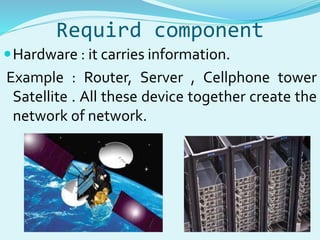
Hardware : it carries information. 
Example : Router, Server , Cellphone tower 
Satellite . All these device together create the 
network of network.
Required component 
Server : Machine that store the information we seek on the 
internet. 
Node : Element which serve as a connecting point along a route 
of traffic. 
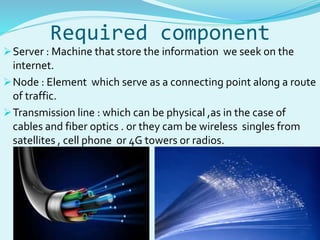
Transmission line : which can be physical ,as in the case of 
cables and fiber optics . or they cam be wireless singles from 
satellites , cell phone or 4G towers or radios.
Protocols 
 All of this hardware wouldn’t create a network without the 
second component of the internet that is protocols. 
 Protocols are sets of rules that machine follow to complete 
tasks. 
 Hypertext transfer protocol is what we use to view web sites 
through a browser . That’s what the http at the front of any web 
address stand for. 
 Two of most important protocols are the transmission control 
protocols (TCP) and internet protocols (IP). We often group the 
two together -- in most discussions about Internet protocols 
you'll see them listed as TCP/IP 
 Each device connected to the Internet has an IP address. This is 
how one machine can find another through the massive 
network.
Protocol’s working 
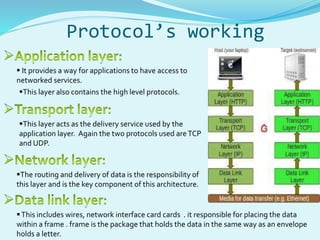
 It provides a way for applications to have access to 
networked services. 
This layer also contains the high level protocols. 
This layer acts as the delivery service used by the 
application layer. Again the two protocols used are TCP 
and UDP. 
The routing and delivery of data is the responsibility of 
this layer and is the key component of this architecture. 
 This includes wires, network interface card cards . it responsible for placing the data 
within a frame . frame is the package that holds the data in the same way as an envelope 
holds a letter.
Working 
 The browser broke the URL into three parts: 
 The protocol ("http") 
 The server name ("www.howstuffworks.com") 
 The file name ("web-server.htm") 
• The browser communicated with the help of ISP to a name 
server to translate the server name "www.howstuffworks.com" 
into an IP Address, which it uses to connect to the server 
machine. 
• Following the HTTP protocol, and a specific port number the 
browser sent a GET request to the server, asking for the file 
"http://www.howstuffworks.com/web-server.htm. 
• The server then sent the HTML text for the Web page to the 
browser . and browser read the HTML text and convert into 
plane text which is readable by us.
Terminology  ISPs : a home computer may be linked to the 
Internet using a phone-line modem, DSL or cable 
modem that talks to an Internet service provider 
(ISP) 
 ISP using a high speed line like a T1 line.ISP then 
connected to larger ISPs and the largest ISP 
maintain fiber optic “ backbones” for an entire 
nation or region.backbon are connected by fiber 
optics or satallite and other method.in this way 
every computer on internet connected to each 
other 
 each machine on the Internet is assigned a 
unique address called an IP address. IP stands 
for Internet protocol, and these addresses 
are 32-bit numbers 
Domain name : because most people have trouble remembering the strings of numbers that 
make up IP addresses, and because IP addresses sometimes need to change, all servers on 
the Internet also have human-readable names, called domain names . it contains three parts: 
The host name ("www") 
The domain name (“ howstuffworks ") 
The top-level domain name ("com")
Terminology 
 DNS : a set of servers called domain name servers (DNS) maps 
the human-readable names to the IP addresses. These servers 
are simple databases that map names to IP addresses, and they 
are distributed all over the Internet. 
 Port number : any server machine makes its services available to 
the internet using numbered ports, one for each service that is 
available on the server. 
 If the server machine accepts connections on a port from the 
outside world, and if a firewall is not protecting the port, you 
can connect to the port from anywhere on the Internet and use 
the service.
Terminology 
 Domain names within the ".com" domain are managed 
by the registrar calledVeriSign. VeriSign also manages 
".net" domain names. 
 VeriSign also maintains contact information for each site 
and runs the "whois" database. The host name is created 
by the company hosting the domain. "www" is a very 
common host name. 
 www is invented by Tim bernes lee . it is not internet . 
but it is a collection of large number of websites , images 
, video , audio etc which is connected by HTML.
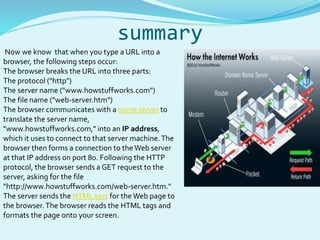
summary 
Now we know that when you type a URL into a 
browser, the following steps occur: 
The browser breaks the URL into three parts: 
The protocol ("http") 
The server name ("www.howstuffworks.com") 
The file name ("web-server.htm") 
The browser communicates with a name server to 
translate the server name, 
"www.howstuffworks.com," into an IP address, 
which it uses to connect to that server machine. The 
browser then forms a connection to the Web server 
at that IP address on port 80. Following the HTTP 
protocol, the browser sends a GET request to the 
server, asking for the file 
"http://www.howstuffworks.com/web-server.htm." 
The server sends the HTML text for the Web page to 
the browser. The browser reads the HTML tags and 
formats the page onto your screen.
References 
 www.howstuffworks.com 
 www.google.com
How Internet Works

How Internet Works

  • 1.
    Prepared by: SumitKumar Information Technology 0111IT121106 3rd Semester
  • 2.
    CONTENT  Introduction  Components  Protocols  Working Terminology  Summary  References
  • 3.
    INTRODUCTION  TheInternet is a global system of interconnected computer networks that use the standard Internet protocol suite (TCP/IP) to serve several billion users worldwide.  Who invented the internet it is not a contribution of one person but Tim Berners Lee on 25 december 1990,with the help of Robert Caillius implimented the first successful communication between a HyperText Transfer Protocol(HTTP) Client and server via internet.  Most website are in English language . the internet user is growing at a fast phase . we use internet in many fields like banking , communication , entertainment , for our bussiness exploring the world.
  • 4.
    Requird component Hardware: it carries information. Example : Router, Server , Cellphone tower Satellite . All these device together create the network of network.
  • 5.
    Required component Server: Machine that store the information we seek on the internet. Node : Element which serve as a connecting point along a route of traffic. Transmission line : which can be physical ,as in the case of cables and fiber optics . or they cam be wireless singles from satellites , cell phone or 4G towers or radios.
  • 6.
    Protocols  Allof this hardware wouldn’t create a network without the second component of the internet that is protocols.  Protocols are sets of rules that machine follow to complete tasks.  Hypertext transfer protocol is what we use to view web sites through a browser . That’s what the http at the front of any web address stand for.  Two of most important protocols are the transmission control protocols (TCP) and internet protocols (IP). We often group the two together -- in most discussions about Internet protocols you'll see them listed as TCP/IP  Each device connected to the Internet has an IP address. This is how one machine can find another through the massive network.
  • 7.
    Protocol’s working It provides a way for applications to have access to networked services. This layer also contains the high level protocols. This layer acts as the delivery service used by the application layer. Again the two protocols used are TCP and UDP. The routing and delivery of data is the responsibility of this layer and is the key component of this architecture.  This includes wires, network interface card cards . it responsible for placing the data within a frame . frame is the package that holds the data in the same way as an envelope holds a letter.
  • 8.
    Working  Thebrowser broke the URL into three parts:  The protocol ("http")  The server name ("www.howstuffworks.com")  The file name ("web-server.htm") • The browser communicated with the help of ISP to a name server to translate the server name "www.howstuffworks.com" into an IP Address, which it uses to connect to the server machine. • Following the HTTP protocol, and a specific port number the browser sent a GET request to the server, asking for the file "http://www.howstuffworks.com/web-server.htm. • The server then sent the HTML text for the Web page to the browser . and browser read the HTML text and convert into plane text which is readable by us.
  • 9.
    Terminology  ISPs: a home computer may be linked to the Internet using a phone-line modem, DSL or cable modem that talks to an Internet service provider (ISP)  ISP using a high speed line like a T1 line.ISP then connected to larger ISPs and the largest ISP maintain fiber optic “ backbones” for an entire nation or region.backbon are connected by fiber optics or satallite and other method.in this way every computer on internet connected to each other  each machine on the Internet is assigned a unique address called an IP address. IP stands for Internet protocol, and these addresses are 32-bit numbers Domain name : because most people have trouble remembering the strings of numbers that make up IP addresses, and because IP addresses sometimes need to change, all servers on the Internet also have human-readable names, called domain names . it contains three parts: The host name ("www") The domain name (“ howstuffworks ") The top-level domain name ("com")
  • 10.
    Terminology  DNS: a set of servers called domain name servers (DNS) maps the human-readable names to the IP addresses. These servers are simple databases that map names to IP addresses, and they are distributed all over the Internet.  Port number : any server machine makes its services available to the internet using numbered ports, one for each service that is available on the server.  If the server machine accepts connections on a port from the outside world, and if a firewall is not protecting the port, you can connect to the port from anywhere on the Internet and use the service.
  • 11.
    Terminology  Domainnames within the ".com" domain are managed by the registrar calledVeriSign. VeriSign also manages ".net" domain names.  VeriSign also maintains contact information for each site and runs the "whois" database. The host name is created by the company hosting the domain. "www" is a very common host name.  www is invented by Tim bernes lee . it is not internet . but it is a collection of large number of websites , images , video , audio etc which is connected by HTML.
  • 12.
    summary Now weknow that when you type a URL into a browser, the following steps occur: The browser breaks the URL into three parts: The protocol ("http") The server name ("www.howstuffworks.com") The file name ("web-server.htm") The browser communicates with a name server to translate the server name, "www.howstuffworks.com," into an IP address, which it uses to connect to that server machine. The browser then forms a connection to the Web server at that IP address on port 80. Following the HTTP protocol, the browser sends a GET request to the server, asking for the file "http://www.howstuffworks.com/web-server.htm." The server sends the HTML text for the Web page to the browser. The browser reads the HTML tags and formats the page onto your screen.
  • 13.

Editor's Notes