1
INFORMATION TECHNOLOGY
Hardware and Software
2
Learning Outcomes
• Define hardware and software
• Describe the hardware categories
• Describe the computers categories by size
• Define the two types of software
• Describe the role of the operating system
and utility software
• Compare the uses of vertical and horizontal
market software
• List the common input, output, storage, and
telecommunication devices
3
Hardware and Software: The Basics
 IT is any computer-based tool that:
 People use to work with information
 Support the information and information-
processing needs of an organization
 Hardware – physical aspects of computers,
telecommunications, and other information
technology devices
 Example: Keyboard, monitor
 Software -a general term for the various
kinds of programs used to operate computers
and related devices
 Example: Microsoft Excel
4
Six Categories of Hardware
 Input Device
 Output device
 Storage device
 Central processing unit (CPU)
 Telecommunications device
 Connecting device
5
Two main types of software
 Application software - software used to
solve specific problems or perform specific
tasks
 System software - handles tasks specific to
technology management and coordinates the
interaction of all technology devices
 Operating system software - supports the
application software and manages how the
hardware devices work together
 Utility software - provides additional
functionality to the operating system
6
Computer Categories
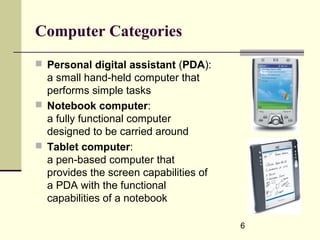
 Personal digital assistant (PDA):
a small hand-held computer that
performs simple tasks
 Notebook computer:
a fully functional computer
designed to be carried around
 Tablet computer:
a pen-based computer that
provides the screen capabilities of
a PDA with the functional
capabilities of a notebook
7
Computer Categories (continued)
 Desktop computer
 Minicomputer - designed to meet the computing
needs of several people simultaneously in a small to
medium-size business environment
 Mainframe computer - designed to meet the
computing needs of hundreds of people in a large
business environment
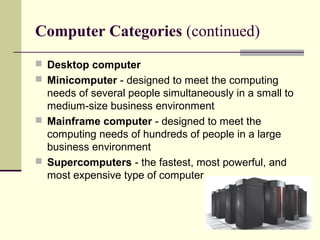
 Supercomputers - the fastest, most powerful, and
most expensive type of computer
8
Software
 Software contains the instructions that the
hardware executes to perform an
information processing task
 Without the aid of software, the computer
hardware is useless
 Two categories of software
 Application
 System
9
Application Software
 Application software is used for specific
information processing needs, including:
 Payroll
 Customer relationship management
 Project management
 Training
 Word processing and many others
10
Application Software (continued)
 Personal productivity software :
used to perform personal tasks such as
writing a memo, creating a graph, or creating
a slide presentation
 Examples:
 Microsoft Word
 Microsoft Excel
 Internet Explorer
 Quicken
11
Application Software (continued)
 Vertical market software :
application software that is unique to a
particular industry
 Patient-scheduling software
 Nursing allocation software
 Horizontal market software :
general enough to be suitable for use in a
variety of industries
 Inventory management software
 Payroll software
12
System Software
 System software controls how the various
technology tools work together along with the
application software
 Operating System controls application
software and manages how the hardware
devices work together
 Example: Microsoft Windows XP Home,
Mac OS, Linux
 Utility
 Uninstaller software, spyware software
13
Data Representation
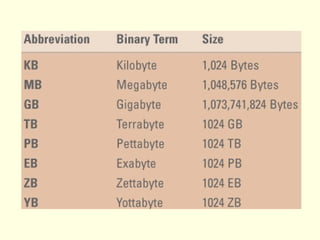
 Binary digit (bit)
 the smallest unit of information that a
computer can process
 ASCII (American Standard Code for
Information Interchange)
 the coding system that most personal
computers use to represent, process, and
store information
 Byte
 a group of eight bits to represent a character
14
Common Input Devices
 Input device is a tool
used to capture
information and
commands
 Examples include:
 Keyboard
 Point-of-sale (POS)
 Microphone
 Mouse
 Pointing stick
 Touch pad
 Touch screen
 Bar code reader
 Optical mark
recognition (OMR)
 Scanner
15
Common Output Devices
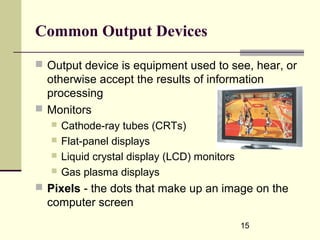
 Output device is equipment used to see, hear, or
otherwise accept the results of information
processing
 Monitors
 Cathode-ray tubes (CRTs)
 Flat-panel displays
 Liquid crystal display (LCD) monitors
 Gas plasma displays
 Pixels - the dots that make up an image on the
computer screen
16
Common Output Devices (continued)
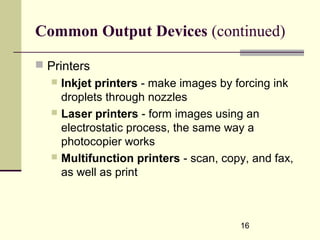
 Printers
 Inkjet printers - make images by forcing ink
droplets through nozzles
 Laser printers - form images using an
electrostatic process, the same way a
photocopier works
 Multifunction printers - scan, copy, and fax,
as well as print
17
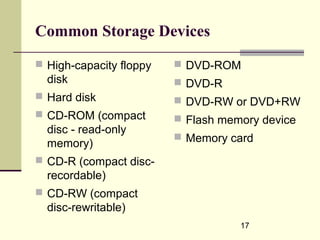
Common Storage Devices
 High-capacity floppy
disk
 Hard disk
 CD-ROM (compact
disc - read-only
memory)
 CD-R (compact disc-
recordable)
 CD-RW (compact
disc-rewritable)
 DVD-ROM
 DVD-R
 DVD-RW or DVD+RW
 Flash memory device
 Memory card
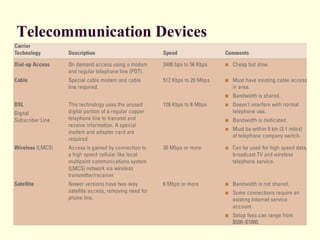
Telecommunication Devices
20
Communication Software
 Connectivity software
 enables a computer to “dial up” or connect to
another computer
 Web browser software
 enables a computer to surf the Web
 E-mail software
 enables electronic communication with other
people by sending and receiving e-mail
21
Wireless Connection
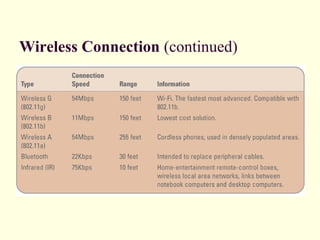
 Infrared also called IR or IrDA (infrared data
association) - uses red light to send and receive
information
 Bluetooth - standard for transmitting information in
the form of short range radio waves over distances of
up to 30 feet and is used for purposes such as
wirelessly connecting a cell phone or a PDA to a
computer
 WiFi (wireless fidelity) - standard for transmitting
information in the form of radio waves over distances
up to about 300 feet
Wireless Connection (continued)
23
Connecting Devices
 Connecting devices enable the hardware to
communicate with each other
 A parallel connector is used to plug a printer
into a system box
 Parallel connector interfaces with a parallel
port that is connected to an expansion card
24
Buses, Expansion Slots, Expansion
Cards; Ports, Connectors
 Expansion bus - moves information from the CPU
and RAM to all of the other hardware devices
 Expansion slot - a long skinny socket on the
motherboard into which an expansion card is inserted
 Expansion card - a circuit board that is inserted into
an expansion slot
 Ports - simply the plug-ins found on the outside of the
system box into which a connector is plugged into
 Popular connectors include:
 USB (universal serial bus)
 Serial connector
 Parallel connector
25
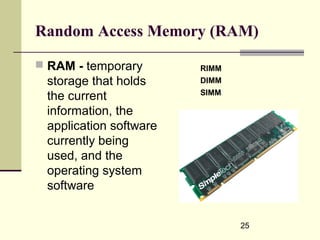
Random Access Memory (RAM)
 RAM - temporary
storage that holds
the current
information, the
application software
currently being
used, and the
operating system
software
RIMM
DIMM
SIMM
26
Central Processing Unit (CPU)
 CPU - the actual hardware that interprets and
executes the program instructions and coordinates
how all the other hardware devices work together.
 Control unit - interprets software instructions and
tells the other hardware devices what to do, based
on the software instructions
 Arithmetic/logic unit (ALU) - performs all
arithmetic operations and all logic operations
 CPU Speed
 Megahertz (MHz) - the number of millions of CPU
cycles per second
 Gigahertz (GHz) - the number of billions of CPU
cycles per second

T1 hardware software

  • 1.
  • 2.
    2 Learning Outcomes • Definehardware and software • Describe the hardware categories • Describe the computers categories by size • Define the two types of software • Describe the role of the operating system and utility software • Compare the uses of vertical and horizontal market software • List the common input, output, storage, and telecommunication devices
  • 3.
    3 Hardware and Software:The Basics  IT is any computer-based tool that:  People use to work with information  Support the information and information- processing needs of an organization  Hardware – physical aspects of computers, telecommunications, and other information technology devices  Example: Keyboard, monitor  Software -a general term for the various kinds of programs used to operate computers and related devices  Example: Microsoft Excel
  • 4.
    4 Six Categories ofHardware  Input Device  Output device  Storage device  Central processing unit (CPU)  Telecommunications device  Connecting device
  • 5.
    5 Two main typesof software  Application software - software used to solve specific problems or perform specific tasks  System software - handles tasks specific to technology management and coordinates the interaction of all technology devices  Operating system software - supports the application software and manages how the hardware devices work together  Utility software - provides additional functionality to the operating system
  • 6.
    6 Computer Categories  Personaldigital assistant (PDA): a small hand-held computer that performs simple tasks  Notebook computer: a fully functional computer designed to be carried around  Tablet computer: a pen-based computer that provides the screen capabilities of a PDA with the functional capabilities of a notebook
  • 7.
    7 Computer Categories (continued) Desktop computer  Minicomputer - designed to meet the computing needs of several people simultaneously in a small to medium-size business environment  Mainframe computer - designed to meet the computing needs of hundreds of people in a large business environment  Supercomputers - the fastest, most powerful, and most expensive type of computer
  • 8.
    8 Software  Software containsthe instructions that the hardware executes to perform an information processing task  Without the aid of software, the computer hardware is useless  Two categories of software  Application  System
  • 9.
    9 Application Software  Applicationsoftware is used for specific information processing needs, including:  Payroll  Customer relationship management  Project management  Training  Word processing and many others
  • 10.
    10 Application Software (continued) Personal productivity software : used to perform personal tasks such as writing a memo, creating a graph, or creating a slide presentation  Examples:  Microsoft Word  Microsoft Excel  Internet Explorer  Quicken
  • 11.
    11 Application Software (continued) Vertical market software : application software that is unique to a particular industry  Patient-scheduling software  Nursing allocation software  Horizontal market software : general enough to be suitable for use in a variety of industries  Inventory management software  Payroll software
  • 12.
    12 System Software  Systemsoftware controls how the various technology tools work together along with the application software  Operating System controls application software and manages how the hardware devices work together  Example: Microsoft Windows XP Home, Mac OS, Linux  Utility  Uninstaller software, spyware software
  • 13.
    13 Data Representation  Binarydigit (bit)  the smallest unit of information that a computer can process  ASCII (American Standard Code for Information Interchange)  the coding system that most personal computers use to represent, process, and store information  Byte  a group of eight bits to represent a character
  • 14.
    14 Common Input Devices Input device is a tool used to capture information and commands  Examples include:  Keyboard  Point-of-sale (POS)  Microphone  Mouse  Pointing stick  Touch pad  Touch screen  Bar code reader  Optical mark recognition (OMR)  Scanner
  • 15.
    15 Common Output Devices Output device is equipment used to see, hear, or otherwise accept the results of information processing  Monitors  Cathode-ray tubes (CRTs)  Flat-panel displays  Liquid crystal display (LCD) monitors  Gas plasma displays  Pixels - the dots that make up an image on the computer screen
  • 16.
    16 Common Output Devices(continued)  Printers  Inkjet printers - make images by forcing ink droplets through nozzles  Laser printers - form images using an electrostatic process, the same way a photocopier works  Multifunction printers - scan, copy, and fax, as well as print
  • 17.
    17 Common Storage Devices High-capacity floppy disk  Hard disk  CD-ROM (compact disc - read-only memory)  CD-R (compact disc- recordable)  CD-RW (compact disc-rewritable)  DVD-ROM  DVD-R  DVD-RW or DVD+RW  Flash memory device  Memory card
  • 19.
  • 20.
    20 Communication Software  Connectivitysoftware  enables a computer to “dial up” or connect to another computer  Web browser software  enables a computer to surf the Web  E-mail software  enables electronic communication with other people by sending and receiving e-mail
  • 21.
    21 Wireless Connection  Infraredalso called IR or IrDA (infrared data association) - uses red light to send and receive information  Bluetooth - standard for transmitting information in the form of short range radio waves over distances of up to 30 feet and is used for purposes such as wirelessly connecting a cell phone or a PDA to a computer  WiFi (wireless fidelity) - standard for transmitting information in the form of radio waves over distances up to about 300 feet
  • 22.
  • 23.
    23 Connecting Devices  Connectingdevices enable the hardware to communicate with each other  A parallel connector is used to plug a printer into a system box  Parallel connector interfaces with a parallel port that is connected to an expansion card
  • 24.
    24 Buses, Expansion Slots,Expansion Cards; Ports, Connectors  Expansion bus - moves information from the CPU and RAM to all of the other hardware devices  Expansion slot - a long skinny socket on the motherboard into which an expansion card is inserted  Expansion card - a circuit board that is inserted into an expansion slot  Ports - simply the plug-ins found on the outside of the system box into which a connector is plugged into  Popular connectors include:  USB (universal serial bus)  Serial connector  Parallel connector
  • 25.
    25 Random Access Memory(RAM)  RAM - temporary storage that holds the current information, the application software currently being used, and the operating system software RIMM DIMM SIMM
  • 26.
    26 Central Processing Unit(CPU)  CPU - the actual hardware that interprets and executes the program instructions and coordinates how all the other hardware devices work together.  Control unit - interprets software instructions and tells the other hardware devices what to do, based on the software instructions  Arithmetic/logic unit (ALU) - performs all arithmetic operations and all logic operations  CPU Speed  Megahertz (MHz) - the number of millions of CPU cycles per second  Gigahertz (GHz) - the number of billions of CPU cycles per second