Basics of Information Systems

                        Material from
     Fundamentals of Information Systems, Fourth Edition
                             By
             Ralph Stair and George Reynolds


1
Information Concepts:
       Data, Information, and Knowledge

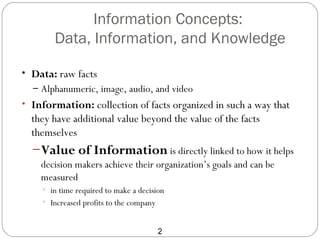
• Data: raw facts
  – Alphanumeric, image, audio, and video
• Information: collection of facts organized in such a way that
  they have additional value beyond the value of the facts
  themselves
  – Value of Information is directly linked to how it helps
    decision makers achieve their organization’s goals and can be
    measured
    • in time required to make a decision
    • Increased profits to the company


                                         2
Data, Information, and Knowledge


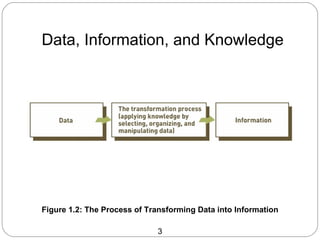
Figure 1.2: The Process of Transforming Data into Information

                             3
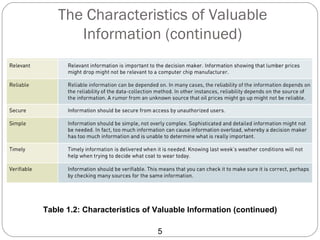
The Characteristics of Valuable
         Information


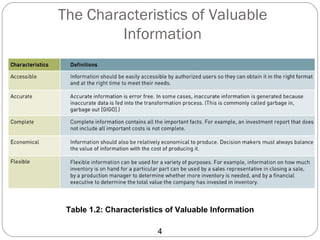
 Table 1.2: Characteristics of Valuable Information

                         4
The Characteristics of Valuable
      Information (continued)


Table 1.2: Characteristics of Valuable Information (continued)

                              5
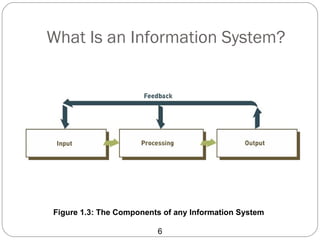
What Is an Information System?


Figure 1.3: The Components of any Information System

                         6
Computer-Based Information Systems
 Computer-based information system (CBIS): single
 set of hardware, software, databases, telecommunications,
 people, and procedures configured to collect, manipulate,
 store, and process data into information


                           7
Computer-Based Information Systems
• CBIS components
  – Hardware: computer equipment used to perform input,
    processing, and output activities
  – Software: computer programs that govern the operation of the
    computer
  – Database: organized collection of facts and information
  – Telecommunications: electronic transmission of signals for
    communications
  – Networks: connect computers and equipment in a building,
    around the country, and around the world


                             8
Business Information Systems
 Most common types of information systems used in business
  organizations
   Electronic and mobile commerce systems
   Transaction processing systems
   Management information systems
   Decision support systems
   Specialized business information systems


                                 9
Electronic and Mobile Commerce
 E-commerce: any business transaction executed electronically
  between parties
   Companies (B2B)
   Companies and consumers (B2C)
   Consumers and other consumers (C2C)
   Companies and the public sector
   Consumers and the public sector


                                10
Transaction Processing Systems

 Transaction: business-related exchange
   Payments to employees
   Sales to customers
   Payments to suppliers
 Transaction processing system (TPS): organized
  collection of people, procedures, software, databases, and
  devices used to record completed business transactions


                               11
Additional Business Information
                     Systems
• Management Information Systems (MIS)
  – provide routine information to managers and decision makers
• Knowledge Management Systems (KMS)
  – create, store, share, and use the organization’s knowledge and
    experience
• Artificial intelligence (AI)
  – field in which the computer system takes on the characteristics of
    human intelligence
• Decision support system (DSS)
  – used to support problem-specific decision making


                                  12
Hardware and Software Basics


13
Hardware Components
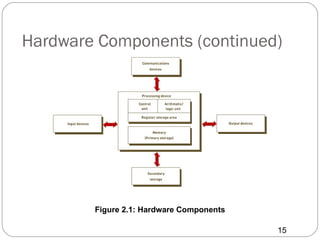
• Central processing unit (CPU)
  – Arithmetic/logic unit (ALU): performs calculations and makes
    logical comparisons
  – Control unit: accesses, decodes and coordinates data in CPU
    and other devices
• Primary memory: holds program instructions and data for
  processing
• Secondary storage: more permanent storage
• Input and output devices
• Communications devices


                             14
Hardware Components (continued)


        Figure 2.1: Hardware Components

                                          15
Processing and Memory Devices:
           Power and Speed
• System unit
  – Houses the components responsible for processing (the CPU
    and memory)
  – All other computer system devices are linked either directly or
    indirectly into the system unit housing
• Clock speed
  – series of electronic pulses produced at a predetermined rate
    that affects machine cycle time
  – Clock speed is often measured in megahertz (MHz) for millions
    or gigahertz(GHz) for billions of cycles per second


                              16
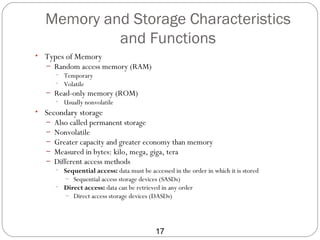
Memory and Storage Characteristics
           and Functions
• Types of Memory
   – Random access memory (RAM)
     • Temporary
     • Volatile
   – Read-only memory (ROM)
     • Usually nonvolatile
• Secondary storage
   –   Also called permanent storage
   –   Nonvolatile
   –   Greater capacity and greater economy than memory
   –   Measured in bytes: kilo, mega, giga, tera
   –   Different access methods
       • Sequential access: data must be accessed in the order in which it is stored
          – Sequential access storage devices (SASDs)
       • Direct access: data can be retrieved in any order
         – Direct access storage devices (DASDs)


                                            17
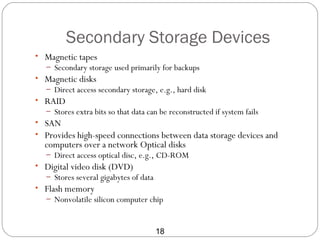
Secondary Storage Devices
• Magnetic tapes
   – Secondary storage used primarily for backups
• Magnetic disks
   – Direct access secondary storage, e.g., hard disk
• RAID
   – Stores extra bits so that data can be reconstructed if system fails
• SAN
• Provides high-speed connections between data storage devices and
  computers over a network Optical disks
   – Direct access optical disc, e.g., CD-ROM
• Digital video disk (DVD)
   – Stores several gigabytes of data
• Flash memory
   – Nonvolatile silicon computer chip


                                        18
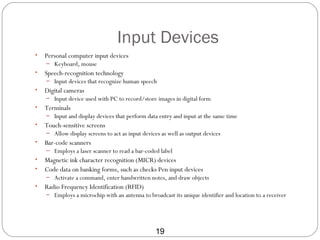
Input Devices
•   Personal computer input devices
    – Keyboard, mouse
•   Speech-recognition technology
    – Input devices that recognize human speech
•   Digital cameras
    – Input device used with PC to record/store images in digital form
•   Terminals
    – Input and display devices that perform data entry and input at the same time
•   Touch-sensitive screens
    – Allow display screens to act as input devices as well as output devices
•   Bar-code scanners
    – Employs a laser scanner to read a bar-coded label
•   Magnetic ink character recognition (MICR) devices
•   Code data on banking forms, such as checks Pen input devices
    – Activate a command, enter handwritten notes, and draw objects
•   Radio Frequency Identification (RFID)
    – Employs a microchip with an antenna to broadcast its unique identifier and location to a receiver


                                                 19
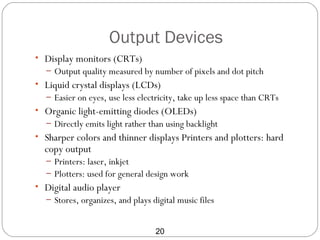
Output Devices
• Display monitors (CRTs)
  – Output quality measured by number of pixels and dot pitch
• Liquid crystal displays (LCDs)
  – Easier on eyes, use less electricity, take up less space than CRTs
• Organic light-emitting diodes (OLEDs)
  – Directly emits light rather than using backlight
• Sharper colors and thinner displays Printers and plotters: hard
  copy output
  – Printers: laser, inkjet
  – Plotters: used for general design work
• Digital audio player
  – Stores, organizes, and plays digital music files


                                  20
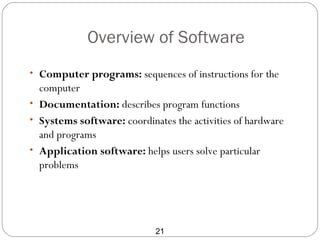
Overview of Software
• Computer programs: sequences of instructions for the
  computer
• Documentation: describes program functions
• Systems software: coordinates the activities of hardware
  and programs
• Application software: helps users solve particular
  problems


                            21
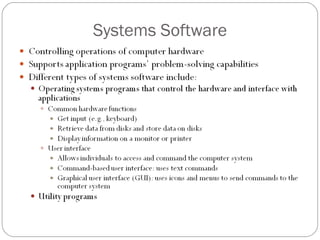
Systems Software
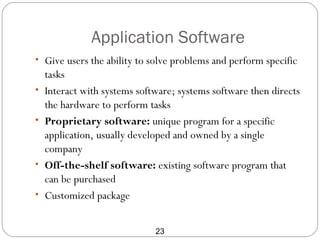
Application Software
• Give users the ability to solve problems and perform specific
    tasks
•   Interact with systems software; systems software then directs
    the hardware to perform tasks
•   Proprietary software: unique program for a specific
    application, usually developed and owned by a single
    company
•   Off-the-shelf software: existing software program that
    can be purchased
•   Customized package


                              23
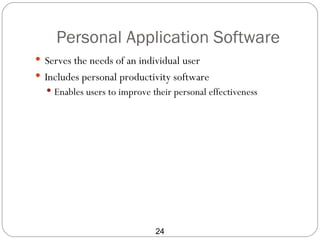
Personal Application Software
 Serves the needs of an individual user
 Includes personal productivity software
   Enables users to improve their personal effectiveness


                              24
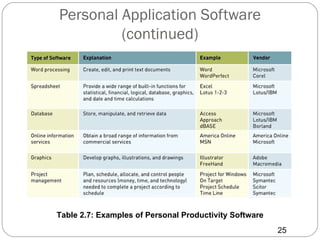
Personal Application Software
         (continued)


Table 2.7: Examples of Personal Productivity Software
                                                        25
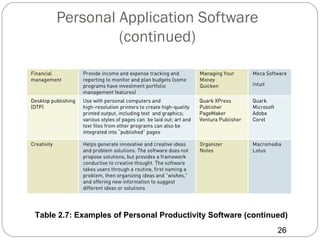
Personal Application Software
              (continued)


Table 2.7: Examples of Personal Productivity Software (continued)
                                                              26
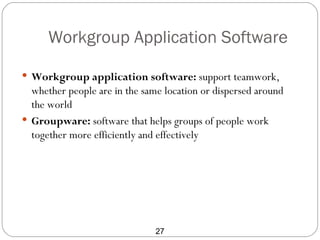
Workgroup Application Software

 Workgroup application software: support teamwork,
  whether people are in the same location or dispersed around
  the world
 Groupware: software that helps groups of people work
  together more efficiently and effectively


                               27
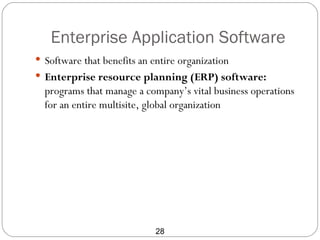
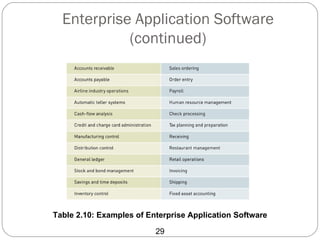
Enterprise Application Software
 Software that benefits an entire organization
 Enterprise resource planning (ERP) software:
  programs that manage a company’s vital business operations
  for an entire multisite, global organization


                             28
Enterprise Application Software
            (continued)


Table 2.10: Examples of Enterprise Application Software

                          29
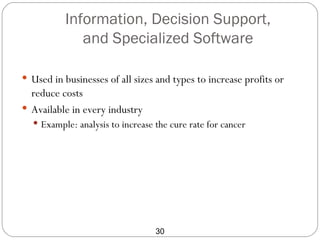
Information, Decision Support,
             and Specialized Software

 Used in businesses of all sizes and types to increase profits or
  reduce costs
 Available in every industry
   Example: analysis to increase the cure rate for cancer


                                  30
Data Management
Data Management
 Without data and the ability to process it, an organization
  could not successfully complete most business activities
 Data consists of raw facts
 For data to be transformed into useful information, it must
  first be organized in a meaningful way


                             32
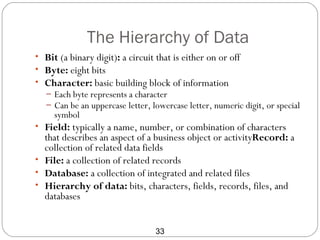
The Hierarchy of Data
• Bit (a binary digit): a circuit that is either on or off
• Byte: eight bits
• Character: basic building block of information
   – Each byte represents a character
   – Can be an uppercase letter, lowercase letter, numeric digit, or special
     symbol
• Field: typically a name, number, or combination of characters
  that describes an aspect of a business object or activityRecord: a
  collection of related data fields
• File: a collection of related records
• Database: a collection of integrated and related files
• Hierarchy of data: bits, characters, fields, records, files, and
  databases


                                  33
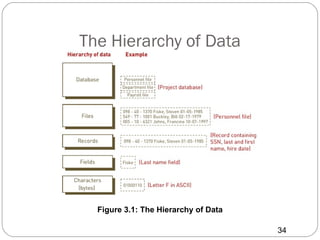
The Hierarchy of Data


  Figure 3.1: The Hierarchy of Data

                                      34
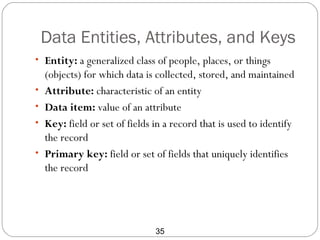
Data Entities, Attributes, and Keys
• Entity: a generalized class of people, places, or things
    (objects) for which data is collected, stored, and maintained
•   Attribute: characteristic of an entity
•   Data item: value of an attribute
•   Key: field or set of fields in a record that is used to identify
    the record
•   Primary key: field or set of fields that uniquely identifies
    the record


                                35
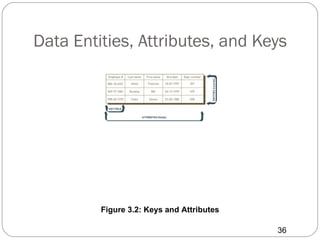
Data Entities, Attributes, and Keys


         Figure 3.2: Keys and Attributes

                                           36
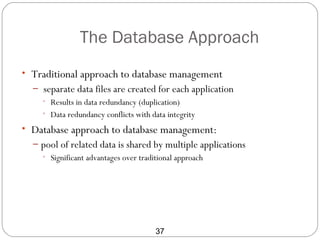
The Database Approach
• Traditional approach to database management
  – separate data files are created for each application
    • Results in data redundancy (duplication)
    • Data redundancy conflicts with data integrity

• Database approach to database management:
  – pool of related data is shared by multiple applications
    • Significant advantages over traditional approach


                                  37
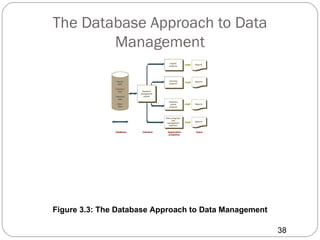
The Database Approach to Data
        Management


Figure 3.3: The Database Approach to Data Management

                                                       38
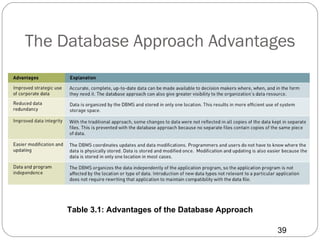
The Database Approach Advantages


    Table 3.1: Advantages of the Database Approach

                                                     39
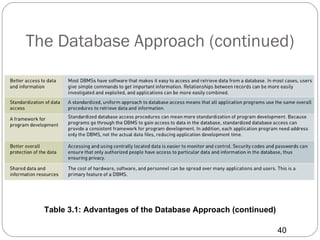
The Database Approach (continued)


  Table 3.1: Advantages of the Database Approach (continued)

                                                               40
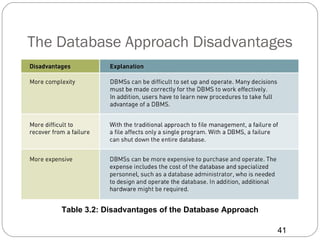
The Database Approach Disadvantages


    Table 3.2: Disadvantages of the Database Approach

                                                        41
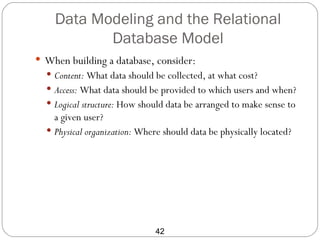
Data Modeling and the Relational
           Database Model
 When building a database, consider:
   Content: What data should be collected, at what cost?
   Access: What data should be provided to which users and when?
   Logical structure: How should data be arranged to make sense to
    a given user?
   Physical organization: Where should data be physically located?


                              42
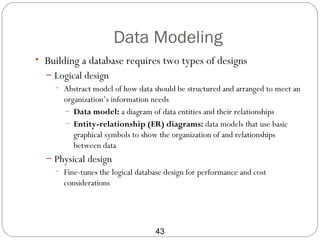
Data Modeling
• Building a database requires two types of designs
  – Logical design
    • Abstract model of how data should be structured and arranged to meet an
      organization’s information needs
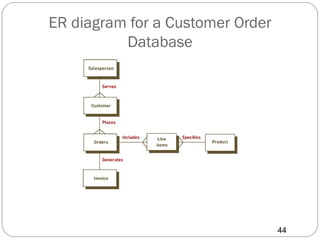
      – Data model: a diagram of data entities and their relationships
      – Entity-relationship (ER) diagrams: data models that use basic
         graphical symbols to show the organization of and relationships
         between data
  – Physical design
    • Fine-tunes the logical database design for performance and cost
       considerations


                                  43
ER diagram for a Customer Order
          Database


                                  44
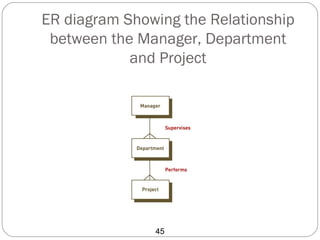
ER diagram Showing the Relationship
 between the Manager, Department
            and Project


               45
Implementing the Relational Database
               Model
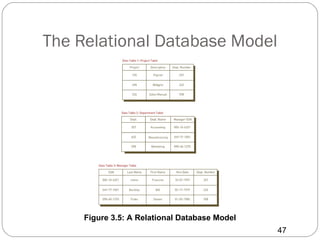
 data elements are placed in two-dimensional tables
  (relations), which are the logical equivalent of files
 Each row of a table represents a data entity
 Columns of the table represent attributes
 The domain of the database model consists of all of the
  allowable values for data attributes i


                            46
The Relational Database Model


     Figure 3.5: A Relational Database Model
                                               47
Manipulating Databases
 Selecting: eliminates rows according to criteria
 Projecting: eliminates columns in a table
 Joining: combines two or more tables
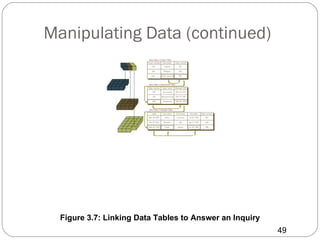
 Linking: relates or links two or more tables using common
  data attributes


                            48
Manipulating Data (continued)


  Figure 3.7: Linking Data Tables to Answer an Inquiry
                                                         49
Database Management Systems
                       (DBMS)

• Interface between:
  – Database and application programs
  – Database and the user
• Creating and implementing the right database system ensures
  that the database will support both business activities and goals
• DBMS: a group of programs used as an interface between a
  database and application programs or a database and the user


                                     50
Overview of Database Types
• Flat file
   – Simple database program whose records have no relationship to
     one another
• Single user
   – Only one person can use the database at a time
   – Examples: Access, FileMaker, and InfoPath
• Multiple user
   – Allows dozens or hundreds of people to access the same
     database system at the same time
   – Examples: Oracle, Sybase, and IBM


                              51
Distributed Databases
 Distributed database
   Data may be spread across several smaller databases connected
    via telecommunications devices
   Corporations get more flexibility in how databases are
    organized and used
 Replicated database
   Holds a duplicate set of frequently used data


                              52
Telecommunications
Basic Concepts of Telecommunications
• Telecommunications: electronic transmission of signals for
  communications
• Computer network: communications media, devices, and
  software needed to connect two or more computer systems
  or devices
• Network types: personal area network (PAN), local area
  network (LAN), metropolitan area network (MAN), wide
  area network (WAN), and international networks


                            54
The Internet
 Internet: collection of interconnected networks, all freely
  exchanging information
 Internet Protocol (IP): communication standard that enables
  traffic to be routed from one network to another as needed
 Uniform Resource Locator (URL): an assigned address on
  the Internet for each computer


                             55
Business Networks
 Intranet: internal corporate network built using Internet and
  World Wide Web standards and protocols
 Extranet: network based on Web technologies that links
  selected resources of a company’s intranet with its
  customers, suppliers, or other business partners


                            56
Systems Development
An Overview of Systems Development
 Managers and employees in all functional areas work
  together in a business information system
 Users help and often lead the way with development process
 Participants in systems development:
   Determine when a project fails
   Are critical to systems development success


                             58
Participants in Systems Development
• Development team consists of the following:
  – Project managers: coordinate system development effort
  – Stakeholders: directly or indirectly benefit from the project
  – Users: interact with the system regularly
  – Systems analysts: analyze and design business systems
  – Programmers: modify or develop programs to satisfy user
    requirements
  – Various support personnel: specialists, vendors


                                  59
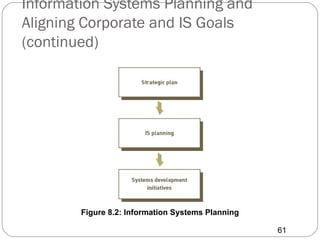
Information Systems Planning and
      Aligning Corporate and IS Goals
 Information systems planning: translating strategic and
  organizational goals into systems development initiatives
 Aligning organizational goals and IS goals is critical for any
  successful systems development effort
 Determining whether organizational and IS goals are aligned
  can be difficult


                             60
Information Systems Planning and
Aligning Corporate and IS Goals
(continued)


        Figure 8.2: Information Systems Planning

                                                   61
Systems Development Life Cycles
• The systems development process is also called a systems
  development life cycle (SDLC)
• Common SDLCs
  – Prototyping
  – Rapid application development (RAD) Systems
     • development approach that employs tools, techniques, and
       methodologies designed to speed application development
  – End-user development any systems
    • development project in which the primary effort is undertaken by a
      combination of business managers and users


                                  62
Systems Development Activities
• Systems investigation:
   – problems and opportunities are identified and considered in light of the goals of
     the business
• Systems analysis:
   – study of existing systems and work processes to identify strengths, weaknesses,
     and opportunities for improvement
• Systems design:
   – defines how the information system will do what it must do to obtain the
     problem solution
• Systems implementation:
   – creation or acquisition of various system components detailed in the systems
     design, assembling them, and placing the new or modified system into operation
• Systems maintenance and review:
   – ensures that the system operates as intended and modifies the system so that it
     continues to meet changing business needs


                                       63

Computer information mft review

  • 1.
    Basics of InformationSystems Material from Fundamentals of Information Systems, Fourth Edition By Ralph Stair and George Reynolds 1
  • 2.
    Information Concepts: Data, Information, and Knowledge • Data: raw facts – Alphanumeric, image, audio, and video • Information: collection of facts organized in such a way that they have additional value beyond the value of the facts themselves – Value of Information is directly linked to how it helps decision makers achieve their organization’s goals and can be measured • in time required to make a decision • Increased profits to the company 2
  • 3.
    Data, Information, andKnowledge Figure 1.2: The Process of Transforming Data into Information 3
  • 4.
    The Characteristics ofValuable Information Table 1.2: Characteristics of Valuable Information 4
  • 5.
    The Characteristics ofValuable Information (continued) Table 1.2: Characteristics of Valuable Information (continued) 5
  • 6.
    What Is anInformation System? Figure 1.3: The Components of any Information System 6
  • 7.
    Computer-Based Information Systems Computer-based information system (CBIS): single set of hardware, software, databases, telecommunications, people, and procedures configured to collect, manipulate, store, and process data into information 7
  • 8.
    Computer-Based Information Systems •CBIS components – Hardware: computer equipment used to perform input, processing, and output activities – Software: computer programs that govern the operation of the computer – Database: organized collection of facts and information – Telecommunications: electronic transmission of signals for communications – Networks: connect computers and equipment in a building, around the country, and around the world 8
  • 9.
    Business Information Systems Most common types of information systems used in business organizations  Electronic and mobile commerce systems  Transaction processing systems  Management information systems  Decision support systems  Specialized business information systems 9
  • 10.
    Electronic and MobileCommerce  E-commerce: any business transaction executed electronically between parties  Companies (B2B)  Companies and consumers (B2C)  Consumers and other consumers (C2C)  Companies and the public sector  Consumers and the public sector 10
  • 11.
    Transaction Processing Systems Transaction: business-related exchange  Payments to employees  Sales to customers  Payments to suppliers  Transaction processing system (TPS): organized collection of people, procedures, software, databases, and devices used to record completed business transactions 11
  • 12.
    Additional Business Information Systems • Management Information Systems (MIS) – provide routine information to managers and decision makers • Knowledge Management Systems (KMS) – create, store, share, and use the organization’s knowledge and experience • Artificial intelligence (AI) – field in which the computer system takes on the characteristics of human intelligence • Decision support system (DSS) – used to support problem-specific decision making 12
  • 13.
  • 14.
    Hardware Components • Centralprocessing unit (CPU) – Arithmetic/logic unit (ALU): performs calculations and makes logical comparisons – Control unit: accesses, decodes and coordinates data in CPU and other devices • Primary memory: holds program instructions and data for processing • Secondary storage: more permanent storage • Input and output devices • Communications devices 14
  • 15.
    Hardware Components (continued) Figure 2.1: Hardware Components 15
  • 16.
    Processing and MemoryDevices: Power and Speed • System unit – Houses the components responsible for processing (the CPU and memory) – All other computer system devices are linked either directly or indirectly into the system unit housing • Clock speed – series of electronic pulses produced at a predetermined rate that affects machine cycle time – Clock speed is often measured in megahertz (MHz) for millions or gigahertz(GHz) for billions of cycles per second 16
  • 17.
    Memory and StorageCharacteristics and Functions • Types of Memory – Random access memory (RAM) • Temporary • Volatile – Read-only memory (ROM) • Usually nonvolatile • Secondary storage – Also called permanent storage – Nonvolatile – Greater capacity and greater economy than memory – Measured in bytes: kilo, mega, giga, tera – Different access methods • Sequential access: data must be accessed in the order in which it is stored – Sequential access storage devices (SASDs) • Direct access: data can be retrieved in any order – Direct access storage devices (DASDs) 17
  • 18.
    Secondary Storage Devices •Magnetic tapes – Secondary storage used primarily for backups • Magnetic disks – Direct access secondary storage, e.g., hard disk • RAID – Stores extra bits so that data can be reconstructed if system fails • SAN • Provides high-speed connections between data storage devices and computers over a network Optical disks – Direct access optical disc, e.g., CD-ROM • Digital video disk (DVD) – Stores several gigabytes of data • Flash memory – Nonvolatile silicon computer chip 18
  • 19.
    Input Devices • Personal computer input devices – Keyboard, mouse • Speech-recognition technology – Input devices that recognize human speech • Digital cameras – Input device used with PC to record/store images in digital form • Terminals – Input and display devices that perform data entry and input at the same time • Touch-sensitive screens – Allow display screens to act as input devices as well as output devices • Bar-code scanners – Employs a laser scanner to read a bar-coded label • Magnetic ink character recognition (MICR) devices • Code data on banking forms, such as checks Pen input devices – Activate a command, enter handwritten notes, and draw objects • Radio Frequency Identification (RFID) – Employs a microchip with an antenna to broadcast its unique identifier and location to a receiver 19
  • 20.
    Output Devices • Displaymonitors (CRTs) – Output quality measured by number of pixels and dot pitch • Liquid crystal displays (LCDs) – Easier on eyes, use less electricity, take up less space than CRTs • Organic light-emitting diodes (OLEDs) – Directly emits light rather than using backlight • Sharper colors and thinner displays Printers and plotters: hard copy output – Printers: laser, inkjet – Plotters: used for general design work • Digital audio player – Stores, organizes, and plays digital music files 20
  • 21.
    Overview of Software •Computer programs: sequences of instructions for the computer • Documentation: describes program functions • Systems software: coordinates the activities of hardware and programs • Application software: helps users solve particular problems 21
  • 22.
  • 23.
    Application Software • Giveusers the ability to solve problems and perform specific tasks • Interact with systems software; systems software then directs the hardware to perform tasks • Proprietary software: unique program for a specific application, usually developed and owned by a single company • Off-the-shelf software: existing software program that can be purchased • Customized package 23
  • 24.
    Personal Application Software Serves the needs of an individual user  Includes personal productivity software  Enables users to improve their personal effectiveness 24
  • 25.
    Personal Application Software (continued) Table 2.7: Examples of Personal Productivity Software 25
  • 26.
    Personal Application Software (continued) Table 2.7: Examples of Personal Productivity Software (continued) 26
  • 27.
    Workgroup Application Software Workgroup application software: support teamwork, whether people are in the same location or dispersed around the world  Groupware: software that helps groups of people work together more efficiently and effectively 27
  • 28.
    Enterprise Application Software Software that benefits an entire organization  Enterprise resource planning (ERP) software: programs that manage a company’s vital business operations for an entire multisite, global organization 28
  • 29.
    Enterprise Application Software (continued) Table 2.10: Examples of Enterprise Application Software 29
  • 30.
    Information, Decision Support, and Specialized Software  Used in businesses of all sizes and types to increase profits or reduce costs  Available in every industry  Example: analysis to increase the cure rate for cancer 30
  • 31.
  • 32.
    Data Management  Withoutdata and the ability to process it, an organization could not successfully complete most business activities  Data consists of raw facts  For data to be transformed into useful information, it must first be organized in a meaningful way 32
  • 33.
    The Hierarchy ofData • Bit (a binary digit): a circuit that is either on or off • Byte: eight bits • Character: basic building block of information – Each byte represents a character – Can be an uppercase letter, lowercase letter, numeric digit, or special symbol • Field: typically a name, number, or combination of characters that describes an aspect of a business object or activityRecord: a collection of related data fields • File: a collection of related records • Database: a collection of integrated and related files • Hierarchy of data: bits, characters, fields, records, files, and databases 33
  • 34.
    The Hierarchy ofData Figure 3.1: The Hierarchy of Data 34
  • 35.
    Data Entities, Attributes,and Keys • Entity: a generalized class of people, places, or things (objects) for which data is collected, stored, and maintained • Attribute: characteristic of an entity • Data item: value of an attribute • Key: field or set of fields in a record that is used to identify the record • Primary key: field or set of fields that uniquely identifies the record 35
  • 36.
    Data Entities, Attributes,and Keys Figure 3.2: Keys and Attributes 36
  • 37.
    The Database Approach •Traditional approach to database management – separate data files are created for each application • Results in data redundancy (duplication) • Data redundancy conflicts with data integrity • Database approach to database management: – pool of related data is shared by multiple applications • Significant advantages over traditional approach 37
  • 38.
    The Database Approachto Data Management Figure 3.3: The Database Approach to Data Management 38
  • 39.
    The Database ApproachAdvantages Table 3.1: Advantages of the Database Approach 39
  • 40.
    The Database Approach(continued) Table 3.1: Advantages of the Database Approach (continued) 40
  • 41.
    The Database ApproachDisadvantages Table 3.2: Disadvantages of the Database Approach 41
  • 42.
    Data Modeling andthe Relational Database Model  When building a database, consider:  Content: What data should be collected, at what cost?  Access: What data should be provided to which users and when?  Logical structure: How should data be arranged to make sense to a given user?  Physical organization: Where should data be physically located? 42
  • 43.
    Data Modeling • Buildinga database requires two types of designs – Logical design • Abstract model of how data should be structured and arranged to meet an organization’s information needs – Data model: a diagram of data entities and their relationships – Entity-relationship (ER) diagrams: data models that use basic graphical symbols to show the organization of and relationships between data – Physical design • Fine-tunes the logical database design for performance and cost considerations 43
  • 44.
    ER diagram fora Customer Order Database 44
  • 45.
    ER diagram Showingthe Relationship between the Manager, Department and Project 45
  • 46.
    Implementing the RelationalDatabase Model  data elements are placed in two-dimensional tables (relations), which are the logical equivalent of files  Each row of a table represents a data entity  Columns of the table represent attributes  The domain of the database model consists of all of the allowable values for data attributes i 46
  • 47.
    The Relational DatabaseModel Figure 3.5: A Relational Database Model 47
  • 48.
    Manipulating Databases  Selecting:eliminates rows according to criteria  Projecting: eliminates columns in a table  Joining: combines two or more tables  Linking: relates or links two or more tables using common data attributes 48
  • 49.
    Manipulating Data (continued) Figure 3.7: Linking Data Tables to Answer an Inquiry 49
  • 50.
    Database Management Systems (DBMS) • Interface between: – Database and application programs – Database and the user • Creating and implementing the right database system ensures that the database will support both business activities and goals • DBMS: a group of programs used as an interface between a database and application programs or a database and the user 50
  • 51.
    Overview of DatabaseTypes • Flat file – Simple database program whose records have no relationship to one another • Single user – Only one person can use the database at a time – Examples: Access, FileMaker, and InfoPath • Multiple user – Allows dozens or hundreds of people to access the same database system at the same time – Examples: Oracle, Sybase, and IBM 51
  • 52.
    Distributed Databases  Distributeddatabase  Data may be spread across several smaller databases connected via telecommunications devices  Corporations get more flexibility in how databases are organized and used  Replicated database  Holds a duplicate set of frequently used data 52
  • 53.
  • 54.
    Basic Concepts ofTelecommunications • Telecommunications: electronic transmission of signals for communications • Computer network: communications media, devices, and software needed to connect two or more computer systems or devices • Network types: personal area network (PAN), local area network (LAN), metropolitan area network (MAN), wide area network (WAN), and international networks 54
  • 55.
    The Internet  Internet:collection of interconnected networks, all freely exchanging information  Internet Protocol (IP): communication standard that enables traffic to be routed from one network to another as needed  Uniform Resource Locator (URL): an assigned address on the Internet for each computer 55
  • 56.
    Business Networks  Intranet:internal corporate network built using Internet and World Wide Web standards and protocols  Extranet: network based on Web technologies that links selected resources of a company’s intranet with its customers, suppliers, or other business partners 56
  • 57.
  • 58.
    An Overview ofSystems Development  Managers and employees in all functional areas work together in a business information system  Users help and often lead the way with development process  Participants in systems development:  Determine when a project fails  Are critical to systems development success 58
  • 59.
    Participants in SystemsDevelopment • Development team consists of the following: – Project managers: coordinate system development effort – Stakeholders: directly or indirectly benefit from the project – Users: interact with the system regularly – Systems analysts: analyze and design business systems – Programmers: modify or develop programs to satisfy user requirements – Various support personnel: specialists, vendors 59
  • 60.
    Information Systems Planningand Aligning Corporate and IS Goals  Information systems planning: translating strategic and organizational goals into systems development initiatives  Aligning organizational goals and IS goals is critical for any successful systems development effort  Determining whether organizational and IS goals are aligned can be difficult 60
  • 61.
    Information Systems Planningand Aligning Corporate and IS Goals (continued) Figure 8.2: Information Systems Planning 61
  • 62.
    Systems Development LifeCycles • The systems development process is also called a systems development life cycle (SDLC) • Common SDLCs – Prototyping – Rapid application development (RAD) Systems • development approach that employs tools, techniques, and methodologies designed to speed application development – End-user development any systems • development project in which the primary effort is undertaken by a combination of business managers and users 62
  • 63.
    Systems Development Activities •Systems investigation: – problems and opportunities are identified and considered in light of the goals of the business • Systems analysis: – study of existing systems and work processes to identify strengths, weaknesses, and opportunities for improvement • Systems design: – defines how the information system will do what it must do to obtain the problem solution • Systems implementation: – creation or acquisition of various system components detailed in the systems design, assembling them, and placing the new or modified system into operation • Systems maintenance and review: – ensures that the system operates as intended and modifies the system so that it continues to meet changing business needs 63