 Definition
 History
 Applications
 Display Devices
 Development of Lines , Circles through algorithms
 Transformations
 Graphics (from Greek graphikos- "belonging
to drawing") are
◦ visual images or designs on some surface, such as
a wall,, screen, paper, or stone
 To convey ,
 To inform,
 To illustrate, or
 To entertain.
Images that are generated by a
computer are called computer
graphics.
 Def1: “The art of creating pictures and
maintaining them is known as computer
graphics”.
 Def2: “Computer Graphics is study of techniques
to improve communication between human and
machine”.
 Def3: “Computer Graphics is defined as the use
of computer to define, store, manipulate,
interrogate, and present pictorial output”.
 There are two types of Computer Graphics
 (1) Non-Interactive:
◦ The observer has no control over images.
◦ It is also called passive computer graphics.
◦ The Image is completely controlled by the instructions of the program,
not by the user.
 Examples:
◦ Titles on T.V
◦ Screen savers.
◦ Map representation of the data.
◦ Business graphics are used as brochures, business cards, menu of the
hotel.
 (2) Interactive Computer Graphics:
◦ we can give some control to the observer over the images by
providing him the I/P device, so that observer can signal his
request to the computer.
◦ Interactive Computer Graphics involves computer-user two-
way communication.
 Examples
◦ Games
◦ Touch screen
◦ Display of whether information.
 In 1950, the first computer driven display at MIT’s
whirlwind1 computer.
 Towards the end of the decade with the development
of the machines like TX-0 (Transistor based computer),
and TX-2, interactive computer graphics feasible.
 In the year 1962, Ivan-E-Sutherland’s thesis titled
◦ “A man-machine Graphical communication system”
 By mid 1960’s large CG research projects were
underway at MIT,General Motors, Bell telephone
Laboratories.
 1970
◦ Size of CAD market estimated at $25 million.
◦ ANSYS founded
 1972
◦ Nolan Kay Bushnell creates Pong, video arcade game.
◦ Raster displays begin to appear.
◦ Introduction of the CT scanner
 1977
◦ The Apple II is the first graphics personal computer.
◦ Star Wars is released; its only computer effects were vector-based, and then filmed.
◦ CADAM, the first commercial 2D CAD package, is released.
 1978
◦ First real standard for constructive solid geometry developed by H. Voelcker et al.
◦ Charles Lang at Cambridge University develops the first real boundary
representation modelling engine
 1979
◦ Size of CAD market estimated at $1 billion
 1981
◦ CATIA, one of the first 3D CAD packages, is developed, using constructive solid
geometry.
 1982
◦ The Commodore 64 personal computer used raster graphics so that regular
televisions could be display devices.
◦ TRON is the first movie to make extensive use of computer graphics.
◦ AutoCAD 1.0 is released - it uses wireframe representation only.
 1987
◦ VGA graphics standard introduced. Pro/Engineer launched as first pure UNIX CAD
software. Everyone laughed. 18 months later, all major CAD vendors were
developing CAD for UNIX.
1988
◦ CATIA selected as CAD package for Boeing 777 leading to a $1 billion revenue for
Dassault.
 1995
◦ Toy Story, the first fully CGI movie, is released.
◦ Solidworks is released.
◦ MS Internet Explorer 1.0 is released.
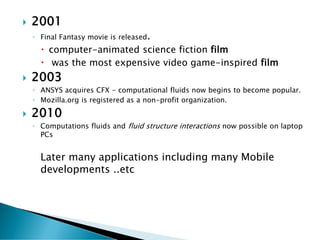
 2001
◦ Final Fantasy movie is released.
 computer-animated science fiction film
 was the most expensive video game-inspired film
 2003
◦ ANSYS acquires CFX - computational fluids now begins to become popular.
◦ Mozilla.org is registered as a non-profit organization.
 2010
◦ Computations fluids and fluid structure interactions now possible on laptop
PCs
Later many applications including many Mobile
developments ..etc
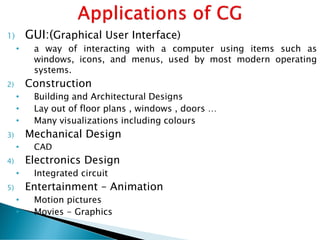
1) GUI:(Graphical User Interface)
• a way of interacting with a computer using items such as
windows, icons, and menus, used by most modern operating
systems.
2) Construction
• Building and Architectural Designs
• Lay out of floor plans , windows , doors …
• Many visualizations including colours
3) Mechanical Design
• CAD
4) Electronics Design
• Integrated circuit
5) Entertainment – Animation
• Motion pictures
• Movies - Graphics
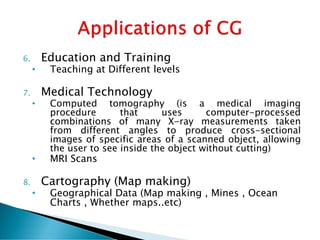
6. Education and Training
• Teaching at Different levels
7. Medical Technology
• Computed tomography (is a medical imaging
procedure that uses computer-processed
combinations of many X-ray measurements taken
from different angles to produce cross-sectional
images of specific areas of a scanned object, allowing
the user to see inside the object without cutting)
• MRI Scans
8. Cartography (Map making)
• Geographical Data (Map making , Mines , Ocean
Charts , Whether maps..etc)
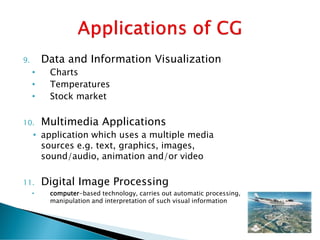
9. Data and Information Visualization
• Charts
• Temperatures
• Stock market
10. Multimedia Applications
• application which uses a multiple media
sources e.g. text, graphics, images,
sound/audio, animation and/or video
11. Digital Image Processing
• computer-based technology, carries out automatic processing,
manipulation and interpretation of such visual information
Advantages of Computer graphics
Some important benefits of Computer graphics are:
•Increase Productivity
•Computer graphics give us tools for creating pictures of solid objects as well as of
theoretical, engineered objects.
•Computer graphics also point out the moving images.
•The computer can store complex drawings and display complex pictures.
•Sound cards are used to make computers produce sound effects led to other uses
of graphics.
Disadvantages of Computer graphics: Some problems with computer graphics
are:
•Hardware characteristics and cost.
•Technical issues.
•Coupling issues (display-to-simulation).
•Define the motion.
•Structure of drawings (making the structure explicit).
•Hidden line removal.
•Program instrumentation and visualization.
Ref : https://www.totalyatra.com/computer-graphics-tutorial/
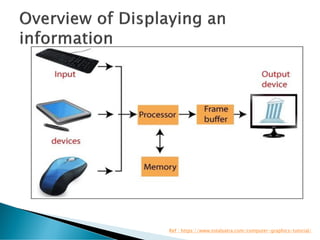
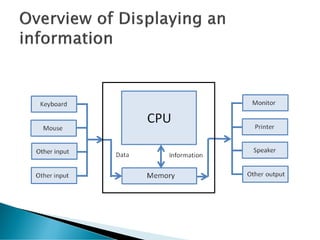
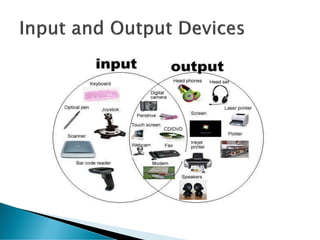
 Input Devices
Input devices can send data or information to a computer or
another device. Input devices cannot receive data or signal from
some other devices.
1. Keyboard: It is an input device which sends data in to the computer. The
data send depends on the key pressed by the user.
2. Mouse: A mouse is a small handheld input device which controls a cursor
in a graphical user interface. It can move and select text, files, folders etc.
on our computer according to the user input.
3. Microphone: it receives audio generated by some input source and sends
the same to a computer.
4. Webcam: it sends the captured images to a computer.
5. Graphics Tablets: This input device is used to draw using hand.
 6. Trackballs: trackball is an upside down mouse which is
encased within a socket. It is a cursor control device.
 7. Barcode reader: It is used to read the barcode of various
items and feed the same to computer.
 8. Gamepad: Also known as joy pad is the input controller
for video games.
 9. Joystick: these input devices are used to control video
games.
 10. Scanner: Scanner optically reads and document, file or
image and then changes it into digital signal and sends to
the computer.
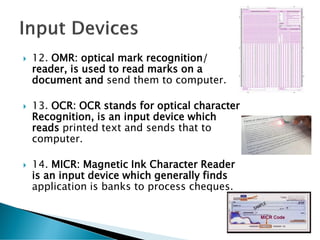
 12. OMR: optical mark recognition/
reader, is used to read marks on a
document and send them to computer.
 13. OCR: OCR stands for optical character
Recognition, is an input device which
reads printed text and sends that to
computer.
 14. MICR: Magnetic Ink Character Reader
is an input device which generally finds
application is banks to process cheques.
 Output Devices
 A device that can receive data from computer or another device
and create output with that data is called output device.
Examples of various output devices are as :
 1. Monitor: A monitor is an output device that is responsible for
receiving data from a computer and displaying that information
as text or images for users to see.
 2. Projector: Gets data from a computer and displays or projects
the same information onto a screen or a wall. Projector cannot
directly accept data from a user and send that data to another
device.
 3. Speakers: Receives sound signal from a computer and then
plays that sound signal and thus we hear songs or music or any
other audio.
 Both Input / Output Devices
 An input/output device is capable of receiving data from users or another devices and also
sending data to another devices or computers. That means a devices which can be used as
both input device and output device are called Input / Output (I/O) devices.
 Some examples of input/output devices are as:
 1. USB drive: Also known as pen drive or flash stick works as both input device to computer
and as an output device. USB drives receive or save data from a computer as an input and it can
also send data to a computer or another device.
 2. Modems: It is used to transmit and receive data from one computer to another computer or
other devices using telephone lines
 3. CD-RW drives and DVD-RW drives: Receives data from a computer as input to copy onto and
save into writable CD or DVD. We also use CDs or DVDs to transfer data to a computer.
 4. Touch Screen: Touch screen is both input and output device. By touching the screen input is
provided and being a screen, it is used as an output device.
 5. Headsets: Headset consists of speaker as an output device and microphone functions as an
input device.
 THANK YOU

Introduction to Computer Graphics with examples

  • 2.
     Definition  History Applications  Display Devices  Development of Lines , Circles through algorithms  Transformations
  • 3.
     Graphics (fromGreek graphikos- "belonging to drawing") are ◦ visual images or designs on some surface, such as a wall,, screen, paper, or stone  To convey ,  To inform,  To illustrate, or  To entertain. Images that are generated by a computer are called computer graphics.
  • 4.
     Def1: “Theart of creating pictures and maintaining them is known as computer graphics”.  Def2: “Computer Graphics is study of techniques to improve communication between human and machine”.  Def3: “Computer Graphics is defined as the use of computer to define, store, manipulate, interrogate, and present pictorial output”.
  • 5.
     There aretwo types of Computer Graphics  (1) Non-Interactive: ◦ The observer has no control over images. ◦ It is also called passive computer graphics. ◦ The Image is completely controlled by the instructions of the program, not by the user.  Examples: ◦ Titles on T.V ◦ Screen savers. ◦ Map representation of the data. ◦ Business graphics are used as brochures, business cards, menu of the hotel.
  • 6.
     (2) InteractiveComputer Graphics: ◦ we can give some control to the observer over the images by providing him the I/P device, so that observer can signal his request to the computer. ◦ Interactive Computer Graphics involves computer-user two- way communication.  Examples ◦ Games ◦ Touch screen ◦ Display of whether information.
  • 7.
     In 1950,the first computer driven display at MIT’s whirlwind1 computer.  Towards the end of the decade with the development of the machines like TX-0 (Transistor based computer), and TX-2, interactive computer graphics feasible.  In the year 1962, Ivan-E-Sutherland’s thesis titled ◦ “A man-machine Graphical communication system”  By mid 1960’s large CG research projects were underway at MIT,General Motors, Bell telephone Laboratories.
  • 8.
     1970 ◦ Sizeof CAD market estimated at $25 million. ◦ ANSYS founded  1972 ◦ Nolan Kay Bushnell creates Pong, video arcade game. ◦ Raster displays begin to appear. ◦ Introduction of the CT scanner  1977 ◦ The Apple II is the first graphics personal computer. ◦ Star Wars is released; its only computer effects were vector-based, and then filmed. ◦ CADAM, the first commercial 2D CAD package, is released.  1978 ◦ First real standard for constructive solid geometry developed by H. Voelcker et al. ◦ Charles Lang at Cambridge University develops the first real boundary representation modelling engine
  • 9.
     1979 ◦ Sizeof CAD market estimated at $1 billion  1981 ◦ CATIA, one of the first 3D CAD packages, is developed, using constructive solid geometry.  1982 ◦ The Commodore 64 personal computer used raster graphics so that regular televisions could be display devices. ◦ TRON is the first movie to make extensive use of computer graphics. ◦ AutoCAD 1.0 is released - it uses wireframe representation only.  1987 ◦ VGA graphics standard introduced. Pro/Engineer launched as first pure UNIX CAD software. Everyone laughed. 18 months later, all major CAD vendors were developing CAD for UNIX. 1988 ◦ CATIA selected as CAD package for Boeing 777 leading to a $1 billion revenue for Dassault.  1995 ◦ Toy Story, the first fully CGI movie, is released. ◦ Solidworks is released. ◦ MS Internet Explorer 1.0 is released.
  • 10.
     2001 ◦ FinalFantasy movie is released.  computer-animated science fiction film  was the most expensive video game-inspired film  2003 ◦ ANSYS acquires CFX - computational fluids now begins to become popular. ◦ Mozilla.org is registered as a non-profit organization.  2010 ◦ Computations fluids and fluid structure interactions now possible on laptop PCs Later many applications including many Mobile developments ..etc
  • 11.
    1) GUI:(Graphical UserInterface) • a way of interacting with a computer using items such as windows, icons, and menus, used by most modern operating systems. 2) Construction • Building and Architectural Designs • Lay out of floor plans , windows , doors … • Many visualizations including colours 3) Mechanical Design • CAD 4) Electronics Design • Integrated circuit 5) Entertainment – Animation • Motion pictures • Movies - Graphics
  • 12.
    6. Education andTraining • Teaching at Different levels 7. Medical Technology • Computed tomography (is a medical imaging procedure that uses computer-processed combinations of many X-ray measurements taken from different angles to produce cross-sectional images of specific areas of a scanned object, allowing the user to see inside the object without cutting) • MRI Scans 8. Cartography (Map making) • Geographical Data (Map making , Mines , Ocean Charts , Whether maps..etc)
  • 13.
    9. Data andInformation Visualization • Charts • Temperatures • Stock market 10. Multimedia Applications • application which uses a multiple media sources e.g. text, graphics, images, sound/audio, animation and/or video 11. Digital Image Processing • computer-based technology, carries out automatic processing, manipulation and interpretation of such visual information
  • 15.
    Advantages of Computergraphics Some important benefits of Computer graphics are: •Increase Productivity •Computer graphics give us tools for creating pictures of solid objects as well as of theoretical, engineered objects. •Computer graphics also point out the moving images. •The computer can store complex drawings and display complex pictures. •Sound cards are used to make computers produce sound effects led to other uses of graphics. Disadvantages of Computer graphics: Some problems with computer graphics are: •Hardware characteristics and cost. •Technical issues. •Coupling issues (display-to-simulation). •Define the motion. •Structure of drawings (making the structure explicit). •Hidden line removal. •Program instrumentation and visualization.
  • 16.
  • 18.
     Input Devices Inputdevices can send data or information to a computer or another device. Input devices cannot receive data or signal from some other devices. 1. Keyboard: It is an input device which sends data in to the computer. The data send depends on the key pressed by the user. 2. Mouse: A mouse is a small handheld input device which controls a cursor in a graphical user interface. It can move and select text, files, folders etc. on our computer according to the user input. 3. Microphone: it receives audio generated by some input source and sends the same to a computer. 4. Webcam: it sends the captured images to a computer. 5. Graphics Tablets: This input device is used to draw using hand.
  • 19.
     6. Trackballs:trackball is an upside down mouse which is encased within a socket. It is a cursor control device.  7. Barcode reader: It is used to read the barcode of various items and feed the same to computer.  8. Gamepad: Also known as joy pad is the input controller for video games.  9. Joystick: these input devices are used to control video games.  10. Scanner: Scanner optically reads and document, file or image and then changes it into digital signal and sends to the computer.
  • 20.
     12. OMR:optical mark recognition/ reader, is used to read marks on a document and send them to computer.  13. OCR: OCR stands for optical character Recognition, is an input device which reads printed text and sends that to computer.  14. MICR: Magnetic Ink Character Reader is an input device which generally finds application is banks to process cheques.
  • 21.
     Output Devices A device that can receive data from computer or another device and create output with that data is called output device. Examples of various output devices are as :  1. Monitor: A monitor is an output device that is responsible for receiving data from a computer and displaying that information as text or images for users to see.  2. Projector: Gets data from a computer and displays or projects the same information onto a screen or a wall. Projector cannot directly accept data from a user and send that data to another device.  3. Speakers: Receives sound signal from a computer and then plays that sound signal and thus we hear songs or music or any other audio.
  • 22.
     Both Input/ Output Devices  An input/output device is capable of receiving data from users or another devices and also sending data to another devices or computers. That means a devices which can be used as both input device and output device are called Input / Output (I/O) devices.  Some examples of input/output devices are as:  1. USB drive: Also known as pen drive or flash stick works as both input device to computer and as an output device. USB drives receive or save data from a computer as an input and it can also send data to a computer or another device.  2. Modems: It is used to transmit and receive data from one computer to another computer or other devices using telephone lines  3. CD-RW drives and DVD-RW drives: Receives data from a computer as input to copy onto and save into writable CD or DVD. We also use CDs or DVDs to transfer data to a computer.  4. Touch Screen: Touch screen is both input and output device. By touching the screen input is provided and being a screen, it is used as an output device.  5. Headsets: Headset consists of speaker as an output device and microphone functions as an input device.
  • 24.