# S T A Y A T H O M E
# S T A Y S A F E
COMPUTER SYSTEM #1
What is Computer?
 A computer system is an integrated form of different
components that work together to give a desirable result. It has
different component and each works for a specific purpose;
however, they generate a common result as required by the
user.
 Computer is an advanced electronic device that takes raw data
as an input from the user and processes it under the control of a
set of instructions (called program), produces a result (output),
and saves it for future use
Advntages of Computer.
 High Speed
 Accuracy
 Storage Capability
 Diligence
 Versatility
 Reliability
 Automation
 Reduction in Paper Work and Cost
.
Disadvantages of Computer
 No I.Q.
 Dependency
 Environment
 No Feelings
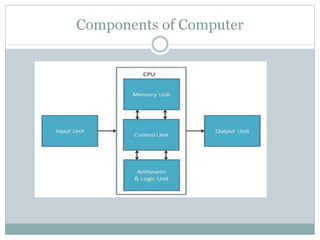
Components of Computer
Components of Computer System
Let us now understand the following basic components of a
computer system.
 Hardware
 Software
 Humanware
 Firmware
 Bridgeware
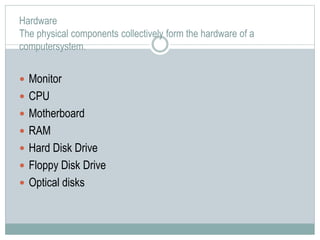
Hardware
The physical components collectively form the hardware of a
computersystem.
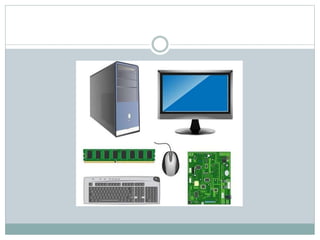
 Monitor
 CPU
 Motherboard
 RAM
 Hard Disk Drive
 Floppy Disk Drive
 Optical disks
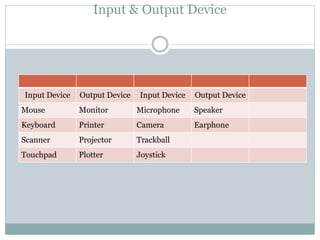
Input & Output Device
Input Device Output Device Input Device Output Device
Mouse Monitor Microphone Speaker
Keyboard Printer Camera Earphone
Scanner Projector Trackball
Touchpad Plotter Joystick
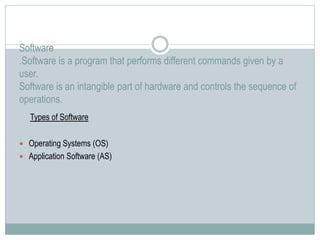
Software
.Software is a program that performs different commands given by a
user.
Software is an intangible part of hardware and controls the sequence of
operations.
Types of Software
 Operating Systems (OS)
 Application Software (AS)
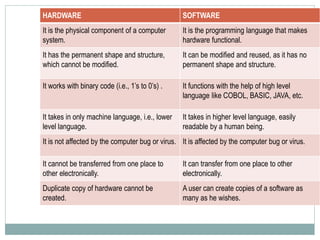
HARDWARE SOFTWARE
It is the physical component of a computer
system.
It is the programming language that makes
hardware functional.
It has the permanent shape and structure,
which cannot be modified.
It can be modified and reused, as it has no
permanent shape and structure.
It works with binary code (i.e., 1’s to 0’s) . It functions with the help of high level
language like COBOL, BASIC, JAVA, etc.
It takes in only machine language, i.e., lower
level language.
It takes in higher level language, easily
readable by a human being.
It is not affected by the computer bug or virus. It is affected by the computer bug or virus.
It cannot be transferred from one place to
other electronically.
It can transfer from one place to other
electronically.
Duplicate copy of hardware cannot be
created.
A user can create copies of a software as
many as he wishes.
Questions:
 What is Computer?
 List some input and output devices.
 Differentiate between hardware and software.
Thankyou
# S T A Y A T H O M E
# S T A Y S A F E
COMPUTER SYSTEM #2
Applications of computer
 Business
A computer has high speed of calculation, diligence, accuracy,
reliability, or versatility which has made it an integrated part in all
business organizations.
 Banking
Today, banking is almost totally dependent on computers.
Banks provide the following facilities −Online accounting facility,
which includes checking current balance, making deposits and
overdrafts, checking interest charges, shares, and trustee records.
 Education
The computer helps in providing a lot of facilities in the education
system.
The computer provides a tool in the education system known as
CBE (Computer Based Education).
CBE involves control, delivery, and evaluation of learning.
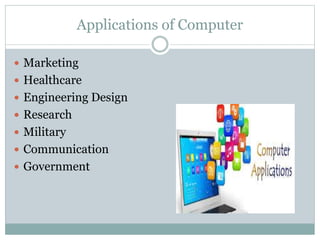
Applications of Computer
 Marketing
 Healthcare
 Engineering Design
 Research
 Military
 Communication
 Government
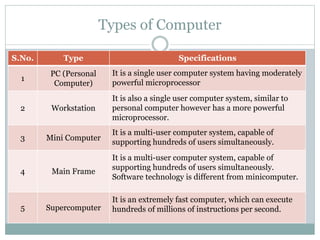
Types of Computer
S.No. Type Specifications
1
PC (Personal
Computer)
It is a single user computer system having moderately
powerful microprocessor
2 Workstation
It is also a single user computer system, similar to
personal computer however has a more powerful
microprocessor.
3 Mini Computer
It is a multi-user computer system, capable of
supporting hundreds of users simultaneously.
4 Main Frame
It is a multi-user computer system, capable of
supporting hundreds of users simultaneously.
Software technology is different from minicomputer.
5 Supercomputer
It is an extremely fast computer, which can execute
hundreds of millions of instructions per second.
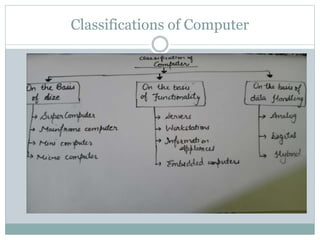
Classifications of Computer
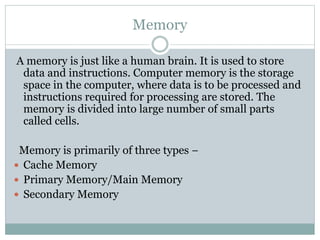
Memory
A memory is just like a human brain. It is used to store
data and instructions. Computer memory is the storage
space in the computer, where data is to be processed and
instructions required for processing are stored. The
memory is divided into large number of small parts
called cells.
Memory is primarily of three types −
 Cache Memory
 Primary Memory/Main Memory
 Secondary Memory
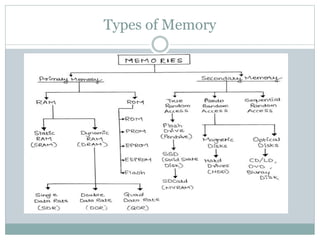
Types of Memory
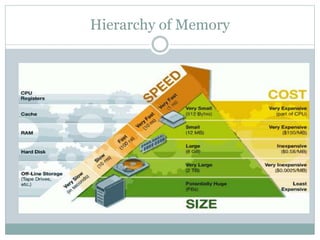
Hierarchy of Memory
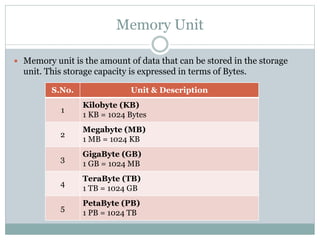
Memory Unit
 Memory unit is the amount of data that can be stored in the storage
unit. This storage capacity is expressed in terms of Bytes.
S.No. Unit & Description
1
Kilobyte (KB)
1 KB = 1024 Bytes
2
Megabyte (MB)
1 MB = 1024 KB
3
GigaByte (GB)
1 GB = 1024 MB
4
TeraByte (TB)
1 TB = 1024 GB
5
PetaByte (PB)
1 PB = 1024 TB
Questions:
 Explain types of computer.
 Write units of Memory.
 What are the applications of computer

Computer system

  • 1.
    # S TA Y A T H O M E # S T A Y S A F E COMPUTER SYSTEM #1
  • 2.
    What is Computer? A computer system is an integrated form of different components that work together to give a desirable result. It has different component and each works for a specific purpose; however, they generate a common result as required by the user.  Computer is an advanced electronic device that takes raw data as an input from the user and processes it under the control of a set of instructions (called program), produces a result (output), and saves it for future use
  • 3.
    Advntages of Computer. High Speed  Accuracy  Storage Capability  Diligence  Versatility  Reliability  Automation  Reduction in Paper Work and Cost .
  • 4.
    Disadvantages of Computer No I.Q.  Dependency  Environment  No Feelings
  • 6.
  • 7.
    Components of ComputerSystem Let us now understand the following basic components of a computer system.  Hardware  Software  Humanware  Firmware  Bridgeware
  • 8.
    Hardware The physical componentscollectively form the hardware of a computersystem.  Monitor  CPU  Motherboard  RAM  Hard Disk Drive  Floppy Disk Drive  Optical disks
  • 9.
    Input & OutputDevice Input Device Output Device Input Device Output Device Mouse Monitor Microphone Speaker Keyboard Printer Camera Earphone Scanner Projector Trackball Touchpad Plotter Joystick
  • 10.
    Software .Software is aprogram that performs different commands given by a user. Software is an intangible part of hardware and controls the sequence of operations. Types of Software  Operating Systems (OS)  Application Software (AS)
  • 11.
    HARDWARE SOFTWARE It isthe physical component of a computer system. It is the programming language that makes hardware functional. It has the permanent shape and structure, which cannot be modified. It can be modified and reused, as it has no permanent shape and structure. It works with binary code (i.e., 1’s to 0’s) . It functions with the help of high level language like COBOL, BASIC, JAVA, etc. It takes in only machine language, i.e., lower level language. It takes in higher level language, easily readable by a human being. It is not affected by the computer bug or virus. It is affected by the computer bug or virus. It cannot be transferred from one place to other electronically. It can transfer from one place to other electronically. Duplicate copy of hardware cannot be created. A user can create copies of a software as many as he wishes.
  • 12.
    Questions:  What isComputer?  List some input and output devices.  Differentiate between hardware and software. Thankyou
  • 13.
    # S TA Y A T H O M E # S T A Y S A F E COMPUTER SYSTEM #2
  • 14.
    Applications of computer Business A computer has high speed of calculation, diligence, accuracy, reliability, or versatility which has made it an integrated part in all business organizations.  Banking Today, banking is almost totally dependent on computers. Banks provide the following facilities −Online accounting facility, which includes checking current balance, making deposits and overdrafts, checking interest charges, shares, and trustee records.  Education The computer helps in providing a lot of facilities in the education system. The computer provides a tool in the education system known as CBE (Computer Based Education). CBE involves control, delivery, and evaluation of learning.
  • 15.
    Applications of Computer Marketing  Healthcare  Engineering Design  Research  Military  Communication  Government
  • 16.
    Types of Computer S.No.Type Specifications 1 PC (Personal Computer) It is a single user computer system having moderately powerful microprocessor 2 Workstation It is also a single user computer system, similar to personal computer however has a more powerful microprocessor. 3 Mini Computer It is a multi-user computer system, capable of supporting hundreds of users simultaneously. 4 Main Frame It is a multi-user computer system, capable of supporting hundreds of users simultaneously. Software technology is different from minicomputer. 5 Supercomputer It is an extremely fast computer, which can execute hundreds of millions of instructions per second.
  • 17.
  • 18.
    Memory A memory isjust like a human brain. It is used to store data and instructions. Computer memory is the storage space in the computer, where data is to be processed and instructions required for processing are stored. The memory is divided into large number of small parts called cells. Memory is primarily of three types −  Cache Memory  Primary Memory/Main Memory  Secondary Memory
  • 19.
  • 20.
  • 21.
    Memory Unit  Memoryunit is the amount of data that can be stored in the storage unit. This storage capacity is expressed in terms of Bytes. S.No. Unit & Description 1 Kilobyte (KB) 1 KB = 1024 Bytes 2 Megabyte (MB) 1 MB = 1024 KB 3 GigaByte (GB) 1 GB = 1024 MB 4 TeraByte (TB) 1 TB = 1024 GB 5 PetaByte (PB) 1 PB = 1024 TB
  • 22.
    Questions:  Explain typesof computer.  Write units of Memory.  What are the applications of computer