Computer Basic & Foundation
By: Vineet Sharma (IT Trainer NIIT)
Simple & Easy
What is Computer?
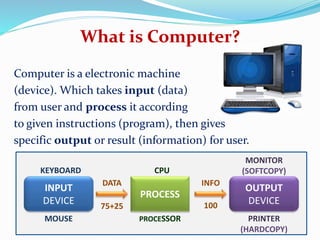
Computer is a electronic machine
(device). Which takes input (data)
from user and process it according
to given instructions (program), then gives
specific output or result (information) for user.
INPUT
DEVICE
OUTPUT
DEVICE
PROCESS
KEYBOARD
MOUSE
CPU
PROCESSOR
MONITOR
(SOFTCOPY)
PRINTER
(HARDCOPY)
75+25
DATA INFO
100
What is Computer?
Computer is an electronic device which is
capable of doing arithmetic calculations,
taking logical decisions and giving very
accurate results. It can also store a large
volume of data for a long time.
Father of Computer Charles Babbage
Computer…
 Comes from the word “compute”
 Compute means “to calculate”
 So Computer is calculating device
 Perform calculations at enormous speed
 Computer is device that operates upon “Data” or “Information”
 e.g. preparing results, calculations, transactions, scientific work etc
 Computer can input “Data”
 Computer can process “Data”
 Computer can store “Data”
 Computer can retrieve “Data”
Finally…
Computer can be termed as “Data Processor”
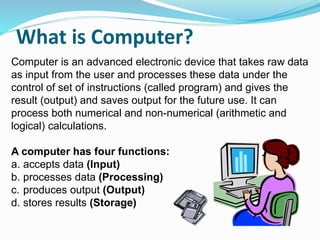
What is Computer?
Computer is an advanced electronic device that takes raw data
as input from the user and processes these data under the
control of set of instructions (called program) and gives the
result (output) and saves output for the future use. It can
process both numerical and non-numerical (arithmetic and
logical) calculations.
A computer has four functions:
a. accepts data (Input)
b. processes data (Processing)
c. produces output (Output)
d. stores results (Storage)
Input (Data): Input is the raw information entered into a computer from the input
devices. It is the collection of letters, numbers, images etc.
Process: Process is the operation of data as per given instruction. It is totally
internal process of the computer system.
Output: Output is the processed data given by computer after data processing.
Output is also called as Result. We can save these results in the storage devices for
the future use.
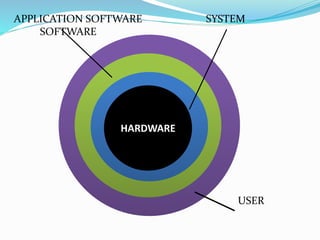
Computer System: All of the components of a computer system can be
summarized with the simple equations.
COMPUTER SYSTEM = HARDWARE + SOFTWARE+ USER
• Hardware = Internal Devices + Peripheral Devices All physical parts of the
computer (or everything that we can touch) are known as Hardware.
• Software = Programs Software gives "intelligence" to the computer.
• USER = Person, who operates computer.
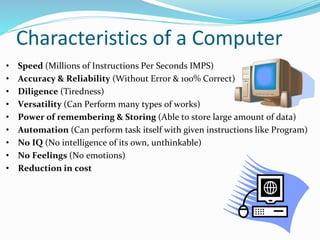
Characteristics of a Computer
• Speed (Millions of Instructions Per Seconds IMPS)
• Accuracy & Reliability (Without Error & 100% Correct)
• Diligence (Tiredness)
• Versatility (Can Perform many types of works)
• Power of remembering & Storing (Able to store large amount of data)
• Automation (Can perform task itself with given instructions like Program)
• No IQ (No intelligence of its own, unthinkable)
• No Feelings (No emotions)
• Reduction in cost
…Characteristics of Computer…
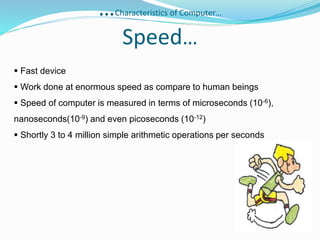
Speed…
 Fast device
 Work done at enormous speed as compare to human beings
 Speed of computer is measured in terms of microseconds (10-6),
nanoseconds(10-9) and even picoseconds (10-12)
 Shortly 3 to 4 million simple arithmetic operations per seconds
…Characteristics of Computer…
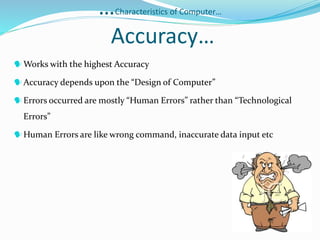
Accuracy…
Works with the highest Accuracy
Accuracy depends upon the “Design of Computer”
Errors occurred are mostly “Human Errors” rather than “Technological
Errors”
Human Errors are like wrong command, inaccurate data input etc
…Characteristics of Computer…
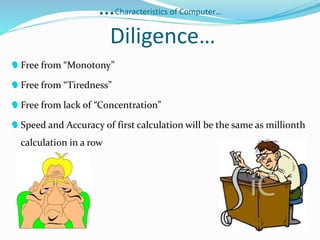
Diligence…
Free from “Monotony”
Free from “Tiredness”
Free from lack of “Concentration”
Speed and Accuracy of first calculation will be the same as millionth
calculation in a row
…Characteristics of Computer…
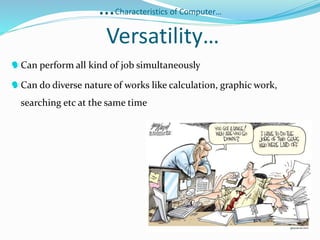
Versatility…
Can perform all kind of job simultaneously
Can do diverse nature of works like calculation, graphic work,
searching etc at the same time
…Characteristics of Computer…
Power of Remembering…
Unlike human being Computer can store tremendous/huge amount
of data
Can recall required data even stored years before in no time
Doesn't differentiate “Important” & “Not Important”
Loss or Deletion of data is done by User
…Characteristics of Computer…
Reduction in cost…
Initial investment is high
Reduce the cost of each transaction
Reduce the man power and space requirements
Greater efficiency
…Characteristics of Computer…
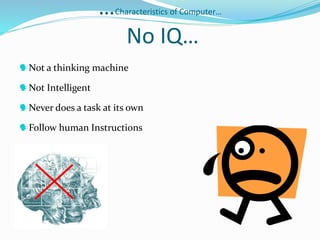
No IQ…
Not a thinking machine
Not Intelligent
Never does a task at its own
Follow human Instructions
…Characteristics of Computer…
No Feeling…
Follow human/programmer Instructions
Never decides at its own will
No taste
No knowledge
No emotion
APPLICATIONS OF COMPUTER
Offices
Books Publication
Data Analysis Graphics
CAM (Computer Aided
Manufacture)
Data Base Management
Project Management
Communications
Education
Medical Field
Airways and Railways
Industrial Control and
Instrumentation
Military
Banks
 Design and Research
Work
Ticket Reservation
Other Applications
COMPUTER GENERATION
Computer generation means upgradation in
technology
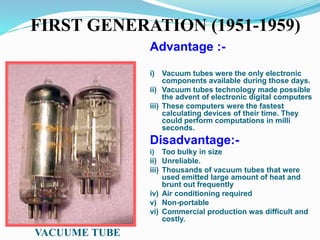
1.FIRST GENERATION (1951-1959)
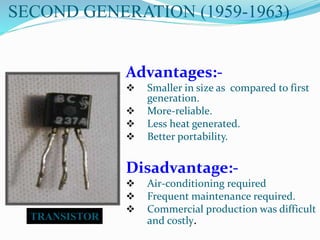
2.SECOND GENERATION (1959-1963)
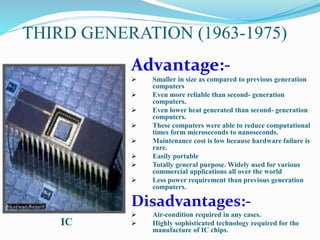
3.THIRD GENERATION (1963-1975)
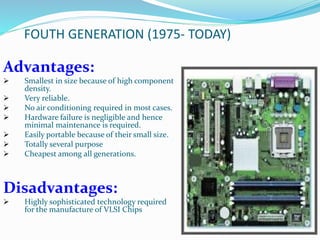
4.FOUTH GENERATION (1975- TODAY)
5.FIFTH GENERATION (UPCOMING)
FIRST GENERATION (1951-1959)
Advantage :-
i) Vacuum tubes were the only electronic
components available during those days.
ii) Vacuum tubes technology made possible
the advent of electronic digital computers
iii) These computers were the fastest
calculating devices of their time. They
could perform computations in milli
seconds.
Disadvantage:-
i) Too bulky in size
ii) Unreliable.
iii) Thousands of vacuum tubes that were
used emitted large amount of heat and
brunt out frequently
iv) Air conditioning required
v) Non-portable
vi) Commercial production was difficult and
costly.
VACUUME TUBE
SECOND GENERATION (1959-1963)
Advantages:-
 Smaller in size as compared to first
generation.
 More-reliable.
 Less heat generated.
 Better portability.
Disadvantage:-
 Air-conditioning required
 Frequent maintenance required.
 Commercial production was difficult
and costly.TRANSISTOR
THIRD GENERATION (1963-1975)
Advantage:-
 Smaller in size as compared to previous generation
computers
 Even more reliable than second- generation
computers.
 Even lower heat generated than second- generation
computers.
 These computers were able to reduce computational
times form microseconds to nanoseconds.
 Maintenance cost is low because hardware failure is
rare.
 Easily portable
 Totally general purpose. Widely used for various
commercial applications all over the world
 Less power requirement than previous generation
computers.
Disadvantages:-
 Air-condition required in any cases.
 Highly sophisticated technology required for the
manufacture of IC chips.
IC
FOUTH GENERATION (1975- TODAY)
Advantages:
 Smallest in size because of high component
density.
 Very reliable.
 No air conditioning required in most cases.
 Hardware failure is negligible and hence
minimal maintenance is required.
 Easily portable because of their small size.
 Totally several purpose
 Cheapest among all generations.
Disadvantages:
 Highly sophisticated technology required
for the manufacture of VLSI Chips
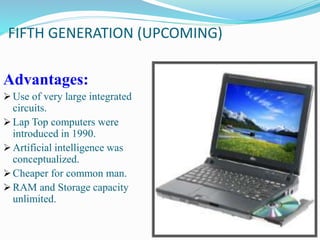
FIFTH GENERATION (UPCOMING)
Advantages:
Use of very large integrated
circuits.
Lap Top computers were
introduced in 1990.
Artificial intelligence was
conceptualized.
Cheaper for common man.
RAM and Storage capacity
unlimited.
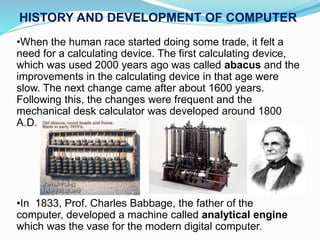
•When the human race started doing some trade, it felt a
need for a calculating device. The first calculating device,
which was used 2000 years ago was called abacus and the
improvements in the calculating device in that age were
slow. The next change came after about 1600 years.
Following this, the changes were frequent and the
mechanical desk calculator was developed around 1800
A.D.
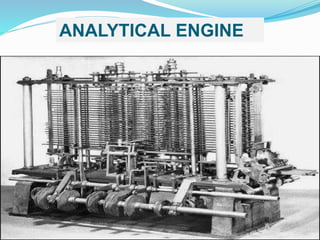
•In 1833, Prof. Charles Babbage, the father of the
computer, developed a machine called analytical engine
which was the vase for the modern digital computer.
HISTORY AND DEVELOPMENT OF COMPUTER
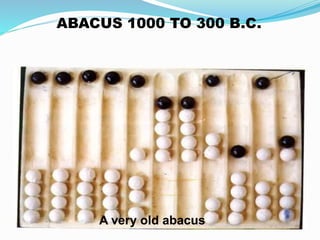
A very old abacus
ABACUS 1000 TO 300 B.C.
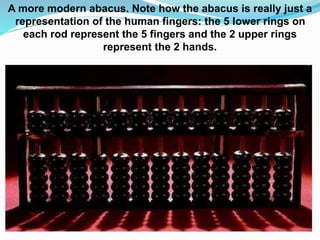
A more modern abacus. Note how the abacus is really just a
representation of the human fingers: the 5 lower rings on
each rod represent the 5 fingers and the 2 upper rings
represent the 2 hands.
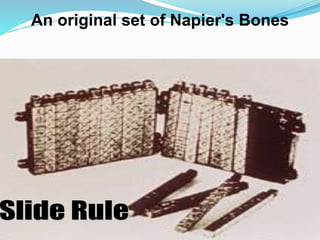
An original set of Napier's Bones
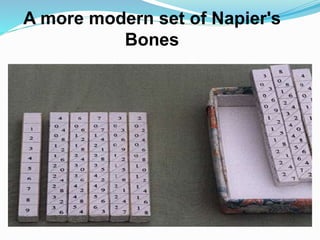
A more modern set of Napier's
Bones
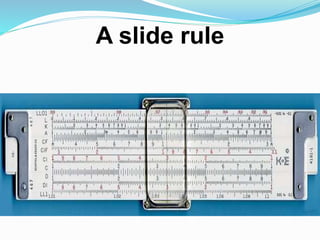
A slide rule
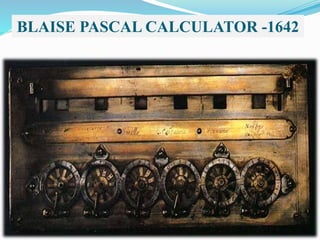
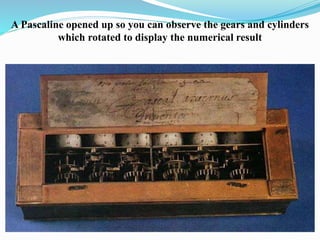
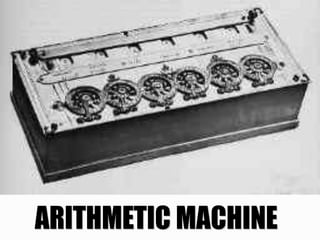
BLAISE PASCAL CALCULATOR -1642
A Pascaline opened up so you can observe the gears and cylinders
which rotated to display the numerical result
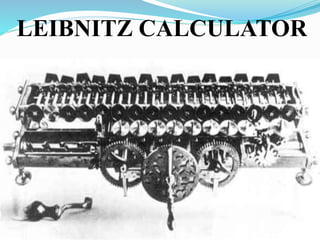
LEIBNITZ CALCULATOR
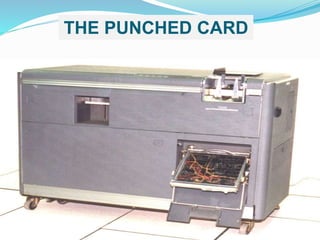
THE PUNCHED CARD
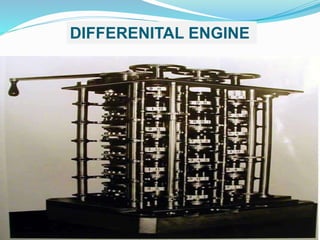
DIFFERENITAL ENGINE
ANALYTICAL ENGINE
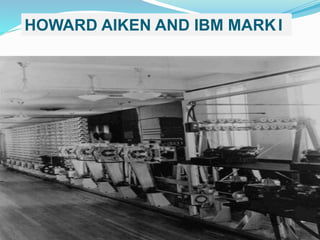
HOWARD AIKEN AND IBM MARKI
Mainframes are the very largest computers - million dollar machines, which can
occupy more than one room, An example is IBM model 390.
Workstations are powerful user machines. They have the power to handle
complex engineering applications. They use the UNIX or sometimes the NT
operating system. Workstations can be equipped with powerful RISC processors
like Digital Alpha or MIPS.
Minicomputers are large powerful machines. They typically serve a network of
simple terminals. IBM's AS/400 is an example of a minicomputer.
Microcomputer are Small inexpensive, mass produced computers. They work on
DOS, Windows, or similar operating systems. They are used for standard
applications.
Types of Computer
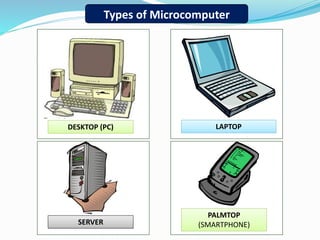
Types of Microcomputer
DESKTOP (PC) LAPTOP
SERVER
PALMTOP
(SMARTPHONE)
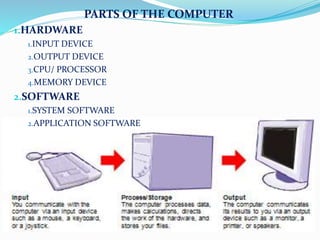
PARTS OF THE COMPUTER
1.HARDWARE
1.INPUT DEVICE
2.OUTPUT DEVICE
3.CPU/ PROCESSOR
4.MEMORY DEVICE
2.SOFTWARE
1.SYSTEM SOFTWARE
2.APPLICATION SOFTWARE
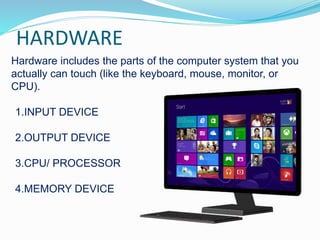
HARDWARE
Hardware includes the parts of the computer system that you
actually can touch (like the keyboard, mouse, monitor, or
CPU).
1.INPUT DEVICE
2.OUTPUT DEVICE
3.CPU/ PROCESSOR
4.MEMORY DEVICE
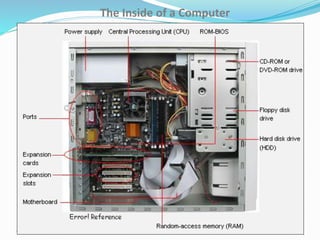
The Inside of a Computer
1/16/2015
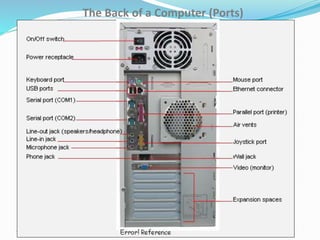
The Back of a Computer (Ports)
1/16/2015
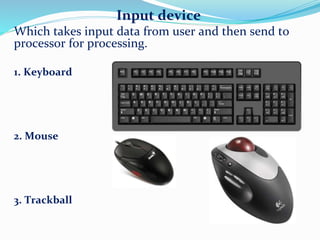
Input device
Which takes input data from user and then send to
processor for processing.
1. Keyboard
2. Mouse
3. Trackball
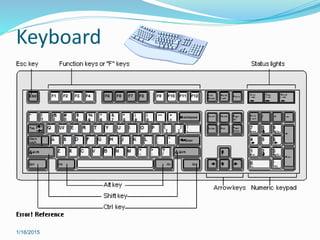
Keyboard
1/16/2015
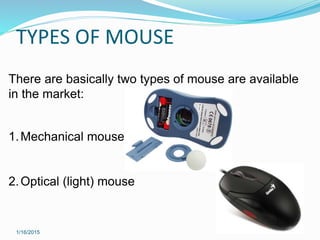
TYPES OF MOUSE
1/16/2015
There are basically two types of mouse are available
in the market:
1.Mechanical mouse
2.Optical (light) mouse
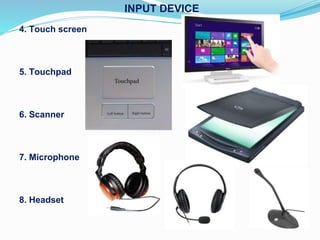
4. Touch screen
5. Touchpad
6. Scanner
7. Microphone
8. Headset
INPUT DEVICE
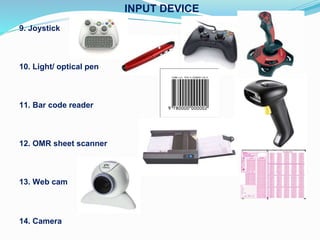
9. Joystick
10. Light/ optical pen
11. Bar code reader
12. OMR sheet scanner
13. Web cam
14. Camera
INPUT DEVICE
OUTPUT DEVICE
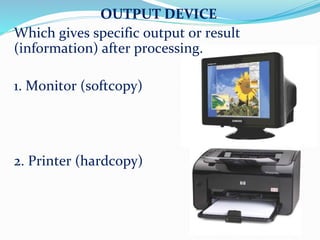
Which gives specific output or result
(information) after processing.
1. Monitor (softcopy)
2. Printer (hardcopy)
OUTPUT DEVICE
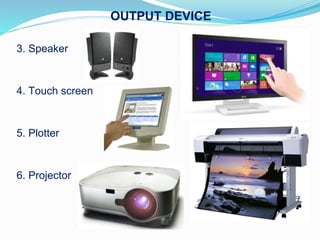
3. Speaker
4. Touch screen
5. Plotter
6. Projector
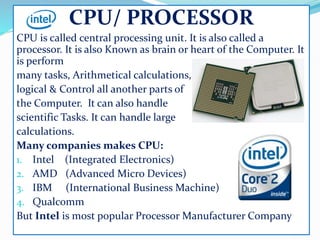
CPU/ PROCESSOR
CPU is called central processing unit. It is also called a
processor. It is also Known as brain or heart of the Computer. It
is perform
many tasks, Arithmetical calculations,
logical & Control all another parts of
the Computer. It can also handle
scientific Tasks. It can handle large
calculations.
Many companies makes CPU:
1. Intel (Integrated Electronics)
2. AMD (Advanced Micro Devices)
3. IBM (International Business Machine)
4. Qualcomm
But Intel is most popular Processor Manufacturer Company
History of Intel Corporation
Intel Corporation, founded on July 18, 1968, is a portmanteau of Integrated
Electronics (the fact that "intel" is the term for intelligence information also
made the name appropriate).[5] Intel also makes motherboard chipsets, network
interface controllers and integrated circuits, flash memory, graphic chips,
Embedded processors and other devices related to communications and
computing. Founded by semiconductor pioneers Robert Noyce and Gordon
Moore and widely associated with the executive leadership and vision of Andrew
Grove, Intel combines advanced chip design capability with a leading-edge
manufacturing capability. Though Intel was originally known primarily to
engineers and technologists, its "Intel Inside" advertising campaign of the 1990s
made it a household name, along with its Pentium processors.
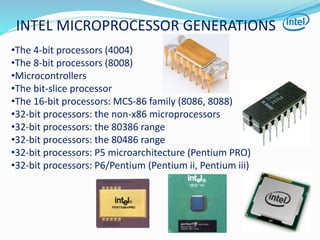
INTEL MICROPROCESSOR GENERATIONS
•The 4-bit processors (4004)
•The 8-bit processors (8008)
•Microcontrollers
•The bit-slice processor
•The 16-bit processors: MCS-86 family (8086, 8088)
•32-bit processors: the non-x86 microprocessors
•32-bit processors: the 80386 range
•32-bit processors: the 80486 range
•32-bit processors: P5 microarchitecture (Pentium PRO)
•32-bit processors: P6/Pentium (Pentium ii, Pentium iii)
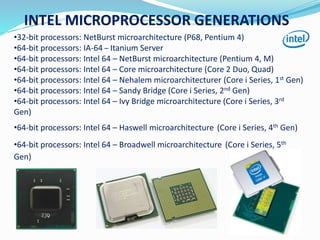
•32-bit processors: NetBurst microarchitecture (P68, Pentium 4)
•64-bit processors: IA-64 – Itanium Server
•64-bit processors: Intel 64 – NetBurst microarchitecture (Pentium 4, M)
•64-bit processors: Intel 64 – Core microarchitecture (Core 2 Duo, Quad)
•64-bit processors: Intel 64 – Nehalem microarchitecturer (Core i Series, 1st Gen)
•64-bit processors: Intel 64 – Sandy Bridge (Core i Series, 2nd Gen)
•64-bit processors: Intel 64 – Ivy Bridge microarchitecture (Core i Series, 3rd
Gen)
•64-bit processors: Intel 64 – Haswell microarchitecture (Core i Series, 4th Gen)
•64-bit processors: Intel 64 – Broadwell microarchitecture (Core i Series, 5th
Gen)
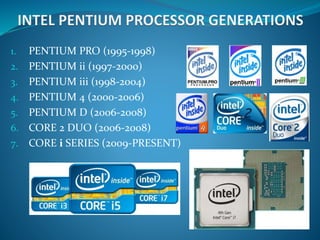
INTEL MICROPROCESSOR GENERATIONS
1. PENTIUM PRO (1995-1998)
2. PENTIUM ii (1997-2000)
3. PENTIUM iii (1998-2004)
4. PENTIUM 4 (2000-2006)
5. PENTIUM D (2006-2008)
6. CORE 2 DUO (2006-2008)
7. CORE i SERIES (2009-PRESENT)
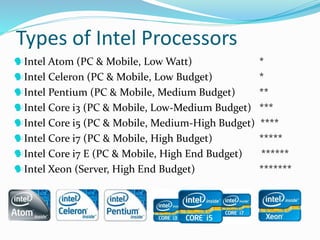
Types of Intel Processors
Intel Atom (PC & Mobile, Low Watt) *
Intel Celeron (PC & Mobile, Low Budget) *
Intel Pentium (PC & Mobile, Medium Budget) **
Intel Core i3 (PC & Mobile, Low-Medium Budget) ***
Intel Core i5 (PC & Mobile, Medium-High Budget) ****
Intel Core i7 (PC & Mobile, High Budget) *****
Intel Core i7 E (PC & Mobile, High End Budget) ******
Intel Xeon (Server, High End Budget) *******
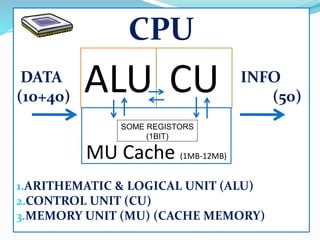
CPU
DATA INFO
(10+40) (50)
1.ARITHEMATIC & LOGICAL UNIT (ALU)
2.CONTROL UNIT (CU)
3.MEMORY UNIT (MU) (CACHE MEMORY)
ALU CU
MU Cache (1MB-12MB)
SOME REGISTORS
(1BIT)
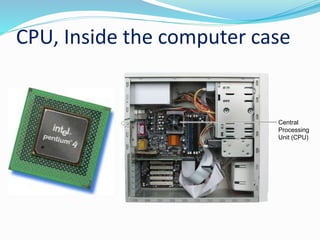
CPU, Inside the computer case
Central
Processing
Unit (CPU)
MEMORY DEVICE (Storage Unit )
Memory device, it is very important part
of the computer. Which can store data
and results for temporarily or
permanently. It is depend on types of
memory. Any storage unit of a computer
is ranked according to following criteria
1. Access Time
2. Storage capacity
3. Cost per bit of storage
Access Time
It is the time required to locate and retrieve
stored data from the storage unit in response
to the program instruction. A faster access is
preferred.
Storage Capacity
It is the amount of data that can be stored
on a storage unit. A larger capacity is
desired
Cost per unit of storage
Goal is to minimize this cost
Types of memory device
Basically two types of memory device:
1. Primary memory
2. Secondary memory
PRIMARY MEMORY
Primary memory is special type of memory.
A primary storage is made of several small
areas called locations or cells . Each of these
locations is capable of storing fixed number of
bits called word length. Two types of primary
memory:
1. RAM (random access memory) (external RAM)
2. ROM (read only memory)
3. Cache memory (static ram) (internal RAM -
inbuilt)
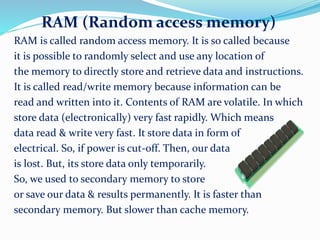
RAM (Random access memory)
RAM is called random access memory. It is so called because
it is possible to randomly select and use any location of
the memory to directly store and retrieve data and instructions.
It is called read/write memory because information can be
read and written into it. Contents of RAM are volatile. In which
store data (electronically) very fast rapidly. Which means
data read & write very fast. It store data in form of
electrical. So, if power is cut-off. Then, our data
is lost. But, its store data only temporarily.
So, we used to secondary memory to store
or save our data & results permanently. It is faster than
secondary memory. But slower than cache memory.
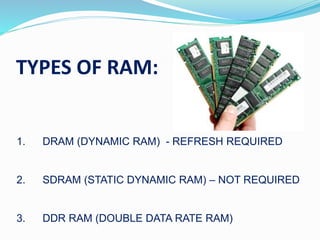
TYPES OF RAM:
1. DRAM (DYNAMIC RAM) - REFRESH REQUIRED
2. SDRAM (STATIC DYNAMIC RAM) – NOT REQUIRED
3. DDR RAM (DOUBLE DATA RATE RAM)
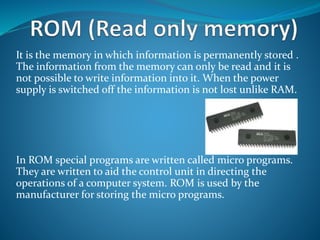
It is the memory in which information is permanently stored .
The information from the memory can only be read and it is
not possible to write information into it. When the power
supply is switched off the information is not lost unlike RAM.
In ROM special programs are written called micro programs.
They are written to aid the control unit in directing the
operations of a computer system. ROM is used by the
manufacturer for storing the micro programs.
Types of ROM:
There of two types of ROM:
PROM(Programmable ROM)
EPROM(Erasable PROM)
EPROM(Electronically EPROM)
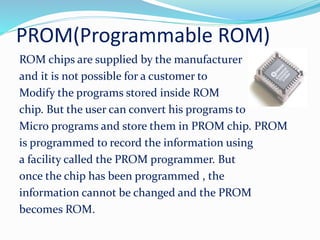
PROM(Programmable ROM)
ROM chips are supplied by the manufacturer
and it is not possible for a customer to
Modify the programs stored inside ROM
chip. But the user can convert his programs to
Micro programs and store them in PROM chip. PROM
is programmed to record the information using
a facility called the PROM programmer. But
once the chip has been programmed , the
information cannot be changed and the PROM
becomes ROM.
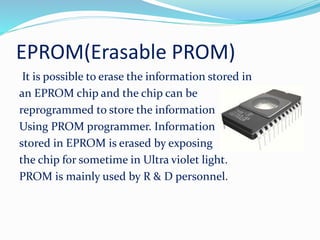
EPROM(Erasable PROM)
It is possible to erase the information stored in
an EPROM chip and the chip can be
reprogrammed to store the information
Using PROM programmer. Information
stored in EPROM is erased by exposing
the chip for sometime in Ultra violet light.
PROM is mainly used by R & D personnel.
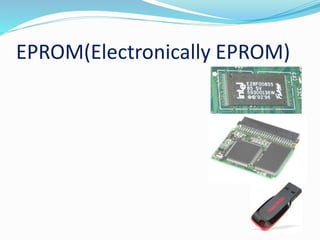
EPROM(Electronically EPROM)
A very high speed memory is sometimes used to increase
the speed of processing by making the current programs
and data available to the CPU at a rapid rate . The CPU
speed is quite high as compared to the access time of
main memory. Cache memory is used to compensate for
the mismatch. It is a small memory between the CPU and
main memory whose access time to close to the
processing speed of CPU. It is not addressable by the user
and is very expensive.
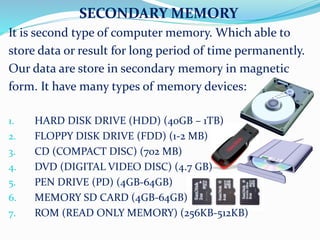
SECONDARY MEMORY
It is second type of computer memory. Which able to
store data or result for long period of time permanently.
Our data are store in secondary memory in magnetic
form. It have many types of memory devices:
1. HARD DISK DRIVE (HDD) (40GB – 1TB)
2. FLOPPY DISK DRIVE (FDD) (1-2 MB)
3. CD (COMPACT DISC) (702 MB)
4. DVD (DIGITAL VIDEO DISC) (4.7 GB)
5. PEN DRIVE (PD) (4GB-64GB)
6. MEMORY SD CARD (4GB-64GB)
7. ROM (READ ONLY MEMORY) (256KB-512KB)
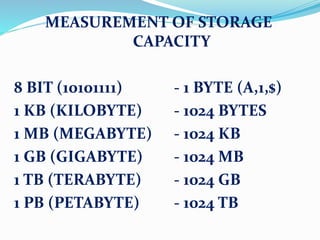
MEASUREMENT OF STORAGE
CAPACITY
8 BIT (10101111) - 1 BYTE (A,1,$)
1 KB (KILOBYTE) - 1024 BYTES
1 MB (MEGABYTE) - 1024 KB
1 GB (GIGABYTE) - 1024 MB
1 TB (TERABYTE) - 1024 GB
1 PB (PETABYTE) - 1024 TB
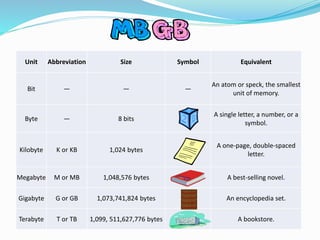
Unit Abbreviation Size Symbol Equivalent
Bit — — —
An atom or speck, the smallest
unit of memory.
Byte — 8 bits
A single letter, a number, or a
symbol.
Kilobyte K or KB 1,024 bytes
A one-page, double-spaced
letter.
Megabyte M or MB 1,048,576 bytes A best-selling novel.
Gigabyte G or GB 1,073,741,824 bytes An encyclopedia set.
Terabyte T or TB 1,099, 511,627,776 bytes A bookstore.
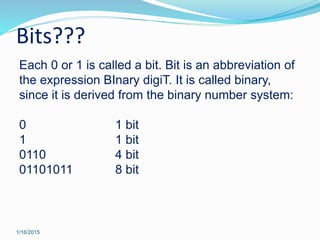
Bits???
1/16/2015
Each 0 or 1 is called a bit. Bit is an abbreviation of
the expression BInary digiT. It is called binary,
since it is derived from the binary number system:
0 1 bit
1 1 bit
0110 4 bit
01101011 8 bit
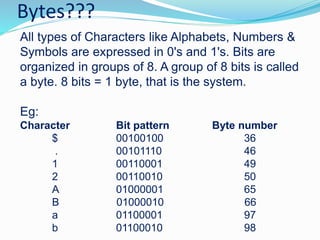
Bytes???
All types of Characters like Alphabets, Numbers &
Symbols are expressed in 0's and 1's. Bits are
organized in groups of 8. A group of 8 bits is called
a byte. 8 bits = 1 byte, that is the system.
Eg:
Character Bit pattern Byte number
$ 00100100 36
. 00101110 46
1 00110001 49
2 00110010 50
A 01000001 65
B 01000010 66
a 01100001 97
b 01100010 98
APPLICATION SOFTWARE SYSTEM
SOFTWARE
USER
HARDWARE
SOFTWARE

Computer Basics by vineet sharma narela

  • 1.
    Computer Basic &Foundation By: Vineet Sharma (IT Trainer NIIT) Simple & Easy
  • 2.
    What is Computer? Computeris a electronic machine (device). Which takes input (data) from user and process it according to given instructions (program), then gives specific output or result (information) for user. INPUT DEVICE OUTPUT DEVICE PROCESS KEYBOARD MOUSE CPU PROCESSOR MONITOR (SOFTCOPY) PRINTER (HARDCOPY) 75+25 DATA INFO 100
  • 3.
    What is Computer? Computeris an electronic device which is capable of doing arithmetic calculations, taking logical decisions and giving very accurate results. It can also store a large volume of data for a long time. Father of Computer Charles Babbage
  • 4.
    Computer…  Comes fromthe word “compute”  Compute means “to calculate”  So Computer is calculating device  Perform calculations at enormous speed  Computer is device that operates upon “Data” or “Information”  e.g. preparing results, calculations, transactions, scientific work etc  Computer can input “Data”  Computer can process “Data”  Computer can store “Data”  Computer can retrieve “Data” Finally… Computer can be termed as “Data Processor”
  • 5.
    What is Computer? Computeris an advanced electronic device that takes raw data as input from the user and processes these data under the control of set of instructions (called program) and gives the result (output) and saves output for the future use. It can process both numerical and non-numerical (arithmetic and logical) calculations. A computer has four functions: a. accepts data (Input) b. processes data (Processing) c. produces output (Output) d. stores results (Storage)
  • 6.
    Input (Data): Inputis the raw information entered into a computer from the input devices. It is the collection of letters, numbers, images etc. Process: Process is the operation of data as per given instruction. It is totally internal process of the computer system. Output: Output is the processed data given by computer after data processing. Output is also called as Result. We can save these results in the storage devices for the future use. Computer System: All of the components of a computer system can be summarized with the simple equations. COMPUTER SYSTEM = HARDWARE + SOFTWARE+ USER • Hardware = Internal Devices + Peripheral Devices All physical parts of the computer (or everything that we can touch) are known as Hardware. • Software = Programs Software gives "intelligence" to the computer. • USER = Person, who operates computer.
  • 7.
    Characteristics of aComputer • Speed (Millions of Instructions Per Seconds IMPS) • Accuracy & Reliability (Without Error & 100% Correct) • Diligence (Tiredness) • Versatility (Can Perform many types of works) • Power of remembering & Storing (Able to store large amount of data) • Automation (Can perform task itself with given instructions like Program) • No IQ (No intelligence of its own, unthinkable) • No Feelings (No emotions) • Reduction in cost
  • 8.
    …Characteristics of Computer… Speed… Fast device  Work done at enormous speed as compare to human beings  Speed of computer is measured in terms of microseconds (10-6), nanoseconds(10-9) and even picoseconds (10-12)  Shortly 3 to 4 million simple arithmetic operations per seconds
  • 9.
    …Characteristics of Computer… Accuracy… Workswith the highest Accuracy Accuracy depends upon the “Design of Computer” Errors occurred are mostly “Human Errors” rather than “Technological Errors” Human Errors are like wrong command, inaccurate data input etc
  • 10.
    …Characteristics of Computer… Diligence… Freefrom “Monotony” Free from “Tiredness” Free from lack of “Concentration” Speed and Accuracy of first calculation will be the same as millionth calculation in a row
  • 11.
    …Characteristics of Computer… Versatility… Canperform all kind of job simultaneously Can do diverse nature of works like calculation, graphic work, searching etc at the same time
  • 12.
    …Characteristics of Computer… Powerof Remembering… Unlike human being Computer can store tremendous/huge amount of data Can recall required data even stored years before in no time Doesn't differentiate “Important” & “Not Important” Loss or Deletion of data is done by User
  • 13.
    …Characteristics of Computer… Reductionin cost… Initial investment is high Reduce the cost of each transaction Reduce the man power and space requirements Greater efficiency
  • 14.
    …Characteristics of Computer… NoIQ… Not a thinking machine Not Intelligent Never does a task at its own Follow human Instructions
  • 15.
    …Characteristics of Computer… NoFeeling… Follow human/programmer Instructions Never decides at its own will No taste No knowledge No emotion
  • 16.
    APPLICATIONS OF COMPUTER Offices BooksPublication Data Analysis Graphics CAM (Computer Aided Manufacture) Data Base Management Project Management Communications Education Medical Field Airways and Railways Industrial Control and Instrumentation Military Banks  Design and Research Work Ticket Reservation Other Applications
  • 17.
    COMPUTER GENERATION Computer generationmeans upgradation in technology 1.FIRST GENERATION (1951-1959) 2.SECOND GENERATION (1959-1963) 3.THIRD GENERATION (1963-1975) 4.FOUTH GENERATION (1975- TODAY) 5.FIFTH GENERATION (UPCOMING)
  • 18.
    FIRST GENERATION (1951-1959) Advantage:- i) Vacuum tubes were the only electronic components available during those days. ii) Vacuum tubes technology made possible the advent of electronic digital computers iii) These computers were the fastest calculating devices of their time. They could perform computations in milli seconds. Disadvantage:- i) Too bulky in size ii) Unreliable. iii) Thousands of vacuum tubes that were used emitted large amount of heat and brunt out frequently iv) Air conditioning required v) Non-portable vi) Commercial production was difficult and costly. VACUUME TUBE
  • 19.
    SECOND GENERATION (1959-1963) Advantages:- Smaller in size as compared to first generation.  More-reliable.  Less heat generated.  Better portability. Disadvantage:-  Air-conditioning required  Frequent maintenance required.  Commercial production was difficult and costly.TRANSISTOR
  • 20.
    THIRD GENERATION (1963-1975) Advantage:- Smaller in size as compared to previous generation computers  Even more reliable than second- generation computers.  Even lower heat generated than second- generation computers.  These computers were able to reduce computational times form microseconds to nanoseconds.  Maintenance cost is low because hardware failure is rare.  Easily portable  Totally general purpose. Widely used for various commercial applications all over the world  Less power requirement than previous generation computers. Disadvantages:-  Air-condition required in any cases.  Highly sophisticated technology required for the manufacture of IC chips. IC
  • 21.
    FOUTH GENERATION (1975-TODAY) Advantages:  Smallest in size because of high component density.  Very reliable.  No air conditioning required in most cases.  Hardware failure is negligible and hence minimal maintenance is required.  Easily portable because of their small size.  Totally several purpose  Cheapest among all generations. Disadvantages:  Highly sophisticated technology required for the manufacture of VLSI Chips
  • 22.
    FIFTH GENERATION (UPCOMING) Advantages: Useof very large integrated circuits. Lap Top computers were introduced in 1990. Artificial intelligence was conceptualized. Cheaper for common man. RAM and Storage capacity unlimited.
  • 23.
    •When the humanrace started doing some trade, it felt a need for a calculating device. The first calculating device, which was used 2000 years ago was called abacus and the improvements in the calculating device in that age were slow. The next change came after about 1600 years. Following this, the changes were frequent and the mechanical desk calculator was developed around 1800 A.D. •In 1833, Prof. Charles Babbage, the father of the computer, developed a machine called analytical engine which was the vase for the modern digital computer. HISTORY AND DEVELOPMENT OF COMPUTER
  • 24.
    A very oldabacus ABACUS 1000 TO 300 B.C.
  • 25.
    A more modernabacus. Note how the abacus is really just a representation of the human fingers: the 5 lower rings on each rod represent the 5 fingers and the 2 upper rings represent the 2 hands.
  • 26.
    An original setof Napier's Bones
  • 27.
    A more modernset of Napier's Bones
  • 28.
  • 29.
  • 30.
    A Pascaline openedup so you can observe the gears and cylinders which rotated to display the numerical result
  • 32.
  • 33.
  • 34.
  • 35.
  • 36.
  • 37.
    Mainframes are thevery largest computers - million dollar machines, which can occupy more than one room, An example is IBM model 390. Workstations are powerful user machines. They have the power to handle complex engineering applications. They use the UNIX or sometimes the NT operating system. Workstations can be equipped with powerful RISC processors like Digital Alpha or MIPS. Minicomputers are large powerful machines. They typically serve a network of simple terminals. IBM's AS/400 is an example of a minicomputer. Microcomputer are Small inexpensive, mass produced computers. They work on DOS, Windows, or similar operating systems. They are used for standard applications. Types of Computer
  • 38.
    Types of Microcomputer DESKTOP(PC) LAPTOP SERVER PALMTOP (SMARTPHONE)
  • 39.
    PARTS OF THECOMPUTER 1.HARDWARE 1.INPUT DEVICE 2.OUTPUT DEVICE 3.CPU/ PROCESSOR 4.MEMORY DEVICE 2.SOFTWARE 1.SYSTEM SOFTWARE 2.APPLICATION SOFTWARE
  • 40.
    HARDWARE Hardware includes theparts of the computer system that you actually can touch (like the keyboard, mouse, monitor, or CPU). 1.INPUT DEVICE 2.OUTPUT DEVICE 3.CPU/ PROCESSOR 4.MEMORY DEVICE
  • 41.
    The Inside ofa Computer 1/16/2015
  • 42.
    The Back ofa Computer (Ports) 1/16/2015
  • 43.
    Input device Which takesinput data from user and then send to processor for processing. 1. Keyboard 2. Mouse 3. Trackball
  • 44.
  • 45.
    TYPES OF MOUSE 1/16/2015 Thereare basically two types of mouse are available in the market: 1.Mechanical mouse 2.Optical (light) mouse
  • 46.
    4. Touch screen 5.Touchpad 6. Scanner 7. Microphone 8. Headset INPUT DEVICE
  • 47.
    9. Joystick 10. Light/optical pen 11. Bar code reader 12. OMR sheet scanner 13. Web cam 14. Camera INPUT DEVICE
  • 48.
    OUTPUT DEVICE Which givesspecific output or result (information) after processing. 1. Monitor (softcopy) 2. Printer (hardcopy)
  • 49.
    OUTPUT DEVICE 3. Speaker 4.Touch screen 5. Plotter 6. Projector
  • 50.
    CPU/ PROCESSOR CPU iscalled central processing unit. It is also called a processor. It is also Known as brain or heart of the Computer. It is perform many tasks, Arithmetical calculations, logical & Control all another parts of the Computer. It can also handle scientific Tasks. It can handle large calculations. Many companies makes CPU: 1. Intel (Integrated Electronics) 2. AMD (Advanced Micro Devices) 3. IBM (International Business Machine) 4. Qualcomm But Intel is most popular Processor Manufacturer Company
  • 51.
    History of IntelCorporation Intel Corporation, founded on July 18, 1968, is a portmanteau of Integrated Electronics (the fact that "intel" is the term for intelligence information also made the name appropriate).[5] Intel also makes motherboard chipsets, network interface controllers and integrated circuits, flash memory, graphic chips, Embedded processors and other devices related to communications and computing. Founded by semiconductor pioneers Robert Noyce and Gordon Moore and widely associated with the executive leadership and vision of Andrew Grove, Intel combines advanced chip design capability with a leading-edge manufacturing capability. Though Intel was originally known primarily to engineers and technologists, its "Intel Inside" advertising campaign of the 1990s made it a household name, along with its Pentium processors.
  • 52.
    INTEL MICROPROCESSOR GENERATIONS •The4-bit processors (4004) •The 8-bit processors (8008) •Microcontrollers •The bit-slice processor •The 16-bit processors: MCS-86 family (8086, 8088) •32-bit processors: the non-x86 microprocessors •32-bit processors: the 80386 range •32-bit processors: the 80486 range •32-bit processors: P5 microarchitecture (Pentium PRO) •32-bit processors: P6/Pentium (Pentium ii, Pentium iii)
  • 53.
    •32-bit processors: NetBurstmicroarchitecture (P68, Pentium 4) •64-bit processors: IA-64 – Itanium Server •64-bit processors: Intel 64 – NetBurst microarchitecture (Pentium 4, M) •64-bit processors: Intel 64 – Core microarchitecture (Core 2 Duo, Quad) •64-bit processors: Intel 64 – Nehalem microarchitecturer (Core i Series, 1st Gen) •64-bit processors: Intel 64 – Sandy Bridge (Core i Series, 2nd Gen) •64-bit processors: Intel 64 – Ivy Bridge microarchitecture (Core i Series, 3rd Gen) •64-bit processors: Intel 64 – Haswell microarchitecture (Core i Series, 4th Gen) •64-bit processors: Intel 64 – Broadwell microarchitecture (Core i Series, 5th Gen) INTEL MICROPROCESSOR GENERATIONS
  • 54.
    1. PENTIUM PRO(1995-1998) 2. PENTIUM ii (1997-2000) 3. PENTIUM iii (1998-2004) 4. PENTIUM 4 (2000-2006) 5. PENTIUM D (2006-2008) 6. CORE 2 DUO (2006-2008) 7. CORE i SERIES (2009-PRESENT)
  • 55.
    Types of IntelProcessors Intel Atom (PC & Mobile, Low Watt) * Intel Celeron (PC & Mobile, Low Budget) * Intel Pentium (PC & Mobile, Medium Budget) ** Intel Core i3 (PC & Mobile, Low-Medium Budget) *** Intel Core i5 (PC & Mobile, Medium-High Budget) **** Intel Core i7 (PC & Mobile, High Budget) ***** Intel Core i7 E (PC & Mobile, High End Budget) ****** Intel Xeon (Server, High End Budget) *******
  • 56.
    CPU DATA INFO (10+40) (50) 1.ARITHEMATIC& LOGICAL UNIT (ALU) 2.CONTROL UNIT (CU) 3.MEMORY UNIT (MU) (CACHE MEMORY) ALU CU MU Cache (1MB-12MB) SOME REGISTORS (1BIT)
  • 57.
    CPU, Inside thecomputer case Central Processing Unit (CPU)
  • 58.
    MEMORY DEVICE (StorageUnit ) Memory device, it is very important part of the computer. Which can store data and results for temporarily or permanently. It is depend on types of memory. Any storage unit of a computer is ranked according to following criteria 1. Access Time 2. Storage capacity 3. Cost per bit of storage
  • 59.
    Access Time It isthe time required to locate and retrieve stored data from the storage unit in response to the program instruction. A faster access is preferred.
  • 60.
    Storage Capacity It isthe amount of data that can be stored on a storage unit. A larger capacity is desired Cost per unit of storage Goal is to minimize this cost
  • 61.
    Types of memorydevice Basically two types of memory device: 1. Primary memory 2. Secondary memory
  • 62.
    PRIMARY MEMORY Primary memoryis special type of memory. A primary storage is made of several small areas called locations or cells . Each of these locations is capable of storing fixed number of bits called word length. Two types of primary memory: 1. RAM (random access memory) (external RAM) 2. ROM (read only memory) 3. Cache memory (static ram) (internal RAM - inbuilt)
  • 63.
    RAM (Random accessmemory) RAM is called random access memory. It is so called because it is possible to randomly select and use any location of the memory to directly store and retrieve data and instructions. It is called read/write memory because information can be read and written into it. Contents of RAM are volatile. In which store data (electronically) very fast rapidly. Which means data read & write very fast. It store data in form of electrical. So, if power is cut-off. Then, our data is lost. But, its store data only temporarily. So, we used to secondary memory to store or save our data & results permanently. It is faster than secondary memory. But slower than cache memory.
  • 64.
    TYPES OF RAM: 1.DRAM (DYNAMIC RAM) - REFRESH REQUIRED 2. SDRAM (STATIC DYNAMIC RAM) – NOT REQUIRED 3. DDR RAM (DOUBLE DATA RATE RAM)
  • 65.
    It is thememory in which information is permanently stored . The information from the memory can only be read and it is not possible to write information into it. When the power supply is switched off the information is not lost unlike RAM. In ROM special programs are written called micro programs. They are written to aid the control unit in directing the operations of a computer system. ROM is used by the manufacturer for storing the micro programs.
  • 66.
    Types of ROM: Thereof two types of ROM: PROM(Programmable ROM) EPROM(Erasable PROM) EPROM(Electronically EPROM)
  • 67.
    PROM(Programmable ROM) ROM chipsare supplied by the manufacturer and it is not possible for a customer to Modify the programs stored inside ROM chip. But the user can convert his programs to Micro programs and store them in PROM chip. PROM is programmed to record the information using a facility called the PROM programmer. But once the chip has been programmed , the information cannot be changed and the PROM becomes ROM.
  • 68.
    EPROM(Erasable PROM) It ispossible to erase the information stored in an EPROM chip and the chip can be reprogrammed to store the information Using PROM programmer. Information stored in EPROM is erased by exposing the chip for sometime in Ultra violet light. PROM is mainly used by R & D personnel.
  • 69.
  • 70.
    A very highspeed memory is sometimes used to increase the speed of processing by making the current programs and data available to the CPU at a rapid rate . The CPU speed is quite high as compared to the access time of main memory. Cache memory is used to compensate for the mismatch. It is a small memory between the CPU and main memory whose access time to close to the processing speed of CPU. It is not addressable by the user and is very expensive.
  • 71.
    SECONDARY MEMORY It issecond type of computer memory. Which able to store data or result for long period of time permanently. Our data are store in secondary memory in magnetic form. It have many types of memory devices: 1. HARD DISK DRIVE (HDD) (40GB – 1TB) 2. FLOPPY DISK DRIVE (FDD) (1-2 MB) 3. CD (COMPACT DISC) (702 MB) 4. DVD (DIGITAL VIDEO DISC) (4.7 GB) 5. PEN DRIVE (PD) (4GB-64GB) 6. MEMORY SD CARD (4GB-64GB) 7. ROM (READ ONLY MEMORY) (256KB-512KB)
  • 72.
    MEASUREMENT OF STORAGE CAPACITY 8BIT (10101111) - 1 BYTE (A,1,$) 1 KB (KILOBYTE) - 1024 BYTES 1 MB (MEGABYTE) - 1024 KB 1 GB (GIGABYTE) - 1024 MB 1 TB (TERABYTE) - 1024 GB 1 PB (PETABYTE) - 1024 TB
  • 73.
    Unit Abbreviation SizeSymbol Equivalent Bit — — — An atom or speck, the smallest unit of memory. Byte — 8 bits A single letter, a number, or a symbol. Kilobyte K or KB 1,024 bytes A one-page, double-spaced letter. Megabyte M or MB 1,048,576 bytes A best-selling novel. Gigabyte G or GB 1,073,741,824 bytes An encyclopedia set. Terabyte T or TB 1,099, 511,627,776 bytes A bookstore.
  • 74.
    Bits??? 1/16/2015 Each 0 or1 is called a bit. Bit is an abbreviation of the expression BInary digiT. It is called binary, since it is derived from the binary number system: 0 1 bit 1 1 bit 0110 4 bit 01101011 8 bit
  • 75.
    Bytes??? All types ofCharacters like Alphabets, Numbers & Symbols are expressed in 0's and 1's. Bits are organized in groups of 8. A group of 8 bits is called a byte. 8 bits = 1 byte, that is the system. Eg: Character Bit pattern Byte number $ 00100100 36 . 00101110 46 1 00110001 49 2 00110010 50 A 01000001 65 B 01000010 66 a 01100001 97 b 01100010 98
  • 76.
  • 77.