COMPUTER, NUMBER SYSTEM
UNIT- V
Fundamental of Computer
programming -206
By- Er. Indrajeet Sinha , +919509010997
CONTENT:-
 Computer, Stored Program Architecture
 Storage Devices – primary memory and secondary storage
 concept of radix and representation of numbers System
 Conversion from radix r1 to radix r2
 Binary Arithmetic
 Complements
 Representation of Alphabets
2
INTRODUCTION TO COMPUTER,
STORED PROGRAM ARCHITECTURE
Lecture no.- 39,
UNIT- V
By- Er. Indrajeet Sinha , +919509010997
5.1.1- What is a computer?
 Definition:-
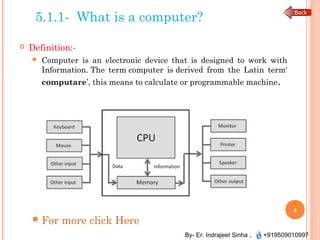
 Computer is an electronic device that is designed to work with
Information. The term computer is derived from the Latin term‘
computare’, this means to calculate or programmable machine.
For more click Here  
4
By- Er. Indrajeet Sinha , +919509010997
5.1.2- Stored Program Architecture
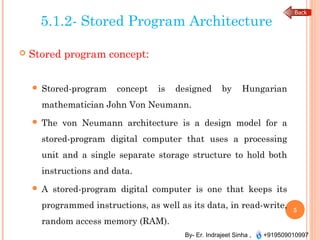
 Stored program concept:
 Stored-program concept is designed by Hungarian
mathematician John Von Neumann.
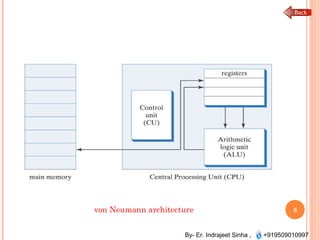
 The von Neumann architecture is a design model for a
stored-program digital computer that uses a processing
unit and a single separate storage structure to hold both
instructions and data.
 A stored-program digital computer is one that keeps its
programmed instructions, as well as its data, in read-write,
random access memory (RAM).
5
By- Er. Indrajeet Sinha , +919509010997
6von Neumann architecture
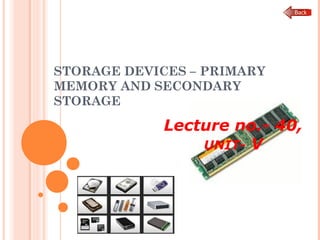
STORAGE DEVICES – PRIMARY
MEMORY AND SECONDARY
STORAGE
Lecture no.- 40,
UNIT- V
By- Er. Indrajeet Sinha , +919509010997
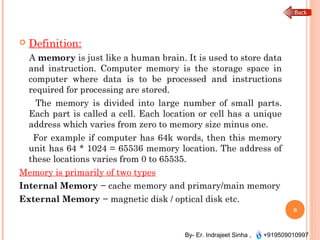
 Definition:
A memory is just like a human brain. It is used to store data
and instruction. Computer memory is the storage space in
computer where data is to be processed and instructions
required for processing are stored.
The memory is divided into large number of small parts.
Each part is called a cell. Each location or cell has a unique
address which varies from zero to memory size minus one.
For example if computer has 64k words, then this memory
unit has 64 * 1024 = 65536 memory location. The address of
these locations varies from 0 to 65535.
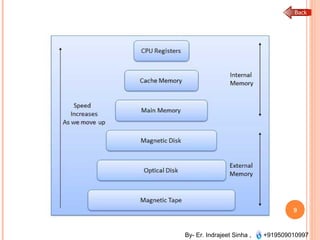
Memory is primarily of two types
Internal Memory − cache memory and primary/main memory
External Memory − magnetic disk / optical disk etc.
8
By- Er. Indrajeet Sinha , +919509010997
9
By- Er. Indrajeet Sinha , +919509010997
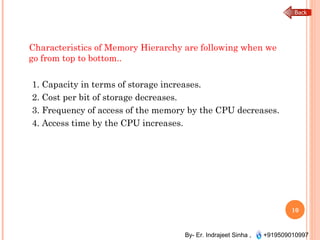
Characteristics of Memory Hierarchy are following when we
go from top to bottom..
1. Capacity in terms of storage increases.
2. Cost per bit of storage decreases.
3. Frequency of access of the memory by the CPU decreases.
4. Access time by the CPU increases.
10
By- Er. Indrajeet Sinha , +919509010997
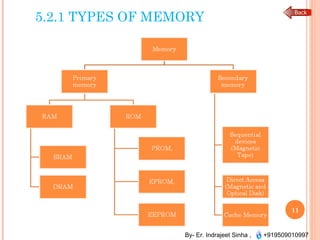
5.2.1 TYPES OF MEMORY
11
By- Er. Indrajeet Sinha , +919509010997
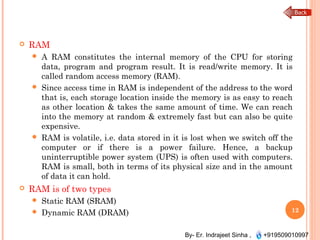
 RAM
 A RAM constitutes the internal memory of the CPU for storing
data, program and program result. It is read/write memory. It is
called random access memory (RAM).
 Since access time in RAM is independent of the address to the word
that is, each storage location inside the memory is as easy to reach
as other location & takes the same amount of time. We can reach
into the memory at random & extremely fast but can also be quite
expensive.
 RAM is volatile, i.e. data stored in it is lost when we switch off the
computer or if there is a power failure. Hence, a backup
uninterruptible power system (UPS) is often used with computers.
RAM is small, both in terms of its physical size and in the amount
of data it can hold.
 RAM is of two types
 Static RAM (SRAM)
 Dynamic RAM (DRAM) 12
By- Er. Indrajeet Sinha , +919509010997
 Static RAM (SRAM)
The word static indicates that the memory retains its contents as long
as power remains applied. However, data is lost when the power gets
down due to volatile nature. SRAM chips use a matrix of 6-transistors
and no capacitors. Transistors do not require power to prevent
leakage, so SRAM need not have to be refreshed on a regular basis.
Because of the extra space in the matrix, SRAM uses more chips than
DRAM for the same amount of storage space, thus making the
manufacturing costs higher.
Static RAM is used as cache memory needs to be very fast and small.
 Dynamic RAM (DRAM)
DRAM, unlike SRAM, must be continually refreshed in order for it to
maintain the data. This is done by placing the memory on a refresh
circuit that rewrites the data several hundred times per second.
DRAM is used for most system memory because it is cheap and small.
All DRAMs are made up of memory cells. These cells are composed of
one capacitor and one transistor. 13
By- Er. Indrajeet Sinha , +919509010997
 ROM
ROM stands for Read Only Memory. The memory from which we can
only read but cannot write on it. This type of memory is non-volatile.
The information is stored permanently in such memories during
manufacture.
A ROM, stores such instruction as are required to start computer
when electricity is first turned on, this operation is referred to as
bootstrap. ROM chip are not only used in the computer but also in
other electronic items like washing machine and microwave oven.
 Following are the various types of ROM −
 MROM (Masked ROM)
The very first ROMs were hard-wired devices that contained a pre-
programmed set of data or instructions. These kind of ROMs are
known as masked ROMs. It is inexpensive ROM.
 PROM (Programmable Read Only Memory)
PROM is read-only memory that can be modified only once by a user.
The user buys a blank PROM and enters the desired contents using a
PROM programmer.
14
By- Er. Indrajeet Sinha , +919509010997
 EPROM (Erasable and Programmable Read Only Memory)
The EPROM can be erased by exposing it to ultra-violet light for
a duration of upto 40 minutes. Usually, an EPROM eraser
achieves this function. During programming an electrical charge
is trapped in an insulated gate region. The charge is retained for
more than ten years because the charge has no leakage path.
For erasing this charge, ultra-violet light is passed through a
quartz crystal window (lid). This exposure to ultra-violet light
dissipates the charge. During normal use the quartz lid is sealed
with a sticker.
15
By- Er. Indrajeet Sinha , +919509010997
 EEPROM (Electrically Erasable and Programmable
Read Only Memory)
The EEPROM is programmed and erased electrically. It can
be erased and reprogrammed about ten thousand times. Both
erasing and programming take about 4 to 10 ms (millisecond).
In EEPROM, any location can be selectively erased and
programmed. EEPROMs can be erased one byte at a time,
rather than erasing the entire chip. Hence, the process of re-
programming is flexible but slow.
16
By- Er. Indrajeet Sinha , +919509010997
 Cache Memory
 Cache memory is a very high speed semiconductor memory
which can speed up CPU. It acts as a buffer between the CPU
and main memory. It is used to hold those parts of data and
program which are most frequently used by CPU. The parts of
data and programs, are transferred from disk to cache memory
by operating system, from where CPU can access them.
 Advantages
 Cache memory is faster than main memory.
 It consumes less access time as compared to main memory.
 It stores the program that can be executed within a short
period of time.
 It stores data for temporary use.
17
By- Er. Indrajeet Sinha , +919509010997
Disadvantages
 Cache memory has limited capacity.
 It is very expensive.
 Virtual memory is a technique that allows the
execution of processes which are not completely
available in memory. The main visible advantage of
this scheme is that programs can be larger than
physical memory. Virtual memory is the separation
of user logical memory from physical memory.
18
By- Er. Indrajeet Sinha , +919509010997
 Auxiliary Memory
 Auxiliary memory is much larger in size than main memory but is
slower. It normally stores system programs, instruction and data
files. It is also known as secondary memory. It can also be used as
an overflow/virtual memory in case the main memory capacity has
been exceeded.
 Characteristics of Auxiliary Memory are following −
 Non-volatile memory − Data is not lost when power is cut off.
 Reusable − The data stays in the secondary storage on permanent
basis until it is not overwritten or deleted by the user.
 Reliable − Data in secondary storage is safe because of high
physical stability of secondary storage device.
 Convenience − With the help of a computer software, authorised
people can locate and access the data quickly.
 Capacity − Secondary storage can store large volumes of data in
sets of multiple disks.
 Cost − It is much lesser expensive to store data on a tape or disk
than primary memory.
19
NUMBER SYSTEM
Lecture no.- 43,
UNIT- V
By- Er. Indrajeet Sinha , +919509010997
5.5.1- NON POSITIONAL AND
POSITIONAL NUMBER SYSTEM
 Number systems are the technique to represent numbers in
the computer system architecture, every value that you are
saving or getting into/from computer memory has a defined
number system.
 Definition:
 A positional number system gives different meaning to
the same symbol depending on its position. A 1 in the
right most or zero position means one, a 1 in the 3rd
position from the right (100) means one hundred.
 An example of non positional number system is the
number system of Romans. Here different letters have
always the same value. For instance 3 is III, so the letter I
has always the same value, 1.
For instance 4 is IV, where V means 5 but the other
number I before subtracts 1 to it, yielding 4.
21
By- Er. Indrajeet Sinha , +919509010997
5.5.3 DECIMAL NUMBER SYSTEM
Definition
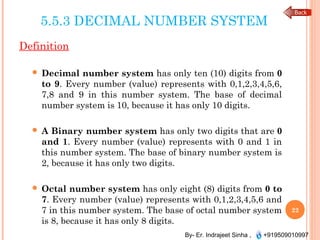
 Decimal number system has only ten (10) digits from 0
to 9. Every number (value) represents with 0,1,2,3,4,5,6,
7,8 and 9 in this number system. The base of decimal
number system is 10, because it has only 10 digits.
 A Binary number system has only two digits that are 0
and 1. Every number (value) represents with 0 and 1 in
this number system. The base of binary number system is
2, because it has only two digits.
 Octal number system has only eight (8) digits from 0 to
7. Every number (value) represents with 0,1,2,3,4,5,6 and
7 in this number system. The base of octal number system
is 8, because it has only 8 digits.
22
By- Er. Indrajeet Sinha , +919509010997
CONTT..
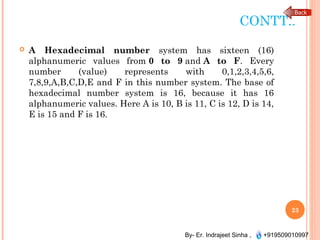
 A Hexadecimal number system has sixteen (16)
alphanumeric values from 0 to 9 and A to F. Every
number (value) represents with 0,1,2,3,4,5,6,
7,8,9,A,B,C,D,E and F in this number system. The base of
hexadecimal number system is 16, because it has 16
alphanumeric values. Here A is 10, B is 11, C is 12, D is 14,
E is 15 and F is 16.
23
By- Er. Indrajeet Sinha , +919509010997
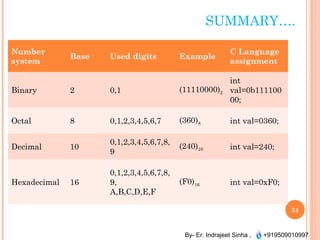
SUMMARY….
Number
system
Base Used digits Example
C Language
assignment
Binary 2 0,1 (11110000)2
int
val=0b111100
00;
Octal 8 0,1,2,3,4,5,6,7 (360)8 int val=0360;
Decimal 10
0,1,2,3,4,5,6,7,8,
9
(240)10 int val=240;
Hexadecimal 16
0,1,2,3,4,5,6,7,8,
9,
A,B,C,D,E,F
(F0)16 int val=0xF0;
24
CONVERSION FROM RADIX
R1 TO RADIX R2
Lecture no.- 44,
UNIT- V
By- Er. Indrajeet Sinha , +919509010997
5.6.1 CONVERSION FROM ONE
NUMBER SYSTEM TO ANOTHER
 Decimal Number System to Other Base
 To convert Number system from Decimal Number
System to Any Other Base is quite easy; you have to follow
just two steps:
A) Divide the Number (Decimal Number) by the base of
target base system (in which you want to convert the
number: Binary (2), octal (8) and Hexadecimal (16)).
B) Write the remainder from step 1 as a Least Signification
Bit (LSB) to Step last as a Most Significant Bit (MSB).
26
By- Er. Indrajeet Sinha , +919509010997
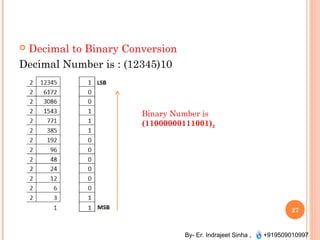
 Decimal to Binary Conversion
Decimal Number is : (12345)10
27
Binary Number is
(11000000111001)2
By- Er. Indrajeet Sinha , +919509010997
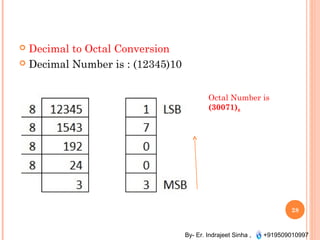
 Decimal to Octal Conversion
 Decimal Number is : (12345)10
28
Octal Number is
(30071)8
By- Er. Indrajeet Sinha , +919509010997
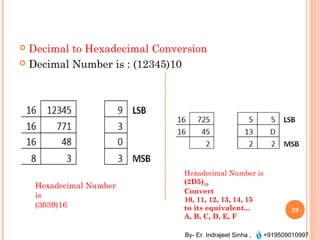
 Decimal to Hexadecimal Conversion
 Decimal Number is : (12345)10
29
Hexadecimal Number
is
(3039)16
Hexadecimal Number is
(2D5)16 
Convert
10, 11, 12, 13, 14, 15
to its equivalent...
A, B, C, D, E, F
By- Er. Indrajeet Sinha , +919509010997
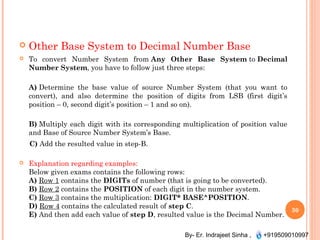
 Other Base System to Decimal Number Base
 To convert Number System from Any Other Base System to Decimal
Number System, you have to follow just three steps:
A) Determine the base value of source Number System (that you want to
convert), and also determine the position of digits from LSB (first digit’s
position – 0, second digit’s position – 1 and so on).
B) Multiply each digit with its corresponding multiplication of position value
and Base of Source Number System’s Base.
C) Add the resulted value in step-B.
 Explanation regarding examples:
Below given exams contains the following rows:
A) Row 1 contains the DIGITs of number (that is going to be converted). 
B) Row 2 contains the POSITION of each digit in the number system.
C) Row 3 contains the multiplication: DIGIT* BASE^POSITION.
D) Row 4 contains the calculated result of step C.
E) And then add each value of step D, resulted value is the Decimal Number.
30
By- Er. Indrajeet Sinha , +919509010997
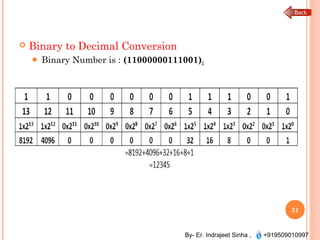
 Binary to Decimal Conversion
 Binary Number is : (11000000111001)2 
31
By- Er. Indrajeet Sinha , +919509010997
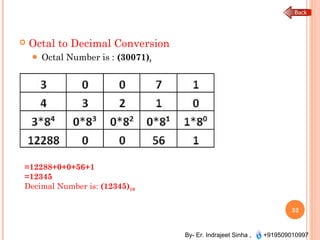
 Octal to Decimal Conversion
 Octal Number is : (30071)8 
32
=12288+0+0+56+1
=12345
Decimal Number is: (12345)10
By- Er. Indrajeet Sinha , +919509010997
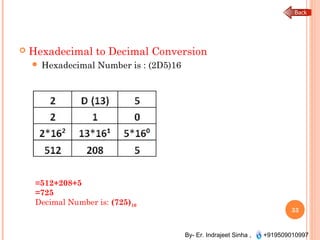
 Hexadecimal to Decimal Conversion
 Hexadecimal Number is : (2D5)16 
33
=512+208+5
=725
Decimal Number is: (725)10
BINARY ARITHMETIC
Lecture no.- 45,
UNIT- V
By- Er. Indrajeet Sinha , +919509010997
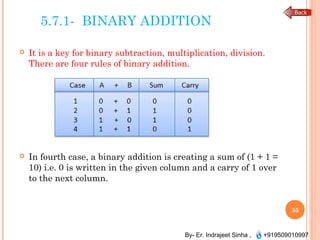
5.7.1- BINARY ADDITION
 It is a key for binary subtraction, multiplication, division.
There are four rules of binary addition.
 In fourth case, a binary addition is creating a sum of (1 + 1 =
10) i.e. 0 is written in the given column and a carry of 1 over
to the next column.
35
By- Er. Indrajeet Sinha , +919509010997
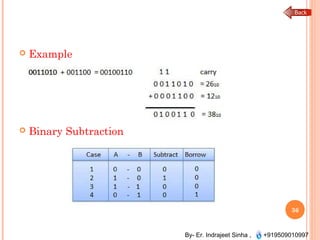
 Example
 Binary Subtraction
36
By- Er. Indrajeet Sinha , +919509010997
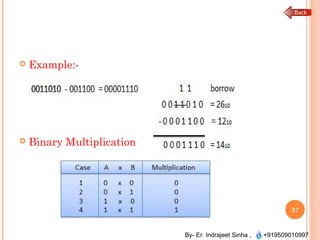
 Example:-
 Binary Multiplication
37
By- Er. Indrajeet Sinha , +919509010997
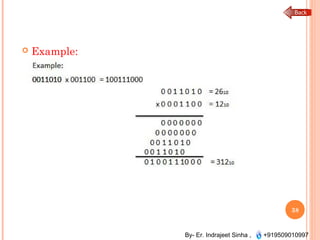
 Example:
38
By- Er. Indrajeet Sinha , +919509010997
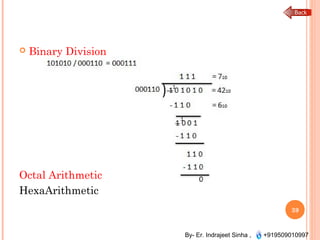
 Binary Division
Octal Arithmetic
HexaArithmetic
39
R’S AND (R-1)’S
COMPLEMENT
Lecture no.- 46,
UNIT- V
By- Er. Indrajeet Sinha , +919509010997
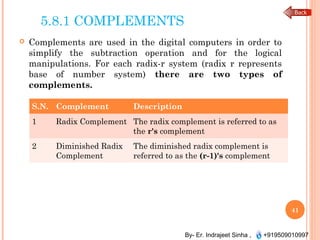
5.8.1 COMPLEMENTS
 Complements are used in the digital computers in order to
simplify the subtraction operation and for the logical
manipulations. For each radix-r system (radix r represents
base of number system) there are two types of
complements.
41
S.N. Complement Description
1 Radix Complement The radix complement is referred to as
the r's complement
2 Diminished Radix
Complement
The diminished radix complement is
referred to as the (r-1)'s complement
By- Er. Indrajeet Sinha , +919509010997
2 REPRESENTATION OF INTEGERS
(SIGNED AND UNSIGNED)
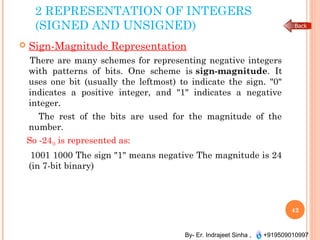
 Sign-Magnitude Representation
There are many schemes for representing negative integers
with patterns of bits. One scheme is sign-magnitude. It
uses one bit (usually the leftmost) to indicate the sign. "0"
indicates a positive integer, and "1" indicates a negative
integer.
The rest of the bits are used for the magnitude of the
number.
So -2410 is represented as:
1001 1000 The sign "1" means negative The magnitude is 24
(in 7-bit binary)
42
By- Er. Indrajeet Sinha , +919509010997
5.8.2.2 SIGNED-1’S COMPLEMENT
 Binary system complements:
As the binary system has base r = 2. So the two types of
complements for the binary system are 2's complement and 1's
complement.
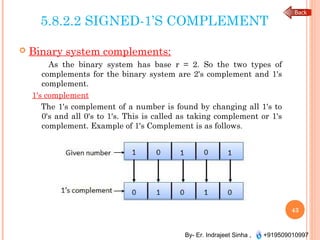
1's complement
The 1's complement of a number is found by changing all 1's to
0's and all 0's to 1's. This is called as taking complement or 1's
complement. Example of 1's Complement is as follows.
43
By- Er. Indrajeet Sinha , +919509010997
5.8.2.3- SIGNED-2’S COMPLEMENT
2's complement
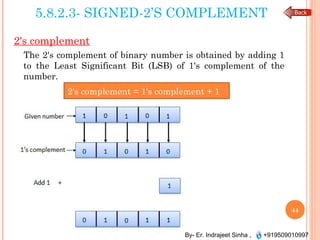
The 2's complement of binary number is obtained by adding 1
to the Least Significant Bit (LSB) of 1's complement of the
number.
2's complement = 1's complement + 1
44
REPRESENTATION OF
ALPHABETS
Lecture no.- 48,
UNIT- V
By- Er. Indrajeet Sinha , +919509010997
5.9 - INTRODUCTION
 In the coding, when numbers, letters or words are
represented by a specific group of symbols, it is said that the
number, letter or word is being encoded.
The group of symbols is called as a code. The digital data is
represented, stored and transmitted as group of binary bits.
This group is also called as binary code.
The binary code is represented by the number as well as
alphanumeric letter.
Advantages of Binary Code
 Binary codes are suitable for the computer applications.
 Binary codes are suitable for the digital communications.
 Binary codes make the analysis and designing of digital
circuits if we use the binary codes.
 Since only 0 & 1 are being used, implementation becomes
easy.
46
By- Er. Indrajeet Sinha , +919509010997
5.9.1- BCD CODE
Binary Coded Decimal (BCD) code
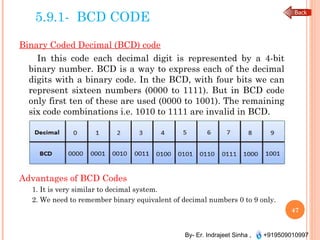
In this code each decimal digit is represented by a 4-bit
binary number. BCD is a way to express each of the decimal
digits with a binary code. In the BCD, with four bits we can
represent sixteen numbers (0000 to 1111). But in BCD code
only first ten of these are used (0000 to 1001). The remaining
six code combinations i.e. 1010 to 1111 are invalid in BCD.
Advantages of BCD Codes
1. It is very similar to decimal system.
2. We need to remember binary equivalent of decimal numbers 0 to 9 only.
47
By- Er. Indrajeet Sinha , +919509010997
Disadvantages of BCD Codes
1. The addition and subtraction of BCD have different rules.
2. The BCD arithmetic is little more complicated.
3. BCD needs more number of bits than binary to represent
the decimal number. So BCD is less efficient than binary.
48
By- Er. Indrajeet Sinha , +919509010997
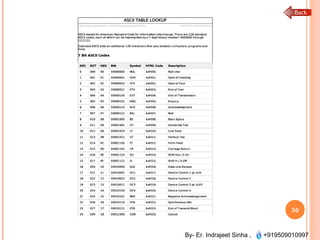
5.9.2 ASCII CODE
 ASCII stands for American Standard Code for Information
Interchange. There are 128 standard ASCII codes, each of
which can be represented by a 7 digit binary number:
0000000 through 1111111.
Extended ASCII adds an additional 128 characters that vary
between computers, programs and fonts.
To See ASCII Table Click Here
49
By- Er. Indrajeet Sinha , +919509010997
50
By- Er. Indrajeet Sinha , +919509010997
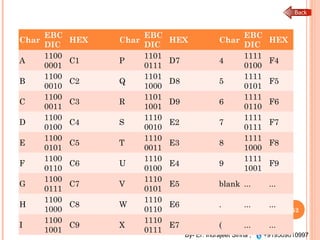
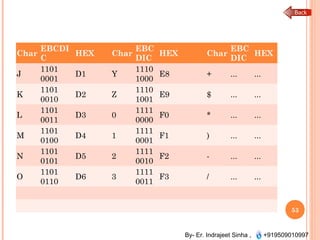
5.9.3 EBCDIC CODE
 Definition:
The extended binary coded decimal interchange code
(EBCDIC) is an 8-bit alphanumeric code which has been
extensively used by IBM in its mainframe applications.
 ASCII code is a 7-bit code whereas EBCDIC is an 8-bit code.
ASCII code is more commonly used worldwide while EBCDIC
is used primarily in large IBM computers.
51
By- Er. Indrajeet Sinha , +919509010997
Char
EBC
DIC
HEX Char
EBC
DIC
HEX Char
EBC
DIC
HEX
A
1100
0001
C1 P
1101
0111
D7 4
1111
0100
F4
B
1100
0010
C2 Q
1101
1000
D8 5
1111
0101
F5
C
1100
0011
C3 R
1101
1001
D9 6
1111
0110
F6
D
1100
0100
C4 S
1110
0010
E2 7
1111
0111
F7
E
1100
0101
C5 T
1110
0011
E3 8
1111
1000
F8
F
1100
0110
C6 U
1110
0100
E4 9
1111
1001
F9
G
1100
0111
C7 V
1110
0101
E5 blank ... ...
H
1100
1000
C8 W
1110
0110
E6 . ... ...
I
1100
1001
C9 X
1110
0111
E7 ( ... ...
52
By- Er. Indrajeet Sinha , +919509010997
Char
EBCDI
C
HEX Char
EBC
DIC
HEX Char
EBC
DIC
HEX
J
1101
0001
D1 Y
1110
1000
E8 + ... ...
K
1101
0010
D2 Z
1110
1001
E9 $ ... ...
L
1101
0011
D3 0
1111
0000
F0 * ... ...
M
1101
0100
D4 1
1111
0001
F1 ) ... ...
N
1101
0101
D5 2
1111
0010
F2 - ... ...
O
1101
0110
D6 3
1111
0011
F3 / ... ...
53
By- Er. Indrajeet Sinha , +919509010997
CONCLUSION OF UNIT-5
 We study different type of number system.
 Arithmetic operation on no. system.
54

Unit v computer, number system

  • 1.
    COMPUTER, NUMBER SYSTEM UNIT-V Fundamental of Computer programming -206
  • 2.
    By- Er. IndrajeetSinha , +919509010997 CONTENT:-  Computer, Stored Program Architecture  Storage Devices – primary memory and secondary storage  concept of radix and representation of numbers System  Conversion from radix r1 to radix r2  Binary Arithmetic  Complements  Representation of Alphabets 2
  • 3.
    INTRODUCTION TO COMPUTER, STOREDPROGRAM ARCHITECTURE Lecture no.- 39, UNIT- V
  • 4.
    By- Er. IndrajeetSinha , +919509010997 5.1.1- What is a computer?  Definition:-  Computer is an electronic device that is designed to work with Information. The term computer is derived from the Latin term‘ computare’, this means to calculate or programmable machine. For more click Here   4
  • 5.
    By- Er. IndrajeetSinha , +919509010997 5.1.2- Stored Program Architecture  Stored program concept:  Stored-program concept is designed by Hungarian mathematician John Von Neumann.  The von Neumann architecture is a design model for a stored-program digital computer that uses a processing unit and a single separate storage structure to hold both instructions and data.  A stored-program digital computer is one that keeps its programmed instructions, as well as its data, in read-write, random access memory (RAM). 5
  • 6.
    By- Er. IndrajeetSinha , +919509010997 6von Neumann architecture
  • 7.
    STORAGE DEVICES –PRIMARY MEMORY AND SECONDARY STORAGE Lecture no.- 40, UNIT- V
  • 8.
    By- Er. IndrajeetSinha , +919509010997  Definition: A memory is just like a human brain. It is used to store data and instruction. Computer memory is the storage space in computer where data is to be processed and instructions required for processing are stored. The memory is divided into large number of small parts. Each part is called a cell. Each location or cell has a unique address which varies from zero to memory size minus one. For example if computer has 64k words, then this memory unit has 64 * 1024 = 65536 memory location. The address of these locations varies from 0 to 65535. Memory is primarily of two types Internal Memory − cache memory and primary/main memory External Memory − magnetic disk / optical disk etc. 8
  • 9.
    By- Er. IndrajeetSinha , +919509010997 9
  • 10.
    By- Er. IndrajeetSinha , +919509010997 Characteristics of Memory Hierarchy are following when we go from top to bottom.. 1. Capacity in terms of storage increases. 2. Cost per bit of storage decreases. 3. Frequency of access of the memory by the CPU decreases. 4. Access time by the CPU increases. 10
  • 11.
    By- Er. IndrajeetSinha , +919509010997 5.2.1 TYPES OF MEMORY 11
  • 12.
    By- Er. IndrajeetSinha , +919509010997  RAM  A RAM constitutes the internal memory of the CPU for storing data, program and program result. It is read/write memory. It is called random access memory (RAM).  Since access time in RAM is independent of the address to the word that is, each storage location inside the memory is as easy to reach as other location & takes the same amount of time. We can reach into the memory at random & extremely fast but can also be quite expensive.  RAM is volatile, i.e. data stored in it is lost when we switch off the computer or if there is a power failure. Hence, a backup uninterruptible power system (UPS) is often used with computers. RAM is small, both in terms of its physical size and in the amount of data it can hold.  RAM is of two types  Static RAM (SRAM)  Dynamic RAM (DRAM) 12
  • 13.
    By- Er. IndrajeetSinha , +919509010997  Static RAM (SRAM) The word static indicates that the memory retains its contents as long as power remains applied. However, data is lost when the power gets down due to volatile nature. SRAM chips use a matrix of 6-transistors and no capacitors. Transistors do not require power to prevent leakage, so SRAM need not have to be refreshed on a regular basis. Because of the extra space in the matrix, SRAM uses more chips than DRAM for the same amount of storage space, thus making the manufacturing costs higher. Static RAM is used as cache memory needs to be very fast and small.  Dynamic RAM (DRAM) DRAM, unlike SRAM, must be continually refreshed in order for it to maintain the data. This is done by placing the memory on a refresh circuit that rewrites the data several hundred times per second. DRAM is used for most system memory because it is cheap and small. All DRAMs are made up of memory cells. These cells are composed of one capacitor and one transistor. 13
  • 14.
    By- Er. IndrajeetSinha , +919509010997  ROM ROM stands for Read Only Memory. The memory from which we can only read but cannot write on it. This type of memory is non-volatile. The information is stored permanently in such memories during manufacture. A ROM, stores such instruction as are required to start computer when electricity is first turned on, this operation is referred to as bootstrap. ROM chip are not only used in the computer but also in other electronic items like washing machine and microwave oven.  Following are the various types of ROM −  MROM (Masked ROM) The very first ROMs were hard-wired devices that contained a pre- programmed set of data or instructions. These kind of ROMs are known as masked ROMs. It is inexpensive ROM.  PROM (Programmable Read Only Memory) PROM is read-only memory that can be modified only once by a user. The user buys a blank PROM and enters the desired contents using a PROM programmer. 14
  • 15.
    By- Er. IndrajeetSinha , +919509010997  EPROM (Erasable and Programmable Read Only Memory) The EPROM can be erased by exposing it to ultra-violet light for a duration of upto 40 minutes. Usually, an EPROM eraser achieves this function. During programming an electrical charge is trapped in an insulated gate region. The charge is retained for more than ten years because the charge has no leakage path. For erasing this charge, ultra-violet light is passed through a quartz crystal window (lid). This exposure to ultra-violet light dissipates the charge. During normal use the quartz lid is sealed with a sticker. 15
  • 16.
    By- Er. IndrajeetSinha , +919509010997  EEPROM (Electrically Erasable and Programmable Read Only Memory) The EEPROM is programmed and erased electrically. It can be erased and reprogrammed about ten thousand times. Both erasing and programming take about 4 to 10 ms (millisecond). In EEPROM, any location can be selectively erased and programmed. EEPROMs can be erased one byte at a time, rather than erasing the entire chip. Hence, the process of re- programming is flexible but slow. 16
  • 17.
    By- Er. IndrajeetSinha , +919509010997  Cache Memory  Cache memory is a very high speed semiconductor memory which can speed up CPU. It acts as a buffer between the CPU and main memory. It is used to hold those parts of data and program which are most frequently used by CPU. The parts of data and programs, are transferred from disk to cache memory by operating system, from where CPU can access them.  Advantages  Cache memory is faster than main memory.  It consumes less access time as compared to main memory.  It stores the program that can be executed within a short period of time.  It stores data for temporary use. 17
  • 18.
    By- Er. IndrajeetSinha , +919509010997 Disadvantages  Cache memory has limited capacity.  It is very expensive.  Virtual memory is a technique that allows the execution of processes which are not completely available in memory. The main visible advantage of this scheme is that programs can be larger than physical memory. Virtual memory is the separation of user logical memory from physical memory. 18
  • 19.
    By- Er. IndrajeetSinha , +919509010997  Auxiliary Memory  Auxiliary memory is much larger in size than main memory but is slower. It normally stores system programs, instruction and data files. It is also known as secondary memory. It can also be used as an overflow/virtual memory in case the main memory capacity has been exceeded.  Characteristics of Auxiliary Memory are following −  Non-volatile memory − Data is not lost when power is cut off.  Reusable − The data stays in the secondary storage on permanent basis until it is not overwritten or deleted by the user.  Reliable − Data in secondary storage is safe because of high physical stability of secondary storage device.  Convenience − With the help of a computer software, authorised people can locate and access the data quickly.  Capacity − Secondary storage can store large volumes of data in sets of multiple disks.  Cost − It is much lesser expensive to store data on a tape or disk than primary memory. 19
  • 20.
  • 21.
    By- Er. IndrajeetSinha , +919509010997 5.5.1- NON POSITIONAL AND POSITIONAL NUMBER SYSTEM  Number systems are the technique to represent numbers in the computer system architecture, every value that you are saving or getting into/from computer memory has a defined number system.  Definition:  A positional number system gives different meaning to the same symbol depending on its position. A 1 in the right most or zero position means one, a 1 in the 3rd position from the right (100) means one hundred.  An example of non positional number system is the number system of Romans. Here different letters have always the same value. For instance 3 is III, so the letter I has always the same value, 1. For instance 4 is IV, where V means 5 but the other number I before subtracts 1 to it, yielding 4. 21
  • 22.
    By- Er. IndrajeetSinha , +919509010997 5.5.3 DECIMAL NUMBER SYSTEM Definition  Decimal number system has only ten (10) digits from 0 to 9. Every number (value) represents with 0,1,2,3,4,5,6, 7,8 and 9 in this number system. The base of decimal number system is 10, because it has only 10 digits.  A Binary number system has only two digits that are 0 and 1. Every number (value) represents with 0 and 1 in this number system. The base of binary number system is 2, because it has only two digits.  Octal number system has only eight (8) digits from 0 to 7. Every number (value) represents with 0,1,2,3,4,5,6 and 7 in this number system. The base of octal number system is 8, because it has only 8 digits. 22
  • 23.
    By- Er. IndrajeetSinha , +919509010997 CONTT..  A Hexadecimal number system has sixteen (16) alphanumeric values from 0 to 9 and A to F. Every number (value) represents with 0,1,2,3,4,5,6, 7,8,9,A,B,C,D,E and F in this number system. The base of hexadecimal number system is 16, because it has 16 alphanumeric values. Here A is 10, B is 11, C is 12, D is 14, E is 15 and F is 16. 23
  • 24.
    By- Er. IndrajeetSinha , +919509010997 SUMMARY…. Number system Base Used digits Example C Language assignment Binary 2 0,1 (11110000)2 int val=0b111100 00; Octal 8 0,1,2,3,4,5,6,7 (360)8 int val=0360; Decimal 10 0,1,2,3,4,5,6,7,8, 9 (240)10 int val=240; Hexadecimal 16 0,1,2,3,4,5,6,7,8, 9, A,B,C,D,E,F (F0)16 int val=0xF0; 24
  • 25.
    CONVERSION FROM RADIX R1TO RADIX R2 Lecture no.- 44, UNIT- V
  • 26.
    By- Er. IndrajeetSinha , +919509010997 5.6.1 CONVERSION FROM ONE NUMBER SYSTEM TO ANOTHER  Decimal Number System to Other Base  To convert Number system from Decimal Number System to Any Other Base is quite easy; you have to follow just two steps: A) Divide the Number (Decimal Number) by the base of target base system (in which you want to convert the number: Binary (2), octal (8) and Hexadecimal (16)). B) Write the remainder from step 1 as a Least Signification Bit (LSB) to Step last as a Most Significant Bit (MSB). 26
  • 27.
    By- Er. IndrajeetSinha , +919509010997  Decimal to Binary Conversion Decimal Number is : (12345)10 27 Binary Number is (11000000111001)2
  • 28.
    By- Er. IndrajeetSinha , +919509010997  Decimal to Octal Conversion  Decimal Number is : (12345)10 28 Octal Number is (30071)8
  • 29.
    By- Er. IndrajeetSinha , +919509010997  Decimal to Hexadecimal Conversion  Decimal Number is : (12345)10 29 Hexadecimal Number is (3039)16 Hexadecimal Number is (2D5)16  Convert 10, 11, 12, 13, 14, 15 to its equivalent... A, B, C, D, E, F
  • 30.
    By- Er. IndrajeetSinha , +919509010997  Other Base System to Decimal Number Base  To convert Number System from Any Other Base System to Decimal Number System, you have to follow just three steps: A) Determine the base value of source Number System (that you want to convert), and also determine the position of digits from LSB (first digit’s position – 0, second digit’s position – 1 and so on). B) Multiply each digit with its corresponding multiplication of position value and Base of Source Number System’s Base. C) Add the resulted value in step-B.  Explanation regarding examples: Below given exams contains the following rows: A) Row 1 contains the DIGITs of number (that is going to be converted).  B) Row 2 contains the POSITION of each digit in the number system. C) Row 3 contains the multiplication: DIGIT* BASE^POSITION. D) Row 4 contains the calculated result of step C. E) And then add each value of step D, resulted value is the Decimal Number. 30
  • 31.
    By- Er. IndrajeetSinha , +919509010997  Binary to Decimal Conversion  Binary Number is : (11000000111001)2  31
  • 32.
    By- Er. IndrajeetSinha , +919509010997  Octal to Decimal Conversion  Octal Number is : (30071)8  32 =12288+0+0+56+1 =12345 Decimal Number is: (12345)10
  • 33.
    By- Er. IndrajeetSinha , +919509010997  Hexadecimal to Decimal Conversion  Hexadecimal Number is : (2D5)16  33 =512+208+5 =725 Decimal Number is: (725)10
  • 34.
  • 35.
    By- Er. IndrajeetSinha , +919509010997 5.7.1- BINARY ADDITION  It is a key for binary subtraction, multiplication, division. There are four rules of binary addition.  In fourth case, a binary addition is creating a sum of (1 + 1 = 10) i.e. 0 is written in the given column and a carry of 1 over to the next column. 35
  • 36.
    By- Er. IndrajeetSinha , +919509010997  Example  Binary Subtraction 36
  • 37.
    By- Er. IndrajeetSinha , +919509010997  Example:-  Binary Multiplication 37
  • 38.
    By- Er. IndrajeetSinha , +919509010997  Example: 38
  • 39.
    By- Er. IndrajeetSinha , +919509010997  Binary Division Octal Arithmetic HexaArithmetic 39
  • 40.
  • 41.
    By- Er. IndrajeetSinha , +919509010997 5.8.1 COMPLEMENTS  Complements are used in the digital computers in order to simplify the subtraction operation and for the logical manipulations. For each radix-r system (radix r represents base of number system) there are two types of complements. 41 S.N. Complement Description 1 Radix Complement The radix complement is referred to as the r's complement 2 Diminished Radix Complement The diminished radix complement is referred to as the (r-1)'s complement
  • 42.
    By- Er. IndrajeetSinha , +919509010997 2 REPRESENTATION OF INTEGERS (SIGNED AND UNSIGNED)  Sign-Magnitude Representation There are many schemes for representing negative integers with patterns of bits. One scheme is sign-magnitude. It uses one bit (usually the leftmost) to indicate the sign. "0" indicates a positive integer, and "1" indicates a negative integer. The rest of the bits are used for the magnitude of the number. So -2410 is represented as: 1001 1000 The sign "1" means negative The magnitude is 24 (in 7-bit binary) 42
  • 43.
    By- Er. IndrajeetSinha , +919509010997 5.8.2.2 SIGNED-1’S COMPLEMENT  Binary system complements: As the binary system has base r = 2. So the two types of complements for the binary system are 2's complement and 1's complement. 1's complement The 1's complement of a number is found by changing all 1's to 0's and all 0's to 1's. This is called as taking complement or 1's complement. Example of 1's Complement is as follows. 43
  • 44.
    By- Er. IndrajeetSinha , +919509010997 5.8.2.3- SIGNED-2’S COMPLEMENT 2's complement The 2's complement of binary number is obtained by adding 1 to the Least Significant Bit (LSB) of 1's complement of the number. 2's complement = 1's complement + 1 44
  • 45.
  • 46.
    By- Er. IndrajeetSinha , +919509010997 5.9 - INTRODUCTION  In the coding, when numbers, letters or words are represented by a specific group of symbols, it is said that the number, letter or word is being encoded. The group of symbols is called as a code. The digital data is represented, stored and transmitted as group of binary bits. This group is also called as binary code. The binary code is represented by the number as well as alphanumeric letter. Advantages of Binary Code  Binary codes are suitable for the computer applications.  Binary codes are suitable for the digital communications.  Binary codes make the analysis and designing of digital circuits if we use the binary codes.  Since only 0 & 1 are being used, implementation becomes easy. 46
  • 47.
    By- Er. IndrajeetSinha , +919509010997 5.9.1- BCD CODE Binary Coded Decimal (BCD) code In this code each decimal digit is represented by a 4-bit binary number. BCD is a way to express each of the decimal digits with a binary code. In the BCD, with four bits we can represent sixteen numbers (0000 to 1111). But in BCD code only first ten of these are used (0000 to 1001). The remaining six code combinations i.e. 1010 to 1111 are invalid in BCD. Advantages of BCD Codes 1. It is very similar to decimal system. 2. We need to remember binary equivalent of decimal numbers 0 to 9 only. 47
  • 48.
    By- Er. IndrajeetSinha , +919509010997 Disadvantages of BCD Codes 1. The addition and subtraction of BCD have different rules. 2. The BCD arithmetic is little more complicated. 3. BCD needs more number of bits than binary to represent the decimal number. So BCD is less efficient than binary. 48
  • 49.
    By- Er. IndrajeetSinha , +919509010997 5.9.2 ASCII CODE  ASCII stands for American Standard Code for Information Interchange. There are 128 standard ASCII codes, each of which can be represented by a 7 digit binary number: 0000000 through 1111111. Extended ASCII adds an additional 128 characters that vary between computers, programs and fonts. To See ASCII Table Click Here 49
  • 50.
    By- Er. IndrajeetSinha , +919509010997 50
  • 51.
    By- Er. IndrajeetSinha , +919509010997 5.9.3 EBCDIC CODE  Definition: The extended binary coded decimal interchange code (EBCDIC) is an 8-bit alphanumeric code which has been extensively used by IBM in its mainframe applications.  ASCII code is a 7-bit code whereas EBCDIC is an 8-bit code. ASCII code is more commonly used worldwide while EBCDIC is used primarily in large IBM computers. 51
  • 52.
    By- Er. IndrajeetSinha , +919509010997 Char EBC DIC HEX Char EBC DIC HEX Char EBC DIC HEX A 1100 0001 C1 P 1101 0111 D7 4 1111 0100 F4 B 1100 0010 C2 Q 1101 1000 D8 5 1111 0101 F5 C 1100 0011 C3 R 1101 1001 D9 6 1111 0110 F6 D 1100 0100 C4 S 1110 0010 E2 7 1111 0111 F7 E 1100 0101 C5 T 1110 0011 E3 8 1111 1000 F8 F 1100 0110 C6 U 1110 0100 E4 9 1111 1001 F9 G 1100 0111 C7 V 1110 0101 E5 blank ... ... H 1100 1000 C8 W 1110 0110 E6 . ... ... I 1100 1001 C9 X 1110 0111 E7 ( ... ... 52
  • 53.
    By- Er. IndrajeetSinha , +919509010997 Char EBCDI C HEX Char EBC DIC HEX Char EBC DIC HEX J 1101 0001 D1 Y 1110 1000 E8 + ... ... K 1101 0010 D2 Z 1110 1001 E9 $ ... ... L 1101 0011 D3 0 1111 0000 F0 * ... ... M 1101 0100 D4 1 1111 0001 F1 ) ... ... N 1101 0101 D5 2 1111 0010 F2 - ... ... O 1101 0110 D6 3 1111 0011 F3 / ... ... 53
  • 54.
    By- Er. IndrajeetSinha , +919509010997 CONCLUSION OF UNIT-5  We study different type of number system.  Arithmetic operation on no. system. 54