Computer Applications

        Grade 6
3 Types of Computers:
      Main Frame               Microcomputer
b)    Largest               b) Smallest
c)    Most Expensive        c) Least Expensive
d)    Stores the Most       d) Stores Least
      Data                     Amount of Data
      Minicomputer
     2nd Largest
     2nd Most Expensive
     2nd in Storing Data
Electrical Signals:

 Digital– Uses On or Off electrical
  signals.
 Analog – Uses a smooth continuous
  change in the electrical signal.
4 Parts of the Computer:

 Input – Enters data into the computer
 Output – Returns processed data
 Memory – Stores data
 Central Processing Unit (CPU) – The
  brain or the heart of the computer
Memory:
    Random Access Memory (RAM)
2)   Memory that we use when we are using the
     computer
3)   Can be changed
4)   Temporary
    Read Only Memory (ROM)
6)   Memory that the computer uses
7)   Can Not be changed
8)   Permanent
Central Processing Unit:

   Made up of the following two units:
   Control Unit – directs the flow of the
    program or data.
   Arithmetic Logic Unit (ALU) – all math and
    comparing is done here.
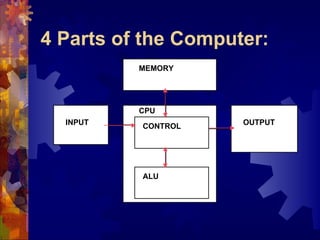
4 Parts of the Computer:
          MEMORY


          CPU
  INPUT   CONTROL    OUTPUT


          ALU
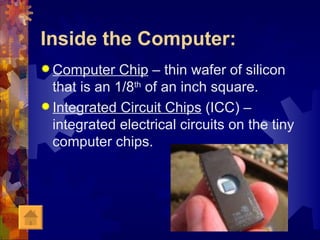
Inside the Computer:
 Computer    Chip – thin wafer of silicon
  that is an 1/8th of an inch square.
 Integrated Circuit Chips (ICC) –
  integrated electrical circuits on the tiny
  computer chips.
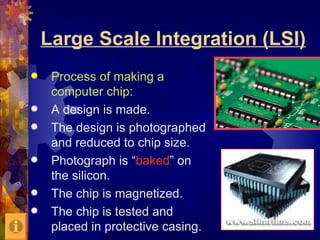
Large Scale Integration (LSI)
    Process of making a
     computer chip:
    A design is made.
    The design is photographed
     and reduced to chip size.
    Photograph is “baked” on
     the silicon.
    The chip is magnetized.
    The chip is tested and
     placed in protective casing.
Computer Definitions:
    Bit (binary digit) – tiny electrical signal. If
     the signal is On = 1 and if the signal is Off =
     0.
    Byte – Pattern of 8 electrical signals or 8
     bits. Everything on the keyboard has its
     own pattern.
    Nybble – ½ a byte.
    Memory Size:
e)   1 Kilobyte (K) – 1024 bytes
f)   1 Megabyte (meg) – 1024 Kilobytes
g)   1 Gigabyte (gig)–1024 megabytes
h)   1 Terabyte (TB)–1024 gigabytes
1 Gigabyte = approx 500,000 letter-size pages of text information
More Definitions:
 Computer Hardware – Any part of the
  computer (monitor, disk drive, speakers,
  printer…).
 Computer Software – Programs used on the
  computer (Microsoft Word, Power Point, Sim
  City, LOGO…..).
 Binary Code – Base 2 number system made
  up of 1’s and 0’s.
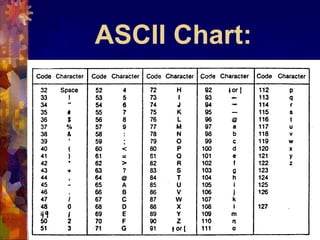
 ASCII Code – Each character on the
  computer has it’s own code number.
        (See the chart on the next slide).
          Don’t write this in your notes!
ASCII Chart:

Computer Applications Notes Grade 6

  • 1.
  • 2.
    3 Types ofComputers: Main Frame Microcomputer b) Largest b) Smallest c) Most Expensive c) Least Expensive d) Stores the Most d) Stores Least Data Amount of Data Minicomputer  2nd Largest  2nd Most Expensive  2nd in Storing Data
  • 3.
    Electrical Signals:  Digital–Uses On or Off electrical signals.  Analog – Uses a smooth continuous change in the electrical signal.
  • 4.
    4 Parts ofthe Computer:  Input – Enters data into the computer  Output – Returns processed data  Memory – Stores data  Central Processing Unit (CPU) – The brain or the heart of the computer
  • 5.
    Memory:  Random Access Memory (RAM) 2) Memory that we use when we are using the computer 3) Can be changed 4) Temporary  Read Only Memory (ROM) 6) Memory that the computer uses 7) Can Not be changed 8) Permanent
  • 6.
    Central Processing Unit:  Made up of the following two units:  Control Unit – directs the flow of the program or data.  Arithmetic Logic Unit (ALU) – all math and comparing is done here.
  • 7.
    4 Parts ofthe Computer: MEMORY CPU INPUT CONTROL OUTPUT ALU
  • 8.
    Inside the Computer: Computer Chip – thin wafer of silicon that is an 1/8th of an inch square.  Integrated Circuit Chips (ICC) – integrated electrical circuits on the tiny computer chips.
  • 9.
    Large Scale Integration(LSI)  Process of making a computer chip:  A design is made.  The design is photographed and reduced to chip size.  Photograph is “baked” on the silicon.  The chip is magnetized.  The chip is tested and placed in protective casing.
  • 10.
    Computer Definitions:  Bit (binary digit) – tiny electrical signal. If the signal is On = 1 and if the signal is Off = 0.  Byte – Pattern of 8 electrical signals or 8 bits. Everything on the keyboard has its own pattern.  Nybble – ½ a byte.  Memory Size: e) 1 Kilobyte (K) – 1024 bytes f) 1 Megabyte (meg) – 1024 Kilobytes g) 1 Gigabyte (gig)–1024 megabytes h) 1 Terabyte (TB)–1024 gigabytes 1 Gigabyte = approx 500,000 letter-size pages of text information
  • 11.
    More Definitions:  ComputerHardware – Any part of the computer (monitor, disk drive, speakers, printer…).  Computer Software – Programs used on the computer (Microsoft Word, Power Point, Sim City, LOGO…..).  Binary Code – Base 2 number system made up of 1’s and 0’s.  ASCII Code – Each character on the computer has it’s own code number. (See the chart on the next slide). Don’t write this in your notes!
  • 12.

Editor's Notes

  • #13 Decode using the chart above