
COMPUTER PROGRAMING AND UTILIZATION
INTRODUCTION
 Computers have been invented mainly as a tool for
computations.
 This puts the need of having knowledge of
computers for every person as no field is left
without having influenced by computers.
 We will focus on basic hardware architecture of a
computer system with function of each part and
provide the advantages, limitations and application
of computers in various fields.
HISTORY OF COMPUTERS
 Modern computers are not developed in short
period, but they have evolved slowly during last 50
to 60 years with advancement in hardware
technologies.
 This has leaded us to develop the third generation
computers.
 Further advancement in IC technology resulted into
a chip known as microprocessor.
 They are today used for desktop applications to
network based applications on internet.
WHAT IS COMPUTER?
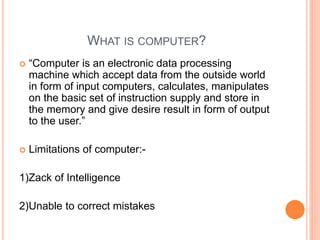
 “Computer is an electronic data processing
machine which accept data from the outside world
in form of input computers, calculates, manipulates
on the basic set of instruction supply and store in
the memory and give desire result in form of output
to the user.”
 Limitations of computer:-
1)Zack of Intelligence
2)Unable to correct mistakes
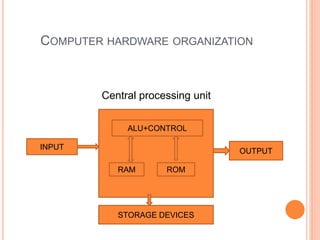
COMPUTER HARDWARE ORGANIZATION
Central processing unit
ALU+CONTROL
RAM ROM
OUTPUT
INPUT
STORAGE DEVICES
ADVANTAGES OF COMPUTERS
 The speed, accuracy, storage, reliability and
automation are main advantages of computer. Let
us discuss them in brief.
 SPEED:-
 ACCURACY:-
 STORAGE:-
 RELIABIILITY:
 AUTOMATION:-
LIMITATION OF COMPUTERS
 Like any other devices, computer has also
limitation. The following major limitation of the
computer.
 LACK OF INTELLIGENCE:-
 UNABLE TO CORRECT MISTAKES:-
OVERVIEW OF SOFTWARE
 Computer is an electronic device and works only as
per instructions provided. The set of instruction
provided to the computer to perform meaningful
task is known as program. Set of programs defined
to perform various tasks for a large problem is
known as software. The process of writing the
program of software is called programming.
SYSTEM SOFTWARE
 Acts as interface between hardware and user.
 Provides file management facility to manage the
information in form of files.
 Manages the primary memory for executing the
various programs.
 Provides necessary environment to run the different
programs and performs the process management
to execute the single or multiple Process
simultaneously.
 Manages and controls the various resources in the
system like disks, printers etc.
APPLICATION SOFTWARE
 Engineering software
 Scientific software
 Gaming software
 Animation software
 Financial software
 Education software
 Business software
 Personal computer
software
COMPILER AND INTERPRETER
 Compiler :- compiler translates whole program at
time.
 After successful translation, for every execution no
translation is required.
 Interpreter:- interpreter translates and executes
program line by line.
 Translation is done for every execution.
TYPES OF PROGRAMMING LANGUAGES
 There are three types of programming:
1. machine language programming
2. assembly language programming
3. higher level language programming
 Machine language programming is done using
binary codes of underling processor.
 The higher level languages are like natural
languages as they use phrases of natural
languages.
CHARACTERISTICS OF HIGHER LEVEL
LANGUAGES
 The major common characteristics of higher level
programming languages are listed below:
 Interactive
 Variety of data types
 Rich set of operator
 Flexible control structures
 Readability
 Modularity
 File handling
 Memory management
 Procedural vs. Object-oriented
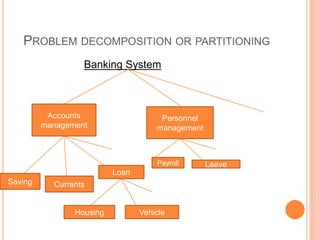
PROBLEM DECOMPOSITION OR PARTITIONING
Banking System
Personnel
management
Accounts
management
Saving Currents
Loan
Payroll Leave
Housing Vehicle
PROBLEM SOLVING METHOD
 There are two widely used problem solving
methods:
1. Algorithms
2. Flowcharts
Algorithms: An algorithm is a stepwise solution to
a problem. Each step in an algorithm represents a
solution to a small problem.
Flowcharts: A flowcharts is a pictorial
representation of an algorithms. As it represents
solution in form of picture, it is more easier to
understand and develop.
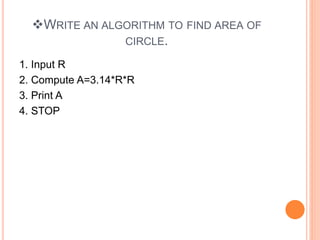
WRITE AN ALGORITHM TO FIND AREA OF
CIRCLE.
1. Input R
2. Compute A=3.14*R*R
3. Print A
4. STOP
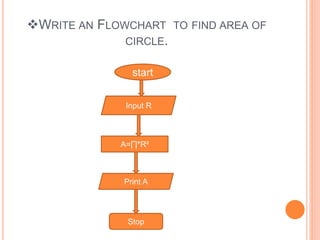
WRITE AN FLOWCHART TO FIND AREA OF
CIRCLE.
start
Input R
A=∏*R²
Print A
Stop
computer programing and utilization

computer programing and utilization

  • 1.
  • 2.
    INTRODUCTION  Computers havebeen invented mainly as a tool for computations.  This puts the need of having knowledge of computers for every person as no field is left without having influenced by computers.  We will focus on basic hardware architecture of a computer system with function of each part and provide the advantages, limitations and application of computers in various fields.
  • 3.
    HISTORY OF COMPUTERS Modern computers are not developed in short period, but they have evolved slowly during last 50 to 60 years with advancement in hardware technologies.  This has leaded us to develop the third generation computers.  Further advancement in IC technology resulted into a chip known as microprocessor.  They are today used for desktop applications to network based applications on internet.
  • 4.
    WHAT IS COMPUTER? “Computer is an electronic data processing machine which accept data from the outside world in form of input computers, calculates, manipulates on the basic set of instruction supply and store in the memory and give desire result in form of output to the user.”  Limitations of computer:- 1)Zack of Intelligence 2)Unable to correct mistakes
  • 5.
    COMPUTER HARDWARE ORGANIZATION Centralprocessing unit ALU+CONTROL RAM ROM OUTPUT INPUT STORAGE DEVICES
  • 6.
    ADVANTAGES OF COMPUTERS The speed, accuracy, storage, reliability and automation are main advantages of computer. Let us discuss them in brief.  SPEED:-  ACCURACY:-  STORAGE:-  RELIABIILITY:  AUTOMATION:-
  • 7.
    LIMITATION OF COMPUTERS Like any other devices, computer has also limitation. The following major limitation of the computer.  LACK OF INTELLIGENCE:-  UNABLE TO CORRECT MISTAKES:-
  • 8.
    OVERVIEW OF SOFTWARE Computer is an electronic device and works only as per instructions provided. The set of instruction provided to the computer to perform meaningful task is known as program. Set of programs defined to perform various tasks for a large problem is known as software. The process of writing the program of software is called programming.
  • 9.
    SYSTEM SOFTWARE  Actsas interface between hardware and user.  Provides file management facility to manage the information in form of files.  Manages the primary memory for executing the various programs.  Provides necessary environment to run the different programs and performs the process management to execute the single or multiple Process simultaneously.  Manages and controls the various resources in the system like disks, printers etc.
  • 10.
    APPLICATION SOFTWARE  Engineeringsoftware  Scientific software  Gaming software  Animation software  Financial software  Education software  Business software  Personal computer software
  • 11.
    COMPILER AND INTERPRETER Compiler :- compiler translates whole program at time.  After successful translation, for every execution no translation is required.  Interpreter:- interpreter translates and executes program line by line.  Translation is done for every execution.
  • 12.
    TYPES OF PROGRAMMINGLANGUAGES  There are three types of programming: 1. machine language programming 2. assembly language programming 3. higher level language programming  Machine language programming is done using binary codes of underling processor.  The higher level languages are like natural languages as they use phrases of natural languages.
  • 13.
    CHARACTERISTICS OF HIGHERLEVEL LANGUAGES  The major common characteristics of higher level programming languages are listed below:  Interactive  Variety of data types  Rich set of operator  Flexible control structures  Readability  Modularity  File handling  Memory management  Procedural vs. Object-oriented
  • 14.
    PROBLEM DECOMPOSITION ORPARTITIONING Banking System Personnel management Accounts management Saving Currents Loan Payroll Leave Housing Vehicle
  • 15.
    PROBLEM SOLVING METHOD There are two widely used problem solving methods: 1. Algorithms 2. Flowcharts Algorithms: An algorithm is a stepwise solution to a problem. Each step in an algorithm represents a solution to a small problem. Flowcharts: A flowcharts is a pictorial representation of an algorithms. As it represents solution in form of picture, it is more easier to understand and develop.
  • 16.
    WRITE AN ALGORITHMTO FIND AREA OF CIRCLE. 1. Input R 2. Compute A=3.14*R*R 3. Print A 4. STOP
  • 17.
    WRITE AN FLOWCHARTTO FIND AREA OF CIRCLE. start Input R A=∏*R² Print A Stop