INTRODUCTION
A computer is an electronic device that processes input data and produces
result (output) according to a set of instructions called program. A computer
performs basically five major functions irrespective of its size and make.
 It accepts data or instructions by way of input
 It stores data
 It processes data as required by the user
 It controls operations of a computer
 It gives results in the form of output
HARDWARE
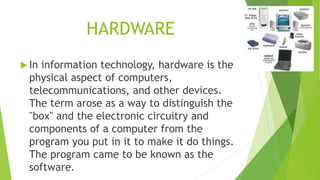
 In information technology, hardware is the
physical aspect of computers,
telecommunications, and other devices.
The term arose as a way to distinguish the
"box" and the electronic circuitry and
components of a computer from the
program you put in it to make it do things.
The program came to be known as the
software.
SOFTWARE
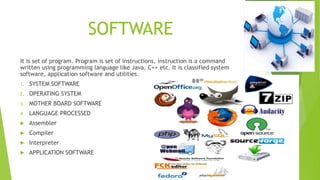
It is set of program. Program is set of instructions, instruction is a command
written using programming language like Java, C++ etc. It is classified system
software, application software and utilities.
1. SYSTEM SOFTWARE
2. OPERATING SYSTEM
3. MOTHER BOARD SOFTWARE
4. LANGUAGE PROCESSED
 Assembler
 Compiler
 Interpreter
 APPLICATION SOFTWARE
 UTILITIES :-They help to enhance the
performance of the system.
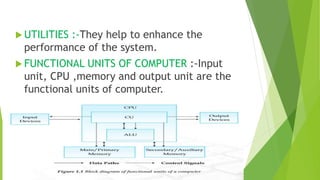
 FUNCTIONAL UNITS OF COMPUTER :-Input
unit, CPU ,memory and output unit are the
functional units of computer.
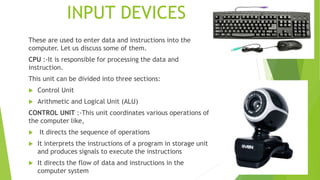
INPUT DEVICES
These are used to enter data and instructions into the
computer. Let us discuss some of them.
CPU :-It is responsible for processing the data and
instruction.
This unit can be divided into three sections:
 Control Unit
 Arithmetic and Logical Unit (ALU)
CONTROL UNIT :-This unit coordinates various operations of
the computer like,
 It directs the sequence of operations
 It interprets the instructions of a program in storage unit
and produces signals to execute the instructions
 It directs the flow of data and instructions in the
computer system
ALU :-This unit is responsible for performing various
Arithmetic operation of addition, subtraction,
multiplication, division and relational operations such as
equal to , greater than , less than, greater than or not equal
to and logical operation etc.
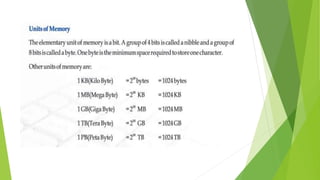
PRIMARY MEMORY UNIT :- The main or primary memory
stores information (instruction and data)
 RAM :-Random Access Memory is used for primary
storage in computers to hold active information of
data and instructions.
 ROM :-ROM (Read Only Memory) is used to store
the instructions provided by the manufacturer, which
holds the instructions to check basic hardware
interconnector and to load operating system from
appropriate storage device.
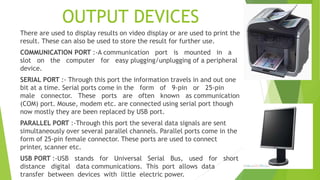
OUTPUT DEVICES
There are used to display results on video display or are used to print the
result. These can also be used to store the result for further use.
COMMUNICATION PORT :-A communication port is mounted in a
slot on the computer for easy plugging/unplugging of a peripheral
device.
SERIAL PORT :- Through this port the information travels in and out one
bit at a time. Serial ports come in the form of 9-pin or 25-pin
male connector. These ports are often known as communication
(COM) port. Mouse, modem etc. are connected using serial port though
now mostly they are been replaced by USB port.
PARALLEL PORT :-Through this port the several data signals are sent
simultaneously over several parallel channels. Parallel ports come in the
form of 25-pin female connector. These ports are used to connect
printer, scanner etc.
USB PORT :-USB stands for Universal Serial Bus, used for short
distance digital data communications. This port allows data
transfer between devices with little electric power.
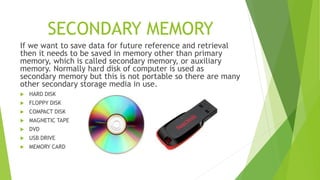
SECONDARY MEMORY
If we want to save data for future reference and retrieval
then it needs to be saved in memory other than primary
memory, which is called secondary memory, or auxiliary
memory. Normally hard disk of computer is used as
secondary memory but this is not portable so there are many
other secondary storage media in use.
 HARD DISK
 FLOPPY DISK
 COMPACT DISK
 MAGNETIC TAPE
 DVD
 USB DRIVE
 MEMORY CARD
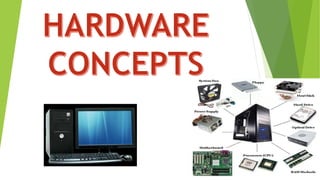
Hardware concepts

Hardware concepts

  • 2.
    INTRODUCTION A computer isan electronic device that processes input data and produces result (output) according to a set of instructions called program. A computer performs basically five major functions irrespective of its size and make.  It accepts data or instructions by way of input  It stores data  It processes data as required by the user  It controls operations of a computer  It gives results in the form of output
  • 3.
    HARDWARE  In informationtechnology, hardware is the physical aspect of computers, telecommunications, and other devices. The term arose as a way to distinguish the "box" and the electronic circuitry and components of a computer from the program you put in it to make it do things. The program came to be known as the software.
  • 4.
    SOFTWARE It is setof program. Program is set of instructions, instruction is a command written using programming language like Java, C++ etc. It is classified system software, application software and utilities. 1. SYSTEM SOFTWARE 2. OPERATING SYSTEM 3. MOTHER BOARD SOFTWARE 4. LANGUAGE PROCESSED  Assembler  Compiler  Interpreter  APPLICATION SOFTWARE
  • 5.
     UTILITIES :-Theyhelp to enhance the performance of the system.  FUNCTIONAL UNITS OF COMPUTER :-Input unit, CPU ,memory and output unit are the functional units of computer.
  • 6.
    INPUT DEVICES These areused to enter data and instructions into the computer. Let us discuss some of them. CPU :-It is responsible for processing the data and instruction. This unit can be divided into three sections:  Control Unit  Arithmetic and Logical Unit (ALU) CONTROL UNIT :-This unit coordinates various operations of the computer like,  It directs the sequence of operations  It interprets the instructions of a program in storage unit and produces signals to execute the instructions  It directs the flow of data and instructions in the computer system
  • 7.
    ALU :-This unitis responsible for performing various Arithmetic operation of addition, subtraction, multiplication, division and relational operations such as equal to , greater than , less than, greater than or not equal to and logical operation etc. PRIMARY MEMORY UNIT :- The main or primary memory stores information (instruction and data)  RAM :-Random Access Memory is used for primary storage in computers to hold active information of data and instructions.  ROM :-ROM (Read Only Memory) is used to store the instructions provided by the manufacturer, which holds the instructions to check basic hardware interconnector and to load operating system from appropriate storage device.
  • 9.
    OUTPUT DEVICES There areused to display results on video display or are used to print the result. These can also be used to store the result for further use. COMMUNICATION PORT :-A communication port is mounted in a slot on the computer for easy plugging/unplugging of a peripheral device. SERIAL PORT :- Through this port the information travels in and out one bit at a time. Serial ports come in the form of 9-pin or 25-pin male connector. These ports are often known as communication (COM) port. Mouse, modem etc. are connected using serial port though now mostly they are been replaced by USB port. PARALLEL PORT :-Through this port the several data signals are sent simultaneously over several parallel channels. Parallel ports come in the form of 25-pin female connector. These ports are used to connect printer, scanner etc. USB PORT :-USB stands for Universal Serial Bus, used for short distance digital data communications. This port allows data transfer between devices with little electric power.
  • 10.
    SECONDARY MEMORY If wewant to save data for future reference and retrieval then it needs to be saved in memory other than primary memory, which is called secondary memory, or auxiliary memory. Normally hard disk of computer is used as secondary memory but this is not portable so there are many other secondary storage media in use.  HARD DISK  FLOPPY DISK  COMPACT DISK  MAGNETIC TAPE  DVD  USB DRIVE  MEMORY CARD