This document discusses different types of printers, including impact printers like dot matrix and daisy wheel, and non-impact printers like inkjet, laser, and thermal. It covers factors that affect print quality such as DPI and print mode. Specific printer types are described along with their advantages and disadvantages. Considerations for choosing the right printer for different users like home, office, and business environments are provided.
In this document
Powered by AI
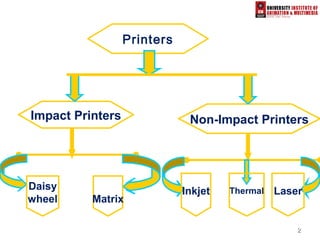
Introduction to printers, including types (impact and non-impact), definitions, and their role as essential peripherals.
Factors like DPI, printer type, print mode, and toner quality influencing print results.
Details on impact printers, particularly Dot-Matrix and Daisy Wheel printers, including advantages and mechanisms.
Non-impact printers like Inkjet and their workings, benefits such as high-resolution output, and disadvantages.
Characteristics of thermal and laser printers, including their resolution capabilities and common uses.
Description of multi-function printers for versatile uses and plotters for precise engineering drawings.
Guidelines for selecting printers based on user needs: budget, color requirements, output volume, and quality.
Summary emphasizing the necessity of printers in modern computing for efficient resource utilization.
List of books and websites for additional information on printers and electronic data processing.
33
What is aprinter?
An external hardware device responsible
for taking computer data and generating a
hard copy of that data. Printers are one of
the most commonly used peripherals and
they print text and still images on the
paper.
4.
44
“Factors affecting printquality”
(1) DPI:
It is a measurement of printer’s resolution indicating how
many ink dots can be placed by the printer in one square
inch. The higher the DPI, the sharper is image.
(2) Type of printer:
Each type of printer has its own capabilities of printing.
Some types of printers produce high quality print while
other produce low quality print.
(3) Print Mode:
The printing mode may also affect the quality. For
example the draft mode increases the print rate but
quality is reduced.
(4) Toner:
The quality and amount of toner also affects print
quality.
5.
55
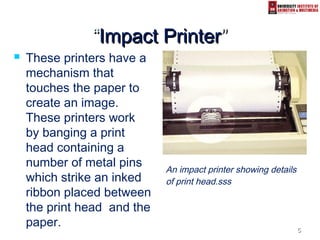
““ImpactImpact PrinterPrinter””
Theseprinters have a
mechanism that
touches the paper to
create an image.
These printers work
by banging a print
head containing a
number of metal pins
which strike an inked
ribbon placed between
the print head and the
paper.
An impact printer showing details
of print head.sss
6.
66
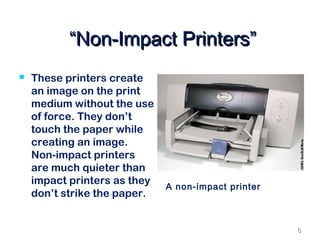
““Non-Impact Printers”Non-Impact Printers”
These printers create
an image on the print
medium without the use
of force. They don’t
touch the paper while
creating an image.
Non-impact printers
are much quieter than
impact printers as they
don’t strike the paper.
A non-impact printer
7.
77
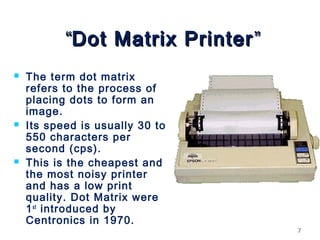
““Dot Matrix PrinterDotMatrix Printer ””
The term dot matrix
refers to the process of
placing dots to form an
image.
Its speed is usually 30 to
550 characters per
second (cps).
This is the cheapest and
the most noisy printer
and has a low print
quality. Dot Matrix were
1st
introduced by
Centronics in 1970.
99
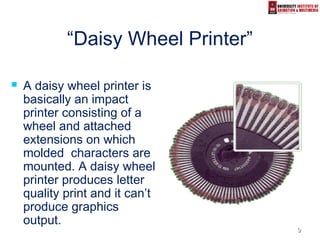
“Daisy Wheel Printer”
A daisy wheel printer is
basically an impact
printer consisting of a
wheel and attached
extensions on which
molded characters are
mounted. A daisy wheel
printer produces letter
quality print and it can’t
produce graphics
output.
10.
10
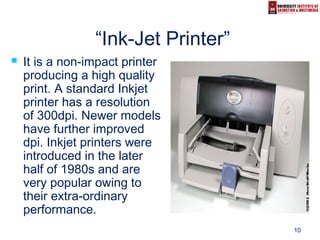
“Ink-Jet Printer”
Itis a non-impact printer
producing a high quality
print. A standard Inkjet
printer has a resolution
of 300dpi. Newer models
have further improved
dpi. Inkjet printers were
introduced in the later
half of 1980s and are
very popular owing to
their extra-ordinary
performance.
11.
11
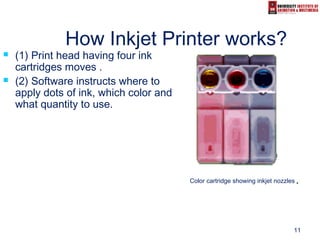
How Inkjet Printerworks?
(1) Print head having four ink
cartridges moves .
(2) Software instructs where to
apply dots of ink, which color and
what quantity to use.
Color cartridge showing inkjet nozzles..
12.
12
Advantages/ Dis-advantages
Advantages:
(1) High resolution output.
(2) Energy efficient.
(3) Many options to select.
Dis-advantages:
(1) Expensive.
(2) Special paper required for higher
resolution output.
(3) Time consuming in case of graphics
printing.
13.
13
Thermal Printer
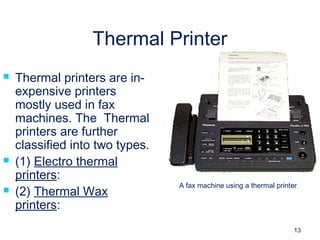
Thermalprinters are in-
expensive printers
mostly used in fax
machines. The Thermal
printers are further
classified into two types.
(1) Electro thermal
printers:
(2) Thermal Wax
printers:
A fax machine using a thermal printer
14.
14
“Laser Printer”
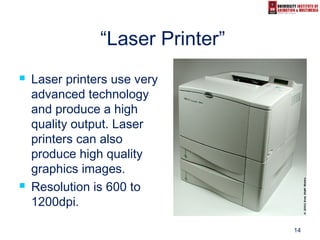
Laserprinters use very
advanced technology
and produce a high
quality output. Laser
printers can also
produce high quality
graphics images.
Resolution is 600 to
1200dpi.
15.
15
“Multi-function printer”
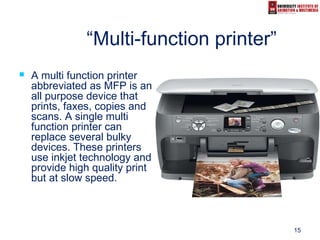
Amulti function printer
abbreviated as MFP is an
all purpose device that
prints, faxes, copies and
scans. A single multi
function printer can
replace several bulky
devices. These printers
use inkjet technology and
provide high quality print
but at slow speed.
16.
16
“Plotter”
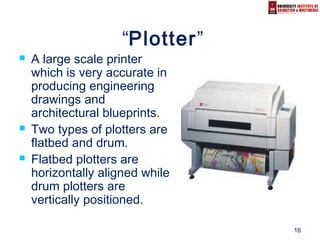
A largescale printer
which is very accurate in
producing engineering
drawings and
architectural blueprints.
Two types of plotters are
flatbed and drum.
Flatbed plotters are
horizontally aligned while
drum plotters are
vertically positioned.
17.
17
“Printers for differentusers”
To choose a printer from a printer’s family
following considerations are to be made.
(1) What’s the budget?
(2) Is color needed or just black& white?
(3) What is the Volume of the output?
(4) How important is the quality of the output?
(5) What special features are needed?
(6) Is the printer is to be used by a single user or
a whole network?
18.
18
“Printer for Homeusers”
For home users, the quality of the print
and the price of the printer both matter. So
a better choice in such case is a portable
color Inkjet printer.
If the budget of the user is good enough
then the best choice is a personal laser
printer which enhances both the speed
and quality of the print.
19.
19
“Small and mediumoffices”
For small and medium scale offices a
better option is a multi-function printer
which is an integrated device fulfilling
various requirement of the office.
For better output, a laser printer is the
best choice.
20.
20
“Printers for banks,large
business organizations and
companies”
In banks, large size business
environments and companies printers with
networking capabilities should be
preferred which can increase productivity
and reduce the cost without compromising
on the quality. Of course laser printer is
quite suitable choice but multi-functional
printer and inkjet printer can also play vital
role.
21.
2121
““Conclusion”Conclusion”
In factcomputer world is incompleteIn fact computer world is incomplete
without printers in the modern age ofwithout printers in the modern age of
technology. A printer is one of the basictechnology. A printer is one of the basic
needs of every computer user and oneneeds of every computer user and one
can not utilize computer resourcescan not utilize computer resources
properly in the absence of a quality printer.properly in the absence of a quality printer.
22.
22
“References”
Books:
(1)Fundamentals of Electronic Data Processing.
By: S.Jaiswal
(2) COMPUTERS. By: Larry Long/Nancy Long.
(3) Using Information Technology. (Course book)
Websites:
http://redhat.com/docs/manuals
http://doit.ort.org/course/output/307.htm
http://deverace.com/printers_types.html
http://howstuffworks.com
http://prenhall.com/long