Computer Networks
Presentation By:
               Nabendu Maji
              Ritu Parna Jain
              Noopur Tomar
          nabendu.maji@gmail.com
                                   1
Abbreviations
O ANSI: American National Standards
    Institute
O   WWW: World Wide Web
O   CPU: Central Processing Unit
O   HDX: Half Duplex
O   FDX: Half Duplex
O   CB radio: Citizens' Band radio
O   UTP : Unshielded twisted pair
                                      2
Computer Networking
Definition:
O A computer network, often simply
  referred to as a network, is a collection of
  hardware components and computers
  interconnected     by      communications
  channels that allow sharing of resources
  and information.


                                                 3
Applications of Networks
Resource Sharing
  Hardware (computing resources, disks, printers)
  Software (application software)
Information Sharing
  Easy accessibility from anywhere (files,
  databases)
  Search Capability (WWW)
Communication
  Email
  Message broadcast
Remote computing
Distributed processing (GRID Computing)             4
Advantages
O File sharing.
O Resource sharing.
O Increase storage capacity.
O Increase cost efficiency.


                               5
Disadvantages
O Security issues.
O Rapid spread of computer
  virus.
O Expenses set-up.
O Dependency of main file
  server.                    6
Type Of Transmission
       O Simplex
      O Half Duplex
      O Full Duplex


                       7
Simplex
Simplex communication refers to communication that occurs in
one direction only.
O ANSI definition: A simplex circuit is one where all signals can
  flow in only one direction. These systems are often employed
  in broadcast networks, where the receivers do not need to
  send any data back to the transmitter/broadcaster.

Examples
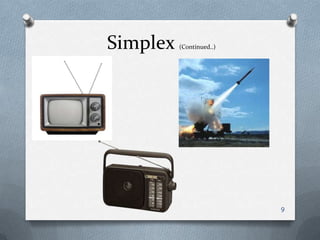
O Commercial Radio Broadcast (not walkie-talkies, etc.)
O Television Broadcast
O Keyboard to CPU communication
O One-way communications from a launcher to a guided missile,
  where the launcher (airplane, ship, etc.) sends commands to
  the missile, but does not receive any information sent back. 8
Simplex   (Continued..)


                          9
Half Duplex
Definition:
O A      half-duplex     (HDX)     system   provides
  communication in both directions, but only one
  direction at a time (not simultaneously).
Typically, once a party begins receiving a signal, it
must wait for the transmitter to stop transmitting,
before replying.

Example: Walkie-talkie
         Fax Machine
                                                   10
Full-Duplex
O A     full-duplex   (FDX), or   sometimes       double-
   duplex system, allows communication in both directions,
   and, unlike half-duplex, allows this to happen
   simultaneously.
It is a system composed of two connected parties or
devices that can communicate with one another in both
directions. (The term multiplexing is also used when
describing communication between more than two parties
or devices.)

Examples: Land-line telephone networks are full-duplex,
since they allow both callers to speak and be heard at the
same time. A good analogy for a full-duplex system would
                                                        11
be a two-lane road with one lane for each direction.
Full-Duplex
Examples:
O Telephone networks
O Mobile phone networks
O CB radio
O Internet


                            12
How many kinds of Networks?
We can classify networks in different ways…
  • Based on Transmission Media: Wired (UTP, coaxial cables,
    fiber-optic cables) and Wireless
  • Based on Network Size: LAN and WAN (and MAN)
  • Based on Management Method: Peer-to-peer and
    Client/Server
  • Based on Topology (connectivity): Bus, Star, Ring, Mesh,
    Hybrid…


                                                          13


                                                               13
Transmission Media
    O Twisted Pair Cable
      O Coaxial cables
     O Fiber-optic cables
         O Wireless


                            14
Twisted Pair Cable
O Twisted pair cabling is a type of wiring in which
 two conductors (the forward and return
 conductors of a single circuit) are twisted together
 for the purposes of cancelling out electromagnetic
 interference (EMI) from external sources; for
 instance,    electromagnetic       radiation    from
 unshielded     twisted    pair     (UTP)     cables,
 and crosstalk between neighbouring pairs. It was
 invented by Alexander Graham Bell.


                                                    15
Twisted Pair Cable
Advantages:
O High availability—More than 1 billion telephone
  subscriber lines based on twisted-pair have been
  deployed, and because it's already in the ground it can
  be used.
O Low cost of installation on premises—The cost of
  installing twisted-pair on premises is very low.
O It is a thin, flexible cable that is easy to string between
  walls.
O More lines can be run through the same wiring
  ducts.
O UTP costs less per meter/foot than any other type of
  LAN cable.                                               16
O Electrical noise prevented- Electrical noise going into
  or coming from the cable can be prevented.
Twisted Pair Cable
Disadvantages:
O Limited frequency spectrum—The total usable
  frequency spectrum of twisted-pair copper cable is
  about 1MHz.
O Limited data rates—The longer a signal has to travel
  over twisted-pair, the lower the data rate. At 30 feet
  (100 m), twisted-pair can carry 100Mbps, but at 3.5
  miles (5.5 km), the data rate drops to 2Mbps or less.
O Short distances required between repeaters—
  More components need to be maintained, and those
  components are places where trouble can arise,
  which leads to higher long-term operational costs.
                                                        17
O High error rate—Twisted-pair is highly susceptibility
  to signal interference.
Coaxial Cables
O Coaxial cable, or coax, is an electrical cable with
  an inner conductor surrounded by a flexible,
  tubular insulating layer, surrounded by a tubular
  conducting shield. The term coaxial comes from
  the inner conductor and the outer shield sharing
  the same geometric axis. Coaxial cable was
  invented      by     English     engineer    and
  mathematician Oliver Heaviside, who patented the
  design in 1880.


                                                        18
Coaxial Cables
Advantages:
O Broadband system: Coax has a sufficient frequency range to
  support multiple channels, which allows for much greater
  throughput.
O Greater bandwidth: Compared to twisted-pair, coax provides
  greater bandwidth, and it also offers greater bandwidth for
  each channel. As it has greater bandwidth per channel, it
  supports a mixed range of services. Voice, data, and even
  video and multimedia can benefit from the enhanced capacity.
O Lower error rates: Because the inner conductor is in a shield
  insulator, noise immunity is improved, and coax has lower
  error rates and therefore slightly better performance than
  twisted-pair. The error rate is generally 10-9 (i.e., 1 in 1 billion)
                                                                     19
  bps.
Coaxial Cables
Disadvantages:
O Problems with the deployment architecture: The
  bus topology in which coax is deployed is susceptible
  to congestion, noise, and security risks.
O High installation costs: Installation costs in the local
  environment are high.
O Bidirectional upgrade required: In countries that
  have a history of cable TV, the cable systems were
  designed for broadcasting, not for interactive
  communications. Before they can offer to the
  subscriber any form of two-way services, those
  networks have to be upgraded to bidirectional systems.
                                                        20
Fiber-Optic Cables
O An optical fiber cable is a cable containing one or
  more optical fibers. The optical fiber elements are
  typically individually coated with plastic layers and
  contained in a protective tube suitable for the
  environment where the cable will be deployed.


                                                     21
Fiber-Optic Cables


                     22
Fiber-Optic Cables
Advantages:
O Extremely high bandwidth – No other cable-based
  data transmission medium offers the bandwidth that
  fiber does.
O Resistance to electromagnetic interference – Fiber
  has a very low rate of bit error (10 EXP-13), as a result
  of fiber being so resistant to electromagnetic
  interference. Fiber-optic transmission are virtually noise
  free.
O Early detection of cable damage and secure
  transmissions – Fiber provides an extremely secure
  transmission medium. By constantly monitoring an
  optical network and by carefully measuring the time 23    it
  takes light to reflect down the fiber, splices in the cable
  can be easily detected.
Fiber-Optic Cables
Disadvantages:
O Installation costs are still high – Despite the fact that fiber
  installation costs are dropping by as much as 60% a year, still
  installing fiber optic cabling is relatively costly.
O Special test equipment is often required – The traditionally
  used test equipment are of no use. Equipment such as an
  OTDR (Optical Time Domain Reflectometer) are used.
O Susceptibility to physical damage – Fiber is a small and
  compact cable, and it is highly susceptible to becoming cut or
  damaged during installation or construction activities.
O Wildlife damage to fiber optic cables – Fibre optic cable
  (fiber cable jackets particularly) is made of using many
  Wildlife materials such as Bird’s nest.
                                                              24
Wireless
O Wireless network refers to any type of computer
 network that is not connected by cables of any
 kind. It is a method by which homes,
 telecommunications networks and enterprise
 (business) installations avoid the costly process of
 introducing cables into a building, or as a
 connection between various equipment locations.
 Wireless telecommunications networks are
 generally implemented and administered using a
 transmission system called radio waves.
Example: WiMAX (Wireless MAN)

                                                   25
Wireless
Wireless communications can be via:
O Radio frequency communication
O Microwave communication, for example long-range line-
  of-sight via highly directional antennas, or short-range
  communication,
O Infrared (IR) short-range communication, for example
  from consumer IR devices such as remote controls.
O Wi-Fi is a wireless local area network that enables
  portable computing devices to connect easily to
  the Internet. Standardized as IEEE 802.11 a,b,g,n,
  Example: Internet access at private homes, within
  offices, and at public hotspots.
                                                       26
Wireless
O Cellular data service offers effective coverage within a range
  of 10-15 miles from the nearest cell site. Speeds have
  increased as technologies have evolved, from earlier
  technologies such as GSM, CDMA and GPRS, to 3G networks
  such as W-CDMA, EDGE or CDMA2000.
O Mobile Satellite Communications may be used where other
  wireless connections are unavailable, such as in largely rural
  areas or remote locations. Satellite communications are
  especially                                               important
  for transportation, aviation, maritime and military use.
O Bluetooth is a proprietary open wireless technology standard
  for exchanging data over short distances (using short
  wavelength radio transmissions in the ISM band from 2400-
  2480 MHz) from fixed and mobile devices, creating personal
  area networks(PANs) with high levels of security. Created by
  telecoms vendor Ericsson in 1994, it was originally conceived
  as a wireless alternative to RS-232 data cables. It can connect
  several devices, overcoming problems of synchronization.        27
Network Tropology
Definition: The network topology defines the way in
which computers, printers, and other devices are
connected. A network topology describes the layout of
the wire and devices as well as the paths used by data
transmissions
                        Types:
                   O Bus Tropology
                   O Ring Tropology
                   O Star Tropology
                  O Mesh Tropology
                  O Hybrid Tropology
                                                     28
Bus Tropology
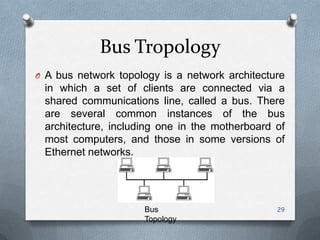
O A bus network topology is a network architecture
 in which a set of clients are connected via a
 shared communications line, called a bus. There
 are several common instances of the bus
 architecture, including one in the motherboard of
 most computers, and those in some versions of
 Ethernet networks.


                     Bus                        29
                     Topology
Ring Tropology
O A ring network is a network topology in which
 each node connects to exactly two other nodes,
 forming a single continuous pathway for signals
 through each node - a ring. Data travels from node
 to node, with each node along the way handling
 every packet.


    Ring Topology


                                                 30
Star Tropology
O Star   networks are one of the most
 common computer network topologies. In its
 simplest form, a star network consists of one
 central switch, hub or computer, which acts as a
 conduit to transmit messages. This consists of a
 central node, to which all other nodes are
 connected; this central node provides a common
 connection point for all nodes through a hub.


         Star
         Topology
                                                31
Mesh Tropology
O The type of network topology in which some of
 the nodes of the network are connected to more
 than one other node in the network with a point-
 to-point link – this makes it possible to take
 advantage of some of the redundancy that is
 provided by a physical fully connected mesh
 topology without the expense and complexity
 required for a connection between every node in
 the network.
                      Mesh
                      Topology

                                               32
Hybrid Tropology
O Hybrid networks use a combination of any two or
  more topologies in such a way that the resulting
  network does not exhibit one of the standard
  topologies (e.g., bus, star, ring, etc.).
For example, a tree network connected to a tree
network is still a tree network topology. A hybrid
topology is always produced when two different
basic network topologies are connected. Two
common examples for Hybrid network are: star ring
network and star bus network
                                                33
Hybrid Tropology   (Continued…)


                                  34
LAN (Local Area Network)
O A local area network (LAN) is a computer
  network that interconnects computers in a limited
  area such as home, school, computer laboratory
  or office building.
It allows resource sharing between computers
within a limited area.
Example: Intranet of IMED.
           Wifi Network of my House.


                                                 35
MAN (Metropolitan Area Network)
O A metropolitan area network (MAN) is a computer
 network that usually spans a city or a large campus.
 A MAN usually interconnects a number of local area
 networks (LANs) using a high-capacity backbone
 technology, such as fiber-optical links, and provides
 up-link services to wide area networks (or WAN)
 and the Internet.
Example: Many Telcom Company provide a popular
MAN service called SMDS (Switched Multimegabit Data Services).


                                                           36
37
WAN (Wide Area Network)
O A   wide     area     network    (WAN)       is   a
 telecommunication network that covers a broad
 area (i.e., any network that links across
 metropolitan, regional, or national boundaries).
 Business and government entities utilize WANs to
 relay data among employees, clients, buyers, and
 suppliers from various geographical locations. In
 essence this mode of telecommunication allows a
 business to effectively carry out its daily function
 regardless of location.

                                                   38
WAN (Wide Area Network)
                      (Cont.…)


           WAN            39
Internet
O The     Internet     is   a    global   system      of
  interconnected computer networks that use the
  standard Internet Protocol Suite (TCP/IP) to serve
  billions of users worldwide. It is a network of
  networks that consists of millions of private, public,
  academic, business, and government networks, of
  local to global scope, that are linked by a broad
  array of electronic, wireless and optical networking
  technologies.
O Example: World Wide Web

                                                      40
INTERNET


           41
Intranet
O An   intranet is a computer network that
  uses Internet Protocol technology to securely
  share any part of an organization's information
  or network operating system within that
  organization.
Sometimes the term refers only to the
organization's internal website.

Example: Intranet Of Bharati Vidyapeeth University

                                                 42
Extranet
O An extranet is a computer network that allows
 controlled access from the outside, for specific
 business or educational purposes. An extranet
 can be viewed as an extension of a
 company's intranet that is extended to users
 outside the company, usually partners, vendors,
 and suppliers.

Example: Bank’s Internet Banking

                                               43
44
Thank You


            45
?
    46

Computer networks

  • 1.
    Computer Networks Presentation By: Nabendu Maji Ritu Parna Jain Noopur Tomar nabendu.maji@gmail.com 1
  • 2.
    Abbreviations O ANSI: AmericanNational Standards Institute O WWW: World Wide Web O CPU: Central Processing Unit O HDX: Half Duplex O FDX: Half Duplex O CB radio: Citizens' Band radio O UTP : Unshielded twisted pair 2
  • 3.
    Computer Networking Definition: O Acomputer network, often simply referred to as a network, is a collection of hardware components and computers interconnected by communications channels that allow sharing of resources and information. 3
  • 4.
    Applications of Networks ResourceSharing Hardware (computing resources, disks, printers) Software (application software) Information Sharing Easy accessibility from anywhere (files, databases) Search Capability (WWW) Communication Email Message broadcast Remote computing Distributed processing (GRID Computing) 4
  • 5.
    Advantages O File sharing. OResource sharing. O Increase storage capacity. O Increase cost efficiency. 5
  • 6.
    Disadvantages O Security issues. ORapid spread of computer virus. O Expenses set-up. O Dependency of main file server. 6
  • 7.
    Type Of Transmission O Simplex O Half Duplex O Full Duplex 7
  • 8.
    Simplex Simplex communication refersto communication that occurs in one direction only. O ANSI definition: A simplex circuit is one where all signals can flow in only one direction. These systems are often employed in broadcast networks, where the receivers do not need to send any data back to the transmitter/broadcaster. Examples O Commercial Radio Broadcast (not walkie-talkies, etc.) O Television Broadcast O Keyboard to CPU communication O One-way communications from a launcher to a guided missile, where the launcher (airplane, ship, etc.) sends commands to the missile, but does not receive any information sent back. 8
  • 9.
    Simplex (Continued..) 9
  • 10.
    Half Duplex Definition: O A half-duplex (HDX) system provides communication in both directions, but only one direction at a time (not simultaneously). Typically, once a party begins receiving a signal, it must wait for the transmitter to stop transmitting, before replying. Example: Walkie-talkie Fax Machine 10
  • 11.
    Full-Duplex O A full-duplex (FDX), or sometimes double- duplex system, allows communication in both directions, and, unlike half-duplex, allows this to happen simultaneously. It is a system composed of two connected parties or devices that can communicate with one another in both directions. (The term multiplexing is also used when describing communication between more than two parties or devices.) Examples: Land-line telephone networks are full-duplex, since they allow both callers to speak and be heard at the same time. A good analogy for a full-duplex system would 11 be a two-lane road with one lane for each direction.
  • 12.
    Full-Duplex Examples: O Telephone networks OMobile phone networks O CB radio O Internet 12
  • 13.
    How many kindsof Networks? We can classify networks in different ways… • Based on Transmission Media: Wired (UTP, coaxial cables, fiber-optic cables) and Wireless • Based on Network Size: LAN and WAN (and MAN) • Based on Management Method: Peer-to-peer and Client/Server • Based on Topology (connectivity): Bus, Star, Ring, Mesh, Hybrid… 13 13
  • 14.
    Transmission Media O Twisted Pair Cable O Coaxial cables O Fiber-optic cables O Wireless 14
  • 15.
    Twisted Pair Cable OTwisted pair cabling is a type of wiring in which two conductors (the forward and return conductors of a single circuit) are twisted together for the purposes of cancelling out electromagnetic interference (EMI) from external sources; for instance, electromagnetic radiation from unshielded twisted pair (UTP) cables, and crosstalk between neighbouring pairs. It was invented by Alexander Graham Bell. 15
  • 16.
    Twisted Pair Cable Advantages: OHigh availability—More than 1 billion telephone subscriber lines based on twisted-pair have been deployed, and because it's already in the ground it can be used. O Low cost of installation on premises—The cost of installing twisted-pair on premises is very low. O It is a thin, flexible cable that is easy to string between walls. O More lines can be run through the same wiring ducts. O UTP costs less per meter/foot than any other type of LAN cable. 16 O Electrical noise prevented- Electrical noise going into or coming from the cable can be prevented.
  • 17.
    Twisted Pair Cable Disadvantages: OLimited frequency spectrum—The total usable frequency spectrum of twisted-pair copper cable is about 1MHz. O Limited data rates—The longer a signal has to travel over twisted-pair, the lower the data rate. At 30 feet (100 m), twisted-pair can carry 100Mbps, but at 3.5 miles (5.5 km), the data rate drops to 2Mbps or less. O Short distances required between repeaters— More components need to be maintained, and those components are places where trouble can arise, which leads to higher long-term operational costs. 17 O High error rate—Twisted-pair is highly susceptibility to signal interference.
  • 18.
    Coaxial Cables O Coaxialcable, or coax, is an electrical cable with an inner conductor surrounded by a flexible, tubular insulating layer, surrounded by a tubular conducting shield. The term coaxial comes from the inner conductor and the outer shield sharing the same geometric axis. Coaxial cable was invented by English engineer and mathematician Oliver Heaviside, who patented the design in 1880. 18
  • 19.
    Coaxial Cables Advantages: O Broadbandsystem: Coax has a sufficient frequency range to support multiple channels, which allows for much greater throughput. O Greater bandwidth: Compared to twisted-pair, coax provides greater bandwidth, and it also offers greater bandwidth for each channel. As it has greater bandwidth per channel, it supports a mixed range of services. Voice, data, and even video and multimedia can benefit from the enhanced capacity. O Lower error rates: Because the inner conductor is in a shield insulator, noise immunity is improved, and coax has lower error rates and therefore slightly better performance than twisted-pair. The error rate is generally 10-9 (i.e., 1 in 1 billion) 19 bps.
  • 20.
    Coaxial Cables Disadvantages: O Problemswith the deployment architecture: The bus topology in which coax is deployed is susceptible to congestion, noise, and security risks. O High installation costs: Installation costs in the local environment are high. O Bidirectional upgrade required: In countries that have a history of cable TV, the cable systems were designed for broadcasting, not for interactive communications. Before they can offer to the subscriber any form of two-way services, those networks have to be upgraded to bidirectional systems. 20
  • 21.
    Fiber-Optic Cables O Anoptical fiber cable is a cable containing one or more optical fibers. The optical fiber elements are typically individually coated with plastic layers and contained in a protective tube suitable for the environment where the cable will be deployed. 21
  • 22.
  • 23.
    Fiber-Optic Cables Advantages: O Extremelyhigh bandwidth – No other cable-based data transmission medium offers the bandwidth that fiber does. O Resistance to electromagnetic interference – Fiber has a very low rate of bit error (10 EXP-13), as a result of fiber being so resistant to electromagnetic interference. Fiber-optic transmission are virtually noise free. O Early detection of cable damage and secure transmissions – Fiber provides an extremely secure transmission medium. By constantly monitoring an optical network and by carefully measuring the time 23 it takes light to reflect down the fiber, splices in the cable can be easily detected.
  • 24.
    Fiber-Optic Cables Disadvantages: O Installationcosts are still high – Despite the fact that fiber installation costs are dropping by as much as 60% a year, still installing fiber optic cabling is relatively costly. O Special test equipment is often required – The traditionally used test equipment are of no use. Equipment such as an OTDR (Optical Time Domain Reflectometer) are used. O Susceptibility to physical damage – Fiber is a small and compact cable, and it is highly susceptible to becoming cut or damaged during installation or construction activities. O Wildlife damage to fiber optic cables – Fibre optic cable (fiber cable jackets particularly) is made of using many Wildlife materials such as Bird’s nest. 24
  • 25.
    Wireless O Wireless networkrefers to any type of computer network that is not connected by cables of any kind. It is a method by which homes, telecommunications networks and enterprise (business) installations avoid the costly process of introducing cables into a building, or as a connection between various equipment locations. Wireless telecommunications networks are generally implemented and administered using a transmission system called radio waves. Example: WiMAX (Wireless MAN) 25
  • 26.
    Wireless Wireless communications canbe via: O Radio frequency communication O Microwave communication, for example long-range line- of-sight via highly directional antennas, or short-range communication, O Infrared (IR) short-range communication, for example from consumer IR devices such as remote controls. O Wi-Fi is a wireless local area network that enables portable computing devices to connect easily to the Internet. Standardized as IEEE 802.11 a,b,g,n, Example: Internet access at private homes, within offices, and at public hotspots. 26
  • 27.
    Wireless O Cellular dataservice offers effective coverage within a range of 10-15 miles from the nearest cell site. Speeds have increased as technologies have evolved, from earlier technologies such as GSM, CDMA and GPRS, to 3G networks such as W-CDMA, EDGE or CDMA2000. O Mobile Satellite Communications may be used where other wireless connections are unavailable, such as in largely rural areas or remote locations. Satellite communications are especially important for transportation, aviation, maritime and military use. O Bluetooth is a proprietary open wireless technology standard for exchanging data over short distances (using short wavelength radio transmissions in the ISM band from 2400- 2480 MHz) from fixed and mobile devices, creating personal area networks(PANs) with high levels of security. Created by telecoms vendor Ericsson in 1994, it was originally conceived as a wireless alternative to RS-232 data cables. It can connect several devices, overcoming problems of synchronization. 27
  • 28.
    Network Tropology Definition: Thenetwork topology defines the way in which computers, printers, and other devices are connected. A network topology describes the layout of the wire and devices as well as the paths used by data transmissions Types: O Bus Tropology O Ring Tropology O Star Tropology O Mesh Tropology O Hybrid Tropology 28
  • 29.
    Bus Tropology O Abus network topology is a network architecture in which a set of clients are connected via a shared communications line, called a bus. There are several common instances of the bus architecture, including one in the motherboard of most computers, and those in some versions of Ethernet networks. Bus 29 Topology
  • 30.
    Ring Tropology O Aring network is a network topology in which each node connects to exactly two other nodes, forming a single continuous pathway for signals through each node - a ring. Data travels from node to node, with each node along the way handling every packet. Ring Topology 30
  • 31.
    Star Tropology O Star networks are one of the most common computer network topologies. In its simplest form, a star network consists of one central switch, hub or computer, which acts as a conduit to transmit messages. This consists of a central node, to which all other nodes are connected; this central node provides a common connection point for all nodes through a hub. Star Topology 31
  • 32.
    Mesh Tropology O Thetype of network topology in which some of the nodes of the network are connected to more than one other node in the network with a point- to-point link – this makes it possible to take advantage of some of the redundancy that is provided by a physical fully connected mesh topology without the expense and complexity required for a connection between every node in the network. Mesh Topology 32
  • 33.
    Hybrid Tropology O Hybridnetworks use a combination of any two or more topologies in such a way that the resulting network does not exhibit one of the standard topologies (e.g., bus, star, ring, etc.). For example, a tree network connected to a tree network is still a tree network topology. A hybrid topology is always produced when two different basic network topologies are connected. Two common examples for Hybrid network are: star ring network and star bus network 33
  • 34.
    Hybrid Tropology (Continued…) 34
  • 35.
    LAN (Local AreaNetwork) O A local area network (LAN) is a computer network that interconnects computers in a limited area such as home, school, computer laboratory or office building. It allows resource sharing between computers within a limited area. Example: Intranet of IMED. Wifi Network of my House. 35
  • 36.
    MAN (Metropolitan AreaNetwork) O A metropolitan area network (MAN) is a computer network that usually spans a city or a large campus. A MAN usually interconnects a number of local area networks (LANs) using a high-capacity backbone technology, such as fiber-optical links, and provides up-link services to wide area networks (or WAN) and the Internet. Example: Many Telcom Company provide a popular MAN service called SMDS (Switched Multimegabit Data Services). 36
  • 37.
  • 38.
    WAN (Wide AreaNetwork) O A wide area network (WAN) is a telecommunication network that covers a broad area (i.e., any network that links across metropolitan, regional, or national boundaries). Business and government entities utilize WANs to relay data among employees, clients, buyers, and suppliers from various geographical locations. In essence this mode of telecommunication allows a business to effectively carry out its daily function regardless of location. 38
  • 39.
    WAN (Wide AreaNetwork) (Cont.…) WAN 39
  • 40.
    Internet O The Internet is a global system of interconnected computer networks that use the standard Internet Protocol Suite (TCP/IP) to serve billions of users worldwide. It is a network of networks that consists of millions of private, public, academic, business, and government networks, of local to global scope, that are linked by a broad array of electronic, wireless and optical networking technologies. O Example: World Wide Web 40
  • 41.
  • 42.
    Intranet O An intranet is a computer network that uses Internet Protocol technology to securely share any part of an organization's information or network operating system within that organization. Sometimes the term refers only to the organization's internal website. Example: Intranet Of Bharati Vidyapeeth University 42
  • 43.
    Extranet O An extranetis a computer network that allows controlled access from the outside, for specific business or educational purposes. An extranet can be viewed as an extension of a company's intranet that is extended to users outside the company, usually partners, vendors, and suppliers. Example: Bank’s Internet Banking 43
  • 44.
  • 45.
  • 46.
    ? 46