NETWORK FUNDAMENTALS
By Manjit Chavda
What is network?
• A network is simply defined as a something that
connects things together for a specific purpose.
• The term network is used in a variety of contexts
including telephone,television, computer, or even people
networks
• A network is simply two or more computers that are
linked together.
Why Do We Use Networks?
• This question can be answered in one word:
convenience
– People expect interoperability from electronic devices
• Computer networks allow:
– For the transfer of files, data, and even shared
applications without copying anything to floppy disk
– Computers to share items such as printers, scanners,
fax machines, processors, disk drives, and other
resources
• Networked computers can share data and
peripherals
Why Do We Use Networks?(Contd.)
• The most common types of networks are :
• Local Area Networks (LAN) , and
• Wide Area Networks (WAN) .
• The primary difference between the two is that a LAN is
generally confined to a limited geographical area,
whereas a WAN covers a large geographical area.
• Most WANs are made up of several connected LANs.
BENEFITS OF A NETWORK
• Information sharing: Authorized users can use other computers
on the network to access and share information and data. This could
include special group projects, databases, etc.
• Hardware sharing: One device connected to a network, such as
a printer or scanner, can be shared by many users.
• Software sharing: Instead of purchasing and installing a software
program on each computer, it can be installed on the server. All of the
users can then access the program from a single location.
• Collaborative environment: Users can work together on
group projects by combining the power and capabilities of diverse
equipment.
RISKS OF NETWORK COMPUTING
• The security of a computer network is
challenged everyday by:
– Equipment malfunctions
– System failures
• Note: equipment malfunctions and system failures may be
caused by natural disasters such as floods, storms, or fires,
and electrical disturbances
– Computer hackers
– Virus attacks
Topic Objectives
• Explain Transmission Media-
Communication,Physical And Wireless.
• Explain How Network Categorized?
- Network Topologies.
- Protocols(Network Terminology)
- Network Architecture
• Explain Different Type of Networks.
• Explain OSI Model of Network.
• Explain Ethernet Cabling.
TRANSMISSION MEDIA
1) Communications Channel :
– To transfer data from one computer to another,
requires some type of link through which the data can
be transmitted. This link is known as the
communications channel.
– To send data through the channel requires some type
of transmission media, which may be either physical
or wireless.
TRANSMISSION MEDIA(Cont.)
2) Physical Media :
• Twisted-pair cable –
consists of two independently insulated wires twisted
around each other (least expensive type of cable—the
kind that is used in many telephone systems)
TRANSMISSION MEDIA(Cont.)
2) Physical Media(Contd.) :
• Coaxial cable –
Consists of an insulated center wire grounded by a
shield of braided wire (the primary type of cabling used
by the cable television industry; it is more expensive
than twisted pair).
TRANSMISSION MEDIA(Cont.)
2) Physical Media(Contd.) :
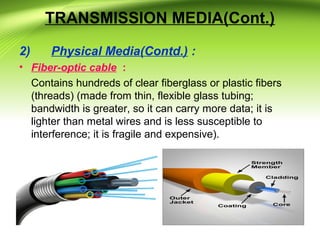
• Fiber-optic cable :
Contains hundreds of clear fiberglass or plastic fibers
(threads) (made from thin, flexible glass tubing;
bandwidth is greater, so it can carry more data; it is
lighter than metal wires and is less susceptible to
interference; it is fragile and expensive).
TRANSMISSION MEDIA(Cont.)
2) Physical Media(Contd.) :
• ISDN line :
A special digital telephone line that transmits and
receives information at very high speeds.
TRANSMISSION MEDIA(Cont.)
3)Wireless Media(Contd.) :
• Microwave system –
Transmits data via high-frequency radio signals through
the atmosphere.
TRANSMISSION MEDIA(Cont.)
3)Wireless Media(Contd.) :
• Satellite System –
Receive transmitted signals, amplify them, and then
transmit the signals to the appropriate locations.
TRANSMISSION MEDIA(Cont.)
3)Wireless Media(Contd.) :
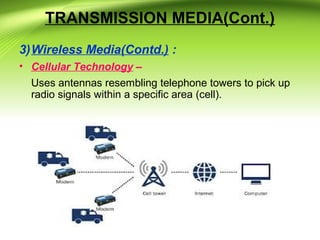
• Cellular Technology –
Uses antennas resembling telephone towers to pick up
radio signals within a specific area (cell).
TRANSMISSION MEDIA(Cont.)
3)Wireless Media(Contd.) :
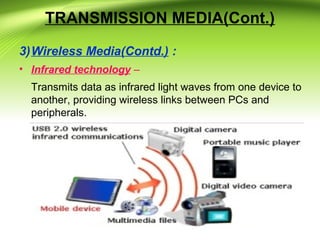
• Infrared technology –
Transmits data as infrared light waves from one device to
another, providing wireless links between PCs and
peripherals.
HOW ARE NETWORKS
CATEGORIZED?
• Networks are usually classified using three
properties:
• Topology
• Protocol
• Architecture
NETWORK TOPOLOGIES
Network Topology (or layout) – refers to the way
computers and peripherals are configured to form
networks :
1) Bus Topology –
All computers are linked by a single line of cable.
NETWORK TOPOLOGIES(Contd.)
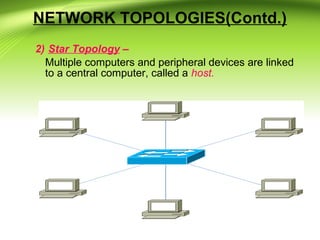
2) Star Topology –
Multiple computers and peripheral devices are linked
to a central computer, called a host.
NETWORK TOPOLOGIES(Contd.)
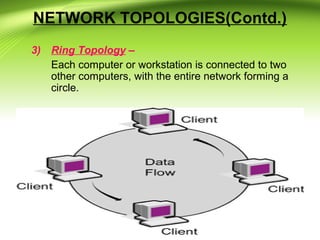
3) Ring Topology –
Each computer or workstation is connected to two
other computers, with the entire network forming a
circle.
NETWORK TOPOLOGIES(Contd.)
4) Hybrid Topology –
combine network layout types to meet their needs
with mix topologies.
Networking Terminology
1) Media :
– Refers to the wire cabling
that form the connections
in most networks
– Some networks use
wireless transmission
media, such as infrared or
radio signals
2) Client/Server networks :
– Servers host the resources
for the clients to use and
provide security
– A client is the computer
that requests resources
from the server
Networking Terminology(Contd.)
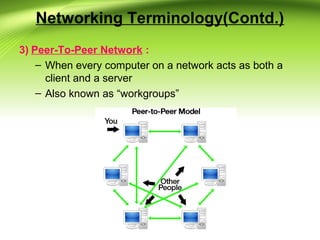
3) Peer-To-Peer Network :
– When every computer on a network acts as both a
client and a server
– Also known as “workgroups”
Networking Terminology(Contd.)
4) LAN, WAN, MAN, SAN :
– Local area network (LAN) is contained within a
company or department and located in a single
geographic area.
– Wide area network (WAN) spans multiple geographic
areas and is usually connected by common
telecommunication carriers.
– Metropolitan area network (MAN) refers to the
intermediate stage between a LAN and a WAN
Networking Terminology(Contd.)
• LAN, WAN, MAN, SAN (continued)
– Storage area network (SAN) refers to a series of
storage devices that are networked together to
provide very fast data storage for a network or
subnetwork.
5) Network Operating System (NOS) :
– Allows communication, security, and distribution of
data, files, and applications over a network.
Networking Terminology(Contd.)
6) Network Interface Card (NIC) :
– A device that allows a computer or other device to
connect to a network through the media
Networking Terminology(Contd.)
7) Networking Hardware :
– Describes all the physical components of a network,
such as the NIC, cable, hub, switch, router, and any
related connectors or devices.
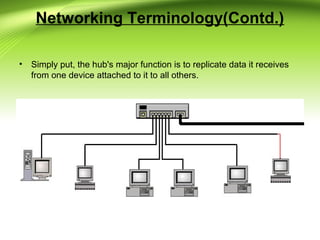
Hub – electronic device (with a number of ports) used in
a LAN to link groups of computers
• Simply put, the hub's major function is to replicate data it receives
from one device attached to it to all others.
Networking Terminology(Contd.)
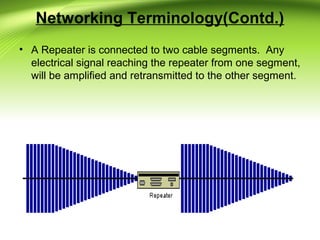
• Repeaters :
A common problem in the networking world is that of
weakening electrical signals. Electrical signals traveling
through wires (such as copper wires used in most
networks), weaken due to the wire's electrical
resistance. This effect limits the lengths of the cable that
can be used. A repeater will overcome this limit, when
there is a need to connect two computers at a larger
distance.
• A Repeater is connected to two cable segments. Any
electrical signal reaching the repeater from one segment,
will be amplified and retransmitted to the other segment.
Networking Terminology(Contd.)
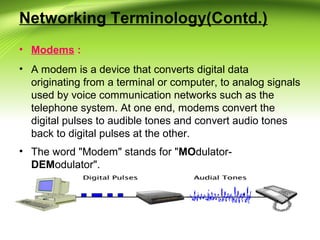
• Modems :
• A modem is a device that converts digital data
originating from a terminal or computer, to analog signals
used by voice communication networks such as the
telephone system. At one end, modems convert the
digital pulses to audible tones and convert audio tones
back to digital pulses at the other.
• The word "Modem" stands for "MOdulator-
DEModulator".
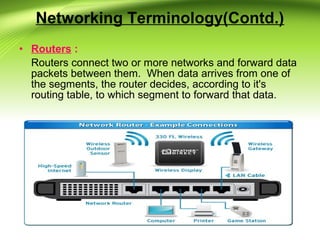
• Routers :
Routers connect two or more networks and forward data
packets between them. When data arrives from one of
the segments, the router decides, according to it's
routing table, to which segment to forward that data.
Networking Terminology(Contd.)
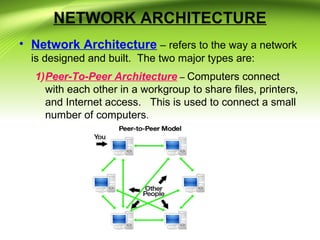
NETWORK ARCHITECTURE
• Network Architecture – refers to the way a network
is designed and built. The two major types are:
1)Peer-To-Peer Architecture – Computers connect
with each other in a workgroup to share files, printers,
and Internet access. This is used to connect a small
number of computers.
NETWORK ARCHITECTURE
Advantages :
 Use less expensive computer hardware
 Easy to administer
 No NOS required
 More built in redundancy
 Easy setup & low cost
Disadvantages :
 Not very secure
 No central point of storage or file archiving
 Additional load on computer because of resource
sharing
 Hard to maintain version control
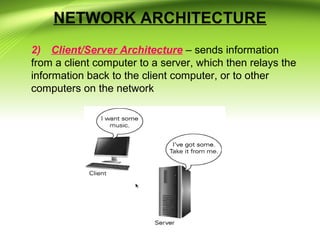
NETWORK ARCHITECTURE
2) Client/Server Architecture – sends information
from a client computer to a server, which then relays the
information back to the client computer, or to other
computers on the network
NETWORK ARCHITECTURE
Advantages :
 Very secure
 Better performance
 Centralized backup
 very reliable
Disadvantages :
 Requires professional administration
 More hardware-intensive
 More software intensive
 Expensive dedicated software
TYPES OF NETWORK
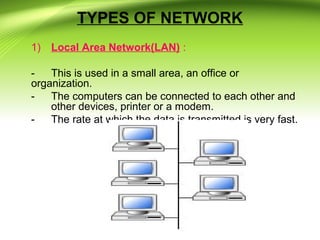
1) Local Area Network(LAN) :
- This is used in a small area, an office or
organization.
- The computers can be connected to each other and
other devices, printer or a modem.
- The rate at which the data is transmitted is very fast.
TYPES OF NETWORK(Contd.)
2) Metropolitan Area Network (MAN) :
– This is used in a large geographical area, town or city.
– Enables high speed connections using fiber optic.
TYPES OF NETWORK(Contd.)
3) Wide Area Network (WAN) :
- This is used in a larger area than MAN, countries
or cities.
- Enables high speed connections using public
networks, telephone lines, satellites, or leased
lines.
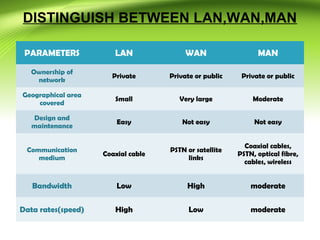
DISTINGUISH BETWEEN LAN,WAN,MAN
PARAMETERS LAN WAN MAN
Ownership of
network
Private Private or public Private or public
Geographical area
covered
Small Very large Moderate
Design and
maintenance
Easy Not easy Not easy
Communication
medium
Coaxial cable
PSTN or satellite
links
Coaxial cables,
PSTN, optical fibre,
cables, wireless
Bandwidth Low High moderate
Data rates(speed) High Low moderate
OSI LAYER MODEL
• What is OSI? -
• The Open Systems Interconnection (OSI) is a
model that was developed by the ISO
(International Organization for Standards ).
• It describes how information from a software
application in one computer, moves through a
network medium to a software application in
another computer.
• Developed by the International Organization for
Standardization in 1974.
• It consists of seven layers.Each layer has a
different but specific processing function.
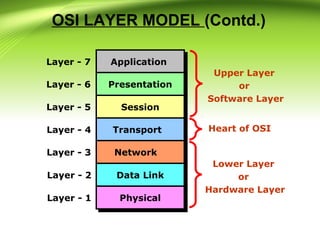
OSI LAYER MODEL (Contd.)
ApplicationApplication
PresentationPresentation
SessionSession
TransportTransport
NetworkNetwork
Data LinkData Link
PhysicalPhysical
Layer - 7
Layer - 6
Layer - 5
Layer - 4
Layer - 3
Layer - 2
Layer - 1
Upper Layer
or
Software Layer
Lower Layer
or
Hardware Layer
Heart of OSI
OSI LAYER MODEL (Contd.)
• Characteristics of the OSI :
• The Upper Layers :
This deals with Application issues and generally are
implemented only in software. The highest layer,
application layer is closest to the end user. This layer is
where communication from one end user to another
begins through the interaction between the application
layer processes and the end user.
• The Lower layers :
This handles Data transport issues. The physical layer
and Data link layers are implemented in hardware and
software.
OSI LAYER MODEL (Contd.)
Application Layer :
• Application Layer is responsible
for providing Networking
Services to the user. It is also
known as Desktop Layer.
Identification of Services is done
using Port Numbers.
• Ports are Entry and Exit Points to
the Layer
ApplicationApplication
PresentationPresentation
SessionSession
TransportTransport
NetworkNetwork
Data LinkData Link
PhysicalPhysical
OSI LAYER MODEL (Contd.)
Application Layer (Contd.) :
• Application layer interacts with application programs and
is the highest level of OSI model.
• Examples of application layer are applications such as
file transfer, electronic mail, remote login etc.
• The Application layer ensures that the remote
communication partner is available, that the needed
communication resource exist (e.g. A modem), and that
both ends of the comunication agree on procedures
involving data integrity, privacy, and error recovery.
OSI LAYER MODEL (Contd.)
• Presentation Layer :
There are 4 primary tasks that this layer is concerned
with :

Compatibility with OS.

Proper encapsulation of data for n/w transmission.

Data formatting ( ASCII, Binary)

Data encryption, compression and translation.

You've probably seen some of the file types that are
used at Presentation layer : JPEG, ASCII, GIF, MPEG,
MIDI and TIFF.
OSI LAYER MODEL (Contd.)
• Session Layer :
• Session layer provides mechanism for controlling the
dialogue between the two end systems. It defines how to
start, control and end conversations (called sessions)
between applications.
• This layer requests for a logical connection to be
established on an end-user’s request.
• Any necessary log-on or password validation is also
handled by this layer.
• Session layer is also responsible for terminating the
connection.
OSI LAYER MODEL (Contd.)
• Transport Layer :
• Purpose of this layer is to provide a reliable mechanism
for the exchange of data between two processes in
different computers.
• Ensures that the data units are delivered error free.
• Ensures that data units are delivered in sequence.
• Ensures that there is no loss or duplication of data units.
• Provides connectionless or connection oriented service.
OSI LAYER MODEL (Contd.)
• Transport Layer (Contd.):
• Flow Control using Three-
Way Handshake.
• Three-Way handshake helps
to establish the connection
between the two devices
OSI LAYER MODEL (Contd.)
• Transport Layer (Contd.):
Is responsible for end-to-end connectivity. It is also
known as the heart of OSI Layers. Following tasks are
performed at the Transport Layer : -
• Identifying Service
• Multiplexing & De-multiplexing
• Segmentation
• Sequencing & Reassembling
• Error Correction
• Flow Control
• Transport Layer (Contd.) :
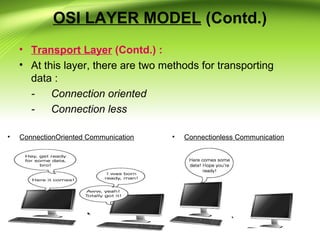
• At this layer, there are two methods for transporting
data :
- Connection oriented
- Connection less
• ConnectionOriented Communication • Connectionless Communication
OSI LAYER MODEL (Contd.)
• Network Layer :
• Implements routing of packets through the network.
• Defines the most optimum path the packet should take
from the source to the destination
• Defines logical addressing so that any endpoint can be
identified.
• Routers and L3 Switches works here.
• IP address understandable layer
• The network layer is responsible for the delivery of
individual packets from the source host to the destination
host.
• Source-to-destination delivery
OSI LAYER MODEL (Contd.)
• Data Link Layer :
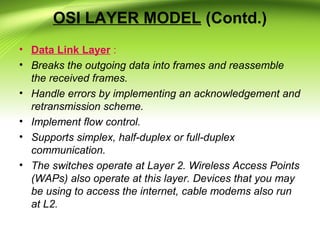
• Breaks the outgoing data into frames and reassemble
the received frames.
• Handle errors by implementing an acknowledgement and
retransmission scheme.
• Implement flow control.
• Supports simplex, half-duplex or full-duplex
communication.
• The switches operate at Layer 2. Wireless Access Points
(WAPs) also operate at this layer. Devices that you may
be using to access the internet, cable modems also run
at L2.
OSI LAYER MODEL (Contd.)
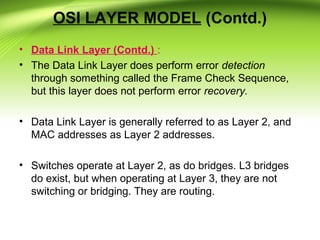
• Data Link Layer (Contd.) :
• The Data Link Layer does perform error detection
through something called the Frame Check Sequence,
but this layer does not perform error recovery.
• Data Link Layer is generally referred to as Layer 2, and
MAC addresses as Layer 2 addresses.
• Switches operate at Layer 2, as do bridges. L3 bridges
do exist, but when operating at Layer 3, they are not
switching or bridging. They are routing.
OSI LAYER MODEL (Contd.)
• Physical Layer :
• Provides physical interface for transmission of
information.
• Defines rules by which bits are passed from one system
to another on a physical communication medium.
• Such characteristics as voltage levels, timing of voltage
changes, physical data rates, maximum transmission
distances, physical connectors, and other similar
attributes are defined by physical layer specifications.
• One of the major function of the physical layer is to move
data in the form of electromagnetic signals across a
transmission medium.
OSI LAYER MODEL (Contd.)
• Physical Layer (Contd.) :
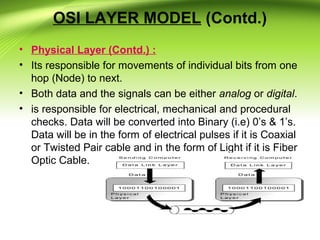
• Its responsible for movements of individual bits from one
hop (Node) to next.
• Both data and the signals can be either analog or digital.
• is responsible for electrical, mechanical and procedural
checks. Data will be converted into Binary (i.e) 0’s & 1’s.
Data will be in the form of electrical pulses if it is Coaxial
or Twisted Pair cable and in the form of Light if it is Fiber
Optic Cable.
TCP/IP SuitOSI Layers
Application
Telnet, FTP, SMTP, HTTP, DNS, SNMP, Specific address etc…
Session
Presentation
Transport
SCTP, TCP, UDP, Sockets and Ports address
Network
IP, ARP/RARP, ICMP, IGMP, Logical address
Data Link
IEEE 802 Standards, TR, FDDI, PPP, Physical address
Application
Session
Presentation
Transport
Network
Data Link
Activities
To allow access to network resources
To establish, manage, and terminate
session
To Translate, encrypt, and compress
data
To Provide reliable process-to-process
Message delivery and error recovery
To move packets from source to
destination; to provide internetworking
To organize bits into frames; to provide
Hop-to-hop delivery
OSI LAYER MODEL (Contd.)
Physical
Medium, Coax, Fiber, 10base, Wireless
Physical
To Transmit bits over a medium; to provide
Mechanical and electrical specifications
Segment
Packet
Frame
A B
Packet
Data
Data
Data
Bits
Data
Segment
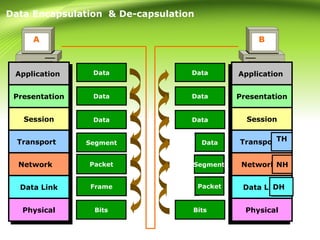
Data Encapsulation & De-capsulation
Packet
Data
Data
Data
ApplicationApplication
PresentationPresentation
SessionSession
TransportTransport
NetworkNetwork
Data LinkData Link
PhysicalPhysical
ApplicationApplication
PresentationPresentation
SessionSession
TransportTransport
NetworkNetwork
Data LinkData Link
PhysicalPhysicalBits
DH DT
NH
THSegment
Packet
DT PacketDH DTDH
NH Segment NH
TH Data
TH
Frame Packet
OSI LAYER MODEL (Contd.)
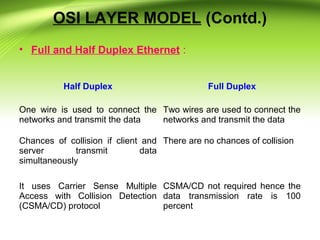
• Full and Half Duplex Ethernet :
Half Duplex Full Duplex
One wire is used to connect the
networks and transmit the data
Two wires are used to connect the
networks and transmit the data
Chances of collision if client and
server transmit data
simultaneously
There are no chances of collision
It uses Carrier Sense Multiple
Access with Collision Detection
(CSMA/CD) protocol
CSMA/CD not required hence the
data transmission rate is 100
percent
ETHERNET CABLING
• Introduction
– Ethernet Cable
– Category
• How to wire
– Straight through
– Crossover
ETHERNET CABLING
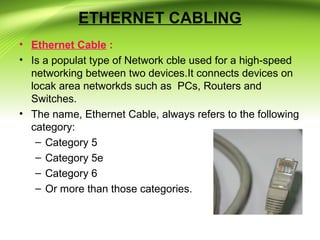
• Ethernet Cable :
• Is a populat type of Network cble used for a high-speed
networking between two devices.It connects devices on
locak area networkds such as PCs, Routers and
Switches.
• The name, Ethernet Cable, always refers to the following
category:
– Category 5
– Category 5e
– Category 6
– Or more than those categories.
Category :
ETHERNET CABLING
Category Data Rate Signal Frequency Standard
Cat5 100 Mbps 100 MHz TIA/EIA
Cat5e 100 Mbps /1 Gbps 100 MHz TIA/EIA-568-B
Cat6 1Gbps / 10 Gbps 250 MHz TIA/EIA-568-B
Cat6a 1Gbps / 10 Gbps 500 MHz
ANSI/TIA/EIA-
568-B.2-10
ETHERNET CABLING
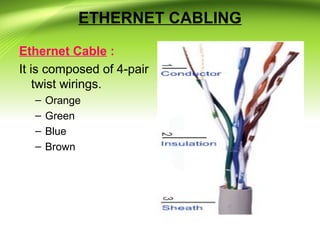
Ethernet Cable :
It is composed of 4-pair
twist wirings.
– Orange
– Green
– Blue
– Brown
ETHERNET CABLING
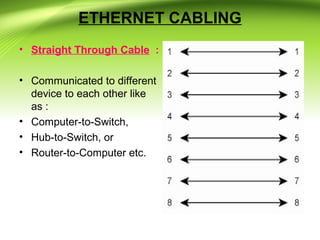
• Straight Through Cable :
• Communicated to different
device to each other like
as :
• Computer-to-Switch,
• Hub-to-Switch, or
• Router-to-Computer etc.
ETHERNET CABLING
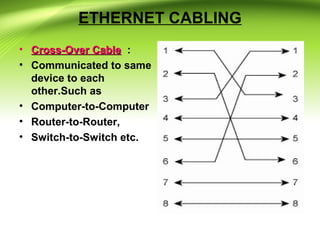
• Cross-Over CableCross-Over Cable :
• Communicated to same
device to each
other.Such as
• Computer-to-Computer
• Router-to-Router,
• Switch-to-Switch etc.
ETHERNET CABLING
• Rolled Over Cable :
• Although rolled cable
isnot used to connect any
Ethernet connections
together, you can use a
rolled ethernet cable to
connect a host to a router
console serial
communication (Com)
port..
Networking  Fundamentals

Networking Fundamentals

  • 1.
  • 2.
    What is network? •A network is simply defined as a something that connects things together for a specific purpose. • The term network is used in a variety of contexts including telephone,television, computer, or even people networks • A network is simply two or more computers that are linked together.
  • 3.
    Why Do WeUse Networks? • This question can be answered in one word: convenience – People expect interoperability from electronic devices • Computer networks allow: – For the transfer of files, data, and even shared applications without copying anything to floppy disk – Computers to share items such as printers, scanners, fax machines, processors, disk drives, and other resources • Networked computers can share data and peripherals
  • 4.
    Why Do WeUse Networks?(Contd.) • The most common types of networks are : • Local Area Networks (LAN) , and • Wide Area Networks (WAN) . • The primary difference between the two is that a LAN is generally confined to a limited geographical area, whereas a WAN covers a large geographical area. • Most WANs are made up of several connected LANs.
  • 5.
    BENEFITS OF ANETWORK • Information sharing: Authorized users can use other computers on the network to access and share information and data. This could include special group projects, databases, etc. • Hardware sharing: One device connected to a network, such as a printer or scanner, can be shared by many users. • Software sharing: Instead of purchasing and installing a software program on each computer, it can be installed on the server. All of the users can then access the program from a single location. • Collaborative environment: Users can work together on group projects by combining the power and capabilities of diverse equipment.
  • 6.
    RISKS OF NETWORKCOMPUTING • The security of a computer network is challenged everyday by: – Equipment malfunctions – System failures • Note: equipment malfunctions and system failures may be caused by natural disasters such as floods, storms, or fires, and electrical disturbances – Computer hackers – Virus attacks
  • 7.
    Topic Objectives • ExplainTransmission Media- Communication,Physical And Wireless. • Explain How Network Categorized? - Network Topologies. - Protocols(Network Terminology) - Network Architecture • Explain Different Type of Networks. • Explain OSI Model of Network. • Explain Ethernet Cabling.
  • 8.
    TRANSMISSION MEDIA 1) CommunicationsChannel : – To transfer data from one computer to another, requires some type of link through which the data can be transmitted. This link is known as the communications channel. – To send data through the channel requires some type of transmission media, which may be either physical or wireless.
  • 9.
    TRANSMISSION MEDIA(Cont.) 2) PhysicalMedia : • Twisted-pair cable – consists of two independently insulated wires twisted around each other (least expensive type of cable—the kind that is used in many telephone systems)
  • 10.
    TRANSMISSION MEDIA(Cont.) 2) PhysicalMedia(Contd.) : • Coaxial cable – Consists of an insulated center wire grounded by a shield of braided wire (the primary type of cabling used by the cable television industry; it is more expensive than twisted pair).
  • 11.
    TRANSMISSION MEDIA(Cont.) 2) PhysicalMedia(Contd.) : • Fiber-optic cable : Contains hundreds of clear fiberglass or plastic fibers (threads) (made from thin, flexible glass tubing; bandwidth is greater, so it can carry more data; it is lighter than metal wires and is less susceptible to interference; it is fragile and expensive).
  • 12.
    TRANSMISSION MEDIA(Cont.) 2) PhysicalMedia(Contd.) : • ISDN line : A special digital telephone line that transmits and receives information at very high speeds.
  • 13.
    TRANSMISSION MEDIA(Cont.) 3)Wireless Media(Contd.): • Microwave system – Transmits data via high-frequency radio signals through the atmosphere.
  • 14.
    TRANSMISSION MEDIA(Cont.) 3)Wireless Media(Contd.): • Satellite System – Receive transmitted signals, amplify them, and then transmit the signals to the appropriate locations.
  • 15.
    TRANSMISSION MEDIA(Cont.) 3)Wireless Media(Contd.): • Cellular Technology – Uses antennas resembling telephone towers to pick up radio signals within a specific area (cell).
  • 16.
    TRANSMISSION MEDIA(Cont.) 3)Wireless Media(Contd.): • Infrared technology – Transmits data as infrared light waves from one device to another, providing wireless links between PCs and peripherals.
  • 17.
    HOW ARE NETWORKS CATEGORIZED? •Networks are usually classified using three properties: • Topology • Protocol • Architecture
  • 18.
    NETWORK TOPOLOGIES Network Topology(or layout) – refers to the way computers and peripherals are configured to form networks : 1) Bus Topology – All computers are linked by a single line of cable.
  • 19.
    NETWORK TOPOLOGIES(Contd.) 2) StarTopology – Multiple computers and peripheral devices are linked to a central computer, called a host.
  • 20.
    NETWORK TOPOLOGIES(Contd.) 3) RingTopology – Each computer or workstation is connected to two other computers, with the entire network forming a circle.
  • 21.
    NETWORK TOPOLOGIES(Contd.) 4) HybridTopology – combine network layout types to meet their needs with mix topologies.
  • 22.
    Networking Terminology 1) Media: – Refers to the wire cabling that form the connections in most networks – Some networks use wireless transmission media, such as infrared or radio signals 2) Client/Server networks : – Servers host the resources for the clients to use and provide security – A client is the computer that requests resources from the server
  • 23.
    Networking Terminology(Contd.) 3) Peer-To-PeerNetwork : – When every computer on a network acts as both a client and a server – Also known as “workgroups”
  • 24.
    Networking Terminology(Contd.) 4) LAN,WAN, MAN, SAN : – Local area network (LAN) is contained within a company or department and located in a single geographic area. – Wide area network (WAN) spans multiple geographic areas and is usually connected by common telecommunication carriers. – Metropolitan area network (MAN) refers to the intermediate stage between a LAN and a WAN
  • 25.
    Networking Terminology(Contd.) • LAN,WAN, MAN, SAN (continued) – Storage area network (SAN) refers to a series of storage devices that are networked together to provide very fast data storage for a network or subnetwork. 5) Network Operating System (NOS) : – Allows communication, security, and distribution of data, files, and applications over a network.
  • 26.
    Networking Terminology(Contd.) 6) NetworkInterface Card (NIC) : – A device that allows a computer or other device to connect to a network through the media
  • 27.
    Networking Terminology(Contd.) 7) NetworkingHardware : – Describes all the physical components of a network, such as the NIC, cable, hub, switch, router, and any related connectors or devices. Hub – electronic device (with a number of ports) used in a LAN to link groups of computers
  • 28.
    • Simply put,the hub's major function is to replicate data it receives from one device attached to it to all others. Networking Terminology(Contd.)
  • 29.
    Networking Terminology(Contd.) • Repeaters: A common problem in the networking world is that of weakening electrical signals. Electrical signals traveling through wires (such as copper wires used in most networks), weaken due to the wire's electrical resistance. This effect limits the lengths of the cable that can be used. A repeater will overcome this limit, when there is a need to connect two computers at a larger distance.
  • 30.
    • A Repeateris connected to two cable segments. Any electrical signal reaching the repeater from one segment, will be amplified and retransmitted to the other segment. Networking Terminology(Contd.)
  • 31.
    Networking Terminology(Contd.) • Modems: • A modem is a device that converts digital data originating from a terminal or computer, to analog signals used by voice communication networks such as the telephone system. At one end, modems convert the digital pulses to audible tones and convert audio tones back to digital pulses at the other. • The word "Modem" stands for "MOdulator- DEModulator".
  • 32.
    • Routers : Routersconnect two or more networks and forward data packets between them. When data arrives from one of the segments, the router decides, according to it's routing table, to which segment to forward that data. Networking Terminology(Contd.)
  • 33.
    NETWORK ARCHITECTURE • NetworkArchitecture – refers to the way a network is designed and built. The two major types are: 1)Peer-To-Peer Architecture – Computers connect with each other in a workgroup to share files, printers, and Internet access. This is used to connect a small number of computers.
  • 34.
    NETWORK ARCHITECTURE Advantages : Use less expensive computer hardware  Easy to administer  No NOS required  More built in redundancy  Easy setup & low cost Disadvantages :  Not very secure  No central point of storage or file archiving  Additional load on computer because of resource sharing  Hard to maintain version control
  • 35.
    NETWORK ARCHITECTURE 2) Client/ServerArchitecture – sends information from a client computer to a server, which then relays the information back to the client computer, or to other computers on the network
  • 36.
    NETWORK ARCHITECTURE Advantages : Very secure  Better performance  Centralized backup  very reliable Disadvantages :  Requires professional administration  More hardware-intensive  More software intensive  Expensive dedicated software
  • 37.
    TYPES OF NETWORK 1)Local Area Network(LAN) : - This is used in a small area, an office or organization. - The computers can be connected to each other and other devices, printer or a modem. - The rate at which the data is transmitted is very fast.
  • 38.
    TYPES OF NETWORK(Contd.) 2)Metropolitan Area Network (MAN) : – This is used in a large geographical area, town or city. – Enables high speed connections using fiber optic.
  • 39.
    TYPES OF NETWORK(Contd.) 3)Wide Area Network (WAN) : - This is used in a larger area than MAN, countries or cities. - Enables high speed connections using public networks, telephone lines, satellites, or leased lines.
  • 40.
    DISTINGUISH BETWEEN LAN,WAN,MAN PARAMETERSLAN WAN MAN Ownership of network Private Private or public Private or public Geographical area covered Small Very large Moderate Design and maintenance Easy Not easy Not easy Communication medium Coaxial cable PSTN or satellite links Coaxial cables, PSTN, optical fibre, cables, wireless Bandwidth Low High moderate Data rates(speed) High Low moderate
  • 41.
    OSI LAYER MODEL •What is OSI? - • The Open Systems Interconnection (OSI) is a model that was developed by the ISO (International Organization for Standards ). • It describes how information from a software application in one computer, moves through a network medium to a software application in another computer. • Developed by the International Organization for Standardization in 1974. • It consists of seven layers.Each layer has a different but specific processing function.
  • 42.
    OSI LAYER MODEL(Contd.) ApplicationApplication PresentationPresentation SessionSession TransportTransport NetworkNetwork Data LinkData Link PhysicalPhysical Layer - 7 Layer - 6 Layer - 5 Layer - 4 Layer - 3 Layer - 2 Layer - 1 Upper Layer or Software Layer Lower Layer or Hardware Layer Heart of OSI
  • 43.
    OSI LAYER MODEL(Contd.) • Characteristics of the OSI : • The Upper Layers : This deals with Application issues and generally are implemented only in software. The highest layer, application layer is closest to the end user. This layer is where communication from one end user to another begins through the interaction between the application layer processes and the end user. • The Lower layers : This handles Data transport issues. The physical layer and Data link layers are implemented in hardware and software.
  • 44.
    OSI LAYER MODEL(Contd.) Application Layer : • Application Layer is responsible for providing Networking Services to the user. It is also known as Desktop Layer. Identification of Services is done using Port Numbers. • Ports are Entry and Exit Points to the Layer ApplicationApplication PresentationPresentation SessionSession TransportTransport NetworkNetwork Data LinkData Link PhysicalPhysical
  • 45.
    OSI LAYER MODEL(Contd.) Application Layer (Contd.) : • Application layer interacts with application programs and is the highest level of OSI model. • Examples of application layer are applications such as file transfer, electronic mail, remote login etc. • The Application layer ensures that the remote communication partner is available, that the needed communication resource exist (e.g. A modem), and that both ends of the comunication agree on procedures involving data integrity, privacy, and error recovery.
  • 46.
    OSI LAYER MODEL(Contd.) • Presentation Layer : There are 4 primary tasks that this layer is concerned with :  Compatibility with OS.  Proper encapsulation of data for n/w transmission.  Data formatting ( ASCII, Binary)  Data encryption, compression and translation.  You've probably seen some of the file types that are used at Presentation layer : JPEG, ASCII, GIF, MPEG, MIDI and TIFF.
  • 47.
    OSI LAYER MODEL(Contd.) • Session Layer : • Session layer provides mechanism for controlling the dialogue between the two end systems. It defines how to start, control and end conversations (called sessions) between applications. • This layer requests for a logical connection to be established on an end-user’s request. • Any necessary log-on or password validation is also handled by this layer. • Session layer is also responsible for terminating the connection.
  • 48.
    OSI LAYER MODEL(Contd.) • Transport Layer : • Purpose of this layer is to provide a reliable mechanism for the exchange of data between two processes in different computers. • Ensures that the data units are delivered error free. • Ensures that data units are delivered in sequence. • Ensures that there is no loss or duplication of data units. • Provides connectionless or connection oriented service.
  • 49.
    OSI LAYER MODEL(Contd.) • Transport Layer (Contd.): • Flow Control using Three- Way Handshake. • Three-Way handshake helps to establish the connection between the two devices
  • 50.
    OSI LAYER MODEL(Contd.) • Transport Layer (Contd.): Is responsible for end-to-end connectivity. It is also known as the heart of OSI Layers. Following tasks are performed at the Transport Layer : - • Identifying Service • Multiplexing & De-multiplexing • Segmentation • Sequencing & Reassembling • Error Correction • Flow Control
  • 51.
    • Transport Layer(Contd.) : • At this layer, there are two methods for transporting data : - Connection oriented - Connection less • ConnectionOriented Communication • Connectionless Communication OSI LAYER MODEL (Contd.)
  • 52.
    OSI LAYER MODEL(Contd.) • Network Layer : • Implements routing of packets through the network. • Defines the most optimum path the packet should take from the source to the destination • Defines logical addressing so that any endpoint can be identified. • Routers and L3 Switches works here. • IP address understandable layer • The network layer is responsible for the delivery of individual packets from the source host to the destination host.
  • 53.
  • 54.
    OSI LAYER MODEL(Contd.) • Data Link Layer : • Breaks the outgoing data into frames and reassemble the received frames. • Handle errors by implementing an acknowledgement and retransmission scheme. • Implement flow control. • Supports simplex, half-duplex or full-duplex communication. • The switches operate at Layer 2. Wireless Access Points (WAPs) also operate at this layer. Devices that you may be using to access the internet, cable modems also run at L2.
  • 55.
    OSI LAYER MODEL(Contd.) • Data Link Layer (Contd.) : • The Data Link Layer does perform error detection through something called the Frame Check Sequence, but this layer does not perform error recovery. • Data Link Layer is generally referred to as Layer 2, and MAC addresses as Layer 2 addresses. • Switches operate at Layer 2, as do bridges. L3 bridges do exist, but when operating at Layer 3, they are not switching or bridging. They are routing.
  • 56.
    OSI LAYER MODEL(Contd.) • Physical Layer : • Provides physical interface for transmission of information. • Defines rules by which bits are passed from one system to another on a physical communication medium. • Such characteristics as voltage levels, timing of voltage changes, physical data rates, maximum transmission distances, physical connectors, and other similar attributes are defined by physical layer specifications. • One of the major function of the physical layer is to move data in the form of electromagnetic signals across a transmission medium.
  • 57.
    OSI LAYER MODEL(Contd.) • Physical Layer (Contd.) : • Its responsible for movements of individual bits from one hop (Node) to next. • Both data and the signals can be either analog or digital. • is responsible for electrical, mechanical and procedural checks. Data will be converted into Binary (i.e) 0’s & 1’s. Data will be in the form of electrical pulses if it is Coaxial or Twisted Pair cable and in the form of Light if it is Fiber Optic Cable.
  • 58.
    TCP/IP SuitOSI Layers Application Telnet,FTP, SMTP, HTTP, DNS, SNMP, Specific address etc… Session Presentation Transport SCTP, TCP, UDP, Sockets and Ports address Network IP, ARP/RARP, ICMP, IGMP, Logical address Data Link IEEE 802 Standards, TR, FDDI, PPP, Physical address Application Session Presentation Transport Network Data Link Activities To allow access to network resources To establish, manage, and terminate session To Translate, encrypt, and compress data To Provide reliable process-to-process Message delivery and error recovery To move packets from source to destination; to provide internetworking To organize bits into frames; to provide Hop-to-hop delivery OSI LAYER MODEL (Contd.) Physical Medium, Coax, Fiber, 10base, Wireless Physical To Transmit bits over a medium; to provide Mechanical and electrical specifications
  • 59.
    Segment Packet Frame A B Packet Data Data Data Bits Data Segment Data Encapsulation& De-capsulation Packet Data Data Data ApplicationApplication PresentationPresentation SessionSession TransportTransport NetworkNetwork Data LinkData Link PhysicalPhysical ApplicationApplication PresentationPresentation SessionSession TransportTransport NetworkNetwork Data LinkData Link PhysicalPhysicalBits DH DT NH THSegment Packet DT PacketDH DTDH NH Segment NH TH Data TH Frame Packet
  • 60.
    OSI LAYER MODEL(Contd.) • Full and Half Duplex Ethernet : Half Duplex Full Duplex One wire is used to connect the networks and transmit the data Two wires are used to connect the networks and transmit the data Chances of collision if client and server transmit data simultaneously There are no chances of collision It uses Carrier Sense Multiple Access with Collision Detection (CSMA/CD) protocol CSMA/CD not required hence the data transmission rate is 100 percent
  • 61.
    ETHERNET CABLING • Introduction –Ethernet Cable – Category • How to wire – Straight through – Crossover
  • 62.
    ETHERNET CABLING • EthernetCable : • Is a populat type of Network cble used for a high-speed networking between two devices.It connects devices on locak area networkds such as PCs, Routers and Switches. • The name, Ethernet Cable, always refers to the following category: – Category 5 – Category 5e – Category 6 – Or more than those categories.
  • 63.
    Category : ETHERNET CABLING CategoryData Rate Signal Frequency Standard Cat5 100 Mbps 100 MHz TIA/EIA Cat5e 100 Mbps /1 Gbps 100 MHz TIA/EIA-568-B Cat6 1Gbps / 10 Gbps 250 MHz TIA/EIA-568-B Cat6a 1Gbps / 10 Gbps 500 MHz ANSI/TIA/EIA- 568-B.2-10
  • 64.
    ETHERNET CABLING Ethernet Cable: It is composed of 4-pair twist wirings. – Orange – Green – Blue – Brown
  • 65.
    ETHERNET CABLING • StraightThrough Cable : • Communicated to different device to each other like as : • Computer-to-Switch, • Hub-to-Switch, or • Router-to-Computer etc.
  • 66.
    ETHERNET CABLING • Cross-OverCableCross-Over Cable : • Communicated to same device to each other.Such as • Computer-to-Computer • Router-to-Router, • Switch-to-Switch etc.
  • 67.
    ETHERNET CABLING • RolledOver Cable : • Although rolled cable isnot used to connect any Ethernet connections together, you can use a rolled ethernet cable to connect a host to a router console serial communication (Com) port..