Web
    Conferencing
                        By
                    Nabendu Maji
                Bharati Vidyapeeth University
Institute Of Management And Entrepreneurship Development
                     MBA-G, B, 73
                nabendu.maji@gmail.com
                                                           1
Definition
• Web conferencing refers to a service that allows
  conferencing events to be shared with remote
  locations. The service allows information to be
  shared simultaneously, across geographically
  dispersed locations in nearly real-time.
• Applications      for        web         conferencing
  include meetings, training events, lectures, or
  short presentations from any computer. A
  participant can be either an individual person or a
  group.


                                                      2
What is Web conferencing?


                        3
History
• Real-time text chat facilities such as IRC appeared in the
  late     1980s.    Web-based        chat    and    instant
  messaging software appeared in the mid-1990s. In the
  late 1990s, the first true web conferencing capability
  became available and dozens of other web
  conferencing venues followed thereafter.
• A trademark for the term "webinar" was registered in
  1998 by Eric R. Korb (Serial Number 75478683, USPTO) but
  was difficult to defend; it is currently assigned
  to InterCall.
• Web conferencing started with Plato, a small standalone
  system that supports a single class of terminals
  connected to a central computer.


                                                           4
Features & Applications
• Slide show presentations - where images are presented
  to the audience and markup tools and a remote mouse
  pointer are used to engage the audience while the
  presenter discusses slide content.
• Live or Streaming video - where full motion webcam,
  digital video camera or multi-media files are pushed to
  the audience.
• VoIP - (Real time audio communication through the
  computer via use of headphones and speakers)
• Web tours - where URLs, data from forms, cookies, scripts
  and session data can be pushed to other participants
  enabling them to be pushed though web based logons,
  clicks, etc. This type of feature works well when
  demonstrating websites where users themselves can also
  participate.
                                                          5
Features & Applications
• Meeting Recording - where presentation activity is
  recorded on the client side or server side for later
  viewing and/or distribution.
• Whiteboard with annotation (allowing the presenter
  and/or attendees to highlight or mark items on the slide
  presentation. Or, simply make notes on a blank
  whiteboard.)
• Text chat - For live question and answer sessions, limited
  to the people connected to the meeting. Text chat may
  be public (echo'ed to all participants) or private
  (between 2 participants).
• Polls and surveys (allows the presenter to conduct
  questions with multiple choice answers directed to the
  audience)
                                                           6
Features & Applications
• Screen sharing/desktop sharing/application sharing-
  (where participants can view anything the presenter
  currently has shown on their screen. Some screen sharing
  applications allow for remote desktop control, allowing
  participants to manipulate the presenters screen,
  although this is not widely used.)
Web conferencing is often sold as a service, hosted on
a web server controlled by the vendor. Offerings vary per
vendor but most hosted services provide a cost per user
per minute model, a monthly flat fee model and a seat
model. Some vendors also provide a server side solution
which allows the customer to host their own web
conferencing service on their own servers.

                                                         7
Deployment models
• Web conferencing is available with three models:
  hosting service, software and appliance.
• An appliance, unlike the online hosted solution, it is
  offered as hardware. It is also known as "in-house" or
  "on-premise" web conferencing. It is used to
  conduct live meetings, remote training, or
  presentations via the Internet.


                                                       8
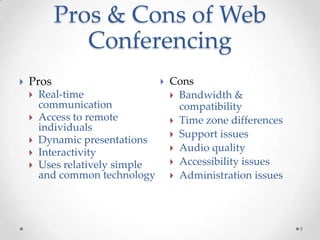
Pros & Cons of Web
              Conferencing
   Pros                            Cons
       Real-time                     Bandwidth &
        communication                  compatibility
       Access to remote              Time zone differences
        individuals
                                      Support issues
       Dynamic presentations
                                      Audio quality
       Interactivity
       Uses relatively simple        Accessibility issues
        and common technology         Administration issues


                                                               9
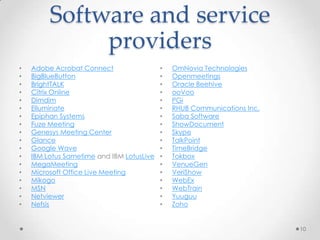
Software and service
              providers
•   Adobe Acrobat Connect                  •   OmNovia Technologies
•   BigBlueButton                          •   Openmeetings
•   BrightTALK                             •   Oracle Beehive
•   Citrix Online                          •   ooVoo
•   Dimdim                                 •   PGi
•   Elluminate                             •   RHUB Communications Inc.
•   Epiphan Systems                        •   Saba Software
•   Fuze Meeting                           •   ShowDocument
•   Genesys Meeting Center                 •   Skype
•   Glance                                 •   TalkPoint
•   Google Wave                            •   TimeBridge
•   IBM Lotus Sametime and IBM LotusLive   •   Tokbox
•   MegaMeeting                            •   VenueGen
•   Microsoft Office Live Meeting          •   VeriShow
•   Mikogo                                 •   WebEx
•   MSN                                    •   WebTrain
•   Netviewer                              •   Yuuguu
•   Nefsis                                 •   Zoho


                                                                          10
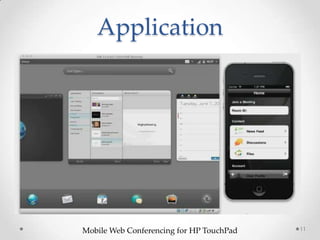
Application


Mobile Web Conferencing for HP TouchPad   11
Thank You


            12

Web conferancing

  • 1.
    Web Conferencing By Nabendu Maji Bharati Vidyapeeth University Institute Of Management And Entrepreneurship Development MBA-G, B, 73 nabendu.maji@gmail.com 1
  • 2.
    Definition • Web conferencingrefers to a service that allows conferencing events to be shared with remote locations. The service allows information to be shared simultaneously, across geographically dispersed locations in nearly real-time. • Applications for web conferencing include meetings, training events, lectures, or short presentations from any computer. A participant can be either an individual person or a group. 2
  • 3.
    What is Webconferencing? 3
  • 4.
    History • Real-time textchat facilities such as IRC appeared in the late 1980s. Web-based chat and instant messaging software appeared in the mid-1990s. In the late 1990s, the first true web conferencing capability became available and dozens of other web conferencing venues followed thereafter. • A trademark for the term "webinar" was registered in 1998 by Eric R. Korb (Serial Number 75478683, USPTO) but was difficult to defend; it is currently assigned to InterCall. • Web conferencing started with Plato, a small standalone system that supports a single class of terminals connected to a central computer. 4
  • 5.
    Features & Applications •Slide show presentations - where images are presented to the audience and markup tools and a remote mouse pointer are used to engage the audience while the presenter discusses slide content. • Live or Streaming video - where full motion webcam, digital video camera or multi-media files are pushed to the audience. • VoIP - (Real time audio communication through the computer via use of headphones and speakers) • Web tours - where URLs, data from forms, cookies, scripts and session data can be pushed to other participants enabling them to be pushed though web based logons, clicks, etc. This type of feature works well when demonstrating websites where users themselves can also participate. 5
  • 6.
    Features & Applications •Meeting Recording - where presentation activity is recorded on the client side or server side for later viewing and/or distribution. • Whiteboard with annotation (allowing the presenter and/or attendees to highlight or mark items on the slide presentation. Or, simply make notes on a blank whiteboard.) • Text chat - For live question and answer sessions, limited to the people connected to the meeting. Text chat may be public (echo'ed to all participants) or private (between 2 participants). • Polls and surveys (allows the presenter to conduct questions with multiple choice answers directed to the audience) 6
  • 7.
    Features & Applications •Screen sharing/desktop sharing/application sharing- (where participants can view anything the presenter currently has shown on their screen. Some screen sharing applications allow for remote desktop control, allowing participants to manipulate the presenters screen, although this is not widely used.) Web conferencing is often sold as a service, hosted on a web server controlled by the vendor. Offerings vary per vendor but most hosted services provide a cost per user per minute model, a monthly flat fee model and a seat model. Some vendors also provide a server side solution which allows the customer to host their own web conferencing service on their own servers. 7
  • 8.
    Deployment models • Webconferencing is available with three models: hosting service, software and appliance. • An appliance, unlike the online hosted solution, it is offered as hardware. It is also known as "in-house" or "on-premise" web conferencing. It is used to conduct live meetings, remote training, or presentations via the Internet. 8
  • 9.
    Pros & Consof Web Conferencing  Pros  Cons  Real-time  Bandwidth & communication compatibility  Access to remote  Time zone differences individuals  Support issues  Dynamic presentations  Audio quality  Interactivity  Uses relatively simple  Accessibility issues and common technology  Administration issues 9
  • 10.
    Software and service providers • Adobe Acrobat Connect • OmNovia Technologies • BigBlueButton • Openmeetings • BrightTALK • Oracle Beehive • Citrix Online • ooVoo • Dimdim • PGi • Elluminate • RHUB Communications Inc. • Epiphan Systems • Saba Software • Fuze Meeting • ShowDocument • Genesys Meeting Center • Skype • Glance • TalkPoint • Google Wave • TimeBridge • IBM Lotus Sametime and IBM LotusLive • Tokbox • MegaMeeting • VenueGen • Microsoft Office Live Meeting • VeriShow • Mikogo • WebEx • MSN • WebTrain • Netviewer • Yuuguu • Nefsis • Zoho 10
  • 11.
  • 12.