Computer Networks
And Communication
BASIC CONCEPTS OF COMPUTER NETWORKS
LECTURER: ENGR. SHARJEEL MUSTAFA ALI
Communication
Communication
◦ The message (data and information) is communicated via the signal. The
transmission medium “carries” the signal.
COMPUTER NETWORKS
Computer Networks
A Computer Network is a collection
of computers and devices
connected together via
communication devices
and transmission media.
For examples it may connect
computers, printers and scanners.
Communication Devices
HUB
Switch
Routers
Transmission Media
Wired
Medium
Wireless
Medium
Devices-printer , scanner
Computer Networks (Cont.)
 A collection of computing devices that are connected in various ways in order to communicate
and share resources.
 Usually, the connections between computers in a network are made using physical wires or
cables.
 However, some connections are wireless using Wi-Fi techniques.
 The physical connection between networked computing devices is established using either
cable media or wireless media.
Types of Network
 Based on the size and the coverage area, networks are
categorized into the following types:
• Local Area Networks (LANs)
• Metropolitan Area Networks (MANs)
• Wide Area Networks (WANs)
Local Area Network(LANs)
 A local area network (LAN) is a network that connects computers and devices in a
limited geographical area such as a home, school, office building, or closely positioned
group of buildings.
 Each computer or device on the network is a node.
 LAN connection speeds can be 10 Mbps or 100 Mbps or 1000 Mbps also.
 LAN uses Physical Media (Wired).
Metropolitan Area Network (MAN)
 It is relatively larger than LAN and extends across a city or a
metropolitan.
 It is created by connecting two or more LANs located at
different locations in a city.
Wide Area Network (WANs)
 A Wide Area Network (WAN) is a computer network that covers a large
geographic area such as a country or the world.
 One of the most prominent examples of the existing WAN is the
Internet.
 Transmission Media
◦ Fibre Optic, Microwave transmission and Satellite
HOW ARE NETWORKS
CATEGORIZED?
 Networks are usually classified using three properties:
◦ Architecture
◦ Topology
◦ Protocol
Classification of Network Architecture
The architecture of a network is a logical design that
determines how the devices in the network communicate.
The commonly used architectures for computer networks
are:
 Client-server architecture
 Peer-to-peer architecture
 Hybrid architecture
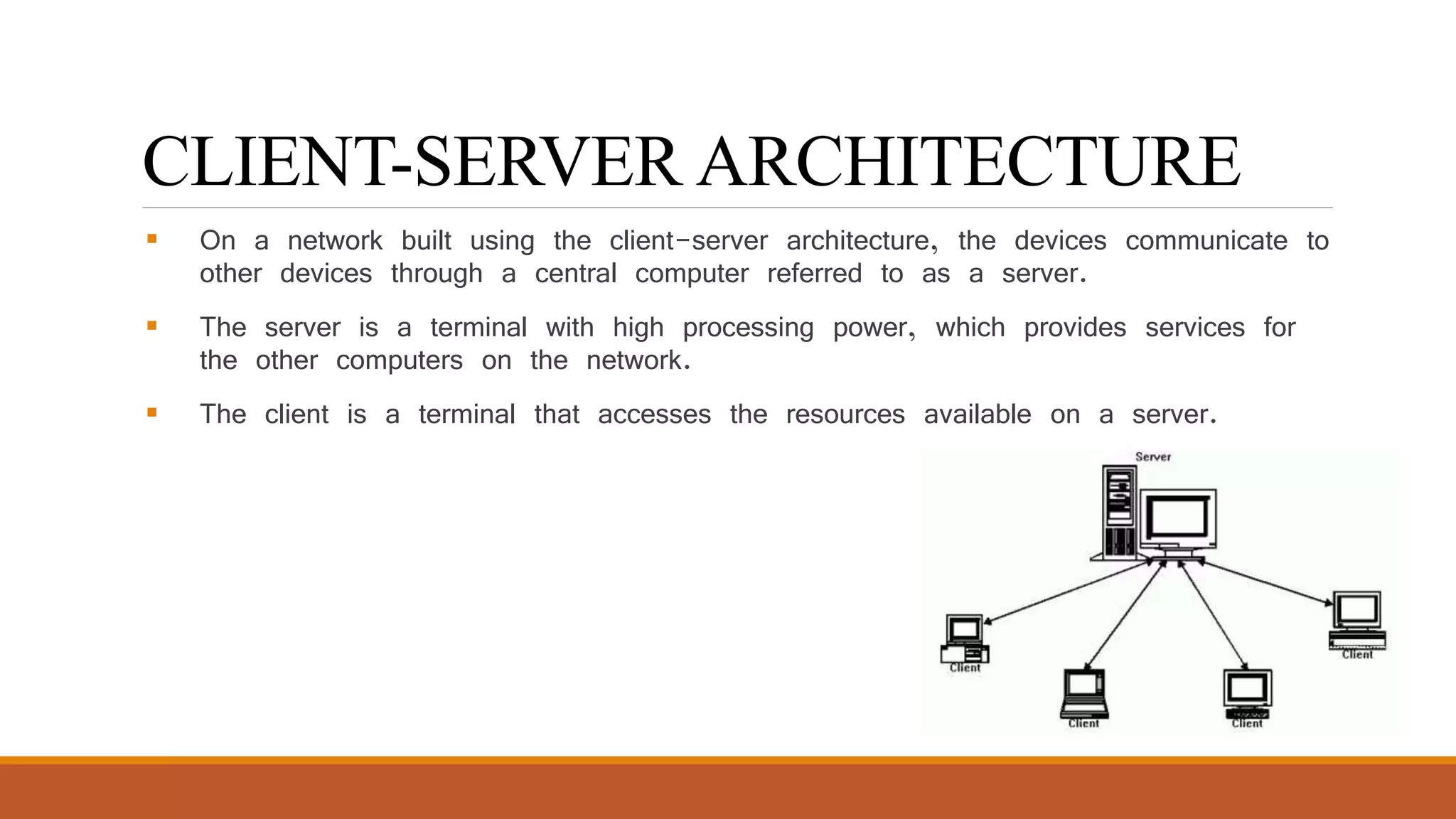
CLIENT-SERVER ARCHITECTURE
 On a network built using the client-server architecture, the devices communicate to
other devices through a central computer referred to as a server.
 The server is a terminal with high processing power, which provides services for
the other computers on the network.
 The client is a terminal that accesses the resources available on a server.
PEER-TO-PEER ARCHITECTURE
 On a network built using the peer-to-peer architecture, no specific distinction
exists between a client and a server.
 Any node can provide a service as well as send a request for a service from
another node on the network.
 The peer-to-peer network architecture allows sharing of resources, data, and
users.
 Each node on the network has full control over the network resources.
HYBRID ARCHITECTURE
 A hybrid, in general, is a composition of two different types of elements.
 A hybrid network architecture is created to get the benefits of both, the peer-to-
peer and the client-server architectures, in a network.
NETWORK TOPOLOGY
 The pattern of interconnection of nodes in a network is called the Topology.
 The physical topology of a network refers to the configuration of cables, computers and other
peripherals.
 The different types of network topologies that can be used to set up a network are:
 Bus Topology
 Ring Topology
 Star Topology
 Mesh Topology
 Hybrid Topology
BUS TOPOLOGY
 The bus topology has each node connected to a main communication channel
(The Bus)
 If one node is faulty this has no effect on the rest of the network
 If the bus is faulty, the whole network is “down”
◦ Advantage = Easy to add new stations
◦ Disadvantage = Each node may have to compete with each other
in order to transmit and receive data
RING TOPOLOGY
 Signals are sent around the network from node to node.
 Data travels in one direction.
 If one of the nodes on the network stops,
the entire network stops functioning.
 If a communications channel fails, the network
fails.
STAR TOPOLOGY
 All peripheral nodes are connected to a central node
 If a peripheral node fails it has no effect on the network
 If the central node fails the whole network is “down”
◦ Advantage = Easy to add new stations
◦ Disadvantage = Central node may get congested with network traffic
MESH TOPOLOGY
 Each node is connected to more than one node.
 This provide an alternate route mechanism.
 Supports back-up and rerouting.
 This type topology generally use in military area.
◦ Advantage = A node failure has no effect on the rest of the network.
◦ Disadvantage = Expensive to set up with a lot of cabling.
HYBRID TOPOLOGY
 The hybrid topology can be a combination of two or more basic
topologies, such as bus, ring, star, mesh, or tree.
 Hybrid networks combine more than two topologies, which, in turn,
enable you to get advantages of the constituent topologies.
RISKS OF NETWORK COMPUTING
The security of a computer network is challenged everyday by:
◦ Equipment malfunctions
◦ Computer hackers
◦ Virus attacks
BENEFITS OF A NETWORK
 Information sharing: Authorized users can use other computers on the network
to access and share information and data. This could include special group projects, databases,
etc.
 Hardware sharing: One device connected to a network, such as a printer or
scanner, can be shared by many users.
 Software sharing: Instead of purchasing and installing a software program on each
computer, it can be installed on the server. All of the users can then access the program from a
single location.
 Collaborative environment: Users can work together on group projects by
combining the power and capabilities of diverse equipment.
COMMUNICATIONS MEDIA
Communications Channel (Medium)
◦ To transfer data from one computer to another requires some type of link
through which the data can be transmitted. This link is known as the
communications channel.
◦ To send data through the channel requires some type of transmission media,
which may be either physical or wireless.
COMMUNICATION PROTOCOLS
File transfer protocol (FTP) – used to transmit files.
Simple mail transfer protocol (SMTP) – used to transmit e-mail messages.
Post office protocol (POP) – allows the recipient to retrieve messages.
Wireless application protocol – enables wireless devices to access and use the
Internet using a client/server network.
802.11 – protocol for wireless LAN technology
COMMUNICATIONS SOFTWARE
E-Mail Software – used to send and receive electronic messages using the Internet
Web Browser – allows users to access and view Web pages
Groupware – allows groups of people on a network to share information and to collaborate on
various projects

Computer network updated

  • 1.
    Computer Networks And Communication BASICCONCEPTS OF COMPUTER NETWORKS LECTURER: ENGR. SHARJEEL MUSTAFA ALI
  • 2.
    Communication Communication ◦ The message(data and information) is communicated via the signal. The transmission medium “carries” the signal.
  • 3.
  • 5.
    Computer Networks A ComputerNetwork is a collection of computers and devices connected together via communication devices and transmission media. For examples it may connect computers, printers and scanners. Communication Devices HUB Switch Routers Transmission Media Wired Medium Wireless Medium Devices-printer , scanner
  • 6.
    Computer Networks (Cont.) A collection of computing devices that are connected in various ways in order to communicate and share resources.  Usually, the connections between computers in a network are made using physical wires or cables.  However, some connections are wireless using Wi-Fi techniques.  The physical connection between networked computing devices is established using either cable media or wireless media.
  • 7.
    Types of Network Based on the size and the coverage area, networks are categorized into the following types: • Local Area Networks (LANs) • Metropolitan Area Networks (MANs) • Wide Area Networks (WANs)
  • 8.
    Local Area Network(LANs) A local area network (LAN) is a network that connects computers and devices in a limited geographical area such as a home, school, office building, or closely positioned group of buildings.  Each computer or device on the network is a node.  LAN connection speeds can be 10 Mbps or 100 Mbps or 1000 Mbps also.  LAN uses Physical Media (Wired).
  • 9.
    Metropolitan Area Network(MAN)  It is relatively larger than LAN and extends across a city or a metropolitan.  It is created by connecting two or more LANs located at different locations in a city.
  • 10.
    Wide Area Network(WANs)  A Wide Area Network (WAN) is a computer network that covers a large geographic area such as a country or the world.  One of the most prominent examples of the existing WAN is the Internet.  Transmission Media ◦ Fibre Optic, Microwave transmission and Satellite
  • 12.
    HOW ARE NETWORKS CATEGORIZED? Networks are usually classified using three properties: ◦ Architecture ◦ Topology ◦ Protocol
  • 13.
    Classification of NetworkArchitecture The architecture of a network is a logical design that determines how the devices in the network communicate. The commonly used architectures for computer networks are:  Client-server architecture  Peer-to-peer architecture  Hybrid architecture
  • 14.
    CLIENT-SERVER ARCHITECTURE  Ona network built using the client-server architecture, the devices communicate to other devices through a central computer referred to as a server.  The server is a terminal with high processing power, which provides services for the other computers on the network.  The client is a terminal that accesses the resources available on a server.
  • 16.
    PEER-TO-PEER ARCHITECTURE  Ona network built using the peer-to-peer architecture, no specific distinction exists between a client and a server.  Any node can provide a service as well as send a request for a service from another node on the network.  The peer-to-peer network architecture allows sharing of resources, data, and users.  Each node on the network has full control over the network resources.
  • 18.
    HYBRID ARCHITECTURE  Ahybrid, in general, is a composition of two different types of elements.  A hybrid network architecture is created to get the benefits of both, the peer-to- peer and the client-server architectures, in a network.
  • 19.
    NETWORK TOPOLOGY  Thepattern of interconnection of nodes in a network is called the Topology.  The physical topology of a network refers to the configuration of cables, computers and other peripherals.  The different types of network topologies that can be used to set up a network are:  Bus Topology  Ring Topology  Star Topology  Mesh Topology  Hybrid Topology
  • 20.
    BUS TOPOLOGY  Thebus topology has each node connected to a main communication channel (The Bus)  If one node is faulty this has no effect on the rest of the network  If the bus is faulty, the whole network is “down” ◦ Advantage = Easy to add new stations ◦ Disadvantage = Each node may have to compete with each other in order to transmit and receive data
  • 21.
    RING TOPOLOGY  Signalsare sent around the network from node to node.  Data travels in one direction.  If one of the nodes on the network stops, the entire network stops functioning.  If a communications channel fails, the network fails.
  • 22.
    STAR TOPOLOGY  Allperipheral nodes are connected to a central node  If a peripheral node fails it has no effect on the network  If the central node fails the whole network is “down” ◦ Advantage = Easy to add new stations ◦ Disadvantage = Central node may get congested with network traffic
  • 23.
    MESH TOPOLOGY  Eachnode is connected to more than one node.  This provide an alternate route mechanism.  Supports back-up and rerouting.  This type topology generally use in military area. ◦ Advantage = A node failure has no effect on the rest of the network. ◦ Disadvantage = Expensive to set up with a lot of cabling.
  • 24.
    HYBRID TOPOLOGY  Thehybrid topology can be a combination of two or more basic topologies, such as bus, ring, star, mesh, or tree.  Hybrid networks combine more than two topologies, which, in turn, enable you to get advantages of the constituent topologies.
  • 25.
    RISKS OF NETWORKCOMPUTING The security of a computer network is challenged everyday by: ◦ Equipment malfunctions ◦ Computer hackers ◦ Virus attacks
  • 26.
    BENEFITS OF ANETWORK  Information sharing: Authorized users can use other computers on the network to access and share information and data. This could include special group projects, databases, etc.  Hardware sharing: One device connected to a network, such as a printer or scanner, can be shared by many users.  Software sharing: Instead of purchasing and installing a software program on each computer, it can be installed on the server. All of the users can then access the program from a single location.  Collaborative environment: Users can work together on group projects by combining the power and capabilities of diverse equipment.
  • 27.
    COMMUNICATIONS MEDIA Communications Channel(Medium) ◦ To transfer data from one computer to another requires some type of link through which the data can be transmitted. This link is known as the communications channel. ◦ To send data through the channel requires some type of transmission media, which may be either physical or wireless.
  • 28.
    COMMUNICATION PROTOCOLS File transferprotocol (FTP) – used to transmit files. Simple mail transfer protocol (SMTP) – used to transmit e-mail messages. Post office protocol (POP) – allows the recipient to retrieve messages. Wireless application protocol – enables wireless devices to access and use the Internet using a client/server network. 802.11 – protocol for wireless LAN technology
  • 29.
    COMMUNICATIONS SOFTWARE E-Mail Software– used to send and receive electronic messages using the Internet Web Browser – allows users to access and view Web pages Groupware – allows groups of people on a network to share information and to collaborate on various projects