INTRODUCTION TOCOMPUTER SCIENCE
CSC 1302
LECTURE 3
Department of Maths and Computer-
Science
Faculty of Natural and Applied Science
BY
UMAR DANJUMA MAIWADA
COMPUTER APPLICATIONS
 Business
 Banking
 Insurance
 Education
 Marketing
 Advertising
 Home Shopping
 Health Care
 Engineering Design
 Military
 Communication
 Government
2
ADVANTAGES OF COMPUTERS
 Speed
 Accuracy
 Efficiency
 Storage Capability
 Versatility
3
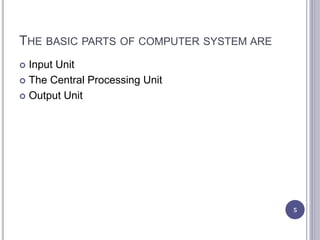
COMPONENTS OF A COMPUTER
4
THE BASIC PARTS OF COMPUTER SYSTEM ARE
 Input Unit
 The Central Processing Unit
 Output Unit
5
INPUT UNIT/DEVICES
 It contain devices that are used for feeding in data
into the computer
 The input devices translate the information into the
form understandable by computer.
 Example: Mouse
 Keyboard
 Joystick
 Scanner
 Lightpen
 Microphone
6
CPU (CENTRAL PROCESSING UNIT)
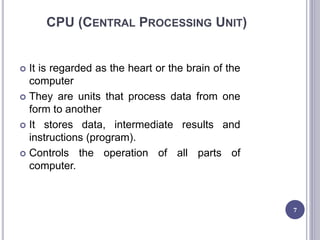
 It is regarded as the heart or the brain of the
computer
 They are units that process data from one
form to another
 It stores data, intermediate results and
instructions (program).
 Controls the operation of all parts of
computer.
7
OUTPUT UNIT/DEVICES
 They allow communication with the user
 They produce output
 Output devices translate the computer's output into the
form understandable by users.
 Example: monitor
 Printer
 Projector
 speaker
8
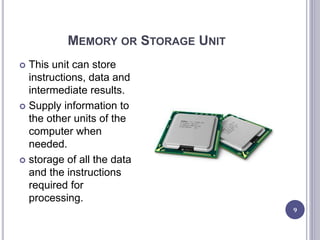
MEMORY OR STORAGE UNIT
9
 This unit can store
instructions, data and
intermediate results.
 Supply information to
the other units of the
computer when
needed.
 storage of all the data
and the instructions
required for
processing.
CONTROL UNIT
 This unit controls the operations of all parts of
computer but does not carry out any actual data
processing operations.
 Responsible for controlling the transfer of data and
instructions among other units of a computer
 communicates with the input/output devices for
transfer of data or results from the storage, do not
process or store data.
10
ALU (ARITHMETIC LOGIC UNIT).
 This unit consists of two subsections namely
Arithmetic section and Logical section.
 Arithmetic Section: The main function is the
performance of arithmetic operations like addition,
subtraction, multiplication and division.
 Logical Section: The main function is performing the
logical operations such as comparing, selecting,
matching and merging of data.
11
MEMORY
 It is the part of the computer that stores programs
and data.
 Computer memory is the storage space in
computer where data is to be processed and
instructions required for processing are stored.
 Memory is primarily of three types
 Cache Memory
 Primary Memory/Main Memory
 Secondary Memory
12
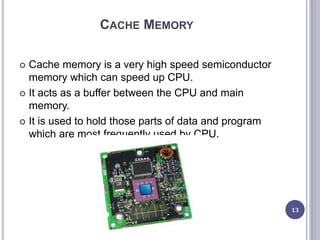
CACHE MEMORY
 Cache memory is a very high speed semiconductor
memory which can speed up CPU.
 It acts as a buffer between the CPU and main
memory.
 It is used to hold those parts of data and program
which are most frequently used by CPU.
13
ADD AND DIS OF CACHE MEMORY
14
 Cache memory is
faster than main
memory.
 It stores data for
temporary use.
 It consumes less
access time as
compared to main
memory.
 Cache memory has
limited capacity
 It is very expensive
Advantages Disadvantages
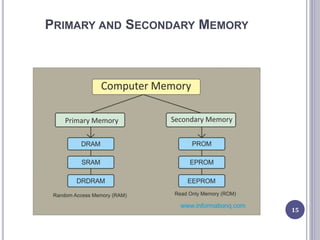
PRIMARY AND SECONDARY MEMORY
15
PRIMARY MEMORY (MAIN MEMORY)
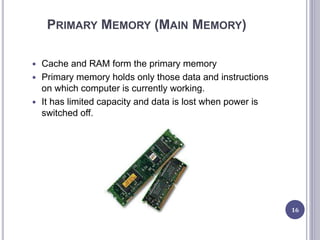
 Cache and RAM form the primary memory
 Primary memory holds only those data and instructions
on which computer is currently working.
 It has limited capacity and data is lost when power is
switched off.
16
CHARACTERISTICS OF MAIN MEMORY
17
Continuat
ion
 These are semiconductor memories.
 It is known as main memory.
 Usually volatile memory.
 Data is lost in case power is switched off.
 It is working memory of the computer.
 Faster than secondary memories.
 A computer cannot run without primary memory
RANDOM ACCESS MEMORY (RAM)
 RAM (Random Access Memory) is the internal
memory of the CPU for storing data, program and
program result
 It is volatile
 It is read/write memory which stores data until the
machine is working.
 As soon as the machine is switched off, data is
erased.
 RAM is of two types
 Static RAM (SRAM)
 Dynamic RAM (DRAM) 18
Static RAM (SRAM)
19
• The word static indicates that the memory
retains its contents as long as power is being
supplied.
• Transistors do not require power to prevent
leakage, so SRAM need not have to be
refreshed on a regular basis.
 Characteristic of the Static RAM
 It has long life
 There is no need to refresh
 Faster
 Used as cache memory
 Large size
 Expensive
Dynamic RAM (DRAM)
 DRAM, unlike SRAM, must be continually
refreshed in order to maintain the data
 DRAM is used for most system memory because it
is cheap and small.
 Characteristics of the Dynamic RAM
 It has short data lifetime
 Need to be refreshed continuously
 Slower as compared to SRAM
 Used as RAM
 Lesser in size
 Less expensive
 Less power consumption
20
SECONDARY MEMORY
 They provide permanent storage
 external memory and are non-volatile
 slower than main memory.
 CPU directly does not access these memories
 secondary memories are first transferred to main
memory, and then CPU can access it. For example:
disk, CD-ROM, DVD etc
 Characteristic of Secondary Memory
 These are magnetic and optical memories.
 It is known as backup memory.
 It is non-volatile memory.
 Data is permanently stored even if power is switched off.
 It is used for storage of data in a computer.
 Computer may run without secondary memory.
 Slower than primary memories.
21
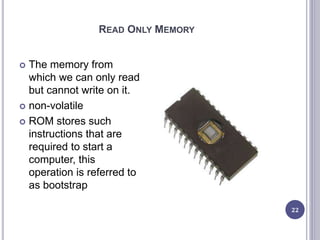
READ ONLY MEMORY
22
 The memory from
which we can only read
but cannot write on it.
 non-volatile
 ROM stores such
instructions that are
required to start a
computer, this
operation is referred to
as bootstrap
MROM (MASKED ROM): THE VERY FIRST ROMS WERE HARDWIRED
DEVICES THAT CONTAINED A PRE-PROGRAMMED SET OF DATA OR
INSTRUCTIONS. THESE KINDS OF ROMS ARE KNOWN AS MASKED
ROMS WHICH ARE INEXPENSIVE.
PROM (PROGRAMMABLE READ ONLY MEMORY): PROM IS READ-
ONLY MEMORY THAT CAN BE MODIFIED ONLY ONCE BY A USER. THE
USER BUYS A BLANK PROM AND ENTERS THE DESIRED CONTENTS
USING A PROM PROGRAM. INSIDE THE PROM CHIP THERE ARE
SMALL FUSES WHICH ARE BURNT OPEN DURING PROGRAMMING. IT
CAN BE PROGRAMMED ONLY ONCE AND IS NOT ERASABLE.
EPROM (ERASABLE PROGRAMMABLE READ ONLY MEMORY):
EPROM WILL OVERCOME THE PROBLEM OF PROM. EPROM CHIP
CAN BE PROGRAMMED TIME AND AGAIN BY ERASING THE
INFORMATION STORED EARLIER IN IT. EPROM CHIP HAS TO BE
EXPOSED TO SUNLIGHT FOR SOME TIME SO THAT ULTRA VIOLET RAYS
FALL ON THE CHIP AND THAT ERASES THE DATA ON THE CHIP AND THE
CHIP CAN BE RE-PROGRAMMED USING A SPECIAL PROGRAMMING
FACILITY. 23
IS PROGRAMMED AND ERASED ELECTRICALLY. IT CAN BE
ERASED AND REPROGRAMMED ABOUT TEN THOUSAND
TIMES. BOTH ERASING AND PROGRAMMING TAKE ABOUT 4
TO 10 MS (MILLI SECOND). IN EEPROM, ANY LOCATION
CAN BE SELECTIVELY ERASED AND PROGRAMMED.
ADVANTAGES OF ROM
THE ADVANTAGES OF ROM ARE AS FOLLOWS:
NON-VOLATILE IN NATURE
THESE CANNOT BE ACCIDENTALLY CHANGED
CHEAPER THAN RAMS
EASY TO TEST
MORE RELIABLE THAN RAMS
THESE ARE STATIC AND DO NOT REQUIRE
REFRESHING
ITS CONTENTS ARE ALWAYS KNOWN AND CAN BE
VERIFIED
24
MOTHERBOARD
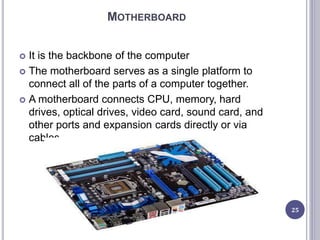
 It is the backbone of the computer
 The motherboard serves as a single platform to
connect all of the parts of a computer together.
 A motherboard connects CPU, memory, hard
drives, optical drives, video card, sound card, and
other ports and expansion cards directly or via
cables.
25
FEATURES OF MOTHERBOARD
 Motherboard varies greatly in supporting various
types of components.
 Normally a motherboard supports a single type of
CPU and few types of memories.
 Video Cards, Hard disks, Sound Cards have to be
compatible with motherboard to function properly.
26
DESCRIPTION OF MOTHERBOARD
 The motherboard is mounted inside the case and is
securely attached via small screws through pre-
drilled holes.
 Motherboard contains ports to connect all of the
internal components.
 It provides a single socket for CPU whereas for
memory, normally one or more slots are available.
 Motherboard carries fans and a special port
designed for power supply.
 There is a peripheral card slot in front of the
motherboard using which video cards, sound cards
and other expansion cards can be connected to
motherboard.
 motherboards carry a number of ports
27
PORT
 A port is a physical docking point using which an
external device can be connected to the computer.
 It can also be programmatic docking point through
which information flows from a program to the
computer or over the Internet.
 A port has the following characteristics −
 External devices are connected to a computer using
cables and ports.
 Ports are slots on the motherboard into which a cable of
external device is plugged in.
 Examples of external devices attached via ports are the
mouse, keyboard, monitor, microphone, speakers, etc. 28
29
TYPES OF PORTS
 Serial Port
 Used for external modems and older computer mouse
 Two versions: 9 pin, 25 pin model
 Data travels at 115 kilobits per second
 Parallel Port
 Used for scanners and printers
 Also called printer port
 25 pin model
 IEEE 1284-compliant Centronics port
30
31
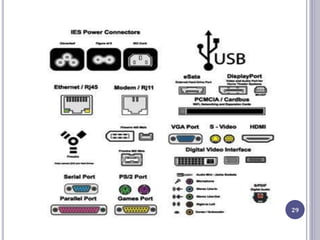
PS/2 Port
Used for old computer keyboard and mouse
Also called mouse port
Most of the old computers provide two PS/2 port, each for the mouse and
keyboard
Universal Serial Bus (or USB) Port
It can connect all kinds of external USB devices such as external hard disk,
printer, scanner, mouse, keyboard, etc.
It was introduced in 1997.
Most of the computers provide two USB ports as minimum.
VGA Port
Connects monitor to a computer's video card.
It has 15 holes.
Similar to the serial port connector. However, serial port connector has pins, VGA
port has holes.
Power Connector
Three-pronged plug.
Connects to the computer's power cable that plugs into a power bar or wall
socket.
Firewire Port
Transfers large amount of data at very fast speed.
Connects camcorders and video equipment to the computer.
Data travels at 400 to 800 megabits per seconds.
Invented by Apple.
32
Modem Port
Connects a PC's modem to the telephone network.
Ethernet Port
Connects to a network and high speed Internet.
Connects the network cable to a computer.
This port resides on an Ethernet Card.
Data travels at 10 megabits to 1000 megabits per seconds depending
upon the network bandwidth.
Game Port
Connect a joystick to a PC
Now replaced by USB
Digital Video Interface, DVI port
Connects Flat panel LCD monitor to the computer's high-end video graphic
cards.
Very popular among video card manufacturers.
Sockets
Sockets connect the microphone and speakers to the sound card of the
computer.
QUESTIONS???
THANK YOU FOR YOUR ATTENTION
33

introduction to Computer system

  • 1.
    INTRODUCTION TOCOMPUTER SCIENCE CSC1302 LECTURE 3 Department of Maths and Computer- Science Faculty of Natural and Applied Science BY UMAR DANJUMA MAIWADA
  • 2.
    COMPUTER APPLICATIONS  Business Banking  Insurance  Education  Marketing  Advertising  Home Shopping  Health Care  Engineering Design  Military  Communication  Government 2
  • 3.
    ADVANTAGES OF COMPUTERS Speed  Accuracy  Efficiency  Storage Capability  Versatility 3
  • 4.
    COMPONENTS OF ACOMPUTER 4
  • 5.
    THE BASIC PARTSOF COMPUTER SYSTEM ARE  Input Unit  The Central Processing Unit  Output Unit 5
  • 6.
    INPUT UNIT/DEVICES  Itcontain devices that are used for feeding in data into the computer  The input devices translate the information into the form understandable by computer.  Example: Mouse  Keyboard  Joystick  Scanner  Lightpen  Microphone 6
  • 7.
    CPU (CENTRAL PROCESSINGUNIT)  It is regarded as the heart or the brain of the computer  They are units that process data from one form to another  It stores data, intermediate results and instructions (program).  Controls the operation of all parts of computer. 7
  • 8.
    OUTPUT UNIT/DEVICES  Theyallow communication with the user  They produce output  Output devices translate the computer's output into the form understandable by users.  Example: monitor  Printer  Projector  speaker 8
  • 9.
    MEMORY OR STORAGEUNIT 9  This unit can store instructions, data and intermediate results.  Supply information to the other units of the computer when needed.  storage of all the data and the instructions required for processing.
  • 10.
    CONTROL UNIT  Thisunit controls the operations of all parts of computer but does not carry out any actual data processing operations.  Responsible for controlling the transfer of data and instructions among other units of a computer  communicates with the input/output devices for transfer of data or results from the storage, do not process or store data. 10
  • 11.
    ALU (ARITHMETIC LOGICUNIT).  This unit consists of two subsections namely Arithmetic section and Logical section.  Arithmetic Section: The main function is the performance of arithmetic operations like addition, subtraction, multiplication and division.  Logical Section: The main function is performing the logical operations such as comparing, selecting, matching and merging of data. 11
  • 12.
    MEMORY  It isthe part of the computer that stores programs and data.  Computer memory is the storage space in computer where data is to be processed and instructions required for processing are stored.  Memory is primarily of three types  Cache Memory  Primary Memory/Main Memory  Secondary Memory 12
  • 13.
    CACHE MEMORY  Cachememory is a very high speed semiconductor memory which can speed up CPU.  It acts as a buffer between the CPU and main memory.  It is used to hold those parts of data and program which are most frequently used by CPU. 13
  • 14.
    ADD AND DISOF CACHE MEMORY 14  Cache memory is faster than main memory.  It stores data for temporary use.  It consumes less access time as compared to main memory.  Cache memory has limited capacity  It is very expensive Advantages Disadvantages
  • 15.
  • 16.
    PRIMARY MEMORY (MAINMEMORY)  Cache and RAM form the primary memory  Primary memory holds only those data and instructions on which computer is currently working.  It has limited capacity and data is lost when power is switched off. 16
  • 17.
    CHARACTERISTICS OF MAINMEMORY 17 Continuat ion  These are semiconductor memories.  It is known as main memory.  Usually volatile memory.  Data is lost in case power is switched off.  It is working memory of the computer.  Faster than secondary memories.  A computer cannot run without primary memory
  • 18.
    RANDOM ACCESS MEMORY(RAM)  RAM (Random Access Memory) is the internal memory of the CPU for storing data, program and program result  It is volatile  It is read/write memory which stores data until the machine is working.  As soon as the machine is switched off, data is erased.  RAM is of two types  Static RAM (SRAM)  Dynamic RAM (DRAM) 18
  • 19.
    Static RAM (SRAM) 19 •The word static indicates that the memory retains its contents as long as power is being supplied. • Transistors do not require power to prevent leakage, so SRAM need not have to be refreshed on a regular basis.  Characteristic of the Static RAM  It has long life  There is no need to refresh  Faster  Used as cache memory  Large size  Expensive
  • 20.
    Dynamic RAM (DRAM) DRAM, unlike SRAM, must be continually refreshed in order to maintain the data  DRAM is used for most system memory because it is cheap and small.  Characteristics of the Dynamic RAM  It has short data lifetime  Need to be refreshed continuously  Slower as compared to SRAM  Used as RAM  Lesser in size  Less expensive  Less power consumption 20
  • 21.
    SECONDARY MEMORY  Theyprovide permanent storage  external memory and are non-volatile  slower than main memory.  CPU directly does not access these memories  secondary memories are first transferred to main memory, and then CPU can access it. For example: disk, CD-ROM, DVD etc  Characteristic of Secondary Memory  These are magnetic and optical memories.  It is known as backup memory.  It is non-volatile memory.  Data is permanently stored even if power is switched off.  It is used for storage of data in a computer.  Computer may run without secondary memory.  Slower than primary memories. 21

  • 22.
    READ ONLY MEMORY 22 The memory from which we can only read but cannot write on it.  non-volatile  ROM stores such instructions that are required to start a computer, this operation is referred to as bootstrap
  • 23.
    MROM (MASKED ROM):THE VERY FIRST ROMS WERE HARDWIRED DEVICES THAT CONTAINED A PRE-PROGRAMMED SET OF DATA OR INSTRUCTIONS. THESE KINDS OF ROMS ARE KNOWN AS MASKED ROMS WHICH ARE INEXPENSIVE. PROM (PROGRAMMABLE READ ONLY MEMORY): PROM IS READ- ONLY MEMORY THAT CAN BE MODIFIED ONLY ONCE BY A USER. THE USER BUYS A BLANK PROM AND ENTERS THE DESIRED CONTENTS USING A PROM PROGRAM. INSIDE THE PROM CHIP THERE ARE SMALL FUSES WHICH ARE BURNT OPEN DURING PROGRAMMING. IT CAN BE PROGRAMMED ONLY ONCE AND IS NOT ERASABLE. EPROM (ERASABLE PROGRAMMABLE READ ONLY MEMORY): EPROM WILL OVERCOME THE PROBLEM OF PROM. EPROM CHIP CAN BE PROGRAMMED TIME AND AGAIN BY ERASING THE INFORMATION STORED EARLIER IN IT. EPROM CHIP HAS TO BE EXPOSED TO SUNLIGHT FOR SOME TIME SO THAT ULTRA VIOLET RAYS FALL ON THE CHIP AND THAT ERASES THE DATA ON THE CHIP AND THE CHIP CAN BE RE-PROGRAMMED USING A SPECIAL PROGRAMMING FACILITY. 23
  • 24.
    IS PROGRAMMED ANDERASED ELECTRICALLY. IT CAN BE ERASED AND REPROGRAMMED ABOUT TEN THOUSAND TIMES. BOTH ERASING AND PROGRAMMING TAKE ABOUT 4 TO 10 MS (MILLI SECOND). IN EEPROM, ANY LOCATION CAN BE SELECTIVELY ERASED AND PROGRAMMED. ADVANTAGES OF ROM THE ADVANTAGES OF ROM ARE AS FOLLOWS: NON-VOLATILE IN NATURE THESE CANNOT BE ACCIDENTALLY CHANGED CHEAPER THAN RAMS EASY TO TEST MORE RELIABLE THAN RAMS THESE ARE STATIC AND DO NOT REQUIRE REFRESHING ITS CONTENTS ARE ALWAYS KNOWN AND CAN BE VERIFIED 24
  • 25.
    MOTHERBOARD  It isthe backbone of the computer  The motherboard serves as a single platform to connect all of the parts of a computer together.  A motherboard connects CPU, memory, hard drives, optical drives, video card, sound card, and other ports and expansion cards directly or via cables. 25
  • 26.
    FEATURES OF MOTHERBOARD Motherboard varies greatly in supporting various types of components.  Normally a motherboard supports a single type of CPU and few types of memories.  Video Cards, Hard disks, Sound Cards have to be compatible with motherboard to function properly. 26
  • 27.
    DESCRIPTION OF MOTHERBOARD The motherboard is mounted inside the case and is securely attached via small screws through pre- drilled holes.  Motherboard contains ports to connect all of the internal components.  It provides a single socket for CPU whereas for memory, normally one or more slots are available.  Motherboard carries fans and a special port designed for power supply.  There is a peripheral card slot in front of the motherboard using which video cards, sound cards and other expansion cards can be connected to motherboard.  motherboards carry a number of ports 27
  • 28.
    PORT  A portis a physical docking point using which an external device can be connected to the computer.  It can also be programmatic docking point through which information flows from a program to the computer or over the Internet.  A port has the following characteristics −  External devices are connected to a computer using cables and ports.  Ports are slots on the motherboard into which a cable of external device is plugged in.  Examples of external devices attached via ports are the mouse, keyboard, monitor, microphone, speakers, etc. 28
  • 29.
  • 30.
    TYPES OF PORTS Serial Port  Used for external modems and older computer mouse  Two versions: 9 pin, 25 pin model  Data travels at 115 kilobits per second  Parallel Port  Used for scanners and printers  Also called printer port  25 pin model  IEEE 1284-compliant Centronics port 30
  • 31.
    31 PS/2 Port Used forold computer keyboard and mouse Also called mouse port Most of the old computers provide two PS/2 port, each for the mouse and keyboard Universal Serial Bus (or USB) Port It can connect all kinds of external USB devices such as external hard disk, printer, scanner, mouse, keyboard, etc. It was introduced in 1997. Most of the computers provide two USB ports as minimum. VGA Port Connects monitor to a computer's video card. It has 15 holes. Similar to the serial port connector. However, serial port connector has pins, VGA port has holes. Power Connector Three-pronged plug. Connects to the computer's power cable that plugs into a power bar or wall socket. Firewire Port Transfers large amount of data at very fast speed. Connects camcorders and video equipment to the computer. Data travels at 400 to 800 megabits per seconds. Invented by Apple.
  • 32.
    32 Modem Port Connects aPC's modem to the telephone network. Ethernet Port Connects to a network and high speed Internet. Connects the network cable to a computer. This port resides on an Ethernet Card. Data travels at 10 megabits to 1000 megabits per seconds depending upon the network bandwidth. Game Port Connect a joystick to a PC Now replaced by USB Digital Video Interface, DVI port Connects Flat panel LCD monitor to the computer's high-end video graphic cards. Very popular among video card manufacturers. Sockets Sockets connect the microphone and speakers to the sound card of the computer.
  • 33.
    QUESTIONS??? THANK YOU FORYOUR ATTENTION 33

Editor's Notes

  • #8 Scalability of handover framework to handle increased handovers without compromising latency performance Flexibility to support various 4G deployments
  • #19 Mobility framework designed to cover: all possible deployment scenarios enable and optimize handover between IEEE 802.16m Bss handover from an IEEE 802.16e BS to an IEEE 802.16m BS (note: under a legacy ASN network) intra-BS zone switch between LZone and Mzone