LECTURE 11: AR
INTERACTION
COMP 4010 – Virtual Reality
Semester 5 – 2016
Bruce Thomas, Mark Billinghurst
University of South Australia
October 18th 2016
Augmented Reality Definition
•  Defining Characteristics [Azuma 97]
• Combines Real andVirtual Images
• Both can be seen at the same time
• Interactive in real-time
• The virtual content can be interacted with
• Registered in 3D
• Virtual objects appear fixed in space
Azuma, R. T. (1997). A survey of augmented reality. Presence, 6(4), 355-385.
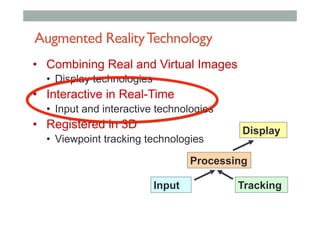
Augmented RealityTechnology
•  Combining Real and Virtual Images
•  Display technologies
•  Interactive in Real-Time
•  Input and interactive technologies
•  Registered in 3D
•  Viewpoint tracking technologies
Display
Processing
Input Tracking
AR INTERFACE DESIGN
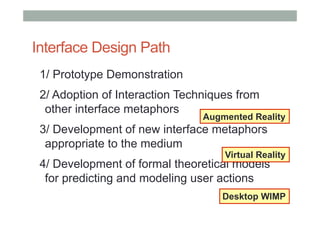
Interface Design Path
1/ Prototype Demonstration
2/ Adoption of Interaction Techniques from
other interface metaphors
3/ Development of new interface metaphors
appropriate to the medium
4/ Development of formal theoretical models
for predicting and modeling user actions
Desktop WIMP
Virtual Reality
Augmented Reality
AR Interaction
• Designing AR System = Interface Design
•  Using different input and output technologies
• Objective is a high quality of user experience
•  Ease of use and learning
•  Performance and satisfaction
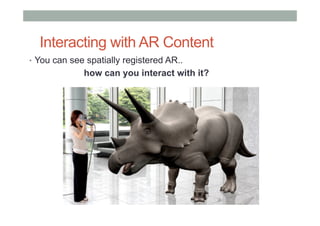
Interacting with AR Content
•  You can see spatially registered AR..
how can you interact with it?
Types of AR Interaction
• Browsing Interfaces
• simple (conceptually!), unobtrusive
• 3D AR Interfaces
• expressive, creative, require attention
• Tangible Interfaces
• Embedded into conventional environments
• Tangible AR
• Combines TUI input + AR display
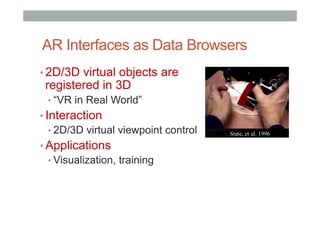
AR Interfaces as Data Browsers
• 2D/3D virtual objects are
registered in 3D
• “VR in Real World”
• Interaction
• 2D/3D virtual viewpoint control
• Applications
• Visualization, training
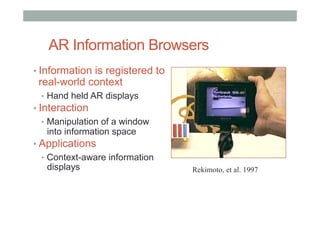
AR Information Browsers
• Information is registered to
real-world context
•  Hand held AR displays
• Interaction
•  Manipulation of a window
into information space
• Applications
•  Context-aware information
displays Rekimoto, et al. 1997
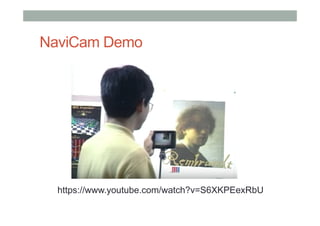
NaviCam Demo
https://www.youtube.com/watch?v=S6XKPEexRbU
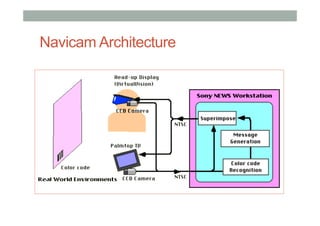
Navicam Architecture
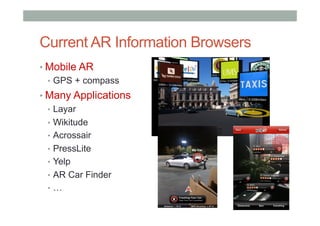
Current AR Information Browsers
• Mobile AR
•  GPS + compass
• Many Applications
•  Layar
•  Wikitude
•  Acrossair
•  PressLite
•  Yelp
•  AR Car Finder
•  …
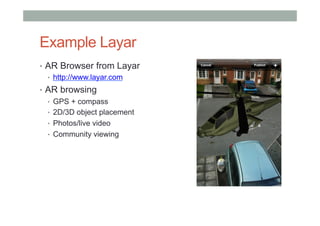
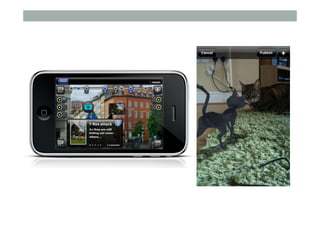
Example Layar
•  AR Browser from Layar
•  http://www.layar.com
•  AR browsing
•  GPS + compass
•  2D/3D object placement
•  Photos/live video
•  Community viewing
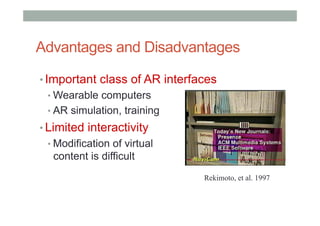
Advantages and Disadvantages
• Important class of AR interfaces
• Wearable computers
• AR simulation, training
• Limited interactivity
• Modification of virtual
content is difficult
Rekimoto, et al. 1997
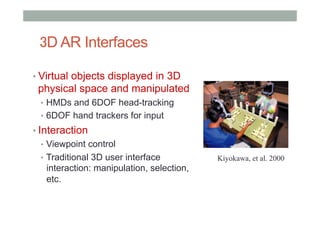
3D AR Interfaces
• Virtual objects displayed in 3D
physical space and manipulated
•  HMDs and 6DOF head-tracking
•  6DOF hand trackers for input
• Interaction
•  Viewpoint control
•  Traditional 3D user interface
interaction: manipulation, selection,
etc.
Kiyokawa, et al. 2000
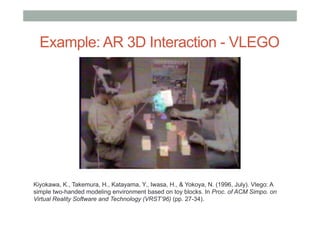
Example: AR 3D Interaction - VLEGO
Kiyokawa, K., Takemura, H., Katayama, Y., Iwasa, H., & Yokoya, N. (1996, July). Vlego: A
simple two-handed modeling environment based on toy blocks. In Proc. of ACM Simpo. on
Virtual Reality Software and Technology (VRST’96) (pp. 27-34).
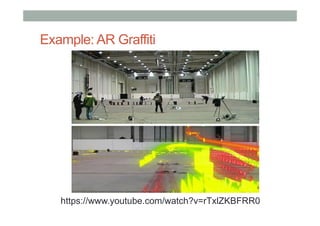
Example: AR Graffiti
https://www.youtube.com/watch?v=rTxlZKBFRR0
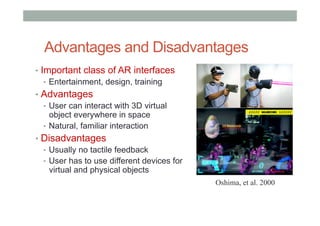
Advantages and Disadvantages
•  Important class of AR interfaces
•  Entertainment, design, training
•  Advantages
•  User can interact with 3D virtual
object everywhere in space
•  Natural, familiar interaction
•  Disadvantages
•  Usually no tactile feedback
•  User has to use different devices for
virtual and physical objects
Oshima, et al. 2000
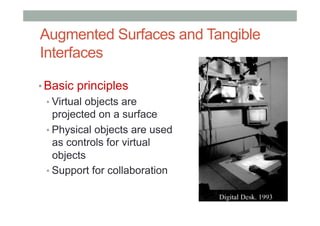
Augmented Surfaces and Tangible
Interfaces
• Basic principles
• Virtual objects are
projected on a surface
• Physical objects are used
as controls for virtual
objects
• Support for collaboration
Augmented Surfaces
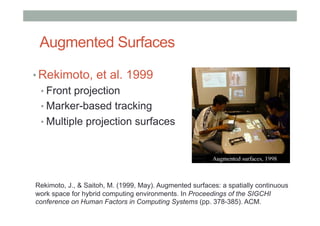
• Rekimoto, et al. 1999
• Front projection
• Marker-based tracking
• Multiple projection surfaces
Rekimoto, J., & Saitoh, M. (1999, May). Augmented surfaces: a spatially continuous
work space for hybrid computing environments. In Proceedings of the SIGCHI
conference on Human Factors in Computing Systems (pp. 378-385). ACM.
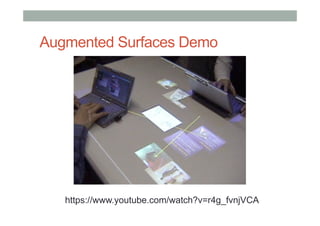
Augmented Surfaces Demo
https://www.youtube.com/watch?v=r4g_fvnjVCA
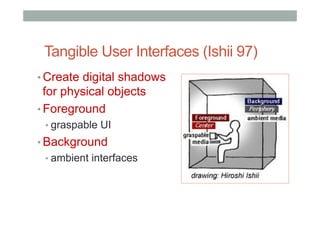
Tangible User Interfaces (Ishii 97)
• Create digital shadows
for physical objects
• Foreground
• graspable UI
• Background
• ambient interfaces
Tangible Interfaces - Ambient
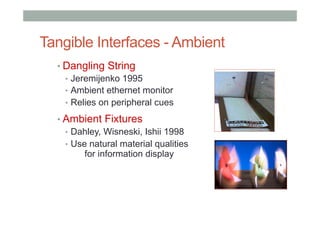
• Dangling String
•  Jeremijenko 1995
•  Ambient ethernet monitor
•  Relies on peripheral cues
• Ambient Fixtures
•  Dahley, Wisneski, Ishii 1998
•  Use natural material qualities
for information display
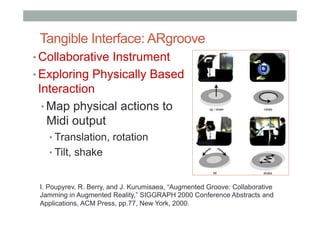
Tangible Interface: ARgroove
• Collaborative Instrument
• Exploring Physically Based
Interaction
• Map physical actions to
Midi output
• Translation, rotation
• Tilt, shake
I. Poupyrev, R. Berry, and J. Kurumisaea, “Augmented Groove: Collaborative
Jamming in Augmented Reality,” SIGGRAPH 2000 Conference Abstracts and
Applications, ACM Press, pp.77, New York, 2000.
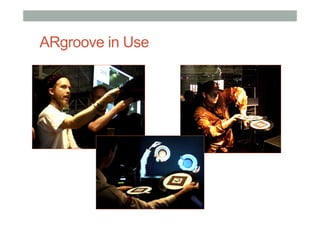
ARgroove in Use
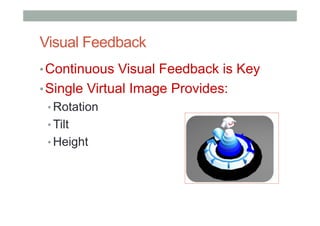
Visual Feedback
• Continuous Visual Feedback is Key
• Single Virtual Image Provides:
• Rotation
• Tilt
• Height
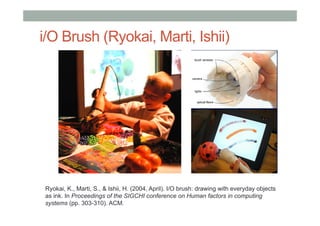
i/O Brush (Ryokai, Marti, Ishii)
Ryokai, K., Marti, S., & Ishii, H. (2004, April). I/O brush: drawing with everyday objects
as ink. In Proceedings of the SIGCHI conference on Human factors in computing
systems (pp. 303-310). ACM.
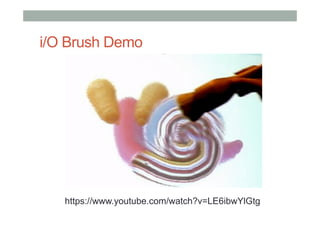
i/O Brush Demo
https://www.youtube.com/watch?v=LE6ibwYlGtg
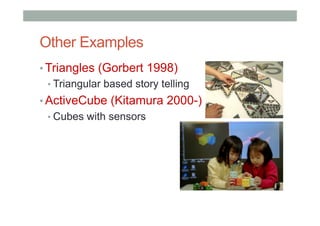
Other Examples
• Triangles (Gorbert 1998)
• Triangular based story telling
• ActiveCube (Kitamura 2000-)
• Cubes with sensors
Lessons from Tangible Interfaces
• Physical objects make us smart
• Norman’s “Things that Make Us Smart”
• encode affordances, constraints
• Objects aid collaboration
• establish shared meaning
• Objects increase understanding
• serve as cognitive artifacts
TUI Limitations
• Difficult to change object properties
• can’t tell state of digital data
• Limited display capabilities
• projection screen = 2D
• dependent on physical display surface
• Separation between object and display
• ARgroove
Advantages and Disadvantages
• Advantages
• Natural - users hands are used for interacting
with both virtual and real objects.
•  No need for special purpose input devices
• Disadvantages
• Interaction is limited only to 2D surface
•  Full 3D interaction and manipulation is difficult
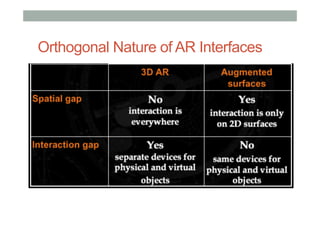
Orthogonal Nature of AR Interfaces
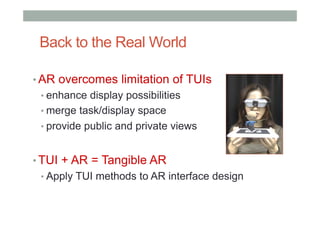
Back to the Real World
• AR overcomes limitation of TUIs
• enhance display possibilities
• merge task/display space
• provide public and private views
• TUI + AR = Tangible AR
• Apply TUI methods to AR interface design
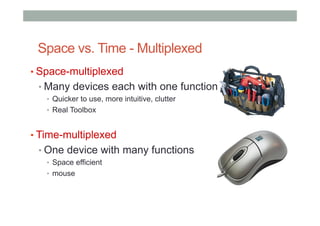
Space vs. Time - Multiplexed
• Space-multiplexed
• Many devices each with one function
•  Quicker to use, more intuitive, clutter
•  Real Toolbox
• Time-multiplexed
• One device with many functions
•  Space efficient
•  mouse
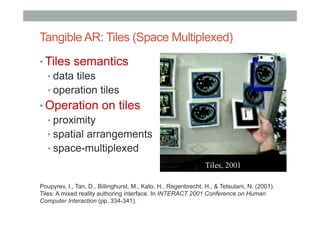
Tangible AR: Tiles (Space Multiplexed)
• Tiles semantics
• data tiles
• operation tiles
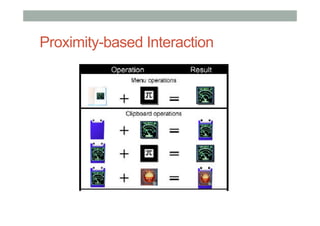
• Operation on tiles
• proximity
• spatial arrangements
• space-multiplexed
Poupyrev, I., Tan, D., Billinghurst, M., Kato, H., Regenbrecht, H., & Tetsutani, N. (2001).
Tiles: A mixed reality authoring interface. In INTERACT 2001 Conference on Human
Computer Interaction (pp. 334-341).
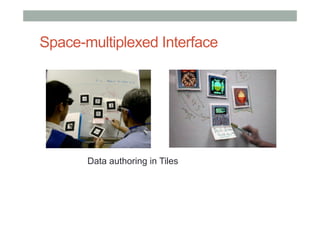
Space-multiplexed Interface
Data authoring in Tiles
Proximity-based Interaction
Tangible AR: Time-multiplexed Interaction
• Use of natural physical object
manipulations to control virtual objects
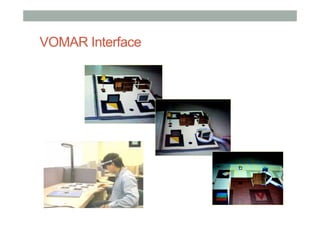
• VOMAR Demo
• Catalog book:
•  Turn over the page
• Paddle operation:
•  Push, shake, incline, hit, scoop
H. Kato, M. Billinghurst, I. Poupyrev, K. Imamoto, K. Tachibana: Virtual Object Manipulation
on a Table-Top AR Environment. In Proceedings of the International Symposium on
Augmented Reality (2000) 111-119
VOMAR Interface
Advantages and Disadvantages
• Advantages
• Natural interaction with virtual and physical tools
•  No need for special purpose input devices
• Spatial interaction with virtual objects
•  3D manipulation with virtual objects anywhere in space
• Disadvantages
• Requires Head Mounted Display
Wrap-up
• Browsing Interfaces
• simple (conceptually!), unobtrusive
• 3D AR Interfaces
• expressive, creative, require attention
• Tangible Interfaces
• Embedded into conventional environments
• Tangible AR
• Combines TUI input + AR display
DESIGNING AR SYSTEMS
Basic Design Guides
• Provide good conceptual model/Metaphor
• customers want to understand how UI works
• Make things visible
• if object has function, interface should show it
• Map interface controls to customer s model
• infix -vs- postfix calculator -- whose model?
• Provide feedback
• what you see is what you get!
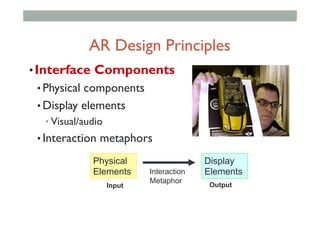
• Interface Components
• Physical components
• Display elements
• Visual/audio
• Interaction metaphors
Physical
Elements
Display
ElementsInteraction
Metaphor
Input Output
AR Design Principles
TangibleAR Metaphor
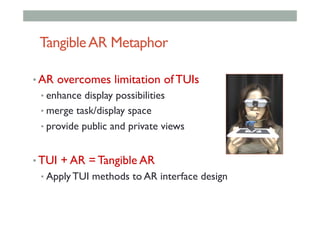
• AR overcomes limitation of TUIs
• enhance display possibilities
• merge task/display space
• provide public and private views
• TUI + AR = Tangible AR
• Apply TUI methods to AR interface design
TangibleAR Design Principles
• Tangible AR Interfaces use TUI principles
• Physical controllers for moving virtual content
• Support for spatial 3D interaction techniques
• Time and space multiplexed interaction
• Support for multi-handed interaction
• Match object affordances to task requirements
• Support parallel activity with multiple objects
• Allow collaboration between multiple users
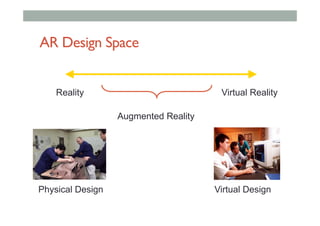
AR Design Space
Reality Virtual Reality
Augmented Reality
Physical Design Virtual Design
Design of Objects
• Objects
• Purposely built – affordances
• “Found” – repurposed
• Existing – already at use in marketplace
• Make affordances obvious (Norman)
• Object affordances visible
• Give feedback
• Provide constraints
• Use natural mapping
• Use good cognitive model
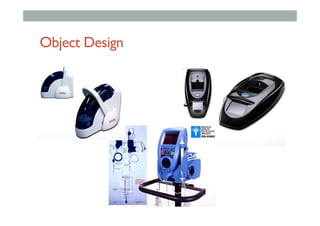
Object Design
Affordances:to give a clue
• Refers to an attribute of an object that allows people to
know how to use it
•  e.g. a button invites pushing, a door handle affords pulling
• Norman (1988) used the term to discuss the design of
everyday objects
• Since has been much popularised in interaction design to
discuss how to design interface objects
•  e.g. scrollbars afford moving up and down, icons afford clicking
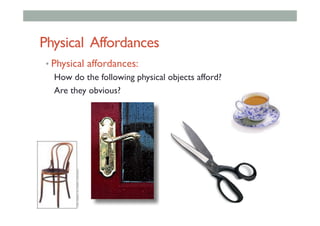
Physical Affordances
• Physical affordances:
How do the following physical objects afford?
Are they obvious?
‘Affordance’ and Interface Design?
• Interfaces are virtual and do not have affordances
like physical objects
• Norman argues it does not make sense to talk
about interfaces in terms of ‘real’ affordances
• Instead interfaces are better conceptualized as
‘perceived’ affordances
•  Learned conventions of arbitrary mappings between action
and effect at the interface
•  Some mappings are better than others
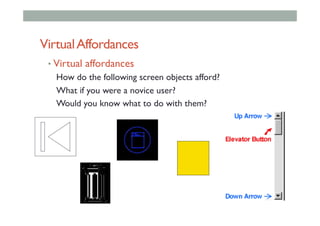
VirtualAffordances
• Virtual affordances
How do the following screen objects afford?
What if you were a novice user?
Would you know what to do with them?
• AR is mixture of physical affordance and
virtual affordance
• Physical
• Tangible controllers and objects
• Virtual
• Virtual graphics and audio
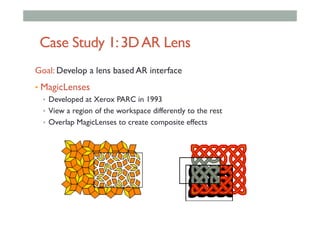
Case Study 1:3DAR Lens
Goal: Develop a lens based AR interface
•  MagicLenses
•  Developed at Xerox PARC in 1993
•  View a region of the workspace differently to the rest
•  Overlap MagicLenses to create composite effects
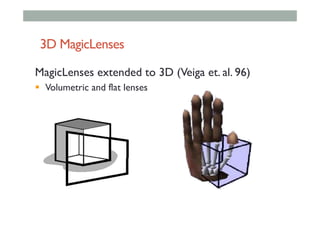
3D MagicLenses
MagicLenses extended to 3D (Veiga et. al. 96)
!  Volumetric and flat lenses
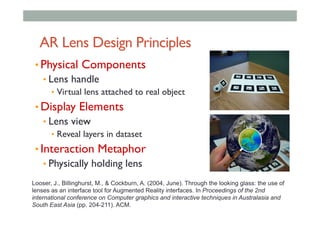
AR Lens Design Principles
• Physical Components
• Lens handle
•  Virtual lens attached to real object
• Display Elements
• Lens view
•  Reveal layers in dataset
• Interaction Metaphor
• Physically holding lens
Looser, J., Billinghurst, M., & Cockburn, A. (2004, June). Through the looking glass: the use of
lenses as an interface tool for Augmented Reality interfaces. In Proceedings of the 2nd
international conference on Computer graphics and interactive techniques in Australasia and
South East Asia (pp. 204-211). ACM.
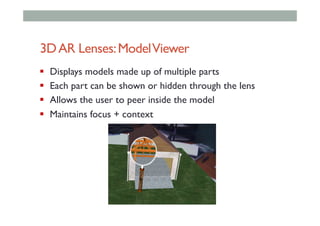
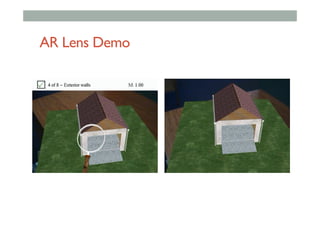
3DAR Lenses:ModelViewer
!  Displays models made up of multiple parts
!  Each part can be shown or hidden through the lens
!  Allows the user to peer inside the model
!  Maintains focus + context
AR Lens Demo
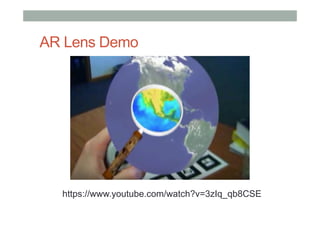
AR Lens Demo
https://www.youtube.com/watch?v=3zIq_qb8CSE
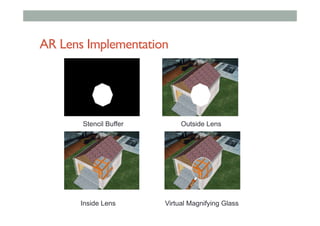
AR Lens Implementation
Stencil Buffer Outside Lens
Inside Lens Virtual Magnifying Glass
Techniques based onAR Lenses
!  Object Selection
!  Select objects by targeting them with the lens
!  Information Filtering
!  Show different representations through the lens
!  Hide certain content to reduce clutter, look inside things
!  Move between AR andVR
!  Transition along the reality-virtuality continuum
!  Change our viewpoint to suit our needs
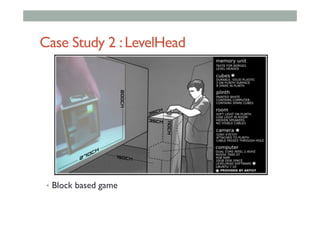
Case Study 2 :LevelHead
•  Block based game
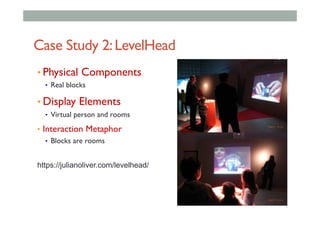
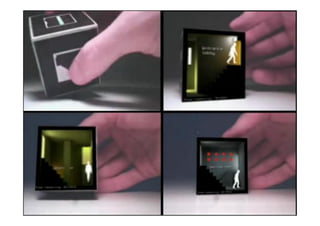
Case Study 2:LevelHead
• Physical Components
•  Real blocks
• Display Elements
•  Virtual person and rooms
•  Interaction Metaphor
•  Blocks are rooms
https://julianoliver.com/levelhead/
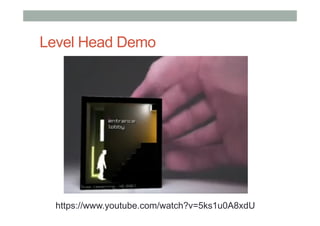
Level Head Demo
https://www.youtube.com/watch?v=5ks1u0A8xdU
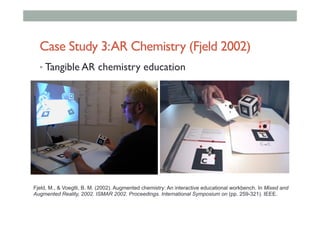
Case Study 3:AR Chemistry (Fjeld 2002)
• Tangible AR chemistry education
Fjeld, M., & Voegtli, B. M. (2002). Augmented chemistry: An interactive educational workbench. In Mixed and
Augmented Reality, 2002. ISMAR 2002. Proceedings. International Symposium on (pp. 259-321). IEEE.
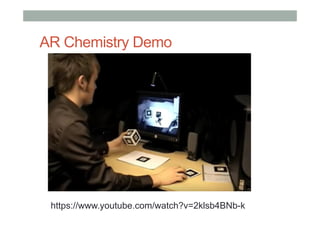
AR Chemistry
Goal: An AR application to test molecular
structure in chemistry
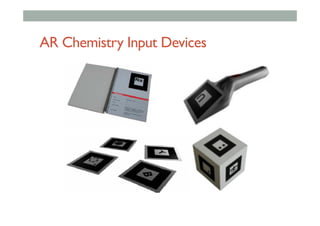
• Physical Components
• Real book, rotation cube, scoop, tracking markers
• Display Elements
• AR atoms and molecules
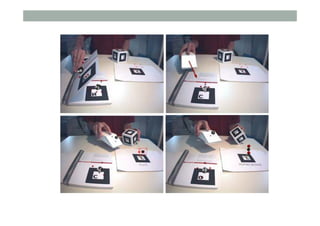
• Interaction Metaphor
• Build your own molecule
AR Chemistry Input Devices
AR Chemistry Demo
https://www.youtube.com/watch?v=2klsb4BNb-k
Case Study 4:Transitional Interfaces
Goal: An AR interface supporting transitions
from reality to virtual reality
• Physical Components
• Real book
• Display Elements
• AR andVR content
• Interaction Metaphor
• Book pages hold virtual scenes
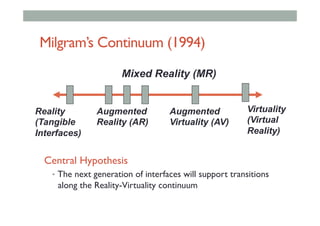
Milgram’s Continuum (1994)
Reality
(Tangible
Interfaces)
Virtuality
(Virtual
Reality)
Augmented
Reality (AR)
Augmented
Virtuality (AV)
Mixed Reality (MR)
Central Hypothesis
•  The next generation of interfaces will support transitions
along the Reality-Virtuality continuum
Transitions
• Interfaces of the future will need to support
transitions along the RV continuum
• Augmented Reality is preferred for:
• co-located collaboration
• ImmersiveVirtual Reality is preferred for:
• experiencing world immersively (egocentric)
• sharing views
• remote collaboration
The MagicBook
• Design Goals:
• Allows user to move smoothly
between reality and virtual reality
• Support collaboration
Billinghurst, M., Kato, H., & Poupyrev, I. (2001). The MagicBook: a
transitional AR interface. Computers & Graphics, 25(5), 745-753.
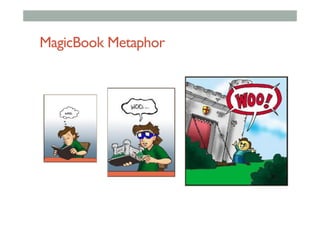
MagicBook Metaphor
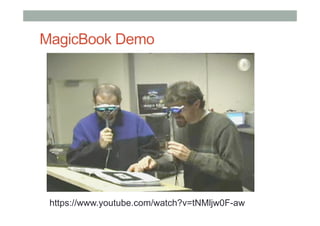
MagicBook Demo
https://www.youtube.com/watch?v=tNMljw0F-aw
Features
• Seamless transition between Reality andVirtuality
• Reliance on real decreases as virtual increases
• Supports egocentric and exocentric views
• User can pick appropriate view
• Computer becomes invisible
• Consistent interface metaphors
• Virtual content seems real
• Supports collaboration
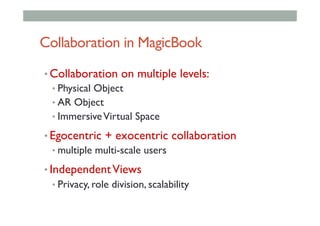
Collaboration in MagicBook
• Collaboration on multiple levels:
• Physical Object
• AR Object
• ImmersiveVirtual Space
• Egocentric + exocentric collaboration
• multiple multi-scale users
• IndependentViews
• Privacy, role division, scalability
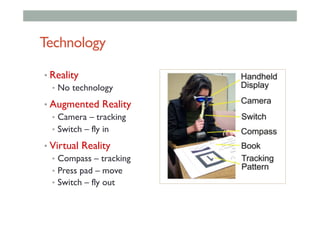
Technology
• Reality
•  No technology
• Augmented Reality
•  Camera – tracking
•  Switch – fly in
• Virtual Reality
•  Compass – tracking
•  Press pad – move
•  Switch – fly out
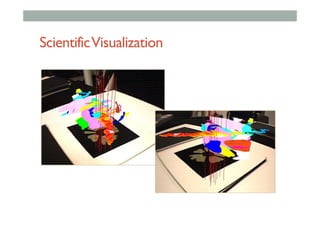
ScientificVisualization
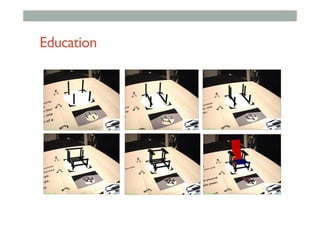
Education
Summary
• When designing AR interfaces, think of:
• Physical Components
• Physical affordances
• Virtual Components
• Virtual affordances
• Interface Metaphors
• Tangible AR or similar
www.empathiccomputing.org
@marknb00
mark.billinghurst@unisa.edu.au

COMP 4010: Lecture11 AR Interaction

  • 1.
    LECTURE 11: AR INTERACTION COMP4010 – Virtual Reality Semester 5 – 2016 Bruce Thomas, Mark Billinghurst University of South Australia October 18th 2016
  • 2.
    Augmented Reality Definition • Defining Characteristics [Azuma 97] • Combines Real andVirtual Images • Both can be seen at the same time • Interactive in real-time • The virtual content can be interacted with • Registered in 3D • Virtual objects appear fixed in space Azuma, R. T. (1997). A survey of augmented reality. Presence, 6(4), 355-385.
  • 3.
    Augmented RealityTechnology •  CombiningReal and Virtual Images •  Display technologies •  Interactive in Real-Time •  Input and interactive technologies •  Registered in 3D •  Viewpoint tracking technologies Display Processing Input Tracking
  • 4.
  • 5.
    Interface Design Path 1/Prototype Demonstration 2/ Adoption of Interaction Techniques from other interface metaphors 3/ Development of new interface metaphors appropriate to the medium 4/ Development of formal theoretical models for predicting and modeling user actions Desktop WIMP Virtual Reality Augmented Reality
  • 6.
    AR Interaction • Designing ARSystem = Interface Design •  Using different input and output technologies • Objective is a high quality of user experience •  Ease of use and learning •  Performance and satisfaction
  • 7.
    Interacting with ARContent •  You can see spatially registered AR.. how can you interact with it?
  • 8.
    Types of ARInteraction • Browsing Interfaces • simple (conceptually!), unobtrusive • 3D AR Interfaces • expressive, creative, require attention • Tangible Interfaces • Embedded into conventional environments • Tangible AR • Combines TUI input + AR display
  • 9.
    AR Interfaces asData Browsers • 2D/3D virtual objects are registered in 3D • “VR in Real World” • Interaction • 2D/3D virtual viewpoint control • Applications • Visualization, training
  • 10.
    AR Information Browsers • Informationis registered to real-world context •  Hand held AR displays • Interaction •  Manipulation of a window into information space • Applications •  Context-aware information displays Rekimoto, et al. 1997
  • 11.
  • 12.
  • 13.
    Current AR InformationBrowsers • Mobile AR •  GPS + compass • Many Applications •  Layar •  Wikitude •  Acrossair •  PressLite •  Yelp •  AR Car Finder •  …
  • 14.
    Example Layar •  ARBrowser from Layar •  http://www.layar.com •  AR browsing •  GPS + compass •  2D/3D object placement •  Photos/live video •  Community viewing
  • 16.
    Advantages and Disadvantages • Importantclass of AR interfaces • Wearable computers • AR simulation, training • Limited interactivity • Modification of virtual content is difficult Rekimoto, et al. 1997
  • 17.
    3D AR Interfaces • Virtualobjects displayed in 3D physical space and manipulated •  HMDs and 6DOF head-tracking •  6DOF hand trackers for input • Interaction •  Viewpoint control •  Traditional 3D user interface interaction: manipulation, selection, etc. Kiyokawa, et al. 2000
  • 18.
    Example: AR 3DInteraction - VLEGO Kiyokawa, K., Takemura, H., Katayama, Y., Iwasa, H., & Yokoya, N. (1996, July). Vlego: A simple two-handed modeling environment based on toy blocks. In Proc. of ACM Simpo. on Virtual Reality Software and Technology (VRST’96) (pp. 27-34).
  • 19.
  • 20.
    Advantages and Disadvantages • Important class of AR interfaces •  Entertainment, design, training •  Advantages •  User can interact with 3D virtual object everywhere in space •  Natural, familiar interaction •  Disadvantages •  Usually no tactile feedback •  User has to use different devices for virtual and physical objects Oshima, et al. 2000
  • 21.
    Augmented Surfaces andTangible Interfaces • Basic principles • Virtual objects are projected on a surface • Physical objects are used as controls for virtual objects • Support for collaboration
  • 22.
    Augmented Surfaces • Rekimoto, etal. 1999 • Front projection • Marker-based tracking • Multiple projection surfaces Rekimoto, J., & Saitoh, M. (1999, May). Augmented surfaces: a spatially continuous work space for hybrid computing environments. In Proceedings of the SIGCHI conference on Human Factors in Computing Systems (pp. 378-385). ACM.
  • 23.
  • 24.
    Tangible User Interfaces(Ishii 97) • Create digital shadows for physical objects • Foreground • graspable UI • Background • ambient interfaces
  • 25.
    Tangible Interfaces -Ambient • Dangling String •  Jeremijenko 1995 •  Ambient ethernet monitor •  Relies on peripheral cues • Ambient Fixtures •  Dahley, Wisneski, Ishii 1998 •  Use natural material qualities for information display
  • 26.
    Tangible Interface: ARgroove • CollaborativeInstrument • Exploring Physically Based Interaction • Map physical actions to Midi output • Translation, rotation • Tilt, shake I. Poupyrev, R. Berry, and J. Kurumisaea, “Augmented Groove: Collaborative Jamming in Augmented Reality,” SIGGRAPH 2000 Conference Abstracts and Applications, ACM Press, pp.77, New York, 2000.
  • 27.
  • 28.
    Visual Feedback • Continuous VisualFeedback is Key • Single Virtual Image Provides: • Rotation • Tilt • Height
  • 29.
    i/O Brush (Ryokai,Marti, Ishii) Ryokai, K., Marti, S., & Ishii, H. (2004, April). I/O brush: drawing with everyday objects as ink. In Proceedings of the SIGCHI conference on Human factors in computing systems (pp. 303-310). ACM.
  • 30.
  • 31.
    Other Examples • Triangles (Gorbert1998) • Triangular based story telling • ActiveCube (Kitamura 2000-) • Cubes with sensors
  • 32.
    Lessons from TangibleInterfaces • Physical objects make us smart • Norman’s “Things that Make Us Smart” • encode affordances, constraints • Objects aid collaboration • establish shared meaning • Objects increase understanding • serve as cognitive artifacts
  • 33.
    TUI Limitations • Difficult tochange object properties • can’t tell state of digital data • Limited display capabilities • projection screen = 2D • dependent on physical display surface • Separation between object and display • ARgroove
  • 34.
    Advantages and Disadvantages • Advantages • Natural- users hands are used for interacting with both virtual and real objects. •  No need for special purpose input devices • Disadvantages • Interaction is limited only to 2D surface •  Full 3D interaction and manipulation is difficult
  • 35.
    Orthogonal Nature ofAR Interfaces
  • 36.
    Back to theReal World • AR overcomes limitation of TUIs • enhance display possibilities • merge task/display space • provide public and private views • TUI + AR = Tangible AR • Apply TUI methods to AR interface design
  • 37.
    Space vs. Time- Multiplexed • Space-multiplexed • Many devices each with one function •  Quicker to use, more intuitive, clutter •  Real Toolbox • Time-multiplexed • One device with many functions •  Space efficient •  mouse
  • 38.
    Tangible AR: Tiles(Space Multiplexed) • Tiles semantics • data tiles • operation tiles • Operation on tiles • proximity • spatial arrangements • space-multiplexed Poupyrev, I., Tan, D., Billinghurst, M., Kato, H., Regenbrecht, H., & Tetsutani, N. (2001). Tiles: A mixed reality authoring interface. In INTERACT 2001 Conference on Human Computer Interaction (pp. 334-341).
  • 39.
  • 40.
  • 41.
    Tangible AR: Time-multiplexedInteraction • Use of natural physical object manipulations to control virtual objects • VOMAR Demo • Catalog book: •  Turn over the page • Paddle operation: •  Push, shake, incline, hit, scoop H. Kato, M. Billinghurst, I. Poupyrev, K. Imamoto, K. Tachibana: Virtual Object Manipulation on a Table-Top AR Environment. In Proceedings of the International Symposium on Augmented Reality (2000) 111-119
  • 42.
  • 43.
    Advantages and Disadvantages • Advantages • Naturalinteraction with virtual and physical tools •  No need for special purpose input devices • Spatial interaction with virtual objects •  3D manipulation with virtual objects anywhere in space • Disadvantages • Requires Head Mounted Display
  • 44.
    Wrap-up • Browsing Interfaces • simple (conceptually!),unobtrusive • 3D AR Interfaces • expressive, creative, require attention • Tangible Interfaces • Embedded into conventional environments • Tangible AR • Combines TUI input + AR display
  • 45.
  • 46.
    Basic Design Guides • Providegood conceptual model/Metaphor • customers want to understand how UI works • Make things visible • if object has function, interface should show it • Map interface controls to customer s model • infix -vs- postfix calculator -- whose model? • Provide feedback • what you see is what you get!
  • 47.
    • Interface Components • Physical components • Displayelements • Visual/audio • Interaction metaphors Physical Elements Display ElementsInteraction Metaphor Input Output AR Design Principles
  • 48.
    TangibleAR Metaphor • AR overcomeslimitation of TUIs • enhance display possibilities • merge task/display space • provide public and private views • TUI + AR = Tangible AR • Apply TUI methods to AR interface design
  • 49.
    TangibleAR Design Principles • TangibleAR Interfaces use TUI principles • Physical controllers for moving virtual content • Support for spatial 3D interaction techniques • Time and space multiplexed interaction • Support for multi-handed interaction • Match object affordances to task requirements • Support parallel activity with multiple objects • Allow collaboration between multiple users
  • 50.
    AR Design Space RealityVirtual Reality Augmented Reality Physical Design Virtual Design
  • 51.
    Design of Objects • Objects • Purposelybuilt – affordances • “Found” – repurposed • Existing – already at use in marketplace • Make affordances obvious (Norman) • Object affordances visible • Give feedback • Provide constraints • Use natural mapping • Use good cognitive model
  • 52.
  • 53.
    Affordances:to give aclue • Refers to an attribute of an object that allows people to know how to use it •  e.g. a button invites pushing, a door handle affords pulling • Norman (1988) used the term to discuss the design of everyday objects • Since has been much popularised in interaction design to discuss how to design interface objects •  e.g. scrollbars afford moving up and down, icons afford clicking
  • 54.
    Physical Affordances • Physical affordances: Howdo the following physical objects afford? Are they obvious?
  • 55.
    ‘Affordance’ and InterfaceDesign? • Interfaces are virtual and do not have affordances like physical objects • Norman argues it does not make sense to talk about interfaces in terms of ‘real’ affordances • Instead interfaces are better conceptualized as ‘perceived’ affordances •  Learned conventions of arbitrary mappings between action and effect at the interface •  Some mappings are better than others
  • 56.
    VirtualAffordances • Virtual affordances How dothe following screen objects afford? What if you were a novice user? Would you know what to do with them?
  • 57.
    • AR is mixtureof physical affordance and virtual affordance • Physical • Tangible controllers and objects • Virtual • Virtual graphics and audio
  • 58.
    Case Study 1:3DARLens Goal: Develop a lens based AR interface •  MagicLenses •  Developed at Xerox PARC in 1993 •  View a region of the workspace differently to the rest •  Overlap MagicLenses to create composite effects
  • 59.
    3D MagicLenses MagicLenses extendedto 3D (Veiga et. al. 96) !  Volumetric and flat lenses
  • 60.
    AR Lens DesignPrinciples • Physical Components • Lens handle •  Virtual lens attached to real object • Display Elements • Lens view •  Reveal layers in dataset • Interaction Metaphor • Physically holding lens Looser, J., Billinghurst, M., & Cockburn, A. (2004, June). Through the looking glass: the use of lenses as an interface tool for Augmented Reality interfaces. In Proceedings of the 2nd international conference on Computer graphics and interactive techniques in Australasia and South East Asia (pp. 204-211). ACM.
  • 61.
    3DAR Lenses:ModelViewer !  Displaysmodels made up of multiple parts !  Each part can be shown or hidden through the lens !  Allows the user to peer inside the model !  Maintains focus + context
  • 62.
  • 63.
  • 64.
    AR Lens Implementation StencilBuffer Outside Lens Inside Lens Virtual Magnifying Glass
  • 65.
    Techniques based onARLenses !  Object Selection !  Select objects by targeting them with the lens !  Information Filtering !  Show different representations through the lens !  Hide certain content to reduce clutter, look inside things !  Move between AR andVR !  Transition along the reality-virtuality continuum !  Change our viewpoint to suit our needs
  • 66.
    Case Study 2:LevelHead •  Block based game
  • 67.
    Case Study 2:LevelHead • PhysicalComponents •  Real blocks • Display Elements •  Virtual person and rooms •  Interaction Metaphor •  Blocks are rooms https://julianoliver.com/levelhead/
  • 69.
  • 70.
    Case Study 3:ARChemistry (Fjeld 2002) • Tangible AR chemistry education Fjeld, M., & Voegtli, B. M. (2002). Augmented chemistry: An interactive educational workbench. In Mixed and Augmented Reality, 2002. ISMAR 2002. Proceedings. International Symposium on (pp. 259-321). IEEE.
  • 71.
    AR Chemistry Goal: AnAR application to test molecular structure in chemistry • Physical Components • Real book, rotation cube, scoop, tracking markers • Display Elements • AR atoms and molecules • Interaction Metaphor • Build your own molecule
  • 72.
  • 74.
  • 75.
    Case Study 4:TransitionalInterfaces Goal: An AR interface supporting transitions from reality to virtual reality • Physical Components • Real book • Display Elements • AR andVR content • Interaction Metaphor • Book pages hold virtual scenes
  • 76.
    Milgram’s Continuum (1994) Reality (Tangible Interfaces) Virtuality (Virtual Reality) Augmented Reality(AR) Augmented Virtuality (AV) Mixed Reality (MR) Central Hypothesis •  The next generation of interfaces will support transitions along the Reality-Virtuality continuum
  • 77.
    Transitions • Interfaces of thefuture will need to support transitions along the RV continuum • Augmented Reality is preferred for: • co-located collaboration • ImmersiveVirtual Reality is preferred for: • experiencing world immersively (egocentric) • sharing views • remote collaboration
  • 78.
    The MagicBook • Design Goals: • Allowsuser to move smoothly between reality and virtual reality • Support collaboration Billinghurst, M., Kato, H., & Poupyrev, I. (2001). The MagicBook: a transitional AR interface. Computers & Graphics, 25(5), 745-753.
  • 79.
  • 80.
  • 81.
    Features • Seamless transition betweenReality andVirtuality • Reliance on real decreases as virtual increases • Supports egocentric and exocentric views • User can pick appropriate view • Computer becomes invisible • Consistent interface metaphors • Virtual content seems real • Supports collaboration
  • 82.
    Collaboration in MagicBook • Collaborationon multiple levels: • Physical Object • AR Object • ImmersiveVirtual Space • Egocentric + exocentric collaboration • multiple multi-scale users • IndependentViews • Privacy, role division, scalability
  • 83.
    Technology • Reality •  No technology • AugmentedReality •  Camera – tracking •  Switch – fly in • Virtual Reality •  Compass – tracking •  Press pad – move •  Switch – fly out
  • 84.
  • 85.
  • 86.
    Summary • When designing ARinterfaces, think of: • Physical Components • Physical affordances • Virtual Components • Virtual affordances • Interface Metaphors • Tangible AR or similar
  • 87.