LECTURE 1: INTRODUCTION
TO VIRTUAL REALITY
COMP 4010 - Virtual Reality
Semester 5 - 2019
Bruce Thomas, Mark Billinghurst, Gun Lee
University of South Australia
July 30th 2019
Overview
• Introduction
• Class Overview
• What is Virtual Reality
• History of Virtual Reality
Lecturers
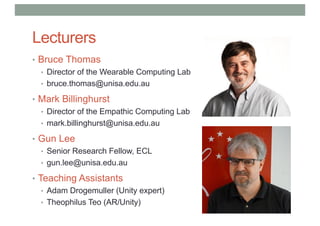
• Bruce Thomas
• Director of the Wearable Computing Lab
• bruce.thomas@unisa.edu.au
• Mark Billinghurst
• Director of the Empathic Computing Lab
• mark.billinghurst@unisa.edu.au
• Gun Lee
• Senior Research Fellow, ECL
• gun.lee@unisa.edu.au
• Teaching Assistants
• Adam Drogemuller (Unity expert)
• Theophilus Teo (AR/Unity)
Class Logistics
• Weekly lecture (2 hrs)
• Tuesday 10pm – 12pm
• Room F1-16
• Weekly Lab (1 hr)
• Thursday 12-1
• Assessment
• 3 projects @ 20%, 30%, 40%
• Paper reading/class presentation @ 10%
• What you will need
• iOS or Android phone/tablet (for AR programming)
• Access to laptop/PC for development
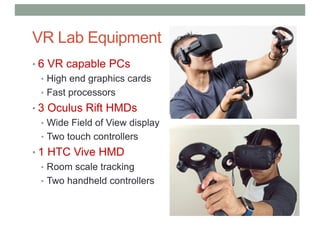
VR Lab Equipment
• 6 VR capable PCs
• High end graphics cards
• Fast processors
• 3 Oculus Rift HMDs
• Wide Field of View display
• Two touch controllers
• 1 HTC Vive HMD
• Room scale tracking
• Two handheld controllers
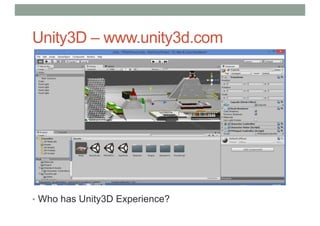
Unity3D – www.unity3d.com
• Who has Unity3D Experience?
What You Will Learn
• What Augmented Reality/Virtual Reality is
• History of AR/VR
• Current AR/VR commercial market
• Different AR/VR applications
• Human perception side of VR/AR
• AR/VR technology
• 3D user interface guidelines
• How to design good AR/VR experiences
• How to build your own AR/VR applications
• Important directions for future research in AR/VR
WHAT IS VIRTUAL REALITY?
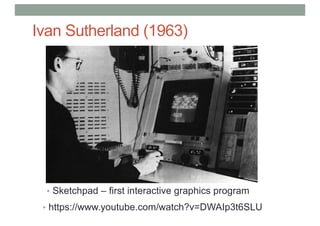
Ivan Sutherland (1963)
• Sketchpad – first interactive graphics program
• https://www.youtube.com/watch?v=DWAIp3t6SLU
The Ultimate Display
“The ultimate display would, of course, be a room
within which the computer can control the
existence of matter. A chair displayed in such a
room would be good enough to sit in. Handcuffs
displayed in such a room would be confining, and
a bullet displayed in such a room would be fatal”.
Ivan Sutherland, 1965
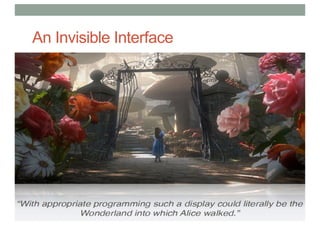
An Invisible Interface
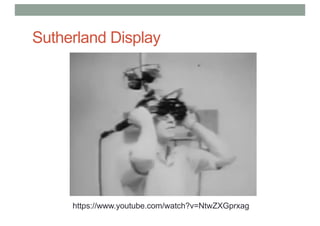
Sutherland Display
https://www.youtube.com/watch?v=NtwZXGprxag
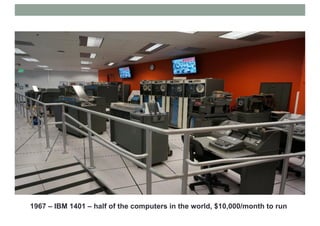
1967 – IBM 1401 – half of the computers in the world, $10,000/month to run
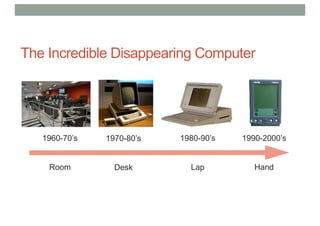
The Incredible Disappearing Computer
1960-70’s
Room
1970-80’s
Desk
1980-90’s
Lap
1990-2000’s
Hand
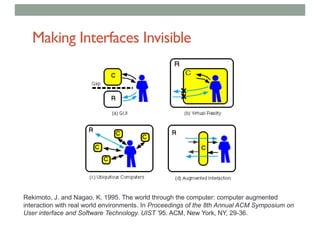
Making Interfaces Invisible
Rekimoto, J. and Nagao, K. 1995. The world through the computer: computer augmented
interaction with real world environments. In Proceedings of the 8th Annual ACM Symposium on
User interface and Software Technology. UIST '95. ACM, New York, NY, 29-36.
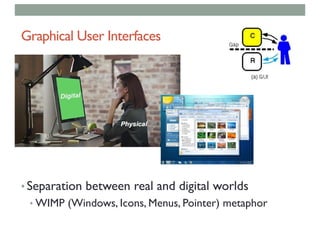
Graphical User Interfaces
• Separation between real and digital worlds
• WIMP (Windows, Icons, Menus, Pointer) metaphor
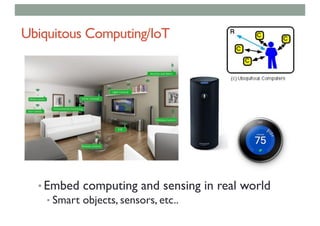
Ubiquitous Computing/IoT
• Embed computing and sensing in real world
• Smart objects, sensors, etc..
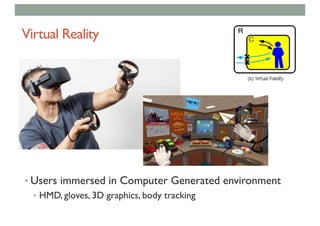
Virtual Reality
• Users immersed in Computer Generated environment
• HMD, gloves, 3D graphics, body tracking
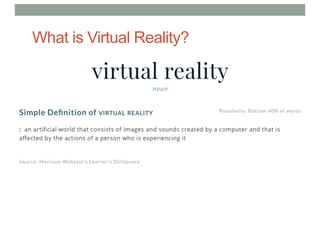
What is Virtual Reality?
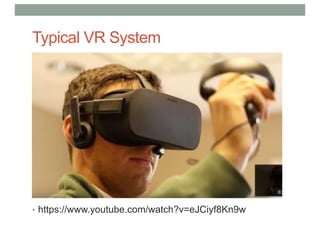
Typical VR System
• https://www.youtube.com/watch?v=eJCiyf8Kn9w
Many Other Definitions
Virtual reality is..
a computer technology that replicates an environment, real
or imagined, and simulates a user's physical presence and
environment to allow for user interaction. (Wikipedia)
electronic simulations of environments experienced via
head mounted eye goggles and wired clothing enabling the
end user to interact in realistic three-dimensional situations.
(Coates, 1992)
an alternate world filled with computer-generated images
that respond to human movements. (Greenbaum, 1992)
an interactive, immersive experience generated by a
computer (Pimental 1995)
Key Characteristics for VR
• Virtual Reality has three key characteristics
• 3D stereoscopic display
• Wide field of view display
• Low latency head tracking
• When these three things are combined they
provide a compelling immersive experience
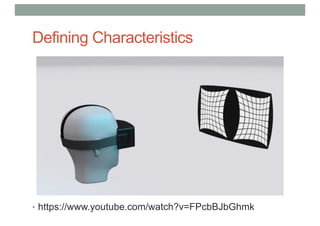
Defining Characteristics
• https://www.youtube.com/watch?v=FPcbBJbGhmk
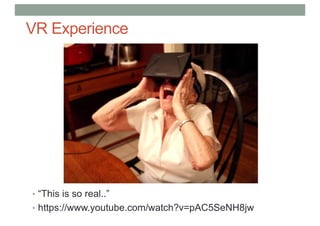
VR Experience
• “This is so real..”
• https://www.youtube.com/watch?v=pAC5SeNH8jw
Defined in Terms of Presence
• Presence is the key to defining VR in terms of experience
• Presence is defined as the sense of being in an environment
• Telepresence is defined as the experience of presence in an
environment by means of a communication medium.
• A “virtual reality” is defined as a real or simulated environment
in which a perceiver experiences telepresence.
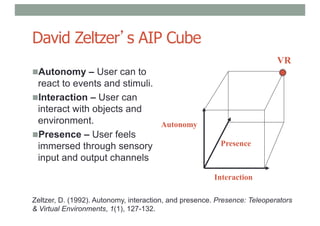
David Zeltzer’s AIP Cube
nAutonomy – User can to
react to events and stimuli.
nInteraction – User can
interact with objects and
environment.
nPresence – User feels
immersed through sensory
input and output channels
Interaction
Autonomy
Presence
VR
Zeltzer, D. (1992). Autonomy, interaction, and presence. Presence: Teleoperators
& Virtual Environments, 1(1), 127-132.
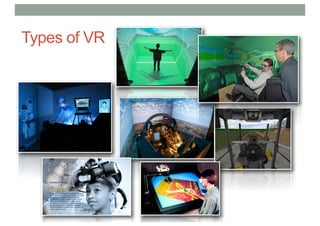
Types of VR
2
7
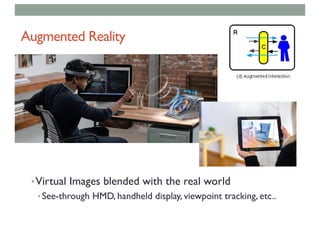
Augmented Reality
•Virtual Images blended with the real world
• See-through HMD, handheld display, viewpoint tracking, etc..
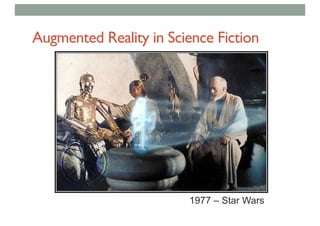
Augmented Reality in Science Fiction
1977 – Star Wars
Augmented Reality Definition
•Defining Characteristics [Azuma 97]
• Combines Real andVirtual Images
• Both can be seen at the same time
• Interactive in real-time
• The virtual content can be interacted with
• Registered in 3D
• Virtual objects appear fixed in space
Azuma, R. T. (1997). A survey of augmented reality. Presence, 6(4), 355-385.
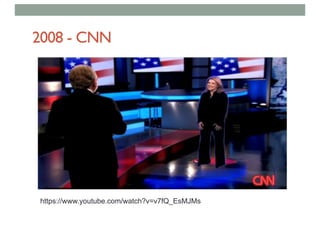
2008 - CNN
https://www.youtube.com/watch?v=v7fQ_EsMJMs
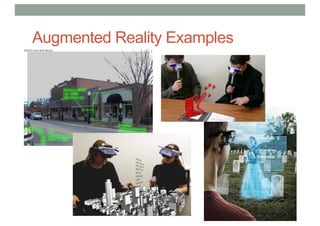
• Put AR pictures here
Augmented Reality Examples
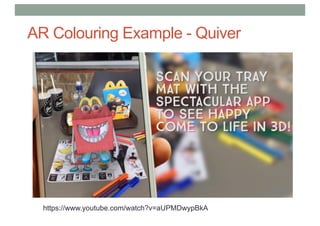
https://www.youtube.com/watch?v=aUPMDwypBkA
AR Colouring Example - Quiver
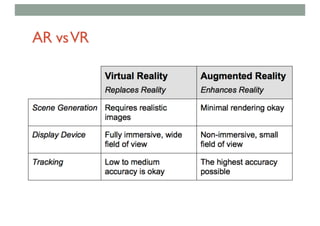
AR vsVR
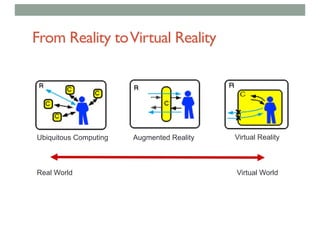
From Reality toVirtual Reality
Ubiquitous Computing Augmented Reality Virtual Reality
Real World Virtual World
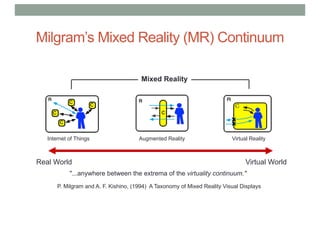
Milgram’s Mixed Reality (MR) Continuum
Augmented Reality Virtual Reality
Real World Virtual World
Mixed Reality
"...anywhere between the extrema of the virtuality continuum."
P. Milgram and A. F. Kishino, (1994) A Taxonomy of Mixed Reality Visual Displays
Internet of Things
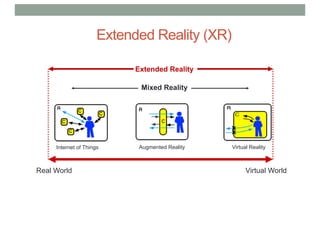
Extended Reality (XR)
Augmented Reality Virtual Reality
Real World Virtual World
Mixed Reality
Extended Reality
Internet of Things
Summary
• Virtual Reality can be defined in a number of ways
• In terms of technology
• From a Presence perspective
• VR can also be classified with other technologies
• Invisible Interfaces
• Milgram’s Mixed Reality continuum
HISTORY OF VR
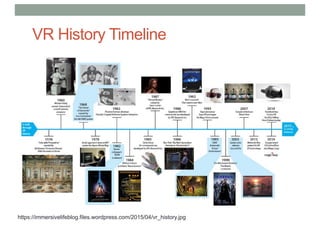
VR History Timeline
https://immersivelifeblog.files.wordpress.com/2015/04/vr_history.jpg
When anything new comes along, everyone,
like a child discovering the world thinks that
they’ve invented it, but you scratch a little
and you find a caveman scratching on a wall
is creating virtual reality in a sense.
Morton Helig (Hammit 1993)
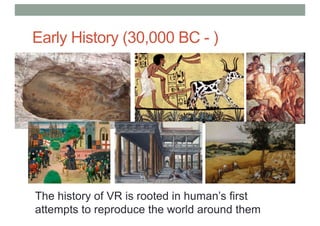
Early History (30,000 BC - )
The history of VR is rooted in human’s first
attempts to reproduce the world around them
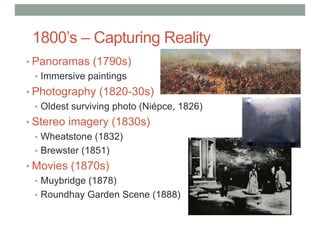
1800’s – Capturing Reality
• Panoramas (1790s)
• Immersive paintings
• Photography (1820-30s)
• Oldest surviving photo (Niépce, 1826)
• Stereo imagery (1830s)
• Wheatstone (1832)
• Brewster (1851)
• Movies (1870s)
• Muybridge (1878)
• Roundhay Garden Scene (1888)
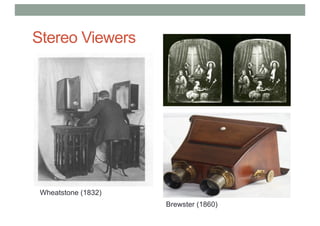
Stereo Viewers
Wheatstone (1832)
Brewster (1860)
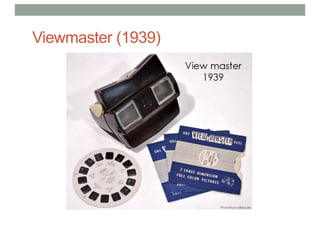
Viewmaster (1939)
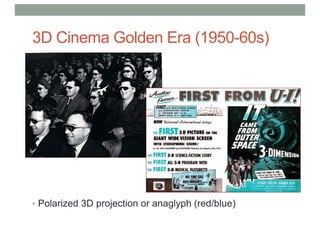
3D Cinema Golden Era (1950-60s)
• Polarized 3D projection or anaglyph (red/blue)
1900s – Interactive Experiences
• Early Simulators (<1960s)
• Flight simulation
• Sensorama (1955)
• Early HMDs (1960s)
• Philco, Ivan Sutherland
• Military + University Research (1970-80s)
• US Airforce, NASA, MIT, UNC
• First Commercial Wave (1980-90s)
• VPL, Virtual i-O, Division, Virtuality
• VR Arcades, Virtual Boy
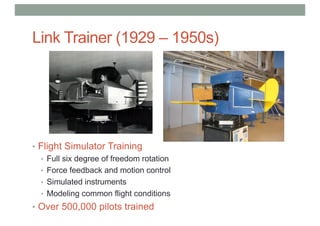
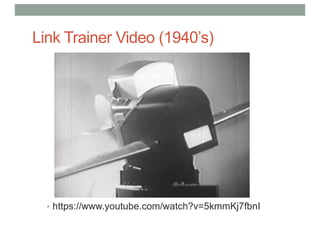
Link Trainer (1929 – 1950s)
• Flight Simulator Training
• Full six degree of freedom rotation
• Force feedback and motion control
• Simulated instruments
• Modeling common flight conditions
• Over 500,000 pilots trained
Link Trainer Video (1940’s)
• https://www.youtube.com/watch?v=5kmmKj7fbnI
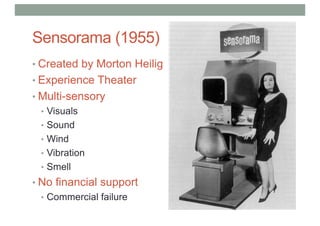
Sensorama (1955)
• Created by Morton Heilig
• Experience Theater
• Multi-sensory
• Visuals
• Sound
• Wind
• Vibration
• Smell
• No financial support
• Commercial failure
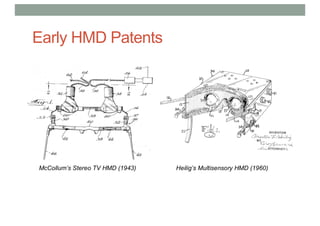
Early HMD Patents
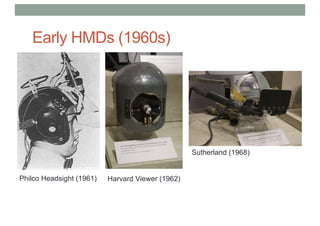
Early HMDs (1960s)
Philco Headsight (1961) Harvard Viewer (1962)
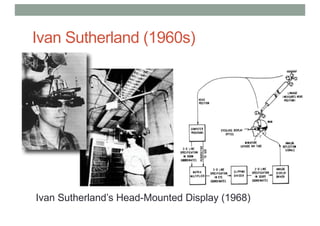
Sutherland (1968)
Ivan Sutherland (1960s)
5
3
Ivan Sutherland’s Head-Mounted Display (1968)
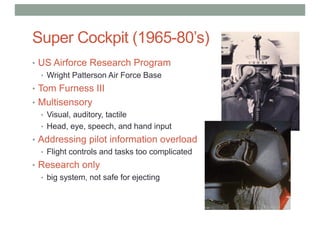
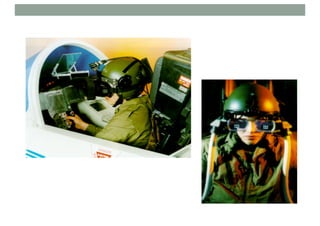
Super Cockpit (1965-80’s)
• US Airforce Research Program
• Wright Patterson Air Force Base
• Tom Furness III
• Multisensory
• Visual, auditory, tactile
• Head, eye, speech, and hand input
• Addressing pilot information overload
• Flight controls and tasks too complicated
• Research only
• big system, not safe for ejecting
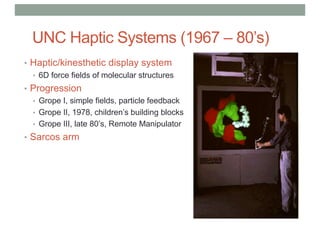
UNC Haptic Systems (1967 – 80’s)
• Haptic/kinesthetic display system
• 6D force fields of molecular structures
• Progression
• Grope I, simple fields, particle feedback
• Grope II, 1978, children’s building blocks
• Grope III, late 80’s, Remote Manipulator
• Sarcos arm
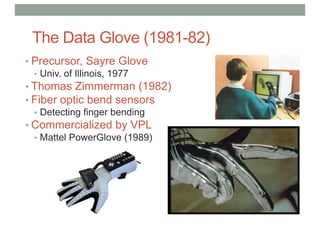
The Data Glove (1981-82)
• Precursor, Sayre Glove
• Univ. of Illinois, 1977
• Thomas Zimmerman (1982)
• Fiber optic bend sensors
• Detecting finger bending
• Commercialized by VPL
• Mattel PowerGlove (1989)
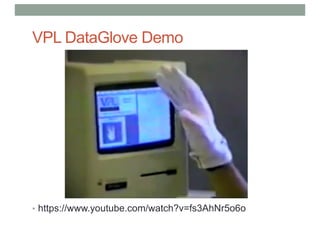
VPL DataGlove Demo
• https://www.youtube.com/watch?v=fs3AhNr5o6o
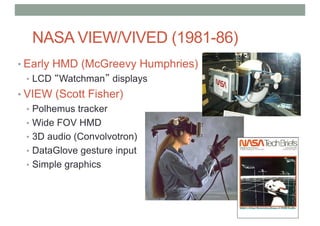
NASA VIEW/VIVED (1981-86)
• Early HMD (McGreevy Humphries)
• LCD “Watchman” displays
• VIEW (Scott Fisher)
• Polhemus tracker
• Wide FOV HMD
• 3D audio (Convolvotron)
• DataGlove gesture input
• Simple graphics
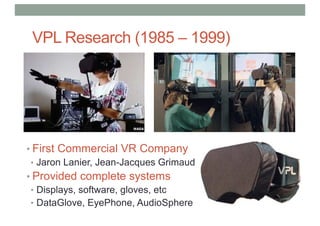
VPL Research (1985 – 1999)
• First Commercial VR Company
• Jaron Lanier, Jean-Jacques Grimaud
• Provided complete systems
• Displays, software, gloves, etc
• DataGlove, EyePhone, AudioSphere
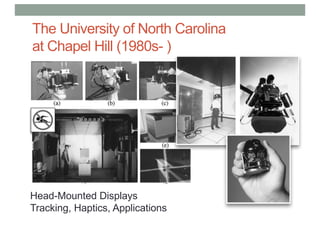
The University of North Carolina
at Chapel Hill (1980s- )
6
1
Head-Mounted Displays
Tracking, Haptics, Applications
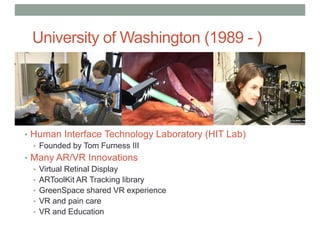
University of Washington (1989 - )
• Human Interface Technology Laboratory (HIT Lab)
• Founded by Tom Furness III
• Many AR/VR Innovations
• Virtual Retinal Display
• ARToolKit AR Tracking library
• GreenSpace shared VR experience
• VR and pain care
• VR and Education
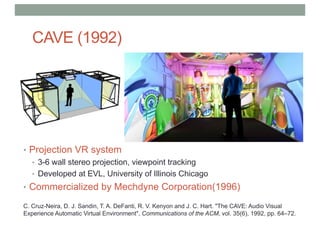
CAVE (1992)
• Projection VR system
• 3-6 wall stereo projection, viewpoint tracking
• Developed at EVL, University of Illinois Chicago
• Commercialized by Mechdyne Corporation(1996)
C. Cruz-Neira, D. J. Sandin, T. A. DeFanti, R. V. Kenyon and J. C. Hart. "The CAVE: Audio Visual
Experience Automatic Virtual Environment", Communications of the ACM, vol. 35(6), 1992, pp. 64–72.
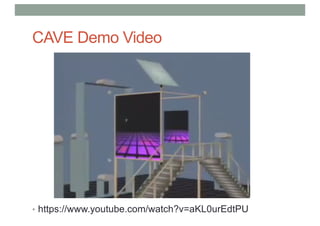
CAVE Demo Video
• https://www.youtube.com/watch?v=aKL0urEdtPU
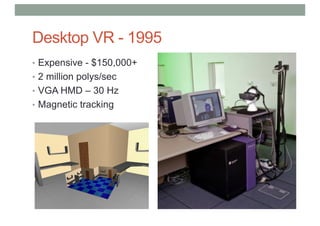
Desktop VR - 1995
• Expensive - $150,000+
• 2 million polys/sec
• VGA HMD – 30 Hz
• Magnetic tracking
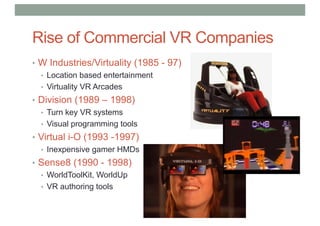
Rise of Commercial VR Companies
• W Industries/Virtuality (1985 - 97)
• Location based entertainment
• Virtuality VR Arcades
• Division (1989 – 1998)
• Turn key VR systems
• Visual programming tools
• Virtual i-O (1993 -1997)
• Inexpensive gamer HMDs
• Sense8 (1990 - 1998)
• WorldToolKit, WorldUp
• VR authoring tools
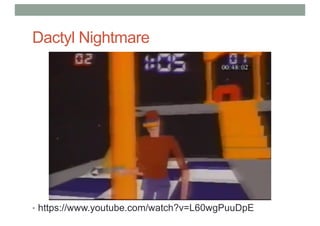
Dactyl Nightmare
• https://www.youtube.com/watch?v=L60wgPuuDpE
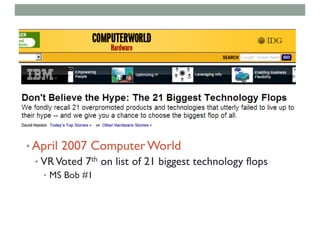
• April 2007 ComputerWorld
• VRVoted 7th on list of 21 biggest technology flops
• MS Bob #1
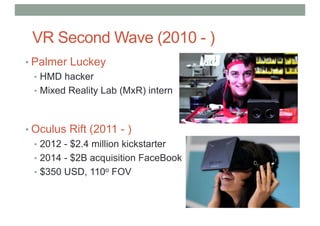
VR Second Wave (2010 - )
• Palmer Luckey
• HMD hacker
• Mixed Reality Lab (MxR) intern
• Oculus Rift (2011 - )
• 2012 - $2.4 million kickstarter
• 2014 - $2B acquisition FaceBook
• $350 USD, 110o FOV
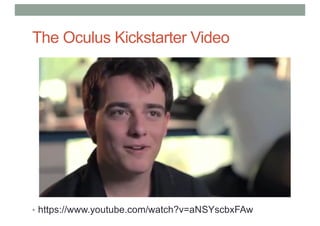
The Oculus Kickstarter Video
• https://www.youtube.com/watch?v=aNSYscbxFAw
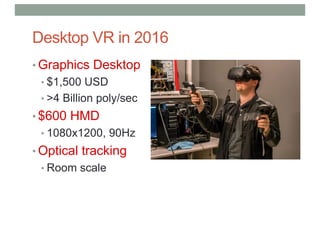
Desktop VR in 2016
• Graphics Desktop
• $1,500 USD
• >4 Billion poly/sec
• $600 HMD
• 1080x1200, 90Hz
• Optical tracking
• Room scale
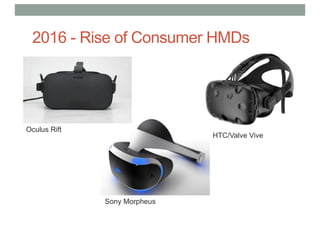
Oculus Rift
Sony Morpheus
HTC/Valve Vive
2016 - Rise of Consumer HMDs
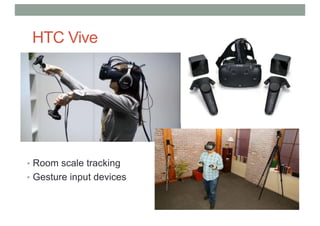
HTC Vive
• Room scale tracking
• Gesture input devices
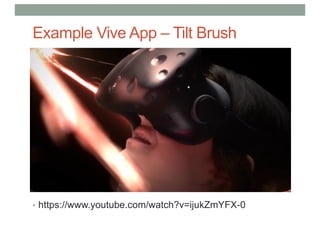
Example Vive App – Tilt Brush
• https://www.youtube.com/watch?v=ijukZmYFX-0
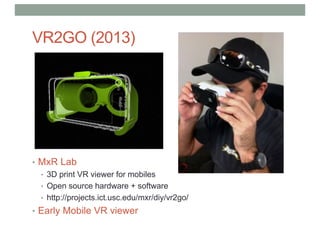
VR2GO (2013)
• MxR Lab
• 3D print VR viewer for mobiles
• Open source hardware + software
• http://projects.ict.usc.edu/mxr/diy/vr2go/
• Early Mobile VR viewer
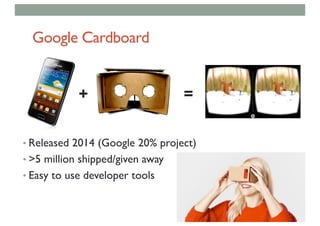
Google Cardboard
• Released 2014 (Google 20% project)
• >5 million shipped/given away
• Easy to use developer tools
+ =
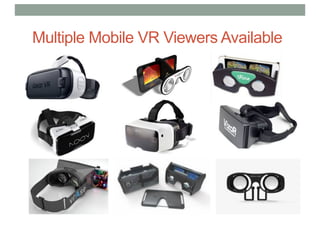
Multiple Mobile VR Viewers Available
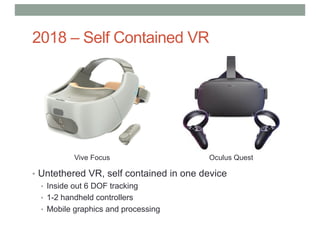
2018 – Self Contained VR
• Untethered VR, self contained in one device
• Inside out 6 DOF tracking
• 1-2 handheld controllers
• Mobile graphics and processing
Vive Focus Oculus Quest
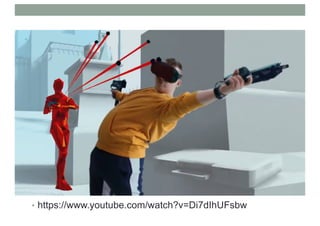
• https://www.youtube.com/watch?v=Di7dIhUFsbw
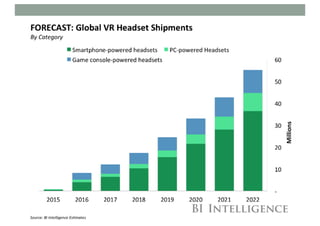
Projected HMD Sales
• asdf
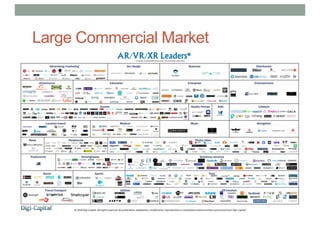
Large Commercial Market
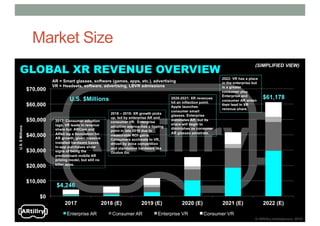
Market Size
Why 2019 won’t be like 1996
• It’s not just VR anymore
• Huge amount of investment
• Inexpensive hardware platforms
• Easy to use content creation tools
• New devices for input and output
• Proven use cases – no more Hype!
• Most important: Focus on User Experience
Conclusion
• Virtual Reality has a long history
• > 50 years of HMDs, simulators
• Key elements for VR were in place by early 1990’s
• Displays, tracking, input, graphics
• Strong support from military, government, universities
• First commercial wave failed in late 1990’s
• Too expensive, bad user experience, poor technology, etc
• We are now in second commercial wave
• Better experience, Affordable hardware
• Large commercial investment, Significant installed user base
Lecture Schedule – 13 Lectures/Labs
• July 30th: 1. Introduction to VR - Intro to Unity
• Aug 6th: 2. Virtual Reality Perception – Intro to Steam VR SDK
• Aug 13th: 3. VR Technology Overview – Building VR scenes in Unity
• Aug 20th: 4. Virtual Reality Systems– Scripting in Unity
• Aug 27st: 5. 3D User Interfaces– Navigation in VR
• Sept 3rd: 6. Interaction Design for VR – Interaction in VR
• Sept 10th: 7. VR Applications – Interaction in VR
• Sept 17th: 8. Introduction to AR – Building Apps using Vuforia
• Oct 8th: 9. AR Technology – AR Tracking
• Oct 15th: 10. AR Interface Design – Handheld AR Interaction
• Oct 22nd: 11. Mobile AR – Handheld AR Interaction
• Oct 29th: 12. AR Applications – AR Project Work
• Nov 5th: 13. Research Directions - (no lab)
Assignments
• Assignment One – VR Scene – August 28th
• Create a VR scene of a four room space station
• Include complex 3D models, texture, skybox, lighting, interactions
• Deploy on HTC Vive or Oculus Rift
• Assignment Two – VR Interaction – October 2nd
• Build a VR burger builder interface
• Add advanced interactivity to the VR scene
• Animations
• Select and manipulation objects controlling a simulation
• Assignment Three – AR Application – November 6th
• Handheld AR application
• Using image based tracking
• Screen based interaction techniques

Lecture1 introduction to VR

  • 1.
    LECTURE 1: INTRODUCTION TOVIRTUAL REALITY COMP 4010 - Virtual Reality Semester 5 - 2019 Bruce Thomas, Mark Billinghurst, Gun Lee University of South Australia July 30th 2019
  • 2.
    Overview • Introduction • ClassOverview • What is Virtual Reality • History of Virtual Reality
  • 3.
    Lecturers • Bruce Thomas •Director of the Wearable Computing Lab • bruce.thomas@unisa.edu.au • Mark Billinghurst • Director of the Empathic Computing Lab • mark.billinghurst@unisa.edu.au • Gun Lee • Senior Research Fellow, ECL • gun.lee@unisa.edu.au • Teaching Assistants • Adam Drogemuller (Unity expert) • Theophilus Teo (AR/Unity)
  • 4.
    Class Logistics • Weeklylecture (2 hrs) • Tuesday 10pm – 12pm • Room F1-16 • Weekly Lab (1 hr) • Thursday 12-1 • Assessment • 3 projects @ 20%, 30%, 40% • Paper reading/class presentation @ 10% • What you will need • iOS or Android phone/tablet (for AR programming) • Access to laptop/PC for development
  • 5.
    VR Lab Equipment •6 VR capable PCs • High end graphics cards • Fast processors • 3 Oculus Rift HMDs • Wide Field of View display • Two touch controllers • 1 HTC Vive HMD • Room scale tracking • Two handheld controllers
  • 6.
    Unity3D – www.unity3d.com •Who has Unity3D Experience?
  • 7.
    What You WillLearn • What Augmented Reality/Virtual Reality is • History of AR/VR • Current AR/VR commercial market • Different AR/VR applications • Human perception side of VR/AR • AR/VR technology • 3D user interface guidelines • How to design good AR/VR experiences • How to build your own AR/VR applications • Important directions for future research in AR/VR
  • 8.
  • 9.
    Ivan Sutherland (1963) •Sketchpad – first interactive graphics program • https://www.youtube.com/watch?v=DWAIp3t6SLU
  • 10.
    The Ultimate Display “Theultimate display would, of course, be a room within which the computer can control the existence of matter. A chair displayed in such a room would be good enough to sit in. Handcuffs displayed in such a room would be confining, and a bullet displayed in such a room would be fatal”. Ivan Sutherland, 1965
  • 11.
  • 12.
  • 13.
    1967 – IBM1401 – half of the computers in the world, $10,000/month to run
  • 14.
    The Incredible DisappearingComputer 1960-70’s Room 1970-80’s Desk 1980-90’s Lap 1990-2000’s Hand
  • 15.
    Making Interfaces Invisible Rekimoto,J. and Nagao, K. 1995. The world through the computer: computer augmented interaction with real world environments. In Proceedings of the 8th Annual ACM Symposium on User interface and Software Technology. UIST '95. ACM, New York, NY, 29-36.
  • 16.
    Graphical User Interfaces •Separation between real and digital worlds • WIMP (Windows, Icons, Menus, Pointer) metaphor
  • 17.
    Ubiquitous Computing/IoT • Embedcomputing and sensing in real world • Smart objects, sensors, etc..
  • 18.
    Virtual Reality • Usersimmersed in Computer Generated environment • HMD, gloves, 3D graphics, body tracking
  • 19.
  • 20.
    Typical VR System •https://www.youtube.com/watch?v=eJCiyf8Kn9w
  • 21.
    Many Other Definitions Virtualreality is.. a computer technology that replicates an environment, real or imagined, and simulates a user's physical presence and environment to allow for user interaction. (Wikipedia) electronic simulations of environments experienced via head mounted eye goggles and wired clothing enabling the end user to interact in realistic three-dimensional situations. (Coates, 1992) an alternate world filled with computer-generated images that respond to human movements. (Greenbaum, 1992) an interactive, immersive experience generated by a computer (Pimental 1995)
  • 22.
    Key Characteristics forVR • Virtual Reality has three key characteristics • 3D stereoscopic display • Wide field of view display • Low latency head tracking • When these three things are combined they provide a compelling immersive experience
  • 23.
  • 24.
    VR Experience • “Thisis so real..” • https://www.youtube.com/watch?v=pAC5SeNH8jw
  • 25.
    Defined in Termsof Presence • Presence is the key to defining VR in terms of experience • Presence is defined as the sense of being in an environment • Telepresence is defined as the experience of presence in an environment by means of a communication medium. • A “virtual reality” is defined as a real or simulated environment in which a perceiver experiences telepresence.
  • 26.
    David Zeltzer’s AIPCube nAutonomy – User can to react to events and stimuli. nInteraction – User can interact with objects and environment. nPresence – User feels immersed through sensory input and output channels Interaction Autonomy Presence VR Zeltzer, D. (1992). Autonomy, interaction, and presence. Presence: Teleoperators & Virtual Environments, 1(1), 127-132.
  • 27.
  • 28.
    Augmented Reality •Virtual Imagesblended with the real world • See-through HMD, handheld display, viewpoint tracking, etc..
  • 29.
    Augmented Reality inScience Fiction 1977 – Star Wars
  • 30.
    Augmented Reality Definition •DefiningCharacteristics [Azuma 97] • Combines Real andVirtual Images • Both can be seen at the same time • Interactive in real-time • The virtual content can be interacted with • Registered in 3D • Virtual objects appear fixed in space Azuma, R. T. (1997). A survey of augmented reality. Presence, 6(4), 355-385.
  • 31.
  • 32.
    • Put ARpictures here Augmented Reality Examples
  • 33.
  • 34.
  • 35.
    From Reality toVirtualReality Ubiquitous Computing Augmented Reality Virtual Reality Real World Virtual World
  • 36.
    Milgram’s Mixed Reality(MR) Continuum Augmented Reality Virtual Reality Real World Virtual World Mixed Reality "...anywhere between the extrema of the virtuality continuum." P. Milgram and A. F. Kishino, (1994) A Taxonomy of Mixed Reality Visual Displays Internet of Things
  • 37.
    Extended Reality (XR) AugmentedReality Virtual Reality Real World Virtual World Mixed Reality Extended Reality Internet of Things
  • 38.
    Summary • Virtual Realitycan be defined in a number of ways • In terms of technology • From a Presence perspective • VR can also be classified with other technologies • Invisible Interfaces • Milgram’s Mixed Reality continuum
  • 39.
  • 40.
  • 41.
    When anything newcomes along, everyone, like a child discovering the world thinks that they’ve invented it, but you scratch a little and you find a caveman scratching on a wall is creating virtual reality in a sense. Morton Helig (Hammit 1993)
  • 42.
    Early History (30,000BC - ) The history of VR is rooted in human’s first attempts to reproduce the world around them
  • 43.
    1800’s – CapturingReality • Panoramas (1790s) • Immersive paintings • Photography (1820-30s) • Oldest surviving photo (Niépce, 1826) • Stereo imagery (1830s) • Wheatstone (1832) • Brewster (1851) • Movies (1870s) • Muybridge (1878) • Roundhay Garden Scene (1888)
  • 44.
  • 45.
  • 46.
    3D Cinema GoldenEra (1950-60s) • Polarized 3D projection or anaglyph (red/blue)
  • 47.
    1900s – InteractiveExperiences • Early Simulators (<1960s) • Flight simulation • Sensorama (1955) • Early HMDs (1960s) • Philco, Ivan Sutherland • Military + University Research (1970-80s) • US Airforce, NASA, MIT, UNC • First Commercial Wave (1980-90s) • VPL, Virtual i-O, Division, Virtuality • VR Arcades, Virtual Boy
  • 48.
    Link Trainer (1929– 1950s) • Flight Simulator Training • Full six degree of freedom rotation • Force feedback and motion control • Simulated instruments • Modeling common flight conditions • Over 500,000 pilots trained
  • 49.
    Link Trainer Video(1940’s) • https://www.youtube.com/watch?v=5kmmKj7fbnI
  • 50.
    Sensorama (1955) • Createdby Morton Heilig • Experience Theater • Multi-sensory • Visuals • Sound • Wind • Vibration • Smell • No financial support • Commercial failure
  • 51.
  • 52.
    Early HMDs (1960s) PhilcoHeadsight (1961) Harvard Viewer (1962) Sutherland (1968)
  • 53.
    Ivan Sutherland (1960s) 5 3 IvanSutherland’s Head-Mounted Display (1968)
  • 54.
    Super Cockpit (1965-80’s) •US Airforce Research Program • Wright Patterson Air Force Base • Tom Furness III • Multisensory • Visual, auditory, tactile • Head, eye, speech, and hand input • Addressing pilot information overload • Flight controls and tasks too complicated • Research only • big system, not safe for ejecting
  • 56.
    UNC Haptic Systems(1967 – 80’s) • Haptic/kinesthetic display system • 6D force fields of molecular structures • Progression • Grope I, simple fields, particle feedback • Grope II, 1978, children’s building blocks • Grope III, late 80’s, Remote Manipulator • Sarcos arm
  • 57.
    The Data Glove(1981-82) • Precursor, Sayre Glove • Univ. of Illinois, 1977 • Thomas Zimmerman (1982) • Fiber optic bend sensors • Detecting finger bending • Commercialized by VPL • Mattel PowerGlove (1989)
  • 58.
    VPL DataGlove Demo •https://www.youtube.com/watch?v=fs3AhNr5o6o
  • 59.
    NASA VIEW/VIVED (1981-86) •Early HMD (McGreevy Humphries) • LCD “Watchman” displays • VIEW (Scott Fisher) • Polhemus tracker • Wide FOV HMD • 3D audio (Convolvotron) • DataGlove gesture input • Simple graphics
  • 60.
    VPL Research (1985– 1999) • First Commercial VR Company • Jaron Lanier, Jean-Jacques Grimaud • Provided complete systems • Displays, software, gloves, etc • DataGlove, EyePhone, AudioSphere
  • 61.
    The University ofNorth Carolina at Chapel Hill (1980s- ) 6 1 Head-Mounted Displays Tracking, Haptics, Applications
  • 62.
    University of Washington(1989 - ) • Human Interface Technology Laboratory (HIT Lab) • Founded by Tom Furness III • Many AR/VR Innovations • Virtual Retinal Display • ARToolKit AR Tracking library • GreenSpace shared VR experience • VR and pain care • VR and Education
  • 63.
    CAVE (1992) • ProjectionVR system • 3-6 wall stereo projection, viewpoint tracking • Developed at EVL, University of Illinois Chicago • Commercialized by Mechdyne Corporation(1996) C. Cruz-Neira, D. J. Sandin, T. A. DeFanti, R. V. Kenyon and J. C. Hart. "The CAVE: Audio Visual Experience Automatic Virtual Environment", Communications of the ACM, vol. 35(6), 1992, pp. 64–72.
  • 64.
    CAVE Demo Video •https://www.youtube.com/watch?v=aKL0urEdtPU
  • 65.
    Desktop VR -1995 • Expensive - $150,000+ • 2 million polys/sec • VGA HMD – 30 Hz • Magnetic tracking
  • 66.
    Rise of CommercialVR Companies • W Industries/Virtuality (1985 - 97) • Location based entertainment • Virtuality VR Arcades • Division (1989 – 1998) • Turn key VR systems • Visual programming tools • Virtual i-O (1993 -1997) • Inexpensive gamer HMDs • Sense8 (1990 - 1998) • WorldToolKit, WorldUp • VR authoring tools
  • 67.
  • 68.
    • April 2007ComputerWorld • VRVoted 7th on list of 21 biggest technology flops • MS Bob #1
  • 69.
    VR Second Wave(2010 - ) • Palmer Luckey • HMD hacker • Mixed Reality Lab (MxR) intern • Oculus Rift (2011 - ) • 2012 - $2.4 million kickstarter • 2014 - $2B acquisition FaceBook • $350 USD, 110o FOV
  • 70.
    The Oculus KickstarterVideo • https://www.youtube.com/watch?v=aNSYscbxFAw
  • 71.
    Desktop VR in2016 • Graphics Desktop • $1,500 USD • >4 Billion poly/sec • $600 HMD • 1080x1200, 90Hz • Optical tracking • Room scale
  • 72.
    Oculus Rift Sony Morpheus HTC/ValveVive 2016 - Rise of Consumer HMDs
  • 73.
    HTC Vive • Roomscale tracking • Gesture input devices
  • 74.
    Example Vive App– Tilt Brush • https://www.youtube.com/watch?v=ijukZmYFX-0
  • 75.
    VR2GO (2013) • MxRLab • 3D print VR viewer for mobiles • Open source hardware + software • http://projects.ict.usc.edu/mxr/diy/vr2go/ • Early Mobile VR viewer
  • 76.
    Google Cardboard • Released2014 (Google 20% project) • >5 million shipped/given away • Easy to use developer tools + =
  • 77.
    Multiple Mobile VRViewers Available
  • 78.
    2018 – SelfContained VR • Untethered VR, self contained in one device • Inside out 6 DOF tracking • 1-2 handheld controllers • Mobile graphics and processing Vive Focus Oculus Quest
  • 79.
  • 80.
  • 81.
  • 82.
  • 83.
    Why 2019 won’tbe like 1996 • It’s not just VR anymore • Huge amount of investment • Inexpensive hardware platforms • Easy to use content creation tools • New devices for input and output • Proven use cases – no more Hype! • Most important: Focus on User Experience
  • 84.
    Conclusion • Virtual Realityhas a long history • > 50 years of HMDs, simulators • Key elements for VR were in place by early 1990’s • Displays, tracking, input, graphics • Strong support from military, government, universities • First commercial wave failed in late 1990’s • Too expensive, bad user experience, poor technology, etc • We are now in second commercial wave • Better experience, Affordable hardware • Large commercial investment, Significant installed user base
  • 85.
    Lecture Schedule –13 Lectures/Labs • July 30th: 1. Introduction to VR - Intro to Unity • Aug 6th: 2. Virtual Reality Perception – Intro to Steam VR SDK • Aug 13th: 3. VR Technology Overview – Building VR scenes in Unity • Aug 20th: 4. Virtual Reality Systems– Scripting in Unity • Aug 27st: 5. 3D User Interfaces– Navigation in VR • Sept 3rd: 6. Interaction Design for VR – Interaction in VR • Sept 10th: 7. VR Applications – Interaction in VR • Sept 17th: 8. Introduction to AR – Building Apps using Vuforia • Oct 8th: 9. AR Technology – AR Tracking • Oct 15th: 10. AR Interface Design – Handheld AR Interaction • Oct 22nd: 11. Mobile AR – Handheld AR Interaction • Oct 29th: 12. AR Applications – AR Project Work • Nov 5th: 13. Research Directions - (no lab)
  • 86.
    Assignments • Assignment One– VR Scene – August 28th • Create a VR scene of a four room space station • Include complex 3D models, texture, skybox, lighting, interactions • Deploy on HTC Vive or Oculus Rift • Assignment Two – VR Interaction – October 2nd • Build a VR burger builder interface • Add advanced interactivity to the VR scene • Animations • Select and manipulation objects controlling a simulation • Assignment Three – AR Application – November 6th • Handheld AR application • Using image based tracking • Screen based interaction techniques