EVALUATION METHODS FOR
SOCIAL XR EXPERIENCES
Mark Billinghurst
mark.billinghurst@unisa.edu.au
March 7th 2024
XR Sprint School
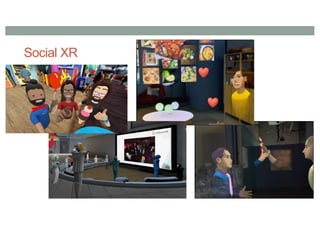
Social XR
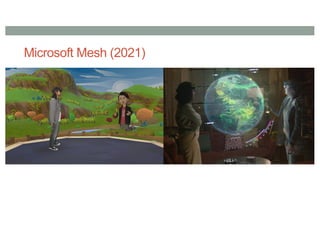
Microsoft Mesh (2021)
https://www.youtube.com/watch?v=4L49WQLzCoI
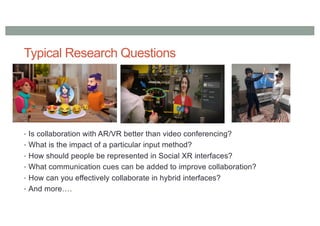
Typical Research Questions
• Is collaboration with AR/VR better than video conferencing?
• What is the impact of a particular input method?
• How should people be represented in Social XR interfaces?
• What communication cues can be added to improve collaboration?
• How can you effectively collaborate in hybrid interfaces?
• And more….
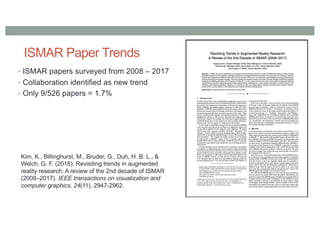
ISMAR Paper Trends
• ISMAR papers surveyed from 2008 – 2017
• Collaboration identified as new trend
• Only 9/526 papers = 1.7%
Kim, K., Billinghurst, M., Bruder, G., Duh, H. B. L., &
Welch, G. F. (2018). Revisiting trends in augmented
reality research: A review of the 2nd decade of ISMAR
(2008–2017). IEEE transactions on visualization and
computer graphics, 24(11), 2947-2962.
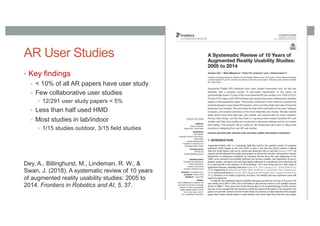
AR User Studies
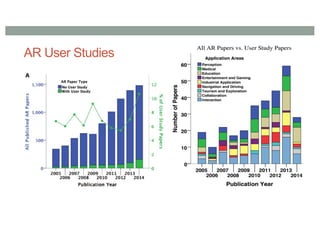
• Key findings
• < 10% of all AR papers have user study
• Few collaborative user studies
• 12/291 user study papers < 5%
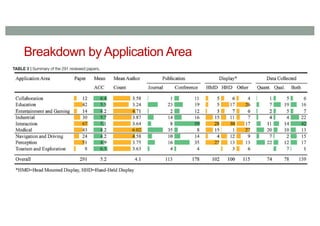
• Less than half used HMD
• Most studies in lab/indoor
• 1/15 studies outdoor, 3/15 field studies
Dey, A., Billinghurst, M., Lindeman, R. W., &
Swan, J. (2018). A systematic review of 10 years
of augmented reality usability studies: 2005 to
2014. Frontiers in Robotics and AI, 5, 37.
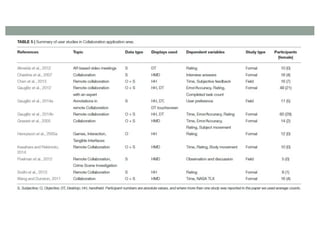
AR User Studies
Breakdown by Application Area
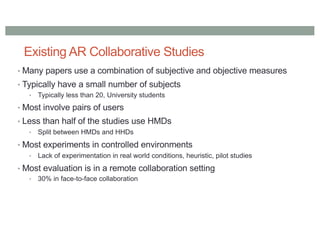
Existing AR Collaborative Studies
• Many papers use a combination of subjective and objective measures
• Typically have a small number of subjects
• Typically less than 20, University students
• Most involve pairs of users
• Less than half of the studies use HMDs
• Split between HMDs and HHDs
• Most experiments in controlled environments
• Lack of experimentation in real world conditions, heuristic, pilot studies
• Most evaluation is in a remote collaboration setting
• 30% in face-to-face collaboration
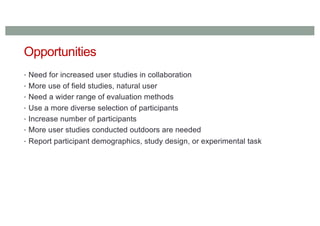
Opportunities
• Need for increased user studies in collaboration
• More use of field studies, natural user
• Need a wider range of evaluation methods
• Use a more diverse selection of participants
• Increase number of participants
• More user studies conducted outdoors are needed
• Report participant demographics, study design, or experimental task
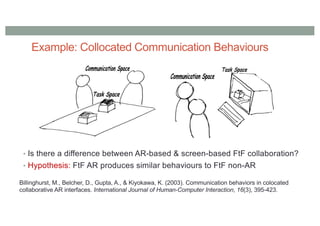
Example: Collocated Communication Behaviours
• Is there a difference between AR-based & screen-based FtF collaboration?
• Hypothesis: FtF AR produces similar behaviours to FtF non-AR
Billinghurst, M., Belcher, D., Gupta, A., & Kiyokawa, K. (2003). Communication behaviors in colocated
collaborative AR interfaces. International Journal of Human-Computer Interaction, 16(3), 395-423.
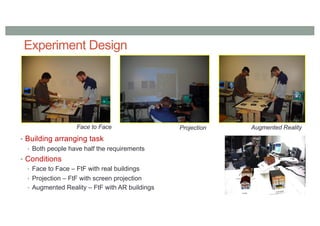
Experiment Design
• Building arranging task
• Both people have half the requirements
• Conditions
• Face to Face – FtF with real buildings
• Projection – FtF with screen projection
• Augmented Reality – FtF with AR buildings
Face to Face Projection Augmented Reality
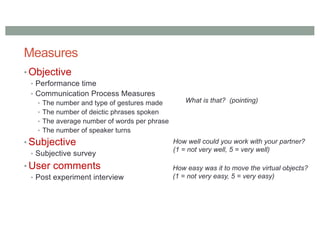
Measures
• Objective
• Performance time
• Communication Process Measures
• The number and type of gestures made
• The number of deictic phrases spoken
• The average number of words per phrase
• The number of speaker turns
• Subjective
• Subjective survey
• User comments
• Post experiment interview
How well could you work with your partner?
(1 = not very well, 5 = very well)
How easy was it to move the virtual objects?
(1 = not very easy, 5 = very easy)
What is that? (pointing)
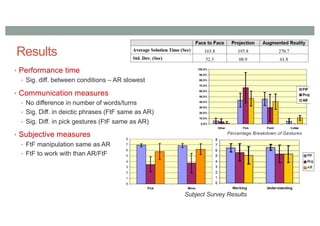
Results
• Performance time
• Sig. diff. between conditions – AR slowest
• Communication measures
• No difference in number of words/turns
• Sig. Diff. in deictic phrases (FtF same as AR)
• Sig. Diff. in pick gestures (FtF same as AR)
• Subjective measures
• FtF manipulation same as AR
• FtF to work with than AR/FtF
Percentage Breakdown of Gestures
Subject Survey Results
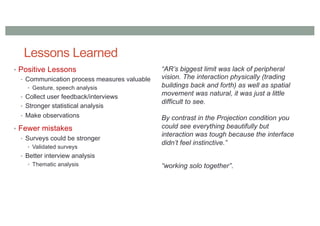
Lessons Learned
• Positive Lessons
• Communication process measures valuable
• Gesture, speech analysis
• Collect user feedback/interviews
• Stronger statistical analysis
• Make observations
• Fewer mistakes
• Surveys could be stronger
• Validated surveys
• Better interview analysis
• Thematic analysis
“AR’s biggest limit was lack of peripheral
vision. The interaction physically (trading
buildings back and forth) as well as spatial
movement was natural, it was just a little
difficult to see.
By contrast in the Projection condition you
could see everything beautifully but
interaction was tough because the interface
didn’t feel instinctive.”
“working solo together”.
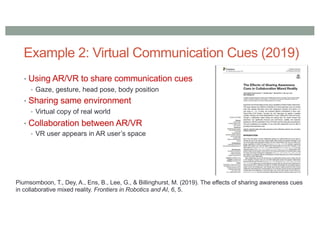
• Using AR/VR to share communication cues
• Gaze, gesture, head pose, body position
• Sharing same environment
• Virtual copy of real world
• Collaboration between AR/VR
• VR user appears in AR user’s space
Piumsomboon, T., Dey, A., Ens, B., Lee, G., & Billinghurst, M. (2019). The effects of sharing awareness cues
in collaborative mixed reality. Frontiers in Robotics and AI, 6, 5.
Example 2: Virtual Communication Cues (2019)
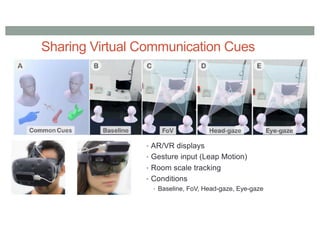
Sharing Virtual Communication Cues
• AR/VR displays
• Gesture input (Leap Motion)
• Room scale tracking
• Conditions
• Baseline, FoV, Head-gaze, Eye-gaze
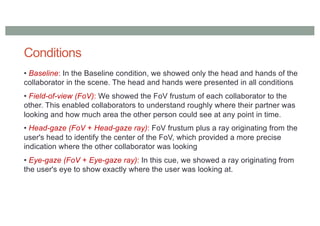
Conditions
• Baseline: In the Baseline condition, we showed only the head and hands of the
collaborator in the scene. The head and hands were presented in all conditions
• Field-of-view (FoV): We showed the FoV frustum of each collaborator to the
other. This enabled collaborators to understand roughly where their partner was
looking and how much area the other person could see at any point in time.
• Head-gaze (FoV + Head-gaze ray): FoV frustum plus a ray originating from the
user's head to identify the center of the FoV, which provided a more precise
indication where the other collaborator was looking
• Eye-gaze (FoV + Eye-gaze ray): In this cue, we showed a ray originating from
the user's eye to show exactly where the user was looking at.
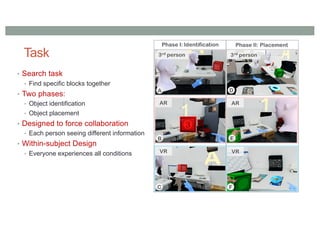
Task
• Search task
• Find specific blocks together
• Two phases:
• Object identification
• Object placement
• Designed to force collaboration
• Each person seeing different information
• Within-subject Design
• Everyone experiences all conditions
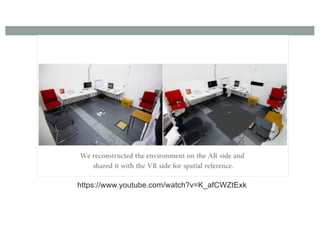
https://www.youtube.com/watch?v=K_afCWZtExk
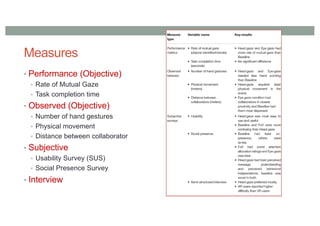
Measures
• Performance (Objective)
• Rate of Mutual Gaze
• Task completion time
• Observed (Objective)
• Number of hand gestures
• Physical movement
• Distance between collaborator
• Subjective
• Usability Survey (SUS)
• Social Presence Survey
• Interview
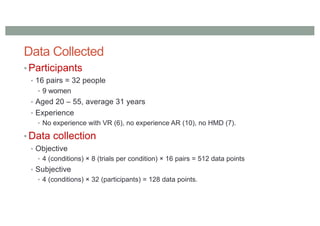
Data Collected
• Participants
• 16 pairs = 32 people
• 9 women
• Aged 20 – 55, average 31 years
• Experience
• No experience with VR (6), no experience AR (10), no HMD (7).
• Data collection
• Objective
• 4 (conditions) × 8 (trials per condition) × 16 pairs = 512 data points
• Subjective
• 4 (conditions) × 32 (participants) = 128 data points.
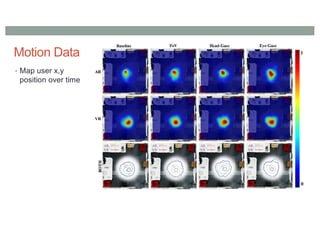
Motion Data
• Map user x,y
position over time
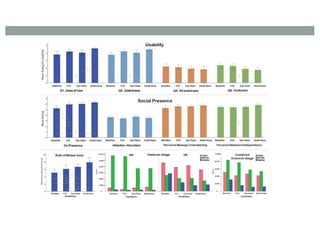
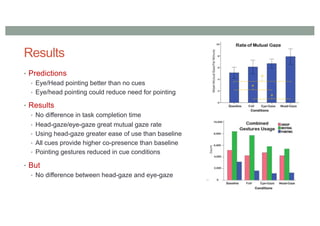
Results
• Predictions
• Eye/Head pointing better than no cues
• Eye/head pointing could reduce need for pointing
• Results
• No difference in task completion time
• Head-gaze/eye-gaze great mutual gaze rate
• Using head-gaze greater ease of use than baseline
• All cues provide higher co-presence than baseline
• Pointing gestures reduced in cue conditions
• But
• No difference between head-gaze and eye-gaze
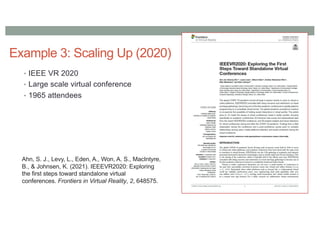
Example 3: Scaling Up (2020)
• IEEE VR 2020
• Large scale virtual conference
• 1965 attendees
Ahn, S. J., Levy, L., Eden, A., Won, A. S., MacIntyre,
B., & Johnsen, K. (2021). IEEEVR2020: Exploring
the first steps toward standalone virtual
conferences. Frontiers in Virtual Reality, 2, 648575.
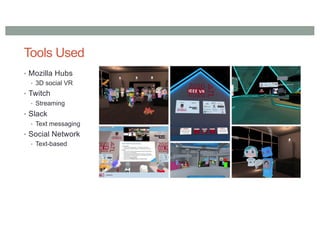
Tools Used
• Mozilla Hubs
• 3D social VR
• Twitch
• Streaming
• Slack
• Text messaging
• Social Network
• Text-based
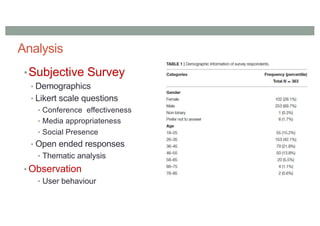
Analysis
•Subjective Survey
• Demographics
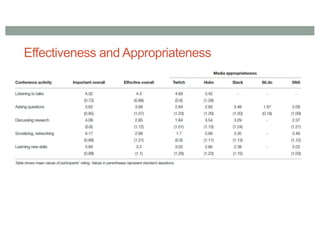
• Likert scale questions
• Conference effectiveness
• Media appropriateness
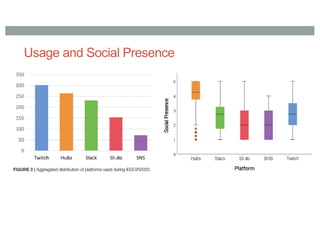
• Social Presence
• Open ended responses
• Thematic analysis
• Observation
• User behaviour
Effectiveness and Appropriateness
Usage and Social Presence
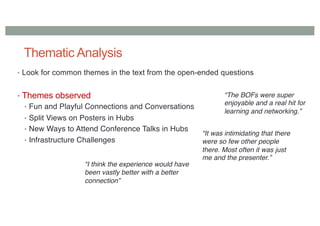
Thematic Analysis
• Look for common themes in the text from the open-ended questions
• Themes observed
• Fun and Playful Connections and Conversations
• Split Views on Posters in Hubs
• New Ways to Attend Conference Talks in Hubs
• Infrastructure Challenges
“The BOFs were super
enjoyable and a real hit for
learning and networking.”
“It was intimidating that there
were so few other people
there. Most often it was just
me and the presenter.”
“I think the experience would have
been vastly better with a better
connection”
Field Observations
• Process
• Moving between rooms
• Short interviews
• Observe and code behaviors
• Observation styles
• Broad observation – observe whole room
• Spotlight - focus on one participant for 10 minutes
• Categories of Behavior
• spatial (how attendees interacted in room), interactions (attendees interacted with each other)
• harassment (toxic interactions), communication (how attendees talked about their experience)
Field Observations
• Spatial navigation issues
• Difficulty in navigating space and interacting with each other
• Need to remove HMD to use keyboard
• Evolving interactions over time
• Learning interaction methods over time
• HMD use dropped by end of conference
• Limitations of social interactions
• Most users moving to less social platforms (twitch)
• Audio issues – being heard anywhere
• Democratization of Academic Conferences
• Increased diversity and removal of status
• Significantly increased participation
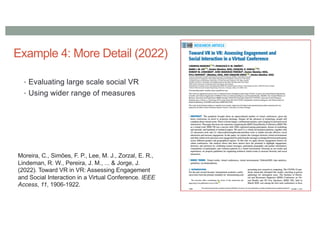
Example 4: More Detail (2022)
• Evaluating large scale social VR
• Using wider range of measures
Moreira, C., Simões, F. P., Lee, M. J., Zorzal, E. R.,
Lindeman, R. W., Pereira, J. M., ... & Jorge, J.
(2022). Toward VR in VR: Assessing Engagement
and Social Interaction in a Virtual Conference. IEEE
Access, 11, 1906-1922.
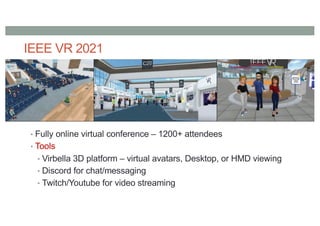
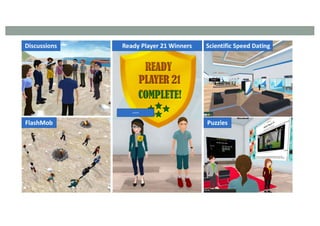
IEEE VR 2021
• Fully online virtual conference – 1200+ attendees
• Tools
• Virbella 3D platform – virtual avatars, Desktop, or HMD viewing
• Discord for chat/messaging
• Twitch/Youtube for video streaming
zxca
• ZCZ
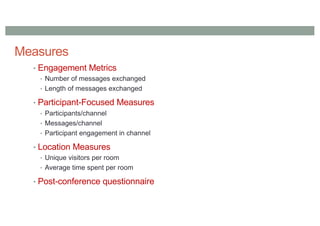
Measures
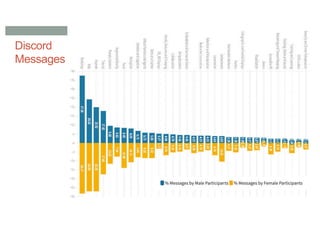
• Engagement Metrics
• Number of messages exchanged
• Length of messages exchanged
• Participant-Focused Measures
• Participants/channel
• Messages/channel
• Participant engagement in channel
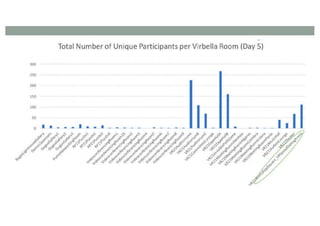
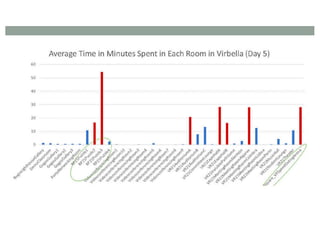
• Location Measures
• Unique visitors per room
• Average time spent per room
• Post-conference questionnaire
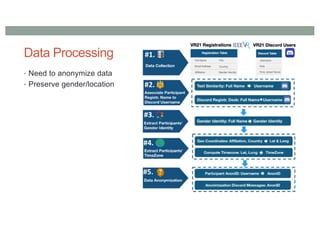
Data Processing
• Need to anonymize data
• Preserve gender/location
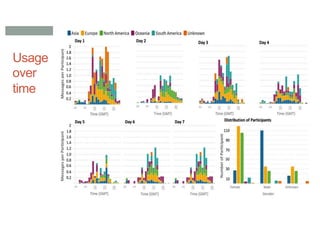
Usage
over
time
Discord
Messages
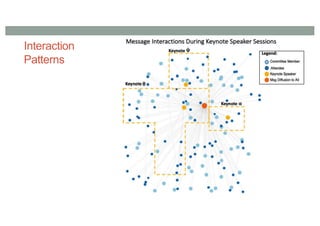
Interaction
Patterns
Key Lessons Learned
• There is a need for more Social XR evaluation studies
• Use a variety of subjective and objective measures
• Focus on the communication measures, not performance
• There are opportunities for new evaluation methods
• Adapt the tools to the number of participants
New Tools
• New types of sensors
• EEG, ECG, GSR, etc
• Sensors integrated into AR/VR systems
• Integrated into HMDs
• Data processing and capture tools
• iMotions, etc
• AR/VR Analytics tools
• Cognitive3D, etc
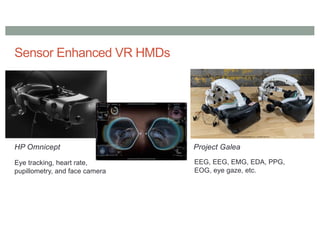
Sensor Enhanced VR HMDs
Eye tracking, heart rate,
pupillometry, and face camera
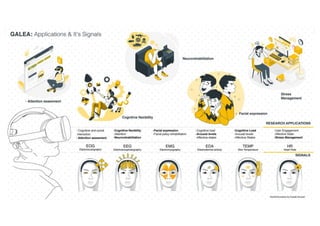
HP Omnicept Project Galea
EEG, EEG, EMG, EDA, PPG,
EOG, eye gaze, etc.
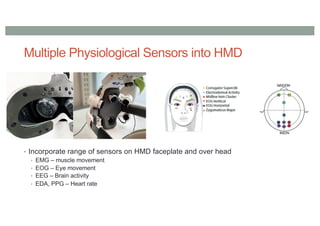
Multiple Physiological Sensors into HMD
• Incorporate range of sensors on HMD faceplate and over head
• EMG – muscle movement
• EOG – Eye movement
• EEG – Brain activity
• EDA, PPG – Heart rate
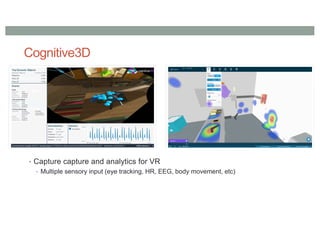
Cognitive3D
• Capture capture and analytics for VR
• Multiple sensory input (eye tracking, HR, EEG, body movement, etc)
https://www.youtube.com/watch?v=tlADFAGLED4
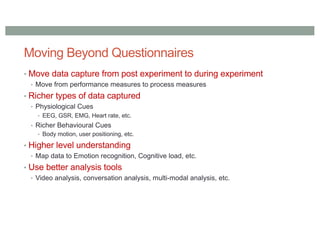
Moving Beyond Questionnaires
• Move data capture from post experiment to during experiment
• Move from performance measures to process measures
• Richer types of data captured
• Physiological Cues
• EEG, GSR, EMG, Heart rate, etc.
• Richer Behavioural Cues
• Body motion, user positioning, etc.
• Higher level understanding
• Map data to Emotion recognition, Cognitive load, etc.
• Use better analysis tools
• Video analysis, conversation analysis, multi-modal analysis, etc.
• Types of Studies
• Need for increased user studies in collaboration
• More use of field studies, natural user experiences
• Use a more diverse selection of participants
• Evaluation measures
• Need a wider range of evaluation methods
• Establish correlations between objective and subject measures
• Better tools
• New types of physiological sensors
• Develop new analytics
Research Opportunities
www.empathiccomputing.org
@marknb00
mark.billinghurst@auckland.ac.nz

Evaluation Methods for Social XR Experiences

  • 1.
    EVALUATION METHODS FOR SOCIALXR EXPERIENCES Mark Billinghurst mark.billinghurst@unisa.edu.au March 7th 2024 XR Sprint School
  • 2.
  • 3.
  • 4.
  • 5.
    Typical Research Questions •Is collaboration with AR/VR better than video conferencing? • What is the impact of a particular input method? • How should people be represented in Social XR interfaces? • What communication cues can be added to improve collaboration? • How can you effectively collaborate in hybrid interfaces? • And more….
  • 6.
    ISMAR Paper Trends •ISMAR papers surveyed from 2008 – 2017 • Collaboration identified as new trend • Only 9/526 papers = 1.7% Kim, K., Billinghurst, M., Bruder, G., Duh, H. B. L., & Welch, G. F. (2018). Revisiting trends in augmented reality research: A review of the 2nd decade of ISMAR (2008–2017). IEEE transactions on visualization and computer graphics, 24(11), 2947-2962.
  • 7.
    AR User Studies •Key findings • < 10% of all AR papers have user study • Few collaborative user studies • 12/291 user study papers < 5% • Less than half used HMD • Most studies in lab/indoor • 1/15 studies outdoor, 3/15 field studies Dey, A., Billinghurst, M., Lindeman, R. W., & Swan, J. (2018). A systematic review of 10 years of augmented reality usability studies: 2005 to 2014. Frontiers in Robotics and AI, 5, 37.
  • 8.
  • 9.
  • 11.
    Existing AR CollaborativeStudies • Many papers use a combination of subjective and objective measures • Typically have a small number of subjects • Typically less than 20, University students • Most involve pairs of users • Less than half of the studies use HMDs • Split between HMDs and HHDs • Most experiments in controlled environments • Lack of experimentation in real world conditions, heuristic, pilot studies • Most evaluation is in a remote collaboration setting • 30% in face-to-face collaboration
  • 12.
    Opportunities • Need forincreased user studies in collaboration • More use of field studies, natural user • Need a wider range of evaluation methods • Use a more diverse selection of participants • Increase number of participants • More user studies conducted outdoors are needed • Report participant demographics, study design, or experimental task
  • 13.
    Example: Collocated CommunicationBehaviours • Is there a difference between AR-based & screen-based FtF collaboration? • Hypothesis: FtF AR produces similar behaviours to FtF non-AR Billinghurst, M., Belcher, D., Gupta, A., & Kiyokawa, K. (2003). Communication behaviors in colocated collaborative AR interfaces. International Journal of Human-Computer Interaction, 16(3), 395-423.
  • 14.
    Experiment Design • Buildingarranging task • Both people have half the requirements • Conditions • Face to Face – FtF with real buildings • Projection – FtF with screen projection • Augmented Reality – FtF with AR buildings Face to Face Projection Augmented Reality
  • 15.
    Measures • Objective • Performancetime • Communication Process Measures • The number and type of gestures made • The number of deictic phrases spoken • The average number of words per phrase • The number of speaker turns • Subjective • Subjective survey • User comments • Post experiment interview How well could you work with your partner? (1 = not very well, 5 = very well) How easy was it to move the virtual objects? (1 = not very easy, 5 = very easy) What is that? (pointing)
  • 16.
    Results • Performance time •Sig. diff. between conditions – AR slowest • Communication measures • No difference in number of words/turns • Sig. Diff. in deictic phrases (FtF same as AR) • Sig. Diff. in pick gestures (FtF same as AR) • Subjective measures • FtF manipulation same as AR • FtF to work with than AR/FtF Percentage Breakdown of Gestures Subject Survey Results
  • 17.
    Lessons Learned • PositiveLessons • Communication process measures valuable • Gesture, speech analysis • Collect user feedback/interviews • Stronger statistical analysis • Make observations • Fewer mistakes • Surveys could be stronger • Validated surveys • Better interview analysis • Thematic analysis “AR’s biggest limit was lack of peripheral vision. The interaction physically (trading buildings back and forth) as well as spatial movement was natural, it was just a little difficult to see. By contrast in the Projection condition you could see everything beautifully but interaction was tough because the interface didn’t feel instinctive.” “working solo together”.
  • 18.
    • Using AR/VRto share communication cues • Gaze, gesture, head pose, body position • Sharing same environment • Virtual copy of real world • Collaboration between AR/VR • VR user appears in AR user’s space Piumsomboon, T., Dey, A., Ens, B., Lee, G., & Billinghurst, M. (2019). The effects of sharing awareness cues in collaborative mixed reality. Frontiers in Robotics and AI, 6, 5. Example 2: Virtual Communication Cues (2019)
  • 19.
    Sharing Virtual CommunicationCues • AR/VR displays • Gesture input (Leap Motion) • Room scale tracking • Conditions • Baseline, FoV, Head-gaze, Eye-gaze
  • 20.
    Conditions • Baseline: Inthe Baseline condition, we showed only the head and hands of the collaborator in the scene. The head and hands were presented in all conditions • Field-of-view (FoV): We showed the FoV frustum of each collaborator to the other. This enabled collaborators to understand roughly where their partner was looking and how much area the other person could see at any point in time. • Head-gaze (FoV + Head-gaze ray): FoV frustum plus a ray originating from the user's head to identify the center of the FoV, which provided a more precise indication where the other collaborator was looking • Eye-gaze (FoV + Eye-gaze ray): In this cue, we showed a ray originating from the user's eye to show exactly where the user was looking at.
  • 21.
    Task • Search task •Find specific blocks together • Two phases: • Object identification • Object placement • Designed to force collaboration • Each person seeing different information • Within-subject Design • Everyone experiences all conditions
  • 22.
  • 23.
    Measures • Performance (Objective) •Rate of Mutual Gaze • Task completion time • Observed (Objective) • Number of hand gestures • Physical movement • Distance between collaborator • Subjective • Usability Survey (SUS) • Social Presence Survey • Interview
  • 24.
    Data Collected • Participants •16 pairs = 32 people • 9 women • Aged 20 – 55, average 31 years • Experience • No experience with VR (6), no experience AR (10), no HMD (7). • Data collection • Objective • 4 (conditions) × 8 (trials per condition) × 16 pairs = 512 data points • Subjective • 4 (conditions) × 32 (participants) = 128 data points.
  • 26.
    Motion Data • Mapuser x,y position over time
  • 27.
    Results • Predictions • Eye/Headpointing better than no cues • Eye/head pointing could reduce need for pointing • Results • No difference in task completion time • Head-gaze/eye-gaze great mutual gaze rate • Using head-gaze greater ease of use than baseline • All cues provide higher co-presence than baseline • Pointing gestures reduced in cue conditions • But • No difference between head-gaze and eye-gaze
  • 28.
    Example 3: ScalingUp (2020) • IEEE VR 2020 • Large scale virtual conference • 1965 attendees Ahn, S. J., Levy, L., Eden, A., Won, A. S., MacIntyre, B., & Johnsen, K. (2021). IEEEVR2020: Exploring the first steps toward standalone virtual conferences. Frontiers in Virtual Reality, 2, 648575.
  • 29.
    Tools Used • MozillaHubs • 3D social VR • Twitch • Streaming • Slack • Text messaging • Social Network • Text-based
  • 30.
    Analysis •Subjective Survey • Demographics •Likert scale questions • Conference effectiveness • Media appropriateness • Social Presence • Open ended responses • Thematic analysis • Observation • User behaviour
  • 31.
  • 32.
  • 33.
    Thematic Analysis • Lookfor common themes in the text from the open-ended questions • Themes observed • Fun and Playful Connections and Conversations • Split Views on Posters in Hubs • New Ways to Attend Conference Talks in Hubs • Infrastructure Challenges “The BOFs were super enjoyable and a real hit for learning and networking.” “It was intimidating that there were so few other people there. Most often it was just me and the presenter.” “I think the experience would have been vastly better with a better connection”
  • 34.
    Field Observations • Process •Moving between rooms • Short interviews • Observe and code behaviors • Observation styles • Broad observation – observe whole room • Spotlight - focus on one participant for 10 minutes • Categories of Behavior • spatial (how attendees interacted in room), interactions (attendees interacted with each other) • harassment (toxic interactions), communication (how attendees talked about their experience)
  • 35.
    Field Observations • Spatialnavigation issues • Difficulty in navigating space and interacting with each other • Need to remove HMD to use keyboard • Evolving interactions over time • Learning interaction methods over time • HMD use dropped by end of conference • Limitations of social interactions • Most users moving to less social platforms (twitch) • Audio issues – being heard anywhere • Democratization of Academic Conferences • Increased diversity and removal of status • Significantly increased participation
  • 36.
    Example 4: MoreDetail (2022) • Evaluating large scale social VR • Using wider range of measures Moreira, C., Simões, F. P., Lee, M. J., Zorzal, E. R., Lindeman, R. W., Pereira, J. M., ... & Jorge, J. (2022). Toward VR in VR: Assessing Engagement and Social Interaction in a Virtual Conference. IEEE Access, 11, 1906-1922.
  • 37.
    IEEE VR 2021 •Fully online virtual conference – 1200+ attendees • Tools • Virbella 3D platform – virtual avatars, Desktop, or HMD viewing • Discord for chat/messaging • Twitch/Youtube for video streaming
  • 38.
  • 39.
    Measures • Engagement Metrics •Number of messages exchanged • Length of messages exchanged • Participant-Focused Measures • Participants/channel • Messages/channel • Participant engagement in channel • Location Measures • Unique visitors per room • Average time spent per room • Post-conference questionnaire
  • 40.
    Data Processing • Needto anonymize data • Preserve gender/location
  • 41.
  • 42.
  • 43.
  • 46.
    Key Lessons Learned •There is a need for more Social XR evaluation studies • Use a variety of subjective and objective measures • Focus on the communication measures, not performance • There are opportunities for new evaluation methods • Adapt the tools to the number of participants
  • 47.
    New Tools • Newtypes of sensors • EEG, ECG, GSR, etc • Sensors integrated into AR/VR systems • Integrated into HMDs • Data processing and capture tools • iMotions, etc • AR/VR Analytics tools • Cognitive3D, etc
  • 48.
    Sensor Enhanced VRHMDs Eye tracking, heart rate, pupillometry, and face camera HP Omnicept Project Galea EEG, EEG, EMG, EDA, PPG, EOG, eye gaze, etc.
  • 49.
    Multiple Physiological Sensorsinto HMD • Incorporate range of sensors on HMD faceplate and over head • EMG – muscle movement • EOG – Eye movement • EEG – Brain activity • EDA, PPG – Heart rate
  • 51.
    Cognitive3D • Capture captureand analytics for VR • Multiple sensory input (eye tracking, HR, EEG, body movement, etc)
  • 52.
  • 53.
    Moving Beyond Questionnaires •Move data capture from post experiment to during experiment • Move from performance measures to process measures • Richer types of data captured • Physiological Cues • EEG, GSR, EMG, Heart rate, etc. • Richer Behavioural Cues • Body motion, user positioning, etc. • Higher level understanding • Map data to Emotion recognition, Cognitive load, etc. • Use better analysis tools • Video analysis, conversation analysis, multi-modal analysis, etc.
  • 54.
    • Types ofStudies • Need for increased user studies in collaboration • More use of field studies, natural user experiences • Use a more diverse selection of participants • Evaluation measures • Need a wider range of evaluation methods • Establish correlations between objective and subject measures • Better tools • New types of physiological sensors • Develop new analytics Research Opportunities
  • 55.