DBMS – Architecture
&
Relational Database Management
System(RDBMS)
DBMS - Architecture
The design of a DBMS depends on its architecture. It can be centralized
or decentralized or hierarchical. The architecture of a DBMS can be
seen as either single tier or multi-tier. An n-tier architecture divides the
whole system into related but independent n modules, which can be
independently modified, altered, changed, or replaced.
One -Tier Architecture
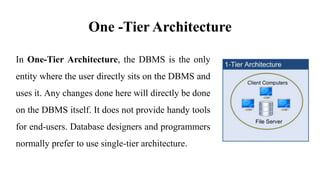
In One-Tier Architecture, the DBMS is the only
entity where the user directly sits on the DBMS and
uses it. Any changes done here will directly be done
on the DBMS itself. It does not provide handy tools
for end-users. Database designers and programmers
normally prefer to use single-tier architecture.
Two-Tier Architecture
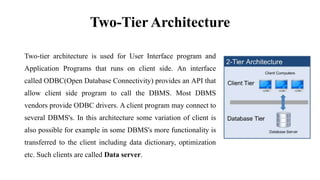
Two-tier architecture is used for User Interface program and
Application Programs that runs on client side. An interface
called ODBC(Open Database Connectivity) provides an API that
allow client side program to call the DBMS. Most DBMS
vendors provide ODBC drivers. A client program may connect to
several DBMS's. In this architecture some variation of client is
also possible for example in some DBMS's more functionality is
transferred to the client including data dictionary, optimization
etc. Such clients are called Data server.
Three-Tier Architecture
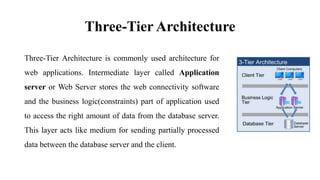
Three-Tier Architecture is commonly used architecture for
web applications. Intermediate layer called Application
server or Web Server stores the web connectivity software
and the business logic(constraints) part of application used
to access the right amount of data from the database server.
This layer acts like medium for sending partially processed
data between the database server and the client.
Database Model
A Database model defines the logical design of data. The model describes
the relationships between different parts of the data. Historically, in
database design, three models are commonly used. They are,
Hierarchical Model
Network Model
Relational Model
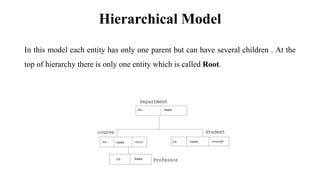
Hierarchical Model
In this model each entity has only one parent but can have several children . At the
top of hierarchy there is only one entity which is called Root.
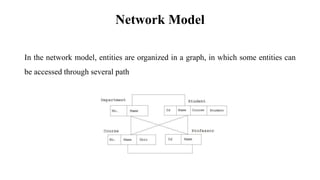
Network Model
In the network model, entities are organized in a graph, in which some entities can
be accessed through several path
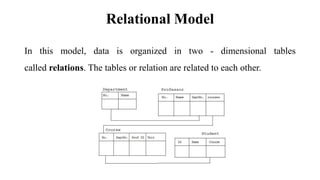
Relational Model
In this model, data is organized in two - dimensional tables
called relations. The tables or relation are related to each other.
RDBMS Concepts
A Relational Database management System(RDBMS) is a database management
system based on relational model introduced by E.F Codd. In relational model, data is
represented in terms of tuples(rows).
RDBMS is used to manage Relational database. Relational database is a collection of
organized set of tables from which data can be accessed easily. Relational Database is
most commonly used database. It consists of number of tables and each table has its
own primary key.
Codd'sRule
E.F Codd was a Computer Scientist who invented Relational model for Database
management. Based on relational model, Relation database was created. Codd proposed 13
rules popularly known as Codd's 12 rules to test DBMS's concept against his relational
model.
Codd's rule actualy define what quality a DBMS requires in order to
become a Relational Database Management System(RDBMS). Till now,
there is hardly any commercial product that follows all the 13 Codd's
rules. Even Oracle follows only eight and half out(8.5) of 13. The
Codd's 12 rules are as follows.
Rule zero
This rule states that for a system to qualify as an RDBMS, it must be able to
manage database entirely through the relational capabilities.
Rule 1 : Information rule
All information(including metadata) is to be represented as stored data in cells of
tables. The rows and columns have to be strictly unordered.
Rule 2 : Guaranteed Access
Each unique piece of data(atomic value) should be accessible by : Table Name + primary
key(Row) + Attribute(column).
NOTE : Ability to directly access via POINTER is a violation of this rule.
Rule 3 : Systematic treatment of NULL
Null has several meanings, it can mean missing data, not applicable or no value. It
should be handled consistently. Primary key must not be null. Expression
on NULL must give null.
Rule 4 : Active Online Catalog
Database dictionary(catalog) must have description of Database. Catalog to be
governed by same rule as rest of the database. The same query language to be used
on catalog as on application database.
Rule 5 : Powerful language
One well defined language must be there to provide all manners of access to data.
Example: SQL. If a file supporting table can be accessed by any manner except SQL
interface, then its a violation to this rule.
Rule 6 : View Updating rule
All view that are theoretically updatable should be updatable by the system.
Rule 7 : Relational Level Operation
There must be Insert, Delete, Update operations at each level of relations. Set
operation like Union, Intersection and minus should also be supported.
Rule 8 : Physical Data Independence
The physical storage of data should not matter to the system. If say, some file
supporting table were renamed or moved from one disk to another, it should not
effect the application.
Rule 9 : Logical Data Independence
If there is change in the logical structure(table structures) of the database the user view
of data should not change. Say, if a table is split into two tables, a new view should give
result as the join of the two tables. This rule is most difficult to satisfy.
Rule 10 : Integrity Independence
The database should be able to conformed its own integrity rather than using other
programs. Key and Check constraints, trigger etc. should be stored in Data
Dictionary. This also make RDBMS independent of front-end.
Rule 11 : Distribution Independence
A database should work properly regardless of its distribution across a network. This
lays foundation of distributed database.
Rule 12 : No subversion rule
If low level access is allowed to a system it should not be able to subvert
or bypass integrity rule to change data. This can be achieved by some
sort of looking or encryption.
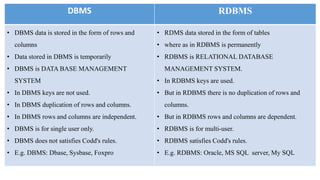
DBMS RDBMS
• DBMS data is stored in the form of rows and
columns
• Data stored in DBMS is temporarily
• DBMS is DATA BASE MANAGEMENT
SYSTEM
• In DBMS keys are not used.
• In DBMS duplication of rows and columns.
• In DBMS rows and columns are independent.
• DBMS is for single user only.
• DBMS does not satisfies Codd's rules.
• E.g. DBMS: Dbase, Sysbase, Foxpro
• RDMS data stored in the form of tables
• where as in RDBMS is permanently
• RDBMS is RELATIONAL DATABASE
MANAGEMENT SYSTEM.
• In RDBMS keys are used.
• But in RDBMS there is no duplication of rows and
columns.
• But in RDBMS rows and columns are dependent.
• RDBMS is for multi-user.
• RDBMS satisfies Codd's rules.
• E.g. RDBMS: Oracle, MS SQL server, My SQL
What is Table ?
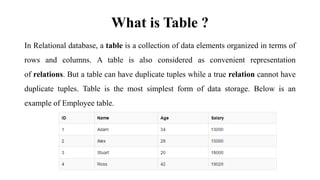
In Relational database, a table is a collection of data elements organized in terms of
rows and columns. A table is also considered as convenient representation
of relations. But a table can have duplicate tuples while a true relation cannot have
duplicate tuples. Table is the most simplest form of data storage. Below is an
example of Employee table.
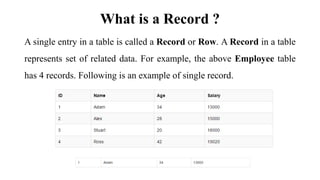
What is a Record ?
A single entry in a table is called a Record or Row. A Record in a table
represents set of related data. For example, the above Employee table
has 4 records. Following is an example of single record.
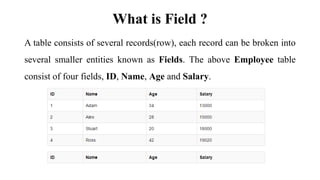
What is Field ?
A table consists of several records(row), each record can be broken into
several smaller entities known as Fields. The above Employee table
consist of four fields, ID, Name, Age and Salary.
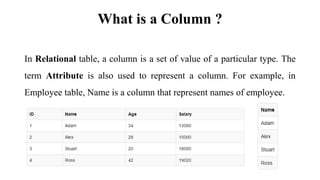
What is a Column ?
In Relational table, a column is a set of value of a particular type. The
term Attribute is also used to represent a column. For example, in
Employee table, Name is a column that represent names of employee.
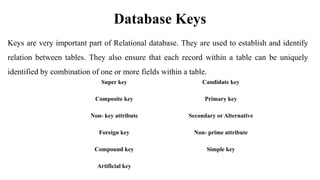
Database Keys
Keys are very important part of Relational database. They are used to establish and identify
relation between tables. They also ensure that each record within a table can be uniquely
identified by combination of one or more fields within a table.
Super key Candidate key
Composite key Primary key
Non- key attribute Secondary or Alternative
Foreign key Non- prime attribute
Compound key Simple key
Artificial key
Super Key
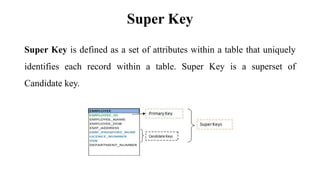
Super Key is defined as a set of attributes within a table that uniquely
identifies each record within a table. Super Key is a superset of
Candidate key.
Candidate Key
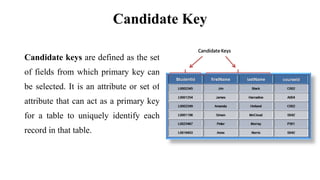
Candidate keys are defined as the set
of fields from which primary key can
be selected. It is an attribute or set of
attribute that can act as a primary key
for a table to uniquely identify each
record in that table.
Primary Key
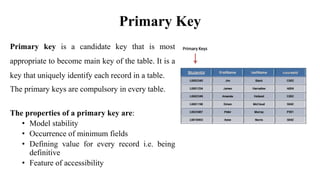
Primary key is a candidate key that is most
appropriate to become main key of the table. It is a
key that uniquely identify each record in a table.
The primary keys are compulsory in every table.
The properties of a primary key are:
• Model stability
• Occurrence of minimum fields
• Defining value for every record i.e. being
definitive
• Feature of accessibility
Foreign Key
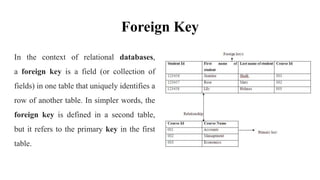
In the context of relational databases,
a foreign key is a field (or collection of
fields) in one table that uniquely identifies a
row of another table. In simpler words, the
foreign key is defined in a second table,
but it refers to the primary key in the first
table.
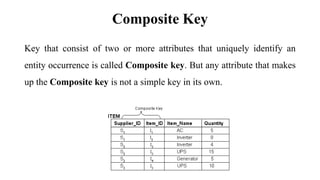
Composite Key
Key that consist of two or more attributes that uniquely identify an
entity occurrence is called Composite key. But any attribute that makes
up the Composite key is not a simple key in its own.
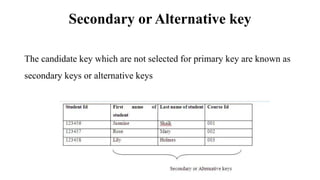
Secondary or Alternative key
The candidate key which are not selected for primary key are known as
secondary keys or alternative keys
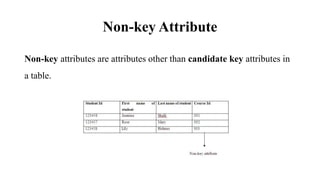
Non-key Attribute
Non-key attributes are attributes other than candidate key attributes in
a table.
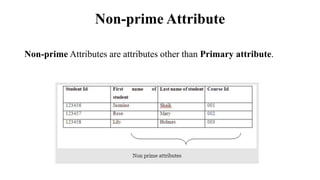
Non-prime Attribute
Non-prime Attributes are attributes other than Primary attribute.
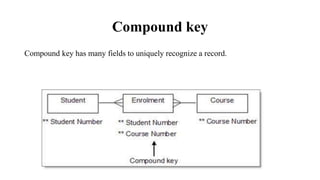
Compound key
Compound key has many fields to uniquely recognize a record.
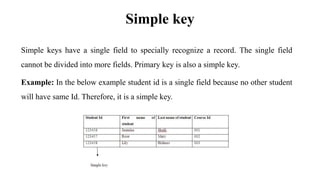
Simple key
Simple keys have a single field to specially recognize a record. The single field
cannot be divided into more fields. Primary key is also a simple key.
Example: In the below example student id is a single field because no other student
will have same Id. Therefore, it is a simple key.
Artificial key
Artificial keys do not have meaning to the firms. They are allowed when
No property has the parameter of primary key
The primary key is huge and complex
Codds rules & keys

Codds rules & keys

  • 1.
    DBMS – Architecture & RelationalDatabase Management System(RDBMS)
  • 2.
    DBMS - Architecture Thedesign of a DBMS depends on its architecture. It can be centralized or decentralized or hierarchical. The architecture of a DBMS can be seen as either single tier or multi-tier. An n-tier architecture divides the whole system into related but independent n modules, which can be independently modified, altered, changed, or replaced.
  • 3.
    One -Tier Architecture InOne-Tier Architecture, the DBMS is the only entity where the user directly sits on the DBMS and uses it. Any changes done here will directly be done on the DBMS itself. It does not provide handy tools for end-users. Database designers and programmers normally prefer to use single-tier architecture.
  • 4.
    Two-Tier Architecture Two-tier architectureis used for User Interface program and Application Programs that runs on client side. An interface called ODBC(Open Database Connectivity) provides an API that allow client side program to call the DBMS. Most DBMS vendors provide ODBC drivers. A client program may connect to several DBMS's. In this architecture some variation of client is also possible for example in some DBMS's more functionality is transferred to the client including data dictionary, optimization etc. Such clients are called Data server.
  • 5.
    Three-Tier Architecture Three-Tier Architectureis commonly used architecture for web applications. Intermediate layer called Application server or Web Server stores the web connectivity software and the business logic(constraints) part of application used to access the right amount of data from the database server. This layer acts like medium for sending partially processed data between the database server and the client.
  • 6.
    Database Model A Databasemodel defines the logical design of data. The model describes the relationships between different parts of the data. Historically, in database design, three models are commonly used. They are, Hierarchical Model Network Model Relational Model
  • 7.
    Hierarchical Model In thismodel each entity has only one parent but can have several children . At the top of hierarchy there is only one entity which is called Root.
  • 8.
    Network Model In thenetwork model, entities are organized in a graph, in which some entities can be accessed through several path
  • 9.
    Relational Model In thismodel, data is organized in two - dimensional tables called relations. The tables or relation are related to each other.
  • 10.
    RDBMS Concepts A RelationalDatabase management System(RDBMS) is a database management system based on relational model introduced by E.F Codd. In relational model, data is represented in terms of tuples(rows). RDBMS is used to manage Relational database. Relational database is a collection of organized set of tables from which data can be accessed easily. Relational Database is most commonly used database. It consists of number of tables and each table has its own primary key.
  • 11.
    Codd'sRule E.F Codd wasa Computer Scientist who invented Relational model for Database management. Based on relational model, Relation database was created. Codd proposed 13 rules popularly known as Codd's 12 rules to test DBMS's concept against his relational model. Codd's rule actualy define what quality a DBMS requires in order to become a Relational Database Management System(RDBMS). Till now, there is hardly any commercial product that follows all the 13 Codd's rules. Even Oracle follows only eight and half out(8.5) of 13. The Codd's 12 rules are as follows.
  • 12.
    Rule zero This rulestates that for a system to qualify as an RDBMS, it must be able to manage database entirely through the relational capabilities. Rule 1 : Information rule All information(including metadata) is to be represented as stored data in cells of tables. The rows and columns have to be strictly unordered.
  • 13.
    Rule 2 :Guaranteed Access Each unique piece of data(atomic value) should be accessible by : Table Name + primary key(Row) + Attribute(column). NOTE : Ability to directly access via POINTER is a violation of this rule. Rule 3 : Systematic treatment of NULL Null has several meanings, it can mean missing data, not applicable or no value. It should be handled consistently. Primary key must not be null. Expression on NULL must give null.
  • 14.
    Rule 4 :Active Online Catalog Database dictionary(catalog) must have description of Database. Catalog to be governed by same rule as rest of the database. The same query language to be used on catalog as on application database. Rule 5 : Powerful language One well defined language must be there to provide all manners of access to data. Example: SQL. If a file supporting table can be accessed by any manner except SQL interface, then its a violation to this rule.
  • 15.
    Rule 6 :View Updating rule All view that are theoretically updatable should be updatable by the system. Rule 7 : Relational Level Operation There must be Insert, Delete, Update operations at each level of relations. Set operation like Union, Intersection and minus should also be supported.
  • 16.
    Rule 8 :Physical Data Independence The physical storage of data should not matter to the system. If say, some file supporting table were renamed or moved from one disk to another, it should not effect the application. Rule 9 : Logical Data Independence If there is change in the logical structure(table structures) of the database the user view of data should not change. Say, if a table is split into two tables, a new view should give result as the join of the two tables. This rule is most difficult to satisfy.
  • 17.
    Rule 10 :Integrity Independence The database should be able to conformed its own integrity rather than using other programs. Key and Check constraints, trigger etc. should be stored in Data Dictionary. This also make RDBMS independent of front-end. Rule 11 : Distribution Independence A database should work properly regardless of its distribution across a network. This lays foundation of distributed database.
  • 18.
    Rule 12 :No subversion rule If low level access is allowed to a system it should not be able to subvert or bypass integrity rule to change data. This can be achieved by some sort of looking or encryption.
  • 19.
    DBMS RDBMS • DBMSdata is stored in the form of rows and columns • Data stored in DBMS is temporarily • DBMS is DATA BASE MANAGEMENT SYSTEM • In DBMS keys are not used. • In DBMS duplication of rows and columns. • In DBMS rows and columns are independent. • DBMS is for single user only. • DBMS does not satisfies Codd's rules. • E.g. DBMS: Dbase, Sysbase, Foxpro • RDMS data stored in the form of tables • where as in RDBMS is permanently • RDBMS is RELATIONAL DATABASE MANAGEMENT SYSTEM. • In RDBMS keys are used. • But in RDBMS there is no duplication of rows and columns. • But in RDBMS rows and columns are dependent. • RDBMS is for multi-user. • RDBMS satisfies Codd's rules. • E.g. RDBMS: Oracle, MS SQL server, My SQL
  • 20.
    What is Table? In Relational database, a table is a collection of data elements organized in terms of rows and columns. A table is also considered as convenient representation of relations. But a table can have duplicate tuples while a true relation cannot have duplicate tuples. Table is the most simplest form of data storage. Below is an example of Employee table.
  • 21.
    What is aRecord ? A single entry in a table is called a Record or Row. A Record in a table represents set of related data. For example, the above Employee table has 4 records. Following is an example of single record.
  • 22.
    What is Field? A table consists of several records(row), each record can be broken into several smaller entities known as Fields. The above Employee table consist of four fields, ID, Name, Age and Salary.
  • 23.
    What is aColumn ? In Relational table, a column is a set of value of a particular type. The term Attribute is also used to represent a column. For example, in Employee table, Name is a column that represent names of employee.
  • 24.
    Database Keys Keys arevery important part of Relational database. They are used to establish and identify relation between tables. They also ensure that each record within a table can be uniquely identified by combination of one or more fields within a table. Super key Candidate key Composite key Primary key Non- key attribute Secondary or Alternative Foreign key Non- prime attribute Compound key Simple key Artificial key
  • 25.
    Super Key Super Keyis defined as a set of attributes within a table that uniquely identifies each record within a table. Super Key is a superset of Candidate key.
  • 26.
    Candidate Key Candidate keysare defined as the set of fields from which primary key can be selected. It is an attribute or set of attribute that can act as a primary key for a table to uniquely identify each record in that table.
  • 27.
    Primary Key Primary keyis a candidate key that is most appropriate to become main key of the table. It is a key that uniquely identify each record in a table. The primary keys are compulsory in every table. The properties of a primary key are: • Model stability • Occurrence of minimum fields • Defining value for every record i.e. being definitive • Feature of accessibility
  • 28.
    Foreign Key In thecontext of relational databases, a foreign key is a field (or collection of fields) in one table that uniquely identifies a row of another table. In simpler words, the foreign key is defined in a second table, but it refers to the primary key in the first table.
  • 29.
    Composite Key Key thatconsist of two or more attributes that uniquely identify an entity occurrence is called Composite key. But any attribute that makes up the Composite key is not a simple key in its own.
  • 30.
    Secondary or Alternativekey The candidate key which are not selected for primary key are known as secondary keys or alternative keys
  • 31.
    Non-key Attribute Non-key attributesare attributes other than candidate key attributes in a table.
  • 32.
    Non-prime Attribute Non-prime Attributesare attributes other than Primary attribute.
  • 33.
    Compound key Compound keyhas many fields to uniquely recognize a record.
  • 34.
    Simple key Simple keyshave a single field to specially recognize a record. The single field cannot be divided into more fields. Primary key is also a simple key. Example: In the below example student id is a single field because no other student will have same Id. Therefore, it is a simple key.
  • 35.
    Artificial key Artificial keysdo not have meaning to the firms. They are allowed when No property has the parameter of primary key The primary key is huge and complex