Types of Database System
Nazmul Hossen
ID:172015047
Subject: Database Systems
Department: Computer Science and Engineering
1
Contents
 Database
 Database Management System
 Database System
 Types of Database Systems
 Single User DBMS
 Multi User DBMS
 Centralized DBMS
 Distributed DBMS
 Parallel DBMS
 Client Server DBMS
2
Database
A database is a data structure that stores organized information. Most
databases contain multiple tables, which may each include several
different fields.
Example: A company database may include tables for products,
employees, and financial records and so on.
3
Database Management System
A database management system (DBMS) is a software package
designed to define, manipulate, retrieve and manage data in a
database. A DBMS generally manipulates the data itself, the data
format, field names, record structure and file structure.
Some other DBMS examples include:
MySQL
SQL Server
Oracle
dBASE and so on.
4
Database System
The collection of Database and DBMS software together is known as a
database system. Through the database system, you can perform many
activities.
5
Types of Database System
On the basis of the number of users
Single-User DBMS
Multi-User DBMS
On the basis of the site location
Centralized DBMS
Distributed DBMS
Parallel DBMS
Client/Server DBMS
6
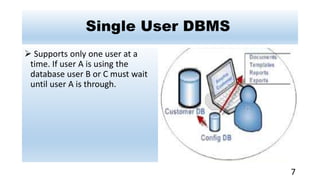
Single User DBMS
 Supports only one user at a
time. If user A is using the
database user B or C must wait
until user A is through.
7
Multi User DBMS
Multi user DBMS are the
systems that support two or
more users. All main frames and
mini computers are multi user
systems, but most personal
computers and workstations are
not.
8
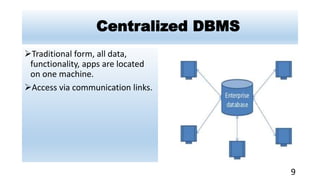
Centralized DBMS
Traditional form, all data,
functionality, apps are located
on one machine.
Access via communication links.
9
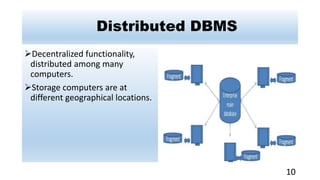
Distributed DBMS
Decentralized functionality,
distributed among many
computers.
Storage computers are at
different geographical locations.
10
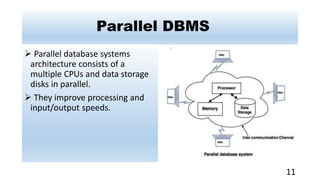
Parallel DBMS
 Parallel database systems
architecture consists of a
multiple CPUs and data storage
disks in parallel.
 They improve processing and
input/output speeds.
11
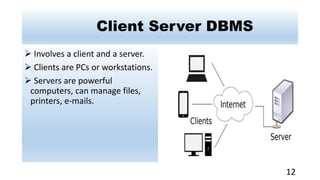
Client Server DBMS
 Involves a client and a server.
 Clients are PCs or workstations.
 Servers are powerful
computers, can manage files,
printers, e-mails.
12
13

Database systems

  • 1.
    Types of DatabaseSystem Nazmul Hossen ID:172015047 Subject: Database Systems Department: Computer Science and Engineering 1
  • 2.
    Contents  Database  DatabaseManagement System  Database System  Types of Database Systems  Single User DBMS  Multi User DBMS  Centralized DBMS  Distributed DBMS  Parallel DBMS  Client Server DBMS 2
  • 3.
    Database A database isa data structure that stores organized information. Most databases contain multiple tables, which may each include several different fields. Example: A company database may include tables for products, employees, and financial records and so on. 3
  • 4.
    Database Management System Adatabase management system (DBMS) is a software package designed to define, manipulate, retrieve and manage data in a database. A DBMS generally manipulates the data itself, the data format, field names, record structure and file structure. Some other DBMS examples include: MySQL SQL Server Oracle dBASE and so on. 4
  • 5.
    Database System The collectionof Database and DBMS software together is known as a database system. Through the database system, you can perform many activities. 5
  • 6.
    Types of DatabaseSystem On the basis of the number of users Single-User DBMS Multi-User DBMS On the basis of the site location Centralized DBMS Distributed DBMS Parallel DBMS Client/Server DBMS 6
  • 7.
    Single User DBMS Supports only one user at a time. If user A is using the database user B or C must wait until user A is through. 7
  • 8.
    Multi User DBMS Multiuser DBMS are the systems that support two or more users. All main frames and mini computers are multi user systems, but most personal computers and workstations are not. 8
  • 9.
    Centralized DBMS Traditional form,all data, functionality, apps are located on one machine. Access via communication links. 9
  • 10.
    Distributed DBMS Decentralized functionality, distributedamong many computers. Storage computers are at different geographical locations. 10
  • 11.
    Parallel DBMS  Paralleldatabase systems architecture consists of a multiple CPUs and data storage disks in parallel.  They improve processing and input/output speeds. 11
  • 12.
    Client Server DBMS Involves a client and a server.  Clients are PCs or workstations.  Servers are powerful computers, can manage files, printers, e-mails. 12
  • 13.